
GA4 Custom Alerts: Set Up Insights, Email and a Useful Response
Use GA4 custom insights to flag changes in a defined metric, then connect each notification to an owner and a diagnostic action. An alert can tell you that recorded purchases fell; it cannot establish whether demand, consent, checkout behavior or tracking caused the fall. Keep an independent business check beside the alert so the team can investigate the right system.
On this page
This guide focuses on configuring, testing and operating GA4 notifications. The marketing data quality guide covers the wider checks across collection, warehouse models and customer actions.
What can a GA4 custom insight alert you to?
A GA4 custom insight evaluates a metric against a condition you choose and can email users when it triggers. Automated insights surface changes selected by Analytics Intelligence; custom insights express the conditions your team wants monitored. An Editor or Administrator can create and manage them. Google's Analytics Insights guide.
Treat the monitor as a small operating contract. Write the business outcome, selected metric, included population, evaluation interval, threshold, recipient and first investigation step. “Revenue anomaly” is less actionable than “Web purchase revenue: checkout owner checks transaction values and order coverage.”
Start with the events behind actual decisions. Review which outcomes belong in GA4's key-event list before building notifications around a mixture of purchases, newsletter subscriptions and incidental clicks.
GA4's standard-property configuration limit is 50 custom insights. Spend that capacity on distinct decisions rather than several nearly identical notifications for the same metric. Configuration limits.
Which GA4 alerts should you build first?
Build a few monitors for important outcomes, the traffic feeding them and the value attached to them. The table below is a starting design to adapt, rather than a universal set of thresholds.
| Monitor | Population and metric | First response | Companion evidence |
|---|---|---|---|
| Primary outcome falls | One accepted lead or purchase event | Reproduce the affected success journey | CRM submissions or completed orders |
| Purchase value changes unexpectedly | Web purchase revenue | Inspect amounts, currency and item mapping | Order components and transaction IDs |
| Acquisition traffic shifts | A defined paid-traffic segment and sessions | Check campaign delivery and landing paths | Ad-platform activity and site requests |
| Low-volume outcome weakens | A longer-period count for one important action | Inspect individual eligible outcomes | Source application records |
Keep the event population precise. A total key-event metric can remain stable when purchases fall and another marked action increases. Confirm that the metric and segment in the insight represent the intended outcome. If the required combination is unavailable in the insight builder, put that check in a suitable reporting or warehouse workflow instead of substituting a different population.
Revenue and purchase count answer different questions. A count can remain stable while a currency mapping fails; revenue can remain stable while a few large orders conceal missing smaller purchases. The GA4 revenue diagnosis provides the transaction-level checks for that second monitor.
For an analytics and tracking implementation, define these monitors while agreeing the event contract. The owner should know which business record can confirm or contradict the alert before the first notification arrives.
How do you create a custom insight in GA4?
Create the insight from the Insights dashboard, configure its population and condition, then add the people responsible for responding. Google's documented setup is: Insights card → View all insights → Create → Create new, or adapt a suggested insight. Choose frequency, segment, metric, condition and value; name the insight, configure email notifications and save. Custom-insight setup.
Before saving, complete this verification sequence:
- Confirm the selected property and web or app scope.
- Match the segment to the business population in the monitoring contract.
- Confirm that the metric counts the intended event or amount.
- Record the comparison basis shown for the condition, including its period.
- Name the outcome and responsible team clearly.
- Confirm the recipient list and where the investigation record will live.
Google documents % decrease more than and Has anomaly as condition examples. The anomaly option supplies its own expected range. Evaluation can be hourly, daily, weekly or monthly; hourly evaluation is available for web data only. Insight conditions and frequency.
Avoid configuring an unverified “zero events” operator from an old tutorial. Use the actual condition choices offered for your metric and test their behavior. Where detecting complete silence is critical, require an independent expected-activity check as well.
How do you choose a threshold without creating constant false alarms?
Choose a threshold using both the size of the change and the number of business outcomes involved. A percentage alone can make a normal fluctuation on a small website look like a major failure.
These illustrative comparisons use completed periods and the same eligible event definition. Percentage decrease is (previous count − current count) ÷ previous count × 100 when the previous count is positive.
| Previous count | Current count | Decrease | Interpretation to investigate |
|---|---|---|---|
| 100 | 50 | 50% | Fifty missing or lost outcomes deserve prompt diagnosis |
| 4 | 2 | 50% | Two outcomes changed; inspect the individual cases |
| 1,000 | 960 | 4% | Forty outcomes can matter even if a broad threshold stays quiet |
| 0 | 0 | Undefined | No positive baseline exists for this percentage comparison |
The last row is a reason to distinguish an absent baseline from a measured zero. Do not label a missing export or unavailable report value as zero before assessing the alert condition.
Review normal variability for the actual population. Compare working days with working days where that is the business cycle. Separate a planned campaign pause, holiday or major launch from an unexplained drop. For sparse outcomes, a weekly review may provide a more interpretable comparison, but the longer interval also delays detection.
Set the interval from the consequence. A team changing bids every morning needs evidence before that decision. A weekly monitor cannot protect an automated action that runs hourly. Add a direct collection or source-to-event check when the required response time is shorter than Analytics reporting can support.
Record the chosen threshold and a known example that should trigger it. Then record a legitimate fluctuation that should not. Those two cases are more useful than describing the threshold as “sensitive” or “conservative.”
How does GA4 anomaly detection differ from a fixed threshold?
GA4 anomaly detection compares an observed metric with a historically predicted range. Google describes a Bayesian state-space model for time-series anomalies, with training periods of two weeks for hourly, 90 days for daily and 32 weeks for weekly analysis. Google's anomaly detection method.
Use that condition when historical variation is informative and the team can interpret the signal. A new property, new event definition or newly isolated segment may not provide a representative history. Keep an explicit business expectation beside the model rather than assuming that the anomaly feature knows your launch plan.
A normal-looking value can still be operationally wrong. Suppose one checkout flow stops reporting while another receives a promotional surge. The combined total may remain within its historical range. Inspect important flows separately where the available dimensions and volumes support that decision.
An anomaly is a prompt to investigate. It does not establish a tag defect, a causal campaign effect or a complete set of missing transactions.
How do you prove that the alert reaches the person who will act?
Test both the condition and the notification path, then record a human acknowledgement. A saved insight proves configuration; an email in the correct inbox proves another stage.
Use an appropriate test property or an agreed temporary rule whose selected condition will be met at an upcoming evaluation. Label it clearly and tell the recipients it is a test. Keep the test isolated from financial events and advertising objectives. Do not manufacture purchases in production to make an alert fire.
For the test, record:
- The metric, segment and values that should satisfy the condition.
- The configured evaluation interval and expected review point.
- Whether an insight appeared in the GA4 dashboard.
- Whether the expected recipient received the email.
- Whether any forwarding route delivered its copy.
- Who acknowledged it and could find the investigation instructions.
If the dashboard shows a triggered insight but email is absent, inspect recipients, notification settings and mail delivery. If no insight appears, first verify the condition, data availability and population. Rebuilding the tag cannot repair a mailbox rule.
After the exercise, remove or restore the temporary condition and record the final production setting. Retest when an owner leaves, forwarding changes, the monitored event is renamed or the measurement policy changes.
How should GA4 alert emails reach Slack?
Route the alert through a mailbox and forwarding process your team owns, then verify the final Slack delivery. Slack supports dedicated channel or direct-message email addresses on paid plans; workspace administrators can restrict the feature. An approved email-provider rule can forward selected messages to that address. Slack's email-routing instructions.
Keep GA4's property-user notification settings and the Slack destination as separate checks. Do not assume that a Slack-generated address is an eligible Analytics user or that adding it to a list establishes delivery. Test the supported route using the actual recipient configuration.
Choose a channel with an accountable owner and appropriate visibility. Any person with the channel email address can send mail into it, and channel members can read the delivered content. Slack also disables email ingestion for HIPAA-compliant Enterprise organizations. Confirm that the route fits the workspace and information being shared. Email-to-Slack boundaries.
The first response should name the next check: inspect a recent release, reproduce the event, compare orders or verify campaign activity. Escalate a confirmed business-impacting defect through the data incident runbook. A channel full of unexplained screenshots is an inbox, not an operating process.
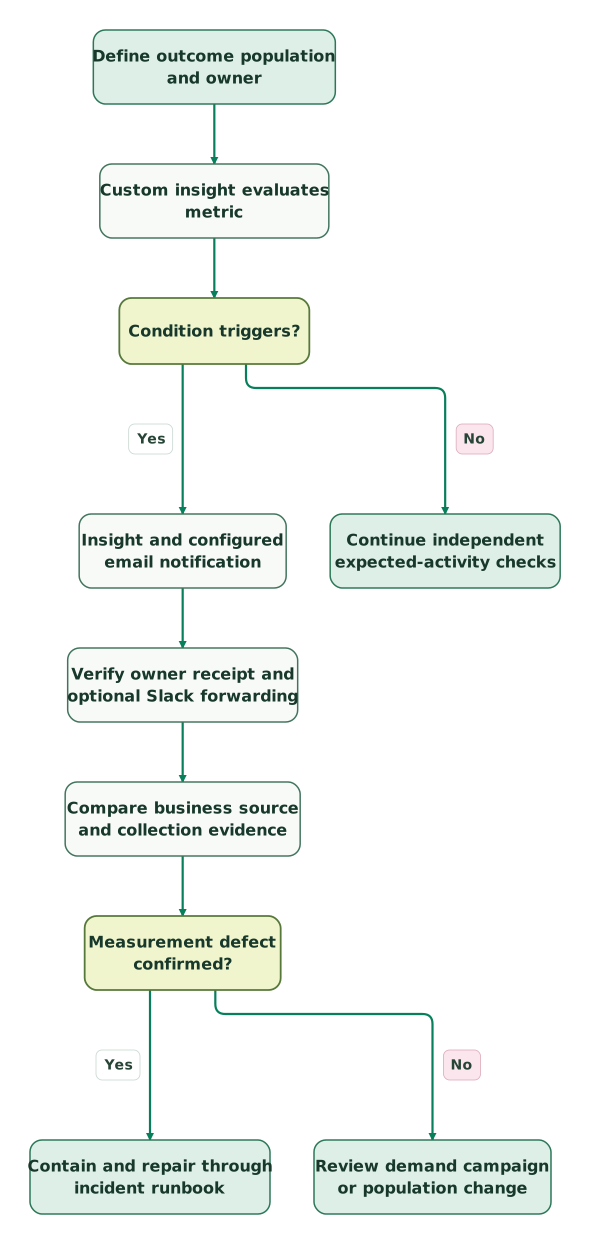
Read diagram as text
- Define outcome population and owner to Custom insight evaluates metric.
- Custom insight evaluates metric to Condition triggers?.
- Condition triggers? to Insight and configured email notification: Yes.
- Insight and configured email notification to Verify owner receipt and optional Slack forwarding.
- Verify owner receipt and optional Slack forwarding to Compare business source and collection evidence.
- Compare business source and collection evidence to Measurement defect confirmed?.
- Measurement defect confirmed? to Contain and repair through incident runbook: Yes.
- Measurement defect confirmed? to Review demand campaign or population change: No.
- Condition triggers? to Continue independent expected-activity checks: No
The notification starts an investigation. Independent evidence distinguishes a measurement failure from a real change in customer activity.
What can a GA4 alert miss even when it is configured correctly?
A GA4 alert can miss a failure that does not move its selected metric beyond the condition. It also cannot independently prove how much eligible activity should have arrived.
| Failure | Why a broad alert may stay quiet | Better companion check |
|---|---|---|
| One checkout path fails | Other paths keep the total stable | Completed orders versus received purchase identities |
| Duplicate events replace missing events numerically | Aggregate counts cancel out | Business-key and repeated-occurrence checks |
| An important parameter disappears | Event count stays unchanged | Required-field coverage and representative payload tests |
| Consent behavior changes | Observed activity changes with collection eligibility | Approved consent-state journey checks |
| A low-volume action stops | The historical series is sparse | Known eligible source outcomes and a suitable review interval |
Use the missing-event workflow when the alert points to collection or reporting. For ecommerce, reconcile purchases with the order source. For retained event data, add GA4 BigQuery checks with explicit stream, event and period coverage.
An alert on received events and a test of whether a known action emits an event protect different boundaries. Keep both where the outcome drives a consequential decision.
When should you use scheduled reports alongside alerts?
Use scheduled reports for a regular human review and conditional insights for changes that merit attention between reviews. GA4 administrators can schedule standard or custom reports as PDF or CSV email attachments, with daily through quarterly frequencies. Realtime reports are excluded; recipient access and schedule expiry need maintenance. GA4 report scheduling.
Preserve the report's intended filters, comparisons and date range when scheduling it. Choose a completed period that fits the data's availability. Google's scheduling guidance warns that processing can take up to 72 hours and suggests sending month-start reports on the fourth day to include late hits. Treat that as reporting-completeness guidance, rather than a delay that every collection test must wait through. Scheduled-report timing.
Give the reviewer a specific question, such as whether purchases and eligible orders still reconcile. A daily attachment with nobody assigned to read it adds distribution without detection.
What should pass before relying on GA4 alerts?
Rely on an alert only after its population, condition, delivery path and response have been demonstrated together.
Checklist
- The metric represents one named outcome or decision.
- The segment, interval and comparison basis are recorded.
- Normal variation and a meaningful failure case were reviewed.
- Web and app evaluation limits are respected.
- The expected condition produced an observable test result.
- The owner received and acknowledged the notification.
- Any Slack forwarding path was checked separately.
- An independent source can help explain missing or suspicious activity.
- A backup owner and a review point are assigned.
An analytics and tracking review should leave you with a short monitor list, tested notifications and the evidence needed to investigate each one. Keep the response small enough that the owner can use it during a real interruption.
Keep reading
Browse all Tracking & Attribution guides
 Tracking & Attribution
GA4 setup for SaaS and apps: the events and settings that matter
Set up GA4 for a SaaS acquisition journey. Define events, test consent and cross-domain tracking, choose Ads goals and verify revenue, identity and export.
Jafrin Akter AloLast updated 14 min read
 Tracking & Attribution
GA4 Bounce Rate Looks Wrong? 5 Checks Before You Change the Page
Diagnose unexpected GA4 bounce rates. Check duplicate views, key events, engagement timers, session scope and weighted averages before changing your page.
Jafrin Akter AloLast updated 10 min read
 Product Analytics
GA4 Alternatives: Choose by the Questions You Need to Answer
Compare Plausible, Matomo, Mixpanel, PostHog and a warehouse by the decisions they support. Use a controlled pilot and preserve critical GA4 dependencies.
Jafrin Akter AloLast updated 13 min read
Analytics & tracking
See the implementation scope, deliverables and acceptance checks.
Questions people ask
Should several related websites share one alert owner?
Use one accountable owner only when that person can distinguish the sites and coordinate their repairs. Keep the site or stream scope explicit in each monitor and name a backup. A shared reporting property does not establish shared operational responsibility. When separate teams publish the websites, route the relevant failure to each publisher while keeping one person responsible for the overall investigation.
How should a planned campaign shutdown affect an alert?
Record the expected population change before the campaign stops and decide who will review the resulting notification. Preserve monitoring for unrelated traffic and business outcomes. If a temporary adjustment is needed, give it an owner and restoration point. Removing the entire alert during a planned shutdown can leave another checkout or tracking failure unobserved after the campaign schedule changes.
What should happen when the alert recipient leaves the company?
Transfer the monitoring responsibility and verify the new delivery path before removing the old owner. Review Analytics access, notification recipients, mailbox forwarding and Slack channel membership separately. Keep an owned backup rather than a personal inbox as the only destination. Run a bounded notification test so the handover establishes receipt and response, rather than only changing a name in a document.
Can an alert prove that an advertising campaign caused a revenue drop?
An alert identifies an observed change in the selected metric, while causal attribution requires a separate analysis. Check measurement, eligibility, campaign delivery and other concurrent changes first. A campaign pause, checkout release and consent update can affect the same series. Preserve those observations and use an appropriate comparison or experiment before attributing the revenue change to one marketing action.
Should an acknowledged alert immediately be deleted?
Keep the monitoring rule if it still protects an ongoing decision. Acknowledgement means someone has taken responsibility for the current signal; it does not establish that the failure cannot recur. Record the investigation outcome, tune an unhelpful condition when evidence supports the change, and retain the useful monitor. Delete obsolete rules deliberately when their outcome, population or ownership has been replaced.
Sources

Written by
Jafrin Akter AloData Engineer and Co-founder at Martechdevs and Growth and Analytics Partners
Jafrin writes practical guides to marketing technology, customer data, analytics and AI workflows. Martechdevs is a Growth and Analytics Partners company.