
Front vs Zendesk for collaborative service and support operations
Pick Front if customer service depends on colleagues collaborating around a conversation; pick Zendesk if centralized support queues, routing and a defined ticket process drive the operation. Front vs Zendesk should compare the required channel and plan, because both products now provide ticketing. Test ownership, internal collaboration, escalation and reporting before turning the entry seat price into a production budget.
On this page
Front vs Zendesk comparison
These are public USD prices per licensed seat or agent per month, paid annually, before tax and optional usage.
| Decision | Front | Zendesk |
|---|---|---|
| Entry plan | Starter $25/seat, up to 10 seats | Support Team $19/agent |
| Broader channel scope | Professional $65/seat, up to 50 seats | Suite Team $55/agent |
| More advanced scope | Enterprise $105/seat | Suite Professional $115/agent; Enterprise + Copilot quoted |
| Core working emphasis | Shared conversations, comments, drafts and ticketing | Ticket queues, routing, triggers and support operations |
| Free evaluation | 14-day Professional trial with limitations | 14-day trial; paid plan afterward |
Sources: Front pricing, Front trial terms, Zendesk pricing and Zendesk trial terms.
At Martechdevs, we build customer support automation around the customer's request, the accountable owner and the information needed to resolve it. We would start with Front when an answer frequently needs coordinated input from customer success, operations or account management. We would start with Zendesk when the support organization needs to manage a consistent ticket lifecycle across queues and channels.
The distinction is an operating priority, rather than a claim that Front lacks ticketing. Front explicitly includes a helpdesk ticketing system. Front ticketing. Compare the normal work and the difficult handoff in each candidate before choosing the interface the team prefers.
Tool decisions
Front
- Best for: Customer teams that need several colleagues to help prepare a response while one person remains responsible for the conversation.
- Pros: Internal comments and shared drafts support collaboration around the message. Teammates can review a response before it is sent. Shared drafts, comments.
- Cons: Starter is limited to a single channel type and ten seats. Professional's broader channel and administration scope changes the cost for teams that outgrow that entry configuration. Plan limits.
- Free plan and startup offer: Front provides a 14-day Professional trial without a card. It has limits and locked features, including inviting guests and auto-reply or forwarding rules. No startup concession is assumed in the budget. Trial details.
- Choose it if: The team can resolve a representative request through shared context and a clear owner without forwarding copies around several inboxes.
- Skip it if: The required production workflow depends on features outside the selected plan or has no owner for collaboration and escalation rules.
A Front pilot should include an answer requiring another department's input. The original owner asks for that input, a colleague reviews the draft and the customer receives one coherent response. Test that the ownership remains obvious throughout the process. Several people participating in a conversation should not become several people assuming somebody else will reply.
Internal comments also need an access review. Front says comments in a shared inbox conversation are visible to people with access to that inbox. Comment visibility. Use the actual roles and inbox structure in the pilot rather than treating internal as a sufficient description of confidentiality.
Zendesk
- Best for: Support organizations managing a common ticket process with accountable queues, routing and escalation.
- Pros: Support Team includes ticketing, routing, prebuilt analytics, triggers and automations. Suite adds broader channel capabilities, with more advanced routing in higher plans. Zendesk plan scope.
- Cons: Support Team's entry price is an incomplete budget for a team requiring the Suite channel scope or higher-tier controls. Rule configuration and reporting definitions still require an owner.
- Free plan and startup offer: Zendesk provides a 14-day trial and requires a paid subscription to continue. This comparison uses standard rates and assumes no startup concession. Trial terms.
- Choose it if: The team can define the ticket lifecycle, queues, routing conditions and service measurements it needs to operate.
- Skip it if: The business mainly needs a small collaborative communication routine and cannot justify the proposed support configuration or administration.
A Zendesk pilot should include a request that changes category after the first reply. Confirm the new queue, the accountable agent, the internal context and the next expected action. Then test a reopened issue and a time-based escalation. A tidy initial assignment is insufficient if later updates leave the request stranded.
Zendesk distinguishes triggers, which react to ticket creation or updates, from time-based automations. Triggers and automations. Model the real condition first so a time-based requirement is not accidentally implemented as a rule that only reacts to an unrelated update.
Collaboration and ticket ownership
The shared requirement is a dependable response to the customer. Evaluate collaboration and queue management as parts of that outcome rather than independent feature scores.
| Representative request | Collaboration requirement | Ownership evidence |
|---|---|---|
| Commercial exception | Account manager reviews the proposed answer | One person approves and sends the reply |
| Technical issue | Engineering receives the relevant context | Support retains an explicit customer follow-up |
| Billing question | Finance supplies the accepted account information | A named owner handles the unresolved request |
| Reopened problem | Previous context remains available | The ticket or conversation returns to an accountable queue |
| Wrong initial category | Routing changes after review | The old and new owners understand the handoff |
For Front, observe whether comments and shared drafts reduce repeated explanation. For Zendesk, observe whether the configured ticket process gives agents and managers the right view of the work. In both products, require a visible next action for requests waiting on another department.
The support customer-context guide helps define the information that should appear with the request. Customer identity, subscription status and recent product activity may come from other systems, so record their owner and freshness rather than copying them into an unmaintained note.
For an ecommerce operation, Gorgias vs Zendesk adds a ticket-volume model and order-action requirements. For another support-platform comparison, Zendesk vs Freshdesk covers a related shortlist.
Channel and plan boundaries
Front Starter is a single-channel-type plan. A team using only email may fit that scope, while a team requiring email and another channel should evaluate the relevant broader plan. Professional lists omnichannel support, up to twenty automation rules and additional workspaces. Front tiers.
Zendesk Support Team and Suite Team have different scopes. The Suite adds messaging, live chat and telephony among its capabilities. The entry $19 rate therefore cannot be used as the full cost of the $55 Suite configuration. Zendesk plans.
Write a channel inventory that includes the request, the response route and the integration needed to provide context. A channel name appearing on a feature page does not establish the cost of phone usage, messaging or the specific integration. Keep those charges and entitlements in the commercial review.
Do the same with occasional collaborators. A colleague who comments on a request may need different permissions from an agent sending external replies. Verify the actual supported role and plan before counting that person as free or fully licensed. A low seat subtotal should not depend on an unverified access assumption.
Seat and add-on budget
These hypothetical examples use annual USD rates, the stated licensed headcount, no discounts, no tax and no optional usage. They compare subscription amounts without claiming equivalent features.
| Configuration | Monthly-equivalent calculation | Annual subscription, USD | Scope |
|---|---|---|---|
| 5 Front Starter seats | 5 × $25 | $1,500 | Single channel type |
| 5 Zendesk Support Team agents | 5 × $19 | $1,140 | Support Team features |
| 10 Front Professional seats | 10 × $65 | $7,800 | Professional scope |
| 10 Zendesk Suite Team agents | 10 × $55 | $6,600 | Suite Team scope |
| 10 Front Enterprise seats | 10 × $105 | $12,600 | Enterprise scope |
| 10 Zendesk Suite Professional agents | 10 × $115 | $13,800 | Suite Professional scope |
Inputs: Front prices and Zendesk prices. The plan labels are part of every calculation. Moving one configuration to a higher tier changes the comparison before any productivity assumption is introduced.
Front lists Copilot at $20 per seat per month as an add-on for Starter and Professional, included in Enterprise. Zendesk lists its Copilot add-on at $50 per agent per month paid yearly. Front add-ons, Zendesk add-ons. Confirm the licensed population and applicable commercial terms before adding either to a quote.
For an illustrative ten-seat Front Professional configuration with all ten seats covered by that $20 monthly Copilot rate, the monthly equivalent is 10 × ($65 + $20) = $850. Twelve unchanged months total $10,200 before exclusions. This calculation is an explicit full-population assumption, not a claim about the minimum selectable add-on seats.
AI automation also has usage definitions. Front advertises Autopilot starting at $0.39 per conversation, while Zendesk measures AI-agent usage through automated resolutions. Front AI pricing, Zendesk AI agents. A conversation and an automated resolution are different commercial units; compare the applicable definition and included allowances.
Use the software pricing tool to include licence, AI usage, channel costs, integrations, implementation and overlap. The support AI pricing guide helps distinguish an assistant used by agents from an automation that handles a customer issue.
Automation and escalation tests
Build the pilot from ordinary requests and explicit exceptions. Include a missing customer identifier, a wrong category, a repeated message and a request that requires approval. The system should expose the unresolved work and send it to an accountable person.
For Zendesk, validate ticket-update triggers separately from elapsed-time automations. Confirm the condition that prevents repeated action and the result after a ticket changes state. For Front, validate the relevant routing and collaboration rules in the qualified production scope. Trial limitations should be recorded as an evaluation boundary, with the missing workflow demonstrated through an appropriate vendor-supported route.
The customer should not receive an internal draft or an unfinished decision. Confirm the distinction between an internal note and an external response in each channel. Test a shared draft with more than one contributor, then record who can send it and who is accountable for accuracy.
For AI-assisted work, separate a useful draft from a completed resolution. A draft may reduce writing effort while still requiring investigation and approval. A resolved issue should have evidence that the accepted customer outcome occurred. Keep escalation, reopened requests and failures visible in both the operational report and the cost model.
Reporting and migration controls
Agree the meaning of first response, resolution, waiting time and reopened work before comparing dashboards. One team may include automated acknowledgements in its first-response measure while another counts only substantive replies. A different chart value can follow from the definition rather than a different service outcome.
A hypothetical team handling 1,000 requests with 100 reopened requests has a 10% reopened-request rate under that simple definition. If the report excludes 200 unresolved requests from the denominator, the same 100 becomes 12.5% of 800. Choose the definition that answers the business question and state it beside the report.
During migration, preserve the information required to continue active work: customer identity, owner, status, last substantive response, internal context and the promised next step. Verify attachments and historical conversations through the selected migration route. A matching ticket count alone does not establish that agents can continue the work.
Keep the old system available for a bounded acceptance period. Run a representative request from each channel and have a second agent take over after a handoff. A support manager should be able to identify overdue and unowned requests from the new system before cutover is accepted.
Best fit by service model
| Company size or operating model | Best fit | Runner-up | Decision reason |
|---|---|---|---|
| Five-person team handling collaborative email service | Front Starter | Zendesk Support Team | Shared draft and comment workflow deserves a pilot |
| Multi-channel support team with managed queues | Zendesk Suite | Front Professional | Routing and a common ticket process drive work |
| B2B account service involving several departments | Front Professional | Zendesk qualified plan | Conversation collaboration is a recurring requirement |
| Growing support operation with advanced controls | A qualified higher-tier pilot | The other qualified configuration | Access and administration change the relevant plan |
| Team without agreed response or resolution definitions | Process and metric definition first | Either tool after validation | Dashboard comparison needs consistent meaning |
Service-platform decision
Both routes must preserve customer context and ownership before the budget is approved.
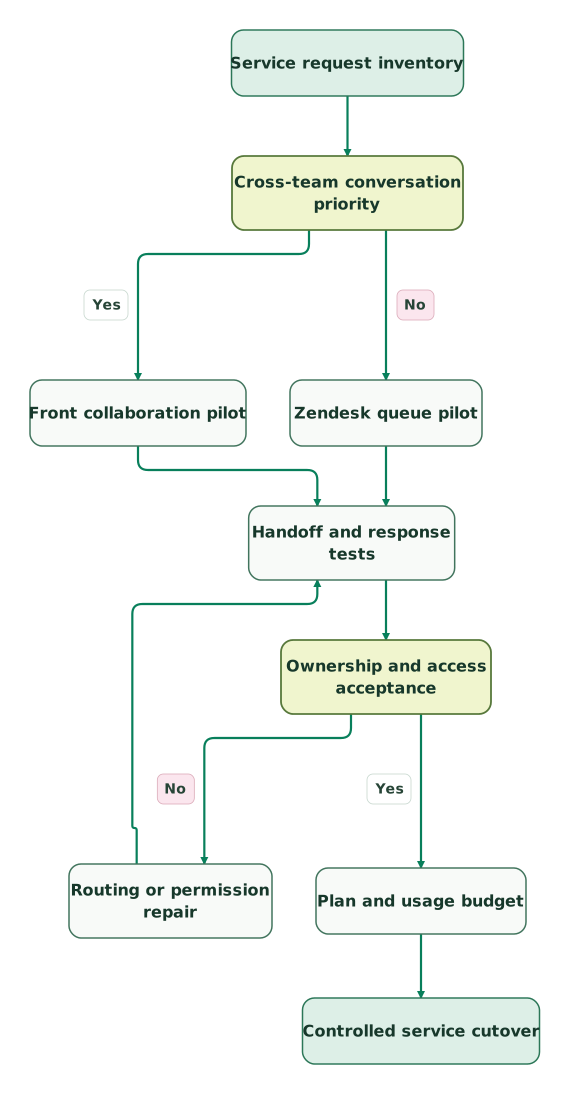
Read diagram as text
- Service request inventory to Cross-team conversation priority.
- Cross-team conversation priority to Front collaboration pilot: Yes.
- Cross-team conversation priority to Zendesk queue pilot: No.
- Front collaboration pilot to Handoff and response tests.
- Zendesk queue pilot to Handoff and response tests.
- Handoff and response tests to Ownership and access acceptance.
- Ownership and access acceptance to Routing or permission repair: No.
- Routing or permission repair to Handoff and response tests.
- Ownership and access acceptance to Plan and usage budget: Yes.
- Plan and usage budget to Controlled service cutover
The repair loop repeats the handoff and response checks after routing or access changes. Keep the expected owner and customer-visible result in the test record so a configuration change cannot silently pass by moving the problem elsewhere.
Support-platform checklist
- Inventory channels, request types and cross-team dependencies.
- Define one accountable owner for each active request.
- Confirm required features on the production plan rather than the trial alone.
- Test internal comments, shared drafts and external replies with actual roles.
- Validate ticket-update and time-based escalation behaviour separately.
- Align response, resolution and reopened-work definitions.
- Reconcile active work, attachments and context after migration repairs.
- Approve licences, AI usage, channel costs and ongoing administration.
Use the CRM audit skill to organize customer-context and ownership requirements before connecting the service platform to the CRM. The support workflow should make the accepted customer record available without creating a competing source of truth.
Keep reading
Browse all CRM & Lifecycle guides
 CRM & Lifecycle
Customer context in support: billing and product data inside Intercom or Zendesk
Connect billing and product data to Intercom or Zendesk with correct account identity, fresh context, useful fields and safe AI support workflows.
Jafrin Akter AloLast updated 14 min read
 CRM & Lifecycle
Gorgias vs Zendesk for ecommerce support and ticket costs
Choose Gorgias or Zendesk by ecommerce order work and support operations. Compare current ticket, seat and AI package costs, permissions and migration checks.
Jafrin Akter AloLast updated 12 min read
 CRM & Lifecycle
Zendesk vs Freshdesk: Compare the Right Plans, AI Bill and Renewal Cost
Zendesk vs Freshdesk pricing: both start at $19 per agent, but Freshdesk tops out at $89 and Zendesk Suite Professional at $115. Compare plans, AI and costs.
Jafrin Akter AloLast updated 23 min read
Customer support automation
See the implementation scope, deliverables and acceptance checks.
Questions people ask
Is Front still only a shared email inbox?
Front is not limited to a shared email inbox in its current product scope. It includes ticketing, and higher plans support multiple channel types and broader automation. The useful comparison with Zendesk is the team's collaboration and support operating model. Confirm the selected tier rather than relying on an older product description. Front ticketing.
Does Front's free trial include every production workflow?
Front's standard trial does not include every production workflow. Its help page describes a 14-day Professional trial with limits and locked features, including guest invitations and auto-reply or forwarding rules. Record any requirement affected by that boundary and arrange an appropriate demonstration before approving the production plan. Front trial details.
Can Zendesk Support Team be budgeted as the full omnichannel Suite?
Zendesk Support Team should not be budgeted as the full Suite. Support Team is the $19 annual-billing entry plan, while Suite Team is $55 per agent per month annually and adds broader channel capabilities. Compare the edition that supports the actual request channels and include usage charges separately. Zendesk plan comparison.
Are Zendesk triggers and time-based automations interchangeable?
Zendesk triggers and time-based automations are not interchangeable. Triggers react when tickets are created or updated, while automations act on time-based conditions. Define the required event or elapsed-time rule, then test the relevant path and its stopping condition. A rule that depends on a later update can miss an intended timed escalation. Zendesk rule types.
Can a lower support seat price justify losing customer context?
A lower support seat price is insufficient justification for losing customer context that agents need to resolve requests. Include the work of finding account information, repeating questions and transferring active issues in the evaluation. Use a representative handoff to test the result, then compare the complete cost of the qualified configurations rather than the licence subtotal alone.
Sources

Written by
Jafrin Akter AloData Engineer and Co-founder at Martechdevs and Growth and Analytics Partners
Jafrin writes practical guides to marketing technology, customer data, analytics and AI workflows. Martechdevs is a Growth and Analytics Partners company.