
Customer.io vs Mailchimp for Campaigns, Product Events and Customer State
Pick Customer.io if product events and account relationships control the customer journey; pick Mailchimp if campaigns and the selected marketing automation features cover the team's work. Customer.io vs Mailchimp is a decision about audience data, stopping rules and ongoing ownership. Compare those behaviors alongside billable contacts and sending capacity before choosing a cheaper entry subscription.
On this page
Customer.io and Mailchimp compared
The prices below are ordinary USD monthly rates excluding introductory offers; contact tiers and additional channels can change the final bill.
| Decision criterion | Customer.io | Mailchimp | Evaluation consequence |
|---|---|---|---|
| Paid entry | Essentials from $100/month with 5,000 profiles | Essentials from $13/month; Standard from $20/month, both at 500 contacts | Different starting populations and features |
| Entry email allowance | 1 million emails/month | Essentials sends equal 10 times the selected contact limit | Count the actual monthly workload |
| Free route | Time-limited trial and an eligible startup program | Free plan with 250 contacts and 500 emails/month, maximum 250/day | Free access serves different purposes |
| Automation depth | Event, profile and relationship-driven workflows | Essentials up to four steps; Standard or higher up to 200 steps | Evaluate the required steps in the paid plan |
| Native early-exit scope | Configurable automation exit conditions | Flow exit conditions require an audience with a connected store | Validate the completion case in the actual setup |
Customer.io pricing, Mailchimp's Essentials offer and Mailchimp plan details establish the commercial starting points. The automation limits and exit boundary come from Mailchimp's flow guide and flow settings.
Mailchimp's amounts above use the ordinary starts-at rates shown after an introductory period. Its offers have eligibility and enrollment conditions, and different trial routes can have different sending limits. The base budgets below exclude promotional savings. Confirm the specific offer and renewal amount before enrolling. Mailchimp trial and offer terms
At Martechdevs, we would define the audience and the event that should stop a reminder before choosing a platform. Our lifecycle messaging implementation service connects those customer expectations to the data, message rules and operating handover.
The campaign and product-messaging decision
Mailchimp is a practical candidate for a team whose routine begins with a campaign audience, an email and a manageable set of follow-up steps. Customer.io becomes more relevant when product behavior, subscriptions or account relationships determine the next message. These are starting recommendations, not permanent boundaries around what either product can do.
Write down a representative customer task. A newsletter signup followed by a welcome sequence has different dependencies from a reminder to the billing administrator of an inactive workspace. The second case may need an account identifier, a current role, subscription state and a completion event from the application.
Evaluate the real sequence rather than an idealized future program. If the team expects to use product events later, include one of those planned cases now and name its data owner. Buying a platform for events that nobody will implement creates capacity without a working lifecycle program.
The Customer.io versus ActiveCampaign comparison is useful when contact-based automation and sales actions sit between these needs. For a broader mobile engagement shortlist, MoEngage alternatives covers app identity and cross-channel migration.
Audience definitions and the recurring bill
Mailchimp's contact total includes subscribed, unsubscribed and non-subscribed contacts. Archived, cleaned and deleted records are excluded from that total. Its documentation defines the total across audiences, so the person who owns the budget needs the billable population as well as the list that can currently receive marketing email. Mailchimp pricing definitions
An unsubscribed contact can remain useful for historical records or other permitted operational purposes while still counting toward the contact limit. Avoid treating a removed marketing permission as an automatic reduction in the bill. Decide retention and archival rules deliberately, with the business's data requirements in view. Mailchimp contact types
Customer.io's starting profile allowance includes people and objects. A product company using company or subscription records therefore needs to count those entities alongside people. The object model lets the team relate a person to a business entity and use changes to that relationship in an automation. Customer.io objects
These definitions make a contact-count screenshot a poor substitute for a migration inventory. Reconcile the source population into people, objects, marketable records, excluded records and retained history. Document which records you intend to move and which will remain accessible elsewhere. The destination count should follow that decision instead of growing accidentally through repeated imports.
Platform decision blocks
Customer.io for event-driven customer journeys
- Best for: Product and lifecycle teams with dependable event data and a named owner for customer and account relationships.
- Pros: Objects, relationships and automation conditions support messages tied to the state of a product or account.
- Cons: The initial configuration and continuing data maintenance can outweigh the benefit for a simple newsletter routine.
- Free plan and startup offer: The ordinary trial lasts 14 days with up to 5,000 messages across channels, subject to lower daily limits. Eligible new businesses can apply for up to 12 months and 30,000 profiles through the startup program. Trial scope and startup requirements
- Choose it if: A real product-state case passes and the team can maintain its identifiers, relationships and message rules.
- Skip it if: The required work is already covered by a simpler campaign process and additional data engineering has no clear use.
Startup eligibility includes less than $10 million raised, no previous or current Customer.io customer relationship, and contact lists obtained through standard rather than purchased methods. Use an approved offer in the budget only after confirming its scope. Include the eventual paid arrangement in the purchase decision.
Mailchimp for the campaign operating routine
- Best for: Teams that can run their required campaigns and automations within the selected audience, step and integration limits.
- Pros: The public plan structure gives a concrete route from a small free audience to paid campaigns and longer marketing flows.
- Cons: Billable contacts can exceed the subscribed audience, and the native exit-condition feature has a connected-store boundary.
- Free plan and startup offer: Free supports 250 contacts and 500 monthly emails, with a 250-email daily maximum. Paid-plan trials are available for 14 days under their terms; a separate startup discount is not assumed in this comparison. Mailchimp plans
- Choose it if: The campaign owner can complete the required work and the actual reminder-stopping case passes in the intended plan.
- Skip it if: The product's required account context or exit behavior needs a workaround the team cannot reliably maintain.
Mailchimp Essentials is a starting offer for a bounded sequence. Its flow documentation allows up to four steps on Essentials and up to 200 on Standard or higher. The price of the appropriate higher tier belongs in the budget when the required flow exceeds the entry scope. A trial should establish that requirement before the subscription is selected.
Completion events and later messages
Define the business result of a completed action separately from reporting success. A customer buying a product may count as a conversion while still being inside a reminder sequence. The acceptance question is whether the next unwanted message is prevented in the specific workflow.
Mailchimp's native flow exit-condition setting removes contacts before completion when its selected condition is met, but the documentation makes it available for audiences with a connected store. A SaaS team using product events should verify its actual stopping design rather than assume that the same setting is available without the store relationship. Mailchimp flow settings
In Customer.io, automation exits are separate from per-action conditions. Exit criteria use OR logic: a person meeting any one exit condition can leave the journey. A failed condition on an individual message skips that item and continues. Choosing the wrong mechanism can allow a later reminder even though the earlier one was correctly suppressed. Automation exits and action conditions
Use a controlled case in which completion arrives during a delay. Inspect the destination event, the current customer state, the journey membership and the next message. Then repeat with completion arriving just before the next action and with a customer whose completion happened before the journey began. Those cases reveal assumptions that a message preview cannot.
Preference changes need their own test. A customer completing onboarding and a customer withdrawing marketing permission are different events. Preserve the distinction in the data and explain which categories of communication remain eligible under the business's rules.
A hypothetical audience and capacity example
Assume a program has 400 subscribed people, 100 unsubscribed people retained in the account, and 100 company objects in its Customer.io model. Plan 12 emails per subscribed person each month. These are illustrative inputs, with no duplicate audience records, additional channels or extra usage.
| Planning item | Calculation | Result | Interpretation |
|---|---|---|---|
| Mailchimp contact population | 400 subscribed + 100 unsubscribed | 500 contacts | At the illustrated Essentials contact limit |
| Customer.io profile population | 500 people + 100 company objects | 600 profiles | Below the Essentials starting profile allowance |
| Monthly planned email volume | 400 people × 12 emails | 4,800 emails | Excludes all other sends |
| Mailchimp Essentials allowance | 500-contact limit × 10 | 5,000 emails/month | 200 emails of remaining capacity |
| Annual base amounts | $13 × 12; $100 × 12 | $156; $1,200 | Different starting configurations, before other costs |
The example leaves very little room in the Mailchimp entry configuration. Adding 25 subscribed people creates 525 billable contacts, and the same cadence becomes 425 × 12 = 5,100 monthly emails. Both assumptions require a revised tier or workload decision. Customer.io would have 625 profiles under the same object model, but feature and operating requirements still need validation.
The base-price difference is $1,044 over a year at unchanged monthly amounts. Suppose a separate hypothetical implementation budget adds $2,000 before ongoing operation and old-system overlap. A subscription saving smaller than that amount would not pay for the change during the first year under this simplified model.
The Mailchimp cost calculator is useful for audience and plan scenarios. Keep promotional periods, currency and the selected contact tier explicit when checking an offer. The $13 Essentials starting case here is the stated 500-contact offer; amounts from another pricing configuration should be qualified before they enter the worksheet.
A shared acceptance fixture
Use a small set of records with known outcomes. The following fixture is a proposed evaluation, not a claim about a completed trial.
| Case | Controlled input | Expected business outcome | Evidence |
|---|---|---|---|
| Fresh subscriber | Valid subscription and initial customer state | Entry into the intended welcome path | Audience record and first action |
| Completed action | Completion during a reminder delay | Exclusion of the later unwanted reminder | Event, condition and journey state |
| Earlier completion | Completion before the new journey starts | The designed treatment for already-completed customers | Entry decision and message eligibility |
| Preference withdrawal | A valid marketing opt-out | No further message in the excluded category | Preference record and attempted-send outcome |
| Account relationship change | A different administrator for the same account | The intended recipient and account context | Relationship record and rendered message |
Ask the eventual operator to diagnose a deliberately incorrect input. They should find the relevant record, explain its audience membership and identify the repair. A platform that passes the happy path but leaves the team unable to investigate failures can create an expensive dependency after handover.
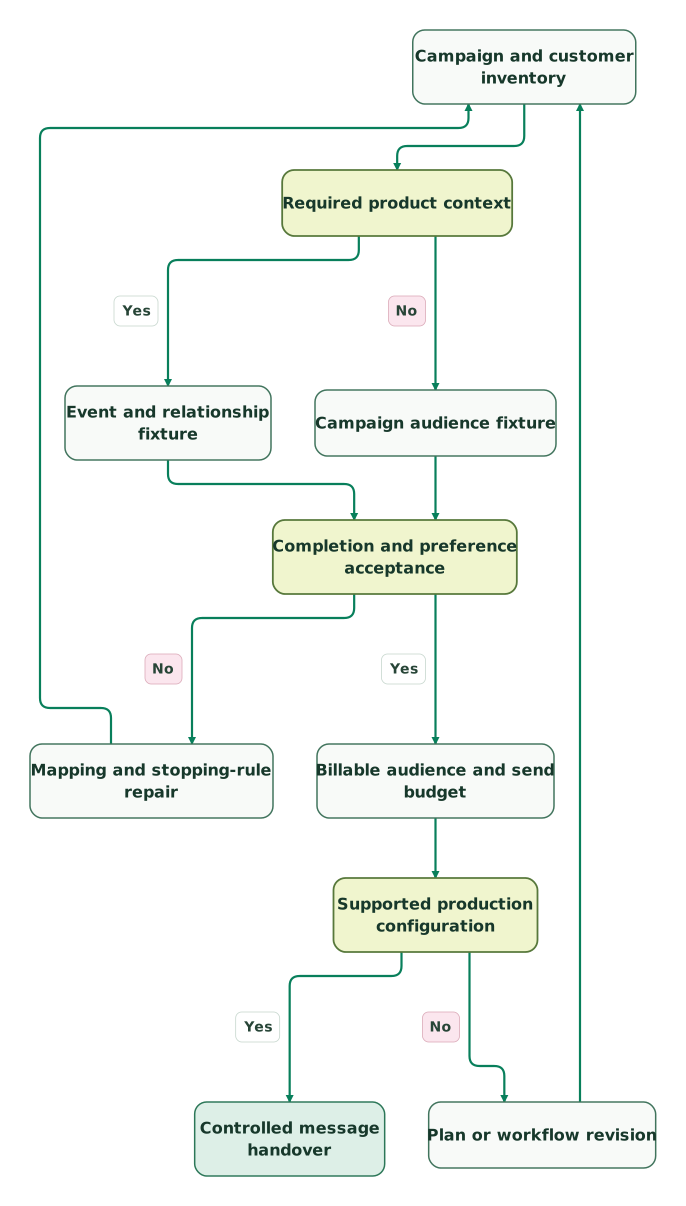
Read diagram as text
- Campaign and customer inventory to Required product context.
- Required product context to Event and relationship fixture: Yes.
- Required product context to Campaign audience fixture: No.
- Event and relationship fixture to Completion and preference acceptance.
- Campaign audience fixture to Completion and preference acceptance.
- Completion and preference acceptance to Mapping and stopping-rule repair: No.
- Mapping and stopping-rule repair to Campaign and customer inventory.
- Completion and preference acceptance to Billable audience and send budget: Yes.
- Billable audience and send budget to Supported production configuration.
- Supported production configuration to Plan or workflow revision: No.
- Plan or workflow revision to Campaign and customer inventory.
- Supported production configuration to Controlled message handover: Yes
The repair path returns to the inventory because changing a model or plan can alter the fixture itself. Keep the expected customer outcomes fixed unless the business explicitly changes the requirement.
Best fit by operating model
| Company size or model | Best fit | Runner-up | Reason |
|---|---|---|---|
| Small newsletter team with a bounded audience and short sequence | Mailchimp | Customer.io | Campaign operation is the main job |
| Product company with several account relationships per person | Customer.io | Mailchimp | Relationship context determines the messages |
| Store-connected team whose required flows pass in Mailchimp | Mailchimp | Customer.io | The store and campaign workflow fit the native setup |
| Lifecycle team coordinating product completion across channels | Customer.io | Mailchimp | Event state and stopping behavior lead the trial |
The recommended product must fit the people operating it. Include the marketer's recurring work, the engineer's data maintenance and the person responsible for investigating missed or unwanted messages. A lower base price cannot compensate for an ownership gap that leaves customer communication unattended.
Migration and handover checklist
- Subscribed, unsubscribed, retained and archived records have explicit destinations.
- Company or subscription objects are included in the profile budget where required.
- The flow step count and every necessary action fit the chosen plan.
- Store-dependent exit features are confirmed for the actual Mailchimp audience.
- Completion before entry and during delays has the intended result.
- Preference changes remain effective after import and subsequent updates.
- Trial-only features, promotional periods and startup assumptions are separated from normal cost.
- One system owns each live message, with rollback criteria and an operating owner.
The lifecycle marketing audit skill helps organize those checks. The existing Customer.io alternatives guide is the next step if neither platform passes the required customer-state case.
Keep reading
Browse all CRM & Lifecycle guides
 CRM & Lifecycle
Customer.io vs ActiveCampaign for Product Events and Marketing Automation
Compare Customer.io and ActiveCampaign through product events, contact creation, relationships, plan-specific actions and a reproducible operating budget.
Jafrin Akter AloLast updated 11 min read
 CRM & Lifecycle
MoEngage Alternatives for Mobile Journeys, Identity and Migration
Compare MoEngage alternatives by customer identity, journey exits, mobile scope and transition cost, with Braze, Customer.io and Iterable decision checks.
Jafrin Akter AloLast updated 11 min read
 CRM & Lifecycle
Customer.io Implementation Mistakes: Events, Segments and Re-Entry
Prevent duplicate journeys, unsafe backfills and irrelevant reminders in Customer.io, with an event contract and an activation test to run before launch.
Jafrin Akter AloLast updated 13 min read
Lifecycle marketing
See the implementation scope, deliverables and acceptance checks.
Questions people ask
Can a Mailchimp flow exit on product completion without a connected store?
Mailchimp's documented native exit-condition setting requires an audience with a connected store. A product team without that connection should validate another supported stopping design in its actual plan instead of assuming the setting applies. Use a controlled completion event during a delay and verify that all later unwanted reminders are prevented, including messages after the first skipped action.
Can twenty-five new subscribers change both Mailchimp limits at once?
Twenty-five new subscribers change both limits in the article's hypothetical entry-plan example. The billable population rises from 500 to 525 contacts, and twelve sends to each of 425 subscribed people produce 5,100 monthly emails. That exceeds the illustrated 500-contact, 5,000-email configuration. Recalculate both dimensions before choosing a larger tier or changing the cadence, even when the audience increase seems small.
Can Customer.io's profile allowance be compared with subscribers alone?
Customer.io's profile allowance should not be compared with subscribers alone because it includes people and objects. A company using account or subscription objects must include those records in the estimate. Map the intended destination population first, then compare the complete count with the chosen allowance. Marketing permission, business identity and billable storage are related concerns with different definitions.
Is a four-step Mailchimp sequence enough evidence for a larger rollout?
A four-step sequence proves only the behavior exercised by that sequence. A larger rollout can introduce additional actions, re-entry, store conditions and customer exclusions. List those requirements and test them in the selected plan before approving the wider move. Keep rendering, audience entry and later-message suppression as separate checks so one successful email does not stand in for the full workflow.
Can a Customer.io trial settle the post-startup budget?
A trial cannot settle the post-startup budget because trial access, startup approval and the eventual paid configuration are different commercial arrangements. Count the expected people, objects, messages and channels, then confirm the applicable offer and graduation terms. Use the trial to validate behavior and operator effort, and use the accepted production scope to calculate recurring and transition costs.
Sources
- Customer.io pricing
- Customer.io objects
- Customer.io plan and trial limits
- Customer.io startup requirements
- Customer.io automation exits
- Customer.io action conditions
- Mailchimp Essentials starting offer
- Mailchimp plans
- Mailchimp pricing definitions
- Mailchimp contact types
- Mailchimp marketing automation flows
- Mailchimp flow settings
- Mailchimp trial and offer terms

Written by
Jafrin Akter AloData Engineer and Co-founder at Martechdevs and Growth and Analytics Partners
Jafrin writes practical guides to marketing technology, customer data, analytics and AI workflows. Martechdevs is a Growth and Analytics Partners company.