
Customer.io vs ActiveCampaign for Product Events and Marketing Automation
Pick Customer.io if product events and account relationships determine the messages; pick ActiveCampaign if a marketing team needs contact-based campaigns and connected sales actions in a suitable plan. Customer.io vs ActiveCampaign depends on the data model and the actions your workflows require. Compare a working customer case, its operating owner and the complete package before comparing entry prices.
On this page
Customer.io and ActiveCampaign compared
These are USD entry configurations; Customer.io uses monthly billing and the ActiveCampaign amount is a monthly equivalent billed annually.
| Decision criterion | Customer.io | ActiveCampaign | Practical consequence |
|---|---|---|---|
| Public entry configuration | Essentials from $100/month | Starter $15/month equivalent for 1,000 contacts | Different feature and audience allowances |
| Included entry email volume | 1 million emails/month | 10,000 emails/month at 1,000 contacts | Check send volume independently of list size |
| Data model focus | People, objects and relationships | Contacts, attributes and connected marketing or CRM actions | Reproduce the actual customer decision |
| Entry automation boundary | Visual workflows with event and relationship use cases | Five actions per Starter automation, with individual action restrictions | A short automation can still need a higher plan |
| Evaluation route | 14-day trial with message limits | 14-day trial matching Professional features | Retest in the production package |
Customer.io pricing, ActiveCampaign's entry-price explanation and its plan comparison support the starting configurations. Treat them as procurement inputs rather than equivalent packages.
At Martechdevs, we would start with the customer action that should change the next message. Our lifecycle messaging implementation service connects that action to the data, preferences and workflow conditions that the marketing team will maintain.
Customer records and product events
Customer.io is a strong candidate when the messaging decision depends on more than a person's latest contact fields. Its object model lets you create business entities, relate them to people and trigger automations from object or relationship changes. A company, workspace or subscription can therefore remain a distinct record instead of being repeatedly copied into a contact's single current-company field. Customer.io objects
Consider a hypothetical administrator belonging to two workspaces. One workspace has completed setup and the other has not. The useful reminder concerns the incomplete workspace. A single contact attribute saying “setup complete” can lose that distinction if the newest update overwrites the earlier value. The trial should prove that the message names the intended workspace and that completing one workspace does not suppress or trigger the other one's reminder.
ActiveCampaign also supports custom events, so it should not be reduced to newsletter sending. Its Event Tracking help describes collecting a defined action and matching the supplied email address to an existing contact. If the contact does not exist, that event does not create the contact and is not added. The event pipeline must therefore establish the contact before the event arrives. ActiveCampaign Event Tracking
For either platform, write down the authoritative identifier, the owner of each important field and the order of updates. An integration can report success while the business condition remains wrong. Check the destination record, the audience membership and the resulting workflow branch rather than relying only on a successful request.
The existing Customer.io implementation guide covers deeper data and journey failures. Keep this comparison focused on whether the intended model fits each platform and the selected package.
Automation actions and plan scope
ActiveCampaign's five-action Starter limit is only part of the decision. Its action matrix excludes If/Else, Webhook and Update a contact from Starter. It places Start an automation and End another automation in Professional and Enterprise. A workflow with only a few boxes can therefore exceed Starter's capability even before it reaches five actions. ActiveCampaign automation actions
Write the required actions before choosing a plan. For example, a proposal follow-up might need to wait, check current sales status, notify an owner and stop a different nurture. Ask the seller to identify the exact base plan, CRM add-on and user allowances supporting those actions. A general automation feature checkbox does not settle those entitlements.
Starter also has a customer-eligibility boundary: ActiveCampaign's plan overview says existing customers do not qualify. An existing account considering a cheaper arrangement should confirm its actual options instead of budgeting an automatic move to the advertised entry plan.
Custom-event scope deserves a specific confirmation. ActiveCampaign's pricing table includes custom event tracking from Plus, while its plan-overview help places that item in the Professional feature list. The Starter exclusion is clear; the Plus-versus-Professional boundary needs confirmation for the selected offer. The API also returns a forbidden response when the account lacks the entitlement. Plan overview and event-tracking entitlement
Customer.io has its own distinction between entering an automation, receiving a particular message and leaving the journey. A failed action condition skips that item and continues through the workflow. It does not automatically remove the customer from every later step. Event-performed conditions also examine whether an event has ever happened, which can include events before the present journey. Customer.io action conditions
Use an explicit exit when the business means “end this reminder sequence.” Customer.io's exit criteria use OR logic, so any one qualifying condition can end a journey. Removing all exit conditions lets the person finish the automation. Record the intended condition combination and test it with completed, incomplete and excluded customer cases. Customer.io automation exits
Platform decision blocks
Customer.io for maintained product messaging
- Best for: Teams whose product events or account relationships drive onboarding, renewal and retention communication.
- Pros: Objects, relationships and event-driven automations fit business changes that need more context than one flat contact record.
- Cons: The team must own data quality and relationship updates; the included profile allowance counts people and objects.
- Free plan and startup offer: The standard trial lasts 14 days with up to 5,000 messages across channels, subject to daily limits. Eligible new businesses can apply for up to 12 months with 30,000 profiles through the startup program. Trial details and startup program
- Choose it if: The product team can maintain the model and the responsible marketer can explain the resulting audience, message conditions and exits.
- Skip it if: The business needs a small campaign routine and has no owner for the additional event and relationship work.
For the startup offer, verify the funding, previous-customer and contact-list requirements before including savings. The published criteria require less than $10 million raised, no current or previous Customer.io customer relationship, and contact lists obtained through standard methods rather than purchased. Confirm the eventual graduation arrangement as well as initial approval.
ActiveCampaign for contact and sales workflows
- Best for: A marketing team organizing campaigns, contact conditions and sales handoffs around the required plan and add-ons.
- Pros: The action matrix makes it possible to specify the exact workflow steps and purchase the configuration that supports them.
- Cons: Trial access, action restrictions and additional CRM or channel scope can make the production requirement larger than Starter.
- Free plan and startup offer: The published evaluation is a 14-day trial with up to 100 contacts and 100 sent emails, matching Professional features. The standard offer is a trial rather than a permanent free plan; a startup discount is not part of that published trial offer. ActiveCampaign trial FAQ
- Choose it if: The required contact workflow passes in the intended production plan and its marketing owner can maintain it without constant custom development.
- Skip it if: The required account relationships or action entitlements create a model the team cannot operate confidently.
Customer.io is also worth comparing with a campaign-focused alternative through Customer.io versus Mailchimp. For a mobile shortlist with broader orchestration requirements, MoEngage alternatives compares a different operating scope.
Capacity and the first-year budget
Use separate worksheets for contact count, stored objects, email volume and the actions needed. An affordable plan that cannot execute the required sequence is an incomplete option. A larger allowance has little value if the workflow never uses it.
This hypothetical example assumes 800 people, 200 company objects and eight planned emails per person each month. The objects apply to the Customer.io model; they are not asserted to be equivalent ActiveCampaign records.
| Planning item | Calculation | Result | Decision |
|---|---|---|---|
| Customer.io profile population | 800 people + 200 objects | 1,000 profiles | Within the 5,000-profile Essentials starting allowance |
| Planned email volume | 800 people × 8 emails | 6,400 emails/month | Below both entry sending allowances |
| Customer.io base subscription | $100 × 12 months | $1,200/year | Excludes additional usage and services |
| ActiveCampaign Starter base | $15 × 12 months | $180/year | Relevant only if its actions and contact model fit |
| Hypothetical implementation work | Assumed implementation budget | $3,600 | Planning assumption for internal or external work |
The $1,020 difference between those annual base amounts does not establish the price of an equivalent event-driven implementation. ActiveCampaign Starter excludes custom event tracking and several actions. A qualified Plus or Professional configuration can have a different bill, and the exact event entitlement needs the confirmation described above.
For a Customer.io implementation using the assumed $3,600 budget, the base subscription plus that work totals $4,800 in year one. Add any overlap with the previous system, channel charges and continuing administration. This is an arithmetic example, not a quote, expected project duration or forecast.
Now change only the send assumption to 70,000 emails a month. The Customer.io Essentials starting email allowance still covers that quantity, while the 1,000-contact ActiveCampaign Starter allowance does not. That change requires a new package calculation even though the number of people has stayed the same.
Use the software pricing tools to organize base inputs and the ActiveCampaign pricing guide for more plan context. Confirm the actual checkout configuration before making a purchasing decision.
A reproducible selection trial
Build a controlled fixture using records that the team owns and can inspect. Include a newly created contact, an event arriving before contact creation, a repeat completion event, an excluded customer and the two-workspace administrator. Write the expected message and destination state for each case before running it.
Keep message rendering separate from audience logic. Correct personalization in a preview does not prove that the correct customer entered the workflow. Correct audience entry does not prove that an exit stops an unwanted reminder. Each observation belongs to a distinct acceptance condition.
For the operator test, ask the person who will maintain the program to change a delay or exclusion, identify affected customers and explain the resulting behavior. Record the plan used during that test. If a trial exposes additional actions, repeat the required case after restricting the configuration to the package being purchased.
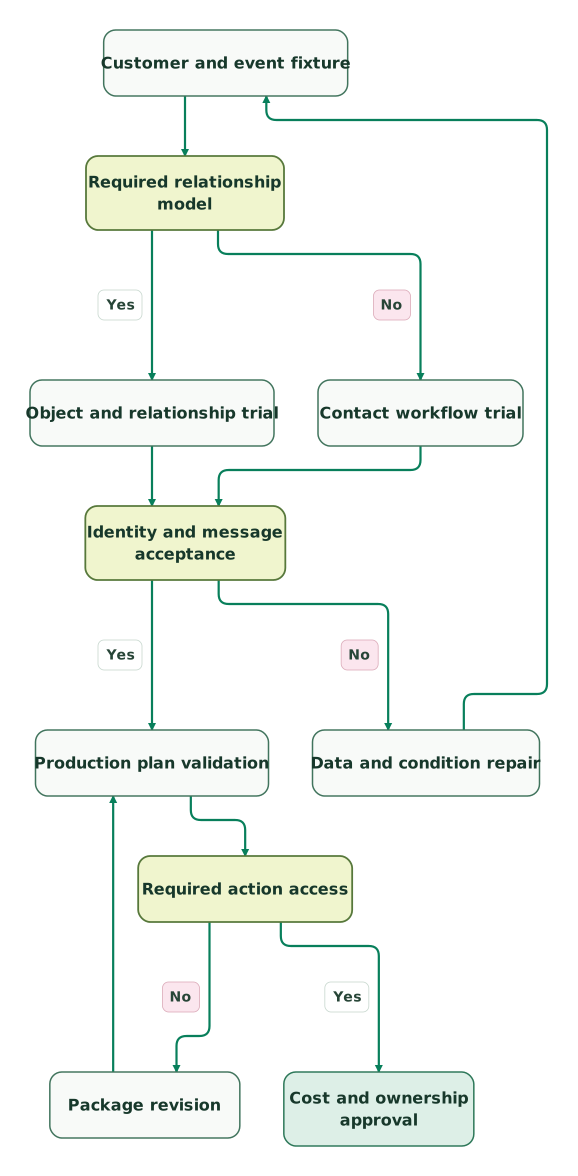
Read diagram as text
- Customer and event fixture to Required relationship model.
- Required relationship model to Object and relationship trial: Yes.
- Required relationship model to Contact workflow trial: No.
- Object and relationship trial to Identity and message acceptance.
- Contact workflow trial to Identity and message acceptance.
- Identity and message acceptance to Data and condition repair: No.
- Data and condition repair to Customer and event fixture.
- Identity and message acceptance to Production plan validation: Yes.
- Production plan validation to Required action access.
- Required action access to Package revision: No.
- Package revision to Production plan validation.
- Required action access to Cost and ownership approval: Yes
A package revision returns to production-plan validation. If it changes the data model or workflow behavior, repeat the customer fixture too. A commercial upgrade should not silently approve an untested design.
Best fit by team model
| Company size or model | Best fit | Runner-up | Reason |
|---|---|---|---|
| Product company with an engineer owning event quality | Customer.io | ActiveCampaign | Product state and relationships drive the journeys |
| Small marketing team with a bounded contact workflow | ActiveCampaign | Customer.io | The required actions may fit a simpler operating routine |
| Account-based SaaS with people in several workspaces | Customer.io | ActiveCampaign | Relationship context deserves an explicit model trial |
| Marketing and sales operation using connected automation actions | ActiveCampaign | Customer.io | Purchase the qualifying plan and CRM scope after testing the handoff |
The strongest result is an accepted workflow with a named maintenance owner. Give usability and ongoing repair effort weight alongside subscription cost. A team that cannot explain the chosen conditions will struggle when customer behavior changes.
Purchasing and rollout checklist
- The customer identifier and contact-creation order are documented.
- Shared-account and multiple-workspace cases have explicit expected recipients.
- The chosen package includes each required event and automation action.
- Action conditions and journey exits have separate acceptance checks.
- A completed action prevents the intended later reminder.
- Profiles, contacts, objects and monthly sends use their correct billing units.
- Trial-only features and startup approval assumptions are removed from the base budget.
- Message ownership and a rollback decision are clear before production cutover.
Use the lifecycle marketing audit skill to keep the selection evidence connected to the operating program. Carry the accepted fixture into the handover so later changes can be reviewed against the same customer expectations.
Keep reading
Browse all CRM & Lifecycle guides
 CRM & Lifecycle
Customer.io vs Mailchimp for Campaigns, Product Events and Customer State
Compare Customer.io and Mailchimp by billable audiences, product events, store-dependent exits, automation limits and the full cost of changing platforms.
Jafrin Akter AloLast updated 11 min read
 CRM & Lifecycle
MoEngage Alternatives for Mobile Journeys, Identity and Migration
Compare MoEngage alternatives by customer identity, journey exits, mobile scope and transition cost, with Braze, Customer.io and Iterable decision checks.
Jafrin Akter AloLast updated 11 min read
 CRM & Lifecycle
Customer.io Implementation Mistakes: Events, Segments and Re-Entry
Prevent duplicate journeys, unsafe backfills and irrelevant reminders in Customer.io, with an event contract and an activation test to run before launch.
Jafrin Akter AloLast updated 13 min read
Lifecycle marketing
See the implementation scope, deliverables and acceptance checks.
Questions people ask
Can ActiveCampaign record an event before the contact exists?
ActiveCampaign's Event Tracking documentation says an event is not added when its contact does not already exist. Establish the contact first, then send the event with the matching email address. Include the reversed order in a controlled test so the team can detect a race between profile creation and event delivery rather than discovering it through missing customer journeys.
Does Customer.io count a company object like a person for pricing?
Customer.io's public profile allowance includes people and objects. A company object therefore belongs in the profile inventory even though it does not receive an email itself. Count the actual entities required by the model, then verify the selected plan's allowance and additional-usage terms. Reducing duplicated objects can improve the model, but do not remove necessary relationships just to fit an entry tier.
Can one setup flag describe an administrator in two workspaces?
A single setup flag can lose the distinction between two workspaces with different completion states. In the hypothetical example, the administrator has completed one workspace while another still needs attention. Preserve the workspace context in the chosen model and verify the intended recipient and message. Completing one workspace should affect the other only if that is the business's explicit rule.
Does a skipped Customer.io message end the automation?
A skipped message does not necessarily end a Customer.io automation. Its action-condition documentation says a person who fails the condition skips that item and continues. Use an appropriate exit condition when the business wants the journey to stop. Test later steps as well as the first skipped message, particularly for reminders that become irrelevant after a customer completes an action.
Can a low email volume still require a higher ActiveCampaign plan?
A low email volume can still require a higher plan because automation actions and feature entitlements have separate restrictions. A small sequence using If/Else or a webhook already exceeds Starter's documented action set, while connected-automation actions have further gates. Price the exact sequence and any CRM or channel add-ons before treating the entry subscription as the operating budget.
Sources
- Customer.io pricing
- Customer.io objects
- Customer.io action conditions
- Customer.io automation exits
- Customer.io plan and trial limits
- Customer.io startup program
- ActiveCampaign entry-price explanation
- ActiveCampaign plan comparison
- ActiveCampaign plan overview
- ActiveCampaign Event Tracking
- ActiveCampaign event-tracking entitlement
- ActiveCampaign automation actions
- ActiveCampaign trial FAQ

Written by
Jafrin Akter AloData Engineer and Co-founder at Martechdevs and Growth and Analytics Partners
Jafrin writes practical guides to marketing technology, customer data, analytics and AI workflows. Martechdevs is a Growth and Analytics Partners company.