
Clay vs ZoomInfo: Data Workflows, Credits and Complete Cost
Pick Clay if you need a configurable workflow across data providers, research and activation, with someone accountable for maintaining it. Pick ZoomInfo if its data and packaged seller workflows meet the requirement with less custom assembly. Clay vs ZoomInfo can also be a combined setup: using ZoomInfo inside Clay preserves the provider subscription while adding workflow control and its own usage costs.
On this page
Clay and ZoomInfo comparison
Clay amounts below are USD monthly-billed entry packages; ZoomInfo requires a tailored quote.
| Decision | Clay | ZoomInfo |
|---|---|---|
| Starting paid package | Launch from $185/month; Growth from $495/month | Quote based on licences, features and credits |
| Usage units | Actions for platform work and Data Credits for marketplace purchases | Export credits in the main sales pricing model; product-specific rules also apply |
| Operating model | Configurable enrichment, research and activation across providers | Data, signals and seller workflows within the purchased package |
| CRM workflow | Native CRM integrations and HTTP API integrations listed from Growth | CRM integrations need the quoted rights and credit scope |
| Multi-provider enrichment | Configurable waterfalls and bring-your-own provider accounts | GTM Studio includes its own waterfall offering |
| Combined use | ZoomInfo enrichment requires your own ZoomInfo account | The ZoomInfo subscription and applicable integration rights remain necessary |
Sources: Clay plans and billing, Clay feature comparison, ZoomInfo pricing, GTM Studio, and Clay's ZoomInfo action.
We would choose from the workflow the team can operate reliably. A tool that returns an email address is doing a smaller job than a process that qualifies an account, checks existing CRM records, validates a contact and routes an approved update. Our GTM engineering service scopes those stages and their owners before selecting the software.
The purchase boundary
Write down whether the purchase replaces a data source, the workflow around it, or both. These boundaries change the trial and the budget.
If sellers mainly need to search an accepted target market, inspect account context and export records into an established sales process, test that complete flow in ZoomInfo. If operations needs different sources for different fields, custom research and conditions that change by segment, test the assembled Clay workflow.
A third possibility is retaining ZoomInfo as one source inside Clay. Clay provides a native ZoomInfo integration for company and contact enrichment, with an account connection required. This is useful when the provider's coverage remains valuable while the surrounding qualification or routing process needs more control. ZoomInfo integration setup.
Keep a replacement ledger: which existing tasks disappear, which subscriptions can end, and which new tasks someone must own. A combined setup can improve coverage or reduce manual work while increasing the software bill. Those outcomes should appear separately in the business case.
Platform fit and ownership
Clay for a maintained enrichment workflow
- Best for: RevOps and growth teams building explicit rules across sources, research and downstream actions.
- Pros: Multi-provider waterfalls, conditional execution and provider-account connections support a flexible process. Tables and users are unlimited across the listed plans. Clay features.
- Cons: Someone must own matching, provider selection, validation, spend and destination changes. A working first table is only the beginning of that operating responsibility.
- Free plan and startup offer: Free includes 100 Data Credits, 500 Actions per month and up to 200 rows per table. It is useful for bounded evaluation; required paid features still need a plan.
- Choose it if: The custom logic creates useful coverage or a better handoff, and the team can maintain it.
- Skip it if: The goal is a simple seller search workflow and the added configuration has no clear owner or benefit.
Our Clay implementation mistakes guide covers the controls to establish before expanding a workflow. A large provider catalogue offers options; the team still needs evidence for the specific fields and markets it uses.
ZoomInfo for a packaged sales-data workflow
- Best for: Sales teams needing contact and account information connected to the platform's prioritization and seller tools.
- Pros: Packages include search, exports and CRM connections, with additional buying signals and workflows in higher editions. ZoomInfo packages.
- Cons: Package scope, licences, credits and integration rights need a complete quote. A feature visible in a demonstration may sit outside the proposed order.
- Free plan and startup offer: The site advertises trials. Confirm the evaluation's product access and export allowance rather than treating the trial as the complete production entitlement.
- Choose it if: Its supported workflow produces accepted data and actions without a custom process the team would struggle to operate.
- Skip it if: Essential sources, fields or conditions remain outside the demonstrated configuration.
ZoomInfo also offers GTM Studio, currently described as early access. It combines a data canvas, orchestration and waterfall enrichment. Compare that product explicitly if those are the required capabilities; a comparison against only ZoomInfo's ordinary contact search would miss the relevant offer. GTM Studio scope.
Waterfalls and data acceptance
A waterfall tries providers in sequence according to the configured stopping rule. The value comes from additional usable coverage at an acceptable cost. Multiple providers returning the same stale address add little unless validation catches the problem.
Clay's Work Email waterfall lets the operator choose a validation provider, require an explicit validation success and control the accepted risk level. Its duplicate-result threshold can stop repeated attempts after the same rejected result appears. Define those settings before comparing a workflow's coverage. Work Email waterfall.
ZoomInfo says GTM Studio's waterfall uses alternative data from more than 25 vendors and returns a highest-confidence result with source attribution. That capability is included within the Studio offering; it does not make the overall product free. Test the available controls and results in the proposed configuration. Studio waterfall description.
Use the same target sample for both options. Preserve each requested company or person even if a candidate returns nothing. Measure usable coverage against the original requested population, then inspect source, job freshness and the intended destination association.
| Acceptance input | Required output | Failure classification |
|---|---|---|
| Name shared by several people | Intended person at the intended company | Identity mismatch |
| Existing CRM contact | Safe update to the correct record | Duplicate or wrong association |
| Conflicting provider values | Approved precedence with source retained | Unexplained overwrite |
| Inconclusive email validation | Held or processed under the agreed policy | Unsupported valid status |
| Missing evidence for an AI-derived fact | Empty value or review queue | Fabricated personalization |
The Cognism versus ZoomInfo guide focuses on the data-provider selection. Clay adds another decision: how that data moves through a maintained workflow.
Clay Actions, Data Credits and external bills
Actions measure Clay's platform work. Data Credits pay for data or AI bought through its marketplace. Bringing your own provider key removes the Clay Data Credit charge for that provider's work, while the Action remains and the provider bills under its own agreement. Actions and Data Credits.
Importing first-party data and using formulas or filters are different from enrichment and external execution. CRM exports consume Actions; a simple CSV download does not. Forecast the actual steps, rather than multiplying every row by one generic credit number.
Refunds are also action-specific. Clay's detailed refund guide says some no-data results remain charged, while listed actions refund when no data is returned. An invalid email-verification result is a real answer and is charged. Inspect the settled run status and charge rather than assuming every unsuccessful business outcome costs zero. Credit refunds.
The published monthly entry packages are Launch at $185 with 15,000 Actions and 2,500 Data Credits, and Growth at $495 with 40,000 Actions and 6,000 Data Credits. Growth adds CRM and HTTP API integrations. Match the actual selected package before purchase because increasing the allowance changes the total. Clay package definitions.
Use the Clay pricing guide for the full billing model. A lower Action count does not override a plan requirement for the destination connection your workflow needs.
A worked workflow budget
Assume a monthly input of 2,000 records. Existing CRM matches, suppression checks and qualification reduce the group needing paid work to 500. The following example assumes every listed enrichment is successfully completed and billable; its Data Credit rates are hypothetical provider-selection inputs to replace with the displayed rates in your own workflow.
| Step | Billable results | Actions | Assumed Data Credits per result | Data Credits |
|---|---|---|---|---|
| Company or profile enrichment | 500 | 500 | 0.5 | 250 |
| Email enrichment | 500 | 500 | 1 | 500 |
| Phone enrichment for priority records | 200 | 200 | 5 | 1,000 |
| AI research for a selected subset | 100 | 100 | 2 | 200 |
| CRM export | 500 | 500 | 0 | 0 |
| Total | Different steps on the same population | 1,800 | Rates depend on selected actions | 1,950 |
This example fits the stated Growth usage allowance, with Growth selected for its native CRM connection. Its $495 monthly base divided by 500 accepted output records is $0.99 per record for the Clay subscription in this particular month. It excludes implementation, other workspace usage and any directly contracted provider bill. The underlying action rules come from Clay's usage guide.
If the first three enrichment steps use your own provider keys, the model's marketplace usage falls by 1,750 Data Credits, leaving 200 for AI. The 1,800 Actions remain in this all-success example. That reduces consumption inside Clay; the total cash result depends on what those external contracts cost and whether you would otherwise need extra Clay credits.
For a simple cost formula, use:
Monthly operating cost = Clay plan + extra marketplace purchases + external provider subscriptions + integration and maintenance cost
If ZoomInfo remains a data source, its accepted quote stays in that formula. A hypothetical $495 Clay subscription plus a $1,500 monthly-equivalent data contract is $1,995 before delivery work. The $1,500 is an example input, not a ZoomInfo price. Removing that line is justified only if the provider can be retired and the replacement passes the data test.
Compare the total with a matched ZoomInfo configuration using the ZoomInfo pricing guide and software pricing directory. Keep feature scope and the same expected outputs attached to both amounts.
Repeat usage and spending controls
Repeated execution needs an explicit freshness rule. A phone number used yesterday, an old company employee count and a new job-change event do not all need the same refresh schedule. Run enrichment when the accepted field is missing or stale, then retain evidence of the last useful result.
Clay's documentation distinguishes non-rolling Actions from Data Credit rollover, and one-time Data Credit top-ups carry a 30% premium. Inspect the applicable billing term and account limits before using a large accumulated balance in the forecast. A top-up of Data Credits does not supply more Action capacity. Usage and top-up rules.
ZoomInfo's main pricing page describes export credits. GTM Studio's Records Under Management instead describes repeat pulls and enrichment for up to one year after a record is first paid for. Apply the managed-record rules only to eligible purchased scope. Export-credit model, managed records.
Record three budgets for any scheduled workflow: one normal run, the expected monthly total and a plausible repeated-run incident. Confirm who can change automatic refresh and who receives usage warnings. An alert needs a defined response; it does not itself undo paid provider requests already sent.
CRM handoff and production acceptance
Treat the CRM update as a separate acceptance step from finding data. Match the person and company using the agreed identifiers, then apply field ownership. An enrichment can fill an empty industry field while leaving owner, lifecycle stage and suppression state untouched.
Preserve the provider, retrieval time and validation outcome with the value where the receiving system supports them. For an AI-generated research field, retain the supporting source and require review where the consequence warrants it. A confident generated sentence is insufficient evidence for an outbound claim about a prospect.
Use an isolated test destination or a designated sample before broad writes. Include a missing identifier, duplicate event, changed employer, blank response and suppressed contact. Re-running the same batch should follow a documented update rule, with the usage and destination effects explainable.
The Clay and HubSpot integration guide provides a focused next step for that destination. For a different data-and-outreach configuration, compare Clay versus Apollo.
Best fit by scenario
| Situation | First configuration | Runner-up | Deciding evidence |
|---|---|---|---|
| Sellers need accepted data and packaged daily workflow | ZoomInfo Sales configuration | Narrow Clay workflow | Required tasks and complete subscription |
| RevOps needs several providers and custom qualification | Clay with selected sources | GTM Studio evaluation | Source control, matching and maintenance effort |
| Existing ZoomInfo data remains useful but routing is manual | ZoomInfo inside Clay | Existing ZoomInfo workflow repair | Added automation value after both bills |
| Repeated enrichment of a stable account universe | Managed-record quote or retained-data workflow | Scheduled selective refresh | Eligible record scope and fresh usable results |
| Small team without a workflow owner | Simplest accepted current setup | Bounded specialist implementation | Sustainable ownership after launch |
Workflow selection checklist
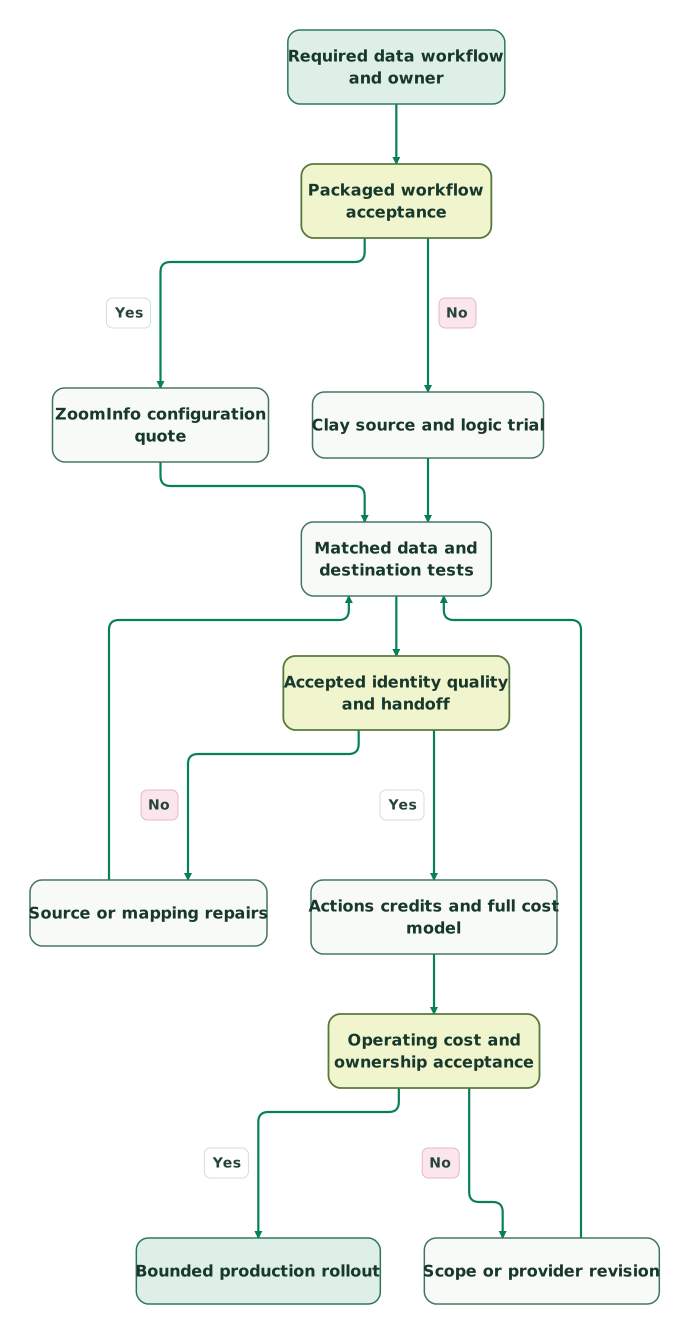
Read diagram as text
- Required data workflow and owner to Packaged workflow acceptance.
- Packaged workflow acceptance to ZoomInfo configuration quote: Yes.
- Packaged workflow acceptance to Clay source and logic trial: No.
- ZoomInfo configuration quote to Matched data and destination tests.
- Clay source and logic trial to Matched data and destination tests.
- Matched data and destination tests to Accepted identity quality and handoff.
- Accepted identity quality and handoff to Source or mapping repairs: No.
- Source or mapping repairs to Matched data and destination tests.
- Accepted identity quality and handoff to Actions credits and full cost model: Yes.
- Actions credits and full cost model to Operating cost and ownership acceptance.
- Operating cost and ownership acceptance to Scope or provider revision: No.
- Scope or provider revision to Matched data and destination tests.
- Operating cost and ownership acceptance to Bounded production rollout: Yes
Checklist
- The purchase boundary identifies the data source, workflow or combined setup.
- Both candidates receive the same target sample and acceptance definitions.
- The selected plan includes the destination integrations and required controls.
- Actions, Data Credits and directly billed providers have separate forecasts.
- Refund assumptions match the exact action and settled run status.
- The budget includes repeat execution, added credits and maintenance.
- CRM identity, field ownership and suppression survive repeated runs.
- One owner can pause the process, inspect failures and explain its spend.
Use the CRM audit skill to establish the destination rules. At Martechdevs, we build and operate the matching, enrichment and routing that make these tools useful together. Request a scoped GTM implementation with the target audience, destination and expected business outcome.
Keep reading
Browse all GTM Engineering guides
 GTM Engineering
ZoomInfo vs Cognism: Data Coverage, Credits and Buyer Fit
Compare ZoomInfo and Cognism by target-market coverage, verified phones, credits and CRM fit. Use a matched sample and complete quote to choose your setup.
Jafrin Akter AloLast updated 11 min read
 GTM Engineering
Clay Pricing: Plans, Actions, Data Credits and a Cost Calculator
Estimate your Clay bill with a step-by-step calculator for Actions and Data Credits. Compare Free, Launch and Growth, top-ups, rollover and legacy plans.
Jafrin Akter AloLast updated 16 min read
 GTM Engineering
ZoomInfo Pricing: Plans, Credits, Add-ons and What Buyers Pay
ZoomInfo pricing depends on your quote. Compare plans, credit rules, add-ons and renewal terms, then use the checklist to evaluate the full cost.
Jafrin Akter AloLast updated 14 min read
GTM engineering & outbound
See the implementation scope, deliverables and acceptance checks.
Questions people ask
Does connecting ZoomInfo to Clay replace the ZoomInfo subscription?
No. Clay's ZoomInfo enrichment action requires your own ZoomInfo account. Confirm the provider's integration entitlements and commercial terms, then include its cost alongside Clay. The combined setup can improve the surrounding workflow, but the data-provider subscription remains part of the operating model until the team deliberately replaces it. Integration requirement.
Does bringing a provider key remove all Clay usage charges?
Your own provider key removes Clay Data Credit charges for that provider's data, while Actions still measure the platform work. The provider can charge you directly under its own agreement. Compare the combined bills and required capacity before assuming the change lowers cash spending, especially if your included Clay credits would otherwise remain unused. BYOK usage.
Is every Clay enrichment that returns no data free?
No. Clay's detailed refund guide says no-data refunds depend on the action. Some providers charge for the request even without a match, and an invalid email-verification result is a chargeable answer. Inspect the action's refund rules and settled result before extrapolating a small workflow's cost to a larger audience. Refund rules.
Does ZoomInfo offer a waterfall workflow of its own?
Yes. ZoomInfo describes multi-provider waterfall enrichment in GTM Studio, alongside its data canvas and orchestration. The page identifies Studio as early access with tailored pricing. Evaluate the available workflow and entitlements in the proposed product rather than assuming every ordinary ZoomInfo Sales package includes the same Studio capabilities. GTM Studio.
Can a Clay workflow fit its credit allowance but still need Growth?
Yes. Usage allowances and feature entitlements are separate. A workflow can consume fewer Actions and Data Credits than Launch includes while still requiring the native CRM or HTTP API integrations listed for Growth. Choose the lowest configuration that supports the complete workflow, then verify its expected usage and the cost of any directly connected providers. Plan scope.
Sources

Written by
Jafrin Akter AloData Engineer and Co-founder at Martechdevs and Growth and Analytics Partners
Jafrin writes practical guides to marketing technology, customer data, analytics and AI workflows. Martechdevs is a Growth and Analytics Partners company.