
Clay Implementation Mistakes: Credits, Enrichment and Sync Rules
Data Engineer and Co-founder, martechdevs
Last updated 9 min read
The most expensive Clay implementation mistakes happen when enrichment runs before qualification, existing data is ignored and CRM writes lack clear rules. Build the workflow around the record you need to produce, then control when each paid step runs. Track Actions, Data Credits and external-provider costs separately, and test repeat runs before connecting the workflow to live sales activity.
Last updated: 9 October 2026.
A Clay table can look complete while the operating process is unreliable. It may enrich the same account twice, classify missing evidence as a poor fit, overwrite a sales-owned field or restart a sequence after a harmless source update. These failures occur between columns and systems, where a successful cell result does not prove a successful business outcome.
Start with a concrete output: a qualified account with evidence, a verified contact with the correct owner, or a CRM record refreshed under specific field rules. GTM engineering should make that output repeatable and explainable, including the records that fail to qualify.
Mistake 1: Budgeting only for Data Credits
Clay's current model separates Actions for platform work from Data Credits for marketplace data and AI. Using your own provider key can remove the Clay Data Credit charge for that provider while still consuming an Action and incurring the provider's own bill. Internal formulas and certain table operations have different treatment from external enrichment or execution. Actions and Data Credits
A budget based only on the visible Data Credit balance can therefore miss a different bottleneck. Record three cost lines: Clay platform capacity, Clay marketplace purchases and directly billed provider usage. Add maintenance time when comparing the workflow with an alternative.
Define the unit you actually care about, such as cost per accepted account brief or cost per CRM-ready contact. A low cost per enriched row is not impressive if most rows are duplicates or outside your market.
For current plan comparisons, use the Clay pricing guide alongside your workspace's actual usage and commercial terms. Older screenshots or instructions referring to a single credit system may describe a different plan structure.
Mistake 2: Letting automatic runs start during construction
Clay documents table-level auto-run as the master control over automatic enrichment, with column-level settings and conditional logic below it. Its table settings also distinguish preserving existing results from updating them. Those choices affect what happens when new rows or source edits arrive. Table management settings
Keep a new workflow in manual mode while you establish dependencies. A blank condition, an incorrectly mapped input or an imported test file should not launch a large research job.
Use a small test set that includes messy rows: an absent domain, a duplicate account, an existing CRM contact, an ambiguous company name and a provider failure. Check which columns run and which stop. A clean set of ten easy records verifies much less than a set designed around failure modes.
Before enabling automation, distinguish the incoming event from the business reason to reprocess. A source can update an irrelevant field without making the previous account research stale. Your run condition should reflect that difference.
Mistake 3: Enriching every row before deciding whether it matters
Clay's credit-conservation guidance recommends early qualification, conditional runs and reuse of existing data. These controls let you avoid buying information for records that will never advance. Credit-conservation guide
Order the workflow by information value. First use reliable data you already have to exclude obvious non-fits and protected accounts. Then pay for the evidence required to resolve the remaining decision. Add contact data only after the account has a plausible reason to enter the motion.
Do not confuse a filter that makes a table look cleaner with the full production rule. Verify the actual run settings for every downstream column, particularly when a scheduled source import or later edit can activate the workflow again.
A worked example of selective processing
Suppose an illustrative import contains 2,000 accounts. Existing data identifies 800 as relevant. Of those, 500 already have sufficiently fresh research, leaving 300 that need it. After research, 150 need a contact lookup, and 120 produce records suitable for CRM export.
For a deliberately simplified model, assume each of those three stages consumes one billable Action per processed record. Running all three stages on every imported account would produce 6,000 stage executions. Selective processing produces 300 + 150 + 120 = 570.
This is a workflow illustration, not a quote or a universal Clay invoice calculation. Real usage can include extra provider attempts, AI runs, lookups, retries and destination operations. The practical lesson is to measure how many records reach each expensive stage and why.
Keep the excluded records with explicit reasons. Otherwise a low processed volume may conceal a broken condition that rejected good accounts rather than an efficient qualification process.
Mistake 4: Using one identifier for every object
A company domain, a person email and a CRM record ID identify different things. A domain can cover several business units. A contact can change jobs. A CRM may already contain a person under an older address.
Define the object at each stage. An account research table should have a stable account key. A contact table should preserve the source contact identity and the destination CRM ID once resolved. A business unit or subsidiary may need an additional relationship key.
Clay's CRM export lesson demonstrates a lookup before conditional creation. That is a useful pattern, but it does not make email a universal identity solution for every CRM. CRM lookup and export lesson
Use separate outcomes for no match, one unambiguous match and multiple possible matches. A multiple-match result should enter review, not become permission to create another record. A lookup failure should remain a failure rather than being interpreted as “contact does not exist.”
For the downstream design, the Clay and HubSpot integration guide explains how enrichment fits into CRM operations. The same principle applies elsewhere: identify the destination record before deciding how to change it.
Mistake 5: Overwriting fields without an ownership policy
Write down which fields Clay may create, refresh or propose. A vendor-derived company size can reasonably refresh under a freshness rule. A sales owner's relationship notes or an active opportunity stage usually needs a different policy.
For each exported field, specify:
- The authoritative source and permitted writers.
- Whether an empty destination may be filled automatically.
- Whether a populated destination may be replaced.
- Which timestamp and confidence rules govern replacement.
- How null, unknown and intentionally cleared values differ.
- The record of the previous value needed for recovery.
Use separate properties for machine suggestions when a field is business-critical. For example, an inferred industry can be stored with its evidence while the team's approved industry remains stable until the chosen review rule permits an update.
Test a source row whose result changes from a value to null. If that null wipes a valid CRM property, fix the mapping before bulk execution. Also test a newer human edit arriving between enrichment and export; stale research should not silently win the race.
Mistake 6: Treating AI confidence as evidence
A useful AI research output names the fact, source, observation date and uncertainty. A confident paragraph without sources can look persuasive while combining two companies with similar names.
Claygent Builder provides reusable agents, testing and version history. Its documentation distinguishes editing a shared skill from saving an agent with the revised instructions: existing agents retain their saved skill copy until updated. Claygent Builder
That detail matters when maintaining a qualification rule. Record the agent version and the criteria used for each run. If the team changes what counts as an eligible technology stack, historical results should remain interpretable under the rule that produced them.
Use explicit output states such as supported, contradicted and insufficient evidence. Do not force the agent to answer every research question with yes or no. Missing public evidence of a tool does not prove that the company does not use it.
Test an account with no relevant public information. A successful result may be a short statement of uncertainty that stops the next step. Rewarding only completed fields encourages invented completeness.
Mistake 7: Retrying the entire workflow after one failure
A provider timeout, a malformed output and a CRM write rejection require different repairs. Rerunning every column can spend again on successful research and repeat a downstream action that already happened.
Keep a processing record with the account key, workflow version, relevant input version, stage status, completion time and destination ID. This can live in the system appropriate to your architecture; it is a design requirement, not a claim that every Clay integration provides the same mechanism.
Before retrying, determine whether the external action succeeded. An ambiguous timeout after a create request is particularly important. Query the destination using a stable identifier or use supported idempotent behavior before creating another record.
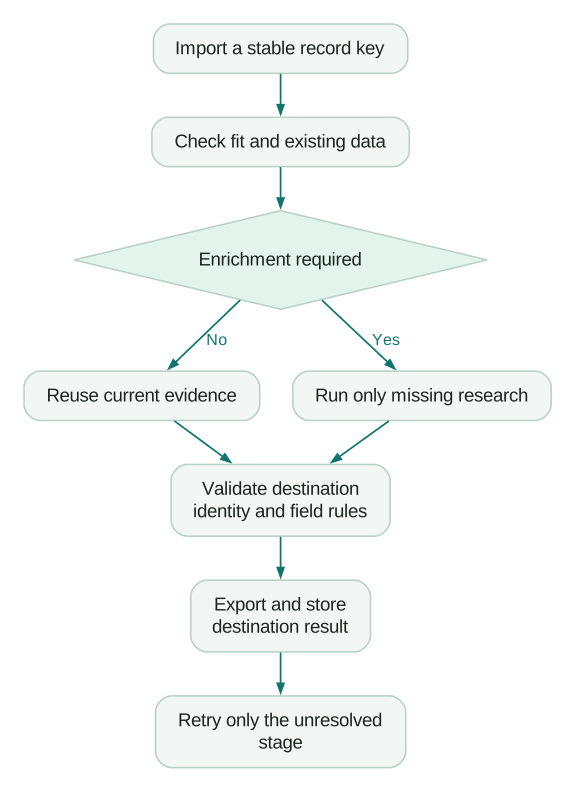
A repeat-run test should leave the CRM in the same correct state. If running the same approved input twice creates two records, two tasks or two sequence enrollments, the workflow needs repair even when both runs show green cells.
How do you investigate a sudden usage spike?
Clay's usage documentation exposes workbook, table and integration breakdowns, plus table-level time, column and run views. Use those views to locate when spend changed and which operation drove it. Credit usage documentation
Compare the spike with actual changes: a source import, a modified run condition, an agent version, a provider switch or an expanded audience. Then inspect a small sample of affected records from before and after the change.
Track both the numerator and the useful output. If Data Credits double while accepted records also double with unchanged quality, the workflow may be behaving as intended. If spend doubles while accepted records remain flat, investigate repeated work, declining provider yield or new rejection patterns.
A useful weekly operating view includes incoming unique records, qualified records, records reusing existing evidence, new enrichments, completed exports and unresolved failures. Include freshness and evidence quality so cost reductions do not conceal lower usefulness.
What should you verify before reconnecting automation?
Use a release checklist based on the actual pipeline:
Checklist
- Duplicate input, absent identity and lookup failure produce different outcomes.
- Existing customer and active-opportunity exclusions run before paid prospecting work.
- A previously successful row is not re-enriched without a relevant freshness or input change.
- Unknown evidence remains unknown and cannot become an unsupported sales claim.
- CRM writes preserve protected fields and handle nulls intentionally.
- Replaying an approved record does not duplicate downstream work.
- Usage can be explained by stage and reconciled with useful output.
Enable one production path at a time and keep the old manual path available until the new one handles normal exceptions. Document who owns the source, agent, destination mapping and failure queue. A workflow becomes maintainable when the next operator can explain why a row ran, what it changed and how to repair it without rerunning everything.
If the main problem is excessive complexity rather than one broken setting, compare the workflow with Clay alternatives. Keep the required output fixed so a simpler tool is judged on the same job.
Questions people ask
Why does Clay spend credits when I use my own API key?
The provider purchase and Clay's platform work are separate cost components. Inspect both Clay usage and the provider invoice, and verify the selected connection on the specific enrichment rather than assuming every column uses the same key.
Should auto-run always be disabled?
It is useful after the workflow's dependencies and conditions are established. Keep construction and repair controlled, then enable automatic execution for the specific production path that has passed repeat-run and exception tests.
Can auto-dedupe replace CRM matching?
Table deduplication and destination identity resolution solve different problems. A clean Clay table can still create duplicate CRM records if the export does not resolve the correct existing object.
How should we refresh old enrichment?
Use field-specific freshness rules tied to the business decision. A current job role may need a different refresh cadence from a stable company identifier, and a failed refresh should not erase a valid value without an explicit rule.
What is the most useful Clay cost metric?
Measure cost per accepted business output, such as a CRM-ready qualified contact, alongside quality and freshness. Keep stage-level usage so the team can explain why that unit cost changed.
Sources
- Clay Actions and Data Credits. Accessed 9 October 2026.
- Clay table management settings. Accessed 9 October 2026.
- Clay credit-conservation guide. Accessed 9 October 2026.
- Clay CRM lookup and export lesson. Accessed 9 October 2026.
- Claygent Builder. Accessed 9 October 2026.
- Clay credit usage. Accessed 9 October 2026.
Written by
Jafrin Akter AloData Engineer and Co-founder, martechdevs
Jafrin Akter Alo is a data engineer and co-founder of martechdevs, where the team has delivered 74+ martech, data and growth stack implementations.