
Clay pricing: Actions, Data Credits and the real cost of a workflow
Data Engineer and Co-founder, martechdevs
Last updated 9 min read
Clay's current self-serve pricing separates platform Actions from Data Credits used for marketplace data and AI. Launch starts at $185 a month and Growth at $495, with annual-payment discounts. The right plan depends first on required integrations, then on how many billable steps your workflow runs. A row is not a credit, and bringing your own API key does not remove every cost.
Last updated: 29 September 2026. Prices are USD before taxes; live monthly and annual selectors were checked.
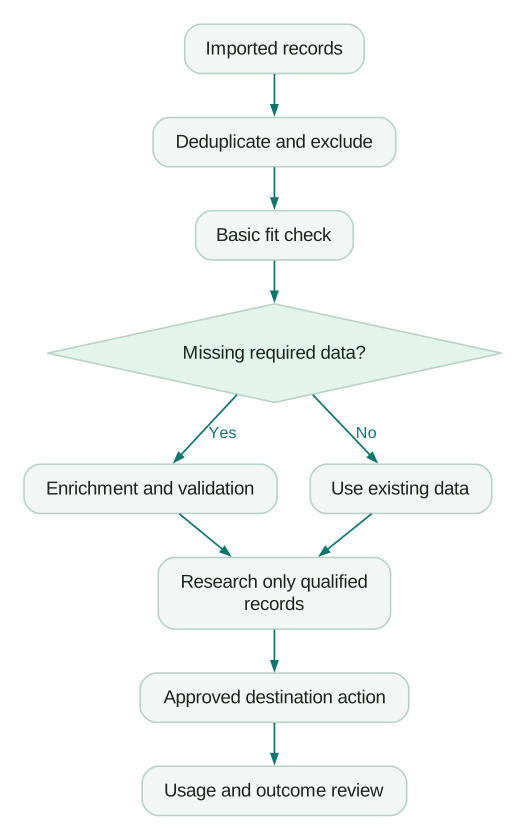
The expensive Clay workflow is often the one that researches every record before checking whether the company is already a customer. Most useful savings come from deciding what should run, in what order and for which records.
Read the plan as two capacity purchases
The live monthly configuration shows Launch with 15,000 Actions and 2,500 Data Credits, and Growth with 40,000 Actions and 6,000 Data Credits. Annual cards show starting equivalents of $167 and $446 per month. Free includes 500 monthly Actions and 100 Data Credits. Enterprise is quoted. Clay pricing.
For the monthly starting configurations, Launch comprises $60 of Action capacity plus $125 of Data Credits. Growth comprises $205 plus $290. Those components explain why the headline price changes when you adjust either selector.
Save the selected Action and Data Credit quantities, billing term and final order total when approving a purchase. Compare renewal offers against that record.
Martechdevs' GTM engineering service designs the workflow around those constraints. The Clay versus Apollo comparison helps establish whether Clay is the appropriate tool before optimising its bill.
Choose the feature tier before buying more volume
Growth is the relevant starting tier for current CRM integrations, HTTP API integrations and webhook automation. Launch can support prospecting and email workflows, but extra Data Credits do not add a missing integration. Current plan comparison.
Separate two meanings of “API.” Calling an external HTTP API from a workflow is a feature requirement. Accessing Clay itself through a particular API or developer surface is another. Confirm the exact direction and endpoint you need rather than relying on a generic “API included” phrase.
At the displayed monthly tiers, 40,000 Actions cost $150 on Launch and $205 on Growth. Growth's higher Action component buys a different feature tier; it is not simply a bulk discount on the same product. An operator who only needs Launch features should not upgrade merely because the larger plan sounds more economical.
What consumes Actions and Data Credits?
Actions meter platform work such as external enrichment, AI operations and execution into other tools. Data Credits cover marketplace data or AI consumption. Supported operations using your own provider key can avoid Clay Data Credits while still using Actions and generating a bill at the external provider. Actions and Data Credits.
Internal formulas, filters and certain table lookup or transfer operations do not consume Actions. CSV download is also distinguished from execution into an external system in Clay's usage documentation. Use those low-cost operations to remove ineligible work early.
Do not assume one prospect equals one Action. A person can pass through company enrichment, email discovery, validation, AI research and a CRM write. Each eligible operation contributes to the workflow's consumption.
Failed searches and invalid results are different
Clay's published rule distinguishes no returned data or an API error from an operation that returns information. A validation result of “invalid” still counts as returned information. In a waterfall, several returned results and validations may consume usage before a valid contact route is found. Unsuccessful-search charging.
That makes a blanket “failed enrichments are free” statement misleading. A workflow can fail to produce a usable final contact while earlier steps have returned billable data.
Inspect a small run at step level. Record the provider, input, returned status, Actions and Data Credits. If you use an external key, inspect the provider's bill too. A zero in Clay's Data Credits column does not mean the operation cost nothing overall.
A worked waterfall budget
The following numbers are illustrative workflow assumptions, not quoted provider rates. Start with 1,000 records and remove 300 duplicates, customers or unsuitable accounts using existing data. Seven hundred records reach enrichment.
Provider A returns 420 candidate addresses. After validation, 380 are usable. Provider B is called for the remaining 320 records and returns 180 candidates, of which 150 are usable. The workflow ends with 530 usable addresses.
Assume Provider A costs one Data Credit per returned result, Provider B costs two and validation costs half a credit per result. Under those assumptions:
Provider A data:        420 × 1.0 = 420 credits
Provider B data:        180 × 2.0 = 360 credits
Validation:            600 × 0.5 = 300 credits
Total data consumption             1,080 credits
The 600 successful data-return steps and 600 validation steps imply 1,200 Actions under the stated per-step model. Add any other billable operations, including downstream execution. The example deliberately avoids charging no-result lookups under Clay's published rule; your external provider's charging can differ.
The useful output is 530 contacts, not 1,000 processed rows. That is about 2.04 Data Credits per usable address before research and activation. Repeat the calculation with actual observed rates and yields from your chosen providers.
Build the monthly budget from workflow frequency
If you run that illustrative batch four times in a month, it consumes 4,320 Data Credits and 4,800 Actions before additional operations. Data capacity is the first constraint on the starting Launch package, even though Action usage remains well below its allowance.
If you instead use your own data subscriptions and run a high-frequency CRM workflow, Actions or feature access may become the constraint. These are different purchasing problems. Do not buy a larger Data Credit pool to solve an Action limit.
Keep a budget for maintenance runs, failed assumptions and deliberate tests. A plan sized to exactly the expected production consumption leaves no room to inspect a provider change or repair an import.
Bring your own API keys when the whole bill improves
Compare three amounts: the extra provider subscription or usage, the Clay Action cost and the operational effort of managing the connection. If a provider has a minimum monthly commitment, low-volume use can be cheaper through Clay even when its apparent per-result price is higher.
Check coverage and licence terms as well as cost. A cheaper provider that misses your target geography can force more fallbacks and reduce useful output. Review rate limits and credential ownership so the workflow does not depend on a personal account that disappears when someone leaves.
Clay's credit-conservation guide describes provider-key connections and selective execution. Use the current integration's supported configuration rather than pasting credentials into a visible table column. Clay credit conservation.
Reduce consumption before increasing the commitment
Start with exclusions. Remove existing customers, open opportunities, suppressed contacts, duplicates and unsupported markets before buying data. Reuse fresh, licensed results when they still answer the current question.
Next, order the waterfall by expected cost per acceptable result. The cheapest lookup is not always the cheapest source if its success rate is poor. Estimate each provider's incremental coverage after earlier providers have run.
Then add run conditions. Research only records that meet basic fit. Generate copy only for records eligible for an approved next action. Avoid refreshing stable company attributes every time a contact's unrelated field changes.
Clay's auto-run setting can execute enrichments when rows are added or edited. Turn it off while designing and test a small representative sample before a full run. Five to ten rows is a useful initial inspection size, followed by a larger test that includes edge cases. Table management settings.
AI model choice is a budget decision
Clay supports both fixed and variable AI pricing. Variable models can depend on actual token usage, so a displayed estimate is not always the final charge. Clay AI pricing.
Match the model and prompt to the task. Classifying a short known field is different from researching an account across several sources. Limit the evidence set, request a structured answer and define what happens when evidence is insufficient.
Test cheaper configurations against a labelled sample. If a simpler model produces acceptable classifications, save the more expensive research route for ambiguous records. Measure correction time too: an apparently cheap model that creates extensive manual review may cost more in practice.
Top-ups, rollover and annual terms
Modern self-serve Data Credit top-ups carry a 30% premium under the documented rules. Actions require a capacity change rather than a one-time credit top-up. Automatic top-ups can also purchase repeatedly as the balance crosses a threshold, so configure a spending limit if using that feature. Usage and top-up rules.
For a recurring shortfall, compare a higher Data Credit tier with repeated premium top-ups. For a one-off project, a top-up may be preferable to an unnecessary ongoing commitment.
Rollover depends on the plan and billing arrangement. Review the actual expiry and renewal conditions shown for your account, especially when comparing monthly balances with an annual allocation. Unused capacity is only valuable if a future useful workflow will consume it before it expires.
The 31 December 2026 legacy-feature deadline
Clay gives legacy Starter, Explorer and Pro customers temporary access to a group of newer products through 31 December 2026. Its documentation distinguishes that feature-access deadline from shutting down the entire legacy subscription. Legacy Enterprise has separate grandfathering language. Legacy-plan documentation.
Inventory which workflows depend on Audiences, newer Workflows, Sequencer via Audiences or other temporarily available features. Evaluate migration before those workflows become operational dependencies. Leaving a legacy plan can also be irreversible under the published migration rules.
Do not migrate because a new package advertises cheaper enrichment alone. Replay a representative month against the modern Action and Data Credit model, include required feature access, then compare total cost and maintenance implications. Clay's legacy-feature announcement.
The GTM engineering guide connects these cost controls to eligibility, CRM handoff and measurement of the resulting workflow.
Monitor useful output alongside usage
Clay's usage views break consumption down by workbooks, integrations and other surfaces. Review those records with the workflow's business result. Credit usage reporting.
A weekly review should identify the most expensive workflow, the largest change from the previous period and the cost per accepted output. Investigate sudden usage growth before purchasing more capacity. It may represent a successful expansion, but it may also be an auto-run loop or a stale input repeatedly retriggering research.
Keep a small change log for provider order, prompts and run conditions. Without it, you cannot explain why the same number of prospects cost twice as much this week.
Clay cost checklist
- Required integrations determine the feature tier.
- Actions and Data Credits are budgeted separately.
- Returned-but-invalid results are included in the model.
- External provider bills are included for owned API keys.
- Exclusions run before paid enrichment.
- Auto-run is controlled during development.
- AI usage is tested on representative records.
- Top-up limits, rollover and annual commitments are documented.
- Legacy feature dependencies are reviewed before the deadline.
- Cost is measured per accepted output, not merely per row.
At Martechdevs, we build prospecting workflows with clear eligibility, controlled execution and documented handover. Start with the free martech AI audit, or explore an AI assistant built around your approved workflows.
Questions people ask
Is Clay priced per seat?
Its current self-serve model centres on Actions and Data Credits, with unlimited seats listed. More operators can still increase usage. Budget the workflows they run and the governance features they need rather than multiplying the company headcount by a seat price.
Does bringing my own API key make enrichment free?
No. It can remove Clay Data Credit consumption for supported provider calls, but Actions still apply and the provider can bill separately. Compare the combined bill, minimum commitments and rate limits.
Does an unsuccessful search consume credits?
Clay distinguishes no data or API errors from returned information. An invalid validation result can still be billable. Inspect the individual waterfall steps; a final empty contact field does not prove that every earlier operation was free.
Should I stay on a legacy plan?
Compare a representative month of actual usage and check which newer features you depend on. The temporary feature-access deadline is separate from the continued operation of legacy plans. Confirm migration consequences before giving up a grandfathered package.
Is Clay worth it for a small team?
It can be when custom research or connected workflows produce valuable results that simpler tools cannot deliver efficiently. If the job is only occasional contact lookup, first test a simpler option. Include operator time and maintenance in the decision.
Sources
- Clay pricing and live configuration. Accessed 29 September 2026.
- Actions and Data Credits. Accessed 29 September 2026.
- Unsuccessful-search charging. Accessed 29 September 2026.
- Credit conservation. Accessed 29 September 2026.
- Table management settings. Accessed 29 September 2026.
- AI pricing. Accessed 29 September 2026.
- Legacy plans. Accessed 29 September 2026.
- Legacy feature-access announcement. Accessed 29 September 2026.
- Credit usage reporting. Accessed 29 September 2026.
Written by
Jafrin Akter AloData Engineer and Co-founder, martechdevs
Jafrin Akter Alo is a data engineer and co-founder of martechdevs, where the team has delivered 74+ martech, data and growth stack implementations.