
Brevo Alternatives: Five Competitors by Email Job and Cost
Pick MailerLite for routine newsletters, ActiveCampaign for more involved marketing automation, Omnisend for a store-led programme, Customer.io for product-event journeys, and Postmark for application email delivery. The best Brevo alternative fixes the part of your operation that needs changing. Price the same audience and sending workload, then test consent, message timing and failures before moving it.
On this page
Brevo competitors compared
These are US list prices in USD; billing periods and entry allowances vary by product.
| Tool | Starting price and billing basis | Best fit | Main tradeoff |
|---|---|---|---|
| MailerLite | Comfort from $12/month; subscriber and send tier applies | Newsletters, forms and a manageable set of automations | Audience growth and sending frequency both affect plan fit |
| ActiveCampaign | Starter $15/month, billed annually, for 1,000 contacts; Plus $49 at the same contact level | Branching marketing journeys with an accountable owner | Advanced work needs the appropriate plan and sometimes add-ons |
| Omnisend | Standard from $16/month; contact tier applies | Ecommerce campaigns and purchase-related flows | New SMS setups require Pro plus separate SMS credits |
| Customer.io | Essentials from $100/month, billed monthly, with 5,000 profiles and 1 million emails | Product-led messaging with reliable events and identity | Profiles include people and objects; implementation needs data ownership |
| Postmark | Basic $15/month for 10,000 emails; $1.80 per additional 1,000 | Password resets, receipts and other application messages | A delivery service still needs application logic and audience management |
Price sources: MailerLite, ActiveCampaign's published entry rates and annual billing example, Omnisend, Customer.io, and Postmark.
We would keep Brevo on the shortlist until the replacement proves a useful gain. Brevo already spans campaigns, automation and transactional messages. Replacing one weak workflow can be sensible; rebuilding every working message adds cost and risk. Our lifecycle messaging implementation service starts with the journeys and data that must survive the change.
Brevo limitations and the repair option
Name the problem precisely. A daily sending cap, an automation audience limit, an awkward approval process and missing product events require different fixes.
Brevo Free allows 300 emails per day, with unused sends expiring daily. Starter removes that daily cap. Free and Starter automation covers up to 2,000 contacts; Standard supports unlimited automation contacts within the selected plan's other limits. A plan change may resolve the immediate constraint without a migration. Brevo plan scope.
Stored contacts have their own ceiling. Starter and Standard at 5,000 monthly emails allow 500 stored contacts; the 20,000-email tier allows up to 500,000 stored contacts. A large database with occasional sends therefore needs a different calculation from a small list receiving frequent campaigns. The current model has both storage and sending boundaries. Brevo storage tiers.
Use an inventory of actual work before comparing competitors:
- Campaigns: Intended recipients, sends per month, approval steps and required reports.
- Journeys: Entry event, eligible audience, waiting period, exit condition and repeat-entry rule.
- Application messages: Password resets, receipts, account alerts and the system that triggers each one.
- Other channels: SMS, WhatsApp and push requirements, including permissions and country coverage.
- Ownership: The person who fixes a failed integration and the person who may approve a send.
A missing purchase event remains a missing purchase event after switching tools. Resolve upstream tracking and identity before treating the platform as the cause. The lifecycle journey guide helps turn a broad request such as better onboarding into a testable workflow.
Brevo alternatives by operating model
MailerLite for newsletters and smaller programmes
- Best for: A marketer publishing regular campaigns with a limited set of welcome and follow-up journeys.
- Pros: Comfort includes three seats and up to 50 active automations. Power adds unlimited seats and sends, subject to fair use. MailerLite plans.
- Cons: Price follows the active-subscriber tier; a large, infrequently emailed list can change the economics of leaving Brevo.
- Free plan and startup offer: Free supports 250 subscribers and 2,500 monthly emails. Use those ordinary allowances in the trial budget.
- Choose it if: Your marketing owner can maintain the editor, forms and complete welcome flow.
- Skip it if: Your team expects this selection alone to replace application email infrastructure or a full sales CRM.
Test a campaign using your longest content, real personalization fields and unsubscribe preferences. Give the marketer a routine change to perform after the initial setup. Include engineering time in the operating budget if routine changes create technical work.
ActiveCampaign for more involved automation
- Best for: Teams with branching journeys, handoffs and an owner willing to maintain their logic.
- Pros: Plus removes Starter's five-action limit per automation; the selected plan can be extended with CRM and messaging add-ons. Automation scope.
- Cons: Pipelines, sales engagement, SMS and transactional delivery can add separate charges. Map the required actions to their actual entitlement.
- Free plan and startup offer: A 14-day trial is available. Use the ordinary subscription price for the renewal budget. Plans and trial.
- Choose it if: Its trial demonstrates a workflow benefit beyond increasing the Brevo plan allowance.
- Skip it if: Your team sends a simple monthly newsletter and has no automation owner.
Build the hardest necessary branch in the trial. Include an opt-out during a waiting step and a purchase that should stop promotion. A visually complete journey still needs correct behaviour at those boundaries. The ActiveCampaign alternatives comparison covers the opposite decision, including reasons to retain a working setup.
Omnisend for ecommerce operations
- Best for: A store team whose message content and eligibility depend on catalogue, cart and purchase data.
- Pros: Standard includes 12 times the contact count in monthly email credits. The commerce workflow is the central evaluation task.
- Cons: Billable contacts can include non-subscribers receiving automated messages. New SMS users need Pro, starting at $59/month, plus a separate credit subscription.
- Free plan and startup offer: Free sends up to 500 emails per month to at most 250 unique contacts. Introductory discounts have an expiry, so use regular rates for ongoing cost.
- Choose it if: Item content, purchase exits and channel permissions pass the tests in your connected store.
- Skip it if: Your essential B2B account workflow depends on external data the proposed setup cannot handle.
These plan and billing distinctions come from Omnisend's plan guide. Test a refunded order, a repeat customer and a purchase completed on another device. The revenue report should use the agreed attribution window; reported revenue alone cannot establish incremental revenue caused by a message.
Customer.io for product-event journeys
- Best for: SaaS or app teams with dependable events, stable customer identifiers and an engineering partner.
- Pros: Essentials includes a visual workflow builder and two object types, alongside its people-and-objects profile allowance. Customer.io pricing.
- Cons: The work expands beyond templates into event definitions, identity, relationship data and monitoring.
- Free plan and startup offer: Eligible new customers can apply for up to 12 months free. The business must have raised under $10 million, have legitimately obtained lists and never have been a Customer.io customer. Startup eligibility.
- Choose it if: Your journeys need meaningful product activity or relationships between records.
- Skip it if: Your newsletter-only team has no capacity to maintain the data feeding automation.
For a workspace product, decide whether an action belongs to a person or their account. One colleague finishing setup might need to stop reminders for the whole account. Our Customer.io implementation mistakes guide addresses the data and journey failures to test before launch.
Postmark for application email delivery
- Best for: Engineering-owned receipts, security messages and account notifications that need a dedicated delivery path.
- Pros: API and SMTP delivery, webhooks and message streams provide a concrete replacement boundary. Postmark supports both transactional and broadcast streams. Message streams.
- Cons: The application still owns triggering, recipient selection, retry handling and business state.
- Free plan and startup offer: A free developer allowance provides 100 emails per month for integration testing. Postmark pricing.
- Choose it if: The problem is limited to application messages and someone owns their operation.
- Skip it if: Your marketing team expects a complete visual lifecycle programme from the delivery service alone.
A partial move can be the better design. Keep campaigns in Brevo and move a bounded application stream after its tests pass. Retain a map of every sender so a marketing unsubscribe and a necessary account notification follow their intended rules.
Cost examples with comparable workloads
Separate the subscription from the work needed to replace it. Record stored contacts, marketable recipients, automated contacts, monthly sends, staff access and extra channels as different inputs.
The following worked examples use Brevo's USD monthly base plus recurring-email tier charges, with one marketing seat and no optional add-ons. Brevo public rate card.
| Example workload | Configuration | Monthly calculation | Decision implication |
|---|---|---|---|
| 20,000 stored contacts and one campaign to all 20,000; no automation | Brevo Starter, 20,000 emails | $9 base + $23 tier = $32 | A contact-priced replacement needs a quote for the full audience |
| 5,000 stored contacts, automated journeys and 20,000 total monthly emails | Brevo Standard, 20,000 emails | $18 base + $51 tier = $69 | An edition change can be the first candidate for an automation limit |
| 5,000 people, no object profiles, 20,000 emails and product-event journeys | Customer.io Essentials | $100 base | The added $31 over the preceding example needs an operational reason |
| 10,000 application emails and a separate marketing programme | Postmark Basic for the application stream | $15, plus the retained marketing platform | Splitting delivery changes ownership and adds a second subscription |
Customer.io's rate comes from its Essentials allowance; the Postmark amount comes from its 10,000-email rate. Each configuration needs its own feature acceptance test before selection.
Now add a hypothetical transition cost. Suppose a proposed move saves $40 per month and takes $1,200 of implementation work. Its simple subscription payback is 30 months. Another tool costing $30 more per month may still be worthwhile if it supports an essential journey the team cannot operate today. Name that benefit and its success measure before approving the extra spend.
For a broader newsletter shortlist, compare the Mailchimp alternatives. Use the software pricing directory to continue the budget exercise for connected tools.
Best fit by scenario
| Team and workload | First candidate | Runner-up | Deciding evidence |
|---|---|---|---|
| Small marketing team, newsletters and welcome messages | MailerLite | Brevo plan adjustment | Editor ownership and accepted audience cost |
| B2B team with branching nurture and sales handoffs | ActiveCampaign | Brevo Standard | Required actions, exit behaviour and complete add-on quote |
| Store team with cart and order messages | Omnisend | Retained Brevo setup | Correct commerce data and channel-specific consent |
| SaaS team with account-level product behaviour | Customer.io | ActiveCampaign | Identity, event freshness and stopping rules |
| Developer replacing only application delivery | Postmark | Brevo transactional path | Delivery events, suppressions and recoverable failures |
Migration acceptance and suppression mapping
Carry over the meaning of a permission, along with the address. Brevo maintains channel-specific blocklists. Its transactional-email unsubscribe behaviour can also be sender-specific. A single generic subscribed flag cannot express every existing restriction. Brevo blocklist types.
Create a migration mapping for campaign permission, transactional suppression, source, reason and effective time. Preserve evidence needed for the agreed retention policy. Decide explicitly how each destination represents the same restrictions. Importing every address as subscribed would erase the very information the migration needs to protect.
Use synthetic acceptance cases before enabling live messages:
| Test record | Required behaviour | Failure evidence |
|---|---|---|
| Campaign opt-out with a legitimate account event | Promotion suppressed; necessary message follows its own policy | A promotion sent or an unexplained account-message failure |
| Purchase during a waiting step | Promotional reminder exits before send | A reminder after the recorded purchase |
| Duplicate event | One intended business action | Duplicate messages or rewards |
| Missing personalization field | Agreed fallback or a visible exception | Blank content or a broken link |
| Failed destination request | Recoverable, identifiable failure | An unexplained gap or unbounded retries |
Keep a reconciliation log for imported records, exclusions and message outcomes. Move one agreed journey or audience first. Set rollback conditions before the move, including the exact event owner, sender and queue that would resume. A rollback must not activate both systems for the same recipient.
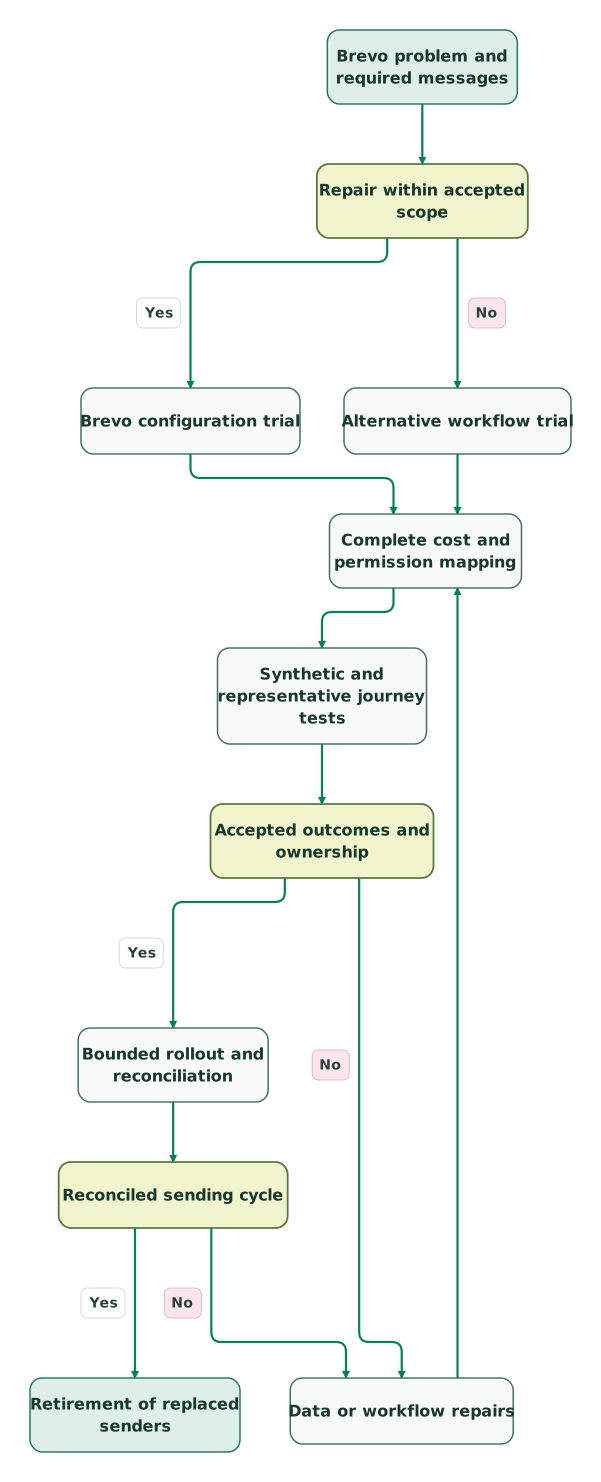
Read diagram as text
- Brevo problem and required messages to Repair within accepted scope.
- Repair within accepted scope to Brevo configuration trial: Yes.
- Repair within accepted scope to Alternative workflow trial: No.
- Brevo configuration trial to Complete cost and permission mapping.
- Alternative workflow trial to Complete cost and permission mapping.
- Complete cost and permission mapping to Synthetic and representative journey tests.
- Synthetic and representative journey tests to Accepted outcomes and ownership.
- Accepted outcomes and ownership to Data or workflow repairs: No.
- Data or workflow repairs to Complete cost and permission mapping.
- Accepted outcomes and ownership to Bounded rollout and reconciliation: Yes.
- Bounded rollout and reconciliation to Reconciled sending cycle.
- Reconciled sending cycle to Data or workflow repairs: No.
- Reconciled sending cycle to Retirement of replaced senders: Yes
Brevo replacement checklist
- The specific Brevo limitation and a cheaper repair option are written down.
- Every candidate is priced for the same audience, send volume, staff access and channels.
- Application messages have a named owner and an explicit migration boundary.
- Campaign, channel and sender-level restrictions have a destination mapping.
- Entry, exit, repeat-entry and failure cases pass before live activation.
- Old and new senders have a single ownership rule during the transition.
- A representative agreed sending cycle reconciles before the replaced service is retired.
Use the lifecycle marketing audit skill to build the current-programme baseline. At Martechdevs, we connect the customer data, messaging tools and validation steps needed for a controlled platform change. Discuss the lifecycle implementation scope with the journeys and acceptance cases that matter to your team.
Keep reading
Browse all CRM & Lifecycle guides
 CRM & Lifecycle
ActiveCampaign Alternatives: Five Competitors by Workflow and Cost
Choose an ActiveCampaign alternative by workflow and full cost. Compare five tools, current billing rules and migration checks for permissions and journey state.
Jafrin Akter AloLast updated 11 min read
 CRM & Lifecycle
Mailchimp Alternatives and Competitors: Prices and Best Fit Compared
Klaviyo or Omnisend for stores, Brevo for big lists, Kit for creators, HubSpot for B2B. Compare 10 Mailchimp alternatives by price, cost at 5,000 contacts and fit.
Jafrin Akter AloLast updated 14 min read
 CRM & Lifecycle
Customer.io Implementation Mistakes: Events, Segments and Re-Entry
Prevent duplicate journeys, unsafe backfills and irrelevant reminders in Customer.io, with an event contract and an activation test to run before launch.
Jafrin Akter AloLast updated 13 min read
Lifecycle marketing
See the implementation scope, deliverables and acceptance checks.
Questions people ask
Can a Brevo upgrade solve the automation contact limit?
Yes, Brevo Standard supports unlimited automation contacts, while Free and Starter have a 2,000-contact automation limit. Other plan boundaries still apply, including stored contacts and sending volume. Price the required Standard tier and test the actual workflow before paying for a migration intended only to remove that limit. Brevo plan scope.
Is Postmark a complete replacement for Brevo marketing?
Postmark is a candidate for the application-email delivery portion of Brevo. Its transactional and broadcast message streams still need audience selection, triggering and business rules from the surrounding application or tools. Specify those responsibilities before choosing it for a marketing programme; a lower delivery bill may come with more engineering work. Postmark message streams.
Can a large Brevo contact list make another platform more expensive?
Yes. A platform priced by active subscribers or billable profiles can cost more for a large audience that receives few messages. Compare the full stored population, marketable subset and actual sending cadence under each vendor's definitions. Include suppressed records where they count, and preserve their restrictions through any cost-control or migration exercise.
Should Brevo transactional messages move at the same time as campaigns?
They can move separately if the teams establish clear sending ownership and suppression rules. A bounded application stream often has different tests from a newsletter programme. Reconcile triggers, delivery events and failures independently, then agree the cutover sequence. During overlap, each message should have one active sender and a documented recovery path.
Does switching from Brevo automatically improve email delivery?
Switching providers does not guarantee improved inbox placement. Diagnose authentication, permission, recipient quality, content and sending behaviour before choosing a replacement. Carry those findings into the trial and compare relevant message outcomes under a consistent audience and cadence. Fixing the original cause may be more useful than moving the same problem to another account.
Sources
- MailerLite plans and billing
- ActiveCampaign published entry prices
- ActiveCampaign annual entry price and trial
- ActiveCampaign feature limits
- ActiveCampaign plans and add-ons
- Omnisend pricing and contact definitions
- Customer.io pricing
- Customer.io startup eligibility
- Postmark pricing
- Postmark message streams
- Brevo plan scope
- Brevo public pricing rate card
- Brevo blocklist behaviour

Written by
Jafrin Akter AloData Engineer and Co-founder at Martechdevs and Growth and Analytics Partners
Jafrin writes practical guides to marketing technology, customer data, analytics and AI workflows. Martechdevs is a Growth and Analytics Partners company.