
Snowflake Warehouse Sizes and Credits: Gen1, Gen2 and Monthly Costs
Snowflake warehouse size sets compute capacity per cluster, and its credit rate depends on the warehouse generation and cloud. A Gen1 X-Small uses one credit per hour; Gen2 X-Small uses 1.35 on AWS or GCP and 1.25 on Azure. At the AWS Northern Virginia Standard on-demand rate of $2 per platform credit, 30 Gen2 X-Small hours cost $81, while 220 Gen2 Small hours cost $1,188, before storage and other services. Snowflake consumption and price tables.
On this page
What are you billed for when a Snowflake warehouse runs?
For a fixed-size standard warehouse, you pay its credit rate for each cluster's running time, including idle time before suspension. Each start or resume has a 60-second minimum, followed by per-second billing. Multiply consumed platform credits by your account's price per credit to calculate warehouse compute cost. Compute billing.
Keep four inputs together: type, generation, size and region. An X-Small label alone does not tell you the rate. Our data warehouse implementation service separates ingestion, transformations and reporting workloads before setting their compute budgets.
Credits per running hour, per cluster. Gen2 availability depends on cloud, region and size. These rates come from Tables 1(a) and 1(b) of the service consumption table.
| Standard warehouse size | Gen1 | Gen2 AWS / GCP | Gen2 Azure |
|---|---|---|---|
| X-Small | 1 | 1.35 | 1.25 |
| Small | 2 | 2.7 | 2.5 |
| Medium | 4 | 5.4 | 5 |
| Large | 8 | 10.8 | 10 |
| X-Large | 16 | 21.6 | 20 |
| 2X-Large | 32 | 43.2 | 40 |
| 3X-Large | 64 | 86.4 | 80 |
| 4X-Large | 128 | 172.8 | 160 |
| 5X-Large | 256 | Unavailable | Unavailable |
| 6X-Large | 512 | Unavailable | Unavailable |
Gen2's higher rate can still produce a lower completed-workload cost if it finishes the same work sufficiently faster. Snowflake recommends testing your workload, and the specific Gen2 guide says new standard warehouses default to Gen2 where it is available. Inspect the actual configuration instead of assuming a default. Gen2 behavior.
What will warehouse compute cost a company like yours?
Estimate warehouse cost from measured running time and workload requirements, then add storage and other services separately. A company-size label is only context: refresh frequency, query complexity and concurrent demand determine the compute needed. Use these worked examples to replace assumptions, rather than assigning a warehouse size from headcount.
USD on-demand illustrations for Standard edition, AWS Northern Virginia, Gen2, one cluster, using $2 per platform credit. Hours include idle intervals and minimum billing. Storage, cloud services, serverless features, AI, transfer and tax are excluded. Rates.
| Company situation | Assumed monthly running time | Platform credits | Warehouse compute |
|---|---|---|---|
| Five-person startup, daily reporting | X-Small, 1 hour × 30 days | 40.5 | $81.00 |
| 20-person SaaS, several daily refreshes | X-Small, 3 hours × 22 days | 89.1 | $178.20 |
| 80-person SaaS, business-day reporting | Small, 10 hours × 22 days | 594 | $1,188.00 |
| 300-person business, two isolated workloads | Small, 220 hours; Medium, 60 hours | 918 | $1,836.00 |
| Agency, six separately running client warehouses | Six X-Small warehouses, 66 hours each | 534.6 | $1,069.20 |
For the two-workload example: 220 × 2.7 + 60 × 5.4 = 918 credits, then 918 × $2 = $1,836. If reporting becomes continuous over a 30-day month, its Small warehouse alone uses 720 × 2.7 = 1,944 credits, or $3,888.
The full Snowflake pricing guide covers the wider invoice. Use its storage, edition and service categories alongside this compute calculation; warehouse hours alone cannot forecast the account total.
What makes the Snowflake warehouse bill jump?
The main warehouse drivers are longer running periods, a higher credit-rate configuration and additional simultaneous clusters. Frequent resumes also magnify minimum billing for short bursts. Before resizing, separate slow query execution from queued work, idle time and background services; each symptom points to a different correction and a different cost calculation.
Why can a short query incur more than its runtime?
A standard warehouse that starts for a 20-second query and immediately suspends still reaches the 60-second minimum. With 120 separate starts per day over 30 days, Gen2 AWS X-Small uses 120 × 30 × 60 / 3,600 × 1.35 = 81 credits, or $162 at $2 per credit. Counting only query runtime would predict $54. Minimum billing.
The practical decision is whether nearby jobs can share a running period without missing their freshness requirements. An aggressive suspension setting is not automatically cheaper when it creates repeated minimums and cache rebuilding.
Does doubling warehouse size double query speed?
A larger standard warehouse doubles the hourly rate at the next size, but the workload determines the speed change. Compare completed work and elapsed time under the same cache conditions. Snowflake's warehouse considerations explicitly recommend experiments rather than a universal size recommendation.
Hypothetical Gen2 AWS example, one continuous run and no other work:
| Candidate | Runtime | Calculation | Credits |
|---|---|---|---|
| Small | 20 minutes | 2.7 × 20 / 60 | 0.9 |
| Medium, modest improvement | 12 minutes | 5.4 × 12 / 60 | 1.08 |
| Medium, strong improvement | 8 minutes | 5.4 × 8 / 60 | 0.72 |
The middle option costs 20% more and may still be justified by a deadline. The final option costs 20% less. Neither outcome follows from size alone.
What changes when you use multiple clusters?
Multi-cluster warehouses target concurrent queries and require Enterprise edition or higher. Additional clusters each consume credits while running. They are less useful for accelerating one slow query; investigate query execution and resizing for that problem. Multi-cluster guidance.
If a Gen2 AWS Small has a base cluster running ten hours and a second cluster running two hours, its total is 12 cluster-hours × 2.7 = 32.4 credits. Use the Enterprise credit price for the actual region, rather than reusing the Standard-edition dollar assumption in the earlier examples.
Do more users or more data increase the warehouse bill?
Snowflake warehouse billing follows compute consumption rather than a per-reader seat charge. More users can raise consumption when they create more queries, concurrency or longer running periods. More data can increase scanning and transformation work. Neither headcount nor stored terabytes alone determines the right warehouse size. Warehouse billing dimensions.
Distinguish these patterns before changing capacity:
| Observed pattern | First investigation | Useful result measure |
|---|---|---|
| One report is slow | Query profile, pruning, joins and spill | Same result, elapsed time and credits |
| Reports wait during a busy hour | Concurrent load and queuing | Queue time at expected peak load |
| Low query activity but high credits | Idle intervals and suspension behavior | Warehouse compute over the full period |
| Bill rises with stable warehouse usage | Other services and retained storage | Account invoice by service category |
Use the Snowflake query profile guide to connect a slow report to the work it performs. A resize should have an expected result you can test, such as meeting the morning refresh deadline with a defined monthly compute budget.
Which warehouse type and size should you choose?
Choose a fixed standard warehouse when explicit size and cluster controls fit your workload, then benchmark a small starting configuration. Consider Adaptive Warehouses for mixed query shapes when you want Snowflake to allocate resources automatically. Snowpark-optimized and Interactive warehouses have different purposes and billing rules, so evaluate them separately.
Adaptive Compute serves Enterprise-or-higher accounts in selected regions. It replaces manual sizing, multi-cluster settings and suspend policies with workload-aware allocation and query-based billing. A fixed X-Small-hours formula does not describe its consumption; compare metered credits for representative work.
The Adaptive guide labels the service generally available, while the consumption table retains a preview footnote for Adaptive Compute. Confirm the applicable availability and contractual terms for your account before committing a production workload. Adaptive availability, consumption-table terms.
For a first benchmark, use this decision path. It follows the symptom and returns failed candidates to diagnosis.
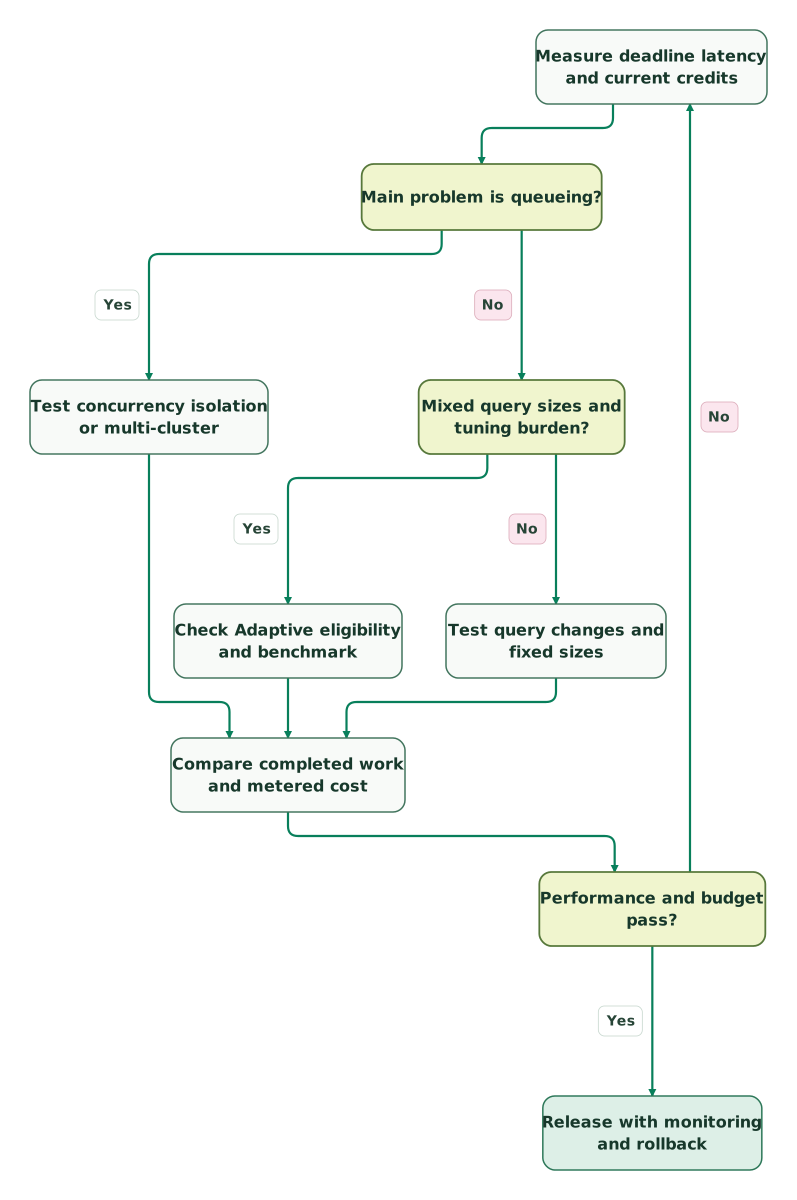
Read diagram as text
- Measure deadline latency and current credits to Main problem is queueing?.
- Main problem is queueing? to Test concurrency isolation or multi-cluster: Yes.
- Main problem is queueing? to Mixed query sizes and tuning burden?: No.
- Mixed query sizes and tuning burden? to Check Adaptive eligibility and benchmark: Yes.
- Mixed query sizes and tuning burden? to Test query changes and fixed sizes: No.
- Test concurrency isolation or multi-cluster to Compare completed work and metered cost.
- Check Adaptive eligibility and benchmark to Compare completed work and metered cost.
- Test query changes and fixed sizes to Compare completed work and metered cost.
- Compare completed work and metered cost to Performance and budget pass?.
- Performance and budget pass? to Release with monitoring and rollback: Yes.
- Performance and budget pass? to Measure deadline latency and current credits: No
Stay on the smaller candidate when it meets the workload requirement at a lower measured cost. Prefer the larger candidate when the time saved is needed and its total is acceptable. For an Adaptive candidate, include workload isolation and controllability in the test, alongside performance.
How do you keep warehouse credit usage under control?
Use automatic suspension for suitable fixed warehouses, set cost-monitor actions deliberately and reconcile actual metered consumption with your forecast. Separate production and experimental work where independent controls help. A monitoring threshold needs an owner and response; it cannot prevent an expensive workload merely by appearing in a dashboard.
Resource monitors can notify, suspend standard warehouses or disable Adaptive Warehouses. They do not govern all serverless spend, and suspension is not precise to the last credit. Leave a buffer for work already executing. Budgets cover supported account and serverless credit usage, but their spending limit alone is an alert threshold.
For a seven-day review:
- Record warehouse type, generation, size, cluster bounds and running schedule.
- Compare the forecast with
CREDITS_USED_COMPUTEinWAREHOUSE_METERING_HISTORY. - Identify the cost of idle periods and unnecessary resumes.
- Review heavy queries with the same input data and comparable cache state.
- Re-run the workload after one controlled change, including the busiest expected period.
- Set the operational threshold and document what can pause safely.
The metering view has up to three hours of latency for compute and six for cloud services. Its CREDITS_USED includes cloud services before the billing adjustment, so it can exceed the credits actually billed. Use settled usage for reconciliation instead of treating an incomplete recent hour as a saving.
What should you watch for in a Snowflake contract?
Separate the price per platform credit from the service's credit-consumption rate, then check edition, region, purchase model and commitment terms. On-demand usage is billed in arrears; capacity purchases commit a dollar amount upfront. A discounted credit rate only improves the budget if the purchased commitment and actual workload fit. Purchase models.
Ask for these items in writing: contracted platform-credit rate, eligible services, commitment period, unused-balance treatment, overage pricing, renewal terms and any region or edition restrictions. Compare year two using the expected workload and contractual rate after any temporary credits end.
Snowflake's trial ends after 30 days or when the free usage balance runs out, whichever comes first. It is an evaluation allowance rather than a permanent free production tier. The trial guide explains conversion to paid use. The Startup Accelerator offers credits to eligible application builders; do not put an unapproved grant into an operating forecast.
How do you read Snowflake's credit rate card?
First select the service table, then its cloud-specific consumption rate, and finally the account's dollar price per credit. The service table tells you how many credits the workload consumes; the regional price table converts those credits to money. Storage and services with different units must be calculated on their own terms.
For a fixed-size, single-cluster standard warehouse, without resizing during a run:
run_credits = max(running_seconds, 60) / 3600 * credits_per_hour
warehouse_compute_cost = sum(run_credits) * dollars_per_platform_credit
Sum each cluster separately when using multi-cluster. Include idle time until suspension. The standard billing rules also apply a minimum to additional resources when resizing upward, so use actual metering for changing configurations.
The consumption table assigns Interactive warehouses a 60-minute startup/resume minimum. Do not apply the standard 60-second formula to them. Likewise, Snowpark-optimized rates depend on resource constraints, and Adaptive uses query-based consumption. A spreadsheet column called only “warehouse size” hides these differences.
What should you measure before changing a warehouse?
Set one performance target, one credit budget and one representative workload before testing. Capture the configuration and metered cost for each candidate, then confirm correctness, peak concurrency and recovery behavior. Keep the successful configuration only when those checks pass; a faster query with an unaffordable monthly running pattern is incomplete evidence.
Checklist
- Type, generation, cloud, region and edition are recorded.
- Running time includes idle periods and repeated minimums.
- Every active cluster is included in the estimate.
- Baseline and candidate runs return the same required result.
- Peak demand, monitor actions and a rollback path have been checked.
- Storage and other service costs are budgeted separately.
Use our marketing data audit skill to organize the workload and operating evidence. The Snowflake cost calculator currently models Gen1 standard warehouse rates; use the formula and Gen2 table above for Gen2 estimates. Compare the broader architecture in Snowflake vs Databricks. For implementation help, our Snowflake service covers warehouse design, cost controls and reporting workloads.
Keep reading
Browse all Data Warehouse guides
 Data Warehouse
Snowflake Pricing: Credits, Warehouse Sizes, Storage, Ingestion and AI Costs
Snowflake credit prices by edition and region, warehouse cost by size, Snowpipe and Cortex AI charges, with worked bills and spend controls.
Jafrin Akter AloLast updated 16 min read
 Data Warehouse
Snowflake Query Profile: Fix Slow Joins, Spilling and Excessive Scans
Diagnose Snowflake Query Profile with timing, operator rows, pruning and spill evidence. Fix join fanout, preserve revenue totals and benchmark comparable workloads.
Jafrin Akter AloLast updated 13 min read
 Data Warehouse
Snowflake vs Databricks: Pricing, Performance, AI and Which to Choose
Snowflake suits SQL-first marketing teams; Databricks suits Spark and ML teams. Smallest warehouses: $2 to $2.70 vs $2.80 an hour. See a worked monthly bill.
Jafrin Akter AloLast updated 40 min read
Data warehouse & CDP
See the implementation scope, deliverables and acceptance checks.
Questions people ask
Is X-Small always one Snowflake credit per hour?
One credit per hour describes a Gen1 standard X-Small warehouse. A Gen2 standard X-Small has a different cloud-specific rate: 1.35 on AWS and GCP, or 1.25 on Azure. Record the generation and cloud before estimating cost, and check that the warehouse type is standard rather than Interactive or Snowpark-optimized. Credit rate table.
Can I estimate warehouse size from stored terabytes?
Stored size alone cannot establish the compute requirement. Query shape, pruning, joins, refresh frequency and concurrency all affect the work. Benchmark representative queries against your latency and credit targets, including a busy period. Snowflake recommends experiments with workload and size combinations rather than an absolute warehouse size for a given dataset. Warehouse considerations.
Does suspending a warehouse stop the whole Snowflake bill?
Suspension stops that standard warehouse's compute consumption, but storage and other services can continue charging. Serverless features use separate Snowflake-managed compute, and a warehouse resource monitor does not control all of them. Review the account's service-level usage alongside warehouse totals to understand which costs remain after suspension. Compute categories, monitor limits.
Is Gen2 guaranteed to be cheaper than Gen1?
Gen2 can improve completed-workload cost when its performance gain outweighs its higher credit rate, but that depends on the workload. Measure the same queries, results and cache conditions across candidates. Include concurrency and running schedules in the comparison, since a short benchmark alone can miss the cost of the surrounding operating pattern. Gen2 testing guidance.
Will changing generation while queries run create overlapping charges?
Changing a running warehouse from Gen1 to Gen2 can keep the old resources serving existing queries while new queries use the new resources. Snowflake charges for both during that overlap. Where a maintenance window is acceptable, changing a suspended warehouse avoids that transition overlap; choose the procedure according to the availability requirement. Generation change behavior.
Sources
- Snowflake Service Consumption Table
- Understanding compute cost
- Overview of warehouses
- Generation 2 standard warehouses
- Warehouse considerations
- Multi-cluster warehouses
- Adaptive Compute
- Working with resource monitors
- Monitor credit usage with budgets
- WAREHOUSE_METERING_HISTORY
- Trial accounts
- Snowflake Startup Accelerator

Written by
Jafrin Akter AloData Engineer and Co-founder at Martechdevs and Growth and Analytics Partners
Jafrin writes practical guides to marketing technology, customer data, analytics and AI workflows. Martechdevs is a Growth and Analytics Partners company.