
Snowflake Time Travel: Repair a Bad Load Without Losing Later Changes
Use Snowflake Time Travel to recover evidence of the correct historical state, then repair only the damage you can identify. Replacing a live table with an old copy can erase legitimate orders, corrections and deletions that arrived afterward. Preserve the current state, establish the affected keys and fields, test the repair on a separate candidate, and reconcile before releasing it.
On this page
What can Time Travel recover, and what does it not decide?
Time Travel lets you query retained historical data, clone supported historical objects and restore dropped objects within their retention window. It does not decide which later changes were legitimate, undo an email already sent from bad data or resolve a conflict between an old value and a newer correction. Snowflake Time Travel
This guide covers standard Snowflake table recovery. Hybrid tables and other object types have different restrictions; do not apply the statement-based examples to them without checking their supported recovery path.
| Incident | Starting recovery path | Decision still required |
|---|---|---|
| Incorrect UPDATE | Historical values plus affected-row evidence | Which changed fields are still safe to restore? |
| Accidental DELETE or TRUNCATE | Retained rows or a historical clone | Which missing rows should exist now? |
| Dropped table | UNDROP if eligible | Is the name free, and are consumers ready? |
| Bad INSERT or duplicate load | Identify the bad batch and its exact records | Have those records since received legitimate updates? |
| Several bad statements | Establish the committed sequence and recovery boundary | Which later work must be retained or replayed? |
| History no longer available | Source replay, an existing backup or eligible support recovery | Can the required state actually be reconstructed? |
Start the incident with containment, not a replacement command. Stop the defective writer and pause affected publication or activation paths. Coordinate the pause with the owners of legitimate incoming work. The data incident runbook covers that operating sequence; our warehouse repair service applies it to a bounded source-to-output workflow.
What should you preserve before attempting a repair?
Preserve the current state, the last known correct boundary and the evidence identifying the bad change. A screenshot of the wrong total is useful context but insufficient to decide which records to rewrite.
Record the fully qualified object, query IDs, transaction boundaries, affected key population, modified fields, first bad output and downstream consumers. Keep the source file or batch identifier and any row-level load audit. If multiple writers were active, establish which one changed each affected field.
An uncommitted DML transaction may still be rolled back in its owning session. A committed change needs a recovery procedure. Snowflake executes DDL in separate transactions; DDL can implicitly commit an active transaction and cannot be undone by a later ordinary rollback. Do not mix clone or replacement DDL into a transaction while assuming one final ROLLBACK protects everything. Snowflake transaction behavior
Prepare recovery objects under controlled names in a restricted schema. Confirm the source and target privileges, available storage and accountable owner. A clone is another accessible object, so review its grants rather than assuming it automatically has exactly the same exposure as the source. Clone privilege behavior
Is the required history still within retention?
Check the actual object rather than the account edition alone. The configured period, object type and available history determine what can be recovered.
| Object and edition | Time Travel range | Practical consequence |
|---|---|---|
| Standard Edition tables under the standard policy | Zero or one day | A delayed investigation can miss the retained version |
| Permanent tables on Enterprise Edition or higher | Up to 90 days when configured | The edition permits longer retention; it does not prove it was enabled |
| Temporary or transient tables | Zero or one day | Do not assume a longer permanent-table policy applies |
| History already beyond retention | Unavailable through normal Time Travel | Raising retention now does not recreate expired versions |
Inspect retention_time in SHOW TABLES; account minimum-retention settings can also affect the effective policy. Increasing retention extends history that still exists, not history already moved out of Time Travel. Retention behavior and inspection
Keep time-to-detection in the design. A problem found during a weekly reconciliation cannot reliably depend on a one-day history window. Either retain enough history for the detection and repair process or maintain a tested alternative recovery source.
A table name can also refer to a newly created object after replacement. Match the object history and creation boundary, not just the familiar name in a dashboard configuration. A valid timestamp for yesterday's object may precede the creation of today's replacement.
Should you use AT, BEFORE, a timestamp or an offset?
Use a saved statement ID when it identifies the relevant committed change, and use an explicit timestamp with a known timezone when that is the appropriate boundary. Avoid a moving offset for a recovery that must be repeatable hours later.
AT includes changes at the specified point; BEFORE(STATEMENT => ...) refers to just before that statement completed. It is not necessarily the state before the statement started: concurrent changes committed during its execution can already be present. AT and BEFORE semantics
| Reference | Useful when | Important qualification |
|---|---|---|
BEFORE(STATEMENT => '<ID>') | Excluding the identified bad statement | Establish transaction and concurrent-write context |
AT(TIMESTAMP => '<VALUE>'::TIMESTAMP_TZ) | Recovering a known point with an explicit timezone | Confirm the point lies inside available history |
AT(OFFSET => -3600) | Exploring the state one hour before now | Repeating it later selects a different point |
Statement references are limited to queries from the previous 14 days, even when the table retains more history. For an older eligible point, use the verified timestamp instead. Clone statement-reference limit
Also inspect schema changes. Historical queries use the current table definition, and Time Travel has object-specific restrictions. A changed column definition can require adapting the recovery query; it is not a reason to select every column blindly. Historical-query limitations
How do you create a recovery candidate without replacing production?
Clone the current table for a working candidate, and clone the earlier state separately for comparison. Use distinct names and establish that they do not already exist. Keep the recovery candidate isolated from ordinary consumers until it passes review.
The following examples assume ANALYTICS.MART.ORDERS is the intended standard table and ANALYTICS.RECOVERY is an approved existing schema. Replace the query-ID placeholder with the identified bad statement. These statements create separate recovery tables; they do not overwrite the live table.
CREATE TABLE ANALYTICS.RECOVERY.ORDERS_CURRENT
CLONE ANALYTICS.MART.ORDERS;

CREATE TABLE ANALYTICS.RECOVERY.ORDERS_BEFORE_BAD
CLONE ANALYTICS.MART.ORDERS
BEFORE (STATEMENT => '<BAD_DML_QUERY_ID>');

CREATE TABLE ANALYTICS.RECOVERY.ORDERS_CANDIDATE
CLONE ANALYTICS.RECOVERY.ORDERS_CURRENT;
Table cloning requires access to the source and the required source/target container privileges. The historical point must still be available. If a wider schema clone skips tables with insufficient retention, the result is incomplete; do not treat a successful command as proof that every required table was recovered. Clone syntax, access and retention
Inspect the current and historical schemas, then compare known keys and relevant fields. Retain both copies while investigating so that a mistaken repair cannot destroy your only evidence of the current state.
If legitimate writers continue, the current clone is only a snapshot. Either coordinate a controlled write pause through promotion or capture and reconcile later changes explicitly. A candidate that was correct when cloned can be stale by the time someone proposes using it.
How do you preserve valid changes that happened afterward?
Restore a field only when you can attribute its wrong value to the incident and establish that a later legitimate change will not be overwritten. Historical-versus-current differences alone do not prove causation.
Consider this hypothetical USD-only order table. A bad job sets two amounts to zero. A later valid correction changes order B to USD 85, and a new order C arrives for USD 30.
| Order | Before the bad job | Current value | Recovery decision |
|---|---|---|---|
| A | USD 100 | USD 0, unchanged since the bad write | Restore USD 100 after attribution and revision checks |
| B | USD 80 | USD 85 from a later valid correction | Keep USD 85 |
| C | Not present | USD 30 from a later valid insert | Keep the new order |
| Total | USD 180 | USD 115 | Corrected current total: USD 215 |
Replacing production with the old USD 180 snapshot would remove order C and undo B's correction. The repair should add USD 100 to the current USD 115 total, not force today's population to equal yesterday's total.
Use a reviewed repair manifest with one row per affected order. It should specify the exact field to repair, expected current value, expected row revision and approved replacement. The historical clone supplies evidence for the replacement; the incident audit identifies the affected key. Neither alone is sufficient.
A reliable row revision must change whenever any writer updates that row and must not be reset or reused. A timestamp column that some integrations neglect is not equivalent. If that evidence does not exist, hold ambiguous rows for source or audit-log reconciliation instead of guessing.
| Field in the repair manifest | Purpose | Example for order A |
|---|---|---|
order_id | Stable unique target key | A |
expected_amount_usd | Value attributable to the bad write | 0 |
expected_row_revision | Version that must still be current | 2 |
restored_amount_usd | Approved historical value | 100 |
The revision check also guards against an “A to B to A” sequence: a value can return to zero through a legitimate later action. Equality with the bad amount does not prove the row was untouched. A changed revision routes that record to review even when the amount looks familiar.
What would a guarded repair query look like?
Start with a read-only preview against the recovery candidate. Require unique, non-null keys in both the candidate and manifest, and require non-null, non-negative integer revisions before evaluating a match. Resolve missing targets separately; they may have been legitimately deleted.
The example assumes the candidate has order_id, amount_usd and row_revision, and the approved manifest has the four fields above. It deliberately repairs only amounts. Other columns remain as they are in the current candidate.
SELECT
    r.order_id,
    c.amount_usd AS current_amount_usd,
    r.restored_amount_usd,
    CASE
        WHEN c.order_id IS NULL THEN 'MISSING_TARGET'
        WHEN c.row_revision = r.expected_row_revision
         AND c.amount_usd IS NOT DISTINCT FROM r.expected_amount_usd
            THEN 'READY'
        ELSE 'CONFLICT'
    END AS repair_status
FROM ANALYTICS.RECOVERY.APPROVED_ORDER_REPAIRS AS r
LEFT JOIN ANALYTICS.RECOVERY.ORDERS_CANDIDATE AS c
    ON c.order_id = r.order_id
ORDER BY r.order_id;
IS NOT DISTINCT FROM provides a null-safe comparison; ordinary equality does not treat two nulls as equal. Whether a null amount is an approved value is a business decision to resolve before it enters the manifest. Null-safe comparison
After reviewing the preview, this update-only merge changes the candidate where both guards still match. It increments the revision so the same repair cannot silently be reapplied as though nothing had changed.
MERGE INTO ANALYTICS.RECOVERY.ORDERS_CANDIDATE AS c
USING ANALYTICS.RECOVERY.APPROVED_ORDER_REPAIRS AS r
    ON c.order_id = r.order_id
WHEN MATCHED
 AND c.row_revision = r.expected_row_revision
 AND c.amount_usd IS NOT DISTINCT FROM r.expected_amount_usd
THEN UPDATE SET
    c.amount_usd = r.restored_amount_usd,
    c.row_revision = c.row_revision + 1;
There is no insert or delete branch. A missing current order is not recreated automatically. A conflict remains unresolved rather than being forced back to its older value.
Duplicate manifest keys must stop the repair. Snowflake documents nondeterministic merges when multiple source rows select incompatible updates for one target. Keep nondeterministic-merge errors enabled and inspect key uniqueness rather than choosing an arbitrary MAX merely to make the merge run. MERGE duplicate behavior
Treat the revision mechanism as part of the application contract. If production uses an immutable source version or a centrally assigned sequence, preserve that contract instead of copying this illustrative increment. The query is a candidate-repair pattern to adapt and validate, not a universal production procedure.
How should deletes, inserts and dropped tables be handled differently?
Classify the incident before choosing the operation. An update-only repair must not be stretched into a generic restore that recreates intentionally deleted rows or removes valid new orders.
| Incident type | Additional evidence | Controlled action to evaluate |
|---|---|---|
| Bad DELETE | Exact deleted keys, prior values and later business events | Reinsert only records still required after reconciliation |
| Bad INSERT | Batch identity and downstream updates to those rows | Remove or correct only the proven bad records |
| Wrong field values | Field ownership, old values and current revisions | Guarded field-level repair |
| Dropped table | Object history, retention and name collision | Eligible UNDROP with consumer verification |
| Table replacement | Old object identity and new object's legitimate contents | Reconcile both histories before a cutover |
UNDROP TABLE restores an eligible dropped table, and a table of the same name already present causes an error. Preserve and investigate a new same-named table rather than dropping it to clear the name. UNDROP is not an undo command for an UPDATE on a table that still exists. UNDROP TABLE
For a multi-statement load, inspect what actually committed. A failed statement does not necessarily mean earlier successful statements in the transaction were rolled back; Snowflake allows an active transaction to remain after a statement error. Establish the committed sequence before selecting a recovery point. Transaction failure behavior
What must reconcile before the repaired data returns to service?
Reconcile the intended current population, the repaired subset and the untouched subset separately. Matching the old total is insufficient when valid later activity exists.
After source recovery, rebuild the dbt models from restored data for the affected population and reconcile downstream results.
For the example above, confirm that only A's amount changed, B remains USD 85, C still exists at USD 30 and the total is USD 215. Compare all relevant fields on untouched records, including status, ownership and permission flags. A correct amount with an old customer-permission state can still cause harm downstream.
The release evidence should answer these questions:
- Did every approved repair either apply once or remain visibly conflicted?
- Are there duplicate or missing keys in either the candidate or repair manifest?
- Were valid later inserts, updates and deletes preserved?
- Do totals reconcile by currency, period and relevant business status?
- Does the intended production role see the correct objects and permissions?
- Are views, models, streams, tasks and downstream destinations accounted for?
- Can publication resume without replaying already completed customer actions?
Cloning has object-specific metadata and dependency behavior, including grants, sequences and streams. A clone is not automatically a complete operational replacement for the original object. Verify consumers and ownership before choosing a promotion mechanism. Cloning considerations
Keep the original current snapshot until the accepted recovery and observation period are complete under your retention policy. Record the repaired keys, field values, revision checks, executed query IDs and reconciliation result. The dbt test guide and data quality metrics help turn the incident's failure into a recurring check.
What if Time Travel cannot provide the needed state?
Use the documented alternative recovery source and state its actual coverage. Source replay may reconstruct current orders while missing historical corrections or deletions; an old export may have the opposite limitation. Validate what is present before promising a complete restore.
Fail-safe is separate from Time Travel. For eligible data it provides a non-configurable seven-day period after Time Travel, with recovery performed by Snowflake on a best-effort basis. It is not a queryable extension of your normal history window, and recovery can take hours or days. Open a support case when appropriate rather than repeatedly issuing a historical query that cannot succeed. Snowflake Fail-safe
Contain affected dashboards and activation while the recovery path is unresolved. If only a partial period or population can be verified, label that limitation in the operating output and agree how consumers should act. Do not present a reconstructed partial total as the complete historical truth.
For an avoidable retention gap, fix the detection and recovery design together. Longer retention without monitoring can still expire before anyone notices, while frequent tests without recoverable evidence only detect the loss sooner.
Which recovery gates should the runbook enforce?
Do not release an old snapshot merely because it is readable. Release a reconciled current state after the chosen repair preserves legitimate later work and the operational consumers pass their checks.
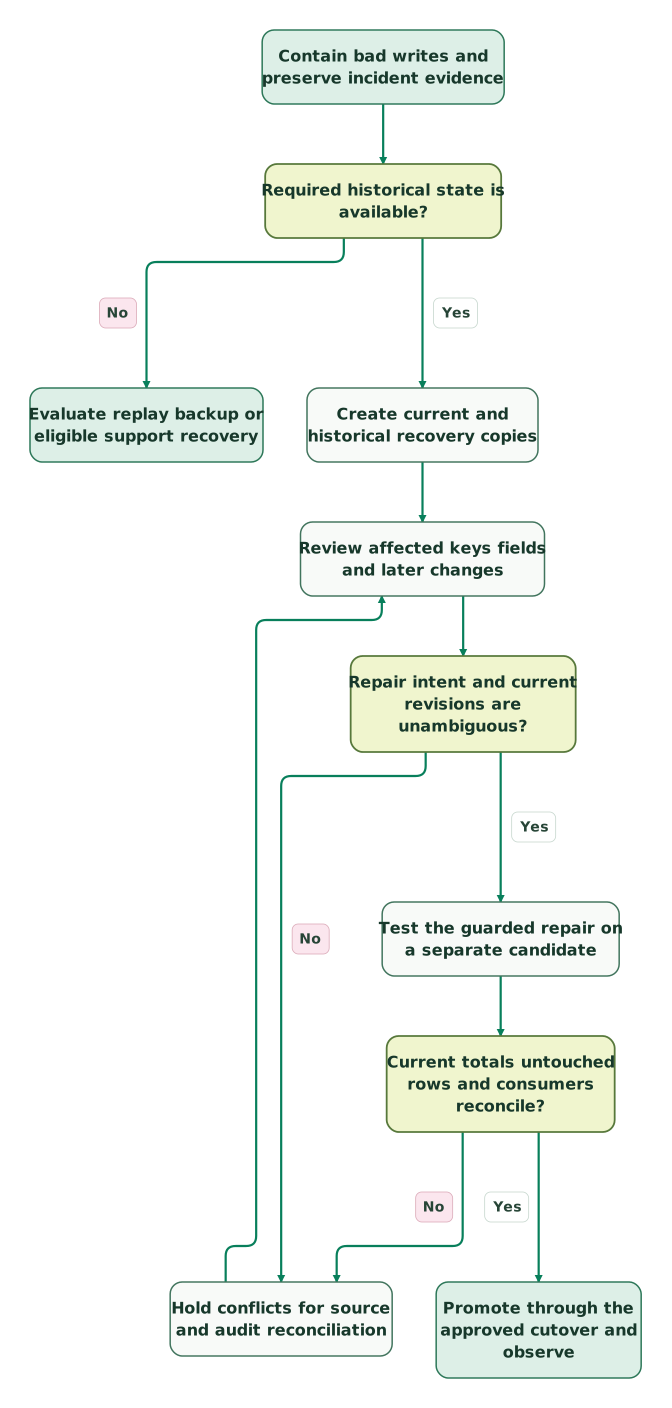
Read diagram as text
- Contain bad writes and preserve incident evidence to Required historical state is available?.
- Required historical state is available? to Evaluate replay backup or eligible support recovery: No.
- Required historical state is available? to Create current and historical recovery copies: Yes.
- Create current and historical recovery copies to Review affected keys fields and later changes.
- Review affected keys fields and later changes to Repair intent and current revisions are unambiguous?.
- Repair intent and current revisions are unambiguous? to Hold conflicts for source and audit reconciliation: No.
- Hold conflicts for source and audit reconciliation to Review affected keys fields and later changes.
- Repair intent and current revisions are unambiguous? to Test the guarded repair on a separate candidate: Yes.
- Test the guarded repair on a separate candidate to Current totals untouched rows and consumers reconcile?.
- Current totals untouched rows and consumers reconcile? to Hold conflicts for source and audit reconciliation: No.
- Current totals untouched rows and consumers reconcile? to Promote through the approved cutover and observe: Yes
Checklist
- The defective writer and affected publication paths are contained.
- Current data and the exact incident boundary are preserved.
- Required history exists under the actual object policy.
- Changed keys and fields are attributable to the incident.
- Valid later changes and ambiguous rows have explicit treatment.
- Candidate and manifest keys are unique and revision guards are reliable.
- The repair changes only approved fields and records.
- Counts, monetary totals, untouched records and consumers reconcile.
- Promotion accounts for any writes since the candidate snapshot.
- Recovery evidence, owner and monitoring changes are retained.
For an active incident, bring the failed batch, object history and expected output to the $99 martech audit. For defined recovery and prevention work, request a detailed warehouse repair scope. The Snowflake implementation guide connects retention and recovery with the rest of the operating setup.
Keep reading
Browse all Data Warehouse guides
 Data Warehouse
Snowflake Implementation: Plan the Phases, Price the Work and Connect Your Sources
Plan a Snowflake implementation in phases: security, ingestion, models, BI and handover, with current credit rates, cost lines and timeline drivers.
Jafrin Akter AloLast updated 16 min read
 Data Warehouse
Snowflake Implementation Mistakes: Diagnose the Failure Before Changing the Setup
Diagnose Snowflake implementation failures: password auth, idle compute, Gen2 cost, storage growth and weak monitors. Practical checks and a recovery plan.
Jafrin Akter AloLast updated 15 min read
 Data Warehouse
Snowflake OAuth Integration: 7 Checks for Token, Role and Connection Failures
Fix Snowflake OAuth failures across token issuance, user mapping, roles, network and renewal. Includes diagnostic SQL, safe encoding and restart acceptance checks.
Jafrin Akter AloLast updated 14 min read
Data warehouse & CDP
See the implementation scope, deliverables and acceptance checks.
Questions people ask
Can increasing retention recover data that already expired?
No. Increasing the policy can retain history that is still available for longer, but it does not recreate versions already outside Time Travel. Check the actual object and required recovery point before changing settings. If the version is unavailable, investigate an existing backup, retained source history or eligible support recovery, and verify the coverage of that alternative before promising a complete restore. Retention changes
Does a historical clone include the original table's complete past history?
No. A clone gives you the state at the selected point; its own historical timeline begins when it is created. Keep the original object's retention and any required recovery evidence intact while investigating. Do not assume that cloning one historical version preserves every earlier state you might later need for another incident or an audit. Clone history
Why is matching the old revenue total an unsafe acceptance test?
The old total describes an old population. Legitimate orders, refunds and corrections may have arrived after the bad job, so forcing the current table back to that number can erase valid business activity. Reconcile the repaired subset and the later activity separately. The accepted total should follow the intended current records and metric definition, not simply reproduce a familiar earlier dashboard value.
What if we have no reliable row revision or change audit?
Treat conflicting rows as unresolved and use the authoritative source or retained event history to reconstruct their intended values. A current field matching the known bad value does not prove that no legitimate change happened afterward. Avoid a broad overwrite based on that coincidence. Define a bounded repair population you can establish, and keep the remaining cases visible until their history is understood.
Does repairing the warehouse reverse actions already sent to CRM or email tools?
No. Correct warehouse data does not retract an email, undo a sales task or automatically repair every destination field. Inventory the downstream actions produced during the incident, then decide which need correction, suppression or separate follow-up. Resume activation from current eligibility and permissions. Replaying an old audience after a restore can create another incident if it repeats actions already completed.
Sources

Written by
Jafrin Akter AloData Engineer and Co-founder at Martechdevs and Growth and Analytics Partners
Jafrin writes practical guides to marketing technology, customer data, analytics and AI workflows. Martechdevs is a Growth and Analytics Partners company.