
Snowflake Implementation Mistakes: Diagnose the Failure Before Changing the Setup
Data Engineer and Co-founder, martechdevs
Last updated 12 min read
A Snowflake implementation is not finished when the first dashboard loads. It has to survive a credential rotation, a late source, a failed model and a month-end bill without becoming a founder's emergency project. The useful question is whether your team can explain what broke, contain the impact and recover the business output.
Last updated: 13 October 2026.
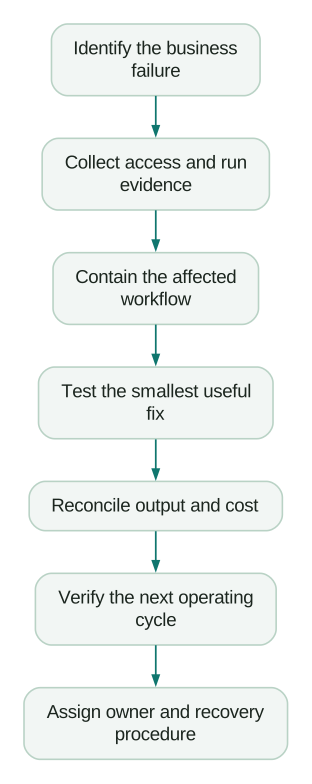
Start with the failing business output
Name the consequence before changing a warehouse setting. Is the revenue report stale, the CRM audience wrong, the dashboard slow or the spend unexpectedly high? Those symptoms require different evidence.
Capture the last known good output, first failed run, affected sources, owner and recent changes. Preserve the relevant job and query IDs. A configuration change without a baseline can make the symptom disappear while hiding the cause.
For an existing messy account, work in this order: restore essential access, stop incorrect downstream decisions, identify the recurring cost drivers and then improve performance. Cosmetic schema cleanup can wait until operations are reliable.
Mistake 1: Treating service authentication as a saved password
An ingestion tool, dbt deployment, BI refresh and scheduled script may all depend on credentials somebody entered months ago. A successful interactive login does not prove those unattended jobs can reconnect.
Snowflake's strong-authentication rollout schedules enforcement for existing users across August to October 2026, with an account-specific notification date. When enforced, LEGACY_SERVICE users move to SERVICE, which cannot use password authentication. Password-based human access requires MFA. The documented rollout excludes reader accounts, trial accounts and Snowflake Postgres; do not generalize one account's behavior to another.
Inventory each integration's user, role, authentication method, client version, credential owner and next rotation date. Include Fivetran or Airbyte ingestion, dbt jobs, BI refreshes, reverse ETL and scripts outside the main scheduler. Classify the identity by who or what uses it. Relabeling a service as a person does not solve unattended authentication.
Use the following read-only query to group recent login evidence. It requires appropriate access to the shared SNOWFLAKE database. It does not reveal passwords or tokens:
SELECT
    user_name,
    first_authentication_factor,
    second_authentication_factor,
    reported_client_type,
    is_success,
    error_code,
    COUNT(*) AS attempts,
    MAX(event_timestamp) AS latest_attempt
FROM SNOWFLAKE.ACCOUNT_USAGE.LOGIN_HISTORY
WHERE event_timestamp >= DATEADD(day, -7, CURRENT_TIMESTAMP())
GROUP BY 1, 2, 3, 4, 5, 6
ORDER BY latest_attempt DESC
LIMIT 100;
Join the findings to your integration inventory. Client type alone is not reliable ownership evidence: Snowflake documents it as client-reported and unauthenticated. The LOGIN_HISTORY view can lag by up to two hours, so also inspect the integration's immediate error logs. An empty recent result is not proof that a connection never attempted to authenticate.
Choose a supported non-password method for the actual connector and driver version. Key-pair authentication, supported OAuth flows and other supported service authentication routes have different setup and lifecycle requirements. Verify the integration's documentation before choosing one.
For key pairs, Snowflake now recommends named keys, with role restriction and expiration, while the older public-key user properties remain supported. Its key-pair guide describes rotation with a transition period. Use the mechanism your integration supports and test a fresh connection before retiring the old credential. A pooled session that keeps working proves little about the next restart.
Acceptance means a new session can authenticate, use the intended role, read or write the required objects and complete a representative scheduled run. If authentication succeeds but the job still fails, move to authorization, network and schema errors instead of rotating credentials repeatedly.
Mistake 2: Assuming auto-suspend guarantees low idle cost
Auto-suspend acts on inactivity. If scheduled work repeatedly requires warehouse compute before the idle threshold expires, the warehouse can remain active all day. Investigate query activity, not just whether the checkbox is enabled.
A BI tool's extract refresh, monitoring query or scheduler can be the source. However, do not blame every login or SELECT 1 for warehouse consumption: inspect the actual statements and warehouse events. Some requests can be served without warehouse compute.
Use completed historical windows to compare compute credits with credits attributed to query execution. This example deliberately stops before the current day and preserves missing attribution as an unknown:
SELECT
    warehouse_id,
    MAX(warehouse_name) AS warehouse_name,
    SUM(credits_used_compute) AS compute_credits,
    SUM(CASE
        WHEN credits_attributed_compute_queries IS NULL THEN 1
        ELSE 0
    END) AS hours_missing_attribution,
    CASE
        WHEN COUNT(*) = COUNT(credits_attributed_compute_queries)
        THEN SUM(
            credits_used_compute - credits_attributed_compute_queries
        )
    END AS credits_outside_query_execution
FROM SNOWFLAKE.ACCOUNT_USAGE.WAREHOUSE_METERING_HISTORY
WHERE start_time >= '2026-10-05 00:00:00 +00:00'::TIMESTAMP_TZ
  AND end_time <= '2026-10-12 00:00:00 +00:00'::TIMESTAMP_TZ
GROUP BY warehouse_id
ORDER BY compute_credits DESC;
Change the dates to a completed window relevant to your incident. The metering reference separates query-attributed compute from idle time and documents reporting latency. Its attribution column is null for Adaptive Warehouses. The query therefore does not turn missing attribution into a claim that all compute was wasted. These are credits, not invoice dollars, and the result excludes storage and other service charges.
Next, use warehouse event history to identify resume and suspension patterns, then correlate them with jobs and query tags. Group legitimate batch work into useful operating windows where possible. Remove unnecessary refreshes only after the dashboard or workflow owner confirms the resulting freshness is acceptable.
Do not set the shortest auto-suspend interval everywhere. Suspending a warehouse discards its local data cache. Snowflake's cache guidance makes the tradeoff explicit: warm cache can help repeated BI queries, while idle runtime still costs money. Measure both user latency and credits over the same representative working period.
Mistake 3: Buying a larger warehouse before finding the bottleneck
A dashboard that takes forty seconds may spend most of that time waiting in a queue, compiling, executing a poor join or transferring a large result. Warehouse size addresses only some of those problems.
Separate queue time from execution time. For execution, inspect the query profile for excessive scans, join expansion and spilling. For concurrency, examine which workloads overlap. A morning dbt build and executive dashboard refresh competing on the same warehouse may need workload separation or scheduling before a larger permanent allocation.
Snowflake's queue guidance describes additional warehouses and multi-cluster scaling; multi-cluster warehouses require Enterprise Edition or higher. More clusters address concurrent demand. They are not a substitute for fixing one bad query.
Benchmark candidates with the same data, queries, concurrency and cache conditions. Include correctness checks. If one run reuses a persisted result while another computes it, the timing comparison is misleading.
Use credits per completed business job alongside latency. In an illustrative comparison, a configuration costing one credit per hour takes forty minutes: about 0.667 credits. A configuration costing two credits per hour takes twenty-five minutes: about 0.833 credits. It cuts runtime by 37.5 percent and costs 25 percent more for that job. At fifteen minutes, the second configuration would cost 0.5 credits and be cheaper.
Those rates are example inputs, not a price quote. Include idle tails, retries and separately billed services in the actual comparison. A faster warehouse can be worth the extra cost when it meets a business deadline; make that decision explicitly.
Mistake 4: Treating warehouse size as the full configuration
Record warehouse type, size, generation, resource constraint, cluster bounds, acceleration settings and suspension behavior. A label such as SMALL is insufficient to reproduce performance or estimate consumption.
The current Gen2 documentation says new standard warehouses default to Gen2 where available. New Gen2 warehouses also enable Query Acceleration Service by default with a maximum scale factor of two. Changing an existing Gen1 warehouse to Gen2 preserves its previous acceleration setting. Inspect the actual configuration instead of assuming an old setup script still produces the same result.
Changing generation while queries are running can temporarily incur charges for both old and new resources. Decide whether the availability benefit justifies that overlap or whether the change can happen during a suspended maintenance window.
Interactive warehouses have a different operating model. Their documentation specifies a one-hour minimum billing period, with a new minimum after resumption, and a minimum automatic suspension interval of twenty-four hours. Manual or scheduled suspension can occur sooner. These settings should not be copied from an intermittent batch warehouse.
Standard warehouse billing generally has a sixty-second minimum on start or resume, followed by per-second billing, as described in compute costs. Neither rule means that a five-second query always costs five seconds of compute.
Choose the type from the workload. A sustained, low-latency application and a nightly marketing report have different needs. Keep a written reason for any setting that buys continuous availability or additional acceleration, and verify that the observed benefit remains after launch. Our Snowflake pricing guide separates the relevant cost categories.
Mistake 5: Calling a resource monitor a whole-account spending cap
Resource monitors cover warehouses and their associated cloud-services usage. They do not monitor serverless features or AI services. They also need an assignment and configured actions; creating a named monitor without a meaningful action is not protection. Snowflake's resource monitor guide documents those limits and possible threshold overshoot.
Decide what should happen when a threshold is reached. Waiting for running statements to finish protects jobs but allows more consumption. Immediate suspension can cancel work. Neither setting should surprise the person responsible for a critical data feed.
Use budgets to monitor supported consumption beyond the warehouse scope. A budget's spending limit is for alerts by default; separately configured stored-procedure actions can automate responses. Refresh latency means the budget is not an instantaneous payment barrier. Check the supported service list for the services you enable.
Create an operating response for each major cost driver: warehouse runtime, ingestion, acceleration, transformation services and AI workloads. Name who receives the alert, what evidence they inspect and which optional work can stop safely. Keep storage and contracted charges in the financial forecast too; a compute credit alert is not the full bill.
Test delivery to the responsible owner. An alert sitting in an unused administrator inbox is operationally equivalent to no alert.
Mistake 6: Reducing retention before understanding recovery
A table can have a modest active footprint and substantial historical storage. Repeated updates, truncation, dropped objects and retained clone data can explain the difference. Deleting active rows does not guarantee an immediate proportional bill reduction.
Use TABLE_STORAGE_METRICS to distinguish active bytes, Time Travel, Fail-safe and bytes retained for clones or relevant backups. Investigate object IDs as well as names when repeated replacement creates successive objects. Review staged files separately. Do not assume a familiar table name refers to one storage history.
Then classify data by recovery requirements. Can raw source data be replayed? Does the provider retain the required history? How long would a reload take? Can you reconstruct corrections and deletions, or only today's current state?
Snowflake's storage guidance explains that transient tables have no Fail-safe and only zero or one day of Time Travel. They still incur storage charges while they exist. Use them for data you can genuinely reproduce within the required recovery time, not because somebody called the schema “staging.”
A derived daily model that rebuilds from retained raw history may be a suitable candidate. The only copy of a source's deleted records is a different case. Record the recovery path and test it before changing table types or retention settings.
For heavily changing tables, investigate whether a full reload is necessary. Incremental processing may reduce churn, but it must still handle late updates, deletes and corrections. Saving storage while silently dropping those changes would make the warehouse cheaper and less trustworthy.
Mistake 7: Testing with an administrator instead of the production identity
A model can run in a developer worksheet and fail in the scheduler because the identities, roles, object ownership or defaults differ. Solving every failure by granting broader access creates a system that nobody can safely maintain.
Snowflake's access-control guidance recommends functional role hierarchies and avoiding ACCOUNTADMIN for automated scripts. Access to a table also depends on its containing database and schema. Test the role and object path the job actually uses.
Separate ingestion, transformation and consumption responsibilities. An ingestion identity should not need to rewrite a revenue mart to load its source. A dashboard identity should not need schema creation privileges to read the published model. Document which role owns the objects that deployments create and which role can maintain them after an employee leaves.
Run acceptance checks for new objects as well as existing ones. A grant that makes today's table visible does not prove tomorrow's newly created model is accessible. Test the intended grant management during a representative deployment.
Finally, verify the business output. Compare a complete reporting period with the agreed source of truth, account for refunds and late data, and expose incomplete periods. Test the behavior when a source is late: the system should identify stale output rather than silently present it as current. The marketing warehouse guide covers those reconciliation contracts.
Mistake 8: Committing capacity against an untested usage forecast
Prepaid capacity can look attractive before the workload has settled. An implementation that later becomes more efficient, starts late or loses a major planned workload can leave the original consumption forecast wrong.
Build the forecast from operating evidence: workload frequency, measured credits, enabled services, storage and expected growth. Separate confirmed use from optional experiments. Review the contract's eligible consumption, term, rollover conditions and renewal obligations directly; do not assume unused value transfers automatically or that every credit category is interchangeable.
For an illustrative commitment review, suppose $30,000 of eligible prepaid value remains with four months left. A current forecast of $5,000 per month uses $20,000, leaving a projected $10,000 gap. That is a forecast to discuss with the commercial owner, not a reason to run unnecessary queries.
Set a recurring forecast review early enough to change the next purchase decision. Include implementation delays and optimization savings in the same model as business growth. Compare the commitment benefit with the flexibility the business is giving up.
A recovery plan with observable finish lines
For a troubled implementation, define a bounded first scope: one critical source-to-output workflow and the shared infrastructure it depends on. Expanding the scope to every dashboard before proving recovery makes progress difficult to verify.
An illustrative four-week planning sequence is one week to inventory and baseline, one to repair access and operating controls, one to reconcile the chosen output and one to observe normal cycles and hand over recovery. It is a planning hypothesis, not a delivery benchmark. Connector approvals, source availability and month-end validation may change it substantially.
The acceptance criteria matter more than the calendar:
Checklist
- Every unattended integration has an owner and supported authentication method.
- A fresh session and credential rotation have been tested for the critical workflow.
- Production roles work without borrowing administrator access.
- Warehouse runtime and generation settings have documented reasons.
- Performance comparisons preserve correctness and comparable cache conditions.
- Resource monitor actions and budget notifications reach an accountable owner.
- Storage retention matches a tested recovery path.
- The business output reconciles and clearly signals missing or late data.
- A failed run can be retried without duplicating the business result.
- Another team member can execute the recovery procedure.
Use a partner where the team lacks the time or specialist experience to establish those controls. Require handover evidence: configuration, access model, reconciliation results, cost baseline and recovery instructions. A successful demo is too small a definition of done.
Our data warehouse and CDP implementation work can start with the failing business workflow and turn it into that bounded scope. The aim is a system the operating team can trust and maintain after the implementation ends.
Questions people ask
How long does a Snowflake implementation take?
Estimate from the sources, identity and revenue definitions, access approvals, recovery needs and validation cycles. A bounded first workflow can be planned separately from the full platform. The four-week sequence above is illustrative; require evidence-based milestones and account for business cycles that cannot be compressed into a demo.
Why does my warehouse keep running with auto-suspend enabled?
Check whether work requiring compute arrives before the inactivity threshold, and correlate that work with warehouse events. Also confirm the warehouse type and its suspension rules. Compare the cost of staying warm with the latency impact of suspension before changing the timeout.
Did Snowflake stop accepting service-user passwords everywhere at once?
No. The documented enforcement uses an account-by-account rollout and notifications, with stated exclusions. Inspect your account's timing and each integration's authentication evidence. Migrate unattended workloads to a supported service authentication method rather than relying on a password reset.
Will a resource monitor stop all Snowflake spending?
No. Its scope does not include serverless and AI services, and threshold actions can overshoot. Use suitable budgets, service controls and an operating response for those workloads, while forecasting storage and other charges separately.
Should all staging tables be transient to save money?
No. Use transient storage only when the data can be reproduced within the required recovery window. Check source history, deleted records, replay time and downstream dependencies. A staging label does not tell you whether losing that data would be harmless.
Sources
- Snowflake: Strong-authentication enforcement rollout
- Snowflake: LOGIN_HISTORY view
- Snowflake: Key-pair authentication and rotation
- Snowflake: WAREHOUSE_METERING_HISTORY view
- Snowflake: WAREHOUSE_EVENTS_HISTORY view
- Snowflake: Warehouse cache and suspension
- Snowflake: Reducing queues
- Snowflake: Gen2 standard warehouses
- Snowflake: Interactive analytics
- Snowflake: Understanding compute cost
- Snowflake: Resource monitors
- Snowflake: Budgets
- Snowflake: TABLE_STORAGE_METRICS view
- Snowflake: Storage cost and retention
- Snowflake: Access control best practices
Written by
Jafrin Akter AloData Engineer and Co-founder, martechdevs
Jafrin Akter Alo is a data engineer and co-founder of martechdevs, where the team has delivered 74+ martech, data and growth stack implementations.