
Snowflake OAuth Integration: 7 Checks for Token, Role and Connection Failures
Fix a Snowflake OAuth failure by locating the boundary that rejected the connection: the client, authorization server, token validation, user mapping, role, network or scheduled renewal. Keep the exact error and test a fresh session from the actual runtime. A successful browser login or an old pooled connection cannot establish that tomorrow's unattended refresh will work.
On this page
What does a Snowflake security integration actually control?
An OAuth security integration defines the relationship between Snowflake and an authorization system or client. It does not grant a reporting job access to every table, choose the correct warehouse automatically or maintain a vendor's credential store. Those are separate parts of a working connection.
First distinguish the issuer. Snowflake OAuth uses Snowflake's authorization service and a code-grant workflow. External OAuth uses an external authorization server, with a flow supported by that server and client. The integration types are OAUTH and EXTERNAL_OAUTH, respectively. Snowflake OAuth comparison
| Connection situation | Configuration to identify | Lifecycle to prove |
|---|---|---|
| A user connects a supported BI application | Partner or custom Snowflake OAuth integration | Consent, token exchange, refresh and published workload access |
| A company identity provider issues the token | External OAuth integration and issuer | Signature, audience, user mapping, scopes and token acquisition |
| A scheduled application uses client credentials | Exact driver support and authorization-server grant | Secret operation, service identity mapping and repeatable token acquisition |
| An application calls an external API from Snowflake | Outbound API-authentication setup | Separate from authenticating that application into Snowflake |
Do not infer the token issuer from a button labelled “OAuth.” Ask which endpoint issues the token and which integration accepts it. Also distinguish an access token from a refresh token or an identity token; they have different purposes.
Our warehouse access and implementation service validates the full connection-to-output path. If the connector supports key pairs instead, use the Snowflake key-pair migration guide; changing authentication methods is a separate decision from repairing an OAuth configuration.
Which seven checks isolate the failure?
Work from the first failing boundary toward the workload. Do not rotate every secret, widen roles and change network rules in one attempt; that loses the evidence needed to identify the actual repair.
| Check | Typical symptom | Evidence to inspect |
|---|---|---|
| 1. Issuer, endpoint and grant | No usable token is issued | Authorization-server URL, client registration and supported grant |
| 2. Client and callback | invalid_client, callback rejection or failed code exchange | Client authentication, redirect configuration and PKCE handling |
| 3. Token validity | Signature, issuer, audience or expiry rejection | Token-validation result and redacted failure details |
| 4. User mapping | Token accepted by issuer but no intended Snowflake identity | Mapping claim and corresponding Snowflake user attribute |
| 5. Role and object access | Missing role, denied query or empty object list | Requested scope, effective roles and object privileges |
| 6. Runtime network | Desktop works; worker cannot connect | Actual worker route, DNS, endpoints and applied network policy |
| 7. Renewal and restart | Initial login works; a later run fails | Refresh behavior, secret version, token storage and fresh-session result |
Capture the failing stage, UTC timestamp, integration name, account, connector version and a correlation identifier. Record whether the error came from the authorization server, Snowflake login or an SQL statement. Keep bearer tokens, refresh tokens and client secrets out of tickets, screenshots and ordinary logs.
How should you inspect the existing integration?
Have the integration owner inspect the current object before changing it. OAuth integration visibility is permission-dependent, so an ordinary reporting role's inability to describe the object does not mean it does not exist.
This read-only command uses an illustrative integration name; substitute the existing object identified by the administrator:
DESCRIBE SECURITY INTEGRATION MARKETING_OAUTH;For Snowflake OAuth and External OAuth integrations, DESCRIBE requires ownership; a generic USAGE grant is insufficient. The command exposes configuration properties, including Snowflake OAuth's supported authorization and token endpoints. DESCRIBE INTEGRATION
Record the applicable values in a restricted configuration record:
| Configuration group | Snowflake OAuth | External OAuth |
|---|---|---|
| Client or issuer | Client type, partner/custom mode and callback | Issuer, provider type and signing-key source |
| Identity | Consenting user and requested role | Token claim mapped to LOGIN_NAME or EMAIL_ADDRESS |
| Role limits | Allowed/blocked roles and secondary-role mode | External OAuth role and scope settings |
| Lifecycle | Access/refresh settings and client storage | Issuer grant, token lifetime and acquisition behavior |
| Runtime access | Relevant endpoint and network settings | Applied integration network policy and destination route |
The two integration references define different parameter sets. Copying OAUTH_* properties into an External OAuth setup, or treating a partner integration as a generic custom client, will not produce the intended configuration. Snowflake OAuth parameters, External OAuth parameters
What should you check at each failing boundary?
Repair only the boundary for which the evidence shows a mismatch, then repeat the original workload. The checks below are ordered so that a valid token does not get confused with a usable Snowflake session.
1. Are the issuer, endpoint and grant compatible?
Match the grant to the actual authorization server. Snowflake's custom OAuth code flow uses its authorization endpoint and token-request endpoint; the documented token-request grants are authorization code and refresh token. An endpoint used for a different token exchange is not interchangeable. Custom Snowflake OAuth flow
The Python connector separately supports OAUTH_AUTHORIZATION_CODE and OAUTH_CLIENT_CREDENTIALS, as well as passing an already obtained access token with authenticator="oauth". Driver support for acquiring a token does not prove that the configured authorization server accepts that grant. Python connector OAuth modes
For an unattended job, write down how it obtains a new token after a restart. If the answer is “someone logged in on a laptop,” the production lifecycle is incomplete. If the selected product cannot perform the approved grant, use its supported authentication path rather than an undocumented endpoint workaround.
2. Are client authentication and the callback correct?
Check that the client ID, secret or assertion belongs to the same registration and environment. Confirm the callback configuration and code-exchange request, including the original PKCE verifier when the authorization request used a challenge. Keep PKCE enabled in a supported client. Snowflake custom-client requirements
For confidential clients using client_secret_basic, Snowflake specifies form-encoding the client ID and secret individually before joining them with a colon and Base64-encoding the result. Missing that encoding can break secrets containing reserved characters. Do not apply both header authentication and a second body credential scheme unintentionally. OAuth client-password encoding, Snowflake client authentication
This Python 3 helper illustrates only the encoding step. It does not request a token. Use a maintained OAuth client in the application, and never log the returned header when it contains real credentials.
import base64
from urllib.parse import quote_plus


def oauth_basic_header(client_id, client_secret):
    if not all(isinstance(value, str) and value
               for value in (client_id, client_secret)):
        raise ValueError("Client ID and secret must be nonempty strings")
    encoded_id = quote_plus(client_id, safe="")
    encoded_secret = quote_plus(client_secret, safe="")
    payload = f"{encoded_id}:{encoded_secret}".encode("ascii")
    return "Basic " + base64.b64encode(payload).decode("ascii")


# Dummy values only: the decoded payload must preserve the encoded colon.
header = oauth_basic_header("client:name", "secret+value")
assert base64.b64decode(header[6:]).decode("ascii") == (
    "client%3Aname:secret%2Bvalue"
)
Base64 is a transport encoding, not protection for a secret. A correctly formed header still needs the correct endpoint, TLS and valid client registration. If the secret was rotated, verify which version each worker loaded; a restarted worker and a long-running worker can otherwise behave differently.
3. Is the access token valid for this Snowflake integration?
For External OAuth, inspect issuer, audience, signature and time validity together. A JWT that decodes into readable JSON has not thereby passed signature or audience validation. Do not send a production token to a public decoder to investigate it.
The custom External OAuth payload includes issuer, audience, issue time, expiry and scope information; a not-before claim can also restrict when it becomes usable. The issuer and Snowflake configuration must agree on the claim representation. External OAuth payload requirements
Snowflake provides SYSTEM$VERIFY_EXTERNAL_OAUTH_TOKEN for validating an External OAuth access token. Its result reports success or a reason for failure and is intended to mask the token. Use the approved administrative diagnostic path and avoid placing a live token in shared query text or saved worksheets. This function is for External OAuth, not a universal validator for every credential. External OAuth token verification
For a failed External OAuth login that returns a UUID, an administrator with the required MONITOR privilege can retrieve additional detail. Replace this deliberately invalid placeholder with that event's identifier:
SELECT SYSTEM$GET_LOGIN_FAILURE_DETAILS('<LOGIN_FAILURE_UUID>');The function distinguishes conditions such as an unknown issuer, disabled integration, failed audience validation, unavailable signing key and a token not yet valid. Client type and version in the result are client-reported rather than verified identity evidence. Login-failure details
| Validation evidence | Investigate next | Avoid this shortcut |
|---|---|---|
| Audience mismatch | Token's intended resource versus configured audience | Accepting unrelated audiences to make one test pass |
| Issuer not found or disabled | Exact issuer and intended enabled integration | Creating another integration without finding the existing one |
| Signing key unavailable or signature invalid | Key publication, rotation and configured key source | Treating decoded claims as a valid signature |
| Expired or not-yet-valid token | Acquisition timing and runtime clock | Removing expiry validation or replaying an old token |
A new token is useful only after the underlying mismatch is corrected. Repeated acquisition from the wrong issuer will produce another wrong token.
4. Does the token map to the intended Snowflake user?
Compare the configured mapping claim with the actual claim value and the selected Snowflake user attribute. External OAuth explicitly supports mapping to LOGIN_NAME or EMAIL_ADDRESS. An application display name, email-looking string and Snowflake object name are not interchangeable identifiers. External OAuth user mapping
Write a redacted mapping trace: issuer claim name, expected stable value, chosen user attribute and resulting user. For a service flow, establish whose identity the issuer emits instead of assuming it represents the human who configured the client.
Test renamed, disabled and deliberately unrecognized identities in the approved environment. A migration from one identity-provider tenant to another can preserve a familiar display name while changing the immutable subject. Do not silently create another Snowflake user to conceal an unexplained mismatch.
If several systems share one service identity, include every consumer in the repair plan. Disabling or remapping that identity can affect ingestion, BI refresh and activation at different schedules. The marketing warehouse architecture guide helps trace the affected outputs.
5. Is the requested role both allowed and useful?
Confirm three separate facts: the user has the role, the OAuth configuration permits it, and the role has the required object privileges. A role listed in a token cannot create grants the user does not have.
Snowflake OAuth's role allowlist and blocklist work together: a role must meet both when an allowlist is configured. Allowlisting cannot be combined with implicit secondary-role activation, because that would bypass the intended boundary. Privileged administrative roles are blocked by default. Use a purpose-built operating role rather than removing those protections to make a connection test pass. Snowflake OAuth role restrictions
Do not assume role switching is always supported or always impossible. Snowflake documents an optional custom-client role-switching mode as a preview feature, with required scope and integration settings; secondary-role activation is controlled separately. Existing configurations remain single-role by default. Treat any dependency on the preview as an explicit product decision. Custom OAuth role-switching settings
For External OAuth, verify the configured scope attribute and its delimiter against the actual token. A scp list and a scope string require the corresponding interpretation. Use the provider-specific configuration and current integration parameters rather than guessing from a decoded token. External OAuth scope representation
After login succeeds, run this read-only context query in the actual application connection:
SELECT
    CURRENT_USER() AS session_user,
    CURRENT_ROLE() AS primary_role,
    CURRENT_SECONDARY_ROLES() AS secondary_roles,
    CURRENT_WAREHOUSE() AS warehouse_name,
    CURRENT_DATABASE() AS database_name,
    CURRENT_SCHEMA() AS schema_name;
These context functions expose the session that is actually running the statement. Snowflake context functions
Then run one bounded query against the approved reporting object and one deliberately forbidden access check. Inspect object names and schemas before querying unfamiliar data. A successful context query proves neither table access nor that the report returns the intended rows. Snowflake's role guidance recommends functional role hierarchies and avoiding administrative roles for automated scripts. Access-control practices
6. Can the real worker reach the correct endpoints?
Test from the scheduler, gateway or worker that will run the job. A browser on a workstation can reach a public endpoint while a cloud worker has different DNS, egress or private-network configuration.
For External OAuth, an integration-level network policy governs login requests and queries and takes precedence over user- and account-level policies. Inspect that effective policy rather than only the account's familiar allowlist. External OAuth network policy
Record the authorization-server route separately from the Snowflake data connection. Identify which component needs each route and whether a proxy changes its behavior. Preserve the original timeout or network rejection; changing an OAuth secret will not repair DNS resolution.
Test the deployed runtime's secret retrieval too. A connection that works locally can fail after deployment because the worker cannot read the secret version, encrypted file or credential cache that the developer used. Confirm the exact runtime identity and configuration without copying secrets into diagnostics.
7. Will renewal, rotation and restart work unattended?
Verify a fresh session after token renewal and after a worker restart. Reusing an existing session is a different test. The result must include a current business output, not only successful token acquisition.
Snowflake OAuth access tokens default to 600 seconds and can be configured from 60 to 3,600 seconds. Refresh tokens have a separate validity period; expiration requires authorization again. Do not apply those Snowflake-issued token values to every external issuer. Snowflake OAuth token validity
When single-use refresh tokens are enabled, the client must replace the used refresh token with the newly returned one. Snowflake documents invalidation behavior for earlier tokens and token reuse. Coordinate concurrent workers and persist the replacement through the approved credential store; two workers replaying one stale refresh token are not a healthy retry strategy. Single-use refresh-token behavior
Connector versions matter here. Python connector documentation distinguishes the behavior before version 5.0 from the current refresh-token and cache controls. Pin and record the actual installed version, then follow that version's supported lifecycle rather than copying an old option such as disabling refresh tokens and assuming its behavior is unchanged. Python connector token handling
For a planned client-secret rotation, inventory all consumers, introduce the replacement through the supported mechanism, test fresh sessions and retire the old secret after the required jobs pass. For a suspected compromise, follow the security incident's revocation requirements; a convenience overlap is not automatically appropriate.
What would a complete repair look like for a scheduled dashboard?
A complete repair proves the intended identity can reconnect, obtain the permitted role, read the correct data and recover after a lifecycle change. It also proves that the same identity cannot read an object outside its assigned scope.
Consider a hypothetical revenue dashboard that works immediately after a person reconnects it but fails during the next scheduled refresh. The useful experiment is a fresh worker session using the scheduled credential path. If the worker can obtain a token but cannot read the reporting view, investigate role and object access; if it cannot obtain a replacement token, investigate renewal first.
| Acceptance case | Required evidence | What it establishes |
|---|---|---|
| Fresh runtime startup | Correct user, role and successful bounded report query | Deployment does not depend on a developer's live session |
| Token renewal | Replacement acquisition and a new successful connection | Token lifecycle is functioning |
| Approved secret rotation | New secret version used by all required workers | Infrequent consumers are included |
| Forbidden object | Expected denial without wider grants | The repair preserved the intended access boundary |
| Normal scheduled output | Freshness and totals match the agreed reference | Authentication restored the business workflow |
| Failed renewal | Alert reaches the named owner; output is marked stale | The next failure is visible before consumers act on it |
Follow this decision path before closing the incident:
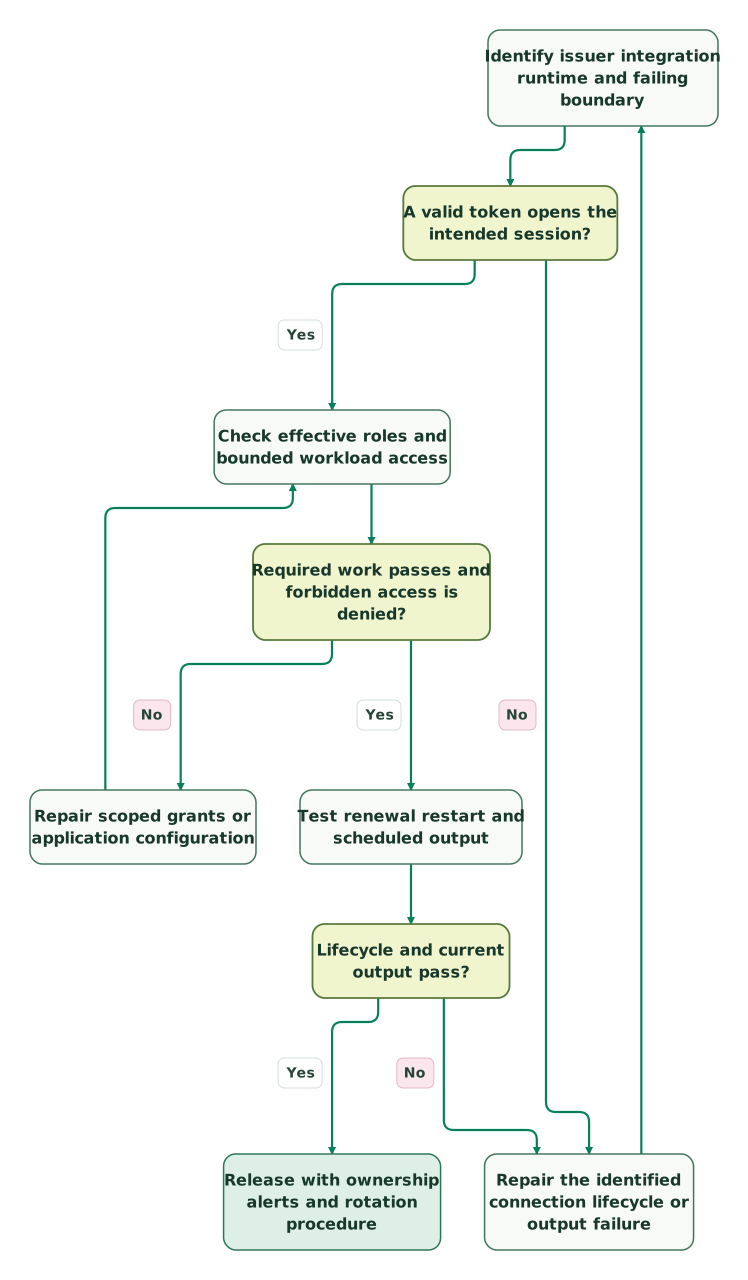
Read diagram as text
- Identify issuer integration runtime and failing boundary to A valid token opens the intended session?.
- A valid token opens the intended session? to Repair the identified connection lifecycle or output failure: No.
- Repair the identified connection lifecycle or output failure to Identify issuer integration runtime and failing boundary.
- A valid token opens the intended session? to Check effective roles and bounded workload access: Yes.
- Check effective roles and bounded workload access to Required work passes and forbidden access is denied?.
- Required work passes and forbidden access is denied? to Repair scoped grants or application configuration: No.
- Repair scoped grants or application configuration to Check effective roles and bounded workload access.
- Required work passes and forbidden access is denied? to Test renewal restart and scheduled output: Yes.
- Test renewal restart and scheduled output to Lifecycle and current output pass?.
- Lifecycle and current output pass? to Repair the identified connection lifecycle or output failure: No.
- Lifecycle and current output pass? to Release with ownership alerts and rotation procedure: Yes
What should be in the OAuth handover checklist?
Keep a reproducible configuration record and an acceptance result for the actual runtime. Another operator should be able to identify the failing boundary without receiving a copy of the secret.
Checklist
- Issuer, integration type, account and supported grant are identified.
- Client registration, callback and token endpoint belong to the correct environment.
- Token validation and user mapping resolve to the expected identity.
- Requested roles, secondary-role behavior and object access are explicit.
- Integration-level network policy and worker routes are verified.
- Fresh startup, renewal and planned rotation have been exercised.
- Required work succeeds and a forbidden object remains denied.
- Logs contain useful correlation evidence without credentials.
- Scheduled output is current and reconciled, with a named failure owner.
For a broken refresh or activation path, bring the redacted failure and the expected output to the $99 martech audit. For a defined repair, request a detailed warehouse integration scope. The Snowflake implementation troubleshooting guide covers the workload and operating issues that remain after authentication works.
Keep reading
Browse all Data Warehouse guides
 Data Warehouse
Snowflake Implementation Mistakes: Diagnose the Failure Before Changing the Setup
Diagnose Snowflake implementation failures: password auth, idle compute, Gen2 cost, storage growth and weak monitors. Practical checks and a recovery plan.
Jafrin Akter AloLast updated 15 min read
 Data Warehouse
Snowflake Implementation: Plan the Phases, Price the Work and Connect Your Sources
Plan a Snowflake implementation in phases: security, ingestion, models, BI and handover, with current credit rates, cost lines and timeline drivers.
Jafrin Akter AloLast updated 16 min read
 Data Warehouse
Snowflake Time Travel: Repair a Bad Load Without Losing Later Changes
Recover from bad Snowflake loads with historical clones, guarded field repairs and reconciliation. Preserve later changes and understand retention, UNDROP and Fail-safe.
Jafrin Akter AloLast updated 14 min read
Data warehouse & CDP
See the implementation scope, deliverables and acceptance checks.
Questions people ask
Does creating a security integration grant access to our reporting tables?
No. The integration controls part of the authentication and authorization relationship, but the resulting user and active roles still need the appropriate warehouse, database, schema and object privileges. Verify the effective session and query the intended reporting object through the real application. Keep a denied-access test alongside the successful one so the repair does not accidentally broaden the job's reach.
Can we use the same OAuth registration in development and production?
Only if the approved design deliberately supports both environments and keeps their permissions, callbacks, credentials and operational ownership clear. Separate registrations often make rotation and incident containment easier. A development success should never depend on broader production access. Record which environment each token issuer, client ID and callback belongs to before diagnosing apparently inconsistent login results.
Why does increasing token lifetime fail to fix our scheduled refresh?
Because a longer-lived token does not repair an incorrect issuer, missing role, inaccessible secret or unsupported renewal flow. It may simply postpone the next failure. Reproduce the job with a fresh runtime and follow token acquisition through to the reporting query. Fix the lifecycle and alerting so the system can reconnect after expiration rather than relying on one unusually long session.
Should we paste a token into a JWT website to inspect it?
Do not expose a live production token to an unapproved third party. Use an approved local inspection or administrative diagnostic path, and remember that readable claims do not prove a valid signature, issuer or audience. Share a redacted description of the relevant fields and the correlation identifier. Keep the bearer token itself in the authorized credential-handling process.
Does a successful OAuth repair prove the revenue dashboard is correct?
It proves only the checks you performed. Authentication and access can work while the dashboard uses a stale source, wrong account mapping or incorrect revenue definition. Verify freshness and reconcile a bounded reporting population against the agreed reference after the connection is restored. Include downstream audiences or scheduled exports if they depend on the same job and may have consumed incomplete data.
Sources
- Snowflake OAuth introduction and integration types
- DESCRIBE INTEGRATION and required privileges
- Snowflake OAuth integration parameters
- External OAuth integration parameters
- Snowflake custom OAuth clients
- Python connector OAuth configuration
- Custom External OAuth payload and scope requirements
- External OAuth token verification
- Login-failure details and error categories
- Snowflake context functions
- Snowflake access-control practices
- External OAuth network and troubleshooting
- Single-use refresh tokens
- OAuth2 client-password encoding, section2.3.1
- Snowflake OAuth role-switching settings

Written by
Jafrin Akter AloData Engineer and Co-founder at Martechdevs and Growth and Analytics Partners
Jafrin writes practical guides to marketing technology, customer data, analytics and AI workflows. Martechdevs is a Growth and Analytics Partners company.