
Sigma Alternatives: BI Competitors by Workflow and Cost
Choose Metabase for straightforward warehouse reporting, Power BI for Microsoft-centered distribution, Tableau for detailed visual analysis, Hex for SQL and Python work, or Looker for centrally modeled metrics. The right Sigma alternatives depend on the workflow being replaced. A dashboard replacement is a smaller project than replacing spreadsheet exploration, data entry and operational actions together.
On this page
Sigma Computing competitors at a glance
The table uses USD public list prices with their stated billing basis; Sigma and Looker require a scoped quote.
| Tool | Starting price and billing basis | Best fit | Main tradeoff |
|---|---|---|---|
| Metabase | Free self-hosted; Starter $100/month or $1,080/year including five users | Curated warehouse tables and ordinary reporting | Advanced permissions can require Pro |
| Power BI | Pro $14/user/month, paid yearly | Microsoft reporting ownership and distribution | Sharing and capacity need separate licensing review |
| Tableau | Standard Creator $75/user/month, billed annually | Detailed visual composition | Author and reader roles affect total cost |
| Hex | Professional $36/editor/month; Team $75/editor/month, monthly self-service billing | SQL and Python analysis with shared outputs | Editor price alone leaves deployment scope unresolved |
| Looker | Custom quote for platform plus users | Shared semantic definitions across teams | Modeling ownership and platform commitment |
| Sigma | Custom quote by required license and commercial scope | Spreadsheet-style exploration with operational interaction | Permission choices determine the billed role |
Price references: Metabase, Microsoft, Tableau, Hex and Looker. Sigma directs buyers to their account team for prices in its license overview. Hex bills self-service customers monthly and order-form customers annually upfront under their agreement. See its billing FAQ.
We would first separate Sigma workbooks that display information from workbooks that run a business process. An input table, an approval step and an action can turn a seemingly simple report into an operational application. Replacing its charts leaves the business process unfinished.
At Martechdevs, we scope these dependencies through our data warehouse and reporting service, including source models, access and downstream actions. The shortlist should follow the work that must survive the migration.
Sigma and alternative tool decisions
Sigma
- Best for: Business teams that combine warehouse analysis with structured inputs and operational actions in a shared workbook workflow.
- Pros: Input tables can add manually entered information to analysis without overwriting the original source data. Sigma documents data-entry permissions and validation within that workflow. See the input tables overview.
- Cons: A tool comparison based on read-only dashboards understates the replacement work when the existing workbook also collects data or invokes actions.
- Free plan and startup offer: Sigma offers a free trial without a credit card. Its trial page does not establish a permanent production free tier or a universal startup discount, so neither is included in this budget. See the trial page.
- Choose it if: Business users actively maintain inputs or perform actions alongside analysis and that combined workflow has a named owner.
- Skip it if: The requirement is only a small number of read-only dashboards and a qualified simpler tool meets the access and maintenance needs.
Metabase
- Best for: A smaller reporting requirement over prepared tables, with SQL available for the analyst and a query builder for other users.
- Pros: The query builder covers filtering, joining and summarizing, giving teams a practical self-service reporting surface.
- Cons: A basic dashboard pilot does not prove that an operational Sigma workbook has been replaced. Compare required permissions and any data-entry process separately.
- Free plan and startup offer: Open Source offers unlimited users with self-hosted operation. Starter and Pro have 14-day trials. The comparison assumes standard prices and no startup concession. See Metabase pricing.
- Choose it if: Warehouse models already contain the difficult logic and users mainly need saved answers, filters and recurring reports.
- Skip it if: The purchase case relies on features outside the selected plan or omits ownership of self-hosted operation.
Power BI
- Best for: Organizations with Microsoft reporting skills, an agreed semantic model and a managed distribution process.
- Pros: Several connection modes support different data-placement needs. Existing qualifying E5 subscriptions include Pro. See connection options and Power BI pricing.
- Cons: Publishing, model ownership and reader access require planning. Import and source-query modes also have different freshness and performance characteristics.
- Free plan and startup offer: Desktop and a free account support evaluation; private sharing has additional licensing requirements. No startup credits are treated as guaranteed user licenses. See Microsoft's sharing rules.
- Choose it if: The organization already has the people and account structure to maintain and distribute Power BI content.
- Skip it if: The proposed saving depends on every reader using a free account without qualifying capacity or another valid entitlement.
Tableau
- Best for: Analysts who need detailed control over visual representation and a clear author, editor and reader publishing model.
- Pros: Fields on shelves and marks control visual detail, color, shape and size. This makes Tableau a relevant shortlist when the reporting job includes deliberate visual exploration. See the shelves and cards reference.
- Cons: Replacing Sigma's input or action workflow needs a separate design. A visually equivalent dashboard is only part of that migration.
- Free plan and startup offer: Desktop Free Edition supports private local analysis. Paid Professional licensing adds publishing and sharing. Public Edition is excluded from commercial use. No startup offer is assumed. See the Desktop edition comparison.
- Choose it if: The analyst can show a recurring business decision that benefits from the proposed visual design and interaction.
- Skip it if: The main need is structured data entry or a simple operational table, with little use for the visual-authoring workflow.
Hex
- Best for: Analysts and data teams whose work mixes SQL, Python and an explanatory analysis that becomes a shared output.
- Pros: Hex notebooks use SQL and Python cells, and SQL results can feed downstream cells. That makes the analysis path visible alongside its outputs. See notebook development and SQL cells.
- Cons: A technical workflow still needs a business-facing owner and acceptance criteria. Adding an editor does not automatically transfer the reasoning behind a model or investigation.
- Free plan and startup offer: Community is free; Team has a 14-day trial without a payment card. Professional is intended for individual use and Team for collaboration. Budget standard terms rather than an assumed startup concession. See Hex plans.
- Choose it if: Code, exploratory analysis and reusable published results belong in the same working environment for the intended authors.
- Skip it if: The core users expect to maintain a spreadsheet-style operating process and have no owner for the notebook logic.
Looker
- Best for: Organizations ready to invest in centrally defined metrics and relationships that business users explore through a governed model.
- Pros: LookML describes dimensions, calculations, aggregates and relationships; Looker uses those definitions to generate SQL. This supports a deliberate division between model maintenance and business exploration. See the LookML introduction.
- Cons: A shared model needs an owner, review process and response time for new requests. A company seeking only cheaper dashboard licenses may inherit a larger commitment than it needs.
- Free plan and startup offer: The core platform is sold through custom pricing. Ask for the evaluation scope and any startup terms in writing; the pricing page does not establish a permanent free production instance. See Looker pricing.
- Choose it if: Consistent definitions across teams matter enough to fund ongoing semantic-model development.
- Skip it if: The organization cannot assign that ownership or is actually seeking Google's separate Data Studio reporting product.
Sigma replacement scope
A replacement inventory should describe behavior, rather than count workbook tabs. Record the audience, source, calculations, data entry, exports, actions and ownership for each active workbook. Then mark the parts that remain necessary. A migration is a good opportunity to remove abandoned content, provided its owner confirms that decision.
| Existing requirement | Replacement evidence | Acceptance owner |
|---|---|---|
| Revenue report | Reconciled totals for the same dates and segments | Finance and analytics |
| Forecast input | Saved entries, validation and permitted editors | Forecast process owner |
| Account investigation | Expected filters, detail access and exports | Operations lead |
| Operational action | Correct target, authorization and failure handling | Application owner |
| Scheduled delivery | Expected audience, timing and restricted content | Report owner |
Sigma's current license documentation includes View, Act, Analyze and Build tiers, with a separate reference for organizations on the Lite, Essential and Pro model. Permissions determine the assigned tier. Therefore an existing contract's labels and a new proposal's labels need reconciliation before comparison. See the account and license overview.
Keep the user list tied to tasks. A person who edits an input table is different from someone who only reads a chart. A person who defines sources is different from someone who rearranges an existing view. Ask each vendor to map these tasks to billable roles, including external users and administrators where relevant.
For a focused lower-cost reporting shortlist, Metabase vs Power BI compares the subscription and model ownership tradeoffs. For visual-authoring requirements, Metabase vs Tableau provides a different pilot. Use Looker pricing for the platform-plus-user purchase rather than confusing it with Data Studio.
Sigma alternative budgets and migration economics
Start with a twelve-month operating budget that separates subscription, warehouse compute, implementation and maintenance. Keep any overlapping subscription during migration visible. A nominally cheaper tool can have a higher first-year cash requirement while content is being rebuilt.
The following hypothetical internal-reporting examples use USD public rates. They exclude taxes, implementation, warehouse compute, optional usage and any operational application rebuild. They are different configurations, rather than equivalent packages.
| Configuration | Calculation | Subscription amount | Scope limit |
|---|---|---|---|
| Metabase Starter, twenty users, annual billing | $1,080 + 15 × $65 | $2,055/year | Starter feature set |
| Power BI Pro, twenty newly licensed users | 20 × $14 × 12 | $3,360/year | No existing Pro entitlement assumed |
| Tableau Standard, two Creators and eighteen Viewers | (2 × $75 + 18 × $15) × 12 | $5,040/year | Readers do not need Explorer tasks |
| Hex Team, three editors | 3 × $75 | $225/month with self-service billing | Consumer, security and contract requirements still need confirmation |
| Sigma or Looker | Required roles plus platform or commercial terms | Written quote | No invented public starting price |
The subscription inputs come from Metabase, Microsoft, Tableau and Hex. Carry the actual scope and billing period into the purchase order. A monthly-equivalent amount does not establish a month-to-month cancellation right.
For a migration sensitivity example, assume the qualified replacement saves $500 per month after including its extra operating costs. Assume the one-time migration needs 100 hours valued internally at $75/hour. Migration effort is $7,500, and simple payback is $7,500 ÷ $500 = 15 months. These are planning assumptions, not Sigma prices or a promise of savings.
If the first three months also require $300/month of overlap, add $900. Total transition cost becomes $8,400, making simple payback 16.8 months at the same steady-state saving. This calculation excludes financing, risk and changes in future usage. It is useful because it shows the decision's sensitivity to rebuild work rather than hiding that work inside a license comparison.
The BI tool pricing guide provides a wider cost framework. The dashboard templates tool helps define a smaller report scope before requesting implementation estimates.
Best fit by operating model
| Company or operating model | Best fit | Runner-up | Decision reason |
|---|---|---|---|
| Small SaaS company with curated tables and read-only reports | Metabase | Power BI | Limited reporting scope and clear source ownership |
| Microsoft-centered finance team | Power BI | Tableau | Existing modeling and distribution skills |
| Analyst team with substantial visual design work | Tableau | Hex | Visual investigation shapes the recurring work |
| SQL and Python team publishing analysis for stakeholders | Hex | Looker | Code and explanatory analysis share a workflow |
| Multi-team organization funding common metric definitions | Looker | Sigma | Model governance is an explicit operating commitment |
| Business users entering forecasts and triggering actions | Sigma | A scoped alternative application design | Operational behavior must survive the replacement |
Sigma migration decision
The decision starts with operational behavior. A candidate must preserve any required inputs or actions as well as the reporting result. Failed validation returns to the replacement design and repeats the affected tests.
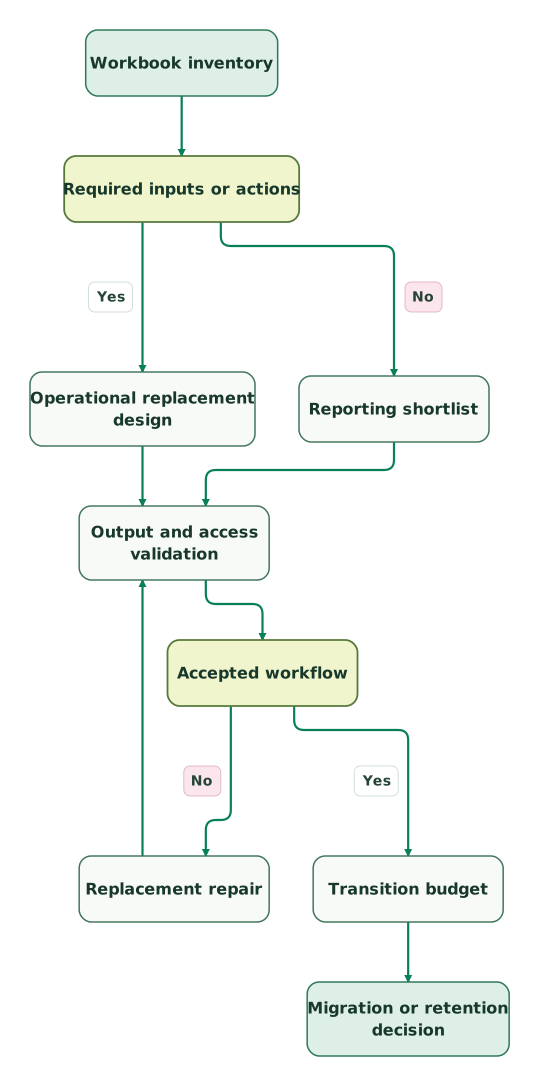
Read diagram as text
- Workbook inventory to Required inputs or actions.
- Required inputs or actions to Operational replacement design: Yes.
- Required inputs or actions to Reporting shortlist: No.
- Operational replacement design to Output and access validation.
- Reporting shortlist to Output and access validation.
- Output and access validation to Accepted workflow.
- Accepted workflow to Replacement repair: No.
- Replacement repair to Output and access validation.
- Accepted workflow to Transition budget: Yes.
- Transition budget to Migration or retention decision
Run the pilot on a closed business period with known totals, then a changing current period. Include an ordinary reader, an author and a restricted user. If input data is part of the workbook, change a permitted value, reject an invalid value and confirm the downstream calculation. Keep the original result available for comparison throughout the transition.
Define a stop condition before spending further. If the replacement requires a separate application to preserve a critical workflow, return to the business case with that cost. If the workbook is only a collection of unused charts, reduce the scope before comparing vendors again. Both outcomes can be better than a full visual copy.
Sigma replacement checklist
- An inventory of active workbook audiences and owners.
- Separate requirements for reading, exploration, data entry and actions.
- A written mapping from each required task to a billable role.
- Source definitions and a reconciled comparison dataset.
- Tests for restricted records, downloads and revoked access.
- A replacement owner for each input table or operational action.
- A transition budget including overlap and training.
- An acceptance period and a clear retirement condition for old content.
Use the marketing data audit skill to organize the metric and ownership evidence. Keep the results attached to the reporting requirement so the next reviewer can understand the decision without reconstructing the original workbook.
Keep reading
Browse all Data Warehouse guides
 Data Warehouse
Metabase vs Tableau: Reporting Workflows, Prices and Team Fit
Choose Metabase for prepared-table reporting or Tableau for detailed visual analysis. Compare current prices, team budgets, access rules and migration checks.
Jafrin Akter AloLast updated 10 min read
 Data Warehouse
Metabase vs Power BI: Costs, Data Models and Reporting Ownership
Choose Metabase for warehouse-led reporting or Power BI for Microsoft model ownership. Compare annual budgets, existing licenses, freshness and reader access.
Jafrin Akter AloLast updated 11 min read
 Data Warehouse
BI Tools Price Comparison: What Tableau, Power BI, Data Studio, Metabase and Looker Cost
Compare what Tableau, Power BI, Data Studio, Metabase and Looker cost at 10, 25 and 50 users, who pays for dashboard viewers, and the costs beyond seats.
Jafrin Akter AloLast updated 14 min read
Data warehouse & CDP
See the implementation scope, deliverables and acceptance checks.
Questions people ask
Is Metabase a complete replacement for a Sigma forecasting workbook?
Metabase can replace the reporting part of a Sigma forecasting workbook when the required analysis and access behavior are supported. A complete replacement also needs a design for any forecast inputs, validation and operational actions. Inventory those behaviors first, then test their replacements with the process owner before calling the migration complete.
Does Sigma publish a universal per-user starting price?
Sigma directs buyers to an account executive or customer success manager for license prices. Its documentation explains the role structure, including permission-based tier assignment, but that does not establish a universal public starting amount. Ask for a quote matching your required roles and existing license model using the Sigma license overview.
Is Hex a better Sigma alternative for Python-heavy analysis?
Hex is a strong shortlist for Python-heavy analysis when the authors want SQL, Python and explanatory outputs in a connected notebook workflow. Its notebook documentation describes that working model. Validate the stakeholder experience separately: the person consuming the result may need a simpler interaction than the person building the analysis.
Can a cheaper BI subscription justify rebuilding working Sigma reports?
A cheaper BI subscription can justify rebuilding Sigma reports when the expected saving exceeds transition and ongoing operating costs over an acceptable period. Include migration effort, overlapping contracts, training and any replacement application. Use measured pilot effort and the actual quote. A license-only comparison can overstate savings by omitting the most expensive parts of the change.
Does Looker mean the same product as Data Studio in a Sigma shortlist?
Looker and Data Studio are separate products, so a Sigma shortlist should identify the intended one explicitly. Looker uses centrally maintained LookML models and has platform-plus-user pricing. This article's Looker recommendation concerns that modeled analytics platform. Its pricing page and LookML introduction describe the relevant scope.
Sources
- Sigma account types and license overview
- Sigma input tables overview
- Sigma free trial
- Metabase pricing
- Metabase query builder
- Microsoft Power BI pricing
- Power BI sharing rules
- Power BI connection modes
- Tableau Cloud pricing
- Tableau shelves and cards
- Tableau Desktop edition comparison
- Hex pricing
- Hex notebook development
- Hex SQL cells
- Looker pricing
- LookML introduction
- Hex billing FAQ

Written by
Jafrin Akter AloData Engineer and Co-founder at Martechdevs and Growth and Analytics Partners
Jafrin writes practical guides to marketing technology, customer data, analytics and AI workflows. Martechdevs is a Growth and Analytics Partners company.