
Metabase vs Power BI: Costs, Data Models and Reporting Ownership
Pick Metabase if your reporting starts with prepared warehouse tables and a browser-based question workflow; pick Power BI if your team wants reusable semantic models and already works within Microsoft's reporting environment. Metabase vs Power BI depends on the cost of the required configuration, the people maintaining it and the way readers receive reports.
On this page
Metabase vs Power BI comparison
These are USD list prices with the billing basis shown; the configurations cover internal reporting.
| Decision | Metabase | Power BI |
|---|---|---|
| Paid entry | Starter: $100/month or $1,080/year with five users | Pro: $14/user/month, paid yearly |
| Additional users | Starter: $6/user/month or $65/user/year beyond five | Each Pro user requires a license unless an applicable existing entitlement covers it |
| Advanced starting point | Pro: $6,210/year with ten users, then $130/user/year | Premium Per User: $24/user/month, paid yearly |
| Free evaluation | Self-hosted Open Source; 14-day paid-plan trials | Free Desktop and account; sharing has licensing conditions |
| Main workflow | Query builder and SQL over connected data | Report authoring with reusable models and several storage modes |
Subscription inputs come from Metabase pricing and Power BI pricing. Microsoft's sharing rules and connectivity modes explain the deployment qualifications.
We would choose Metabase for a team that has already standardized its business logic in the warehouse and wants people to answer questions against those models. We would choose Power BI when an existing Microsoft team can maintain shared semantic models, manage report distribution and support the authoring environment. Familiarity with Excel helps identify potential maintainers, but it does not prove that the organization has a reporting owner.
At Martechdevs, we define those ownership boundaries and implement the source models through our data warehouse and reporting service. The first deliverable should be a trusted business definition and a clear audience. Tool access follows that design.
Metabase and Power BI decision blocks
Metabase
- Best for: Teams with dependable database models and business users who need a direct route to filtered tables, summaries and dashboards.
- Pros: The query builder supports stepwise exploration without SQL. The SQL editor gives analysts an escape route for more specific logic.
- Cons: The inexpensive plan can be the wrong comparison if row and column permissions or auditing are requirements. Self-hosted operation also creates a maintenance responsibility.
- Free plan and startup offer: Open Source is self-hosted with unlimited users and no license fee. Paid plans offer a 14-day trial. No startup discount is assumed in the examples. See Metabase plan terms.
- Choose it if: Shared business rules already live in curated warehouse tables, and a browser-first reporting workflow suits both authors and readers.
- Skip it if: The team wants to avoid both managed-plan fees and ownership of upgrades, application backups and access administration.
Power BI
- Best for: Microsoft-centered organizations with an owner for reusable reporting models and a defined publishing and access process.
- Pros: Import, DirectQuery and other connection modes support different data-placement requirements. Existing Microsoft 365 E5 or Office 365 E5 subscriptions include Pro, which can change incremental license cost. See connection modes and Power BI plans.
- Cons: Free authoring and paid distribution are different decisions. The desktop workflow also needs a suitable Windows environment, while the chosen storage mode affects freshness and performance.
- Free plan and startup offer: Power BI Desktop and the free account support evaluation. Shared content requires the applicable user or capacity licensing. Treat any startup credits as a separate eligibility check rather than guaranteed report-user licenses. See Desktop availability and sharing prerequisites.
- Choose it if: A team can own shared models and distribution, and the Microsoft environment makes that workflow practical for authors and consumers.
- Skip it if: The purchasing case assumes that a free account or a small Fabric capacity automatically gives every employee free access to private reports.
Data models and reporting responsibility
The useful distinction in Power BI vs Metabase is the location of reusable business logic. A warehouse-first team may prefer to calculate business definitions once in source models and expose them to several destinations. A Power BI-centered team may choose to maintain measures and relationships within shared semantic models. Both designs need an owner and a change process.
Consider monthly recurring revenue. The definition needs a billing period, currency policy, treatment of discounts and rules for inactive subscriptions. If one dashboard computes these rules independently from another, product choice will not make the totals agree. Document the contract and decide which layer owns each transformation before comparing report features.
Use a small source with known edge cases in the pilot: a refund, a customer with several subscriptions, an account that changes region and a month with no activity. Ask both tools to produce the same grouped result. A match on the grand total alone is weak evidence because offsetting errors can cancel out.
The marketing metric contracts guide helps separate the business definition from the chart. The data warehouse design guide explains the upstream models that make several reporting destinations manageable. These preparations also reduce the work of changing BI tools later.
In Metabase, broad query freedom needs usable source tables. A person can join two tables correctly in the interface and still multiply rows if the relationship is misunderstood. Publish descriptions of each table's row definition and expected relationships. Keep a known-good total available so users can validate a new question.
In Power BI, plan for another maintainer to understand the model and refresh configuration. A report file on one employee's computer is an ownership risk even when the visuals are correct. During the pilot, have a second author change a measure, publish an approved revision and explain its effect on existing reports.
Import, source queries and freshness
Power BI Import loads selected data into its semantic model. Source changes become visible after refresh. DirectQuery leaves data at the source and issues queries for report interactions, so response time depends on the source and connection path. Microsoft recommends Import as the default, with other modes selected for specific constraints. See the DirectQuery guide.
A source-query requirement therefore needs a business reason. If yesterday's closed revenue is enough for the morning meeting, a predictable refresh can be appropriate. If an operations team makes decisions from current orders, freshness deserves a defined target and a load test. Calling a dashboard live does not specify the acceptable delay or failure behavior.
Define freshness from the business event to the displayed result. A report can run a new query against a warehouse whose upstream import is several hours old. Record the source extraction timestamp, warehouse completion timestamp and report refresh or query timestamp. Show the relevant timestamp to readers where it affects their decision.
Do the same with performance. Evaluate the busiest realistic viewing period, the default filter state and the most expensive allowed drill-down. A single demonstration over a small sample is insufficient for sizing the operating budget. Keep source-query cost separate from the BI license and record an acceptable response-time target before testing.
Metabase and Power BI cost by team size
These hypothetical examples use annual USD list pricing and assume every named Power BI user needs a new Pro license. They exclude taxes, implementation, warehouse usage, optional metered features, hosting and capacity. Metabase Starter must satisfy the team's access requirements for that column to apply.
| Internal audience | Metabase Starter per year | Power BI Pro per year | License arithmetic |
|---|---|---|---|
| Five people | $1,080 | $840 | Five included Starter users; 5 × $14 × 12 for Pro |
| Twenty people | $2,055 | $3,360 | $1,080 + 15 × $65; 20 × $14 × 12 |
| Fifty people | $4,005 | $8,400 | $1,080 + 45 × $65; 50 × $14 × 12 |
The rates are published in Metabase plans and Power BI plans. Use the actual annual additional-user rate for Metabase; its annual and monthly amounts are separate offers.
For this narrow Starter-versus-Pro subscription comparison, Starter is $755 + $65 per user annually once the audience reaches five. Power BI Pro is $168 per user annually. The mathematical crossover is $755 ÷ $103, or about 7.33 users, making eight the first whole-user count at which Starter's annual subscription is lower. Required features and existing licenses can reverse the practical decision.
Suppose the same twenty-person company needs Metabase Pro for its chosen access design. Its annual license is $6,210 + 10 × $130 = $7,510. Suppose a different requirement calls for Power BI Premium Per User for all twenty people: 20 × $24 × 12 = $5,760. These are alternative planning cases, with inputs from the same official pricing pages. They are not a claim of feature equivalence.
Existing entitlements deserve their own line. If twelve of the twenty users already have qualifying E5 subscriptions that include Pro, eight new Pro licenses would cost 8 × $14 × 12 = $1,344/year. The existing E5 contracts still cost money; $1,344 describes only the incremental Pro purchase under that assumption.
For a bigger reporting estate, consult the Power BI pricing guide before estimating capacity. If the choice also includes detailed visual authoring, Metabase vs Tableau covers that decision. The Sigma alternatives guide adds spreadsheet-style and notebook-led options.
Distribution and access boundaries
Power BI recipients generally need the relevant Pro or Premium Per User license unless the content qualifies for capacity-based consumption. For free users consuming Power BI items on Fabric, Microsoft identifies F64 or larger as the relevant capacity threshold. Smaller Fabric capacities do not remove the per-user requirement for that scenario. See Fabric licenses.
Check the actual distribution path. A report link, an app, a workspace collaborator and an external guest have different operational implications. The report and its underlying model both matter. Microsoft's sharing documentation also warns that hiding fields or pages does not secure the underlying data; row-level or object-level security supplies the appropriate boundary.
Metabase's groups need an equally concrete review. Users receive the most permissive access from their memberships, so a broad All users grant can defeat a restriction elsewhere. Test with the account's complete membership rather than examining one restricted group in isolation. The behavior is described in the permissions introduction.
A useful acceptance test includes an allowed record, a forbidden record and an export attempt. Then remove the test user's access and revisit an existing saved link. Record expected behavior before running the test. The goal is a repeatable release check that the reporting owner can run after an access change.
Best fit by company and workflow
| Company or operating model | Best fit | Runner-up | Decision reason |
|---|---|---|---|
| Small database-led SaaS team with mixed computers | Metabase | Power BI | Browser workflow and warehouse-owned logic fit the team |
| Finance organization with established Microsoft reporting skills | Power BI | Metabase | Existing modeling and distribution ownership has value |
| Five-person team buying all licenses from scratch | Power BI Pro, subject to workflow fit | Metabase Starter | Lower subscription in the stated annual example |
| Twenty-person team with simple permissions and curated warehouse tables | Metabase Starter | Power BI Pro | Lower subscription in the stated annual example |
| Organization with qualifying E5 access already purchased | Power BI | Metabase | Incremental license cost may be limited |
| Team with complex restrictions and unclear ownership | A scoped access pilot | The other qualified tool | Verified access design precedes a cost comparison |
Reporting selection workflow
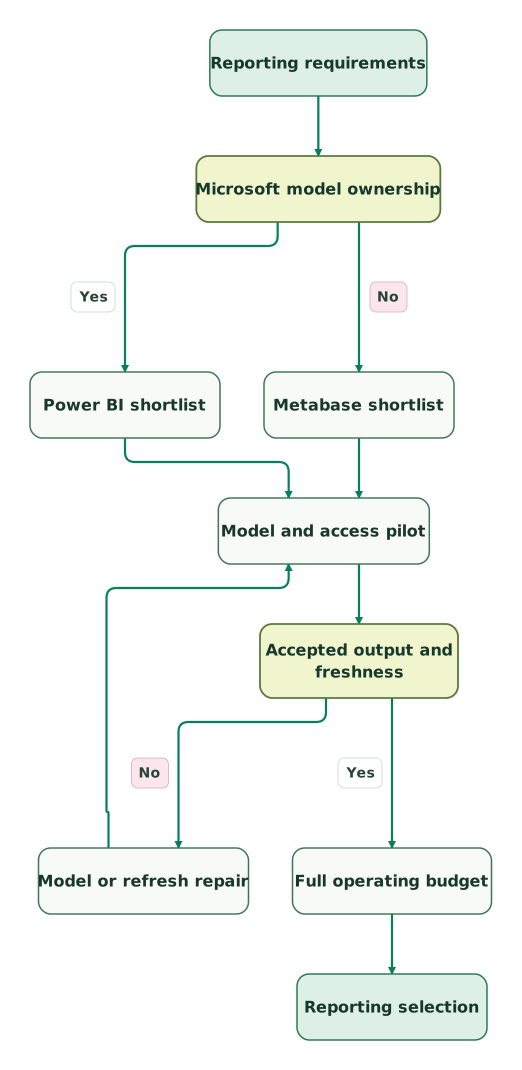
The workflow treats existing ownership as a shortlist signal. Both routes return to the same model, access and refresh validation. A repair must repeat that validation before the team considers the full operating budget.
Read diagram as text
- Reporting requirements to Microsoft model ownership.
- Microsoft model ownership to Power BI shortlist: Yes.
- Microsoft model ownership to Metabase shortlist: No.
- Power BI shortlist to Model and access pilot.
- Metabase shortlist to Model and access pilot.
- Model and access pilot to Accepted output and freshness.
- Accepted output and freshness to Model or refresh repair: No.
- Model or refresh repair to Model and access pilot.
- Accepted output and freshness to Full operating budget: Yes.
- Full operating budget to Reporting selection
Reporting purchase checklist
- An explicit distinction between existing license entitlement and new spending.
- A named maintainer for source models, reports and access groups.
- A reconciled sample with duplicates, refunds and empty periods.
- A documented freshness target from source event to report result.
- A reader test for forbidden rows, exports and revoked access.
- A subscription comparison using the required plan and distribution method.
- A realistic busy-period test and separate source-query budget.
- A second author able to change and publish an approved report.
The marketing data audit skill provides a useful structure for the source and ownership review. Use the dashboard templates tool to define the reporting job before spending time on layout. Keep the acceptance evidence with the report so later changes can repeat the same checks.
Keep reading
Browse all Data Warehouse guides
 Data Warehouse
Metabase vs Tableau: Reporting Workflows, Prices and Team Fit
Choose Metabase for prepared-table reporting or Tableau for detailed visual analysis. Compare current prices, team budgets, access rules and migration checks.
Jafrin Akter AloLast updated 10 min read
 Data Warehouse
Sigma Alternatives: BI Competitors by Workflow and Cost
Compare Sigma alternatives for reporting, visual analysis, SQL and Python, and shared metrics. Review prices, operational workflow gaps and migration costs.
Jafrin Akter AloLast updated 11 min read
 Data Warehouse
BI Tools Price Comparison: What Tableau, Power BI, Data Studio, Metabase and Looker Cost
Compare what Tableau, Power BI, Data Studio, Metabase and Looker cost at 10, 25 and 50 users, who pays for dashboard viewers, and the costs beyond seats.
Jafrin Akter AloLast updated 14 min read
Data warehouse & CDP
See the implementation scope, deliverables and acceptance checks.
Questions people ask
Is Power BI Pro cheaper than Metabase Starter for five people?
Power BI Pro has the lower annual subscription in a five-person team buying every license from scratch: $840 versus $1,080 for Metabase Starter. The comparison assumes standard USD annual terms and sufficient Starter features. Existing subscriptions, additional capabilities and operating work can change the total. The inputs are on the Microsoft and Metabase pricing pages.
Can a Mac-only team ignore Power BI Desktop requirements?
A Mac-only team should confirm its complete Power BI authoring workflow before purchasing. Power BI Desktop is distributed for Windows, while browser reporting does not establish that every required model-editing task fits the browser workflow. Test the actual creation, maintenance and publishing tasks with the intended authors. Microsoft's Desktop guidance defines that application's requirements.
Does a small Fabric capacity replace every Power BI Pro license?
A small Fabric capacity does not automatically replace Pro licenses for private Power BI consumption. Microsoft identifies F64 or larger for free-user consumption in the applicable Fabric scenario, and authoring activities retain their own licensing requirements. Map the report, model, workspace and each user's role before budgeting from the Fabric license rules.
Can Metabase and Power BI report from the same warehouse models?
Metabase and Power BI can be evaluated against the same prepared warehouse data when the source and required connection modes are supported. Use one metric contract and reconcile the same period and segments in both. Keep report-specific calculations visible so a matching source table does not conceal different business logic in the two reporting layers.
Is a live source connection enough to guarantee current dashboards?
A live source connection does not guarantee that the underlying source contains current business data. Upstream imports, transformations and delayed events can all add lag before a report queries anything. Define freshness from the original business event to the displayed result, then test that path. Record source completion and reporting timestamps separately so readers can interpret a delayed update.
Sources

Written by
Jafrin Akter AloData Engineer and Co-founder at Martechdevs and Growth and Analytics Partners
Jafrin writes practical guides to marketing technology, customer data, analytics and AI workflows. Martechdevs is a Growth and Analytics Partners company.