
Shopify Cookiebot Consent Mode: Carry Choices Into Checkout
Shopify Cookiebot consent mode needs a working connection between the banner, Shopify's privacy settings and the tags that actually run during checkout. A storefront acceptance does not prove that a checkout pixel received the same permission. Choose one owner for each consent-writing integration, then test the shopper's choice across the storefront, checkout and any server-side destination before trusting purchase measurement.
On this page
How does consent reach Shopify checkout?
Shopify checkout uses privacy state communicated through Shopify's Customer Privacy API. A Cookiebot choice and a Google tag's consent state belong to different parts of that journey, so inspect both rather than treating the banner as the complete implementation.
Use this boundary map to assign the work:
| Boundary | Evidence to retain | Question it answers |
|---|---|---|
| Banner interaction | Selected categories and the tested journey | What did this visitor choose? |
| Shopify privacy integration | Registered choice and effective permissions | What does Shopify allow for this visitor and configuration? |
| Checkout pixel | Required purposes, initial state and later updates | Can this pixel load, and which state does it receive? |
| Google measurement | Default, update and state at the business event | How does the Google tag interpret the permitted use? |
| Server destination | Incoming consent and actual outgoing request | Did the downstream implementation preserve the restriction? |
The API applies decisions to Shopify-managed surfaces, including pixels and checkout. Arbitrary theme scripts need their own consent integration; platform settings do not automatically wrap every third-party resource. Shopify privacy API, Shopify customer privacy settings.
Start with one real path the store offers: product page, cart, checkout and the purchase confirmation. Add accelerated checkout, direct checkout links and post-purchase offers to the inventory where applicable. Record each hostname and which app, theme script or pixel owns measurement there. A check performed on the home page cannot establish what ran in another execution context.
The general Cookiebot troubleshooting guide covers duplicate installations and late defaults. This guide focuses on the Shopify handoff. At Martechdevs, our Consent Mode v2 implementation work starts by identifying that handoff and the evidence each owner must produce.
Which Cookiebot installation should own the setup?
Use the dedicated Cookiebot Shopify app when its supported integration fits the store, and treat a manual installation or custom pixel as a separately maintained implementation. Avoid combining instructions from those routes into one installation.
Check Cookiebot's plans and per-domain prices for the selected installation before budgeting implementation work.
| Installed route | Consent work to confirm | Main implementation risk |
|---|---|---|
| Cookiebot Shopify app | App embed, privacy sync and its Google configuration | An older theme or GTM installation still writes competing state |
| Manual Cookiebot in the theme | Banner, Shopify API bridge and Google consent configuration | Only the visible banner was installed |
| GTM inside a Shopify custom pixel | Pixel eligibility plus consent handling inside that sandbox | Main-page consent is assumed to exist in the pixel's runtime |
Cookiebot says its Shopify app handles Customer Privacy API sync automatically; manual theme installation requires the sync code to be added. The app's own Google setup also provides default consent state, so adding a second theme-level default is not a routine app-installation step. Cookiebot checkout integration, Cookiebot app Consent Mode setup.
There is a useful support distinction here. Shopify publishes an advanced GTM custom-pixel tutorial, while Cookiebot's app guide excludes GTM inside a custom pixel from its supported setup. Shopify also places custom-pixel maintenance and troubleshooting on the implementer. Do not interpret the existence of Shopify's tutorial as a promise that Cookiebot's main-page integration configures that sandbox. Shopify GTM custom-pixel tutorial.
Before changing anything, inventory the Cookiebot app embed, manually inserted Cookiebot script, theme GTM, custom pixels and Google-related apps. Keep one identified writer for each intended runtime. Separate containers can serve separate jobs, but two purchase senders or two conflicting defaults on the same path need an explicit resolution.
How do you configure the app without competing writers?
Configure the selected Cookiebot app route, align Shopify's regions and verify the deployed theme before changing downstream triggers. Keep a record of the previous configuration so a repair can be rolled back without guessing.
- Open Cookiebot CMP in Shopify and complete its account setup. For an existing Cookiebot account, connect the appropriate Domain Group ID.
- Open Online Store → Themes → Customize → App embeds, enable Cookiebot CMP and save the theme you intend to publish.
- Review Shopify Settings → Customer privacy and the CMP's consent regions together. Follow Shopify's third-party-banner procedure to avoid two competing visible banners while retaining the required regions.
- In the app's Google Consent Mode configuration, choose the approved Basic or Advanced mode, enter the relevant service IDs and save the configuration.
- Check the deployed page for any former banner, hard-coded consent command or duplicate measurement sender before starting the journey tests below.
Cookiebot documents the new-account and existing-account activation paths separately. Its configuration warning can mean the Google settings were enabled but never saved. App activation, Google configuration warning.
Shopify specifically requires the third-party app's consent regions and Shopify's regions to match; otherwise non-essential processing can occur before a visitor gives consent. Removing a duplicate banner is therefore a different task from removing privacy-region requirements. Third-party banner configuration.
For a manual installation, use Cookiebot's Shopify integration instructions as the starting point, then reconcile the bridge against Shopify's current API. Cookiebot's sample still loads API version 0.1, while Shopify's current reference uses 0.2. Check loading, callbacks and purpose mapping deliberately rather than copying the old snippet into an app-managed store. Manual Shopify integration.
What should you inspect in Shopify's privacy state?
Inspect the recorded choice and the effective permission separately. Shopify's currentVisitorConsent() reports yes, no or an empty string for no recorded decision. Its Allowed methods also account for merchant configuration and visitor location. An empty choice is not interchangeable with either a confirmed acceptance or a processing-permission result. Customer Privacy API semantics.
The following read-only diagnostic runs in the storefront page context after the privacy API has loaded. It reads four purposes without changing consent, reading customer identifiers or sending data anywhere. If the API is unavailable, investigate initialization first; the official loader is Shopify.loadFeatures with consent-tracking-api version 0.2 and a completion callback.
function readShopifyPrivacy(privacy) {
  if (!privacy || typeof privacy.currentVisitorConsent !== "function") {
    throw new Error("Shopify privacy API is not ready in this context");
  }
  const choices = privacy.currentVisitorConsent();
  if (!choices || typeof choices !== "object" || Array.isArray(choices)) {
    throw new Error("Unexpected consent response");
  }
  const purposes = [
    ["analytics", "analyticsProcessingAllowed"],
    ["marketing", "marketingAllowed"],
    ["preferences", "preferencesProcessingAllowed"],
    ["sale_of_data", "saleOfDataAllowed"],
  ];
  return purposes.map(([purpose, method]) => {
    if (typeof privacy[method] !== "function") {
      throw new Error(`Missing privacy method: ${method}`);
    }
    const allowed = privacy[method]();
    if (typeof allowed !== "boolean") {
      throw new Error(`Unexpected permission result: ${purpose}`);
    }
    const raw = choices[purpose];
    const choice = raw === "yes" ? "granted"
      : raw === "no" ? "denied"
      : raw === "" ? "not_recorded" : "unexpected";
    return { purpose, choice, allowed };
  });
}

console.table(readShopifyPrivacy(window.Shopify?.customerPrivacy));
Run it before interaction, after the selected choice and after a reload. Compare the output with the banner action and the applicable region settings. An unexpected value is a diagnostic exception; this helper never turns it into a grant. A missing API also remains an error instead of becoming a default permission.
Do not paste this storefront probe into the pixel sandbox and expect the same global object. The pixel has its own privacy interface, covered below. Neither probe reads the Google tag's internal consent state, so Shopify evidence alone cannot certify that Google received the correct values.
Do not repair a mismatch by editing Shopify cookies directly or recording acceptance on the visitor's behalf. Shopify requires its privacy API for those settings and ties consent recording to visitor interaction. Keep a sale/sharing opt-out distinct from a general marketing category; a copied category mapping is not a substitute for the store's approved policy. Privacy API recording rules.
How should Google consent types and pixel permissions work together?
Treat Shopify pixel eligibility as an outer loading rule and Google consent mode as behavior inside the loaded measurement path. A Google configuration cannot send a cookieless ping from code that Shopify has never loaded.
Google separates four commonly inspected signals:
| Google signal | What it controls | Test implication |
|---|---|---|
analytics_storage | Analytics-related storage | Inspect analytics storage separately from advertising |
ad_storage | Advertising-related storage | A storage decision does not settle every advertising use |
ad_user_data | Sending user data to Google for advertising | Check this signal rather than inferring it from cookies |
ad_personalization | Personalized advertising | Verify its own state for the intended advertising behavior |
Google's Basic mode blocks Google tags until the required consent; Advanced mode can send measurements without cookies under denied storage states. Select the mode under the store's approved collection policy, including what may leave the browser before a choice. Google consent types and modes, Consent Mode v2 implementation context.
Shopify's pixel manager loads an app pixel only when all its declared required privacy permissions are allowed. Custom pixels expose their own purpose and data-sale settings in Customer events. A pixel requiring both analytics and marketing may therefore remain unloaded after an analytics-only choice. Do not remove a required purpose merely to make a debugger show activity. Verify whether the pixel's actual collection can be separated or whether its current requirement is correct. Shopify pixel privacy, Custom-pixel privacy settings.
Google requires defaults before measurement and updates on the page where the choice occurs, before navigation. In GTM, consent templates use the consent-specific APIs; a queued gtag update is not a replacement for updateConsentState inside a template. Google consent implementation.
A permitted tag also needs the correct business trigger. Accepting marketing is not a purchase. Preserve the relationship between the actual checkout event, its transaction identity and the permission under which its destination request is made.
What changes inside the checkout pixel sandbox?
The checkout pixel must read its own initial privacy state and later updates through the supported pixel APIs. It cannot rely on the storefront's JavaScript variables remaining available after navigation.
Shopify app pixels use a strict worker sandbox; custom pixels use a sandboxed iframe that cannot access the top frame. Theme DOM access and a main-page dataLayer are therefore not shared state to build around. Use the customer-event payload and pixel APIs for the information that Shopify exposes. Shopify sandbox boundaries.
Inside a pixel, init.customerPrivacy provides the initial permissions. The customerPrivacy API supplies visitorConsentCollected updates, with the new permissions in event.customerPrivacy. Keep both initialization and updates in the implementation: listening only for a future change can miss the saved state present when the pixel starts. Pixel privacy interface.
The Cookiebot app intentionally does not display its banner inside checkout. Its supported mechanism is the storefront-to-Shopify privacy sync. That does not mean Shopify can never show a checkout consent interface: Shopify's native banner has its own checkout and customer-account behavior. Verify the actual configured interface and the route for changing preferences instead of treating either banner's visibility as proof of permission. Cookiebot checkout behavior, Shopify banner surfaces.
If maintaining a GTM custom pixel, replace the tutorial's illustrative all-granted configuration with the store's actual consent design. The tutorial itself says its sample settings may not match the store's requirements. Then verify the initial state and every update inside that runtime. Installing a second Google configuration to cover a missing checkout event can create duplicate purchases while leaving the original permission problem intact. Shopify GTM example and qualifications.
Test a customer who enters checkout without first visiting the banner, and a returning customer whose saved choice differs from the current default. These are distinct paths. Never infer acceptance from an email address, login, existing customer record or the fact that checkout was entered.
What must server-side GTM receive and enforce?
Server-side GTM needs consent context from its collection path and destination behavior that respects it. A first-party hostname does not supply permission missing from the browser journey.
Cookiebot's Shopify app does not control purely server-side requests. Its support guidance distinguishes browser consent signals from the separately configured server container that consumes them. Treat server-side consent as an owned implementation task, even when the app has already configured its supported client-side integration. Cookiebot server-side boundary.
In Google's supported architecture, the Google tag adds consent parameters to the HTTP request, the GA4 client receives it in the server container, and compatible Google product tags adjust their outgoing behavior. This does not prove that an unrelated destination template or an order webhook implements the same controls. Google server-side consent flow.
For each destination, retain the incoming state, interpretation and outgoing request in the same diagnostic case. Inspect any transformation that removes fields or replaces missing values. An absent state should produce the explicitly designed restricted or held outcome, never an undocumented grant.
A delayed server event needs its original event identity and a defined permission policy for delayed processing. Do not recover a blocked browser purchase by sending a fresh full-data event from the server simply because the order exists. Operational order processing and marketing disclosure have different purposes. The server-side tracking guide explains the wider delivery architecture.
Which journeys prove consent survives the purchase flow?
Test the choice at every relevant surface and reconcile the resulting business event separately. Use controlled records and preserve redacted evidence, rather than recording full checkout details in a debugging log.
This example test matrix assumes a region configured to require opt-in, a policy with analytics and advertising choices separated, and one named purchase sender. It is an implementation specification to adapt, not a declaration of legal requirements for every store.
| Journey | Choice and transition | Evidence required | Failure to catch |
|---|---|---|---|
| Fresh visit | Make no choice, then open checkout | Defaults, pixel eligibility and permitted network behavior | An early grant or unintended full-data collection |
| Reject optional purposes | Reject, then follow the normal cart route | Denial survives the boundary under the selected mode | Checkout silently restores a grant |
| Analytics only | Accept analytics, decline advertising | Separate purpose states and the pixel's declared requirements | Marketing becomes enabled or an intentional loading restriction is misdiagnosed |
| Accept configured purposes | Accept, then complete the test purchase | Correct state at one intended purchase outcome | Duplicate senders or a consent change counted as a sale |
| Returning visitor | Reload with the saved choice | Initial permissions before the first relevant event | Correct updates but wrong initialization |
| Withdraw | Change a previous choice, then navigate and act again | New restrictions govern subsequent collection | Earlier acceptance remains cached in the next runtime |
| Alternative entry | Open a direct or accelerated checkout path used by the store | Actual initial state and available preference controls | A storefront visit is assumed when none occurred |
Repeat the affected cases after a theme, app, pixel or checkout change. Where the store serves different consent regions, verify each configured policy rather than comparing two sessions with different region assumptions.
Use the consent debugging skill to maintain the regional choice matrix and record which request, storage or tag evidence proves each case.
For Google tags on a supported page, inspect the earliest default, the update and the state when the event fires. Google describes these checks in Tag Assistant's consent workflow. For a Shopify custom pixel, use Shopify Pixel Helper for event and sandbox errors; Shopify says Tag Assistant's Troubleshoot tag feature cannot detect Google tags inside custom pixels. An incompatible debugging view is not evidence that the pixel is absent. Custom-pixel testing limitations.
Keep request evidence separate from reporting evidence. A request's existence alone does not establish its permitted payload or its eventual destination record. Conversely, a missing purchase in GA4 does not identify the failing consent boundary. After the controlled collection checks, use the Shopify-to-GA4 reconciliation method to distinguish expected non-collection, duplicate orders and value differences.
How do you isolate the failing boundary?
Repair the first boundary whose evidence disagrees with the specification, then repeat the complete path. Changing later tags to compensate can conceal the original fault.
| Observation | Inspect first | Repair and retest |
|---|---|---|
| Banner choice is correct, Shopify record differs | Selected app route or manual bridge | Restore the intended writer and verify registration |
| Recorded choice exists, effective permission differs | Region settings, purpose and sale/sharing controls | Resolve policy/configuration differences without forcing a grant |
| Shopify allows the purpose, pixel is absent | Connection, declared requirements and sandbox errors | Correct the actual loading condition or implementation error |
| Pixel receives the state, Google still uses a different one | Defaults, updates and duplicate consent writers | Repair the state translation and event ordering |
| Browser behavior passes, server request does not | Incoming consent, client parsing and destination template | Preserve and enforce the required restriction downstream |
| Consent checks pass but purchase counts do not | Event ownership, trigger and transaction identity | Reconcile business outcomes before adding another sender |
Record an unresolved result as unresolved. For example, a test that proves analytics permission reached the pixel but lacks an outbound request capture has not yet established how the Google tag behaved. That distinction keeps the next investigation focused.
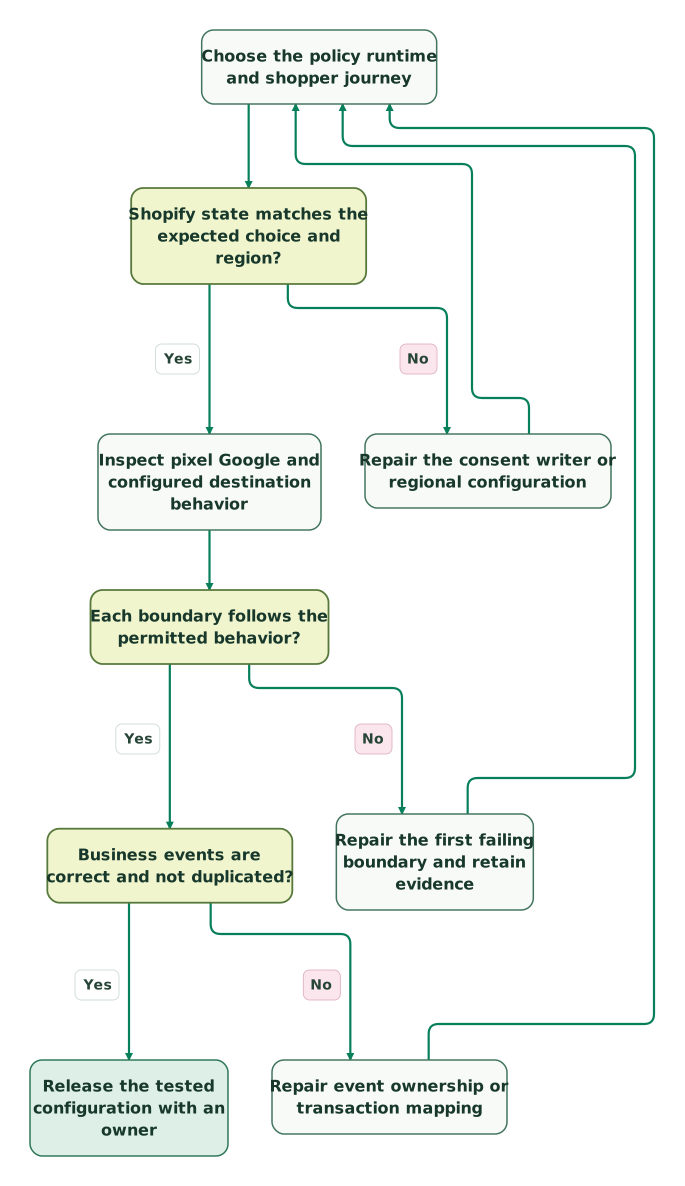
Read diagram as text
- Choose the policy runtime and shopper journey to Shopify state matches the expected choice and region?.
- Shopify state matches the expected choice and region? to Repair the consent writer or regional configuration: No.
- Repair the consent writer or regional configuration to Choose the policy runtime and shopper journey.
- Shopify state matches the expected choice and region? to Inspect pixel Google and configured destination behavior: Yes.
- Inspect pixel Google and configured destination behavior to Each boundary follows the permitted behavior?.
- Each boundary follows the permitted behavior? to Repair the first failing boundary and retain evidence: No.
- Repair the first failing boundary and retain evidence to Choose the policy runtime and shopper journey.
- Each boundary follows the permitted behavior? to Business events are correct and not duplicated?: Yes.
- Business events are correct and not duplicated? to Repair event ownership or transaction mapping: No.
- Repair event ownership or transaction mapping to Choose the policy runtime and shopper journey.
- Business events are correct and not duplicated? to Release the tested configuration with an owner: Yes
What belongs in the release handover?
The handover should identify the consent owner, supported collection routes, tested journeys and evidence needed to reproduce a failure. Retain the actual theme, app and container versions with the test record.
Checklist
- The app, manual bridge and custom-pixel responsibilities are explicit.
- Shopify and CMP consent regions match the approved policy.
- Raw choices and effective permissions are inspected separately.
- Default state, saved choices and withdrawal work in each runtime.
- Pixel requirements and the selected Google mode are compatible.
- No unconditional grant is copied from an illustrative tutorial.
- Server destinations preserve consent and handle missing state deliberately.
- Direct and accelerated checkout routes have their own results.
- One intended business event produces the expected destination outcome.
- Failures have an owner, rollback route and a repeatable retest.
Bring the failed journey and its first mismatching boundary to the $99 martech audit. The useful deliverable is a working consent handoff with evidence, followed by a purchase report whose remaining gaps can be explained.
Keep reading
Browse all Tracking & Attribution guides
 Tracking & Attribution
5 Cookiebot Implementation Mistakes and How to Fix Them
Diagnose late consent defaults, missing updates, duplicate Cookiebot installs and unmanaged embeds. Use six concrete journeys to verify actual tag behaviour.
Jafrin Akter AloLast updated 10 min read
 Tracking & Attribution
Cookiebot Pricing: Free Plan, Premium Tiers and Cost per Domain
Cookiebot costs €7 to €90 per domain a month. See the USD invoice changes from 30 November, Small eligibility, annual budgets and extra costs.
Jafrin Akter AloLast updated 14 min read
 Tracking & Attribution
OneTrust Pricing: Compare the Quote, Usage and Renewal
Compare OneTrust CMP quotes by package, visitor usage, implementation and renewal. Includes a cost worksheet, contract checks and clear budget examples.
Jafrin Akter AloLast updated 15 min read
Consent Mode v2
See the setup scope, acceptance checks and handover.
Questions people ask
Does a missing Cookiebot banner at checkout prove that consent was lost?
No. Cookiebot's Shopify app uses the platform privacy integration rather than showing its own banner in checkout. Inspect the checkout pixel's actual state and behavior for the same visitor journey. Banner visibility and consent propagation are different checks, and Shopify's native banner has separate display behavior. Keep the configured preference-change route usable as part of the test.
Can I choose Not required on a custom pixel to recover advanced-mode pings?
Only when that setting accurately reflects the pixel's permitted collection and the store's policy. Changing it affects the outer loading restriction; it does not make every tag inside the pixel consent-aware. Review the payload, storage and downstream destinations first. If analytics and marketing need different requirements, evaluate separate collection paths rather than weakening the combined pixel's declaration.
Should a consent update replay a purchase that happened earlier?
A consent update is not a new purchase. Any supported replay or queued delivery needs the original business-event identity, occurrence time and an approved rule for that collection. Test its relationship to other senders before enabling it. Never create a fresh purchase on every acceptance event just to raise reporting coverage; that can count the same order repeatedly.
Will copying the theme setup cover a headless storefront or mobile checkout?
No. A different storefront or embedded checkout needs its own supported privacy integration and acceptance tests. Confirm where the choice is collected, how the platform receives it and which state the destination runtime exposes. Keep that work outside the theme-installation assumption, and do not treat a shared store account or a successful customer login as proof that the permission crossed environments.
What evidence should support a consent-related purchase-loss estimate?
Use an explicitly defined order population, collection period and appropriately retained consent evidence for the relevant journey. Separate confirmed consent restrictions from technical errors and cases with no usable evidence. A missing analytics event cannot report its own consent state. Present unresolved gaps honestly, and avoid promising that a server-side implementation will recover every purchase absent from the browser dataset.
Sources
- Shopify: Customer Privacy API
- Shopify: Configuring customer privacy settings
- Cookiebot: Consent in Shopify Checkout
- Cookiebot: Setting Up Google Consent Mode v2 on Shopify
- Cookiebot: Activate Your Consent Banner
- Cookiebot: Basic, Advanced and the configuration warning
- Cookiebot: Manual Shopify installation
- Shopify: GTM custom-pixel tutorial
- Shopify: Pixel privacy
- Shopify: Manage custom pixels
- Shopify: Web pixel sandbox environments
- Google: Consent mode overview
- Google: Set up consent mode on websites
- Google: Troubleshoot consent mode
- Cookiebot: Server-side tagging support boundary
- Google: Consent mode with server-side Tag Manager

Written by
Jafrin Akter AloData Engineer and Co-founder at Martechdevs and Growth and Analytics Partners
Jafrin writes practical guides to marketing technology, customer data, analytics and AI workflows. Martechdevs is a Growth and Analytics Partners company.