
Salesforce Jira Integration: Setup, Ownership and 5 Sync Checks
A useful Salesforce Jira integration keeps customer commitments connected to engineering work without making both systems compete to own the same fields. Choose the connection for the job: a record-sync app for cases and work items, a Flow connector for a defined automation, or an alert integration for on-call escalation. Then prove identity, permissions, update direction and recovery with representative records.
On this page
The expensive mistake is treating a successful connection test as a finished integration. An authenticated app can still create duplicate work, overwrite a support priority or leave another affected customer waiting for an update. Our CRM and lifecycle implementation work starts with those operating decisions before configuring automation.
Which Salesforce Jira integration should you choose?
Choose the integration by the record and action your team needs, rather than the two product names in an app listing.
| Reader's job | Route to evaluate | Boundary to verify |
|---|---|---|
| Support needs linked customer records and engineering work items | A record-sync app such as Appfire Connector for Salesforce & Jira | Object mappings, field direction, association behavior and ordinary-user access |
| An existing Salesforce process needs a Jira action or trigger | Salesforce's MuleSoft for Flow Jira connector | Flow entitlement, connection permissions and the actions in the designed flow |
| A Service Cloud case needs on-call acknowledgement and escalation | Jira Service Management's Salesforce Service Cloud integration | Alert lifecycle and the relevant Service Collection subscription |
| Product needs a Salesforce record as evidence for an idea | Salesforce insights in Jira Product Discovery | Insight visibility and supported Salesforce links |
Appfire publishes its Connector for Salesforce & Jira on Atlassian Marketplace, with Cloud and Data Center variants. The implementation steps below focus on its Cloud route. Other publishers and the Data Center version need their own setup and acceptance checks.
Salesforce's Jira connector for Flow supplies triggers and actions such as creating issues and updating comments. It generally requires the MuleSoft for Flow: Integration add-on, with named exceptions for segment-triggered, activation-triggered and broadcast flows. The documentation separately specifies API access for Professional Edition. Verify the entitlement against the edition on your actual order; do not assume a similarly named suite includes it.
The Service Cloud integration in Jira Service Management turns cases into alerts: a case entering Working acknowledges its alert, and Closed closes it. Bidirectional and specified outgoing integration capabilities require Premium or Enterprise, accessed through Service Collection Premium or Enterprise. Choose this for incident response, not as evidence that Jira Software bugs and Salesforce cases automatically share every field.
Jira Product Discovery's Salesforce integration adds a Salesforce object link as an insight on an idea. Salesforce sandbox insight URLs are unsupported. That is useful for product evidence; it does not establish a case-resolution workflow.
If customer context is still missing from the support process itself, establish the requester, affected account and evidence contract first. An integration cannot repair an ambiguous customer identity by moving it faster.
What must a Salesforce case and Jira work item mean?
A Salesforce case should represent a customer obligation, while the Jira work item represents the engineering work needed to investigate or resolve a problem. Several customers can have separate obligations connected to one defect.
For example, imagine two fictional customers reporting the same failed export. Case A belongs to a customer with a workaround. Case B belongs to a customer whose reporting process is blocked. One bug can describe the shared technical cause. Each case still needs its own contact, impact, response commitment and confirmation that the fix worked.
Use a field contract before setting synchronization direction:
| Information | Authoritative owner | Integration treatment |
|---|---|---|
| Case identity, affected account and customer contact | Salesforce support process | Retain stable references; expose only the context engineering needs |
| Reproduction and sanitized technical evidence | Agreed support-to-engineering handoff | Create a usable engineering description without copying the entire conversation |
| Engineering investigation and delivery state | Jira engineering process | Return progress into a distinct Salesforce engineering-status field |
| Customer response commitment and case closure | Support owner in Salesforce | Keep separate from engineering status and release completion |
| Commercial impact across affected customers | Agreed account-level calculation | Aggregate deliberately; do not let the last edited case become the total |
These are proposed operating rules, not names of built-in connector fields. Create the required fields in your own schema and document their allowed values. The CRM property ownership guide gives a method for resolving competing writers before enabling updates.
Keep three questions separate: was the defect fixed, was the fix released to the affected environment, and did it resolve this customer's case? A Jira transition may answer only the first. Automatically closing every associated case would discard the remaining work.
What does the Appfire connection cost and require?
Budget the Jira app, underlying Salesforce and Atlassian subscriptions, required API access and implementation separately. Appfire says its Salesforce package has no separate Salesforce-side charge: licensing and billing run through the Jira subscription on Atlassian Marketplace. That does not make the Jira app or the underlying platforms free. Package licensing.
Request a quote for the actual Jira deployment and user tier, then check renewal, sandbox, support and procurement terms. Use the Salesforce pricing guide to evaluate the CRM edition and API line items without confusing them with connector fees.
Name a Salesforce administrator, a Jira administrator and an ongoing integration owner. Record which Salesforce org and Jira site are connected, which projects and objects are in scope, and which identity authorizes access. Test with ordinary support and engineering roles before declaring success.
Package installation scope matters. Appfire's Admins Only option restricts the integration identity and component visibility to Salesforce administrators. All Users grants view and create permissions broadly; Specific Profiles applies the package permissions to selected existing profiles. Review the edition-specific installation choices and choose the access your workflow requires. Package access options.
An administrator seeing a Jira panel is insufficient evidence that a support agent can use it. Equally, making everyone an administrator is an unacceptable substitute for finding the missing package or record permission.
How do you configure a controlled Appfire Cloud handoff?
Start with one Jira project, one Salesforce object and a small set of fields; expand only after the same records pass creation, updates and recovery.
1. Authorize the correct Salesforce environment
In Jira, open Apps → Connector for Salesforce and Jira → App settings → Connections, add a connection, select Production or Sandbox, then authorize Salesforce. Import only the required Salesforce objects and compact-layout fields. The authorizing account needs the relevant object and layout permissions; a successful connection shows AUTHORIZED. Jira-side connection setup.
Use names that identify the environment and purpose. A sandbox connection called “Salesforce” is easy to mistake for production when someone later creates a binding.
2. Connect the Salesforce package back to Jira
After installing the Salesforce package and adding its required remote site, open Setup → Installed Packages → Jira Cloud for Salesforce → Configure → Add Connection. Generate the token from the relevant connector connection's API Access Token menu in Jira, then save it in the package configuration. This is the connector's connection token, not an instruction to paste an arbitrary Atlassian account token. Salesforce-side connection setup.
Keep credentials out of issue descriptions, screenshots and change-request text. The change record needs the credential owner and recovery procedure, not the secret itself.
3. Bind the project and define ownership
A binding joins a Jira project to a Salesforce connection. Configure the relevant entity pair, such as Case and Bug, then map compatible fields. Appfire defaults field mappings to bidirectional; inbound means Salesforce to Jira, while outbound means Jira to Salesforce. Review each default against the owner you assigned. Entity and field mappings.
For the fictional export problem, let Jira supply the engineering state and keep the support commitment in Salesforce. Avoid giving two unrelated priority fields the same label and assuming their meanings align.
4. Prove a manual association before automation
Create or associate the controlled engineering issue from the intended user interface, then record both identifiers. Inspect the resulting values in each system and confirm the correct people can see them.
Next, test the automation you actually intend to enable. A manual push, a Salesforce-triggered update and a Jira-triggered update are three separate test cases. Record which mechanism performs each one and how it is disabled. Do not enable two creation mechanisms for the same case unless their duplicate-prevention behavior is explicitly designed.
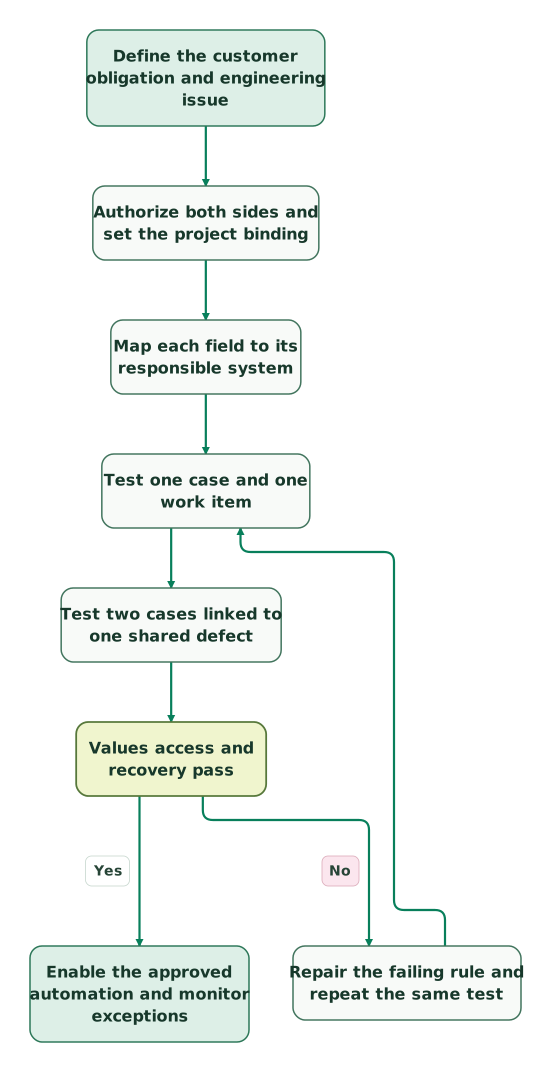
The following sequence is a proposed acceptance workflow:
Read diagram as text
- Define the customer obligation and engineering issue to Authorize both sides and set the project binding.
- Authorize both sides and set the project binding to Map each field to its responsible system.
- Map each field to its responsible system to Test one case and one work item.
- Test one case and one work item to Test two cases linked to one shared defect.
- Test two cases linked to one shared defect to Values access and recovery pass.
- Values access and recovery pass to Repair the failing rule and repeat the same test: No.
- Repair the failing rule and repeat the same test to Test one case and one work item.
- Values access and recovery pass to Enable the approved automation and monitor exceptions: Yes
Which 5 checks catch a misleadingly successful sync?
Check value translation, initial creation, multiple associations, failure recovery and API consumption independently. Each can fail while the app still reports an authorized connection.
1. Can an issue be created but its values fail to synchronize?
Yes. Appfire documents a case where issue creation succeeds despite an unmapped-value warning, while subsequent synchronization cannot proceed. Match the rejected value in the mapping or define an explicitly approved fallback. Unmapped-value warning.
Keep “unknown” distinct from “low priority.” Silencing a mapping error by translating every unexpected urgency into a harmless-looking value hides the problem from the team making the decision. Add a test value that is deliberately unmapped, confirm the failure is visible, then repair it through the approved mapping.
2. Does a new issue start with the priority you expected?
Test initial creation separately from later updates. When Salesforce Priority is empty during Jira work-item creation, Jira uses its own default priority; Appfire's configured Priority value applies only after a later push. Priority creation behavior.
Create one controlled case with an explicit priority and another without one. Inspect Jira immediately after creation and again after the intended update. If triage relies on the first value, require an explicit source value or an approved initial Jira default. A later correction cannot undo an earlier notification or escalation decision.
3. Do two linked Salesforce records behave as intended?
Test each associated record rather than assuming a shared Jira issue relays updates to every other Salesforce record. Appfire documents a loop-prevention limitation: a Salesforce-origin update can reach Jira without being pushed onward to other associated Salesforce objects. Multiple-association limitation.
Use the two fictional export cases. Change a shared diagnostic field from Case A and inspect the engineering item and Case B separately. Then change an engineering-owned field directly in Jira and inspect both cases. Record the expected result for each route rather than treating every difference as a defect.
Appfire describes manual push, workflow and custom automation approaches for related association scenarios, but states that these workarounds are not supported out of the box and custom implementation issues fall outside standard support. Confirm the supported design before adding a relay that might create an update loop. Workaround scope.
4. Can the owner find and recover a failed job?
A failed update needs a visible record and an accountable owner. Appfire's Salesforce job list exposes failed and pending auto-sync work, attempt timing and exhausted retries. Successful retried jobs disappear from that list. The retry feature is disabled by default and requires administrator configuration. Failed jobs and retry status.
In your Salesforce host, the documented list path is:
/lightning/o/JCFS__AutoSyncJob__c/listDo not equate an empty failure list with a complete audit history. Retain the source record, destination identifier, expected change and observed outcome in your acceptance evidence. Confirm which failure classes your configured retry mechanism handles; a mapping or permission error still needs its cause corrected.
5. Does normal use fit the shared Salesforce API allowance?
Measure API use with the rest of the Salesforce estate included. Appfire explains that the connector shares the org's API allowance with other applications; Company Information shows requests over the past 24 hours. Its estimates include 1–2 calls per Jira update for each non-view-only association and additional calls for searches, record creation and attachments. API usage guidance.
As a planning example, 500 Jira updates with two applicable associations represent approximately 1,000–2,000 calls for those updates alone: 500 × 2 × 1–2. This excludes searches, views, attachments, configuration activity and all other applications. Use the estimate to plan a measured pilot, not as a guaranteed daily bill or complete capacity calculation.
What should pass before the integration goes live?
Require evidence that ordinary users can complete the handoff, exceptions are recoverable and customer information stays within the intended audience.
| Test fixture | Expected evidence | Release decision |
|---|---|---|
| One case and one engineering work item | Correct association and agreed fields in each system | Identity and basic mapping pass |
| Two cases linked to one shared defect | Independent customer obligations remain intact | No accidental overwrite or assumed relay |
| Ordinary support and engineering users | Intended panel, record and action access | Admin-only success is insufficient |
| Explicit and empty source priority | Known creation value and subsequent update behavior | Triage does not depend on a later surprise |
| Invalid mapped value | Visible rejection, corrected mapping and verified recovery | Unknown data is not silently downgraded |
| Restricted comment or attachment | Only the approved audience receives it | Confidential context does not leak |
| Repeated event or operator retry | Existing association reused or duplicate detected | Recovery does not multiply engineering work |
| Disabled automation and controlled restart | Known backlog, reconciliation and named owner | Rollback has an operating procedure |
The fixture is a suggested acceptance plan. Set your own acceptable delay based on the support commitment and record both the source change time and the destination observation time. Do not promise “real time” without a measured bound for the actual route.
Before launch:
Checklist
- The app publisher, Cloud route and commercial scope are recorded.
- Salesforce and Jira administrators approved the scoped access.
- Each mapped field has one agreed authority and a defined fallback.
- Case closure is distinct from engineering completion.
- One-case and multiple-association tests passed with ordinary users.
- Comment and attachment audiences were inspected.
- Failure monitoring, API allowance and recovery have named owners.
- A rollback disables automation and reconciles changed records without deleting customer obligations.
When several teams already maintain overlapping rules, our $99 martech audit can establish which system writes each field and where the handoff fails. For implementation, bring the proposed object pairs, a sanitized failing example and the required acceptance results to a scoped CRM integration discussion.
Keep reading
Browse all CRM & Lifecycle guides
 CRM & Lifecycle
Salesforce Implementation Mistakes That Break Revenue Operations
Avoid Salesforce failures in identity, migration, automation and permissions. Use a worked won-deal handover and an evidence-based release checklist.
Jafrin Akter AloLast updated 10 min read
 CRM & Lifecycle
Salesforce Implementation Checklist: From Scope to a Working Release
Plan a Salesforce rollout with owners, migration rehearsals, permissions, integration tests, UAT, cutover and recovery gates before approving the release.
Jafrin Akter AloLast updated 14 min read
 CRM & Lifecycle
Salesforce to HubSpot migration: plan, field mapping and cutover checklist
Plan a Salesforce to HubSpot migration: phases, a field mapping template, load order, Smart Transfer limits, reconciliation checks and a safe cutover.
Jafrin Akter AloLast updated 21 min read
CRM & marketing automation
See the implementation scope, deliverables and acceptance checks.
Questions people ask
Should a sales opportunity be linked to a Jira feature request?
Link an opportunity when the feature materially affects its evaluation, and keep the sales commitment separate from engineering scheduling. Record the buyer's requirement, affected use case and commercial owner. Avoid treating a salesperson's desired date as an approved release date. Review the relationship when the opportunity closes so stale pipeline value does not keep influencing product priorities.
Can a connector replace a customer-facing incident update process?
A connector can supply evidence for an incident update, but the customer-facing message still needs an owner and an approved interpretation. Several bugs may relate to one incident, and a technical fix may reach customer environments at different times. Decide which facts can be published, who confirms resolution and how customers receive follow-up before automating notifications.
How should renamed Jira projects affect Salesforce reports?
Treat a project rename or move as a change to test against your stored references and reporting joins. Preserve the stable identifiers your integration uses, then inspect visible keys, links and exported fields. Reconcile a sample of moved work items before relying on existing dashboards. Do not assume that an embedded panel and a copied reporting field refresh identically.
Is Jira Product Discovery suitable for sensitive Salesforce deal evidence?
Use a Salesforce insight only after checking who can see the idea and the selected properties. Keep confidential deal terms out of a broadly shared roadmap. Product teams usually need the problem, affected segment and evidence strength rather than the full commercial record. Test access with the intended viewer role and retain a controlled reference for authorized follow-up.
What should support collect before escalating a Salesforce Jira sync failure?
Collect the affected record identifiers, direction of the attempted update, expected value, actual result and relevant error. Include the app variant, project, object type and whether a manual update succeeds. Provide sanitized configuration evidence through the vendor's approved support channel. Remove tokens and unnecessary customer data; a reproducible example is more useful than an unrestricted export.
Sources
- Appfire Connector for Salesforce & Jira
- Salesforce Jira connector for Flow
- Atlassian Salesforce Service Cloud alert integration
- Atlassian Salesforce insights in Jira Product Discovery
- Appfire Salesforce package installation and licensing
- Appfire Jira-side Salesforce connection
- Appfire Salesforce-side Jira connection
- Appfire entity, field and value mappings
- Appfire unmapped-value warning
- Appfire multiple-association loop prevention
- Appfire related-association workaround scope
- Appfire failed sync jobs and retry status
- Appfire Salesforce API usage

Written by
Jafrin Akter AloData Engineer and Co-founder at Martechdevs and Growth and Analytics Partners
Jafrin writes practical guides to marketing technology, customer data, analytics and AI workflows. Martechdevs is a Growth and Analytics Partners company.