
monday CRM vs Pipedrive for sales routines and handoffs
Pick Pipedrive if salespeople need a clear routine around deals and next activities; pick monday CRM if sales and customer handoffs benefit from configurable boards. Pipedrive vs monday CRM is also a plan-selection decision. Email, permissions and automation capacity can make the required edition more expensive than the entry price, so evaluate the working process before comparing the annual bill.
On this page
monday CRM vs Pipedrive comparison
The prices below are public USD monthly equivalents on annual billing, before tax and optional products.
| Decision | monday CRM | Pipedrive |
|---|---|---|
| Entry subscription | Basic $12/seat/month, minimum 3 users | Lite $14/seat/month |
| Automation-oriented starting point | Standard $17/seat/month, 250 custom automations/month | Growth $39/seat/month with automation and sequences |
| Higher working tier | Pro $28/seat/month, 25,000 custom automations/month | Premium $59/seat/month with stronger customization and permissions |
| Daily working model | Boards, columns and connected work | Deals, stages and next activities |
| Free evaluation | 14-day CRM trial | 14-day trial without a credit card |
Sources: monday CRM plans, Pipedrive plans and Pipedrive pipeline management. monday's final price depends on billing country; these figures use its USD offer. The Pipedrive examples use the displayed annual $14/$39/$59/$79 offer, with the applicable order governing the purchase.
At Martechdevs, we connect the sales process to customer onboarding through CRM and lifecycle implementation. We would begin with Pipedrive for a conventional sales team that needs consistent follow-ups. We would begin with monday CRM when the team can show a useful board-based handoff that it wants to maintain alongside sales.
The comparison concerns monday CRM. A work-management subscription or a general board used as a contact list has a different scope. Write the product name on the shortlist and the order so a work-management price does not become the budget for a CRM requirement.
Tool decisions
monday CRM
- Best for: A team that uses boards to coordinate sales and adjacent work and can keep the record definitions consistent.
- Pros: Configurable columns and dashboards support a team-specific working view. Standard adds a centralized communication timeline, and Pro adds sequences and more automation capacity. CRM plan features.
- Cons: The seat floor and plan limits affect the real budget. Board flexibility also needs someone to prevent duplicate customer records and conflicting status meanings.
- Free plan and startup offer: monday CRM provides a 14-day trial and requires a paid CRM plan afterward. A separate nonprofit concession may apply to eligible organizations; no startup discount is assumed here. Trial and subscription terms.
- Choose it if: The receiving team can explain how the sales board connects to onboarding or delivery and accepts responsibility for that handoff.
- Skip it if: The sales team mainly wants a ready-to-manage deal routine and regards board design as avoidable administration.
Start the monday pilot with the meaning of one row. A company, an opportunity and an onboarding project can have different owners and dates. If they all share one row, advancing a delivery status may erase the meaning of a sales status. Separate them where they represent independently managed work, then agree how they relate.
The benefit of a flexible board should be visible in a real task. Ask a salesperson to prepare a handoff, then ask the delivery owner to accept it. Both should identify the same customer, promised scope and start condition without a private explanation from the board's creator.
Pipedrive
- Best for: Sales teams managed through comparable opportunities, stage definitions and accountable next activities.
- Pros: Deals and sales activities give the manager a focused working structure. Custom pipelines and fields let the team express its own sales process. Pipeline management.
- Cons: Lite excludes the full email sync on Growth. A team that needs granular visibility groups should evaluate Premium or Ultimate rather than assume Growth covers the requirement. Pricing, visibility rules.
- Free plan and startup offer: The public evaluation is a 14-day trial without a credit card. The examples use standard paid rates and no startup concession. Pipedrive trial.
- Choose it if: A seller's work can be organized around opportunities, owners, stages and the next scheduled action.
- Skip it if: Preserving a broader board-based operating process is the main requirement and the team has no plan for the surrounding work.
Begin the Pipedrive pilot with a manager's review, not a blank pipeline. Load a small set of representative opportunities, including an overdue action, a slipped close date and a lost deal. Ask the manager to explain the changes since the previous review using the records themselves.
Then test the seller's side. A process that makes reporting easy but creates excessive updating work will deteriorate. Keep the fields tied to a decision or next action. A required field should have a clear owner and a clear reason to be collected at that stage.
Sales process and delivery boundary
The daily sales routine and the handoff after close are separate acceptance tests. The first shows that the team can maintain a dependable pipeline. The second shows that a closed opportunity becomes actionable customer work.
| Working moment | Evidence from the sales team | Evidence from the receiving team |
|---|---|---|
| Qualification | Clear problem, owner and next activity | Required customer information identified |
| Proposal | Agreed commercial scope and decision date | Constraints that affect delivery captured |
| Closed won | Accepted value, contact and commitment | A named owner accepts the handoff |
| Delayed start | A visible reason and follow-up | Delivery status does not overwrite sales history |
| Expansion | A separate commercial opportunity | Existing delivery remains understandable |
For monday CRM, inspect every board or status used in the handoff. For Pipedrive, inspect the deal and the destination that receives the accepted work. In both cases, a notification is only a transport step. The business needs evidence that somebody accepted responsibility.
The CRM property ownership guide helps assign the authoritative owner of customer fields. The CRM selection guide provides a broader shortlist method. If process enforcement and a wider module structure are central, compare monday CRM with Zoho CRM. For a lower-price sales candidate, compare Freshsales with Pipedrive.
Automation capacity
monday counts actions performed by automations. A single triggered template can consume several actions: its documentation gives an item-creation example with two mapped Status columns that consumes three actions. Notifications to several subscribers can also consume an action per recipient. Action accounting.
That distinction matters for a handoff. Suppose an illustrative template creates an onboarding item and maps two Status columns, matching that three-action structure. At 100 handoffs per month, the calculation is 100 × 3 = 300 actions. Against Standard's 250 monthly allowance, that single assumed workflow is 50 actions over the allowance, before other automations. Pro lists 25,000 custom automations monthly. CRM plan limits.
The example does not estimate your account's consumption. Inspect the actual recipe, mapped fields and usage report. Condition steps, notifications and other activity can change the total. Monitor the common workflow and the unusual case, such as a bulk owner reassignment that triggers many updates together.
Pipedrive Growth includes automations and nurturing sequences. Pipedrive plans. Evaluate the proposed routine within the applicable plan limits and avoid assuming that a workflow label has the same billing or execution meaning across products. Compare the completed business action, its failure handling and the operating cost.
For either product, test a repeated trigger and an incomplete record. The automation should update the intended customer, avoid duplicate outreach and expose a failure that a named owner can resolve. Add a recovery path before enabling a workflow for the full dataset.
Subscription examples
These hypothetical budgets assume annual USD billing, the stated number of paid seats, no discounts, no tax, no optional products and no extra usage. The plans have different entitlements.
| Licensed team | monday CRM Standard/year | monday CRM Pro/year | Pipedrive Growth/year |
|---|---|---|---|
| 3 users | $612 | $1,008 | $1,404 |
| 10 users | $2,040 | $3,360 | $4,680 |
| 20 users | $4,080 | $6,720 | $9,360 |
The formulas are licensed seats × the annual monthly-equivalent rate × 12. For ten users, monday CRM Pro is 10 × $28 × 12 = $3,360; Pipedrive Growth is 10 × $39 × 12 = $4,680. Inputs come from monday CRM and Pipedrive. Confirm the purchased seat quantity and applicable offer on the order.
If the ten-user Pipedrive team needs Premium's access design, the base subscription becomes 10 × $59 × 12 = $7,080. The higher plan may still be the correct purchase if its required capability is material. A lower entry price has little meaning after the implementation depends on a higher edition.
Use the software pricing tool to include implementation, integration work, staff training and overlap. For an illustrative annual subscription difference of $1,320 between the ten-user Pro and Growth configurations, a claimed two-hour monthly saving valued at $60 per hour would be $1,440 a year. That is a sensitivity calculation using assumed time and value, not a promise that either product saves those hours.
A pilot should supply the evidence for a time-saving claim. Observe the same sales review and handoff in both systems, note the work that remains outside the CRM and price that work separately. Avoid assigning a return to every feature just because it appears in the subscription.
Visibility and ownership
Pipedrive distinguishes visibility groups, which govern what a user can see, from permission sets, which govern actions. Lite and Growth use one default visibility group; Premium and Ultimate support additional groups and subgroups. Deal administrators retain access to all deals and pipelines. Access-control overview.
Test restricted access with an ordinary account. An administrator's demonstration cannot show what a regional seller will see. Include a permitted deal, a restricted deal, a report and an export attempt. The plan and configured access should both support the expected boundary.
For monday CRM, make the same expected-access list before selecting the edition. A shared board may be useful for coordination while exposing more customer context than a particular participant needs. Validate the actual board, item, dashboard and export behaviour in the candidate configuration.
Ownership also applies to automated updates. An integration should not silently overwrite an approved commercial value with an older field from another system. Record the source responsible for each shared field, the permitted direction of updates and the response to a conflict.
Best fit by team model
| Company size or operating model | Best fit | Runner-up | Decision reason |
|---|---|---|---|
| Three sellers with a stable pipeline | Pipedrive Growth | monday CRM Standard | Follow-up discipline is the central task |
| Agency coordinating sales and onboarding in boards | monday CRM Pro | Pipedrive Growth | The receiving process has a working board structure |
| Ten-person sales team with regional visibility needs | Pipedrive Premium pilot | monday CRM qualified plan | Access requirements change the appropriate tier |
| Small business with limited automation volume | monday CRM Standard | Pipedrive Growth | Confirm the simpler routine stays within the allowance |
| Team with many account types and no agreed definitions | A model-design exercise | A bounded pilot of either tool | Record meaning must be agreed before product choice |
Migration and pilot workflow
monday's Excel export follows table views and filters, with exclusions such as subitem updates. Pipedrive's spreadsheet importer supports field mapping, previews and a summary of added, updated, merged or skipped records. Those are different stages of migration, so validate the information between them rather than assuming an exported workbook is ready to load. monday export coverage, Pipedrive imports.
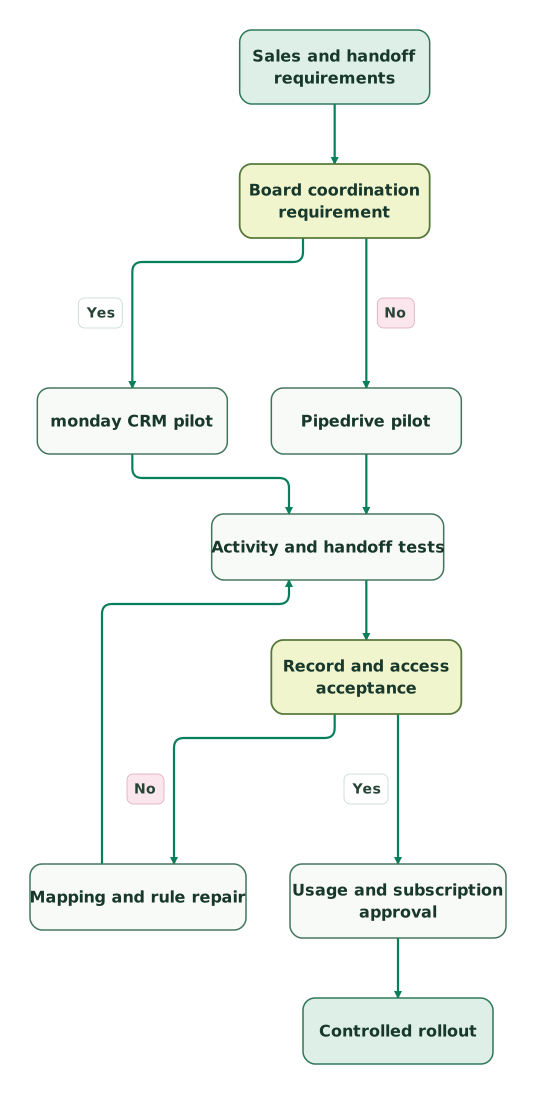
Read diagram as text
- Sales and handoff requirements to Board coordination requirement.
- Board coordination requirement to monday CRM pilot: Yes.
- Board coordination requirement to Pipedrive pilot: No.
- monday CRM pilot to Activity and handoff tests.
- Pipedrive pilot to Activity and handoff tests.
- Activity and handoff tests to Record and access acceptance.
- Record and access acceptance to Mapping and rule repair: No.
- Mapping and rule repair to Activity and handoff tests.
- Record and access acceptance to Usage and subscription approval: Yes.
- Usage and subscription approval to Controlled rollout
The correction path repeats activity, handoff and access tests. A field-mapping change can fix the customer name while breaking an owner assignment or a downstream rule. Keep a stable test sample and rerun the whole affected workflow after each repair.
Purchase checklist
- Confirm the monday product and each candidate's required production plan.
- Define deal stages and the evidence for a successful handoff.
- Assign ownership of boards, fields and automation changes.
- Count the actions in the actual monday recipe and review peak use.
- Run the weekly review and daily follow-up process with intended users.
- Test ordinary-user visibility, exports and owner changes.
- Reconcile exported history and imported relationships after repairs.
- Approve seat quantities, annual terms and total transition cost.
Use the CRM data hygiene audit skill before the import. It provides an export review and duplicate queue that helps the team separate source problems from configuration problems.
Keep reading
Browse all CRM & Lifecycle guides
 CRM & Lifecycle
monday CRM vs Zoho CRM for flexible boards and sales processes
Choose monday CRM for configurable boards or Zoho CRM for controlled sales transitions. Compare edition costs, Blueprint limits, imports and exception paths.
Jafrin Akter AloLast updated 11 min read
 CRM & Lifecycle
Freshsales vs Pipedrive for small sales teams
Compare Freshsales and Pipedrive by paid plan, daily sales work and annual cost, with duplicate matching, historical email and migration acceptance checks.
Jafrin Akter AloLast updated 11 min read
 CRM & Lifecycle
Best CRM for startups: seven options ranked on price, integrations, reporting and fit
Compare HubSpot, Attio, Pipedrive, Zoho, monday CRM, Freshsales and Close for startups, ranked on price at 5, 10 and 20 seats, integrations and reporting.
Jafrin Akter AloLast updated 30 min read
CRM & marketing automation
See the implementation scope, deliverables and acceptance checks.
Questions people ask
Does one monday CRM automation always consume one action?
One monday CRM automation can consume several actions. A recipe that creates an item and maps certain columns can count additional actions for those mappings, and notifications can count per recipient. Inspect the recipe and usage report before estimating capacity. Count expected runs and the actions each run performs, then include other account activity. Action accounting.
Is Pipedrive Lite enough for a team expecting full email sync?
Pipedrive Lite is not the appropriate plan for a team requiring full email sync. Pipedrive lists that capability on Growth, together with automation and sequences. Evaluate the daily routine on the production tier you intend to buy and calculate the bill from that tier. A trial can otherwise conceal a necessary upgrade. Pipedrive plans.
Can a delivery team remain on monday while sales uses Pipedrive?
A delivery team can remain on monday while sales uses Pipedrive if the company defines and implements the boundary between them. Specify the customer identifier, accepted scope, receiving owner and failure handling. Test a repeated handoff and a changed deal after close. Each shared field needs one agreed source of truth and a permitted update direction.
Are Pipedrive visibility groups the same as permission sets?
Pipedrive visibility groups and permission sets control different things. Visibility groups determine what users can see, while permission sets determine which actions they can perform. Plan availability also differs, and deal administrators retain broad access. Validate the expected behaviour with a regular user rather than an administrator before approving the access design. Pipedrive access rules.
Should a monday CRM price advantage decide the whole purchase?
A monday CRM price advantage should inform the purchase after the required configuration passes the workflow tests. Compare the same licensed audience, relevant plan capabilities and surrounding tools. Include implementation, integration work, maintenance and overlap. A cheaper subscription can be the right choice, but only if sellers and the receiving team can operate the agreed process reliably.
Sources

Written by
Jafrin Akter AloData Engineer and Co-founder at Martechdevs and Growth and Analytics Partners
Jafrin writes practical guides to marketing technology, customer data, analytics and AI workflows. Martechdevs is a Growth and Analytics Partners company.