
Marketo Salesforce Sync: 9 Checks for Missing Records and Stale Fields
A Marketo Salesforce sync incident needs an object, a direction and a specific failed record before it needs another retry. Check the actual sync user's access, field behavior, validation result and backlog, then verify the business action that depends on the value. Leads, contacts, accounts, opportunities and campaign membership do not share one universal write rule or refresh guarantee.
On this page
Which nine checks locate the sync failure?
Start with a controlled record and work through the failed boundary. These nine checks distinguish a missing transfer from an unsupported write, a delayed update or a broken relationship.
| Check | Evidence to inspect | Common-looking symptom | Decision |
|---|---|---|---|
| 1. Object and direction | Salesforce object, Marketo record and intended writer | An edit never travels back | Confirm that the route supports the write |
| 2. Connection identity | Actual sync user, account and authentication state | Broad sync failure | Repair the intended connection |
| 3. Record and field access | Sync-user visibility and required permissions | Only some data is absent | Validate access as the integration user |
| 4. Field-change behavior | API name, type, formula and update timestamp | Field exists but value is stale | Distinguish schema discovery from data transfer |
| 5. Competing writers | Source histories and simultaneous edits | A corrected value returns | Set field ownership and retest |
| 6. Validation result | Record-level error and Salesforce rule | One person repeatedly fails | Repair the invalid input or approved rule |
| 7. Capacity and backlog | Cycle duration, arrivals and useful throughput | Updates arrive too late | Reduce unnecessary load and diagnose failures |
| 8. Relationships and conversion | Contact role, program membership and conversion mapping | Synced data cannot qualify the person | Repair the relationship, not only the row |
| 9. Deletion and recovery | Delete flags, flow actions and retained identity | A removed record reappears | Apply the intended lifecycle before replay |
Record the expected source value and the business consequence. A wrong lead owner can misroute sales work; an outdated eligibility field can enroll the wrong audience. Holding that downstream action may matter more than restoring a green dashboard immediately.
The Marketo operations ownership guide covers who should run the platform. This guide covers the evidence that person needs during a sync incident. Our martech integration work addresses the mappings, recovery and acceptance checks behind it.
Which objects can Marketo actually write back to Salesforce?
Check object-specific behavior before treating the integration as universally bidirectional. The overview identifies leads, contacts and Salesforce campaigns as two-way areas; the detailed campaign rules separate membership from other campaign information. Salesforce sync overview
| Data | Relevant direction | Important boundary | What to test |
|---|---|---|---|
| Salesforce leads | Both directions | Marketo wins a simultaneous lead-field collision | The approved writer and required values |
| Salesforce contacts | Both directions | Salesforce wins a simultaneous contact-field collision | A contact correction and conflicting update |
| Ordinary company account fields | Salesforce to Marketo | Marketo-side edits do not update the Salesforce account | Every related contact's resulting account value |
| Opportunities | Salesforce to Marketo | A person needs the relevant opportunity relationship | Contact-role-based audience qualification |
| Program/campaign membership | Both directions when linked | Program channel and period cost have their own one-way mapping | Member status and unintended lead creation |
Adobe documents the distinct collision outcomes for leads and contacts. Do not use those tie-breakers as the business's field-ownership policy. They describe a collision outcome, not which value deserves to win.
For ordinary account fields, a Marketo edit affects the related contacts in Marketo but not Salesforce. A later Salesforce account update can overwrite that account information. Account-field direction
Person Accounts and other specialized configurations need their own field contract; Adobe's required-field reference describes exceptions to default account behavior. Preserve that distinction rather than applying a company-account table to every Salesforce record type. Required objects and field permissions
What should be confirmed before the initial connection?
Prepare the sync identity, visible fields and conversion mappings before starting a persistent connection. An accidental first sync can create lasting schema clutter or expose the wrong record population.
Adobe recommends a dedicated Salesforce account for Marketo. Its Enterprise/Unlimited setup identifies the profile, API and object/field permissions, with campaign permissions conditional on campaign sync. Have the Salesforce administrator configure the approved scope and required fields. Dedicated sync-user setup
Identify whether the Marketo subscription uses OAuth or the username/password/token interface. The OAuth guide describes a Salesforce External Client App and requires Marketo Support to enable the applicable OAuth, refresh-secret and PKCE features. Do not substitute an employee's existing logged-in Salesforce identity for the intended sync user. Current OAuth setup
The initial connection guide warns that visible fields are created permanently in Marketo during Sync Fields, and mapping customization belongs before starting Salesforce Sync. It also warns that native Salesforce sync does not automatically deduplicate records. Initial connection and mapping boundaries
Use a short implementation record:
- Record the intended Marketo subscription and Salesforce organization.
- Confirm the dedicated sync identity and authentication route.
- Approve visible objects and fields with their business owners.
- Review lead-to-contact mappings and existing duplicate populations.
- Define controlled acceptance records and downstream actions to hold.
- Start the approved scope and reconcile its actual results.
Changing which production organization is connected is not a casual troubleshooting step. Use the vendor-supported change process rather than treating reconnect as a reversible reset of the whole data model.
How do you distinguish a sync-user permission problem from missing data?
Inspect the record through the integration user's effective access, not through an administrator who can see more. A field visible to sales is not automatically visible to the sync.
Adobe's permission diagnostic starts with the Credentials identity under Admin → Salesforce, then checks whether that identity can see the affected lead/contact field and its field-level security. Sync-user visibility checks
Have the Salesforce administrator perform that inspection through the organization's approved access procedure. Review object permission, field visibility and record sharing separately. The Salesforce field-permission guide explains those layers.
Required connector fields need attention even if marketing never displays them. Adobe lists identifiers, conversion/deletion metadata, relationships and timestamps among its required fields. Its reference distinguishes fields needing read access from those Marketo can update. Required sync fields
Do not hide mandatory fields to reduce clutter or grant broad administrator access to make one error disappear. Establish the narrow supported correction, then repeat the same record test. Include an intentionally out-of-scope record to confirm that the repair did not widen the audience unexpectedly.
Why does a new field appear while its old values remain empty?
Field discovery and historical value transfer are separate events. After enabling visibility, verify a controlled record update before declaring a backfill complete.
Adobe says an existing Salesforce field can become available on the next sync once the sync user can see it, but existing values do not arrive until the next record update. Adding an existing field to sync
That can explain a new Marketo column with unexpectedly sparse values. It does not justify touching every production record immediately. Identify the required historical population, estimate the update load and check which Salesforce or Marketo automations a bulk update may trigger.
Field changes also have different consequences:
| Field change | Documented behavior | Operating consequence |
|---|---|---|
| Salesforce label renamed | Marketo label does not follow automatically | Review labels without assuming a new mapping |
| Salesforce API name changed | A new Marketo field is created | Preserve old dependencies and migrate deliberately |
| Lookup field synced | The referenced ID arrives, not its display name | Resolve the relationship before presenting a label |
| Formula dependency changes | Sync waits for a relevant System Mod Stamp update | Verify the record's change signal |
| Salesforce field deleted | Marketo field remains but stops syncing | Retire downstream use deliberately |
Adobe's field-sync reference also warns that incompatible field-type changes can delete field data. Preserve a verified export and map the affected programs, reports and tokens before changing type.
A field that still appears in the interface may be obsolete or no longer updated. Record its current source, expected refresh and owner in the CRM property-ownership register.
How should you investigate a value that keeps changing back?
Reconstruct both systems' edits and the automation behind them before forcing another overwrite. A field can synchronize successfully while two legitimate writers continually disagree.
For a hypothetical contact, assume Salesforce and a Marketo campaign make conflicting lifecycle edits that the connector treats as a simultaneous collision. The contact conflict rule favors Salesforce. A superficially similar lead collision favors Marketo. The fix is not to time updates until the preferred system wins.
Define who authors the business state, who may propose an override and which evidence approves the override. Keep a marketing qualification field separate from a sales disposition field when they answer different questions. Connect them with an explicit handoff instead of making both teams write one ambiguous status.
Retain the record IDs across conversion. Use the Salesforce ID guide when exporting into a case-insensitive system so a malformed comparison does not create a false conflict.
Test the approved writer, an unauthorized competing write, a blank value and an older delayed update. If you use Marketo field-update blocking, include that setting in the incident record; a local protection rule is not a complete cross-system ownership contract.
Which error messages should change the repair you attempt?
Use the record-level Salesforce error to select the correction. A validation failure, duplicate rejection and insufficient access require different decisions.
| Error class | Likely boundary to inspect | Controlled repair | Proof after repair |
|---|---|---|---|
INSUFFICIENT_ACCESS_OR_READONLY | Sync-user access to the object, record or field | Correct the required permission | Same record writes through the intended route |
INSUFFICIENT_ACCESS_ON_CROSS_REFERENCE_ENTITY | Access to a referenced record | Inspect the relationship and effective access | Reference resolves without widening unrelated access |
DUPLICATES_DETECTED | Salesforce duplicate rule | Resolve identity or approve the specific rule treatment | Intended survivor, no unintended second person |
REQUIRED_FIELD_MISSING | Required input absent | Supply the valid business value | Record meets the required schema |
INVALID_OR_NULL_FOR_RESTRICTED_PICKLIST | Value outside the permitted picklist | Map the actual allowed value | Destination stores the intended meaning |
FIELD_CUSTOM_VALIDATION_EXCEPTION | Organization-specific validation | Meet the business condition or approve its redesign | Relevant negative case still fails correctly |
These error families are described in Adobe's post-launch sync troubleshooting guide. The repair column above is an operating checklist, not a reason to disable every validation or duplicate rule.
In Marketo, Admin → Salesforce → Sync Errors separates record-level and job-level failures. The list covers five days; record details expose the related Marketo and Salesforce IDs, and the errors can be exported. Sync error evidence
Capture the evidence promptly. A recurring incident should retain the first failure, attempted change and result rather than losing its history when the dashboard's window moves.
Why does the five-minute sync interval not guarantee fresh data in five minutes?
The five minutes are normally a pause after a cycle completes, not the maximum time from a source edit to the destination update. Cycle work and backlog add time.
Adobe distinguishes the background interval from immediate Sync Person to SFDC flow actions. It says those flow actions consume an API call per lead while background processing can handle batches of up to 200 records per call. That efficiency difference is a reason to avoid forcing a large population merely because a few records are urgent. Sync interval and flow-action costs
Use Sync Status to inspect object operations, start/end times and new, updated, failed or skipped records. Skipped can mean there was no change to a field of interest. The dashboard covers the previous five days. Sync Status fields
The backlog view measures pending background work in both directions and excludes the work undertaken by sync flow steps. Its throughput is a rolling observation; the backlog and throughput panels refresh on different schedules. Check the displayed observation time before comparing them. Backlog measurement
A hypothetical backlog of 12,000 records with 3,000 processed per hour takes four hours only if no new work arrives and that rate holds. With 1,000 new records an hour, net drainage is 2,000 an hour and the modeled time becomes six hours. If arrivals equal or exceed processing, there is no finite drain time under those assumptions.
| Hypothetical backlog | Processing per hour | Arrivals per hour | Constant-rate drain estimate |
|---|---|---|---|
| 12,000 | 3,000 | 0 | 4 hours |
| 12,000 | 3,000 | 1,000 | 6 hours |
| 12,000 | 3,000 | 3,000 | Does not drain |
| 0 | 0 | 0 | No existing backlog |
This original Python helper calculates that diagnostic model. Supply non-negative finite values; backlog is a whole record count. It does not call either vendor, predict queue order or promise a record's arrival time.
from decimal import Decimal, InvalidOperation


def drain_hours(backlog, processed_per_hour, arriving_per_hour):
    values = []
    for value in (backlog, processed_per_hour, arriving_per_hour):
        if isinstance(value, bool):
            raise ValueError("Use numeric counts and rates")
        try:
            number = Decimal(str(value))
        except (InvalidOperation, ValueError):
            raise ValueError("Use numeric counts and rates") from None
        if not number.is_finite() or number < 0:
            raise ValueError("Counts and rates must be finite and non-negative")
        values.append(number)
    count, processed, arriving = values
    if count != count.to_integral_value():
        raise ValueError("Backlog must be a whole record count")
    if count == 0:
        return Decimal(0)
    net_rate = processed - arriving
    return None if net_rate <= 0 else count / net_rate


print(drain_hours(12000, 3000, 1000))  # 6
Use this to explain why another broad update may delay recovery. Investigate unnecessary writes, frequently changing fields, failing records and custom-object scope before purchasing capacity or promising an ETA. Monitor the oldest business-critical exception as well as the aggregate queue.
Why can an opportunity or campaign exist without the expected person qualifying?
A synchronized row does not guarantee the relationship required by a filter or campaign. Check the association separately.
Opportunities sync from Salesforce to Marketo, but Marketo associates them with people through Opportunity Contact Roles. An opportunity without a role can exist in Marketo without making a person qualify for Has Opportunity. Adobe also says the opportunity amount uses the Marketo subscription's default currency; do not assume a multicurrency Salesforce report can be reproduced by summing that value. Opportunity relationship and currency behavior
For program/campaign sync, membership and progression status move both ways. Marketo channel and period cost map one way to campaign type and actual cost. Linking a program can create Salesforce leads for members who do not already exist there; incompatible statuses can produce errors. Program and campaign rules
Before linking a large program, inspect a known Salesforce lead, an existing contact and a Marketo-only person. Verify status meaning, qualification and ownership in each case. A program sync can become a lead-creation path, so a lifecycle policy enforced only in a separate lead-push campaign may not cover every route.
Lead conversion requires its own test. Salesforce Lead and Contact fields need the correct conversion mappings; otherwise a value used for marketing qualification may remain on the old lead and fail to reach the new contact. Conversion mapping considerations
Avoid using Convert Person just to force a missing association. Adobe warns that the action can create a new account and opportunity in Salesforce. Use the approved Salesforce conversion process when that extra creation is not intended. Contact conversion warning
What should you verify for custom objects and missing activity?
Check the object's supported relationship path, sync-user visibility and the evidence surface being inspected. A displayed object name does not establish that its relationships or activity history are available to the campaign.
Salesforce custom objects need a relationship to a lead, contact or account and read access for the sync user. Adobe supports the specified one- or two-level relationship depth and warns against selecting the same object through several paths. Re-enable global sync after the approved schema change. Custom-object sync requirements
Use custom-object fields as constraints on the Has <custom object name> filter. For email personalization, use Velocity Script tokens; standard tokens do not directly read those fields. Custom-object filters and tokens
For a hypothetical subscription object, test the person with an active subscription and the person whose subscription was canceled. Verify the actual qualifying row and status, rather than only checking that the object appears in the canvas.
An absent activity entry is not always an absent value update. For an account with more than 5,000 contacts, Adobe says an account-field change can sync without individual Change Data Value activity entries for those contacts. Inspect the current field and the downstream qualification directly. Large-account activity behavior
Keep Sales Insight Actions logging and other activity writers separate from the native object-sync diagnosis. The same visible Salesforce task can have a different creator, authentication route and retry policy.
How do you pause or recover without recreating removed records?
Treat pause, deletion and recovery as distinct operations. Establish every active writer before assuming that one switch stops all Salesforce changes.
Adobe explicitly says Salesforce flow actions continue when the background Salesforce sync is disabled. Inventory affected smart campaigns and other writers when planning a controlled change; the pause plan must cover the actions that matter to the incident. Disable Sync scope
Deleting a Salesforce lead does not automatically delete its Marketo person; the Salesforce-deleted flag is set. Running that remaining person through Sync with Salesforce can create a new Salesforce lead. Deletion flow actions also have separate choices for removing the other system's record. Deletion and recreation behavior
In the other direction, a Salesforce update can recreate a person deleted only from Marketo when visibility and sync eligibility permit. The recreated Marketo record does not regain the previous activity history. Marketo recreation limitation
Do not use delete-and-recreate as a generic repair. Preserve the reason a record was removed, suppression requirements, retained identifiers and relevant downstream actions. A record that should stay excluded must not re-enter a campaign merely because a recovery job sees a new ID.
What evidence should approve the repaired sync?
Approve the repair when the intended records, relationships and downstream actions agree, including the original negative case. A lower error count is useful, but it is not the whole acceptance result.
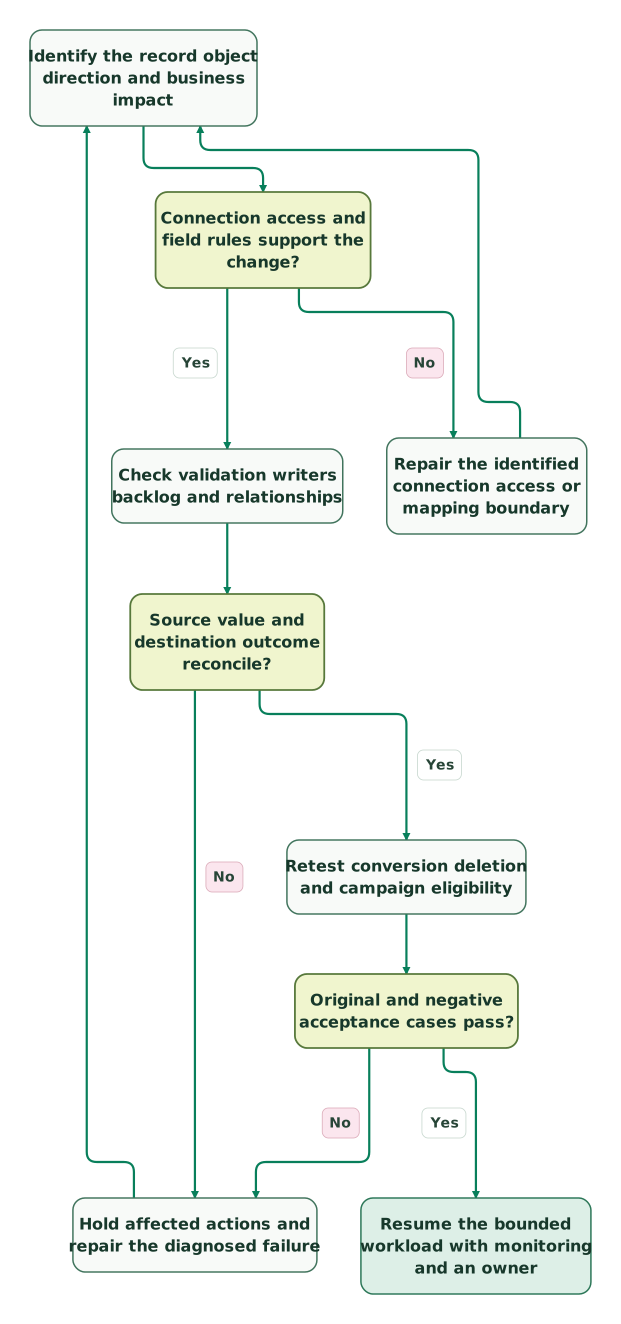
Read diagram as text
- Identify the record object direction and business impact to Connection access and field rules support the change?.
- Connection access and field rules support the change? to Repair the identified connection access or mapping boundary: No.
- Repair the identified connection access or mapping boundary to Identify the record object direction and business impact.
- Connection access and field rules support the change? to Check validation writers backlog and relationships: Yes.
- Check validation writers backlog and relationships to Source value and destination outcome reconcile?.
- Source value and destination outcome reconcile? to Hold affected actions and repair the diagnosed failure: No.
- Hold affected actions and repair the diagnosed failure to Identify the record object direction and business impact.
- Source value and destination outcome reconcile? to Retest conversion deletion and campaign eligibility: Yes.
- Retest conversion deletion and campaign eligibility to Original and negative acceptance cases pass?.
- Original and negative acceptance cases pass? to Hold affected actions and repair the diagnosed failure: No.
- Original and negative acceptance cases pass? to Resume the bounded workload with monitoring and an owner: Yes
Checklist
- Object, record IDs, direction and authoritative field writer are known.
- The intended sync identity can access the required record and fields.
- Field discovery, historical population and formula-change behavior are checked.
- Lead and contact collision rules are not mistaken for ownership policy.
- The exact validation or duplicate error is resolved without bypassing its purpose.
- Backlog evidence includes observation time and incoming workload.
- Opportunity roles, conversion mappings and program statuses pass.
- Custom-object relationship paths and relevant activity limits are understood.
- Pause scope includes still-active flow actions and other writers.
- Deleted or excluded people cannot be revived into unintended outreach.
- The repaired value produces the intended sales or marketing action.
For recurring incidents, get the $99 martech audit with one redacted record and its before-and-after evidence. A scoped Marketo–Salesforce repair should leave a documented owner, a repeatable test and a recovery path the team can operate.
Keep reading
Browse all CRM & Lifecycle guides
 CRM & Lifecycle
Salesforce Implementation Checklist: From Scope to a Working Release
Plan a Salesforce rollout with owners, migration rehearsals, permissions, integration tests, UAT, cutover and recovery gates before approving the release.
Jafrin Akter AloLast updated 14 min read
 CRM & Lifecycle
Salesforce to HubSpot migration: plan, field mapping and cutover checklist
Plan a Salesforce to HubSpot migration: phases, a field mapping template, load order, Smart Transfer limits, reconciliation checks and a safe cutover.
Jafrin Akter AloLast updated 21 min read
 CRM & Lifecycle
Salesforce Implementation Mistakes That Break Revenue Operations
Avoid Salesforce failures in identity, migration, automation and permissions. Use a worked won-deal handover and an evidence-based release checklist.
Jafrin Akter AloLast updated 10 min read
Martech integration
See the implementation scope, deliverables and acceptance checks.
Questions people ask
Should a critical lead always use an immediate sync action?
Use immediate sync only when the business deadline requires it and the record has already passed the relevant eligibility, access and validation checks. Inspect available capacity and whether a previous attempt succeeded before retrying. Keep the urgent population bounded. Repeatedly forcing every delayed record can increase load while preserving the same invalid data or competing-write problem that caused the delay.
What should marketing inspect after Salesforce changes its duplicate rules?
Test the intended new lead, an existing contact, an ambiguous match and a record that should be rejected. Inspect the resulting Marketo activity and Salesforce identity rather than counting successful flow executions alone. Confirm how the exception reaches its owner. A stricter rule may be working correctly while exposing an identity problem that an older process silently tolerated.
Can a successful field update prove that a campaign will select the right people?
No. Qualification can depend on relationships, status values, conversion mappings, suppression and timing as well as the updated field. Test the actual campaign condition with a known qualifying person and a known exclusion. Record why each should behave that way. Keep customer-facing actions held until the data and the audience decision both match the approved lifecycle policy.
How should a team preserve evidence beyond the sync dashboard window?
Export relevant errors and status evidence into the approved incident record while they are available. Retain the affected source and destination IDs, field values, timestamps, configuration changes and acceptance results. Limit the record to necessary data and controlled access. That history lets the next operator distinguish a recurring defect from a different failure that happens to produce the same message.
What should happen after a Salesforce administrator removes an unused field?
Review every Marketo dependency before assuming the integration cleanup is complete. A field may remain visible in Marketo even though updates have stopped, and a program or report may still use its old values. Retire or replace the dependency deliberately, preserve the required history and test the affected audience or report. Document the new owner and expected behavior.
Sources
- Adobe Salesforce sync overview
- Adobe lead-sync collision behavior
- Adobe contact sync and conversion
- Adobe account-sync boundaries
- Adobe required fields and update permissions
- Adobe dedicated Salesforce sync-user setup
- Adobe Salesforce OAuth setup
- Adobe initial connection and mapping boundaries
- Adobe sync-user field visibility diagnostic
- Adobe adding existing fields to sync
- Adobe field-change behavior
- Adobe conversion, errors and custom-object considerations
- Adobe sync-error evidence
- Adobe sync intervals and flow-action cost
- Adobe Sync Status fields
- Adobe backlog measurement
- Adobe opportunity relationships and currency
- Adobe program and campaign sync
- Adobe custom-object sync requirements
- Adobe Disable Sync behavior
- Adobe deletion and recreation behavior
- Adobe recreation without prior activity history

Written by
Jafrin Akter AloData Engineer and Co-founder at Martechdevs and Growth and Analytics Partners
Jafrin writes practical guides to marketing technology, customer data, analytics and AI workflows. Martechdevs is a Growth and Analytics Partners company.