Marketo Managed Services vs an In-House Admin: Cost, Coverage and How to Choose
Data Engineer and Co-founder at Martechdevs and Growth and Analytics Partners
Last updated 13 min read
A Marketo managed service fits recurring work below a full-time workload or work that needs several specialisms. An in-house administrator fits sustained demand that depends on daily sales and marketing context. Compare the complete cost, usable capacity and response coverage of both. Either arrangement still needs an internal owner who sets priorities, defines lifecycle rules and approves consequential changes.
What Marketo work needs an owner after launch?
Marketo needs ongoing ownership of campaign operations, CRM synchronization, deliverability, access and release changes. A launch project can establish those systems without supplying the capacity to run them indefinitely. The agency, in-house and freelancer comparison explains the broader staffing choice; this guide scopes the Marketo work behind it.
Start with an operating inventory:
| Workstream | Recurring work | Evidence of completion |
|---|---|---|
| Campaign operations | Build, test, approve and retire programs and smart campaigns | Approved audience, QA record, release owner |
| CRM integration | Investigate missing records, lag and field conflicts | Expected source value, sync result and resolution |
| Deliverability and domains | Coordinate DNS changes, authentication and sender configuration | Current domain inventory and verified settings |
| Access | Maintain named users, roles and integration credentials | Access register and review history |
| Platform changes | Review release notes and affected integrations | Change assessment, test result and owner |
Adobe's setup guide assigns domain and email configuration work across marketing, IT and administrators. It covers tracking and landing-page CNAMEs, SPF/DKIM, MX and sender requirements, plus CRM administrator involvement. These remain dependencies when an operational change touches the original setup. Adobe's setup steps.
A provider cannot fix a DNS problem quickly if nobody can approve the change. Include each dependency's owner and response route in the scope. Integration work between Marketo, Salesforce and a warehouse should also define which system owns each field and how failed updates are diagnosed.
What makes the Salesforce sync an ongoing job?
The sync has direction, permission and timing rules that someone must maintain. Adobe documents bidirectional synchronization for leads, contacts and Salesforce campaigns; the other listed object flows run from Salesforce to Marketo. A cycle finishes, pauses five minutes, then starts again. That is not a guarantee of five-minute end-to-end freshness. The initial sync can take hours or days, and only data accessible to the sync credentials is included. Salesforce sync behavior.
For each incident, capture the record, field, expected direction, source value and destination result. Distinguish a permissions problem from a field-ownership conflict before replaying records. The CRM sync troubleshooting guide illustrates that diagnostic discipline for a different connector; its HubSpot-specific settings should not be applied to Marketo.
Who governs access and release changes?
Assign access governance to a named administrator and release review to an accountable technical owner. Adobe separates permission areas such as Access Admin, Access API, Access Database, Access Marketing Activities and Workspace Administration. A person who builds campaigns does not automatically need every administrative capability. Marketo role permissions.
Release review has concrete consequences. Adobe's October 2026 notes say that, from 30 September, Get Lead Activities or Get Lead Changes requests using listId fail with error 1003 when the target static list contains at least 10,000 leads. Adobe also announces deprecation of Grab Images from Web with the October release. Standard release features begin a phased rollout on 23 October; the note does not establish an exact removal time for every account. As checked on 17 October, treat this as an upcoming change to assess. October release notes.
Someone must find affected jobs, assess their impact, test a replacement and record completion. “Keep Marketo running” is too vague to establish who performs those tasks or when.
Which delivery model fits your team?
Choose the model around sustained workload, business context and required coverage. Use these recommendations as a starting point, then test the actual people who will do the work.
Managed service
- Best for: A team with recurring work below a full-time load, specialist gaps or a temporary vacancy.
- Pros: A defined engagement can provide several skills and backup without hiring each capability separately.
- Cons: Queue priority, staff rotation and limited business context can slow decisions even when hours remain available.
- Commercial model: Evaluate an hours bank, ticket plan or fixed scope against the actual work; obtain minimums, unused-hour rules and overages in writing.
- Choose it if: Someone inside can prioritize requests and the provider can demonstrate the required skills and response coverage.
- Skip it if: Most tasks require continuous access to changing product, sales and campaign decisions that cannot be captured in a workable brief.
In-house administrator
- Best for: Sustained demand with frequent decisions across marketing, sales and product.
- Pros: Daily context and direct participation in planning can reduce repeated explanations and handoffs.
- Cons: Hiring takes time, specialist gaps can remain, and one employee still needs leave coverage and a backup.
- Commercial model: Budget employer costs, recruiting, onboarding, training and management, as well as salary.
- Choose it if: Enough useful work persists to justify the capacity and the role has clear authority to resolve priorities.
- Skip it if: You have a short project or a small uneven backlog that would leave the role underused after stabilization.
Where does a hybrid fit?
An internal owner plus specialist support fits teams with steady business decisions and intermittent technical peaks. The internal owner retains definitions, prioritization and acceptance; the specialist handles agreed execution, integration work or overflow.
| Situation | First choice | Runner-up | Why the weaker fit needs scrutiny |
|---|---|---|---|
| About 20 to 40 hours of predictable monthly work | Managed service | Fractional internal operator plus specialist | A full-time hire needs other valuable work to fill the capacity |
| Sustained near-full-time work with daily sales decisions | In-house admin | Hybrid | An external queue may create repeated context and approval delays |
| Stable operations with occasional integration releases | Hybrid | Fixed project plus internal run owner | A broad recurring agreement may buy unused capacity |
| Admin departure with poor documentation | Temporary coverage plus structured handover | Replacement hire with overlap | Either model fails if credentials and operating knowledge leave first |
| Frequent urgent incidents across several systems | Hybrid with explicit incident coverage | Managed service with verified specialist backup | One unsupported admin can become the common point of failure |
The hour ranges are planning examples, not market thresholds. A 30-hour workload containing unpredictable launch emergencies needs a different response arrangement from 30 hours of scheduled builds.
What should a managed-service scope actually include?
The scope should identify work, capacity, response coverage, approval authority and handover obligations. An hours allowance alone does not tell you when urgent work will start or what happens after the named specialist leaves.
Ask each candidate to price the same operating inventory. Distinguish campaign production, administration, integration development, reporting and incident response. A ticket plan that excludes integration defects cannot be compared directly with one that includes them.
| Agreement item | Decision to put in writing | Useful acceptance evidence |
|---|---|---|
| Named delivery team | Primary operator, specialist escalation and backup | Introductions and availability for the real team |
| Severity and response | Which failures qualify, coverage hours and escalation | Sample incident with acknowledgment and restoration milestones |
| Changes | Who approves audience, scoring, routing and production releases | Change record with test, approval and rollback |
| Capacity | Included work, overages, unused hours and queue priority | Example month containing both routine and urgent work |
| Exit | Notice period, documentation ownership and access removal | Handover pack another operator can use |
Separate response from resolution. A reply within an hour does not mean the broken sync will be restored within an hour. Define what happens while diagnosis continues, who communicates business impact and who can stop an unsafe send.
Keep lifecycle definitions, consent decisions and campaign priorities inside the business. A provider can recommend changes, but it should not silently decide what constitutes a qualified lead or which customers may receive a message.
Does vendor support replace an administrator?
Vendor support can supply technical assistance and guidance, but an admin-capacity decision needs an explicit list of work someone will perform. Do not infer campaign production or ongoing configuration ownership from a support response target.
Adobe's Marketo services page presents Premier Support, case support, documentation and professional services separately. Its account-specific guidance directs customers to their CSM for the support level in their contract. Ask which tasks Adobe performs, which it advises on and which require a separately purchased service. Adobe services and support, finding your support contract.
For the Salesforce side, current Success Plan terms checked on 17 October 2026 distinguish:
| Plan | Published commercial position | Published support emphasis |
|---|---|---|
| Standard | Included with licenses | Self-service resources and technical support |
| Premier | 30% of net license fees; bundled with Unlimited | Coaching, health checks and a one-hour response for business-impacting issues |
| Signature | Quote through the account team | Designated success management, architect reviews and a 15-minute response for critical business-stopping issues |
These are support-plan terms, not a quote for a person to administer your Marketo-Salesforce integration. Salesforce Success Plans. Review Salesforce license and edition costs separately from staffing.
How do you compare the full twelve-month cost?
Compare the same workload and coverage over the same period, including internal coordination. Keep cash invoices separate from the value of internal time, while showing both in the resource-cost model.
For an employee, include salary, employer costs, recruiting, onboarding, equipment, training and management. For a managed service, include fees, minimum commitments, out-of-scope work, onboarding and your internal review time. Keep costs common to both options, such as the same Marketo subscription, visible without charging them to only one side.
A hypothetical employee-versus-provider calculation
Assume a USD 100,000 annual salary and 120 usable delivery hours per month. Neither is a reported Marketo salary or productivity benchmark. For an illustrative employer-cost adjustment, the US Bureau of Labor Statistics reports wages at 70.0% and benefits at 30.0% of private-industry compensation in June 2026. Replace that broad US average with your own payroll figures. BLS employer compensation costs.
Because salary represents 70% of the assumed total, divide by 0.70. Multiplying salary by 1.30 would use a different denominator and understate this particular model.
This hypothetical model was prepared on 17 October 2026. All amounts below are monthly USD; the salary and other inputs are planning assumptions, with the checked June 2026 BLS ratio used only for the employer-cost calculation.
| Employee input | Calculation | Monthly USD |
|---|---|---|
| Loaded compensation | 100,000 ÷ 0.70 ÷ 12 | 11,904.76 |
| Tools, training and allocated recruiting | Assumed | 500.00 |
| Management capacity | 3 hours × USD 70 | 210.00 |
| Total resource cost | Sum of the above | 12,614.76 |
For managed support, assume USD 150 per delivery hour and six internal coordination hours at USD 70, or USD 420 monthly. This is a planning assumption, not a market rate or a Martechdevs offer.
This comparison, prepared on 17 October 2026, shows monthly delivery hours and monthly USD resource costs under those assumed rates; it is not a provider price quote.
| Monthly delivery hours | Provider fee, USD | Internal coordination, USD | Total monthly resource cost, USD |
|---|---|---|---|
| 40 | 6,000.00 | 420.00 | 6,420.00 |
| 80 | 12,000.00 | 420.00 | 12,420.00 |
| 100 | 15,000.00 | 420.00 | 15,420.00 |
At 40 hours each month, the modeled annual provider resource cost is USD 77,040. The employee model is approximately USD 151,377.14 annually, calculated from unrounded inputs. The comparison includes allocated internal time, so the difference is not entirely a cash saving.
The crossover is (12,614.76 − 420) ÷ 150, or approximately 81.3 delivery hours per month. Above that point, the employee model becomes cheaper within its assumed 120-hour capacity. Do not treat salary as unlimited throughput if demand exceeds that capacity.
What can change the crossover?
Rate changes, coordination effort, specialist coverage and other work the employee can do can all change the decision. The wider staffing guide's 88.8-hour example uses different inputs; it is not a conflicting Marketo benchmark.
Run at least three cases: normal demand, a launch month and a prolonged vacancy or incident. Count work delivered and accepted, rather than hours merely logged. A lower hourly price can still cost more if the team repeatedly rewrites briefs or repairs avoidable mistakes.
Include the integrations around Marketo in the wider ownership budget once their maintenance scope is established. Avoid hiding a recurring integration defect inside an ever-larger campaign-support allowance.
How do you choose using your actual workload?
Log four to six weeks of requests by type, delivery effort, urgency and required business context, then compare the resulting workload with your own crossover and coverage needs.
Use a request record with the business outcome, system involved, requester, urgency reason, estimated effort, actual effort and acceptance date. Separate queue time from work time: a two-hour fix that waits ten days is a prioritization or coverage problem as well as a capacity question.
Ask five questions:
- How much accepted work recurs after one-off repairs are removed?
- How often does the work need an immediate decision from sales, marketing or product?
- Which specialist skills are needed occasionally rather than continuously?
- Who inside the business can review and approve consequential changes?
- How long can each type of failure wait before it damages a campaign or customer experience?
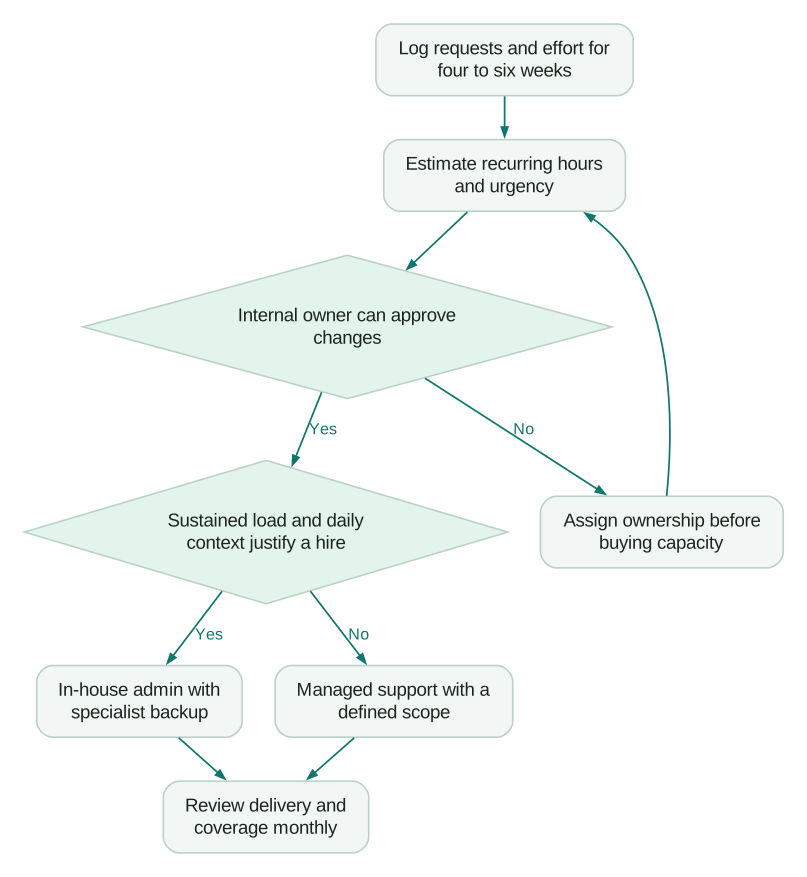
Validate the selected person or team with a bounded task. For example, give them a synthetic sync incident and ask for the expected field direction, evidence they would collect, proposed correction and verification. Assess their reasoning and documentation, not just whether they know the platform's menu labels.
How do you change models without disrupting Marketo?
Transfer operating knowledge and access before the outgoing owner leaves, then verify the live processes during a planned overlap. A contract signature does not complete the handover.
Collect the program inventory, active triggers, scoring and routing rules, sync mappings, domain configuration, user roles, API integrations and unresolved incidents. For each, name its owner, business purpose and failure response. Reissue individual access where appropriate and review integration credentials without casually interrupting the sync user.
In the first month, prioritize evidence over a broad redesign:
- Confirm the CRM sync's accessible records, important fields and expected direction.
- Review active trigger campaigns and identify any unclear audience or stop condition.
- Verify critical domain and sender settings with the IT owner.
- Read current release notes and record which integrations or processes are affected.
- Close a small set of requests through the new approval and documentation process.
Keep a named backup under either delivery model. For an employee, test whether the backup can follow the runbook during leave. For a provider, test whether another named operator can take over without requesting credentials or rediscovering the data model.
How do you know the arrangement is working?
Review accepted delivery, backlog age and operational failures monthly with the internal owner. Hours consumed alone cannot distinguish useful capacity from repeated repair work.
Track request age by severity, campaign launch lead time, sync incidents opened and resolved, repeated incidents, release changes assessed before their effective date and changes that needed rollback. Use consistent definitions and inspect outliers rather than averaging urgent failures into routine work.
A team can meet every ticket-response target while a recurring field conflict keeps returning. If most requests concern duplicate identities, overwritten fields or contradictory rules, decide which system owns each field and audit the surrounding stack. Then consider whether overlapping tools should be removed.
An integration repair and an ongoing admin arrangement are separate scopes. At Martechdevs, the next step can be a free martech audit or a scoped integration quote for the connections, field ownership and tests that need work. For the CRM-side configuration, review Salesforce implementation and sync rules.
What should your staffing and handover checklist include?
Approve the arrangement when ownership, capacity, coverage and exit readiness can be demonstrated:
Checklist
- Four to six weeks of requests recorded by type, effort and urgency.
- Campaign, sync, domain, access and release responsibilities assigned.
- Full costs compared over the same period using your actual payroll inputs.
- Internal owner named for definitions, priorities and approval.
- Named delivery team and backup tested against a bounded task.
- Response, restoration, coverage hours and escalation distinguished.
- Vendor support contract checked for performed work versus advice.
- Scope, overages, unused hours and notice terms documented.
- Runbooks and access handover usable by another operator.
- Monthly review measures accepted work, recurring defects and business impact.
Questions people ask
Is a Marketo managed service cheaper than a full-time admin?
It can be cheaper when recurring demand is below your own cost crossover. The illustrative model here crosses at about 81.3 delivery hours monthly, but that is not a market benchmark. Compare equivalent skill, internal coordination, minimum commitments and coverage before deciding that the smaller invoice represents better value.
How many hours a month does Marketo need?
There is no reliable universal allowance for a Marketo instance. Log requests for four to six weeks and separate routine operations, incidents and one-off improvements. Include work waiting on business decisions or IT, because those delays affect delivery even when they do not consume a provider's billable hours.
What should we do when the same Marketo sync incident keeps returning?
Keep one linked incident history showing the affected records, field ownership, attempted fixes and recurrence dates. Ask the delivery owner to identify the underlying cause and define a regression test before accepting another closure. Repeated temporary repairs may indicate a scope or ownership problem, even when every ticket meets its response target.
Can one person run Marketo and Salesforce?
One person can cover both at a manageable change volume if they have the required skills and authority. Document field ownership, integration credentials and escalation before relying on that arrangement. A backup must be able to diagnose the sync and handle urgent work when the primary administrator is unavailable.
Is it safe to give a provider admin access to Marketo?
Give each named operator the permissions needed for the approved work, with separate review of integration access and credentials. Broad admin access should follow a documented need, not convenience. Review access when staffing changes, verify production changes after approval and remove access as part of a tested handover at exit.
Sources
- Adobe: Marketo setup steps. Accessed 17 October 2026.
- Adobe: Understanding the Salesforce sync. Accessed 17 October 2026.
- Adobe: Role permissions. Accessed 17 October 2026.
- Adobe: Current Marketo release notes. Accessed 17 October 2026.
- Adobe: Marketo services and support. Accessed 17 October 2026.
- Adobe: Finding account support details. Accessed 17 October 2026.
- Salesforce: Success Plans. Accessed 17 October 2026.
- US Bureau of Labor Statistics: Employer costs for employee compensation. Accessed 17 October 2026.

Written by
Jafrin Akter AloData Engineer and Co-founder at Martechdevs and Growth and Analytics Partners
Jafrin writes practical guides to marketing technology, customer data, analytics and AI workflows. Martechdevs is a Growth and Analytics Partners company.