
Looker vs Looker Studio: Data Studio, Modeling and Cost
Pick Looker for a maintained semantic model and governed exploration over your warehouse. Pick Data Studio, formerly Looker Studio, for report creation and sharing that fits its connectors and data-source model. Looker vs Looker Studio compares separate products. Data Studio Pro adds team ownership and administration, while a Looker purchase needs its own platform, user and operating scope.
On this page
Looker, Data Studio and Pro compared
USD public pricing below excludes source-system costs, paid connectors and implementation; Looker requires a tailored quote.
| Decision | Looker | Data Studio | Data Studio Pro |
|---|---|---|---|
| Subscription | Quoted platform and users | No charge for the reporting product | Project subscription lists $9/user/project/month |
| Main modeling approach | Maintained LookML definitions and relationships | Data sources, calculated fields and report blends | Data Studio capabilities with additional team controls |
| Content ownership | Managed within the selected Looker deployment | Individual asset owners | Organization-owned Pro content through a Cloud project |
| Team operation | Model development and exploration entitlements | Shared reports with deliberate ownership | Team workspaces and administration |
| Selection question | Shared semantic and analytical operating model | Required reports and connector behavior | Organization ownership and Pro features |
Sources: Looker pricing, Data Studio pricing, Pro content ownership, LookML, Data Studio calculated fields.
Google has returned the Looker Studio product name to Data Studio. Existing searches and report links can still use the former name; the official welcome guide explains the change and redirect. The naming history does not make Looker and Data Studio the same platform. Current product identity.
At Martechdevs, we select reporting implementations from the business question, data quality and ownership requirement. A team needing a reliable weekly marketing report has a different problem from a team maintaining shared revenue definitions across many departments. The right design should solve that problem without adding an unowned modeling or administration burden.
Shared semantic modeling and report-level work
LookML describes dimensions, measures, calculations and relationships that Looker turns into database queries. A maintained model can support many analytical questions from shared definitions, provided the team owns the model and its release process. LookML overview.
Data Studio also supports reusable data-source calculations. Those fields can be used by reports based on that source. Chart-specific calculations have a narrower scope: creating one in a chart does not create the field in the underlying data source. Choose the appropriate level when a definition will appear in more than one report. Calculated-field scope.
The operational difference becomes visible during a change. Suppose finance changes the accepted revenue definition to exclude a particular refund state. Inventory every data source, chart formula and blend using the old definition. A central warehouse model or LookML definition may reduce the places requiring change, but only if the reports actually consume it.
Define the record grain, time boundary, exclusions and business owner before choosing either product. Our data warehouse design guide covers that upstream work.
Looker selection boundaries
- Best for: teams that need maintained warehouse definitions and governed exploration across recurring questions.
- Pros: a shared LookML model can serve many reports and analytical workflows.
- Cons: the model, user entitlements and warehouse work need a deliberate operating and commercial scope.
- Free plan and startup offer: Looker's paid platform requires a quote; core evaluation instances last 90 days. Confirm trial charges and startup credits separately from Data Studio's no-cost reporting offer. Core evaluation terms.
- Choose it if: the required shared model and exploration process justify their development and ongoing ownership.
- Skip it if: a bounded report with accepted source data meets the need without the additional semantic-platform scope.
The product boundary follows LookML and Looker pricing.
Data Studio selection boundaries
- Best for: teams creating and sharing reports from accepted sources, with Pro available for organization-owned content.
- Pros: the no-cost reporting product and the separate Pro ownership model allow scope to follow the reporting requirement.
- Cons: copied blends and chart-local calculations can create maintenance work; connector credentials and limits still govern access.
- Free plan and startup offer: Data Studio has a no-charge reporting option; Pro has its own subscription, and any complimentary Looker-linked licences require eligibility confirmation.
- Choose it if: the actual connectors, calculations, sharing and ownership model pass the report's acceptance tests.
- Skip it if: the team expects a Pro subscription alone to supply LookML modeling or repair inconsistent upstream definitions.
The boundaries follow Data Studio pricing, Pro ownership, calculated-field scope and Pro licence conditions.
Blends and the limits of report-local logic
Data Studio blends combine up to five sources and remain embedded in their report. Copying a report copies its blends, which can create several independently maintained definitions. The blend inherits freshness and credentials from the underlying sources. Blend behavior.
Before combining tables, Data Studio groups and aggregates their data according to the selected dimensions. That means the fields selected in the blend affect the result before the final chart aggregates it. Test both the source-level and final result rather than assuming the blend behaves like a direct join of every raw row. Pre-aggregation rules.
Consider a hypothetical daily channel-cost table with $100 for one channel and a second table with two campaign rows for that channel. Joining only on channel can repeat the $100 against both campaign rows. Summing the repeated value gives $200. The intended solution might be aggregating campaigns to channel grain or using campaign-level cost, depending on the question.
| Required report | Appropriate data preparation | Acceptance check |
|---|---|---|
| Cost by channel and day | Both sources at channel-day grain | One accepted cost amount per channel-day |
| Cost by campaign | Campaign identifiers and matching cost grain | No repeated channel total across campaigns |
| Shared executive revenue | Maintained upstream definition | Same total across consuming reports |
| A one-off exploratory comparison | Bounded report calculation | Its scope and denominator are visible |
A blend can be useful for a limited report. Repeated business-critical joins across copied reports are a signal to evaluate a maintained upstream model. The relevant limit is the team's ability to keep the definition correct as data and requirements change.
Pro ownership and continuity
No-cost Data Studio assets are owned by the individual who creates them. Pro content is owned by the organization through a Google Cloud project, with team workspaces and management capabilities. This can solve an ownership and continuity problem without requiring a Looker semantic-platform purchase. Pro content model.
The Pro licence and the content's actual location both matter. Plan how existing reports and reusable sources become Pro content instead of assuming that purchasing seats moves every asset automatically. Keep the destination project and administrator responsibilities explicit.
Content ownership and data credentials are also separate. When a no-cost data source changes owner, its existing credentials remain intact until changed or revoked. An ownership transfer can therefore leave a report dependent on the departing person's source authorization. Include reconnection and access validation in the handover. Ownership transfer.
For technical support, Google's Pro content guide specifies both a Data Studio Pro subscription and a Google Cloud support plan. Verify the actual support route and coverage in the budget rather than interpreting Pro ownership alone as every support entitlement. Support requirement.
Credentials and actual data access
Data Studio supports Owner's Credentials, Viewer's Credentials and supported service-account credentials. Owner's Credentials allow report access through the credential owner's authorization; Viewer's Credentials rely on the individual viewer's underlying access. These choices can produce different outcomes from the same report-sharing setting. Data credentials.
Test an intended viewer who lacks direct access to the source. If the report uses Owner's Credentials, that viewer may still see the report's data through the owner's authorization. That can be appropriate for a deliberate sharing design, but it should be an explicit decision.
Service-account credentials are currently available for BigQuery data sources in managed Google Workspace or Cloud Identity organizations, with administrator setup. Do not assume the same option applies to every connector. Service-account boundaries.
Data Studio roles control actions on reports and sources, while data credentials govern access to the underlying data. Review both layers and test restricted users, downloads and scheduled delivery. A report being hidden from one folder does not prove the data is inaccessible through every shared route. Roles and permissions.
Looker has its own model and user permissions. For example, access filters apply restrictions at the Explore level and must be configured wherever the restriction is needed. A combined design needs those controls as well as the report's sharing configuration. Looker access filters.
Data Studio Pro cost examples
Google lists the project subscription at $9 per user per project per month. In the self-service model, creators, editors and managers using Pro workspaces need licences, while people only viewing shared reports do not need Pro licences. Those viewers still need appropriate sharing permissions and do not gain all Pro workspace capabilities. Published price, subscription scope.
These worked examples use the listed monthly project rate and exclude source queries, paid connectors, support and implementation.
| Example | Paid Pro licence assumption | Monthly subscription | Twelve-month equivalent |
|---|---|---|---|
| Five report operators and fifteen view-only recipients | Five licences in one project | $45 | $540 |
| Ten report operators in one project | Ten licences | $90 | $1,080 |
| Five operators licensed in two separate project subscriptions | Ten user-project licences | $90 | $1,080 |
The first example does not charge all twenty people because the fifteen recipients only view shared reports under the stated assumption. If those recipients also need Pro workspace creation or management, the licence count changes. Unused purchased licences are still billed in the self-service subscription. Licence billing.
An illustrative complete budget might add a $60/month connector and $35/month of warehouse query costs to the $45 subscription. That gives $140/month before implementation and support. The connector and warehouse amounts are hypothetical planning inputs, not Google prices.
Looker requires a separate platform and role-based quote. Its published Google Cloud core editions include ten Standard users and two Developer users, with additional user and product scope in the agreement. Compare the full operating model rather than extrapolating the $9 Pro rate into a Looker price. Looker pricing structure.
Complimentary Data Studio Pro licences exclude customer-hosted Looker instances, Looker original contracts signed after 1 August 2026, and Google Cloud core instances created after that date. Confirm the instance and contract eligibility before deducting those licences from a budget. Complimentary-licence conditions.
A combined Looker and Data Studio design
The Looker connector can expose a Looker Explore as a Data Studio data source. It needs an eligible Looker instance, administrator enablement and the required Looker permissions. This supports a combined design in which modeled data serves a Data Studio reporting experience. Looker connector setup.
The connector has limits that can change the decision. Charts are limited to 5,000 rows, queries have a five-minute timeout, and data downloads or exports are limited to 75,000 rows, subject to user permissions. Customer-hosted Looker instances are unsupported. Private-network configurations also impose restrictions on scheduled delivery and exports. Connector requirements and limits.
Test the exact report rather than assuming that every Looker visualization and Data Studio feature carries through. Include the largest legitimate result, a restricted viewer and the required scheduled output. A connection that works for one small chart can still fail the reporting contract.
Keep one owner for the shared definition and another, if appropriate, for report presentation. A local chart calculation should not silently override an accepted model definition just because the combined interface makes it possible.
Freshness and performance
Data Studio freshness options vary by connector and affect performance, source queries and quotas. Its freshness threshold cannot make the upstream system produce new data sooner. Check source arrival, connector availability and the report result separately. Data freshness.
Looker also has caching policies. Datagroups can align cache expiry and derived-table rebuilding with the warehouse loading process. A combined setup adds another reason to write down the full source-to-report freshness path instead of assuming the last refreshed screen is the authoritative timestamp. Looker caching.
For an illustrative schedule, suppose the source finishes loading at 08:00, a required model completes at 08:20 and the accepted report becomes current at 08:35. The end-to-end reporting delay after the source load is 35 minutes. Optimizing only the chart's two-second render time will not remove that delay.
Best fit by reporting requirement
| Situation | First candidate | Runner-up | Deciding evidence |
|---|---|---|---|
| Simple shared marketing report with accepted source data | Data Studio | Current report with focused repair | Connector coverage, ownership and required output |
| Team reports needing organization ownership | Data Studio Pro | Looker if shared semantic exploration is also required | Ownership continuity and the actual analytical job |
| Reusable warehouse definitions and governed exploration | Looker | Data Studio over a maintained upstream model | Required exploration, model ownership and total scope |
| Existing Looker model with a Data Studio presentation need | Supported connector design | Native Looker reporting | Connector limits, networking and delivery requirements |
| Many inconsistent copied reports | Upstream model and ownership repair | Product change after an accepted architecture | One maintained definition and a reproducible report |
The Looker vs Power BI comparison and Looker vs Tableau comparison cover broader BI alternatives. The Data Studio vs Power BI guide addresses the report-tool comparison more directly.
Reporting architecture decision
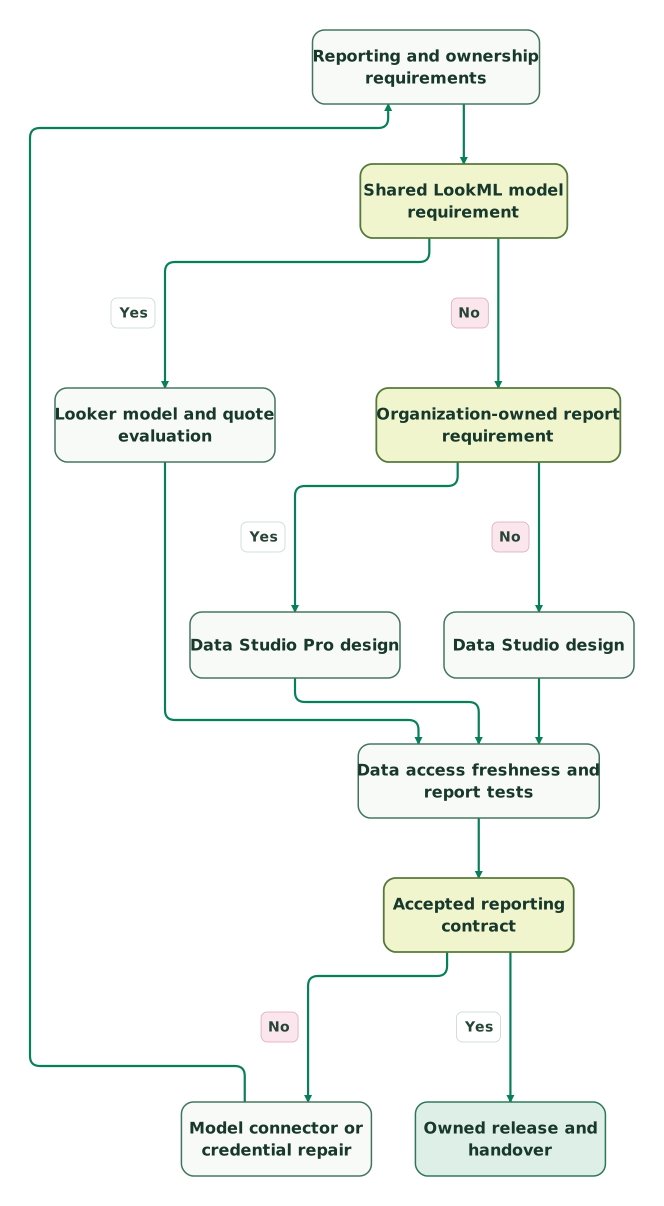
Read diagram as text
- Reporting and ownership requirements to Shared LookML model requirement.
- Shared LookML model requirement to Looker model and quote evaluation: Yes.
- Shared LookML model requirement to Organization-owned report requirement: No.
- Organization-owned report requirement to Data Studio Pro design: Yes.
- Organization-owned report requirement to Data Studio design: No.
- Looker model and quote evaluation to Data access freshness and report tests.
- Data Studio Pro design to Data access freshness and report tests.
- Data Studio design to Data access freshness and report tests.
- Data access freshness and report tests to Accepted reporting contract.
- Accepted reporting contract to Model connector or credential repair: No.
- Model connector or credential repair to Reporting and ownership requirements.
- Accepted reporting contract to Owned release and handover: Yes
Looker and Data Studio checklist
- The chosen product is named separately from its former branding.
- Shared metrics and report-local calculations have clear owners.
- Blended sources have compatible grains and accepted totals.
- Content ownership and source credentials are reviewed separately.
- Pro operators and view-only report recipients are counted correctly.
- Project subscriptions, connectors, source queries and support appear in the budget.
- Any Looker connector design passes its actual limits and networking rules.
- Source-to-report freshness and failure recovery meet the business need.
- Handover includes credential continuity and restricted-user checks.
Use the marketing data audit skill for the evidence inventory. Our Data Studio implementation scope covers maintained sources, reporting and handover. The $99 audit includes a written assessment and a one-hour specialist call.
Keep reading
Browse all Data Warehouse guides
 Data Warehouse
Looker vs Power BI: Semantic Models, Sharing and Complete Cost
Compare Looker and Power BI by semantic modeling, licences, access and freshness. Includes worked budgets, metric tests and a practical selection checklist.
Jafrin Akter AloLast updated 11 min read
 Data Warehouse
Looker vs Tableau: Modeling, Visual Analysis and Ownership Cost
Compare Looker and Tableau by modeling, visual analysis, user roles and total cost. Includes filter tests, edition budgets, access controls and migration checks.
Jafrin Akter AloLast updated 12 min read
 Data Warehouse
Data warehouse design for a small company: layers, models and rules that prevent rework
Design a marketing warehouse around clear record grain, identity and history. Includes model examples, metric definitions and a first-project checklist.
Jafrin Akter AloLast updated 11 min read
Looker Studio dashboards
See the implementation scope, deliverables and acceptance checks.
Questions people ask
Is Looker Studio still the current Google product name?
Google now calls that reporting product Data Studio. Existing searches and older links still use Looker Studio, and the product's old domain redirects. Looker remains a separate BI platform with its own modeling and commercial scope. Identify the actual product and edition before comparing costs, migration requirements or features described in older articles. Google's naming guide.
Does buying Data Studio Pro turn reports into a LookML semantic model?
Pro adds organization ownership and team capabilities to Data Studio. A LookML model belongs to Looker's separate modeling workflow. If shared metrics and reusable relationships are the requirement, design that layer explicitly in Looker or the upstream data architecture. A Pro subscription can solve asset ownership while leaving inconsistent chart calculations and source definitions unchanged. Pro content, LookML.
Must every recipient of a Pro report buy a Data Studio Pro licence?
In the self-service subscription model, people who only view shared reports do not need a Pro licence. They require the appropriate sharing permissions and do not receive all Pro-specific workspace capabilities. Count creators, editors and content managers separately from those recipients, then check the actual project subscription and required actions before estimating the licence amount. Pro user scope.
Does transferring a Data Studio source also replace its credentials?
An ownership transfer leaves the source's existing credentials intact. The new owner can reconnect with different credentials, and revoking the old authorization can affect access until that is done. Include a source-access check in the handover rather than assuming the new ownership label removes every dependency on the departing person. Credential continuity.
Can Data Studio use a Looker model without a separate data copy?
The Looker connector can expose an eligible Looker Explore as a Data Studio source. Administrator enablement, user permissions, network configuration and connector limits still apply. Test the required chart and delivery behavior before choosing the combined design, and keep the shared metric definition in the maintained model rather than recreating it independently in every report. Looker connection.
Sources
- Looker platform pricing
- Data Studio product and pricing
- Data Studio naming and overview
- LookML modeling
- Data Studio calculated-field scope
- Data Studio blends
- Data Studio Pro content ownership
- Data Studio ownership transfer
- Data Studio credentials
- Data Studio roles and permissions
- Data Studio Pro subscriptions and licences
- Looker connector setup
- Looker connector requirements and limits
- Data Studio freshness
- Looker caching
- Looker access filters
- Looker core evaluation and transition

Written by
Jafrin Akter AloData Engineer and Co-founder at Martechdevs and Growth and Analytics Partners
Jafrin writes practical guides to marketing technology, customer data, analytics and AI workflows. Martechdevs is a Growth and Analytics Partners company.