
lemlist vs Instantly for Email Capacity and Multichannel Sales
Pick Instantly if its email campaign workspace and contact limits fit the team's operating process; pick lemlist for a volume-priced email plan or a deliberate multichannel sales routine. lemlist vs Instantly is no longer a simple per-seat-versus-mailbox comparison. lemlist Email has unlimited users, while its Multichannel plan is per user, so choose the workflow before calculating the bill.
On this page
Instantly and lemlist comparison
These are US list prices in USD on monthly billing, excluding infrastructure, data and optional products.
| Decision criterion | Instantly | lemlist | Practical consequence |
|---|---|---|---|
| Email entry | Outreach Growth $47/month, 1,000 uploaded contacts, 5,000 emails/month | Email $69/month, 50,000 team-wide emails/month, unlimited users and senders | Compare both contact storage and sends |
| Larger email scope | Outreach Hypergrowth $107/month, 25,000 contacts, 125,000 emails/month | Higher volume Email tiers | Use the required tier rather than the cheapest card |
| Multichannel scope | Qualify the selected products and workflow | Multichannel $109/user/month with additional channels | Count the people operating those channels |
| Trial | 14 days, 2 connected accounts, 250 leads, 1,000 campaign emails | Standard 14-day trial, 50 emails/day; some features excluded | Trial capacity differs from paid scope |
| Reply handling | Configurable stop-on-reply and company stopping | Continue, pause or end after replies; company pausing option | Test the intended stopping rule |
Sources: Instantly standalone Outreach plans, lemlist plan guide, Instantly trial, lemlist trial, Instantly settings and lemlist reply rules.
Instantly also sells bundles and credits, so the standalone Outreach figures should remain distinct from those offers. lemlist's current Email plan uses a shared sending-volume allowance rather than a user charge. A team following an older comparison can therefore misprice both products before it has even chosen a sequence.
At Martechdevs, we build outbound and CRM workflows around eligibility, message ownership and the response after a prospect engages. Sending capacity is one input. The platform also needs to stop the correct work, assign the conversation and preserve the CRM relationship.

Tool decision blocks
Instantly
- Best for: An email-led team whose campaign and reply workflow fits the selected Outreach plan.
- Pros: Outreach plans include unlimited connected email accounts, with explicit uploaded-contact and monthly-email allowances.
- Cons: Unlimited account connections do not remove contact limits, sending allowances or the cost of the underlying mailboxes. Data credits and bundles have separate scope.
- Free plan and startup offer: The 14-day trial permits two connected accounts, 250 uploaded leads and 1,000 campaign emails without a credit card. Paid service is required afterward; no universal startup discount is assumed.
- Choose it if: A representative email campaign, reply and CRM handoff are clear to the operators and fit the paid tier.
- Skip it if: The planned contact population exceeds the entry tier or the business needs a multichannel process that the selected setup has not demonstrated.
lemlist
- Best for: A team choosing between a shared email-volume subscription and named-user multichannel selling.
- Pros: The Email plan includes unlimited users and senders; Multichannel adds channels and sales tasks under a per-user model.
- Cons: Multichannel seats and data add-ons change the total. The platform's shared email cap includes work across campaigns, inbox and contact-panel sending.
- Free plan and startup offer: The standard trial lasts 14 days with a 50-email daily limit; warming and in-app calling are excluded. It transitions to limited Freemium access without automatic billing. No universal startup concession is assumed.
- Choose it if: The required channel work and human tasks justify the selected family, or the Email volume plan fits the team's email-only operation.
- Skip it if: The purchase assumes several people can share one Multichannel seat or that every feature seen in marketing copy is available in the trial.
For other sending workspaces, Smartlead alternatives adds client-scope and migration considerations. The lemlist alternatives guide helps when the team wants to change its operating model rather than compare only this pair.
Email volume and uploaded contacts
Count contacts separately from scheduled emails. A contact can receive several planned steps, and replies or exclusions can reduce actual sends. The full scheduled workload is useful for capacity planning even when the eventual delivered count will be lower.
Instantly's standalone Growth allowance is 1,000 uploaded contacts and 5,000 monthly emails. Hypergrowth increases those figures to 25,000 contacts and 125,000 emails. Instantly plans. A team can exceed the first limit while remaining below the second, so one monthly email total cannot establish plan fit.
lemlist Email starts at 50,000 monthly emails for $69 on monthly billing. The plan guide lists unlimited contacts, users and senders, with a team-wide cap covering campaigns, inbox and contact-panel sends. lemlist volume rules. Include manual follow-up in the forecast when it consumes the same allowance.
Do not purchase capacity as a target to exhaust. The approved audience and the team's ability to handle replies should determine the work. Extra unused volume can simply be headroom. It does not justify adding irrelevant people to a campaign or increasing the cadence beyond the accepted outreach plan.
A hypothetical email-only budget
Assume a hypothetical team holds 2,000 approved contacts and plans four emails per contact during a month. The maximum planned workload is 8,000 emails before replies and exclusions. The example needs more than Instantly Growth's contact and send allowances, so it compares Hypergrowth with lemlist Email.
| Hypothetical component | Instantly setup | lemlist setup | Basis |
|---|---|---|---|
| Required email subscription | $107/month | $69/month | Published monthly plans |
| Twelve mailboxes | $72/month | $72/month | Assumed $6/mailbox/month |
| Four domains | $4/month equivalent | $4/month equivalent | Assumed $12/domain/year |
| Complete stated recurring scope | $183/month | $145/month | Excludes data, tax and other products |
| Twelve-month total | $2,196 | $1,740 | Constant hypothetical workload |
The $38 monthly difference becomes $456 over twelve months. Mailbox and domain costs are invented planning inputs, not vendor infrastructure quotes. The subscription rates come from Instantly pricing and lemlist's plan guide.
The result does not prove lemlist is the better choice for that team. A retained integration, reply workflow or operator preference can justify a difference, but the reason should be demonstrated. Conversely, the buyer should not assume Instantly has the lower email bill because its smallest card is cheaper.
If three people instead need lemlist Multichannel on monthly billing, its seat subscription is 3 × $109 = $327/month before the other costs. That is a different scope, and the comparison must include the channel work it replaces. Use the software pricing tool and lemlist pricing guide to keep the two plan families separate.
Reply, pause and company-level stopping
An engaged prospect should receive the treatment the sales process intends. Define separate outcomes for a human reply, an out-of-office response, an unsubscribe request and a booked meeting. A generic replied status can hide different follow-up decisions.
Instantly has a setting that pauses follow-ups after a reply. It also documents company-level stopping, under which other leads at the same company are completed after a human reply; automatic replies do not trigger that company stop. Instantly campaign behavior.
lemlist lets an operator continue, pause or end a sequence after a reply or selected link interaction. It also offers a setting to pause contacts at the same company. lemlist reply controls. Choose the intended behavior explicitly instead of assuming the default fits every campaign.
| Reply case | Required decision | Evidence in the trial |
|---|---|---|
| Human response | Stop automated follow-up and assign the conversation | No later automated step after the detected response |
| Out-of-office | Agreed pause or review behavior | A documented return path without duplicate enrollment |
| Removal request | Apply the relevant exclusion | Re-import does not restore unwanted outreach |
| Another contact at the account replies | Person-level or account-level stop policy | Other contacts follow the chosen rule |
| Meeting booked outside the platform | Receive the booking state and stop the relevant work | Booking and sequence state reconcile |
The outbound automation guide explains the boundary between automatic preparation and human conversation ownership. A tool that records a reply correctly still needs a person responsible for responding.
Mailbox operations and message quality
A platform allowance is distinct from the sending provider's limits and the condition of the mailbox. Keep the mailbox subscription, authentication, daily schedule and operating owner visible in the implementation plan. A change of sequencer does not reset the reputation or history of the underlying sender.
Do not infer a deliverability winner from a warmup feature or a vendor claim. A meaningful comparison holds the audience, offer, mailbox conditions and measurement method consistent. Record the actual delivered, bounced and responded outcomes, and avoid calling a small or uncontrolled test a universal result.
The cold email infrastructure guide covers the surrounding setup. Evaluate the selected tool's response to a disconnected mailbox or failed send. The team should see the failure, identify the affected contacts and resume only the intended work after repair.
Best fit by sales workflow
| Company size or operating model | Best fit | Runner-up | Decision reason |
|---|---|---|---|
| Small email team below 1,000 stored campaign contacts | Instantly Growth trial | lemlist Email | Entry capacity can fit a narrow workflow |
| Email-only team with more users and moderate sends | lemlist Email | Instantly qualified tier | Shared volume pricing deserves a matched budget |
| Named sellers coordinating email, calls and other channels | lemlist Multichannel | Instantly plus qualified surrounding tools | Human channel work is part of the requirement |
| Existing Instantly operation with a reliable reply process | Instantly retention | lemlist pilot | Preserve working operations unless the replacement improves a specific task |
| Agency coordinating separate client exclusions | Client-scope trial | Either qualified setup | The exclusion boundary must be demonstrated |
Migration and repair workflow
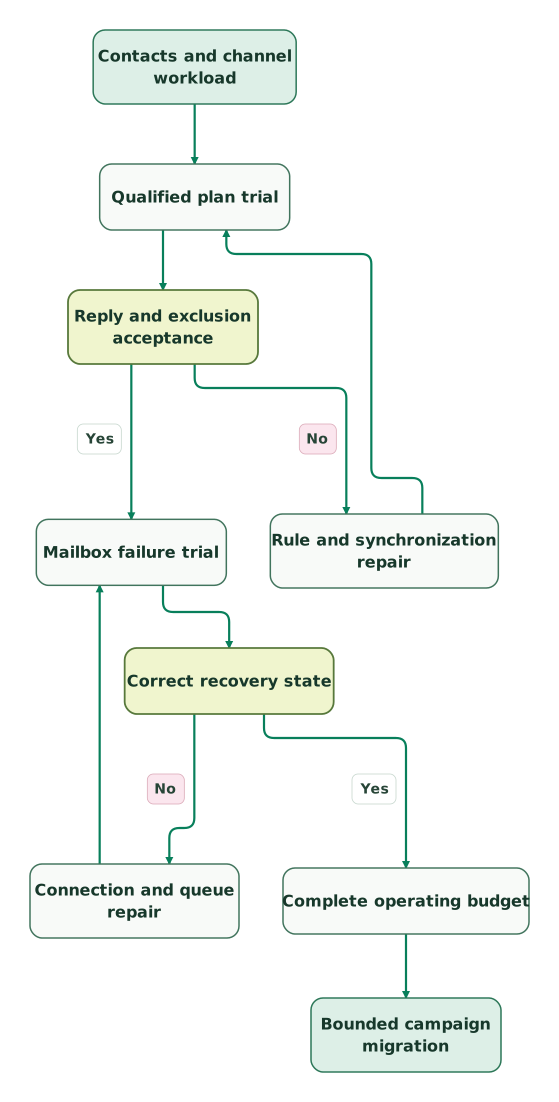
Read diagram as text
- Contacts and channel workload to Qualified plan trial.
- Qualified plan trial to Reply and exclusion acceptance.
- Reply and exclusion acceptance to Rule and synchronization repair: No.
- Rule and synchronization repair to Qualified plan trial.
- Reply and exclusion acceptance to Mailbox failure trial: Yes.
- Mailbox failure trial to Correct recovery state.
- Correct recovery state to Connection and queue repair: No.
- Connection and queue repair to Mailbox failure trial.
- Correct recovery state to Complete operating budget: Yes.
- Complete operating budget to Bounded campaign migration
Export exclusions and current conversation states before moving active campaigns. Decide whether in-progress prospects finish in the old tool or resume at a documented step in the replacement. Starting everyone again at step one can duplicate outreach and lose the context of an existing conversation.
Run the trial on controlled records and inspect the later steps. Re-import a previously excluded test contact, simulate a reply and disconnect a test mailbox. After each repair, repeat the affected case and confirm that only the expected contacts remain eligible.
lemlist vs Instantly checklist
- Choose email-only or multichannel scope before counting users.
- Count uploaded contacts, scheduled sends and manual follow-up separately.
- Confirm the current plan family and billing term.
- Include mailboxes, domains, data and optional products in the budget.
- Define human reply, automatic reply and account-level stopping behavior.
- Test exclusion persistence after re-import and a meeting-state update.
- Test mailbox disconnection and the intended recovery queue.
- Preserve in-progress steps and conversation ownership during migration.
- Repeat affected validation after rule or connection repairs.
The CRM data hygiene audit skill helps prepare accepted contacts and exclusions before either tool receives the list. The purchase should follow the workflow that the team can run and investigate reliably.
Keep reading
Browse all GTM Engineering guides
 GTM Engineering
Smartlead Alternatives for Client Operations and Outbound Workflows
Compare Smartlead alternatives by client exclusions, contact storage, sends, reply ownership and migration cost, with a three-client budget example.
Jafrin Akter AloLast updated 10 min read
 GTM Engineering
lemlist Alternatives for Email Operations and Sales Workflows
Compare lemlist alternatives including Instantly, Smartlead and Apollo by current plan families, contacts, sends, reply handling and full transition cost.
Jafrin Akter AloLast updated 10 min read
 GTM Engineering
Cold email infrastructure: domains, authentication, sending and monitoring
Build email infrastructure around authentication, suppression and recipient expectations. Check Gmail, Yahoo and Outlook requirements and plan a measured pilot.
Jafrin Akter AloLast updated 9 min read
GTM engineering & outbound
See the implementation scope, deliverables and acceptance checks.
Questions people ask
Is lemlist Email still priced separately for every user?
lemlist's current Email plan is priced by team-wide sending volume and includes unlimited users and senders. Its Multichannel plan uses a per-user price. Select the plan family before multiplying a rate by headcount, and check any legacy account terms separately. An older per-seat Email Pro comparison can describe a different subscription from the current Email offer.
Can Instantly Growth fit two thousand contacts with only four thousand emails?
Instantly Growth's published uploaded-contact allowance is 1,000, so two thousand uploaded contacts exceed that limit even if the email volume remains below its monthly sending allowance. Count the relevant contact population and sends independently. Use a qualified higher plan or a different workflow before treating the entry subscription as the production budget.
Does unlimited connected mailboxes mean the mailboxes themselves are free?
Unlimited connected mailboxes does not mean the underlying mailbox subscriptions are free. It describes the connection allowance in the outreach platform. Domains, provider accounts and optional infrastructure products can still create separate charges. Keep those items in the budget and confirm what the selected package actually includes before comparing the complete monthly cost.
Can an automatic reply safely be treated like a human response?
An automatic reply should follow its own agreed rule rather than automatically receiving the same treatment as a human response. An out-of-office notice may need a pause and later review, while a human answer should move to conversation ownership. Test both cases in the selected configuration and verify the effect on other contacts at the same account.
Should an Instantly-to-lemlist migration restart every active sequence?
An Instantly-to-lemlist migration should not restart every active sequence automatically. Preserve current step, reply state, exclusions and relevant timing, then decide which prospects finish in the old tool and which resume in the new one. Test a bounded cohort and inspect later messages before moving the rest of the active campaign population.
Sources

Written by
Jafrin Akter AloData Engineer and Co-founder at Martechdevs and Growth and Analytics Partners
Jafrin writes practical guides to marketing technology, customer data, analytics and AI workflows. Martechdevs is a Growth and Analytics Partners company.