
Smartlead Alternatives for Client Operations and Outbound Workflows
Choose Instantly for an email campaign workspace, lemlist for shared email volume or named-user multichannel work, and Apollo.io for contact data connected with outreach. Smartlead alternatives should improve the specific process you need to change. Test client boundaries, stopping rules and CRM ownership alongside capacity, because a cheaper subscription can become expensive if active prospects or exclusions are migrated incorrectly.
On this page
Smartlead competitors compared
Prices are US amounts in USD on monthly billing, with Apollo's annual option shown separately.
| Tool | Starting price and billing basis | Best fit | Main tradeoff |
|---|---|---|---|
| Instantly | Outreach Growth $47/month, 1,000 contacts and 5,000 emails/month | Email campaign operations | Larger contact storage and data products change scope |
| lemlist | Email $69/month for 50,000 team-wide sends; Multichannel $109/user/month | Shared email volume or multichannel sellers | The two plan families have different billing units |
| Apollo.io | Basic $65/seat/month monthly, or $49 billed annually | Prospect data and outreach together | Shared credits and the account-wide plan level need budgeting |
| Smartlead, retained baseline | Base $39/month, 2,000 contacts and 6,000 emails/month | Mailbox-led sending with an established operating process | Client exclusions and optional services need deliberate configuration |
Sources: Instantly pricing, lemlist plans, Apollo pricing and Smartlead pricing. These packages do not represent equal contact, channel or data capacity.
Start by naming the Smartlead problem. A team may need a different reply workspace, a seller-led channel routine, simpler data acquisition or stronger separation between clients. Another team may simply need to repair an existing mapping or exclusion rule. A new platform should solve the defined problem rather than provide a new interface for the same unfinished process.
At Martechdevs, we design outbound workflows and CRM handoffs with explicit record, sender and client ownership. That gives a migration a concrete acceptance standard: the intended prospect is eligible, the correct operator owns the conversation and excluded people stay excluded after the move.
Tool decision blocks
Instantly
- Best for: An email-led team evaluating a different campaign and reply workspace.
- Pros: Standalone Outreach plans offer unlimited connected email accounts with stated contact and send limits.
- Cons: Growth is a small entry package. Bundles, credits and larger contact requirements can create a different bill from the first card.
- Free plan and startup offer: The 14-day trial includes two connected accounts, 250 leads and 1,000 campaign emails without a credit card. No universal startup concession is assumed.
- Choose it if: The operators can complete campaign preparation, reply triage and CRM updates more reliably in the qualified plan.
- Skip it if: The replacement case assumes unlimited mailbox connections also remove the contact and send ceilings.
lemlist
- Best for: A team choosing between a common email-volume allowance and a deliberate multichannel sales process.
- Pros: The Email family supports unlimited users and senders, while Multichannel provides per-user access to additional channels and tasks.
- Cons: A change from mailbox-led operations to named-user selling can require a different ownership and seat model. Data and optional channel products add scope.
- Free plan and startup offer: The standard trial lasts 14 days with 50 emails/day, excludes calling and warming, and moves to limited Freemium access if not upgraded. No universal startup discount is assumed.
- Choose it if: The channel and operator model fits the actual selling routine and passes a reply-and-handoff trial.
- Skip it if: Several people would share a Multichannel identity or the projected saving ignores the users who need paid access.
Apollo.io
- Best for: A small team that wants the prospect data and execution work in one place.
- Pros: Basic includes sequencing and core integrations, creating a useful consolidation test for a fragmented stack.
- Cons: Every seat uses the same plan level. Data reveals and other chargeable actions share a credit budget that must be estimated separately from message volume.
- Free plan and startup offer: Free provides 75 credits per seat monthly. The 14-day trial has separate limits; approved startups can receive 50% off Basic or Professional for one year on up to five seats.
- Choose it if: The data sample and complete sales process justify removing another product or manual transfer.
- Skip it if: Your requirement is only a sending-workspace change and the data capabilities add no useful operating value.
Smartlead
- Best for: A team already running dependable mailbox operations with understood client and CRM boundaries.
- Pros: The plan structure includes unlimited connected email accounts and explicit contact and send allowances, so a scope repair can preserve the current setup.
- Cons: Client-scoped exclusion rules need attention. A plan name containing Unlimited should not be read as unlimited sends when the package lists a monthly send allowance.
- Free plan and startup offer: The 14-day trial includes 1,250 contacts and 2,500 sends without a credit card. No permanent free production plan or standard startup concession is assumed.
- Choose it if: The current problem is a bounded rule or workflow issue and repairing it produces the required result.
- Skip it if: The operator cannot maintain the needed client boundaries or another qualified workflow clearly reduces ongoing work.
Client boundaries and exclusions
Smartlead's global block-list documentation makes a critical distinction: an unassigned entry applies to campaigns without a client assignment. It does not automatically apply across client-specific campaigns. Blocking the same contact for several clients requires an appropriately scoped entry for each.
Preserve that meaning during export. A CSV of excluded addresses without client scope can become incomplete or overly broad in the destination. Decide whether an exclusion belongs to one client, several clients or the entire business, then map it to the replacement's actual controls.
| Exclusion type | Scope to preserve | Migration test |
|---|---|---|
| Client-specific removal | Relevant client only | The person remains excluded from that client's campaigns |
| Business-wide exclusion | Every intended business scope | Re-import into another scope does not restore eligibility |
| Existing customer | Account and business context | New prospect lists do not overwrite customer status |
| Active sales conversation | Person or company according to policy | Other automated steps follow the agreed stopping rule |
| Invalid contact method | The affected address or number | A corrected field is reviewed before re-entry |
An agency should retain the reason and scope of an exclusion, not merely a yes-or-no flag. The same company can have different relationships with different clients. The correct treatment needs a deliberate business policy and a test against the destination configuration.
The lemlist alternatives guide covers a change toward named-seller or multichannel work. The lemlist vs Instantly comparison is useful when both survive the initial email-workspace shortlist.
Contact and send capacity
Smartlead Base lists 2,000 stored contacts and 6,000 monthly sends. Pro lists 30,000 contacts and 90,000 sends at $94/month on monthly billing. Unlimited Smart lists unlimited contact storage with a 150,000-email monthly allowance at $174/month. Smartlead plan table. Keep the storage and sending units separate even when a plan name is broad.
Instantly's standalone Hypergrowth offer lists 25,000 contacts and 125,000 emails/month at $107/month. lemlist Email lists 50,000 team-wide emails at $69/month with unlimited contacts and users. Instantly pricing, lemlist plan rules. These are distinct packages, not equivalent quotas.
Count the active migration population and the records needed for history or exclusions. Do not delete required context merely to fit an entry allowance. Confirm the vendor's precise storage definition and how archived or completed records affect it before planning a large transfer.
A hypothetical three-client budget
Assume a hypothetical agency has three client campaigns with 2,000 distinct approved contacts each. Every contact has three planned email steps in the month. The maximum scheduled workload is 6,000 contacts and 18,000 emails before replies and exclusions. The example assumes the selected account and client arrangement permits those workloads together.
| Qualified candidate | Monthly subscription | Stated capacity relevant to the example | Twelve-month total |
|---|---|---|---|
| Smartlead Pro | $94 | 30,000 contacts; 90,000 emails/month | $1,128 |
| Instantly Hypergrowth | $107 | 25,000 contacts; 125,000 emails/month | $1,284 |
| lemlist Email | $69 | Unlimited contacts; 50,000 team-wide emails/month | $828 |
The arithmetic is three clients × 2,000 contacts = 6,000 contacts, then 6,000 × three steps = 18,000 emails. The table uses Smartlead, Instantly and lemlist monthly prices. It excludes mailboxes, domains, data, tax, client-access add-ons and other products.
The Smartlead-to-lemlist subscription difference is $25/month, or $300/year. If a hypothetical transition costs $1,200, subscription-only payback is 48 months. A move may still be justified by operating fit, but that benefit needs evidence from the trial. A modest base-price reduction should not hide the actual cost of rebuilding active client operations.
If each client instead requires an independently purchased account, calculate that arrangement explicitly. Do not assume one shared subscription gives every required access boundary. Ask the vendor to confirm client access, permissions and commercial scope, then use the software pricing tool for the complete budget.
Reply handling and conversation ownership
Test the moment an automated sequence becomes a human conversation. The correct operator needs the reply, its account context and a clear next action. A platform that stops an email but leaves the response unassigned has completed only part of the job.
Instantly documents reply stopping and company-level stopping in its campaign settings. lemlist allows continue, pause or end behavior after replies, with an optional company pause. lemlist stopping controls. Translate your policy into the chosen configuration and test a person-level and company-level case.
Separate automatic replies from human answers. An out-of-office response may call for a pause and review, while a removal request needs a durable exclusion. A booking completed outside the outreach platform needs a reliable state update if it is supposed to stop the sequence.
The outbound automation guide helps define those responsibilities. Keep a person accountable for reply review, exceptions and failed synchronization even when software prepares or classifies the work.
Active-campaign migration
Export current step, next scheduled action, reply status, client assignment and exclusions before moving records. Decide which prospects finish in Smartlead and which resume in the replacement. Preserve the original export so a disputed state can be reconstructed.
A migration should include a test contact who has already replied, one waiting between steps, one excluded from a single client and one excluded from every relevant scope. Re-import those records and inspect later eligibility. A successful import count cannot prove the stopping and client rules survived.
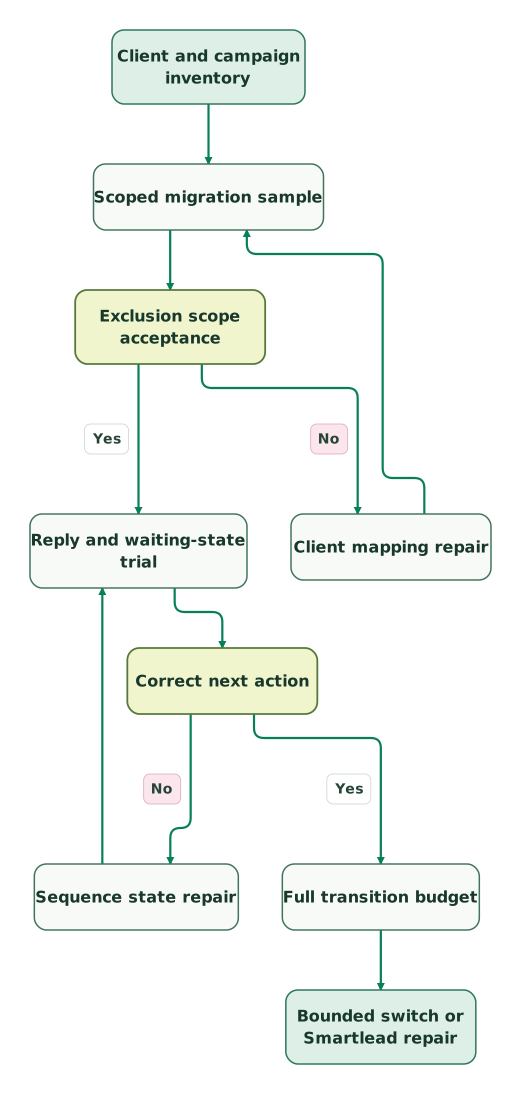
Read diagram as text
- Client and campaign inventory to Scoped migration sample.
- Scoped migration sample to Exclusion scope acceptance.
- Exclusion scope acceptance to Client mapping repair: No.
- Client mapping repair to Scoped migration sample.
- Exclusion scope acceptance to Reply and waiting-state trial: Yes.
- Reply and waiting-state trial to Correct next action.
- Correct next action to Sequence state repair: No.
- Sequence state repair to Reply and waiting-state trial.
- Correct next action to Full transition budget: Yes.
- Full transition budget to Bounded switch or Smartlead repair
Repeat the relevant tests after every mapping or state repair. A client-assignment change can alter which block-list entry applies. A revised sequence step can alter the next scheduled send. Keep one system responsible for each live prospect during the transition.
The cold email infrastructure guide covers sender dependencies outside the sequencer. Validate disconnected-mailbox recovery separately from the data migration so a connection problem does not look like a missing prospect or incorrect sequence state.
Best fit by operating model
| Company size or operating model | Best fit | Runner-up | Decision reason |
|---|---|---|---|
| Existing Smartlead agency with a narrow rule problem | Smartlead repair | Instantly | Preserve client operations if the repair is bounded |
| Email team changing its reply workspace | Instantly | Smartlead | Operators should test triage and ownership directly |
| Email-only team with several users | lemlist Email | Instantly | Shared volume pricing deserves a complete comparison |
| Named sellers moving to multichannel work | lemlist Multichannel | Apollo qualified scope | Human tasks and channel ownership change the requirement |
| Founder-led team consolidating data and outreach | Apollo | lemlist | Accepted prospect data and execution belong in the same trial |
Smartlead replacement checklist
- Record the exact operating gap and the scope of an in-place repair.
- Inventory clients, sender accounts, active steps and exclusion reasons.
- Separate storage, sends, users, data credits and optional products.
- Confirm the commercial scope for shared or separate client access.
- Test client-specific and business-wide exclusions after re-import.
- Validate human reply, automatic reply and booked-meeting handling.
- Preserve waiting-state and conversation ownership during the transfer.
- Test mailbox recovery without duplicating the next action.
- Repeat affected checks after client or sequence-state repairs.
- Approve a small cohort before moving the remaining live campaigns.
Use the CRM data hygiene audit skill to prepare identity and exclusion mappings before a replacement receives production contacts.
Keep reading
Browse all GTM Engineering guides
 GTM Engineering
lemlist Alternatives for Email Operations and Sales Workflows
Compare lemlist alternatives including Instantly, Smartlead and Apollo by current plan families, contacts, sends, reply handling and full transition cost.
Jafrin Akter AloLast updated 10 min read
 GTM Engineering
lemlist vs Instantly for Email Capacity and Multichannel Sales
Compare lemlist and Instantly by email volume, contacts, user pricing, reply rules and complete operating cost, with a checked example and migration plan.
Jafrin Akter AloLast updated 9 min read
 GTM Engineering
Cold email infrastructure: domains, authentication, sending and monitoring
Build email infrastructure around authentication, suppression and recipient expectations. Check Gmail, Yahoo and Outlook requirements and plan a measured pilot.
Jafrin Akter AloLast updated 9 min read
GTM engineering & outbound
See the implementation scope, deliverables and acceptance checks.
Questions people ask
Does Smartlead's Global Block List automatically cover all client campaigns?
Smartlead's Global Block List does not automatically cover all client campaigns. Its documentation says an unassigned entry applies to unassigned campaigns, while client-specific campaigns need the relevant scoped entries. Preserve that scope in a migration and test it after re-import. A global label alone does not prove that every client or business unit will respect the same exclusion.
Does Unlimited Smart mean unlimited monthly email sends?
Unlimited Smart should not be read as unlimited monthly sends. Smartlead's pricing table lists unlimited contact storage for that plan alongside a stated 150,000-email monthly allowance. Keep storage and sending capacity separate in the budget. The required features, optional products and account arrangement also need confirmation before a plan name becomes a production assumption.
Can a cheaper Smartlead alternative create a long payback period?
A cheaper Smartlead alternative can create a long payback period when the monthly subscription saving is small compared with transition work. Include active-sequence mapping, client exclusions, integrations, training and parallel subscriptions. Calculate the saving only after the replacement plan is qualified. Any expected operating improvement should be supported by the trial rather than added as an automatic benefit.
Should replied prospects be imported as new leads during a switch?
Replied prospects should not be imported as new eligible leads without preserving their conversation state. Assign the current owner, retain the relevant response and prevent automated steps that no longer apply. Test a known replied contact through the replacement and inspect later actions. An import that creates the right person but restarts unwanted outreach has not preserved the business process.
Can an agency compare one shared account with three separate subscriptions?
An agency can compare those arrangements only after confirming the required client access and permissions in each. A shared subscription may fit volume while failing the intended separation of records or exclusions. Price the actual approved account structure, then include add-ons and operator work. The number of clients alone does not establish the correct licence arrangement.
Sources
- Smartlead current pricing and allowances
- Smartlead trial limits
- Smartlead block-list client scope
- Instantly standalone Outreach pricing
- Instantly trial
- Instantly reply settings
- lemlist plan families
- lemlist trial and Freemium terms
- lemlist stopping rules
- Apollo pricing and credit scope
- Apollo trial limits
- Apollo startup program

Written by
Jafrin Akter AloData Engineer and Co-founder at Martechdevs and Growth and Analytics Partners
Jafrin writes practical guides to marketing technology, customer data, analytics and AI workflows. Martechdevs is a Growth and Analytics Partners company.