
Lemlist Pricing: Seats, Channels and Enrichment Costs
Data Engineer and Co-founder, martechdevs
Last updated 9 min read
Lemlist pricing now separates a volume-based Email plan from per-user Multichannel access, with data credits and other usage adding to the bill. Choose the sales workflow first, then count users, sending volume, enrichment actions and calling needs. Existing Email Pro accounts can have different terms, so an older per-seat comparison may not describe the offer available to a new team.
Last updated: 9 October 2026.
The useful question is not whether Lemlist is cheaper per seat than another tool. It is whether the complete package supports your team's actual outreach process at a cost the resulting qualified conversations can justify.
A team that only sends email has a different purchasing decision from a team whose sellers use LinkedIn and calling. A team with a clean CRM has a different data bill from one that needs to discover every contact. Keep those differences visible throughout the comparison.
What are the current plan families?
The public pricing page displays Email from USD69 monthly, or USD55 per month on the annual option, for a 50,000-email monthly tier with unlimited users and senders. Multichannel displays USD109 per user monthly, or USD87 on the annual option. Enterprise is custom-priced. These are displayed subscription figures; verify the selected billing period and full charge in checkout. Lemlist pricing.
The plan guide calls the second offer Multichannel Expert. It says the current Email plan is for new customers, while existing Email Pro customers retain their terms. It also lists higher Email volume tiers and describes Enterprise as annual billing with a five-seat minimum. Keep legacy and current plans separate when reviewing an existing invoice. Plan guide.
Treat the annual display as an equivalent monthly amount. Record the actual commitment and invoice total rather than assuming the displayed number is charged monthly. Currency, tax and account-specific terms can also affect the amount paid.
Our GTM engineering work begins with the audience, research, sequencing and sales handoff. That workflow determines which plan capabilities matter and which paid features would remain unused.
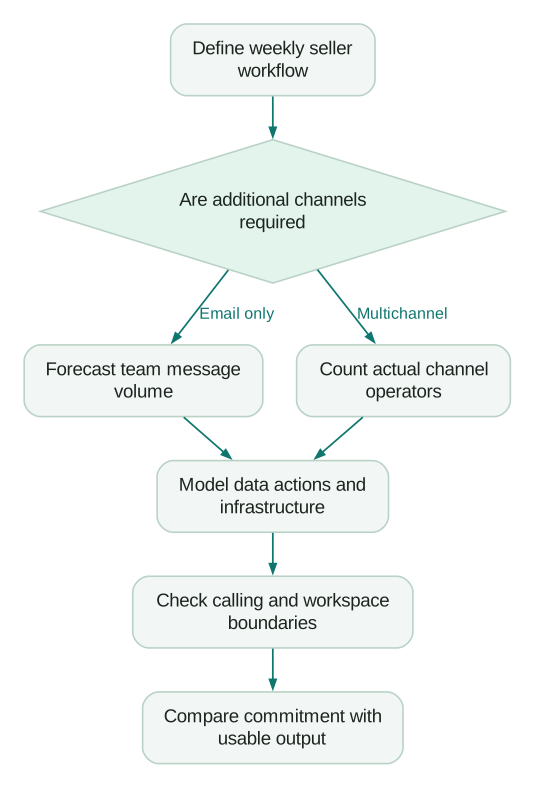
Choose channels before comparing seats
For an email-only team, forecast messages across the whole workflow. Include follow-ups and replies sent through the platform, not just first-touch emails. The plan guide says the Email allowance covers campaigns, inbox and contact-panel sending together, and that reaching the cap pauses active campaigns. Email plan limits.
For a multichannel team, count the people who actually operate the additional channels. A LinkedIn step or a call task only adds value when a responsible person can perform it and manage the response. Adding more channels to a sequence does not automatically make the message more relevant.
Describe a representative week for each seller: accounts researched, first messages, follow-ups, calls, response handling and CRM updates. Then map those actions to the plan. This keeps a feature comparison connected to actual work.
If you are deciding between tools, compare the same operating scope. Our Apollo alternatives guide separates data acquisition from engagement and CRM needs. A platform with a lower subscription can still require another product or more manual work to complete the process.
A sending slot is different from a person or mailbox
Lemlist's sending-address guide lists five connected addresses per Multichannel user and unlimited addresses on the current Email plan. On plans with slot limits, additional slots are listed at USD9 monthly each. The guide also requires secondary addresses to belong to the same person as the primary account holder. Sending-address documentation.
A slot allows a connection; it does not supply the email provider subscription behind that address. Budget the mailbox and domain separately, and establish who administers them. Do not confuse multiple sender identities with multiple independent people who can share one licensed user.
Create an access list with three roles: people who send, people who configure or supervise, and people who only need reporting. Confirm the access and billing treatment of each against the selected plan. Avoid buying a sending seat just because someone needs to review campaign results, but also avoid sharing a person's account to evade the intended user model.
When a seller leaves, retain necessary conversation ownership, remove their access and explicitly reassign the workflow. An unused paid seat is an obvious cost; a disconnected reply channel that loses a relevant conversation can cost more.
How should you budget enrichment?
Lemlist's enrichment guide lists five credits for its email finder and verifier, one for verification of an existing email, one for LinkedIn enrichment and twenty for a found phone number. The email finder charges for deliverable or risky results. “Result found” therefore does not mean every result should pass your sending policy. Enrichment options.
Separate four questions in your list preparation:
- Is this account in the audience we should pursue?
- Is this the relevant person at that account?
- Which contact route do we actually need?
- Does the returned result meet our quality and eligibility rules?
Filter obvious account mismatches before buying contact details. If the campaign never includes a call, finding every phone number creates a cost without a defined action. If you already have recent email addresses, evaluate verification rather than automatically paying to find them again.
Use a small sample from your actual market. Record attempted records, charged results, accepted records and rejection reasons. Measure coverage by the countries, roles and company types that matter to your business, rather than relying on a vendor's total database count.
Included credits and paid credits behave differently
The shared credit pool includes 400 monthly credits per Multichannel Expert user and none on the current Email plan. Free credits reset monthly; subscription credits roll over while the add-on stays active. Check balances by type before buying more. Credit rules.
Enterprise documentation conflicts: the plan guide says 400 credits per team; the credit guide says per user. Require an explicit allocation in your quote before multiplying it by seats. Plan guide, credit guide.
The catalog lists 2,000 credits at USD28 for a one-off top-up or USD20 monthly on a subscription. Choose based on whether demand recurs. Credit price catalog.
A mixed-workload example
Consider an illustrative two-seller team on monthly Multichannel pricing. The base subscription is 2 × USD109, or USD218 monthly. Its documented included allowance would total 800 credits if the account follows the current Multichannel allocation.
Suppose one month's successful, chargeable work consists of finding 200 emails, finding 40 phone numbers and verifying 300 existing email addresses. Using the documented units, that is 1,000 + 800 + 300, or 2,100 credits. After the assumed 800 included credits, the modeled shortfall is 1,300.
A 2,000-credit one-off top-up at USD28 would cover that modeled shortfall, bringing the month's base subscription and selected top-up to USD246. A monthly 2,000-credit subscription at USD20 would instead make those two lines USD238 for the month, with an ongoing commitment. These calculations exclude mailboxes, domains, taxes, calling top-ups and other add-ons.
The eight-dollar difference is not the whole decision. If the shortfall occurs once during migration, a recurring purchase may be unnecessary. If the same work repeats monthly, the subscription can be reasonable. Record expected future demand and review the remaining balance after the first cycle.
Now add quality. If only 150 of the 200 found emails meet your actual audience and sending rules, the useful email output is 150. Do not divide the whole mixed-workload bill by 200 and call it a universal price per lead. The bill also bought phone data and verification for different records.
Keep consumption by purpose. That makes it possible to stop an unnecessary enrichment step without cutting work that supports a valuable channel.
Calling minutes are not always clock minutes
Lemlist's calling guide applies destination multipliers of one, two, four or eight after rounding call duration up to a whole minute. It lists 400 included monthly calling minutes per Multichannel Expert user and 800 for Enterprise. It also distinguishes unanswered manual calls from Power Dialer calls, where unanswered calls can consume a minute. Calling destination and minute rules.
For an illustrative call lasting 70 seconds at a four-times multiplier, rounding produces two minutes, then the multiplier produces eight billed minutes. That is why dividing a minute allowance by average conversation duration can overstate capacity.
Forecast calls by destination and calling mode, then compare the forecast with the exported billed-minute data. Inspect the rate displayed for the actual from/to number combination. Do not assume a country label alone captures every pricing detail.
If calling is central to your sales process, evaluate connection quality, call logging and follow-up ownership during the trial or demonstration. A low nominal calling cost is not useful if sellers must manually reconstruct every conversation in the CRM.
Team structure changes both cost and operations
Lemlist documents separate teams as independent workspaces with separate billing, campaigns, integrations, duplicate detection and unsubscribe lists. Each requires its own subscription. A single shared team instead provides shared visibility and suppression context. Single versus multiple teams.
For an agency, separation can be necessary to protect client data and keep billing clear. Budget the operational work required to manage that separation. For departments selling to the same accounts, splitting teams can create a coordination problem if no shared relationship policy exists outside the tool.
Before moving teams, export the information needed to preserve context: contacts, account ownership, active conversations and exclusions. Verify the destination's behavior before restarting sequences. A cheaper plan is a poor trade if migration causes repeat outreach to people who already replied or opted out.
The Smartlead implementation guide covers related scope and event-handling problems. The product mechanics differ, but the purchasing lesson is consistent: the workspace boundary affects how much coordination your team must build.
How do you choose the right package?
Use the smallest package that completes the intended workflow with adequate capacity. Do not choose solely by the largest advertised allowance.
Before purchase:
Checklist
- The quote identifies the current or legacy plan and the actual billing period.
- Email volume includes follow-ups and other counted sending surfaces.
- Paid users, sending slots and mailbox subscriptions are counted separately.
- Enrichment demand is measured by action and accepted result.
- Included credit allocation and rollover behavior are confirmed for the account.
- Calling assumptions include destination multipliers and calling mode.
- Team boundaries preserve ownership and exclusions during migration.
After one complete operating cycle, replace estimates with actual usage. Compare qualified conversations and sales-accepted outcomes against the full cost, including review and administration. That gives you a reason to keep, change or remove a paid capability based on its contribution to the work.
Questions people ask
Is Lemlist still priced only per seat?
No, the current Email offer uses sending-volume tiers, while Multichannel uses per-user pricing. Existing Email Pro accounts can retain different terms, so identify the exact plan before comparing an invoice with a new-customer offer.
Are email accounts included in a sending slot?
A slot is permission to connect an address within the plan's limits. Include the actual mailbox provider and domain costs separately, and confirm ownership and access for every sending identity.
Does paying for enrichment guarantee a usable prospect?
No, a returned data result can still fail your role, account-fit or sending-quality rules. Record charged results and accepted prospects separately so the budget reflects the records your team can actually use.
Should I buy a credit subscription or a top-up?
Use measured recurring demand to justify a subscription and a temporary shortfall to evaluate a one-off purchase. Check existing balances and expiry or rollover conditions first, since the cheapest displayed unit price may create unused commitments.
What should an Enterprise quote clarify?
Have it state users, billing commitment, included credits, calling allowances and required administrative capabilities. Resolve the public per-team versus per-user credit discrepancy in the account-specific proposal before using the allowance in a budget.
Sources
- Lemlist public pricing, accessed 9 October 2026.
- Lemlist plan selection guide, accessed 9 October 2026.
- Sending-address slots, accessed 9 October 2026.
- Lead enrichment options, accessed 9 October 2026.
- Credit rules and prices, accessed 9 October 2026.
- Calling destination and minute pricing, accessed 9 October 2026.
- Single versus multiple teams, accessed 9 October 2026.
Written by
Jafrin Akter AloData Engineer and Co-founder, martechdevs
Jafrin Akter Alo is a data engineer and co-founder of martechdevs, where the team has delivered 74+ martech, data and growth stack implementations.