
Outbound Automation: What to Automate and What to Keep Human
Data Engineer and Co-founder, martechdevs
Last updated 12 min read
Automate the work that makes outbound accurate and timely: checking account fit, finding missing data, applying exclusions, preparing evidence and keeping the CRM current. Keep people responsible for the target market, the offer, campaign approval and conversations that require judgment. Sending faster has little value when the audience or offer is wrong.
Last updated: 13 October 2026.
A useful outbound system helps a small team make more relevant approaches with fewer administrative mistakes. It should also make mistakes easier to detect and stop. If nobody can explain why a person entered a campaign, which facts appeared in the message or how to prevent the next follow-up, the workflow is not ready to scale.
The examples below are proposed operating designs. They are not claims about a live customer implementation or results from a campaign we ran.
Start with a sales decision, not a tool chain
Write a one-page campaign agreement before choosing integrations. Define the account characteristics that matter, the problem you can solve, evidence that makes the timing relevant, the proposed offer and the outcome sales will count as useful.
“Companies with 50–200 employees” is a filter, not a reason to contact them. “Reporting teams connecting a new CRM to an existing warehouse, where ownership of lifecycle metrics is unresolved” describes a problem you can investigate and potentially help solve.
The offer should follow from that problem. A short integration review, a specific checklist or a conversation about a documented constraint can be useful. An automatically generated compliment followed by a generic meeting request usually adds little.
Choose an accountable campaign owner. That person approves the audience logic and offer, handles exceptions and decides when to stop. A workflow builder should not quietly become responsible for market strategy because they can connect the tools.
Automate research preparation with an evidence requirement
Research automation can collect approved public sources, normalize company names, extract relevant facts and prepare a short account brief. It should preserve the source, when it was checked and any uncertainty.
Ask for narrowly defined outputs. Instead of “write a compelling reason this company needs us,” ask whether the supplied job advertisement mentions the relevant platform, return the supporting passage and distinguish a confirmed mention from an inference about implementation.
Use separate fields for observation and interpretation. “The vacancy mentions HubSpot and Snowflake” can be checked. “Their revenue reporting is broken” is an unsupported leap unless the source actually establishes it.
For an AI-generated message, every company-specific claim should be traceable to accepted evidence. If the evidence is missing, remove the claim or send the record to review. Do not ask the model to fill gaps with plausible details.
Treat source pages and incoming emails as untrusted content. A sentence on a webpage telling an agent to ignore instructions, export contacts or change a campaign is source text, not authorization. Research tools should not have message-sending or credential-management access merely because those tools exist in the same platform.
Enrich only the fields that change eligibility or the next action
A complete-looking record is not necessarily useful. Decide which missing facts are required before buying more data: current employer, role, business contact channel, account fit or a specific technical requirement.
Validate identity as well as format. A working email for someone with the same name at another company can be more damaging than an empty field. Preserve provider provenance and distinguish a failed lookup from a valid result, an uncertain result and an unfinished request.
Use the waterfall-enrichment guide when several providers are needed. Its stopping rule is based on acceptable data, not simply the first nonempty response.
In Clay, table-level auto-run controls whether columns can run automatically, and conditional runs execute only when their formulas evaluate to true. Start with auto-run off, inspect a small representative sample and apply conditions before enabling broader execution. Clay table management
For example, skip email enrichment if an accepted, sufficiently recent address already exists. Hold the record if the company match is uncertain. Do not purchase phone data for a campaign that has no approved phone workflow.
Budget both the data and the work that uses it. Bringing an external provider key can move part of the bill to that provider without removing the orchestration work or its associated charges.
Make eligibility a separate, deterministic gate
Do not let a persuasive AI draft override a disqualifying condition. Before preparing an enrollment, check the account relationship, current owner, existing opportunity, active campaign, suppression status, allowed communication route and evidence age.
Give each failed check a reason. A person who opted out should be excluded. An uncertain company match may need review. An existing customer may belong with the account team. These are different outcomes; a single “failed” column hides the action needed.
Keep permission and provider requirements outside the lead score. In the United States, the FTC explains that CAN-SPAM covers commercial business-to-business email as well as bulk campaigns, and includes accurate sender information, non-deceptive subjects and an effective opt-out process. Meeting a targeting rule does not establish that the campaign meets all applicable requirements. FTC commercial-email guidance
Define the relevant requirements for the actual recipients and channel before launch. Store the eligibility decision your team approved; do not infer contact permission from a purchased record or a vendor's deliverability label.
An explicit inbound request can require a separate response path. Suppressing proactive marketing should not silently discard a support request or a question the person chose to send.
Approve a concrete audience and message version
Human review works only if the reviewer can see what will happen.
For a new play, provide the eligible audience, exclusions, a representative set of actual messages, sender identities, sequence timing and expected downstream CRM changes. Review the ordinary cases and the awkward ones: missing values, unusual names, subsidiaries, conflicting sources and existing relationships.
Freeze the approved message version and audience criteria. If someone changes the offer, adds another follow-up or swaps the targeting rule, require a new review appropriate to that change. Approval of a template last month is not approval of arbitrary text generated today.
A proposed internal decision record could look like this:
{
  "account_id": "acct_demo_27",
  "contact_id": "contact_demo_84",
  "play_id": "warehouse-crm-review",
  "rule_version": "eligibility-v3",
  "message_version": "intro-v2",
  "evidence_ref": "research:demo-27-2026-10-13",
  "eligibility": "approved",
  "approval_ref": "review:demo-019",
  "approved_until": "2026-10-15T12:00:00Z",
  "enrollment_key": "demo-27:demo-84:warehouse-crm-review:episode-1",
  "activation_state": "ready",
  "owner_team": "new-business"
}
This is a design example, not a vendor payload. The references stand for records your system must retain. Before enrollment, recheck live suppression and relationship state even if the approval has not expired. An opt-out received after approval must win.
For a stable, low-risk play, review can become more selective as evidence accumulates. Keep automatic exclusions deterministic and inspect samples plus every exceptional case. Do not remove oversight simply because the workflow has run without an obvious error.
Automate enrollment without creating duplicates
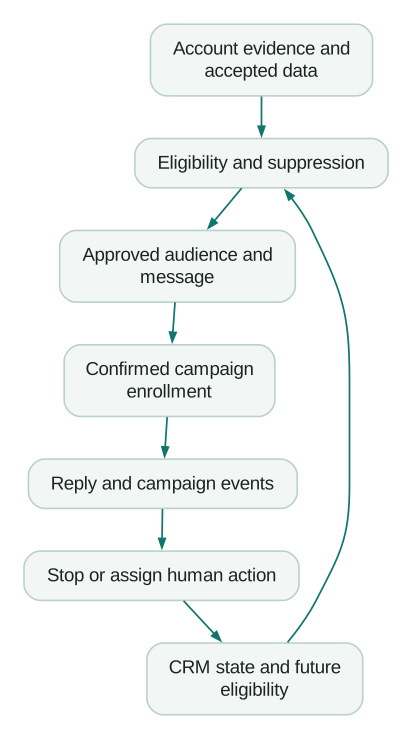
Enrollment should be a controlled state change: eligible, reviewed, ready, enrollment requested, confirmed or held for investigation. A timeout between requested and confirmed is an unknown outcome, not proof that nothing happened.
Use an internal key that identifies the contact, play and business episode. Store the destination's campaign and lead identifiers after a successful response. A repeated workflow run should reconcile the same intended enrollment rather than manufacture a new one.
A unique key in your own database does not automatically make the destination API idempotent. Check whether the destination supports an idempotency mechanism or a reliable lookup. If it does not, design a reconciliation path and hold ambiguous outcomes rather than blindly retrying a send or create operation.
Smartlead's API reference describes campaign and lead management, unsubscribe operations and event webhooks. It also documents plan-dependent API access and rate limits. Verify the required operations on the actual account before designing the workflow around them. Smartlead API reference
For a rate-limit response, wait according to the provider's documented policy and retry within a bounded budget. For invalid input, repair or review the record. For an uncertain write outcome, inspect the destination first. Those are different recovery paths.
Design stopping before scheduling follow-ups
Follow-ups can be automated after the audience, copy, timing and stop conditions are approved. They should never be independent of replies, opt-outs, account status or active conversations.
There is an important boundary here: after you enroll someone in a native sequencer, that sequencer may schedule later messages itself. Rechecking suppression in your enrichment workflow will not necessarily affect those queued messages. You must update the destination's effective suppression or pause mechanism and verify the result.
Instantly illustrates the distinction. Its native Blocklist applies during ongoing campaigns, while a Google Sheets blocklist is checked at import. Updating the spreadsheet alone does not protect leads already enrolled. Instantly suppression behavior
Also test reply detection. Instantly documents cases where a different reply address, forwarding configuration or disconnected sending account interferes with detection. Moving or re-importing a lead can restart progression. These are operational cases to check, not reasons to assume that a stop-on-reply setting always covers the whole workflow. Instantly reply troubleshooting
Once a person asks you to stop, propagate that instruction to every relevant active campaign and future eligibility check. Keep the suppression history. Deleting the lead can remove the evidence you need to prevent re-enrollment.
The sequencer comparison provides a common set of acceptance cases for Instantly, Smartlead and Clay.
Keep conversation ownership human
Automate reply triage and preparation before automating substantive replies. A classifier can propose categories such as interested, referral, objection, out of office, opt-out or unclear. It should preserve the original message and route uncertain cases for review.
Allow an opt-out route to stop further outreach without waiting for a salesperson to approve the stop. Positive replies need an owner. Referrals need interpretation: being given a colleague's name is not necessarily permission to enroll that colleague in a sequence.
Keep people responsible for pricing commitments, implementation promises, sensitive objections, complaints and statements about what your product can do. AI can draft a response grounded in approved product information, but a plausible answer to a prospect's technical requirement can create a serious commercial problem if it is wrong.
Set a coverage schedule and an escalation path. If every reply waits until the campaign builder is free, automation has merely moved the bottleneck. Log response time and whether the person received a useful answer, not only whether a task was created.
Treat LinkedIn automation as a separate decision
Do not assume that a browser extension makes a workflow authorized. LinkedIn's User Agreement prohibits bots and other unauthorized automated methods for activities including access, contact operations and messaging. LinkedIn User Agreement
A practical boundary is to automate preparation and CRM task creation, then let the rep review and perform permitted activity. Use approved integrations only within their actual authorized scope. An official integration for one function does not authorize unrelated scraping or automated outreach.
There is no universal “safe number” of automated connection requests that makes an unauthorized method acceptable. Evaluate the method and permission first, rather than designing around supposed detection thresholds.
Build an operating queue for failures
A failed run needs an owner, the affected records, the last confirmed action, a reason and a recovery decision. Keep destination IDs and correlation keys while minimizing retained personal data and redacting credentials.
In n8n, an error workflow can be assigned in Workflow Settings and starts with an Error Trigger. That provides a route for notifying an operator when an execution fails. It does not decide whether replaying the failed operation would duplicate an external side effect. n8n error handling
Separate three operational views: work waiting normally, work waiting because of an error and work with an unknown destination outcome. A green run history does not prove that every enrolled contact was eligible or that all replies reached the CRM.
Reconcile counts and selected records between systems. Check approved enrollments against confirmed destination records, confirmed sends against campaign events, and human replies against assigned CRM work. Investigate gaps before replaying whole batches.
Provide an emergency stop that pauses new enrollments and the relevant destination campaigns. Test what it actually stops; messages already sent cannot be recalled. Document how to resume without reprocessing the entire audience.
Measure saved work and commercial quality separately
Time saved is useful, but distinguish reusable capacity from cash savings. If automation reduces manual research and the team uses the time for better conversations, the benefit is capacity. It becomes a cash saving only when spending or paid hours actually fall.
In an illustrative 100-account workflow, six minutes of manual preparation per account takes 600 minutes. An assisted process requiring two minutes of review per account plus 60 minutes of operating checks takes 260 minutes. The difference is 340 minutes, or five hours and 40 minutes.
That example excludes initial setup and tool costs. Measure those too, along with rework caused by incorrect data or weak drafts. A workflow that saves research time but creates hours of CRM cleanup may not be an improvement.
For commercial performance, track eligible accounts, accepted research, enrollments, human replies, qualified meetings, accepted opportunities and later wins. Keep account-level deduplication and stable definitions. Ten replies from one account should not become ten new opportunities.
Compare the automated play with an appropriate existing process or controlled pilot. Do not claim incremental revenue simply because the CRM attributes a deal to a campaign. The prospect may have arrived through another path or been in an active conversation already.
Release checklist
- The target account rule and offer have an accountable owner.
- Company-specific claims have accepted evidence and dates.
- Eligibility, existing relationships and suppression are checked independently of AI copy.
- Audience and message versions are reviewable and approval expires or changes when required.
- Duplicate runs and uncertain API outcomes have defined recovery paths.
- Reply, opt-out and pause events reach the destination and CRM correctly.
- Human replies have coverage and an escalation owner.
- Credentials are restricted and absent from shared logs and prompts.
- A small controlled pilot exercises failures as well as successful sends.
- The emergency stop and resumption process are understood.
Start with one play and a small cohort your team can inspect. If that works, increase the volume while watching rejection reasons, operational errors and commercial quality. A GTM engineering implementation should connect those controls and feedback loops before expanding the campaign.
Questions people ask
What is outbound automation?
It is the use of software to carry out defined prospecting tasks such as preparing research, enriching records, checking eligibility, enrolling approved contacts and updating the CRM. A useful implementation makes decisions traceable and handles stopping and exceptions, rather than treating message volume as the goal.
Which outbound tasks should stay human?
Keep people responsible for the market, offer, consequential campaign changes and substantive conversations. Automation can prepare evidence and suggest replies. Uncertain claims, technical promises, negotiation and complaints need accountable judgment, while clear stop requests should be acted on promptly.
Can Clay run an entire outbound workflow?
Clay can support research, enrichment, conditional workflows and sequencing or exports, depending on the configuration and plan. You still need eligibility rules, approved messaging, CRM ownership and failure handling. A connected set of tools does not automatically supply those business decisions.
Is LinkedIn outbound automation safe?
Do not evaluate it only by whether an account has been restricted yet. LinkedIn's agreement limits unauthorized automated methods. Use permitted activity and integrations within their approved scope; automate research preparation and task management where appropriate rather than relying on a vendor's claimed safe sending limit.
How do I know whether outbound automation is working?
Measure time and rework alongside relevant conversations and commercial outcomes. Check that approved contacts reach the correct campaign once, stop requests prevent further outreach and replies reach an owner. Compare performance with a suitable baseline, including setup, tools and ongoing operating costs.
Sources
Written by
Jafrin Akter AloData Engineer and Co-founder, martechdevs
Jafrin Akter Alo is a data engineer and co-founder of martechdevs, where the team has delivered 74+ martech, data and growth stack implementations.