
HubSpot Sequences vs Workflows: Choose the Right Automation and Stop Duplicate Sends
Use a HubSpot sequence for targeted follow-up from a named person's connected inbox, with a clear conversation outcome such as a reply or meeting. Use a workflow to coordinate a broader record or customer process through triggers, branches and actions. When both support the same journey, define who sends each message and what stops the other automation before publishing either one.
On this page
The distinction is not simply sales versus marketing, or manual versus automatic. Sequences can have automated enrolment, and workflows can create internal tasks without sending any customer email. The useful decision is which tool expresses the required owner, trigger, action and exit most clearly.
Our CRM and lifecycle implementation work starts with that operating contract. A lead who already replied should not receive another introduction because two separately built automations both consider them eligible.
What is the practical difference between sequences and workflows?
Sequences organise a personal follow-up cadence. Workflows organise a process around records and conditions. Choose the tool that matches the work rather than rebuilding one product inside the other.
| Decision | Sequence | Workflow |
|---|---|---|
| Main job | Targeted emails and follow-up tasks | Record changes, routing, communications and connected actions |
| Sending responsibility | Named individual and connected inbox | Depends on the selected action and approved sender |
| Typical end condition | Reply, meeting or other configured exit | Explicit suppression, goal, eligibility or completion rule |
| State to inspect | Enrolment, sender and scheduled step | Record history, branch path and action outcome |
| Best initial use | A specific conversation requiring follow-up | A repeatable process with several conditions or systems |
HubSpot sequences combine timed email templates with tasks. They require a connected individual work email; a team inbox cannot send sequence emails. Workflows support actions against their enrolled records and relevant associated records, with availability depending on the subscription. Sequence design, workflow creation.
Choose a sequence for an approved proposal follow-up where the seller should take over as soon as the person responds. Choose a workflow for a demo request that must validate the account, preserve existing ownership, assign work and notify an operator. A product-onboarding email programme also needs eligibility, subscription and exit rules; it should not inherit a sales cadence merely because both can send email.
Use the lead-routing guide for assignment precedence and lifecycle journey design for customer outcomes. Neither should be decided by the first template available in the automation editor.
Which subscription and permissions does each route need?
Confirm access for the actual builder and sender, including the action that will run. Seeing a workflow editor does not establish access to every action inside it.
Sequences are available with Sales Hub or Service Hub Professional/Enterprise and an assigned Sales or Service seat. Creation/editing needs the corresponding sequence permissions. For manual enrolment, the sender uses their own connected email; the sequence must be shared with that user. A contact can occupy only one sequence at a time. Sequence access, enrolment requirements.
The general workflow tool is available through qualifying Professional/Enterprise subscriptions. Editing and publishing have separate permissions, and particular objects or actions can have additional requirements. Workflow access.
| Capability needed | What to verify | A useful acceptance case |
|---|---|---|
| Seller sends a sequence | Seat, inbox, sequence access and sending capacity | Intended seller enrols a controlled contact |
| Workflow sends marketing email | Applicable Marketing Hub entitlement and automated email | Eligible contact reaches the intended email action |
| Workflow sends a service response | The specific supported Service Hub action | Correct ticket event produces the approved response |
| Workflow enrols a sequence | Exact enrolment route and sender entitlement | Named sender is selected and enrolment is confirmed |
Standard automated marketing emails in workflows require the applicable Marketing Hub Professional/Enterprise functionality. Service Hub has specific ticket-email uses; the presence of a Send email action is not permission to use every email type. Automated marketing emails, action-specific requirements.
Price the required configuration with the HubSpot seat and usage guide. Do not buy another edition until the missing capability is identified, and do not work around a missing entitlement by giving an unrelated person ownership of customer communication.
Can a workflow automatically enrol someone in a sequence?
Yes, but there are two routes with different boundaries. The general contact-based workflow action requires Sales Hub or Service Hub Enterprise. Professional users can use the sequence editor's bounded Automation-tab workflows, including supported form-submission or page-view triggers. “Sequences are manual-only” is therefore an incomplete rule. Automated enrolment routes, embedded sequence automation.
For the general action, the selected sender needs the appropriate seat, a connected individual email and access to the sequence. HubSpot advises against automated enrolment for recently imported cold leads, more than 100 contacts or generic criteria such as a record being created today. Treat this as a targeted follow-up mechanism, not a bulk-nurture substitute. Automated enrolment considerations.
The failure behaviour matters: if the sender exceeds the daily send limit, the contact skips the enrolment action rather than waiting in an automatic next-day queue. Placeholder tokens can also remain unfilled when no person supplies their value before enrolment. Monitor actual enrolment and route exceptions to an owner. Enrolment limits.
When the workflow chooses Contact owner as the sequence sender, that sender is fixed at enrolment for the sequence's emails. A later owner change does not automatically change those From addresses. Define a handover procedure for active sequences instead of assuming the reassigned CRM record transfers the conversation. Sender selection behaviour.
Use an explicit qualification event. For example: a valid request is accepted by an eligible seller, no active conversation already exists, the intended follow-up is permitted, and the sender has confirmed availability. Keep the source request identifier so a replay does not become a second sales instruction.
What stops a sequence after a reply or meeting?
Inspect the sequence's actual Automation settings. Default reply and meeting exits can be changed, and company-wide unenrolment has a different effect from removing only the responding contact.
HubSpot can unenrol on a reply, a qualifying meeting, a sequence unsubscribe, a bounce, completion or other configured actions. With the company option enabled, another person's response can remove contacts at that company. Meeting behaviour depends on how it was booked or logged. Out-of-office detection also varies by mailbox combination; do not treat every automatic reply as a human response. Sequence exit rules.
Test the outcome your team relies on. If one buyer's reply should stop all outreach to the account, verify the company associations and the company-wide setting. If parallel conversations should continue, do not enable that wider exit casually.
Unenrolling stops upcoming scheduled steps; it does not undo sent email. Re-enrolling starts new sends unless the operator deliberately chooses the appropriate starting step. Review the contact's completed activity before a manual restart. Unenrolment and restart.
Reply detection also depends on a working mailbox connection. A provider change can interrupt detection, leaving follow-up active when a customer has already replied. Verify the connected provider and a controlled reply after any mailbox migration. Reply detection after provider changes.
What stops a workflow when the customer is no longer eligible?
Configure the exit; do not assume the original enrolment condition is continuously enforced by default. For contact-based workflows, suppression segments, goals and the relevant eligibility setting serve different purposes.
HubSpot's “no longer meets eligibility” setting is off by default and applies to filter-based enrolment. A suppression segment can prevent enrolment and remove an active contact. Removing someone from suppression does not immediately enrol them; they must qualify through an applicable enrolment or re-enrolment route. Workflow unenrolment controls.
For a conversion journey, define what evidence ends the current purpose. A completed purchase, accepted sales conversation or account cancellation should have a named source and a clear consequence. A campaign operator should be able to explain why the next message is still useful.
Apply the appropriate object scope. A company-level restriction may need to affect several contacts, while a deal outcome may concern only one opportunity. Do not clear every communication programme because a single unrelated record changed.
A stop rule also has a delivery boundary. Stop future actions before they hand a message to the sending system; do not promise to recall an already-started delivery. Keep the original attempt and later state change visible when investigating a complaint.
How should sequences and workflows share one journey?
Give each customer-facing step one owner, with explicit entry and exit evidence between the tools. Use a workflow for the operational handoff and a sequence for the seller's accepted conversation when that combination is justified.
Consider a hypothetical demo-request process:
- A form creates or updates the intended person and account.
- A workflow checks whether the person is an existing customer and whether an active opportunity already has an owner.
- An eligible new request reaches the right seller; ambiguous cases enter a review queue.
- The seller accepts the request and, where appropriate, starts the targeted sequence through the permitted route.
- A reply or meeting ends the relevant cadence and creates a clear next action for the seller.
- The broader marketing workflow respects the active conversation and its approved suppression policy.
This is a proposed operating design, not a claim that a default HubSpot template implements every step. The HubSpot implementation plan provides the surrounding identity, data and handover work.
| Responsibility | Owner in this example | Evidence |
|---|---|---|
| Request identity and account match | Form/integration owner | Stable request and CRM record references |
| Routing and eligibility | Operations workflow | Accepted branch or visible exception |
| Personal conversation | Named seller and sequence | Confirmed enrolment, sender and next step |
| Broader marketing eligibility | Approved subscription and suppression rules | Current state at the sending boundary |
| Recovery after failure | Integration/operations owner | Failure reason, repair and verified outcome |
Avoid using a sequence to bypass marketing-email restrictions. The message's purpose and permission requirements do not disappear when it comes from an individual inbox. Keep sales follow-up, service communication and optional marketing distinct in the policy and implementation.
How do you prevent repeat enrolment and duplicate messages?
Separate a repeated event from a new business request. The same form submission can be retried, an old import can meet a current filter, and several workflows can all recognise the same customer state.
By default, workflow records enter the first time they meet the triggers. They cannot re-enter the same workflow while still enrolled. Re-enrolment needs an eligible later trigger or manual action after completion; enabling the setting alone does not repeatedly enrol every record. Workflow re-enrolment, re-enrolment configuration.
Event triggers describe an occurrence; filter triggers describe a state. Choose the one that matches the job. A recurring “still a lead” condition is not the same thing as a new accepted demo request. At publication, decide whether existing matching records should enter, then review that population before switching communication on. Trigger semantics, activation choices.
Keep a compact business contract:
purpose: follow up an accepted demo request
subject: one contact and its intended commercial account
request_key: source request identifier
owner: accepted seller
entry: new eligible request with no conflicting active conversation
repeat: same request must not create another follow-up instruction
exit: approved reply, meeting, withdrawal or resolved request
fallback: visible review task when sender or data is unavailable
evidence: request, workflow path, sequence enrolment and outcome
This is a planning record, not a vendor API payload. The implementation must prove how its trigger, enrolment and repeat-entry settings enforce it. If several automations can request the same action, centralise the decision or use a durable action record with a stable key.
Review manual tasks too. A task reminder is not an automatically sent email, and a task marked complete does not establish that the intended customer outcome occurred. Make the operator's required action and evidence clear.
What should testing prove before automation goes live?
Test eligibility, branch behaviour, actual action execution and exit as separate layers. A green criteria check is useful, but it is not proof that a message will send or that the record is eligible to re-enter.
HubSpot's workflow Test criteria evaluates current enrolment conditions. Its Test feature simulates the current workflow path without executing real actions; branch predictions use current record state. Send preview sends the preview-path emails to the tester, not the selected contact. Compare incident evidence with the version the record actually entered. Workflow testing boundaries.
Use controlled records and recipients for the later execution check. The following cases belong in the proposed demo-request design:
| Case | Expected result | Evidence to inspect |
|---|---|---|
| New eligible request | One accepted follow-up path | Workflow enrolment and sequence/action record |
| Same request replayed | No duplicate customer instruction | Stable request reference and repeat handling |
| Existing customer submits again | Correct owner or review path | Account state and selected branch |
| Sender lacks access or inbox | Visible exception, no silent loss | Enrolment error and assigned recovery task |
| Sender reaches daily sequence capacity | Skipped enrolment is surfaced | Actual action result and follow-up owner |
| Customer replies before next step | Expected cadence exits | Reply evidence and removed scheduled step |
| Conversion occurs during a delay | Remaining ineligible actions stop | Current state and configured exit outcome |
| Person opts out | Relevant restrictions remain enforced | Subscription/suppression state at dispatch |
A skipped action may not recover automatically after the data changes. For example, HubSpot says a workflow continues after a marketing email is skipped for a non-marketing contact, and changing that status later does not resend the skipped email. Repair the eligibility and decide the appropriate next action instead of assuming a retry queue exists. Workflow error behaviour.
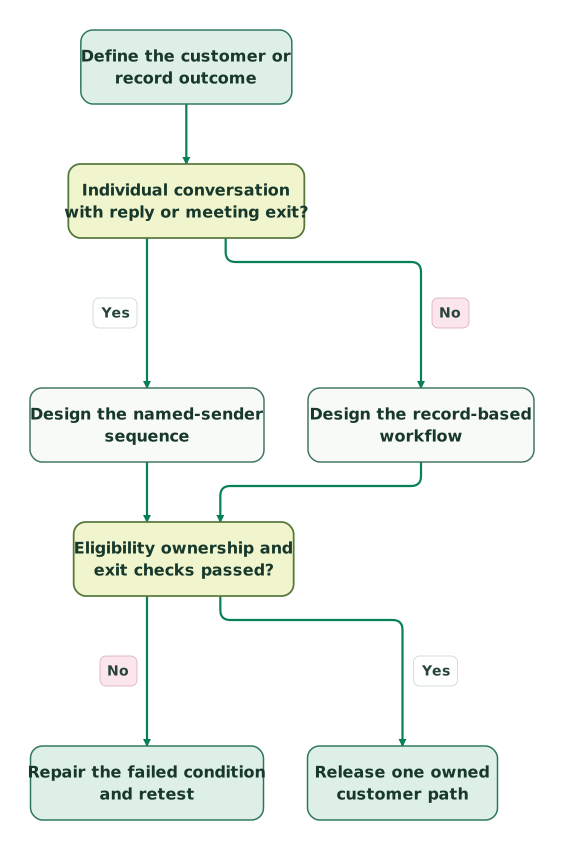
Read diagram as text
- Define the customer or record outcome to Individual conversation with reply or meeting exit?.
- Individual conversation with reply or meeting exit? to Design the named-sender sequence: Yes.
- Individual conversation with reply or meeting exit? to Design the record-based workflow: No.
- Design the named-sender sequence to Eligibility ownership and exit checks passed?.
- Design the record-based workflow to Eligibility ownership and exit checks passed?.
- Eligibility ownership and exit checks passed? to Repair the failed condition and retest: No.
- Eligibility ownership and exit checks passed? to Release one owned customer path: Yes
What belongs in the release checklist?
Approve the complete customer path, including the places where the two automation tools interact. Record the expected outcome and owner of each exception before enabling a wider audience.
Checklist
- The purpose fits the chosen sequence, workflow or combination.
- Builder, publisher and sender entitlements are verified separately.
- The selected enrolment route is available in the actual account.
- The sender's inbox, sequence access and daily capacity are checked.
- Existing records and new requests have deliberate entry rules.
- Repeated requests cannot create unintended duplicate actions.
- Sequence reply/meeting exits have the intended contact/company scope.
- Workflow suppression and eligibility exits are explicitly configured.
- Marketing permission and delivery restrictions cannot be bypassed.
- Simulated paths and controlled action execution are recorded separately.
- Skipped actions, failures and handovers have named owners.
- A rollback can stop future actions without erasing useful history.
For help repairing competing automations, get the $99 martech audit with one customer path and its enrolment/action history. The useful deliverable is a smaller, explainable process whose messages stop when their purpose has ended.
Keep reading
Browse all CRM & Lifecycle guides
 CRM & Lifecycle
HubSpot implementation cost: onboarding fees, partner prices and your team's time
HubSpot implementation cost by layer: onboarding fees from $1,500, published partner prices, migration, integrations, internal time and a worked budget.
Jafrin Akter AloLast updated 14 min read
 CRM & Lifecycle
HubSpot Pricing: Seat Prices, Marketing Contacts, Credits and Onboarding
HubSpot is free for 2 users. Starter seats list at $20, Professional seats at $50 to $100, plus $250 per 5,000 marketing contacts and $1,500 to $3,000 onboarding.
Jafrin Akter AloLast updated 19 min read
 CRM & Lifecycle
Salesforce to HubSpot migration: plan, field mapping and cutover checklist
Plan a Salesforce to HubSpot migration: phases, a field mapping template, load order, Smart Transfer limits, reconciliation checks and a safe cutover.
Jafrin Akter AloLast updated 21 min read
CRM & marketing automation
See the implementation scope, deliverables and acceptance checks.
Questions people ask
Can Starter or free HubSpot accounts use any automation?
Yes, limited form automations are a separate feature from the full workflows and sequences tools. Their actions and limits depend on the subscription. Form automation scope. Start with the task you need, then verify that exact route. Seeing a simple form follow-up does not establish access to a general multi-object workflow or a seller's sequence.
Should a reply stop every marketing workflow?
Only when that matches the approved customer journey. A reply to a sales proposal may justify pausing prospect nurture, while an unrelated service message can remain appropriate. Define the scope and source of the conversation state, then map it to the relevant suppression rules. A broad global stop can hide useful operational communication just as an absent stop can create duplicate outreach.
What happens if the contact owner changes during a sequence?
Treat the change as an active-conversation handover. Inspect the current sender, completed steps and next scheduled action before deciding whether to continue, stop or restart under another owner. Do not assume a record reassignment transfers every running automation. Keep the customer's conversation history and the reason for the handover visible so the new seller does not repeat an introduction or proposal.
Is a sequence completion the same as a successful outcome?
No. Completion can mean the cadence reached its end without the desired reply or meeting. Record the business outcome separately from the automation state. Review whether the contact should enter a different approved process, remain with a seller or receive no further contact. Re-enrolling everyone who completes a sequence can turn a bounded follow-up into an endless cycle.
Should we copy a working workflow for every team?
Copy only when the teams need different governed behaviour. Otherwise shared definitions and a small number of well-owned workflows can be easier to maintain. Inventory the writers, enrolment populations and message responsibilities before cloning. Test the combined result because two individually correct workflows can still contact the same person or overwrite the same property in conflicting ways.
Sources
- HubSpot: Create and edit sequences.
- HubSpot: Enrol contacts in sequences.
- HubSpot: Workflow-based sequence enrolment.
- HubSpot: Sequence unenrolment.
- HubSpot: Create workflows.
- HubSpot: Workflow actions.
- HubSpot: Automated marketing email.
- HubSpot: Workflow unenrolment controls.
- HubSpot: Workflow enrolment triggers.
- HubSpot: Re-enrolment triggers.
- HubSpot: Reply-only logging and provider changes.
- HubSpot: Workflow simulation.
- HubSpot: Workflow errors and skipped sends.
- HubSpot: Simple form automation.

Written by
Jafrin Akter AloData Engineer and Co-founder at Martechdevs and Growth and Analytics Partners
Jafrin writes practical guides to marketing technology, customer data, analytics and AI workflows. Martechdevs is a Growth and Analytics Partners company.