
HIPAA-Compliant CRM: Compare BAA Scope, Access and Integration Controls
A CRM can support a HIPAA-regulated workflow when the right BAA, covered services, permissions and operating controls are in place. Salesforce, HubSpot Enterprise and Zoho CRM offer relevant arrangements, but each has limits that affect fields, attachments, messaging and integrations. Choose around the patient or referral workflow you need to run, then prove that only approved users and systems can access its information. HHS cloud guidance.
On this page
Which CRM options offer a BAA-supported route?
Salesforce, HubSpot and Zoho provide published routes for handling PHI within defined services and conditions. The useful comparison is how each proposed configuration serves your workflow, including its exclusions. Obtain the applicable agreement and validate the exact plan, features and connected services before treating a candidate as ready for patient data.
| Candidate | Contract and setup requirement | Where to start evaluating | Boundary that can change the decision |
|---|---|---|---|
| Salesforce | Signed BAA covering the selected services; service-specific restrictions | Configurable referral, service and care-related workflows | A covered cloud does not authorize every AI, messaging or integration feature |
| HubSpot | Eligible Enterprise subscription; Sensitive Data and HIPAA settings; applicable BAA terms | A team already operating its approved workflows in HubSpot | Sensitive properties, attachments and unsupported tools need deliberate design |
| Zoho CRM | Confirm eligible plan and BAA naming the service; configure HIPAA controls | A bounded CRM process with explicit fields and export rules | Supported modules, field types, encryption and audit detail may limit the design |
Sources: Salesforce BAA restrictions and covered services, HubSpot setup, HubSpot BAA terms, Zoho CRM controls.
The shortlist is a starting point for evaluation. An existing supported CRM with a manageable process can be preferable to a migration that creates more copies, permissions and integration paths to govern.
What should you check in Salesforce?
Salesforce requires a signed BAA that includes the service being used, plus compliance with the service-specific restrictions. Its current list includes Sales Cloud, Service Cloud and Health Cloud. The signed agreement controls if its terms conflict with the public restrictions page. Salesforce BAA scope.
Start with the particular workflow and every product it touches. A referral entering Sales Cloud, an attachment, an email capture feature and an AI summary can have different conditions. The BAA restrictions require secure transmission and encryption of stored PHI to the extent within the customer's control. They also specify restrictions for Einstein and Agentforce features, including data masking requirements and prohibited medical uses.
Request confirmation of the complete proposed configuration, including third-party telephony, marketplace applications, middleware and any LLM provider. Keep those responses alongside the order. Salesforce's HIPAA page directs customers to the account representative for the BAA arrangement.
What should you check in HubSpot?
HubSpot's standard Sensitive Data setup is available with the listed Enterprise subscriptions. A Super Admin enables it, selects Health/Medical Data and the covered-entity or business-associate designation, accepts the relevant terms and marks the appropriate properties as PHI. HubSpot Sensitive Data setup.
The Sensitive Data terms limit use to permitted data and covered features and include the applicable BAA. Do not treat “Enterprise” as permission to paste health information into every tool. The account's scope, data classification and field permissions matter.
Three implementation boundaries deserve a specific test:
- Ordinary property creation does not allow changing a non-sensitive property to sensitive. HubSpot also offers an opt-in beta for converting selected existing custom text, number, date, email, URL and file properties. Check beta availability, permitted PHI scope and unsupported usages before choosing conversion or a new-property migration. Property rules and conversion beta.
- Additional attachment protection applies to supported uploads made after Sensitive Data is enabled. Files hosted in the general Files tool do not receive that protection; using “Choose existing” does not convert them. HubSpot also warns that a copied attachment URL can be opened by another authenticated account user, so test copied URLs across roles and avoid sharing them with staff who should not see the file. Attachment behavior.
- Sensitive properties are unavailable in certain features, including personalization tokens and chatbots. Verify the proposed automation and communication route before promising a journey the platform cannot safely support. Tool restrictions.
Keep health details out of AI prompts unless the exact feature, use and contractual scope are approved. HubSpot's tool guidance specifically cautions against putting sensitive information into configured Breeze inputs.
What should you check in Zoho CRM?
Zoho provides a BAA template on request and directs customers to keep PHI within the services that agreement covers. Confirm the exact CRM plan and enabled capabilities before buying. In CRM, administrators select applicable modules, mark personal-health fields and configure restrictions for APIs, exports, other Zoho apps and third-party connections. Zoho's BAA route, CRM configuration.
The CRM guide supports up to ten selected modules and 25 marked health-data fields per module. It names Leads, Contacts, Vendors and custom modules, and excludes lookup, multi-select lookup and autonumber fields from health-data marking. These are design constraints when the relationship or identifier itself contains sensitive context.
Also separate marking a field as health data from configuring encryption. The CRM guide treats encryption as an additional configuration step. Verify the plan's field-encryption capacity and other limits rather than assuming the HIPAA toggle applies every protection. Feature availability.
Zoho's CRM security page notes that merely viewing data is not logged. If your risk assessment requires a particular read-access trail, demonstrate that requirement in the proposed system before acceptance. Do not infer it from a generic “audit logs” feature. Zoho CRM audit boundary.
What does a HIPAA-compliant CRM need to support?
A CRM used for electronic protected health information needs appropriate contractual coverage and safeguards for the actual workflow. Review access, auditability, transmission, retention and incident handling, together with the permitted use of the information. The organization remains responsible for its configuration and operations even when the vendor offers a BAA. HHS Security Rule summary.
The CRM's job should be explicit. Referral coordination, appointment follow-up and patient-service requests have different access and integration needs from clinical documentation. Keep the clinical system of record responsible for the information and functions it is designed to manage; put only the approved operational context into the CRM.
Our CRM and lifecycle implementation service can map those responsibilities and data transfers. Have the organization's privacy and security owners approve the permitted purpose and vendor scope before any production PHI is introduced.
How do you choose the right CRM for your healthcare workflow?
Choose the candidate that satisfies the required process with the fewest uncontrolled data paths and a supportable access model. Start with a representative referral or service request, including exceptions, rather than a feature-count comparison. A platform's lower subscription price matters only after its permitted configuration can complete the work and preserve the necessary controls.
| Situation | First evaluation | What would rule it out? |
|---|---|---|
| Organization already using HubSpot Enterprise | Its covered Sensitive Data workflow | Required fields or communications need unsupported features |
| Complex service and referral orchestration | Salesforce's explicitly covered configuration | Product scope, permissions or integration overhead cannot be operated reliably |
| Smaller, structured operational CRM | Zoho with confirmed plan and BAA | Required objects, encryption limits or audit detail fail acceptance |
| Primarily clinical recordkeeping | The clinical system of record first | A general CRM would duplicate clinical responsibility without a clear need |
Give every vendor the same test brief: record types, sensitive fields, staff roles, expected volumes, systems to connect, retention needs and required audit evidence. Ask them to demonstrate that configuration, then validate it with your own access tests before putting real data into the system.
What data should stay out of the CRM?
Keep information out of the CRM when it is unnecessary for the approved workflow, prohibited by the vendor's terms or unsuitable for the configured feature. Map each field to a purpose and an owner. A smaller operational dataset reduces the number of places that need protection and simplifies matching, access review and deletion decisions.
For a hypothetical referral workflow, the CRM might need a referral reference, assigned coordinator, status and next action. Detailed clinical documents can remain in the approved clinical record system when the coordinator can complete the task through an appropriate protected reference. The reference and status can themselves remain PHI; reducing detail does not make the record anonymous.
HHS generally requires limiting uses, disclosures and requests to the minimum necessary where that standard applies. It has exceptions, including disclosures to or requests by a healthcare provider for treatment. Let the privacy owner apply the correct basis to the workflow rather than turning data minimization into an inaccurate universal legal rule. Minimum necessary guidance.
How do you stop CRM integrations from exposing PHI?
Treat each integration as a separate data transfer with its own field map, purpose, permissions and recipient review. Include background logs, retries, exports and analytics in that map. A BAA for the CRM does not automatically cover another provider receiving the data, and a successful sync does not prove that the transfer is appropriate.
For a provider operating on the organization's behalf with PHI, confirm the required business-associate arrangement. HHS also makes clear that a subcontractor handling PHI for a business associate can itself be a business associate. Business-associate relationships.
| Integration surface | Question to resolve | Test to run |
|---|---|---|
| Intake form to CRM | Which fields and uploads are allowed? | Synthetic record reaches only the mapped fields |
| CRM to email | Is this communication and recipient list approved? | Body, subject, preview, links and logs reveal no unapproved data |
| CRM to automation platform | Where are payloads and retries retained? | Failed run remains in the approved environment |
| CRM to reporting | Does the dataset need patient-level detail? | Approved audience sees only the required report |
| CRM to advertising | Is the disclosure permitted and accepted by the platform? | Patient data is excluded from unapproved audience or conversion uploads |
Keep marketing and care-related communication decisions explicit. HHS generally requires written authorization for using or disclosing PHI for marketing, with limited exceptions and exclusions from its marketing definition. A BAA does not grant a new marketing purpose. HHS marketing guidance.
Our HIPAA email marketing guide covers that decision in more detail. The Google Analytics and HIPAA guide addresses the separate measurement layer, including why a CRM-to-analytics connection needs its own review.
Which access and security tests should pass before launch?
Test the least-privileged roles, complete record lifecycle and failure paths using synthetic data. Demonstrate both permitted work and denied access, including attachments, exports and connected applications. Retain the test results and remediation decisions with the configuration, so a later permission or integration change can be compared with an approved operating baseline.
- Define roles by task, including coordinators, supervisors, administrators and external implementers.
- Test record and field access for each role, including search, reports and attachment links.
- Verify authentication, session behavior and removal of access when a person or integration leaves.
- Test import, export and API permissions independently of the visible CRM screen.
- Inspect audit evidence for the events your risk assessment requires. Test its retention and export process.
- Simulate a safe integration failure and a duplicate match; confirm an owned recovery path.
- Exercise the process for retrieving, correcting, retaining and returning records under your policies and applicable obligations.
HHS identifies risk analysis, role-appropriate access, audit controls, workforce training and periodic evaluation as relevant safeguards. The precise controls should follow the organization's risks and the platform's supported capabilities. Security Rule summary.
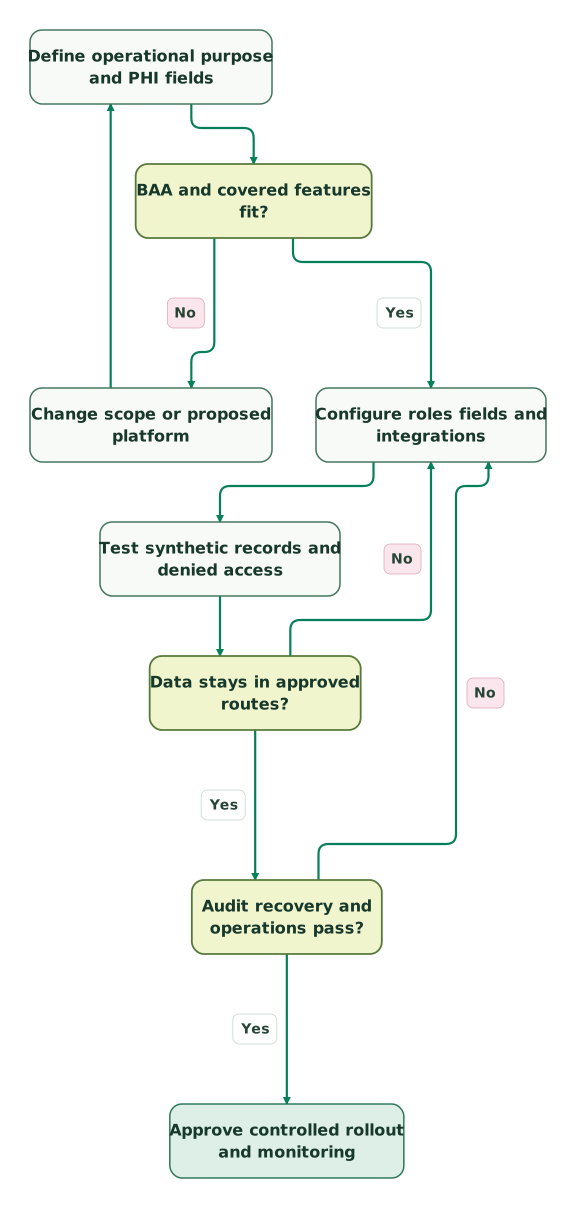
Use this acceptance path for the initial rollout and material changes:
Read diagram as text
- Define operational purpose and PHI fields to BAA and covered features fit?.
- BAA and covered features fit? to Change scope or proposed platform: No.
- Change scope or proposed platform to Define operational purpose and PHI fields.
- BAA and covered features fit? to Configure roles fields and integrations: Yes.
- Configure roles fields and integrations to Test synthetic records and denied access.
- Test synthetic records and denied access to Data stays in approved routes?.
- Data stays in approved routes? to Configure roles fields and integrations: No.
- Data stays in approved routes? to Audit recovery and operations pass?: Yes.
- Audit recovery and operations pass? to Configure roles fields and integrations: No.
- Audit recovery and operations pass? to Approve controlled rollout and monitoring: Yes
What should you budget beyond the CRM subscription?
Budget the full supported configuration: seats, required security capabilities, integration services, migration, validation and ongoing administration. Confirm which controls are included in the proposed edition and which are separately purchased. A low seat price can become expensive when the team has to build and maintain missing operational safeguards around it.
| Budget component | What to request in the scope | Why it affects the decision |
|---|---|---|
| Subscription and eligible features | Exact products, seats, BAA scope and limits | Establishes whether the proposed workflow is supported |
| Data migration | Field classification, matching, attachments and retained copies | Determines which data moves and what remains elsewhere |
| Integration work | Allowed mappings, authentication, logs and recovery | Prevents an unreviewed transfer from becoming the weak point |
| Acceptance and training | Role tests, evidence and operating procedures | Makes the configuration usable by the real team |
| Ongoing operation | Access reviews, incident handling and vendor changes | Keeps controls current after launch |
Use the Salesforce pricing guide or HubSpot pricing guide for the general commercial model, then obtain a quote for the exact healthcare configuration. Neither guide's cheapest public tier establishes eligibility for your PHI workflow.
For a migration, include the exit process from the old system: final export, reconciliation, restricted legacy access and the disposition of temporary files. An otherwise controlled new CRM does not resolve ungoverned copies left in the previous implementation.
What should be approved before a healthcare CRM rollout?
Approve a bounded workflow with evidence for its contracts, configuration, access and recovery. Name an operational owner and a security owner, and give both the final field and integration inventory. The release decision should describe the exact supported process and the changes that require another review, rather than declaring the entire vendor universally compliant.
Checklist
- The organization has identified its HIPAA role and the permitted use of the data.
- The applicable BAA names the covered services used by the workflow.
- Sensitive fields, attachments and connected products fit the vendor's permitted scope.
- Role, API, export and attachment tests show expected access and denial.
- Audit evidence and recovery procedures meet the documented requirements.
- Messaging, reporting and advertising destinations have separate approved data rules.
- Staff training, retention, incident handling and change ownership are documented.
The CRM audit skill helps organize the data model, permissions and integration inventory. Our CRM implementation service can handle the configuration and handoff work within an agreed access and contractual scope. Keep the organization's privacy and security sign-off attached to the release record.
Keep reading
Browse all CRM & Lifecycle guides
 CRM & Lifecycle
HIPAA-Compliant Email Marketing: Choose the Right CRM and Sending Route
Compare healthcare email and CRM options by BAA scope, patient-data restrictions and sending rules, with a practical setup and release checklist.
Jafrin Akter AloLast updated 14 min read
 Tracking & Attribution
Is Google Analytics HIPAA compliant? What to do with GA4 on a healthcare website
Google offers no BAA for Analytics. Review healthcare page groups, restrict GA4 data flows, test for leaks and choose a suitable replacement.
Jafrin Akter AloLast updated 12 min read
 Tracking & Attribution
HIPAA-Compliant Forms: Choose a Provider and Check the Whole Intake Flow
Compare Jotform, Cognito Forms, Formstack and Google Forms for healthcare intake. Check BAA scope, notifications, integrations, tracking and launch tests.
Jafrin Akter AloLast updated 10 min read
CRM & marketing automation
See the implementation scope, deliverables and acceptance checks.
Questions people ask
Does signing a CRM BAA complete HIPAA compliance?
A BAA establishes the relevant contractual responsibilities, while the organization still has to configure and operate the system appropriately. HHS requires risk analysis and applicable safeguards for the actual environment. Review the covered service, permitted use, access, integrations and operating procedures together; an agreement cannot correct an unsupported feature or an exposed export. HHS cloud guidance.
Can HubSpot Starter store patient health details if I buy more credits?
Additional credits do not replace the subscription and Sensitive Data requirements. HubSpot's standard setup guide lists Enterprise subscriptions and requires enabling the appropriate health-data and HIPAA settings. Confirm your exact agreement and covered features before storing PHI; a larger usage allowance does not make an ineligible feature or plan suitable. HubSpot Sensitive Data setup.
Do I need Salesforce Health Cloud for every HIPAA-related CRM task?
Salesforce's covered-services list includes Sales Cloud and Service Cloud as well as Health Cloud, subject to the signed BAA and applicable restrictions. Choose the product around the required workflow and data model. A healthcare-specific product name alone does not establish the correct scope, and a different covered service still requires the same contractual and configuration review. Salesforce covered services.
Does replacing a patient name with a CRM ID make the data de-identified?
A CRM identifier does not automatically make linked health information de-identified. HHS describes Safe Harbor and Expert Determination as the methods for satisfying its de-identification standard, each with specific conditions. Keep operational identifiers and their linked data within the approved environment unless an appropriate de-identification assessment supports another use. HHS de-identification guidance.
Can I connect a normal email inbox to a healthcare CRM?
Review the email service, message content, agreement and security configuration before connecting it to a PHI workflow. The CRM's BAA does not automatically establish coverage for the mailbox provider or every email feature. Prefer an approved communication route and test subjects, previews, attachments and logs, alongside the intended recipients. Zoho's mailbox scope guidance.
Sources
- HHS: HIPAA and cloud computing
- HHS: Security Rule summary
- HHS: Business associates
- HHS: Minimum necessary
- HHS: Marketing
- HHS: De-identification guidance
- Salesforce: BAA restrictions and covered services
- Salesforce: HIPAA compliance resources
- HubSpot: Store Sensitive Data
- HubSpot: Sensitive Data terms and BAA
- HubSpot: Sensitive Data in tools
- Zoho: HIPAA and BAA scope
- Zoho CRM: HIPAA controls
- Zoho CRM: Edition feature availability
- Zoho CRM: Security and audit boundary
- Zoho CRM: Email security and mailbox scope

Written by
Jafrin Akter AloData Engineer and Co-founder at Martechdevs and Growth and Analytics Partners
Jafrin writes practical guides to marketing technology, customer data, analytics and AI workflows. Martechdevs is a Growth and Analytics Partners company.