Is Google Analytics HIPAA compliant? What to do with GA4 on a healthcare website
Data Engineer and Co-founder at Martechdevs and Growth and Analytics Partners
Last updated 12 min read
Google does not offer a business associate agreement for Google Analytics or represent that it satisfies HIPAA requirements. Keep GA4 away from protected health information (PHI) and remove it from authenticated care journeys. A healthcare organisation may retain a reviewed general-content measurement path, but that decision needs evidence about the data actually sent. Consent settings, a proxy and generic event names do not settle it.
Is Google Analytics a suitable destination for PHI?
No. Google's current policy prohibits using Analytics in a way that gives Google access to PHI or creates HIPAA obligations for it. It directs regulated customers away from tagging authenticated pages and asks them to identify permissible pages with their legal team. Google's HIPAA guidance.
That is more precise than saying a hospital can never use analytics, or that every public page is safe. Separate the decision about a particular data flow from the organisation's name and the product's default settings.
Use this guide for the technical restriction and verification work. Have the organisation's privacy or legal owner determine which pages and uses are permissible; this is not a legal determination for your site. The industry stack guide explains how mixed business models create different collection boundaries.
Which healthcare pages should lose GA4, and which need review?
Remove GA4 from authenticated care areas and other flows that expose PHI. Treat uncertain care-related pages as pending review rather than letting an all-pages trigger decide their status.
The following is an engineering triage model. The classification must consider actual content, identifiers, embedded tools and navigation, not just the path name.
| Page group | Starting action | Why the flow needs attention | Evidence needed before release |
|---|---|---|---|
| Patient portal or logged-in care area | Remove GA4 | Account and care context can be available to scripts | No GA4 collection through browser, embed or backend paths |
| Booking, intake or symptom tool | Remove or replace the collection path | Inputs, identifiers and confirmations can disclose care information | Approved alternative and a tested field/recipient map |
| Condition, treatment or provider page | Review before allowing collection | Public access does not settle every data-flow question | Documented classification and actual request evidence |
| Careers, investor or general corporate page | Consider a limited allowlisted path | Incoming URLs, referrers or shared code can still carry sensitive context | Approved schema, clean handoffs and permitted collection |
A shared header is an easy place to get this wrong. The marketing team removes a tag from the booking template, while a global script or scheduling embed continues sending the same event. A separate subdomain can make boundaries easier to operate, but it does not stop an inherited script by itself.
For GA4 and tracking implementation, ask for a route inventory, a recipient map and negative tests for excluded journeys. A configuration screenshot alone does not show that no other integration is forwarding data.
What did the court ruling change about public healthcare pages?
The June 2024 ruling vacated a specified part of HHS's tracking guidance concerning an IP address combined with a visit to a public unauthenticated condition or provider page. HHS's live bulletin acknowledges that limited scope. It does not establish blanket approval for intake data, portal activity or all tracking on public pages. HHS court notice.
Keep the legal and implementation questions separate. The actual information disclosed, purpose, recipient and applicable rules still need assessment. Google's own service restrictions also remain part of the decision.
For example, a public article visited for research and a booking flow containing an appointment identifier are different facts. Do not use the ruling to label both flows “public, therefore permitted.” Nor should an audit assume that an IP address plus any health-related page always establishes PHI without considering the ruling and context.
Other health-data rules can apply outside HIPAA. Our healthcare analytics architecture guide covers the FTC and state-law distinction, vendor agreements and alternatives. Use current legal advice for the specific implementation; the court notice does not replace that review.
Where can a GA4 implementation expose health information?
Inspect every field and request that can combine identity with care context. A leak does not need an event parameter named diagnosis.
| Collection surface | Example to inspect | Useful technical check |
|---|---|---|
page_location | Appointment or patient identifiers in a URL | Compare address bar, redirects and transmitted location |
page_title and event names | Condition or treatment wording | Review defaults and developer-generated names |
page_referrer and request headers | Return from a portal or intake flow | Inspect the first request on the next page |
| Site search | Health terms in search_term | Test the real search route with synthetic markers |
| Form interactions | Form ID, name, destination or button text | Inspect automatic metadata and custom tags separately |
| User IDs, properties and custom dimensions | Stable account identifier joined to care events | Trace the identifier's source and downstream use |
| Ads links, audiences and other destinations | Sensitive events reused for advertising | Review enabled sharing and activation paths |
Google's enhanced-measurement reference documents URL/referrer fields, search-term capture and form metadata. Its form events do not mean GA4 automatically captures every typed form value; custom tags, page code or other SDKs can introduce additional collection. Enhanced measurement fields.
A key-event label changes how an outcome is used in reporting. It does not remove its underlying context. Review which events count as key events only after deciding whether the event belongs in GA4 at all.
Campaign values deserve the same scrutiny. Keep UTM naming meaningful without encoding patient, appointment or sensitive audience details. Changing a medical campaign name to an opaque code does not automatically make the resulting joined dataset de-identified.
Can data redaction make an otherwise prohibited flow acceptable?
Redaction is a supplementary control for an already approved flow, not a reason to send PHI to GA4. Removing selected query values does not establish that the path, title, identifier, request header or other event fields are safe.
GA4's web-stream redaction works client-side and checks email patterns on a best-effort basis. Google says it does not evaluate HTTP headers and does not prevent PII collection through Measurement Protocol or Data Import. Its preview can test configured query keys before transmission. Google's redaction limits.
For a reviewed corporate page, use an allowlisted page group and a deliberate event schema. For a patient portal, do not attempt to turn the portal into a general marketing page by overriding its title. The collection context still needs to be considered.
Prefer preventing sensitive values from entering a general analytics path. A growing blacklist of words is fragile: a new form, encoded value or identifier can bypass it. Test both the expected permitted record and an unexpected field that the implementation must reject.
Do Consent Mode or server-side GTM solve the HIPAA problem?
Neither changes GA4's contractual status or approves a disclosure. Consent Mode changes tag behaviour; server-side processing changes where requests are handled.
Google documents basic mode as blocking the relevant tags before consent, while advanced mode can send measurements without cookies when storage is denied. Those signals can still include contextual information. If the approved decision is that GA4 must receive nothing from a route, a denied storage setting alone is insufficient. Consent Mode behaviour.
Use what Consent Mode actually changes to test your implementation. A visitor's acceptance of an ordinary cookie banner should not be treated as a general authorisation for health-data sharing.
Cloud Run and BigQuery appear on Google's HIPAA supported-service list, subject to the agreement and customer responsibilities. A collector on that infrastructure can still forward an impermissible payload to a destination outside its agreement. Review processing, logs and destinations individually. Google Cloud HIPAA scope.
The server-side GTM setup and hosting choices help define that operating path. They do not replace the decision about what may reach GA4. If de-identification is the proposed boundary, have the method assessed before disclosure; pseudonymous IDs or generic paths alone do not establish it.
What can replace GA4 where care data is needed?
Use an approved analytics or reporting arrangement that fits the actual care-related analysis. Choose between a vendor under a suitable BAA, a controlled self-hosted service or reporting inside an approved warehouse environment.
| Measurement job | Route to evaluate | Acceptance evidence |
|---|---|---|
| Product or booking funnel needing event-level records | Analytics service with the required signed BAA and feature scope | Correct cohort, restricted access and reviewed payloads |
| Operational counts reconciled with scheduling or billing | Warehouse reporting inside the approved environment | Counts match authoritative records and exports are controlled |
| A small corporate-content report with no PHI | Limited reviewed general analytics | Only allowed routes and fields are collected |
| Unclear data or uncertain legal classification | Pause the unapproved path while reviewing it | Written scope and a verified replacement design |
The HIPAA analytics guide compares current PostHog, Mixpanel, Amplitude and Google Cloud agreement boundaries. For an ordinary non-health use case, the broader GA4 alternatives guide helps assess reporting fit.
Do not parallel-run an unapproved GA4 path simply to compare its numbers with a replacement. Use the application's source records and synthetic test cases as the acceptance baseline instead.
How do you remove or restrict GA4 without missing another collection path?
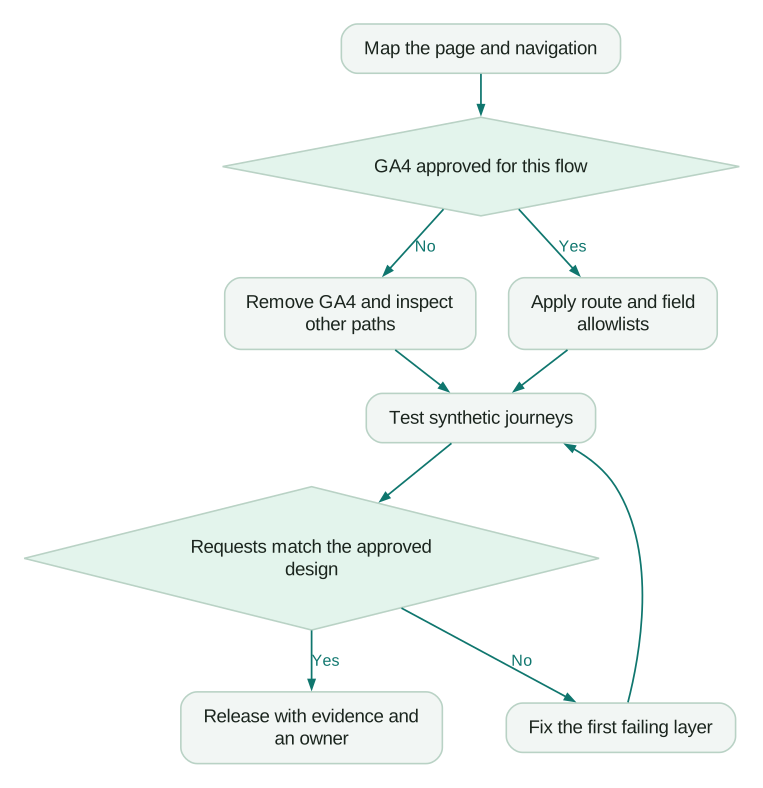
Inventory first, contain confirmed exposure, then release a tested allowlist for any collection that remains approved. Coordinate the sequence with the privacy/security owner if historic disclosure may need assessment.
- Find every installation. Include direct Google tags, GTM containers, CMS integrations, mobile SDKs, embedded booking tools, Measurement Protocol jobs and data imports.
- Record the classification. Name each route, app screen and transition, with its approved recipients and responsible owner. Include default handling for new routes.
- Remove the prohibited paths. Block or remove all relevant GA4 event routes, not only
page_viewor one container tag. Check scripts that survive client-side navigation. - Restrict any remaining path. Use a small approved route list and field allowlist. Inspect page location, title, referrer and campaign values before the first collection call.
- Review automatic collection. Disable risky search/form options where appropriate for the remaining approved pages; inspect custom tags independently.
- Review advertising reuse. Check Google signals, Ads links, audience sharing and other destinations against the approved purpose. Turning them off does not erase previous transfers.
- Verify and document. Test direct entry, navigation, redirects, consent states and server retries. Record the release and route owner.
For enhanced measurement, Google's documented path is Admin → Data collection and modification → Data streams → the web stream → Enhanced measurement settings. Use the current property and inspect individual options. On excluded care routes, removing optional events is not a substitute for stopping the GA4 collection path.
A shared single-page application needs particular care. If a Google tag loaded on an approved page remains active when the application opens intake, changing the pathname does not unload the script. Test that transition as its own case; an isolated page refresh is insufficient.
How do you prove the restriction works?
Use synthetic journeys and verify both absence on excluded routes and correct limited collection on allowed ones. A zero in a dashboard is not proof that a request was never sent.
| Synthetic test | Expected result | Evidence to retain |
|---|---|---|
| Open the patient route directly | No GA4 delivery through any configured route | Browser requests plus collector/server observations |
| Move from corporate content into intake | No new prohibited collection after navigation | Preserved network log and tag state across transition |
| Accept, reject and change consent | Behaviour matches the approved route rule in every state | Consent state and resulting requests |
| Submit a failed and successful test booking | Approved system records the right outcome; GA4 stays excluded | Backend record and destination evidence |
| Add an unexpected field to a test event | Allowlist rejects or removes it as designed | Input fixture and outbound schema comparison |
Inspect the actual destinations, including a custom first-party collection hostname. Use Tag Assistant where appropriate with synthetic data, then examine network traffic independently. Do not send real patient values into DebugView merely to demonstrate that a filter fails.
For a permitted general-content stream, DebugView can help confirm expected events. For an excluded route, your acceptance criterion is the absence of delivery, not the absence of a convenient report row.
How can an existing BigQuery export help locate suspicious values?
A restricted export query can find candidates for review without printing their raw values. It cannot prove that the original collection was permissible or that no PHI exists.
This illustrative GoogleSQL follows the documented event_params and top-level user_id fields. Replace the dataset and dates, run with approved access and inspect estimated scan cost first. It has not been run against a live property. GA4 export schema.
WITH candidate_values AS (
  SELECT event_date, p.key AS field, p.value.string_value AS value
  FROM `your_project.analytics_123.events_*`
  CROSS JOIN UNNEST(event_params) AS p
  WHERE _TABLE_SUFFIX BETWEEN '20261001' AND '20261007'
    AND p.key IN (
      'page_location', 'page_referrer', 'page_title',
      'search_term', 'form_destination'
    )
  UNION ALL
  SELECT event_date, 'user_id' AS field, user_id AS value
  FROM `your_project.analytics_123.events_*`
  WHERE _TABLE_SUFFIX BETWEEN '20261001' AND '20261007'
)
SELECT
  event_date,
  field,
  COUNT(*) AS values_checked,
  COUNTIF(
    (field = 'user_id' AND NULLIF(value, '') IS NOT NULL)
    OR REGEXP_CONTAINS(
      IFNULL(value, ''),
      r'(?i)(@|%40|[?&](patient_id|appointment_id|email)=|/patient/|synthetic_health_marker)'
    )
  ) AS review_flags
FROM candidate_values
GROUP BY event_date, field
HAVING review_flags > 0
ORDER BY event_date, field;
A non-empty user_id is flagged for review, not declared PHI. The expression catches selected query keys, an illustrative patient path and a synthetic marker. It misses many other possibilities, including innocuous-looking codes and health context outside those patterns. A condition page can require review without matching any expression.
Expand the investigation to custom parameters, user properties, campaign values and other stores under the approved procedure. Keep access restricted and avoid copying findings into ordinary tickets. The GA4 BigQuery export guide explains the surrounding export model; exporting data does not repair its original collection.
What should pass before the revised healthcare setup is released?
Release when the approved route decisions match observed behaviour, and the team has a separate plan for any historical data that needs assessment:
Checklist
- Every page, app screen and transition has an approved collection decision.
- Direct, embedded, tag-manager and backend routes are inventoried.
- GA4 is excluded wherever the approved design requires no delivery.
- New routes default to review rather than inheriting broad tags.
- Remaining URLs, titles, search/form metadata and identifiers are checked.
- Consent changes and single-page navigation pass negative tests.
- Advertising reuse and downstream exports match the approved purpose.
- Synthetic outcomes reconcile with the authoritative booking system.
- Possible historic disclosures are escalated through the incident process.
- Release evidence, owners and recurring checks are recorded.
At Martechdevs, we can work with your developers to map the collection paths, implement restrictions and produce test evidence for your privacy team's review. Start with a free tracking audit, or request a scoped implementation quote for the identified changes.
Questions people ask
Does GA4's IP handling remove the healthcare-data problem?
No. Google says GA4 does not log or store IP addresses, but that does not classify every other field in the request or supply a BAA. Check page context, identifiers, properties and downstream use as well. Do not apply a legacy Universal Analytics IP-masking setting as proof that a GA4 healthcare flow is permissible. Google's IP clarification.
Can we assume GA4 is acceptable if we exclude names and email addresses?
No. Those exclusions address only some possible identifiers. A stable user code, an appointment reference or other context may still make a health-related record identifiable. Review the actual flow and its purpose rather than a short prohibited-field list. Where de-identification is the proposed basis, use the relevant formal method and qualified assessment. HHS de-identification guidance.
Is a separate Google Tag Manager container enough to isolate care pages?
It can make ownership and deployment clearer, but isolation depends on the code that actually loads and the requests it sends. A second container, shared plugin or embedded tool can bypass the intended boundary. Test the page and its navigation paths, and review the container's own loading and configuration context alongside its downstream tags.
Can a Data Studio dashboard make previously collected GA4 data suitable for healthcare use?
A dashboard does not repair the source collection or change the classification of the data it displays. Review its own access and service terms separately. Google's HIPAA guidance lists Data Studio with a required opt-in to governance under the Google Cloud Agreement; that does not extend a BAA to GA4. Keep source and reporting approval distinct. Google Cloud conditions.
What should we do with historic GA4 records that may contain PHI?
Contain further exposure and involve the privacy/security owner before deciding the remediation scope. Google's deletion requests have specific field and timing limitations, so verify what the chosen process actually removes. Review warehouse exports, copies and reports separately, preserve necessary incident evidence securely and confirm completion rather than assuming one UI request cleans every destination. GA4 deletion guidance.
Sources
- HHS: De-identification methods
- Google: HIPAA and Google Analytics
- HHS: Online tracking technologies and the court notice
- Google: Enhanced measurement events
- Google: GA4 data redaction
- Google: Consent Mode overview
- Google Cloud: HIPAA service scope and configuration
- Google: BigQuery export schema
- Google: IP handling clarification
- Google: GA4 data-deletion requests

Written by
Jafrin Akter AloData Engineer and Co-founder at Martechdevs and Growth and Analytics Partners
Jafrin writes practical guides to marketing technology, customer data, analytics and AI workflows. Martechdevs is a Growth and Analytics Partners company.