
HIPAA-Compliant Forms: Choose a Provider and Check the Whole Intake Flow
A HIPAA-compliant form workflow needs an appropriate business associate agreement, supported product features and safeguards across collection, storage, notifications and integrations. Jotform Gold or Enterprise, Cognito Forms Enterprise, Formstack for Healthcare and covered Google Workspace Forms configurations are candidates, each with specific conditions. Choose the form around where the information must go, then test that complete route before collecting real patient data. HHS cloud guidance.
On this page
Which form builders offer a BAA-supported option?
Shortlist a provider whose eligible plan, BAA and supported integrations cover your actual intake process. Jotform, Cognito Forms and Formstack provide dedicated healthcare arrangements; Google Forms can fit an appropriately configured covered Workspace environment. None of these options makes every embed, add-on, notification or downstream destination suitable for patient information.
| Option | Required arrangement | Practical fit | Boundary to check |
|---|---|---|---|
| Jotform | Gold or Enterprise, HIPAA environment enabled, BAA completed | A dedicated form workflow with configurable fields and uploads | Existing widgets and integrations undergo eligibility review |
| Cognito Forms | Paid Enterprise organization and BAA | Structured intake and form workflows | Protected fields, notification content and authenticated links |
| Formstack | Formstack for Healthcare arrangement and BAA | Intake connected to a supported operational system | Healthcare integration list and plan-specific email controls |
| Google Forms | Eligible Workspace agreement, accepted BAA and covered functionality | A governed Workspace process with a simple form | Drive/Sheets sharing and third-party add-ons |
Sources: Jotform enablement, Cognito BAA requirements, Formstack healthcare controls, Google Workspace BAA.
When does Jotform fit?
Jotform fits a team that wants a dedicated form builder and can keep its process within the HIPAA environment's supported features. Current eligibility is Gold or Enterprise. Enable the HIPAA environment through the account's Data settings, complete the migration and form review, then complete and retain the BAA. Jotform setup.
Test the final published form after that process. A form copied from a marketing account can carry widgets, notifications or destinations that should not follow it into patient intake. Jotform identifies Enterprise as its only multiuser plan, so a staff team needing separate user accounts should evaluate Enterprise rather than assume Gold covers those users. Confirm the intended submission and storage limits as well. Jotform plan scope.
When does Cognito Forms fit?
Cognito Forms supports a BAA on its paid Enterprise plan, excluding a trial. Signing the BAA applies encryption at rest to forms and uploaded files, changes user timeout behavior and enables protective link settings. Review fields marked as protected and the contents of notification emails before release. Cognito HIPAA configuration.
Cognito explicitly says it is not an electronic medical record system. If the submission belongs in the legal health record, define how it reaches the appropriate patient-record system and how staff access it during an outage. A form inbox should not become an accidental substitute for the clinical system of record.
When does Formstack fit?
Formstack for Healthcare fits an intake process that needs its supported integrations and healthcare-specific controls. Its published guidance commits to a BAA and describes restricted data handling, email and integration behavior. Request the exact healthcare plan and confirm which controls and connections are included before choosing it. Formstack healthcare arrangement.
The healthcare integration list includes systems such as Salesforce, Box and Google Drive. Availability on that list does not establish that your destination account, contract or sharing settings are appropriate. Review the receiving service independently, including any intermediate automation provider.
Can Google Forms be used for patient information?
Google lists Forms within the Drive functionality covered by its Workspace BAA arrangement. The organization must accept the applicable BAA and configure sharing, access and connected services appropriately. A form created with an ordinary personal account does not establish that organizational arrangement. Google covered services, Workspace BAA requirements.
Inspect the response spreadsheet, uploaded files, collaborators and any add-on that reads responses. Google states that third-party applications and add-ons are outside its Workspace BAA. A convenient automation or document generator needs its own suitability review before receiving PHI.
What makes an online form HIPAA compliant?
An online form supports a HIPAA-regulated workflow when the permitted use, vendor agreements and technical and operational safeguards fit the information it handles. A product label or encrypted submission is insufficient by itself. Review who receives the data, who can access it and how the organization responds to failures. HHS Security Rule summary.
For a covered entity or business associate, a cloud provider that creates, receives, maintains or transmits electronic protected health information on its behalf generally needs a BAA. Encryption does not remove that relationship merely because the provider cannot read the information. HHS cloud guidance.
The practical unit of review is the intake flow: landing page, form, attachments, confirmation, staff notification, integration, destination and retention. Our tracking and analytics implementation service can inspect the surrounding collection paths; the organization's privacy and security owners should approve the intended data use and safeguards.
Does a contact or appointment form contain PHI?
A contact form can collect PHI when identifiable information relates to someone's health, care or payment for care in the HIPAA-regulated context. Appointment reasons, symptoms and uploaded referrals can establish that connection. Classify the actual fields and surrounding information instead of assuming that a public form is harmless because it needs no login.
HHS identifies appointment scheduling and symptom-checking forms as situations where tracking can access PHI. It also notes the court decision vacating part of its guidance concerning an IP address combined with a visit to a public health-related page. Assess what the form actually collects and discloses; a blanket rule about every public healthcare page is inaccurate. HHS tracking guidance.
For a routine callback request, ask the operational owner which fields are necessary to route the request. Keep the clinical history in the approved intake step when it is not needed for the callback. Removing a diagnosis field does not guarantee that a free-text message, attachment name or selected service will contain no health information.
How should the data move from the form to your team?
Send each submission through a documented route to the approved system, with access restricted to the people handling that task. Keep routine notifications minimal and direct staff into an authenticated workspace. Include storage, temporary files, logs and failure queues in the design because these can retain a copy even when the normal destination succeeds.
A worked design for a hypothetical clinic starts with a callback form collecting the contact details and routing information approved for that purpose. Staff receive a neutral notification and review the request in the protected system. Detailed clinical intake happens through a separately approved workflow. The exact fields and permissions are decisions for that clinic's privacy and operational owners.
| Stage | What to decide | Acceptance evidence |
|---|---|---|
| Collection | Required fields, uploads and surrounding scripts | Synthetic submission shows only intended fields collected |
| Staff notification | Minimum useful content and authorized recipients | No unexpected clinical details in subject, preview or attachment |
| Integration | Field mapping, vendor scope and retry behavior | Allowed fields arrive once; failures stay in an approved queue |
| Record system | Matching, access and operational availability | Correct record receives the submission; unauthorized role is denied |
| Retention and exit | How long each copy remains and who can remove it | Retention action and export/return procedure are documented |
HHS expects a risk analysis of the actual cloud arrangement, including responsibilities and availability. Use that assessment to choose the route and controls; the table is an implementation checklist, not a substitute for the organization's compliance assessment. Cloud responsibilities.
What can leak from an embedded healthcare form?
The surrounding page can expose information through analytics, advertising tags, session replay, URL parameters, error reports and third-party widgets. An embedded form does not automatically isolate the whole patient journey. Inspect both the host page and the form's behavior, including validation errors, uploads and redirects, before approving the configuration.
Start with these surfaces:
- Field values copied into event properties or a data layer.
- Patient information in a query string, thank-you URL or page title.
- Attachment filenames in analytics, logs or notification subjects.
- Session replay or chat tools that can inspect the page or form interaction.
- A webhook body stored in an automation service's execution history.
- Error alerts that include the original request body.
Keep PHI out of destinations not approved to receive it. The Google Analytics and HIPAA guide covers GA4 restrictions; the Meta Pixel and HIPAA guide explains why hashing identifiers or forwarding through a server does not settle advertising disclosures. A cookie consent setting does not replace the required assessment of the data, recipient and purpose.
How do you test a form before collecting real patient data?
Use clearly synthetic records to exercise the entire journey, including failure and unauthorized-access cases. Confirm where every submitted field appears, which systems receive it and who can retrieve it. The test should produce evidence of allowed and blocked behavior, plus a record of any gap that must be fixed before launch.
- Create a synthetic submission with recognizable test values in every field and file name. Use no real patient information.
- Inspect browser requests on the host page and form during typing, validation and submission.
- Review confirmation screens, staff emails, exports and integration histories for those test values.
- Test the destination with an authorized role, an unauthorized role and an expired session.
- Force a safe integration failure and confirm the retry route does not send data to an unapproved inbox or log.
- Confirm duplicate submissions, attachments and patient matching behave as intended.
- Exercise the documented retention and recovery process in the test environment.
A record failing destination mapping should return to the integration check. A tracking disclosure should return to the collection design. Both need a repeat test after the correction.
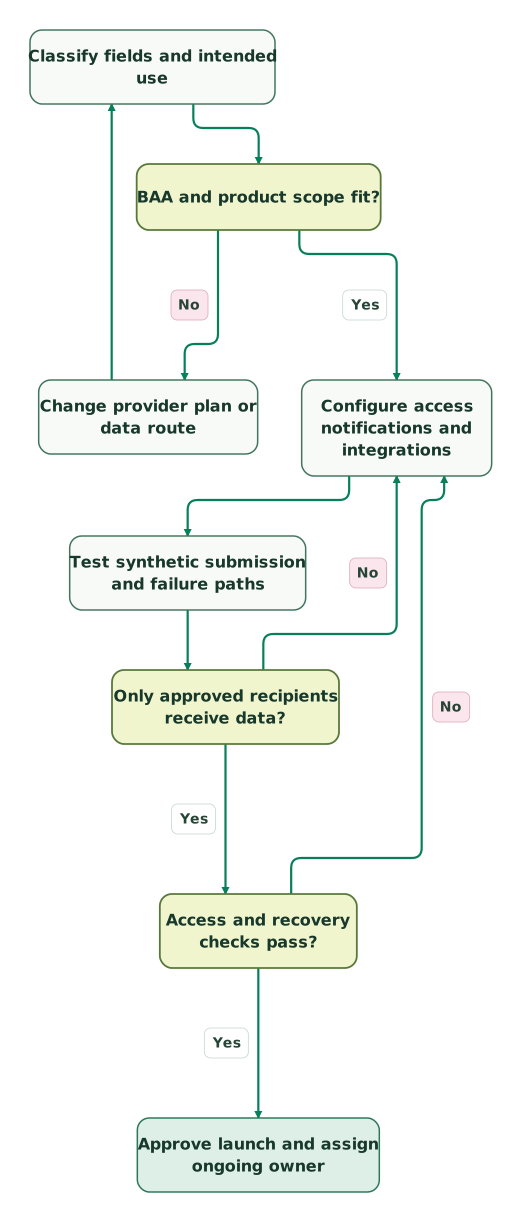
Read diagram as text
- Classify fields and intended use to BAA and product scope fit?.
- BAA and product scope fit? to Change provider plan or data route: No.
- Change provider plan or data route to Classify fields and intended use.
- BAA and product scope fit? to Configure access notifications and integrations: Yes.
- Configure access notifications and integrations to Test synthetic submission and failure paths.
- Test synthetic submission and failure paths to Only approved recipients receive data?.
- Only approved recipients receive data? to Configure access notifications and integrations: No.
- Only approved recipients receive data? to Access and recovery checks pass?: Yes.
- Access and recovery checks pass? to Configure access notifications and integrations: No.
- Access and recovery checks pass? to Approve launch and assign ongoing owner: Yes
HHS describes risk analysis, access controls, audit controls and periodic evaluation as part of the Security Rule. Retain the test evidence with your operating procedures and review it after material changes. Security Rule requirements.
Can you measure form performance without sending patient details to analytics?
You can design reporting around an approved operational dataset and the minimum information needed for the measurement question. Define the metric, recipient and retention before collecting events. Keep patient-level outcomes inside a suitable environment, and review aggregation or de-identification deliberately rather than assuming a generic event name makes the data anonymous.
Useful intake measures can include total submitted requests, requests received by the destination, duplicate rate and time to operational handoff. The reporting design still needs to account for identifiers and small groups. Read our HIPAA analytics architecture guide when the clinic needs measurement across acquisition and care operations.
For example, a weekly report that compares accepted submissions with received records can reveal a broken integration without putting the submitted message into a marketing tool. Keep the reconciliation keys and underlying records in the approved operational environment; share only the approved report with its intended audience.
What should be approved before the form goes live?
Approve the purpose, data route, vendor scope and test results together, with named owners for security and operations. Keep the form's configuration and agreements with the release record. A later widget, notification or integration change should reopen the affected checks so the reviewed design continues to describe the system in use.
Checklist
- The privacy owner has classified the information and approved its intended use.
- Required BAAs are in place for the services acting as business associates.
- The selected plan, features and destinations are within the contractual scope.
- Access, notification content and file handling pass synthetic-data tests.
- Tracking and error-reporting paths receive no unapproved patient information.
- Integration failures, retries and duplicate records have an owned process.
- Retention, recovery, incident response and vendor-exit steps are documented.
Use the tracking audit skill to inventory the page's collection behavior, then bring any intake-to-CRM handoff work into our Martech integration service. Define the required BAA and access scope before granting an implementation partner access to PHI.
Keep reading
Browse all Tracking & Attribution guides
 Tracking & Attribution
Is Google Analytics HIPAA compliant? What to do with GA4 on a healthcare website
Google offers no BAA for Analytics. Review healthcare page groups, restrict GA4 data flows, test for leaks and choose a suitable replacement.
Jafrin Akter AloLast updated 12 min read
 Tracking & Attribution
HIPAA-compliant analytics: how to measure a healthcare website and app without leaking PHI
Plan healthcare analytics around PHI, BAAs and permitted data flows. Compare vendor scope, test tracking and reconcile an internal booking funnel.
Jafrin Akter AloLast updated 14 min read
 Tracking & Attribution
Meta Pixel and HIPAA: Review the Data Before Sending Conversions
Audit Meta Pixel, CAPI and patient-list exports before sharing healthcare data. Includes seven test cases, policy boundaries and an internal reporting example.
Jafrin Akter AloLast updated 15 min read
Analytics & tracking
See the implementation scope, deliverables and acceptance checks.
Questions people ask
Is HTTPS enough to make a patient form HIPAA compliant?
HTTPS protects a transport connection, while the complete workflow still needs appropriate agreements, access controls and operational safeguards. Review the stored submission, staff notification, integration logs and final destination as well. HHS requires regulated organizations to assess risks to electronic PHI across the environment; one encrypted connection cannot establish the whole arrangement. HHS cloud guidance.
Can a free Google Forms account be used for clinical intake?
Google's HIPAA arrangement requires the applicable Workspace or Cloud Identity agreement and acceptance of its BAA before PHI is used in covered services. An ordinary personal account does not establish that arrangement. Verify the organization, agreement, included functionality and sharing configuration before using Forms for clinical intake. Google's BAA requirements.
Does Jotform Silver include the HIPAA environment?
Jotform's current setup guide limits the dedicated HIPAA environment to eligible Gold and Enterprise accounts. Upgrading the plan is followed by the enablement wizard, form review, migration and BAA process. Check the completed configuration and your retained agreement before using a form for PHI; the paid-plan label alone does not complete setup. Jotform eligibility and setup.
Does the form provider's BAA cover a connected CRM automatically?
A form provider's BAA covers its agreed services and responsibilities. A separately connected CRM or automation provider needs review for its own role, covered service, configuration and agreement where required. Trace the actual recipients, including retry queues and logs, before enabling the connection. A supported connector is evidence of technical availability, not blanket contractual coverage. HHS business associates.
Can I keep all patient submissions in the form builder forever?
Set retention according to the record's purpose, applicable obligations and your organization's policy, then ensure the selected service can support that plan. A form builder may be an intake system rather than the clinical record system. Cognito, for example, explicitly directs legal-health-record information into an appropriate patient-record system with suitable availability. Cognito's record-system boundary.
Sources
- HHS: HIPAA and cloud computing
- HHS: Security Rule summary
- HHS: Business associates
- HHS: Online tracking technologies
- Jotform: Enable the HIPAA environment
- Jotform: HIPAA features and plan scope
- Cognito Forms: HIPAA requirements and BAA
- Formstack: Maintaining HIPAA compliance
- Formstack: Healthcare-compatible integrations
- Google: HIPAA compliance and supported services
- Google Workspace: HIPAA and BAA requirements

Written by
Jafrin Akter AloData Engineer and Co-founder at Martechdevs and Growth and Analytics Partners
Jafrin writes practical guides to marketing technology, customer data, analytics and AI workflows. Martechdevs is a Growth and Analytics Partners company.