
GA4 Spam Traffic: Diagnose It and Filter the Right Data
Investigate GA4 spam by identifying the suspicious population and the collection path that supplied it. Compare hostnames, events, acquisition fields and your own source records before excluding anything. Use hostname filters for an approved web-domain boundary, report filters for reversible analysis and sender controls for the route you actually own. A strange referrer or low engagement alone does not prove that the visitor is fake.
On this page
How do you tell spam from a legitimate change in traffic?
Build an evidence-based population before calling the change spam. Record the affected property, stream, period, event names, hostnames and source/medium values. Compare absolute counts as well as rates, and inspect whether the pattern reaches genuine business outcomes.
| Observation | Possible explanations | Evidence to inspect |
|---|---|---|
| An unexpected hostname appears | Copied tag, staging site, partner experience or unwanted sender | Approved-domain inventory and known integrations |
| One referrer sends many short visits | Poor-fit campaign, automated requests or misleading acquisition fields | Landing paths, site requests and campaign ownership |
| Purchases have no matching orders | False trigger, test sender, identity mismatch or injected events | Transaction IDs and authoritative order records |
| Analytics rises without a matching site-request pattern | Another sender, incomplete logs or direct collection abuse | Browser, server and integration routes with matching scope |
| A country suddenly dominates | New acquisition, changed collection or suspicious activity | Campaign scope and corroborating request evidence |
These are hypotheses, not automatic blocking rules. A cloud-hosted customer application, a permitted partner checkout or a new campaign can produce unfamiliar traffic that belongs in the business dataset.
Keep suspicious referral strings as investigation data; there is no need to visit an unknown referring site to start the diagnosis. Preserve a small, access-controlled export and the relevant request evidence. Avoid distributing customer payloads with a general incident summary.
If the issue is an unclassified channel with otherwise legitimate events, use the GA4 Unassigned guide. If the rate merely looks implausible, inspect GA4 bounce-rate measurement. Those symptoms require their own diagnosis before a spam exclusion.
Doesn't GA4 already remove bot traffic?
GA4 automatically excludes known bots and spiders using Google's research and the IAB list. Google says that this exclusion cannot be disabled and does not provide a count of the known-bot traffic removed. Known bot-traffic exclusion.
That protection does not establish that every remaining event represents a real customer. Keep a source-to-outcome check for the records that matter, particularly purchases and qualified leads. A fake-looking session and a false purchase can have different business consequences.
Also distinguish automated access from malicious activity. A legitimate crawler, a monitoring service and a script abusing a form have different purposes and may need different site controls. Your analytics rule should describe which activity belongs in the measurement contract; your security rules should describe which requests the website should accept.
An analytics and tracking review should establish those boundaries before changing collection. A lower event count is not evidence of a successful cleanup if real checkout or application traffic disappeared with it.
Why doesn't the unwanted-referrals list remove spam events?
The unwanted-referrals setting controls referral attribution rather than deleting the matching events. Google describes it as adding ignore_referrer=true so the referrer is not displayed as a traffic source. Its intended examples include payment-provider returns and related website-managed interactions. Unwanted-referral behavior.
Use that setting when a domain is part of completing an existing customer journey and should not receive referral credit. It does not establish that the underlying event is legitimate, nor does it remove a false purchase from the property.
Changing a suspicious source label can make the investigation harder if the unwanted events remain under another attribution result. Preserve the original evidence before changing referral handling. Do not promise that every excluded referral will appear as Direct; attribution depends on the journey and retained source context.
For a payment or login handoff, follow the cross-domain tracking checks. An unexpected referral can be a continuity problem rather than spam, especially when the real transaction exists and its path is reproducible.
Which control should you use for each type of contamination?
Choose the control at the boundary where you can identify and stop the unwanted data. Reporting exclusions, collection filters and site protection have different effects.
| Control | Appropriate job | Boundary to remember |
|---|---|---|
| Report filter or comparison | Inspect an identified population separately | Changes the analysis rather than removing collection |
| Web hostname data filter | Keep web events within approved hostname rules | Requires complete legitimate-domain coverage |
| Internal or developer traffic control | Separate defined staff or debugging activity | Use the actual intended traffic classification |
| Website or edge protection | Restrict unwanted requests reaching your site | Cannot control a sender that never reaches that boundary |
| Owned server sender controls | Validate and restrict events your integration forwards | Covers that sender's path, not every route into GA4 |
GA4 data filters act on incoming data and do not rewrite historical collection. Active exclusions are permanent; the excluded data is unavailable in both Analytics and BigQuery. Use report filters for a reversible analytical view while the classification is under investigation. GA4 data filters.
For site-request abuse, involve the owner of the website's request logs and security controls. For a noisy scheduled job, correct the sender and its environment routing. Relabeling an arbitrary suspicious population as internal traffic can hide the distinction between staff testing and an unexplained source.
How do GA4 hostname Include filters work?
A hostname Include filter permits the approved web-hostname population and filters out other matching-scope traffic. The crucial exception is Measurement Protocol: Google says hostname Include filters do not apply to those events. Include filters also block empty-hostname events in the applicable web collection path. Google's hostname-filter release guidance.
Inventory the legitimate hostnames before building an allowlist. Include the actual marketing site, app and controlled checkout hosts used by this property. Check locale domains, migration domains and embedded experiences with their owners. A hostname missing from the list can remove valuable data while the filter behaves exactly as configured.
Use precise matches where the domain inventory is small. The hostname filter offers exact, begins-with, ends-with and contains matches. A loose contains example.com condition also matches example.com.unrelated.test; a plain ends with example.com can match notexample.com. Choose the rule by the complete hostname boundary you intend. Hostname-filter configuration.
Google applies active Include-only filters as a combined union first, followed by active Exclude filters. Review the complete active filter set rather than judging a new rule in isolation. Filter evaluation order.
Keep server-originated traffic in a separate acceptance lane. An allowlist does not certify the legitimacy of an event solely because a hostname looks familiar, and its Measurement Protocol exception means it cannot be your universal spam gate.
How do you test a hostname allowlist without losing real traffic?
Use Testing state, inspect the matched population and reproduce the important legitimate journeys before activation. An Editor or higher can create the filter through Admin → Data collection and modification → Data filters → Create filter → Web hostname traffic filter. Choose the operation and match condition, then start in Testing. Create and validate hostname filters.
Google instructs waiting 24 to 36 hours before validating a Testing filter. Inspect Test data filter name with event counts, and add hostname detail to the review so the matched domain is explicit. After activation, Google also notes that filtering can take 24 to 36 hours to begin. Hostname-filter validation timing.
The following is an illustrative acceptance record for an active allowlist containing exactly www.example.com, app.example.com and checkout.example.com. Counts are events. The delivery-path labels come from the owned test setup; they are not presented as a built-in GA4 dimension.
| Hostname | Known delivery path | Events | Expected Include behavior |
|---|---|---|---|
www.example.com | Browser web collection | 100 | Retain |
app.example.com | Browser web collection | 50 | Retain |
checkout.example.com | Browser web collection | 20 | Retain |
example.com.unrelated.test | Browser web collection | 30 | Exclude |
| Empty | Browser web collection | 10 | Exclude |
| Empty | Measurement Protocol | 15 | Outside this Include filter's scope |
The record contains 225 events. The hostname rule retains 170 approved browser events, excludes 40 web events and leaves 15 Measurement Protocol events outside its scope. The resulting 185 events still need their own validity checks. “Retained” does not mean “verified customer.”
Test an omitted legitimate hostname deliberately in an isolated property or a non-destructive classification exercise. The test should show the failure you want the release process to prevent. Keep the domain inventory under change control so a new checkout host is reviewed before launch.
Before activation, have the measurement owner approve the expected retained and excluded populations. Preserve the Testing evidence, active filter configuration and original period. The tracking plan should name who updates that domain contract.
What should you check when suspicious events come through a server route?
Identify the actual server sender, its credential ownership and the values it emits before assuming a compromised integration. A missing match in one website log does not establish which route supplied an Analytics event.
Measurement Protocol requires an API secret that Google treats as private and recommends updating to reduce spam risk. Measurement Protocol reference. Keep secrets out of client code and shared payload screenshots, and rotate a suspect credential through the integration owner's controlled process.
Preserve the inventory of legitimate senders before rotation so a valid billing or CRM integration can be updated and tested. Check the event names, identifiers, timestamps and allowed inputs at the sender. A credential change affects the route using that credential; it does not establish that every other collection path is protected.
Use the GA4 Measurement Protocol guide for implementation and identity requirements. If events arrive through a server-side tag container, inspect its incoming and outgoing requests separately. Google notes that a server-side Tag Manager Measurement Protocol client forwards through the container's normal GA4 mechanism rather than the direct Measurement Protocol endpoint. Server-route distinction.
That distinction matters when verifying which filter and identity rules apply. Label the actual route in your acceptance record rather than treating every server-generated event as the same protocol.
How should you handle spam already present in historical reports?
Create a documented reporting view that separates the identified population while preserving the original evidence. A new collection filter improves future processing; it does not clean the earlier period automatically.
Google supports filters on detail reports so a report can include or exclude the relevant dimension values. Detail-report filters. For a warehouse analysis, retain the raw export and add an explicit classification field with the rule and version used.
Keep three categories when evidence requires them: accepted, excluded under a documented rule and unresolved. Do not quietly move every unfamiliar source into excluded just to recover a preferred conversion rate. Show the original total and the effect of each nonoverlapping exclusion when explaining a restatement.
For example, removing a known test hostname and removing a suspicious referrer may affect some of the same events. Count the combined excluded event set once. Adding the two exclusion counts without checking overlap can overstate how much contamination was removed.
If false purchases or leads reached advertising or operational destinations, assess those consumers separately. A cleaner GA4 report does not undo a conversion upload or customer action. Use the data incident runbook when the contamination affects decisions or external state.
What proves that a GA4 spam cleanup worked?
The cleanup succeeds when the targeted unwanted population is controlled and legitimate collection still passes its acceptance checks. Track both sides of that result.
Checklist
- The suspicious population has corroborating evidence beyond one unusual metric.
- Channel-classification problems are separated from invalid events.
- The legitimate hostname inventory includes the real customer journey.
- Filter matches preserve exact domain boundaries.
- Testing evidence precedes any permanent activation.
- Browser, direct Measurement Protocol and server-container paths are checked separately.
- Confirmed purchases and leads still reconcile with their source records.
- Historical report exclusions have a documented rule and unresolved category.
- Any affected advertising or customer-action destination is reviewed.
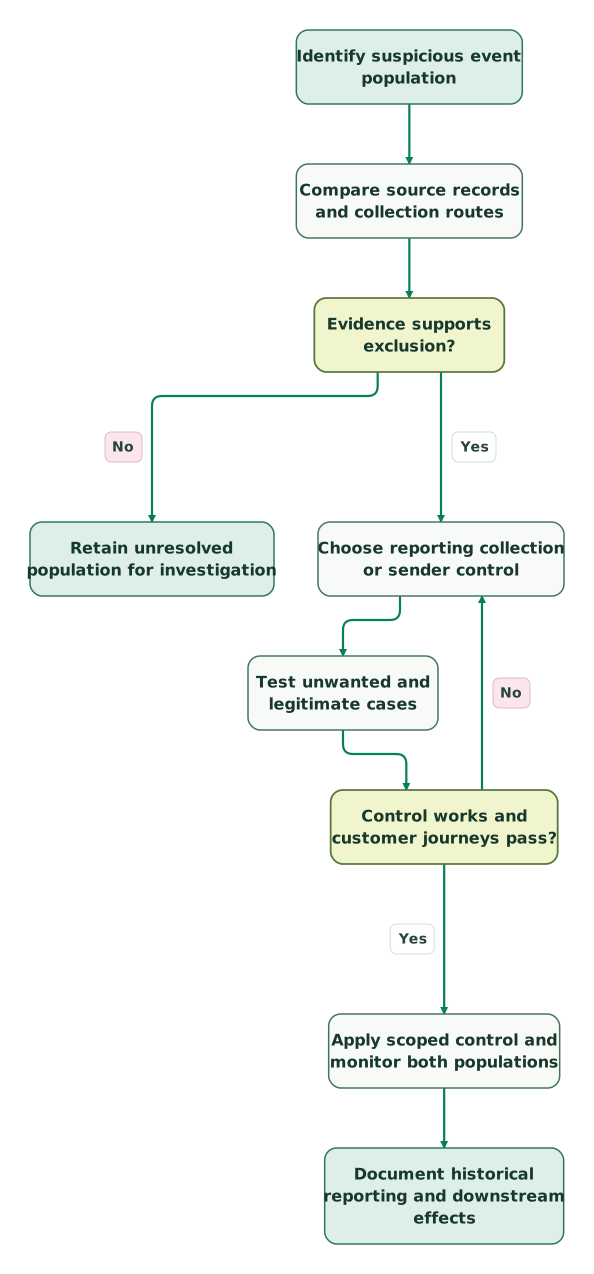
Read diagram as text
- Identify suspicious event population to Compare source records and collection routes.
- Compare source records and collection routes to Evidence supports exclusion?.
- Evidence supports exclusion? to Retain unresolved population for investigation: No.
- Evidence supports exclusion? to Choose reporting collection or sender control: Yes.
- Choose reporting collection or sender control to Test unwanted and legitimate cases.
- Test unwanted and legitimate cases to Control works and customer journeys pass?.
- Control works and customer journeys pass? to Choose reporting collection or sender control: No.
- Control works and customer journeys pass? to Apply scoped control and monitor both populations: Yes.
- Apply scoped control and monitor both populations to Document historical reporting and downstream effects
An analytics and tracking audit should produce this evidence, the scoped rule and a known-good journey test. Keep monitoring the legitimate outcome population after the noisy traffic disappears.
Keep reading
Browse all Tracking & Attribution guides
 Tracking & Attribution
GA4 setup for SaaS and apps: the events and settings that matter
Set up GA4 for a SaaS acquisition journey. Define events, test consent and cross-domain tracking, choose Ads goals and verify revenue, identity and export.
Jafrin Akter AloLast updated 14 min read
 Tracking & Attribution
GA4 Bounce Rate Looks Wrong? 5 Checks Before You Change the Page
Diagnose unexpected GA4 bounce rates. Check duplicate views, key events, engagement timers, session scope and weighted averages before changing your page.
Jafrin Akter AloLast updated 10 min read
 Product Analytics
GA4 Alternatives: Choose by the Questions You Need to Answer
Compare Plausible, Matomo, Mixpanel, PostHog and a warehouse by the decisions they support. Use a controlled pilot and preserve critical GA4 dependencies.
Jafrin Akter AloLast updated 13 min read
Analytics & tracking
See the implementation scope, deliverables and acceptance checks.
Questions people ask
Should all traffic from a country outside the target market be removed?
Use the business measurement scope and corroborating evidence before excluding a country. A customer, partner or campaign can produce legitimate activity outside the main market, and geography alone does not establish spam. Analyze the population separately first. If the business intentionally excludes that market from a particular report, label the reporting scope clearly rather than describing every excluded visitor as fraudulent.
What should happen when a new checkout hostname launches?
Add the new hostname to the approved collection inventory and test its complete purchase path before launch. Review any active Include and Exclude filters together, then verify the expected event and transaction identity after release. Assign this responsibility to the release checklist so a valid new checkout cannot be blocked merely because the marketing site's original allowlist was never updated.
What if one referral source sends both genuine customers and suspicious activity?
Separate the demonstrably unwanted population using the evidence available, rather than excluding the entire source by default. Compare landing paths, periods, event patterns and confirmed outcomes. Preserve the genuine customers and leave uncertain records visible for investigation. A source-level label can contain several behaviors, so the exclusion rule needs to match the specific defect you established.
How should an agency investigate contamination across several client properties?
Keep each property's measurement IDs, legitimate domains, integrations and affected periods separate. A shared pattern can help prioritize the investigation, but it does not establish identical causes or justify copying one exclusion everywhere. Test each client's important journeys and destination dependencies. Preserve the client-specific evidence and approval for permanent filtering so a fix in one account cannot silently remove another account's valid traffic.
Should I create a new GA4 property whenever spam becomes persistent?
First identify the collection route and evaluate whether a scoped control can address it. A new property changes reporting continuity, integrations and operational setup, while an unchanged faulty sender may reproduce the contamination. If a migration becomes necessary, plan the historical boundary, destinations, access and acceptance tests explicitly. Keep the original evidence so the new property does not become an unexplained break in business reporting.
Sources
- Google: Known bot-traffic exclusion
- Google: Identify unwanted referrals
- Google: Data filters
- Google: Hostname Include behavior and Measurement Protocol exception
- Google: Filter web hostname traffic
- Google: Measurement Protocol reference
- Google: Measurement Protocol and server-side troubleshooting
- Google: Apply filters to detail reports

Written by
Jafrin Akter AloData Engineer and Co-founder at Martechdevs and Growth and Analytics Partners
Jafrin writes practical guides to marketing technology, customer data, analytics and AI workflows. Martechdevs is a Growth and Analytics Partners company.