
GA4 Ecommerce Events: Parameters and a Complete QA Journey
GA4 ecommerce events describe what a shopper viewed, selected, added, purchased and later returned. Use the recommended event names, put product details inside items, and keep purchase identity and monetary values consistent from the application to Analytics. Before launch, follow one known order through the full journey and reconcile its purchase and refund. A visible event name alone does not prove that item reporting or revenue is correct.
On this page
Which GA4 ecommerce events belong in the journey?
GA4 recommends fourteen online-sales events, but you should emit each only when the corresponding action actually occurs. A digital checkout can omit a shipping step it does not have; a direct purchase does not need invented product-list interactions. Google's recommended events define the actions.
The example below is a fictional stationery order. It deliberately exercises the shopping steps once, including a wishlist and an internal promotion, followed by a partial refund.
| Event | Trigger | This QA journey |
|---|---|---|
view_promotion | A promotion is shown | Desk offer appears |
select_promotion | A promotion is selected | Shopper opens the offer |
view_item_list | An item list is viewed | Notebook and pen appear |
select_item | An item is selected | Shopper selects the notebook |
view_item | Item details are viewed | Notebook details open |
add_to_wishlist | Items enter a wishlist | One notebook is saved |
add_to_cart | Items are added | Two notebooks and two pens enter the basket |
remove_from_cart | Items are removed | One pen is removed |
view_cart | The cart is viewed | Two notebooks and one pen remain |
begin_checkout | Checkout begins | The remaining basket enters checkout |
add_shipping_info | Shipping details are submitted | Standard delivery is selected |
add_payment_info | Payment details are submitted | Card payment is selected |
purchase | Purchase completes | One confirmed order is recorded |
refund | A refund occurs | One notebook is refunded |
For cart changes, send the items affected by that action. For view_cart and checkout, send the relevant current basket. Keep list and promotion context on the intended items as the shopper moves forward. Google's ecommerce implementation guide shows these different item populations.
Choose one owner for each business outcome, using the ecommerce stack guide to place collection beside payment, consent and operational systems. A browser click can indicate intent, while payment confirmation establishes the purchase under your measurement policy. Do not fire purchase merely because a payment button was pressed or a revisitable success URL loaded.
Which parameters are required for useful revenue reporting?
A usable purchase includes transaction_id, numeric value, event-level currency and an items array with identifiable products. Those fields must reach the actual GA4 event, not just exist in a checkout object that the tag never reads. Google's missing-revenue checks identify this contract.
| Parameter | Scope | What to verify |
|---|---|---|
transaction_id | Purchase/refund event | Stable nonblank order identity; refund references the original purchase |
currency | Event | Actual transaction currency as a three-letter ISO code, such as USD |
value | Event | Numeric item subtotal, excluding tax and shipping |
items | Event array | Correct products and quantities for this action |
item_id or item_name | Each item | At least one is required by the event reference; use stable IDs in your implementation |
price, quantity | Each item | Discounted unit price and the affected number of units |
shipping, tax | Purchase/refund event | Separate monetary components, when applicable |
Read required fields with their conditions. Google's reference requires items for the listed journey events except refund and select_promotion, where it is optional. Currency is required when value is supplied; value is described as typically needed for meaningful reporting. Quantity defaults to one if omitted. Our launch contract deliberately requires item details for every step, both item ID and name, and explicit quantities. Recommended-event parameter reference.
Do not pass "25.00" or "$25" as a numeric value. Use 25 with currency: "USD". Keep price inside each item, while value, currency, shipping and tax describe the event. If the event arrives but revenue does not, use the focused GA4 missing-revenue diagnosis after checking this schema.
How should discounts, quantities and checkout totals reconcile?
Purchase value is the sum of discounted unit prices multiplied by quantities, with shipping and tax kept separate. A discount field describes the unit discount; it should not be subtracted a second time from an already discounted price. The event reference defines unit price and discount this way.
Illustrative USD order, after removing one of the two pens initially added:
| Item | Purchased quantity | Net unit price, USD | Item subtotal, USD |
|---|---|---|---|
| Field Notebook | 2 | 10.00 | 20.00 |
| Ink Pen | 1 | 5.00 | 5.00 |
| Merchandise total | 3 | Not applicable | 25.00 |
The notebook's original unit price is USD 12.50, so its unit discount is 2.50 and its price is 10.00. With USD 4.00 shipping and USD 2.50 tax, the checkout total is USD 31.50. The purchase event's value remains 25.00.
Later, one notebook is refunded: item value 10.00, tax 1.00 and shipping 0.00. The item value remaining is 25.00 − 10.00 = 15.00. The remaining cash under these assumptions is 31.50 − 11.00 = 20.50. They are different measures, even though both calculations are correct.
Define rounding at the currency and line-allocation boundary. This example uses USD cents and whole physical units. Other currencies, fractional quantities, order-wide discounts or rounding adjustments need their own reviewed fixtures; do not force them through the example by silently changing quantities or dropping a cent.
How do item scope and transport limits change the implementation?
Item attributes belong inside items; event attributes belong outside it. Some fields exist at both levels, so avoid assuming that an event-level value always overrides a product value. For list and promotion identifiers, item-level values take precedence; event and item coupons are independent. Google's ecommerce-scope guide explains these rules.
| Boundary | Limit or rule | Implementation check |
|---|---|---|
Ecommerce items array | Up to 200 elements | Count products in the actual serialized event |
| Web ecommerce custom item parameters | Up to 27 beyond prescribed fields | Keep a deliberate item-field allowlist |
| Measurement Protocol custom item parameters | Up to 10 | Do not copy a larger browser payload unchanged |
| Measurement Protocol request | At most 25 events; at most 25 parameters per event | Chunk requests without inventing new business occurrences |
| Measurement Protocol body | Smaller than 130 kB | Measure encoded bytes before sending |
The web ecommerce guide and Measurement Protocol sending limits describe different boundaries. Collection limits also differ from custom-dimension registration quotas. Register a custom attribute only when it has a defined reporting use; standard ecommerce fields already have predefined reporting meanings.
On a tagged website, map the event name and its parameters into the existing Google tag or GTM event configuration. In a server request, the same business event sits inside the Measurement Protocol request envelope with the required stream and identity context. The local example below contains neither a stream ID nor credentials. Use the Measurement Protocol implementation guide for that delivery layer.
What does one complete local ecommerce QA run look like?
Use a deterministic journey to catch state and arithmetic mistakes before sending anything. The following complete Python program generates all fourteen synthetic events, checks the changing cart, links the refund to its purchase and prints a local JSON artifact. It never calls Google or loads a tag.
Save it as journey.py. The occurrence_id belongs to the local QA envelope; it is not a promised GA4 deduplication parameter. The generated name and params represent the intended event content.
from copy import deepcopy
from decimal import Decimal
import json
import re

SEQUENCE = ('view_promotion select_promotion view_item_list select_item view_item '
            'add_to_wishlist add_to_cart remove_from_cart view_cart begin_checkout '
            'add_shipping_info add_payment_info purchase refund').split()
MONEY_EVENTS = set(SEQUENCE) - {'view_promotion', 'select_promotion', 'view_item_list', 'select_item'}
ITEM_FIELDS = set(('item_id item_name affiliation coupon discount index item_brand '
                  'item_category item_category2 item_category3 item_category4 item_category5 '
                  'item_variant item_list_id item_list_name location_id price quantity '
                  'promotion_id promotion_name creative_name creative_slot google_business_vertical').split())
EVENT_FIELDS = set(('items currency value transaction_id coupon shipping tax shipping_tier '
                   'payment_type item_list_id item_list_name promotion_id promotion_name '
                   'creative_name creative_slot customer_type').split())


def require(condition, message):
    if not condition:
        raise ValueError(message)


def text(value):
    require(type(value) is str and bool(value) and value == value.strip(), 'Expected nonblank text')
    return value


def money(value):
    require(type(value) in (int, float), 'Money must be a JSON number, not text or boolean')
    number = Decimal(str(value))
    require(number.is_finite() and number >= 0, 'Money must be finite and nonnegative')
    digits, exponent = number.as_tuple().digits, number.as_tuple().exponent
    excess = max(0, -exponent - 2)
    require(not excess or not any(digits[-excess:]), 'This USD exercise uses cent precision')
    return number


def audit_event(event, transport='web', approved_custom=()):
    require(transport in ('web', 'mp'), 'Choose web or mp explicitly')
    require(type(event) is dict and set(event) == {'occurrence_id', 'name', 'params'}, 'Invalid local envelope')
    text(event['occurrence_id'])
    name, params = event['name'], event['params']
    require(type(name) is str and name in SEQUENCE, 'Unexpected ecommerce event name')
    require(type(params) is dict and set(params) <= EVENT_FIELDS, 'Unexpected event parameter')
    require(type(approved_custom) in (tuple, list, set), 'Custom keys need an explicit collection')
    require(all(type(key) is str and re.fullmatch(r'[A-Za-z][A-Za-z0-9_]{0,39}', key)
                and key not in ITEM_FIELDS for key in approved_custom), 'Invalid custom key allowlist')
    custom = set(approved_custom)
    items = params.get('items')
    require(type(items) is list and 1 <= len(items) <= 200, 'Exercise requires 1 to 200 items')
    total, ids = Decimal(0), set()
    for item in items:
        require(type(item) is dict, 'Item must be an object')
        require(set(item) <= ITEM_FIELDS | custom, 'Unapproved custom item parameter')
        require(len(set(item) - ITEM_FIELDS) <= (10 if transport == 'mp' else 27), 'Custom item limit exceeded')
        identifier = text(item.get('item_id'))
        text(item.get('item_name'))
        require(identifier not in ids, 'Aggregate duplicate SKUs for this exercise')
        ids.add(identifier)
        quantity = item.get('quantity')
        require(type(quantity) is int and quantity > 0, 'Exercise requires positive whole-unit quantities')
        price = money(item.get('price'))
        if 'discount' in item:
            money(item['discount'])
        for key in set(item) - ITEM_FIELDS:
            require(type(item[key]) in (str, int, float), 'Unsupported custom item value')
            if type(item[key]) is float:
                require(Decimal(str(item[key])).is_finite(), 'Nonfinite custom value')
        for key in set(item) & ITEM_FIELDS - {'price', 'quantity', 'discount', 'index'}:
            text(item[key])
        if 'index' in item:
            require(type(item['index']) is int and item['index'] >= 0, 'Invalid list index')
        total += price * quantity
    if name in MONEY_EVENTS:
        require(params.get('currency') == 'USD', 'This journey uses USD')
        require(money(params.get('value')) == total, 'Event value differs from item subtotal')
    else:
        require('value' not in params and 'currency' not in params, 'This manifest omits value on list and promotion steps')
    for key in set(params) - {'items', 'value', 'shipping', 'tax'}:
        text(params[key])
    for field in ('shipping', 'tax'):
        if field in params:
            require(name in ('purchase', 'refund'), 'Shipping and tax belong to this order outcome')
            money(params[field])
    if name in ('purchase', 'refund'):
        text(params.get('transaction_id'))
    return total


def make_journey():
    notebook = {'item_id': 'SKU_NOTE', 'item_name': 'Field Notebook', 'price': 10,
                'discount': 2.5, 'quantity': 1, 'item_list_id': 'desk', 'promotion_id': 'desk_offer'}
    pen = {'item_id': 'SKU_PEN', 'item_name': 'Ink Pen', 'price': 5, 'quantity': 1,
           'item_list_id': 'desk'}
    def units(item, quantity):
        return {**deepcopy(item), 'quantity': quantity}
    result = []
    def add(name, items, **extra):
        params = {'items': deepcopy(items), **extra}
        if name in MONEY_EVENTS:
            params.update(currency='USD', value=float(sum(money(x['price']) * x['quantity'] for x in items)))
        result.append({'occurrence_id': 'demo-step-%02d' % (len(result) + 1), 'name': name, 'params': params})
    for name in ('view_promotion', 'select_promotion'):
        add(name, [notebook], promotion_id='desk_offer', promotion_name='Desk offer')
    add('view_item_list', [notebook, pen], item_list_id='desk', item_list_name='Desk supplies')
    for name in ('select_item', 'view_item', 'add_to_wishlist'):
        add(name, [notebook])
    add('add_to_cart', [units(notebook, 2), units(pen, 2)])
    add('remove_from_cart', [pen])
    cart = [units(notebook, 2), pen]
    add('view_cart', cart)
    add('begin_checkout', cart)
    add('add_shipping_info', cart, shipping_tier='Standard')
    add('add_payment_info', cart, payment_type='Card')
    add('purchase', cart, transaction_id='demo-order-001', shipping=4, tax=2.5)
    add('refund', [notebook], transaction_id='demo-order-001', shipping=0, tax=1)
    return result


def audit_journey(events, transport='web'):
    require(type(events) is list and len(events) >= len(SEQUENCE), 'Incomplete QA journey')
    for event in events:
        audit_event(event, transport)
    names = [event['name'] for event in events]
    require(names[:13] == SEQUENCE[:13] and all(name == 'refund' for name in names[13:]),
            'This QA manifest expects each pre-refund step once, then refund occurrences')
    seen, catalogue, cart, refunded = set(), {}, {}, {}
    purchase = None
    refund_value = refund_tax = refund_shipping = Decimal(0)
    for event in events:
        occurrence, name, params = event['occurrence_id'], event['name'], event['params']
        require(occurrence not in seen, 'Repeated local business occurrence')
        seen.add(occurrence)
        quantities = {}
        for item in params['items']:
            key = item['item_id']
            identity = (item['item_name'], money(item['price']), money(item.get('discount', 0)))
            require(key not in catalogue or catalogue[key] == identity, 'SKU identity or unit money drifted')
            catalogue[key] = identity
            quantities[key] = item['quantity']
        if name == 'add_to_cart':
            for key, quantity in quantities.items():
                cart[key] = cart.get(key, 0) + quantity
        elif name == 'remove_from_cart':
            for key, quantity in quantities.items():
                require(quantity <= cart.get(key, 0), 'Removing more units than the cart contains')
                cart[key] -= quantity
            cart = {key: value for key, value in cart.items() if value}
        elif name in ('view_cart', 'begin_checkout', 'add_shipping_info', 'add_payment_info', 'purchase'):
            require(quantities == cart, 'Cart snapshot contains stale or missing units')
            if name == 'purchase':
                purchase = params
        elif name == 'refund':
            require(purchase is not None and params['transaction_id'] == purchase['transaction_id'],
                    'Refund must reference this completed order')
            for key, quantity in quantities.items():
                refunded[key] = refunded.get(key, 0) + quantity
                require(refunded[key] <= cart.get(key, 0), 'Refund quantity exceeds purchased units')
            refund_value += money(params['value'])
            refund_tax += money(params.get('tax', 0))
            refund_shipping += money(params.get('shipping', 0))
            require(refund_tax <= money(purchase.get('tax', 0)), 'Refund tax exceeds this order tax')
            require(refund_shipping <= money(purchase.get('shipping', 0)), 'Refund shipping exceeds this order shipping')
    purchase_value = money(purchase['value'])
    cash = purchase_value + money(purchase.get('tax', 0)) + money(purchase.get('shipping', 0))
    return {'events_checked': len(events), 'purchase_value_usd': str(purchase_value),
            'checkout_total_usd': str(cash), 'refund_item_value_usd': str(refund_value),
            'remaining_item_value_usd': str(purchase_value - refund_value),
            'remaining_cash_usd': str(cash - refund_value - refund_tax - refund_shipping)}


if __name__ == '__main__':
    journey = make_journey()
    print(json.dumps({'local_only': True, 'checks': audit_journey(journey), 'events': journey}, indent=2))
Run it locally:
python3 journey.py > journey-output.jsonThe artifact should contain fourteen events and these reconciled amounts: purchase value 25.00, checkout total 31.50, refunded item value 10.00, remaining item value 15.00 and remaining cash 20.50, all in USD. The program checks both schema choices and journey state, so a basket with an arithmetically correct but stale extra pen still fails.
Try changing the purchase value to 31.50, removing currency, changing a unit price to the line total, or replaying the refund with the same occurrence ID. Each should stop the local run. A distinct second one-notebook refund can be represented as a new occurrence, but the cumulative refunded quantity cannot exceed the two notebooks purchased.
This checker is a focused launch contract, not Google's complete validator. It requires a specific sequence, USD, whole-unit quantities, cent precision and a stable single-locale catalogue. Real shoppers can revisit steps or change prices legitimately; adapt the expected journey and test those cases explicitly. The optional custom-item allowlist exercises the 27-versus-10 boundary without authorizing arbitrary customer data as a new analytics field.
How do you avoid duplicate purchases and model renewals correctly?
Use one stable transaction ID per actual purchase and preserve it across repeated delivery attempts. Google documents purchase deduplication by transaction ID for web streams, not app streams, warns against empty IDs and says IDs must not identify individual customers. Do not reuse a subscription or customer ID for several paid orders. Google's transaction-ID guidance defines the scope.
Prevent duplicate production as well as relying on destination behavior. Inventory the browser tag, checkout app, server handler and any old sender left during migration. Two senders using different transaction IDs for the same order can make one business purchase look like two. A custom event_id is not a general replacement for the documented purchase rule.
For subscriptions, decide whether every paid renewal should contribute purchase revenue or whether renewals belong in a separate lifecycle event. If you choose purchase for each renewal, use the unique paid-invoice occurrence, retain its real time and keep acquisition-only bidding rules separate. A custom renewal event does not automatically become purchase revenue. The Stripe server-side tracking guide covers that policy and payment evidence.
A refund references the original transaction but has its own occurrence in your delivery ledger. Do not resend the cumulative refunded amount each time another partial refund completes. Use the GA4 refund guide for occurrence IDs, partial-refund delivery and later-period reconciliation. The exercise above validates item and amount relationships; it does not prove that GA4 will deduplicate a refund retry.
How do you verify collection without confusing it with processed reporting?
Verify the local payload, the collected event and the processed report as three separate stages. Each can expose a different failure.
- Inspect the exact event object generated by the application. Compare names, item IDs, quantities, currency and value with the test order.
- In a permitted test environment, check the actual tag or transport mapping and the destination stream. Confirm the purchase fires only for the chosen completed outcome.
- Enable debug mode for the test device and inspect the event parameters and items in DebugView. If it is absent, follow the DebugView troubleshooting guide.
- For Measurement Protocol, send development requests to
/debug/mp/collectwithENFORCE_RECOMMENDATIONSand inspectvalidationMessagesbefore controlled collection. - Reconcile processed purchase and refund data with the known order after the relevant processing and export windows.
DebugView requires debug mode and has consent-related visibility limits. Debug traffic also needs a deliberate test-property or developer-filter policy. Remove the debug_mode parameter to disable it; setting it to false does not disable debug mode. Google's DebugView guidance describes these details.
The Measurement Protocol validation endpoint does not populate reports and does not establish that credentials are valid. A production collection response is not equivalent to successful measurement. Google's validation guide separates these checks.
Google's purchase tutorial describes data appearing after about 24 hours. Its broader freshness guidance says processing can take 24–48 hours and figures can change during that interval. Use those as processing expectations, not an exact completion guarantee or a reason to ignore a known payload defect. Purchase setup, data freshness.
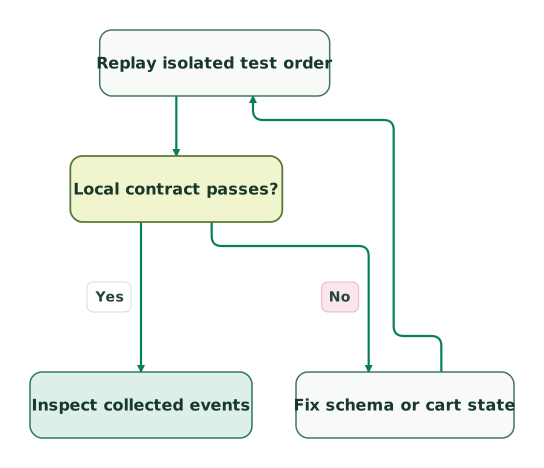
Check the local order contract
The collected-events step is shared with the next view. A local pass does not establish delivery to Analytics.
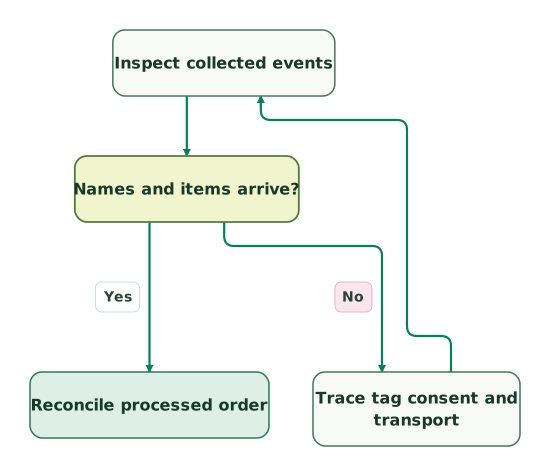
Verify event collection
This view starts after the local contract passes and ends at the same reconciliation step used next.
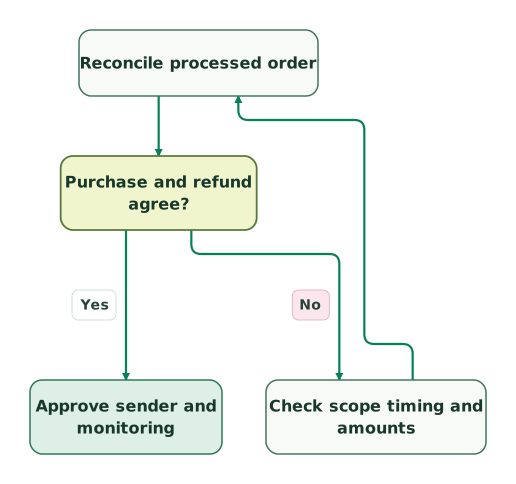
Reconcile the processed order
The release decision depends on the agreed order outcome, not only on seeing a collected event.
Read diagram as text
- Replay isolated test order to Local contract passes?.
- Local contract passes? to Fix schema or cart state: No.
- Fix schema or cart state to Replay isolated test order.
- Local contract passes? to Inspect collected events: Yes.
- Inspect collected events to Names and items arrive?.
- Names and items arrive? to Trace tag consent and transport: No.
- Trace tag consent and transport to Inspect collected events.
- Names and items arrive? to Reconcile processed order: Yes.
- Reconcile processed order to Purchase and refund agree?.
- Purchase and refund agree? to Check scope timing and amounts: No.
- Check scope timing and amounts to Reconcile processed order.
- Purchase and refund agree? to Approve sender and monitoring: Yes
What should you inspect in BigQuery and ecommerce reports?
Use the exported transaction and item fields to compare one known order, while preserving the difference between event counts and item quantities. In BigQuery, inspect ecommerce.transaction_id, purchase or refund value, tax and shipping, plus the repeated items fields for ID, price, quantity and item revenue or refund amount. Google's export schema defines them.
Start with a narrowly selected test population, the correct property dataset and the relevant dates. Do not multiply an event's purchase value by flattening its items and summing that repeated event value. Sum item values at item grain, or keep the purchase value at event grain. Likewise, a purchase containing three units is one ecommerce purchase and three items purchased, not three orders. Ecommerce metric scopes explain the distinction.
Daily and intraday exports have different availability, and daily tables can receive late updates for up to three days. Avoid counting the same day's daily and intraday rows together. Record which tables and extraction time supported the check; an early extract is not necessarily the final population.
Compare IDs before comparing totals. The purchase-reconciliation skill helps classify individual orders as matched, missing, duplicated, late or different in value. For Shopify, use the GA4 purchase-mismatch guide to establish the actual emitted order key and eligible checkout population. Neither guide assumes analytics should equal every financial transaction regardless of consent and collection eligibility.
What should pass before ecommerce tracking is released?
Release the event journey after the chosen producers, edge cases and reporting outputs agree with a written contract. Keep the QA order and the expected outcomes together so a later checkout change can rerun the same checks.
Checklist
- Each recommended event has a real trigger and one responsible producer.
- Item IDs stay consistent across the tested journey and source catalogue.
- Event and item parameters are mapped at the correct scope.
- Prices are discounted unit prices, quantities are explicit and totals reconcile.
- Purchase value excludes shipping and tax; the currency is the actual transaction currency.
- Transaction IDs are nonblank, stable per purchase and contain no personal data.
- Browser and server routes respect their own limits and duplicate controls.
- Refunds reference the order and carry the refunded items and occurrence amount.
- Controlled collection, processed reports and available export data are checked separately.
- Monitoring distinguishes missing orders, duplicates, timing differences and value mismatches.
For help implementing the event contract, tag mapping and order-by-order QA, request a detailed GA4 implementation scope. Bring the actual checkout flow, current senders and a small set of known purchase and refund cases.
Keep reading
Browse all Tracking & Attribution guides
 Tracking & Attribution
GA4 Refund Tracking: Reconcile Purchases, Returns and Revenue
Track full and partial refunds in GA4 with correct order IDs, incremental item values, duplicate controls and a practical revenue reconciliation method.
Jafrin Akter AloLast updated 12 min read
 Tracking & Attribution
GA4 Revenue Missing: Fix Purchase Values, Currency and Transaction IDs
Diagnose zero or missing GA4 revenue with purchase payload checks, an offline validator, transaction-ID tests and a worked merchandise-versus-checkout example.
Jafrin Akter AloLast updated 11 min read
 Tracking & Attribution
Why GA4 purchases don't match Shopify, and how to reconcile them
Reconcile Shopify orders with GA4 by transaction ID. Find missing purchases, duplicates, checkout failures, value differences and refund gaps.
Jafrin Akter AloLast updated 14 min read
Purchase reconciliation skill
Compare a known order across the application, event payload and reporting outcome.
Questions people ask
Must a digital product send add_shipping_info?
No. Send add_shipping_info when the customer actually submits shipping information in your checkout. A digital service without that step should not manufacture one to make a funnel look complete. Document the intended path and choose a report that fits it. The full synthetic journey here exercises physical delivery; its fixed sequence is a test fixture, not a rule for every business.
Can an item keep its ID when its displayed name is translated?
Yes, a stable catalogue ID can identify the same item while its localized display name changes. Define the ID at the product or variant level that your reports need, and preserve the relevant locale separately where useful. This example intentionally uses one fixed catalogue and language, so its name-drift check should be adapted with explicit translation fixtures before use across storefronts.
Does a coupon parameter automatically reduce the purchase value?
No. A coupon is descriptive context; your monetary fields must already reflect the intended discount allocation. Send the discounted unit price, the applicable unit discount and a value that reconciles to the items. Keep event-level and item-level coupon meanings separate. A correct coupon label alongside an undiscounted value still leaves the financial mapping wrong, even if the event is collected successfully.
Do standard ecommerce fields need duplicate custom-dimension registrations?
Standard ecommerce parameters already populate predefined reporting fields, so start with those rather than registering another version of item_id or transaction_id. A genuinely custom attribute needs its own defined scope and reporting purpose. Check whether it is sent, registered where required and compatible with the intended report. Collection of an arbitrary item parameter does not automatically make it available in every Analytics report. See Google's ecommerce setup guidance.
Can cart value be treated as completed revenue?
No. Cart and checkout values describe the value associated with those interactions; they do not establish that a purchase completed. A shopper may abandon, change quantities or fail payment after those events. Keep funnel value separate from purchase and refund metrics, and use the authoritative order outcome when reconciling revenue. Summing every value-bearing event in the journey would count the same merchandise repeatedly.
Sources
- Google Analytics: Recommended events
- Google Analytics: Measure ecommerce
- Google Analytics: Recommended-event parameter reference
- Google Analytics: Fix missing revenue data
- Google Analytics: Ecommerce scopes
- Google Analytics: Send Measurement Protocol events
- Google Analytics: Minimize duplicate key events with transaction IDs
- Google Analytics: Monitor events in DebugView
- Google Analytics: Validate Measurement Protocol events
- Google Analytics: Set up a purchase event
- Google Analytics: Data freshness
- Google Analytics: BigQuery Export schema
- Google Analytics: About ecommerce metrics
- Google Analytics: Set up ecommerce events

Written by
Jafrin Akter AloData Engineer and Co-founder at Martechdevs and Growth and Analytics Partners
Jafrin writes practical guides to marketing technology, customer data, analytics and AI workflows. Martechdevs is a Growth and Analytics Partners company.