
Event Tracking for Websites and Products: Actions, Identity and Reliable Counts
Event tracking records a meaningful action together with the context needed to understand it. For website and product analytics, start with a business question, define the successful action and verify its destination record. Tracking events is useful when the resulting counts support a decision; collecting every possible click can instead create duplicated, ambiguous data that nobody knows how to interpret.
On this page
Event tracking examples and evidence
Each event should represent a defined occurrence, with a clear distinction between an attempt and a completed outcome.
| Business question | Event example | Useful context | Acceptance evidence |
|---|---|---|---|
| Signup completion | Successful account creation | Method, product and account reference | Accepted account exists |
| Product activation | Completion of the agreed first-value action | Feature, account and relevant state | Required product result exists |
| Purchase completion | Accepted order | Order reference, value and currency | Order system confirms the transaction |
| Feature adoption | Meaningful feature use | Feature version and usage context | Intended action completed |
| Journey friction | Failed attempt or validation error | Controlled error category and step | Reproducible failure case |
Google Analytics describes events as interactions on websites and apps, including page loads, clicks and purchases. Segment's Track specification similarly records an action with descriptive properties. The useful event is the one with a meaning your team can verify. See GA4 event setup and Segment Track.
We would choose a small set around one decision first. If the question is why people fail to activate, define the activation outcome and the preceding steps. A long inventory of unrelated clicks can make that question harder to answer.
At Martechdevs, analytics and tracking implementation connects those definitions to the website, application and business records. We check that the accepted action reaches the intended destination once with the right identity and context.
Events, properties and customer state
In website and product analytics, an event tracker collects defined actions and their context. An event describes something that happened. A property explains the occurrence. A profile attribute usually describes a person or account's state. Mixing those concepts can change the meaning of historical reports.
For example, Account created is an occurrence. Signup method and the plan selected at that moment can be event properties. A customer's current plan is a changing attribute. If the customer upgrades later, a historical signup report should not silently replace the original plan with today's value unless that is the intended analysis.
Segment's Track specification separates the event name from its properties and describes recognized property names with special meanings. Use a reserved property only for its intended purpose, rather than placing unrelated information in a familiar field. See Track properties.
The event naming guide provides a naming framework. Keep the event name stable enough to preserve a useful series, while properties hold controlled variations such as product, step or method. Avoid creating a new event name for every customer or campaign.
Attempts and completed outcomes
A button click can be worth tracking, but it is not necessarily a successful business event. Someone can click Create account and receive a validation error. A payment button can be clicked before the payment is accepted. The producer should emit the success event at the point where success is known.
Use separate events for attempts and outcomes when both answer a useful question. The attempt can reveal intent or interface friction; the accepted outcome measures completion. A funnel comparing the two needs compatible identity and time rules.
For a signup, the application can record a successful account creation after its backend accepts the new account. For a purchase, the appropriate authority may be the order or payment workflow, depending on the agreed business definition. Write that definition before choosing a browser or server event producer.
Also distinguish failure from missing observation. A user with no recorded completion may have abandoned, encountered an error or completed an action that was not collected. A report cannot infer which explanation is true from the absence of one event alone.
A small event contract
Write the contract in language the product owner and implementer can both inspect. It should identify the event, trigger, producing system, identifier, required properties, allowed values and expected destinations.
The following is a hypothetical internal event envelope, not a payload to send unchanged to GA4 or Segment. Each destination needs an explicit mapping to its supported schema.
{
  "event_id": "evt-order-1042-paid",
  "event_name": "order_accepted",
  "occurred_at": "2026-11-15T09:15:00Z",
  "actor_id": "user-17",
  "properties": {
    "order_id": "order-1042",
    "value": 80,
    "currency": "USD"
  }
}
The event identifier describes this occurrence; the actor identifies the person or other chosen unit; the order identifier describes the business object. Those references solve different problems. Do not substitute the order amount or a display name for a stable identifier.
Require a currency when monetary interpretation depends on it. A value of 80 is ambiguous when one system expects dollars and another expects cents, or when the business operates in several currencies. Include the unit and conversion policy in the contract rather than resolving it differently in every dashboard.
The tracking plan guide covers the complete contract. This event-tracking guide focuses on turning that contract into accepted occurrences and reliable counts.
Browser, server and automatic collection
Browser events can describe interface behavior close to the interaction. Server events can describe outcomes accepted by the application. Automatic capture can help discover interactions, but the captured action still needs a business interpretation before it becomes a trusted metric.
GA4 distinguishes automatically collected, enhanced-measurement, recommended and custom events. Recommended events have established names and purposes, while custom events cover actions without a suitable predefined event. Confirm the appropriate event and parameters before inventing a parallel name. See GA4 event categories.
Do not add a second manual event simply because a report looks empty. First inspect the existing collection path. A browser tag, a framework callback and a server integration may all be able to send related records, but that does not mean they should all own the same success event.
Choose one authoritative producer or an explicit deduplication design for each outcome. If the browser measures the user's attempt and the server records acceptance, give the two records distinct meanings. If both report the same accepted order, preserve the same business reference and qualify the destination's actual deduplication behavior.
The server-side tracking guide covers that architecture in more detail. Moving the producer to a server changes delivery and ownership; it does not automatically establish identity, permission or a correct event definition.
Identity, timestamps and late delivery
An event needs an identity policy that fits the question. Anonymous browsing, a signed-in user and a business account are different units. Linking them can support a journey, but an incorrect link can also attribute one person's behavior to someone else.
Segment's common specification distinguishes a known userId, an anonymousId, a message identifier and several timestamps. These fields are not interchangeable. Its documentation also distinguishes event timing from send and receipt timing, with SDK-specific clock behavior. See Segment common fields.
Keep the occurrence time and receipt time available where the pipeline supports them. An event that arrives tomorrow may belong to today's business activity. A dashboard grouped only by receipt time can therefore describe processing volume rather than the timing of the customer journey.
Test anonymous-to-known transitions, returning users and shared-device behavior against the intended rules. A consistent identifier in one session is not proof of correct account-level reporting. The identity merge guide explains why those cases need deliberate treatment.
Define how reports handle late events. A recent day's number may remain provisional until the accepted delay window passes. Preserve that distinction rather than promising that a dashboard is final merely because the latest refresh completed.
Event counts and a synthetic reconciliation
Consider eight hypothetical deliveries. Two are retries of already delivered occurrences. The same user completes two separate orders, each worth $80. The table is an internal fixture with stable identifiers, not a claim about a vendor's default deduplication rules.
| Delivery | Event identifier | Event meaning | Business reference |
|---|---|---|---|
| 1 | e1 | Page viewed by user A | None |
| 2 | e2 | Signup completed by user A | Account A |
| 3 | e2 | Retry of the same signup event | Account A |
| 4 | e3 | Signup completed by user B | Account B |
| 5 | e4 | Signup started by user C | No completed account |
| 6 | e5 | Order accepted from user A | Order 1, USD 80 |
| 7 | e5 | Retry of the same order event | Order 1, USD 80 |
| 8 | e6 | Another order accepted from user A | Order 2, USD 80 |
The expected result is eight deliveries, six distinct event identifiers, two completed signups and two accepted orders. The accepted order value is $160, while the number of purchasing users is one. Counting the retry as a new order would produce three purchases and $240.
Deduplicating by monetary value would make the opposite mistake: both genuine orders are worth $80. The correct distinction comes from the event and business identifiers, not the amount. Similarly, signup started must not be counted as signup completed.
Use the fixture at each important boundary: the producer, collection endpoint, destination and final reporting model. A passing transport count is incomplete if the destination renames the event incorrectly or the report counts users where the business asked for orders.
Event-tracking setup sequence
- Name one decision and define the successful business action that informs it.
- Select the event and properties, including required identifiers, types and units.
- Choose the authoritative producer and permitted destination mapping.
- Implement the trigger at the accepted action boundary, with failure and retry behavior defined.
- Inspect a known event and its properties in the collection and destination tools.
- Reconcile successful, failed, repeated and late occurrences against expected records.
- Verify the report's population, time field and aggregation.
- Assign a monitoring owner and repeat the fixture after relevant releases.
Keep implementation and analysis acceptance separate. An event visible in a debugger proves that a particular record was observed there. It does not by itself establish complete collection, correct revenue or an accurate conversion rate.
For GA4, DebugView displays events and user properties from devices with debug mode enabled. Google recommends using the personal test device during troubleshooting, so it is easier to identify the relevant stream. DebugView and Realtime also have limited attribution analysis. See DebugView guidance.
When disabling GA4 debug mode, remove the debug_mode parameter rather than setting it to false; Google's instructions explicitly distinguish those operations. Treat debugging configuration as part of the handover, not something left enabled accidentally. See debug-mode controls.
Collection boundaries and information quality
Send only properties that serve the defined measurement purpose and are permitted in the receiving product. Free-text fields, page URLs and search queries can carry information the team never intended to collect.
Google's Analytics guidance identifies email addresses and similar information as prohibited personally identifiable information in ordinary Analytics collection. It highlights URLs, titles, user input and custom parameters as common sources of accidental disclosure. Inspect the actual payload and approved collection design. See Google's PII guidance.
An opaque identifier is preferable to placing an email address in an ordinary event field, but it does not remove every privacy or governance consideration. Maintain the organization's approved purpose, consent and destination rules separately from the mechanics of generating an event.
Test a permitted collection case and a case that should be excluded under that design. A downstream filter may prevent a destination write while leaving the upstream event present, so document which boundary performs each operation.
Event-tracking diagnostics
| Symptom | Likely area for investigation | Evidence to compare |
|---|---|---|
| Missing success event | Trigger timing, rejection or delivery path | Accepted business record and producer log |
| Double counts | Multiple producers or repeated delivery | Event and business identifiers |
| Correct event, wrong revenue | Units, currency or aggregation | Source order and mapped properties |
| Broken funnel sequence | Identity or timestamp policy | Known journey across stages |
| Debugger activity without useful reports | Destination mapping or report definition | Accepted payload and reporting configuration |
Repair the cause, then repeat the relevant fixture. If a duplicate producer is removed, verify both that duplicate counts disappear and that the remaining producer still covers the intended cases. If an event name changes, preserve or deliberately migrate dependent reports.
Event acceptance workflow
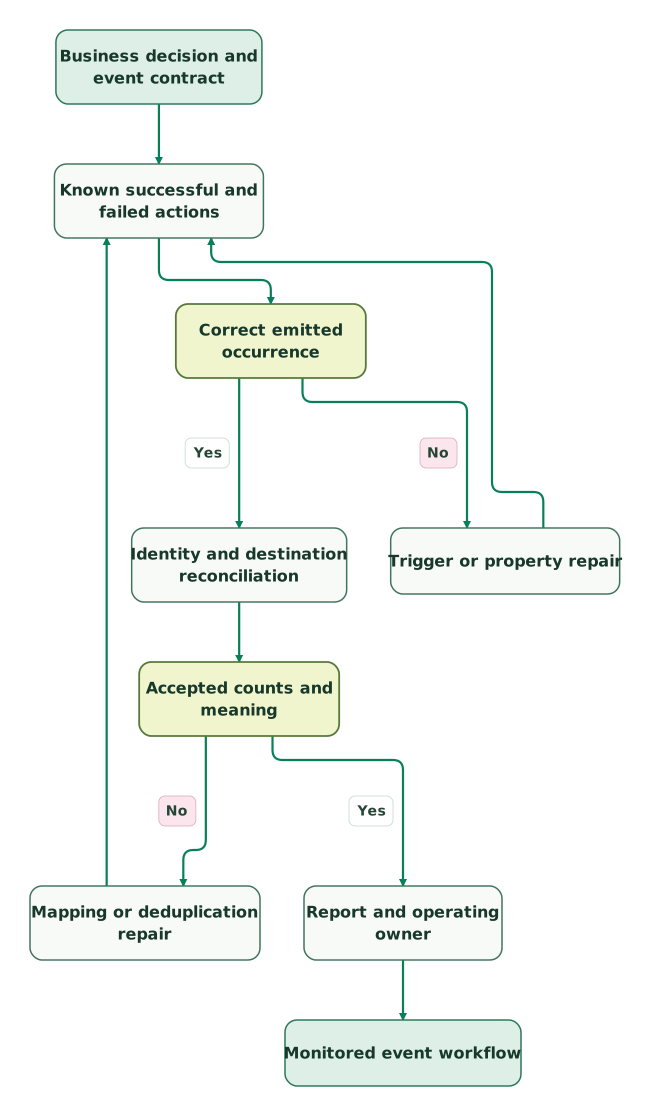
Read diagram as text
- Business decision and event contract to Known successful and failed actions.
- Known successful and failed actions to Correct emitted occurrence.
- Correct emitted occurrence to Trigger or property repair: No.
- Trigger or property repair to Known successful and failed actions.
- Correct emitted occurrence to Identity and destination reconciliation: Yes.
- Identity and destination reconciliation to Accepted counts and meaning.
- Accepted counts and meaning to Mapping or deduplication repair: No.
- Mapping or deduplication repair to Known successful and failed actions.
- Accepted counts and meaning to Report and operating owner: Yes.
- Report and operating owner to Monitored event workflow
Event tracking checklist
- A named decision and clearly defined successful action.
- Separate attempts, failures and completed outcomes.
- Stable event, actor and business-object identifiers.
- Required properties with types, units and currency.
- One authoritative producer or an explicit deduplication design.
- Known success, retry, failure and late-event fixtures.
- A deliberate identity and timestamp policy.
- Destination and report counts reconciled independently.
- Approved collection boundaries and inspected payload fields.
- A monitoring owner and revalidation after changes.
The tracking plan audit skill helps preserve those checks. Use the dashboard templates tool to display distinct deliveries, occurrences, users and business outcomes without hiding the difference between them.
Keep reading
Browse all Tracking & Attribution guides
 Tracking & Attribution
Tracking Plan: Free Template, Examples by Business Type and How to Build One
A tracking plan defines each event: when it fires, its properties, IDs, owner and tools. Get a free two-tab template, six examples and an approval checklist.
Jafrin Akter AloLast updated 42 min read
 Tracking & Attribution
Event naming conventions for Mixpanel, Amplitude, PostHog and GA4
Create consistent events across Mixpanel, Amplitude, PostHog and GA4. Define meanings, map destinations, detect collisions and rename without double counting.
Jafrin Akter AloLast updated 13 min read
 Product Analytics
Identity merge in Mixpanel, Amplitude and PostHog explained
Mixpanel identity merge compared with Amplitude and PostHog: identify and reset behaviour, client and server IDs, shared devices and historical repair limits.
Jafrin Akter AloLast updated 15 min read
Analytics & tracking
See the implementation scope, deliverables and acceptance checks.
Questions people ask
Does a tracked button click establish that the customer completed the intended action?
A tracked button click does not establish that the customer completed the intended action. Validation, payment or server processing can fail afterward. Keep the attempt when it answers a useful question, but emit the success event where acceptance is known. Reconcile that event with the resulting account, order or other business record before using it as a completion metric.
Can two orders with the same value be treated as duplicate tracking events?
Two orders with the same value should not be treated as duplicate tracking events merely because the amounts match. Distinct accepted orders can legitimately have identical totals. Use stable event and business-object identifiers under a defined deduplication policy, then reconcile the accepted source records. Amount-based deduplication can remove valid purchases while leaving other duplicate deliveries untouched.
Is a Segment message identifier interchangeable with a customer identifier?
A Segment message identifier is not interchangeable with a customer identifier. The common specification distinguishes the message, known user, anonymous identity and timestamps. Each supports a different part of delivery or analysis. Preserve the intended unit when mapping those fields, especially when one person performs several actions or changes from anonymous to identified activity. See Segment common fields.
Does a visible DebugView event prove that a GA4 acquisition report is correct?
A visible DebugView event does not prove that a GA4 acquisition report is correct. DebugView helps inspect collected events and properties from a debug-enabled device, while Google notes that its attribution analysis is limited. Validate the appropriate report, population and source context separately after confirming the event. See Google's DebugView guidance.
Should every event property describe the customer's current state?
Every event property should not automatically describe the customer's current state. Some properties need to preserve what was true when the action happened, such as the plan selected at signup or the price of an accepted order. Keep changing profile attributes separate where appropriate and state whether a report uses historical event context or today's customer attributes.
Sources

Written by
Jafrin Akter AloData Engineer and Co-founder at Martechdevs and Growth and Analytics Partners
Jafrin writes practical guides to marketing technology, customer data, analytics and AI workflows. Martechdevs is a Growth and Analytics Partners company.