
ClickHouse vs Databricks: Event Analytics, Lakehouse Workflows and Cost
Pick ClickHouse for a defined analytical serving workload that benefits from a query-focused data model. Pick Databricks when shared engineering, SQL and machine-learning workflows are the main requirement. ClickHouse vs Databricks also needs a current serving comparison: Databricks offers a Lakehouse Real-Time beta, so evaluate its actual limits alongside ClickHouse before deciding to introduce another database.
On this page
ClickHouse and Databricks compared
USD list examples below use AWS N. Virginia; the units measure different consumption and exclude a complete implementation budget.
| Decision | ClickHouse Cloud | Databricks |
|---|---|---|
| Compute price example | Scale $0.2985 per compute-unit-hour | SQL Serverless Premium $0.70/DBU; other compute types have other rates |
| Main starting job | Analytical queries over a deliberately modeled serving dataset | Shared engineering, SQL and ML platform |
| Low-latency evaluation | Actual query patterns, ingestion and read load | SQL warehouse selection, including Lakehouse Real-Time beta |
| Changed records | Table-engine and update strategy determine correctness | Delta MERGE and supported Lakeflow CDC workflows |
| Broader operating question | Dedicated serving layer or main analytical store | Existing platform fit versus another serving system |
Sources: ClickHouse pricing, Databricks regional pricing data, Databricks warehouse types, Delta MERGE, Lakeflow CDC.
A common decision starts with a slow dashboard inside a wider data platform. The response might be a different table layout, query, warehouse type or serving database. Establish which part fails before adding a second copy of the data and another operating responsibility.
At Martechdevs, we scope data platforms and analytical serving from the result the business needs. A customer-facing report has a latency, freshness and access requirement; a feature-development pipeline has a different completion and recovery requirement. Each should be evaluated against its own contract.
Analytical serving and platform scope
ClickHouse organizes data in columnar parts and uses ordering and sparse indexes to reduce the data a query reads. The ordering key should reflect important filters and the workload's access pattern. A generic imported schema may fail to demonstrate the value of that design. Ordering-key guidance.
For an event dashboard, write down the actual filters: customer account, time window, event type and any commonly used dimensions. Include the largest tenant and the broadest legitimate time range in the test. An average query against a small tenant can conceal the behavior that affects the most valuable account.
Databricks combines engineering, SQL and ML workflows around its lakehouse architecture. If those workflows already run there, keeping a serving use case in the same platform may reduce data movement and operating dependencies. That benefit still needs a suitable warehouse and acceptable query results. Databricks architecture.
Databricks SQL has serverless, pro and classic warehouses, with different operating and performance capabilities. The serverless option includes its intelligent workload management, while the classic and pro configurations have different infrastructure boundaries. Name the selected type in any comparison. Warehouse types.
Our ClickHouse vs Snowflake guide covers a related warehouse-serving decision.
ClickHouse selection boundaries
- Best for: a defined analytical serving workload with a database owner who can maintain its query-focused model.
- Pros: ordering and indexing can support the filters and read patterns the serving contract requires.
- Cons: update semantics, deduplication, downstream delivery and another stored copy need operating ownership.
- Free plan and startup offer: treat any approved evaluation credits separately from ongoing Cloud compute, storage and transfer costs.
- Choose it if: representative queries pass correctness, freshness and peak-load tests and justify the complete serving cost.
- Skip it if: the proposed benefit comes from an average query while the largest tenant, corrections or failed delivery remain untested.
The design and commercial boundaries follow ClickHouse ordering guidance and Cloud pricing.
Databricks selection boundaries
- Best for: a team already operating a lakehouse, or one whose shared engineering and ML work justifies that platform.
- Pros: an accepted SQL serving configuration can keep analysis close to the maintained engineering workflow.
- Cons: warehouse types have different capabilities, and the Real-Time beta has its own compatibility and billing boundaries.
- Free plan and startup offer: separate any approved credits or temporary promotion from the recurring SKU-specific estimate.
- Choose it if: a supported warehouse meets the read requirement without an unjustified extra serving system.
- Skip it if: the selected warehouse fails a legitimate query or feature requirement after reasonable configuration work.
The scope follows Databricks architecture, warehouse types and SQL pricing.
Lakehouse Real-Time beta boundaries
Databricks Lakehouse Real-Time is a beta warehouse type for low-latency, high-concurrency SQL reads. It requires feature enablement and a supported region. Its current scope includes SELECT queries against supported Unity Catalog managed tables, with several unsupported table and product combinations. Treat those boundaries as selection criteria. Lakehouse Real-Time.
The dashboard guidance targets selective queries that read limited data. It does not promise to accelerate broad scans or joins across many large tables. Queries exceeding its resource guardrails return errors. Existing dashboards can depend on unsupported features, so a migration needs a deliberate compatibility review. Real-Time dashboard guidance.
Build a small representative candidate before deciding that the beta replaces a dedicated serving database. Include an expensive legitimate query, a restricted user and the required dashboard behavior. Record whether the workload fits without introducing another maintenance-heavy layer of precomputed tables.
Lakehouse Real-Time uses its own billing SKU. The ordinary SQL Serverless rate in this article's table should not be applied to it. The SQL pricing page also describes a temporary Real-Time promotion implemented through reduced DBU consumption, so separate promotional and recurring usage when requesting its estimate. Databricks SQL pricing.
Updates, duplicates and business correctness
Fresh data needs a clear definition of the current accepted record. A change-data-capture pipeline can deliver the same record more than once, receive corrections out of order or represent a deletion as a new event. The analytical result must resolve those states deliberately.
ClickHouse's ReplacingMergeTree identifies duplicate rows through the ordering-key values and resolves versions during background merges. Those merges do not guarantee immediate deduplication. Queries requiring the resolved state need the appropriate query-time handling, such as FINAL, and correct deletion treatment. ReplacingMergeTree behavior.
Do not describe ClickHouse as unable to update rows. Its lightweight UPDATE implementation uses patch parts on supported engines and requires specific table settings. Updates to key columns have restrictions, and frequent small updates create their own processing considerations. The existence of UPDATE does not remove the need to select an appropriate ingestion and correction model. Lightweight UPDATE.
Databricks Delta MERGE supports inserts, updates and deletes. Its matching rules still require care: a single target row cannot be ambiguously matched by multiple source rows, and duplicate-match evaluation varies by runtime. Deduplicate or sequence the incoming data according to the business contract before merging it. MERGE semantics.
Lakeflow's AUTO CDC APIs support change feeds and snapshot-based processing, including Type 1 and Type 2 history patterns. They require a supported pipeline configuration, such as Serverless or the specified paid pipeline editions. Budget that processing separately from the SQL service that reads its output. AUTO CDC requirements.
A hypothetical invoice illustrates the acceptance test. Version one says $120; a later accepted correction says $100; a duplicate of the correction then arrives. The current invoice amount should remain $100. Summing all received versions would report $320. Test the desired state and history independently so a correct history table does not become an incorrect revenue table.
End-to-end freshness and query tests
Measure source-to-answer freshness alongside query latency. A dashboard can return in 200 milliseconds while displaying data that is an hour old. A more expensive query might still be acceptable for an internal report that refreshes once each morning.
| Test area | Required measurement | Decision implication |
|---|---|---|
| Ingestion | Accepted source change to query-visible record | Freshness includes every pipeline stage |
| Read latency | Median and tail response under the target concurrency | Slow customer experiences remain visible |
| Corrections | Duplicate, late update and delete outcomes | Results stay correct during change |
| Cold behavior | First query after idle or a service change | Warm-only tests do not define availability |
| Background work | Ingestion and maintenance during read load | Serving remains acceptable during normal operation |
| Recovery | Interrupted feed followed by controlled replay | The system can recover without silent gaps |
Use the same query intent, time range, access filters and accepted result on both candidates. Preserve the difference between raw detail, approximate calculations and pre-aggregated answers. A faster result with a different definition is a different product.
For pricing a production design, specify the availability requirement. ClickHouse Cloud warehouses can separate compute services over shared data, allowing workloads to use dedicated resources without duplicating all stored data. Replica count and service configuration remain part of the bill and reliability design. ClickHouse warehouses.
Databricks warehouse size and cluster scaling are separate controls. Auto Stop also affects charged idle time and subsequent startup behavior. Test the intended settings with the query pattern rather than carrying an unrelated default into the budget. Databricks SQL settings.
Cost examples and workload accounting
ClickHouse Cloud defines one compute unit as 8 GiB of RAM and two vCPUs, metered per minute. Its Scale rate in N. Virginia is $0.2985 per unit-hour; stored data and backups have a separate meter. Databricks SQL uses product-specific DBUs. These units are not interchangeable hardware or performance guarantees. ClickHouse units, Databricks pricing model.
The following arithmetic uses hypothetical charged quantities in the same region. It demonstrates the budget inputs, rather than claiming the configurations complete equivalent work.
| Example component | Assumed monthly quantity | Calculation | Charge |
|---|---|---|---|
| ClickHouse Scale compute | Four total compute units for 730 hours | 4 × 730 × $0.2985 | $871.62 |
| ClickHouse stored data and backups | One billed TB-month | 1 × $25.30 | $25.30 |
| Databricks ordinary SQL Serverless | Four DBUs/hour for 730 hours | 4 × 730 × $0.70 | $2,044.00 |
| Databricks alternative measured use | 1,000 SQL Serverless DBUs | 1,000 × $0.70 | $700.00 |
Sources: ClickHouse rate card, Databricks regional rates, Databricks AWS calculator. Databricks storage, ingestion, other compute and networking remain separate. ClickHouse ingestion services, transfer and operating work can also add charges. Select valid provisioned sizes and replica settings in the actual quote.
The first two rows total $896.92. That total cannot establish a winner over the Databricks rows because the assumed consumption is different and the Databricks storage line is still missing. A valid comparison replaces these inputs with each candidate's measured quantities for the same accepted work and includes the full architecture.
For Databricks allocation, usage records identify the product SKU, unit and quantity, and can include correction records. Join the appropriate price interval and unit when estimating list-price spend; retain the difference between a list estimate and the contracted invoice. Billable usage, price history.
The Databricks pricing guide and calculator help split those components. Include the team's ongoing work managing schemas, incidents and model changes as an explicit planning input.
One platform or a dedicated serving layer
| Situation | First candidate | Runner-up | Deciding evidence |
|---|---|---|---|
| Defined event-query product with a capable database owner | ClickHouse trial | Supported Databricks SQL trial | Correct results and acceptable freshness under peak reads |
| Existing Databricks estate with a limited new read use case | Suitable Databricks warehouse trial | Bounded ClickHouse serving trial | Required features and query behavior fit |
| Broad engineering and ML programme | Databricks platform evaluation | Current platform with a separate serving design | Runtime, governance and team ownership |
| Databricks source models plus a demanding serving contract | Databricks with bounded ClickHouse serving evaluation | A supported Databricks-only serving configuration | Added pipeline and duplication costs justified by measured benefit |
| Working platform with one inefficient dashboard | Current model and query repair | A new serving system after a demonstrated gap | The actual bottleneck before new infrastructure |
A two-system design needs one authoritative business model and a defined downstream serving contract. Record which platform owns a correction, how it reaches the serving table and what a consumer sees while delivery is delayed. Avoid a second independent revenue definition merely because the data exists in two places.
For a hypothetical architecture change, assume $900/month of extra serving and pipeline costs and $18,000 of implementation work. The first year adds $28,800 before any offsetting savings. The justification might be a customer-facing capability or an accepted reduction in operational cost; it needs a measurable outcome rather than a general promise of speed.
Use Databricks vs BigQuery for Google Cloud reporting choices, Databricks vs Redshift for the AWS platform decision and Redshift alternatives for the wider shortlist. The data warehouse design guide covers the model responsibilities that remain in every architecture.
Serving-platform decision
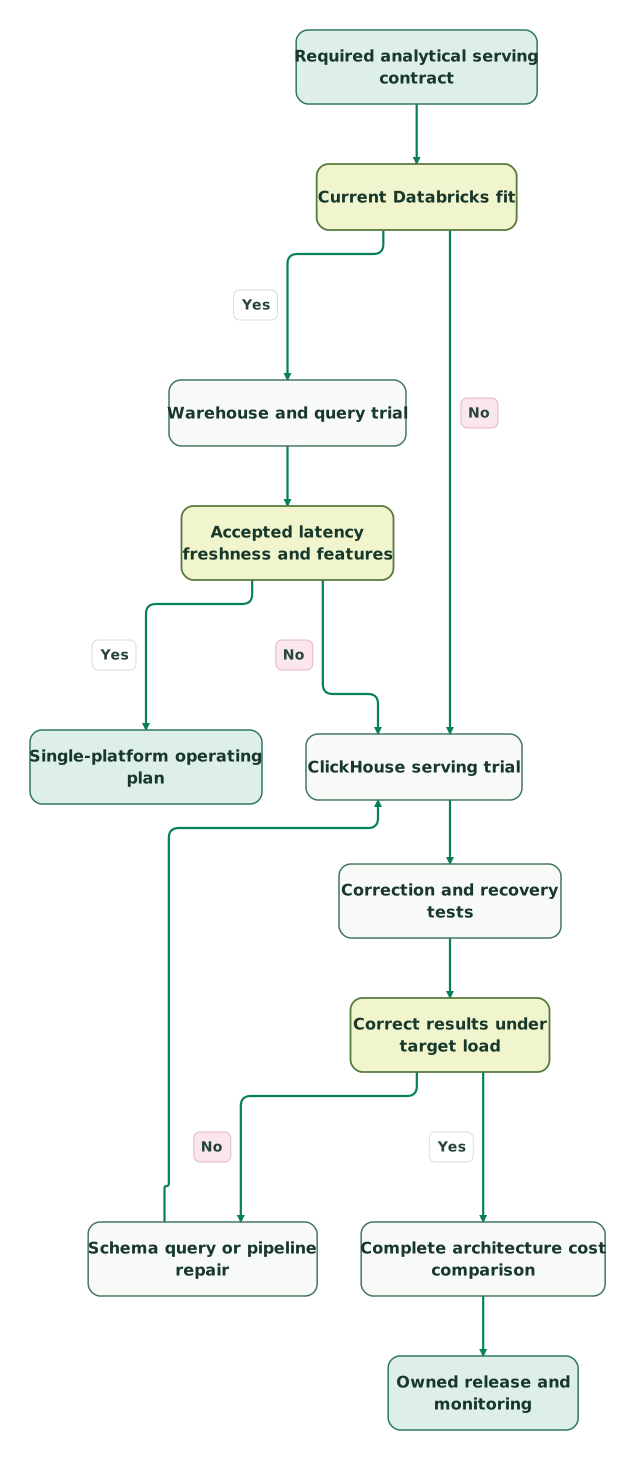
Read diagram as text
- Required analytical serving contract to Current Databricks fit.
- Current Databricks fit to Warehouse and query trial: Yes.
- Current Databricks fit to ClickHouse serving trial: No.
- Warehouse and query trial to Accepted latency freshness and features.
- Accepted latency freshness and features to Single-platform operating plan: Yes.
- Accepted latency freshness and features to ClickHouse serving trial: No.
- ClickHouse serving trial to Correction and recovery tests.
- Correction and recovery tests to Correct results under target load.
- Correct results under target load to Schema query or pipeline repair: No.
- Schema query or pipeline repair to ClickHouse serving trial.
- Correct results under target load to Complete architecture cost comparison: Yes.
- Complete architecture cost comparison to Owned release and monitoring
Analytical serving checklist
- The target queries, peak concurrency and freshness requirements are explicit.
- Current Databricks warehouse types and beta restrictions are considered.
- Ordering keys and data models match the intended access pattern.
- Updates, duplicates, late events and deletes produce accepted results.
- Cold starts, ingestion and background work are included in the trial.
- Compute units, DBUs, storage and pipeline charges remain separate.
- Any second serving system has an authoritative upstream model and recovery owner.
- A measured benefit supports the additional implementation and operating cost.
Use the marketing data audit skill to assemble the evidence. Our warehouse and serving implementation scope connects the accepted design to delivery. The $99 audit includes a written assessment and a one-hour specialist call.
Keep reading
Browse all Data Warehouse guides
 Data Warehouse
Databricks vs BigQuery: SQL Reporting, Engineering and Workload Cost
Compare Databricks and BigQuery for SQL reporting, engineering and ML. Includes billing examples, runtime limits, cost controls and migration checks.
Jafrin Akter AloLast updated 11 min read
 Data Warehouse
Databricks vs Redshift: AWS Reporting, Engineering and Total Cost
Compare Databricks and Redshift for AWS reporting, engineering and ML. See complete billing examples, runtime boundaries, pipeline checks and migration fit.
Jafrin Akter AloLast updated 11 min read
 Data Warehouse
5 Redshift Alternatives for Warehousing, Engineering and Event Queries
Choose a Redshift alternative by workload. Compare Snowflake, BigQuery, Databricks, ClickHouse and Athena with costs, repair options and migration checks.
Jafrin Akter AloLast updated 12 min read
Data warehouse & CDP
See the implementation scope, deliverables and acceptance checks.
Questions people ask
Does Databricks offer a low-latency alternative to a separate ClickHouse service?
Databricks offers the Lakehouse Real-Time beta for supported analytical read workloads. Its table, feature and query guardrails need checking before migration, especially for an existing dashboard. Trial the exact queries and access rules, then compare complete cost and operating responsibility with a ClickHouse design. A beta capability should not be treated as universal compatibility. Real-Time guidance.
Do ClickHouse background merges guarantee an immediately deduplicated result?
ReplacingMergeTree background merges provide eventual version resolution and do not guarantee immediate deduplication. Queries needing the resolved record require an appropriate query-time strategy, including deletion handling. Test duplicate and out-of-order records before comparing performance, because a faster aggregate over several versions of the same business record can produce an incorrect answer. ReplacingMergeTree.
Is ClickHouse unable to update existing data?
ClickHouse supports lightweight UPDATE on specified engines with required settings, alongside other approaches to changing data. The appropriate method depends on the workload, keys and correction frequency. Review the current constraints and test the chosen pattern under read load rather than relying on an older blanket statement that every change requires the same expensive rewrite. UPDATE requirements.
Can the ordinary Databricks SQL price be used for every pipeline and serving feature?
Different Databricks services can use different billing SKUs and rates. Lakehouse Real-Time, SQL Serverless, pipeline processing and other compute should be identified separately in the estimate. Use measured usage and the applicable pricing interval, then add storage and networking. Applying one familiar DBU price to every record can misstate the total architecture cost. SQL billing distinctions.
Can Databricks and ClickHouse serve the same business without replacing each other?
They can, provided the additional serving layer has a clear purpose and owner. Define the authoritative data model, delivery timing, correction behavior and recovery process between systems. Compare the extra pipeline, storage and operating cost with the measured benefit. A second database adds value only when the complete design meets a requirement better than a simpler accepted configuration.
Sources
- ClickHouse Cloud pricing and units
- ClickHouse ordering-key design
- ClickHouse ReplacingMergeTree
- ClickHouse lightweight UPDATE
- ClickHouse Cloud warehouses
- Databricks pricing model
- Databricks regional pricing data
- Databricks AWS calculator data
- Databricks SQL pricing and billing types
- Databricks SQL warehouse types
- Databricks lakehouse architecture
- Databricks Lakehouse Real-Time
- Databricks Real-Time dashboard boundaries
- Databricks Delta MERGE
- Databricks AUTO CDC APIs
- Databricks SQL warehouse settings
- Databricks billable usage records
- Databricks price history

Written by
Jafrin Akter AloData Engineer and Co-founder at Martechdevs and Growth and Analytics Partners
Jafrin writes practical guides to marketing technology, customer data, analytics and AI workflows. Martechdevs is a Growth and Analytics Partners company.