
Brevo vs Klaviyo for Email Budgets and Commerce Journeys
Pick Brevo if its sending tiers and broader messaging setup fit your workload; pick Klaviyo if order and product journeys are the centre of the commerce team's work. Brevo vs Klaviyo requires more than comparing entry prices. Count stored contacts, marketable profiles, daily peaks and monthly sends, then test the store integration and the messages that should stop after purchase.
On this page
Brevo and Klaviyo comparison
These are US standalone-plan prices in USD with monthly billing; a separate Shopify app subscription can have a different scope.
| Decision criterion | Brevo | Klaviyo | Practical consequence |
|---|---|---|---|
| Paid email entry | Starter from $9/month for 5,000 emails and up to 500 stored contacts | Email from $20/month for 500 active profiles and 5,000 emails | Stored contacts and active profiles are different populations |
| Larger automation scope | Standard from $18/month, with unlimited automation contacts | Campaigns and flows in the email offer | Confirm required workflow and feature limits |
| Free email | 300 sends/day; up to 100,000 stored contacts | 500 emails/month; up to 250 active profiles | Daily capacity cannot be pooled into a single large campaign |
| Free automation | Up to 2,000 contacts in automation | Within the free profile and send allowance | Separate storage from automation eligibility |
| Store route | Confirm the platform plugin or Brevo PushOwl setup | Direct Shopify integration | Existing and new Brevo accounts have different Shopify setup paths |
Sources: Brevo plan guide, Brevo Free limits, Klaviyo pricing, Brevo Shopify setup and Klaviyo Shopify setup.
Brevo's Free contact storage is much larger than the first paid sending tier's storage allowance. That makes an upgrade a scope decision rather than a simple removal of the daily cap. Klaviyo's active-profile count raises a different question: how many stored people can the business market to? Start with a clean population count in each model.
At Martechdevs, we prepare a lifecycle messaging implementation from the audience, event and preference rules. A store's daily campaign calendar and its triggered flows belong in the same capacity model. The selected plan should cover both while keeping purchase, cancellation and unsubscribe behavior correct.
Tool decision blocks
Brevo
- Best for: A small business with a clear sending workload that wants to evaluate marketing and transactional messaging within a broader customer setup.
- Pros: The plan guide provides explicit email and contact tiers, and Free includes transactional email alongside marketing features.
- Cons: Contact storage, daily sends, automation contacts and optional add-ons are separate constraints. Removing Brevo branding on Starter requires an add-on; Standard includes it.
- Free plan and startup offer: Free has 300 daily sends, up to 100,000 stored contacts and automation for up to 2,000 contacts. It has no time limit or credit-card requirement. No universal startup discount is assumed. Free and paid scope.
- Choose it if: The required audience and cadence fit the selected tier, and the actual integration delivers the customer states your automations need.
- Skip it if: The budget assumes unlimited paid contact storage at the cheapest tier or treats unused daily sends as a bank for the next campaign.
Klaviyo
- Best for: A commerce team building repeatable product, checkout, purchase and retention journeys.
- Pros: The Shopify connection brings customer and order data into a directly supported store workflow.
- Cons: Active-profile and email capacity still need management. Additional products and mobile messaging require their own commercial scope.
- Free plan and startup offer: The Free plan includes 250 active profiles and 500 emails/month. No standard startup discount is assumed; the selected offer should identify any promotional period and regular price.
- Choose it if: The commerce owner can maintain the required flows and investigate a customer case using the store data.
- Skip it if: The main requirement is a general low-volume messaging setup and the proposed commerce scope does not improve the daily work.
For an app-led requirement, compare Braze vs Klaviyo. For broader cross-channel orchestration, Braze vs Iterable addresses identity and operating scope. A small email price difference should not force an unrelated product architecture into this pair.
Contact storage, eligibility and cadence
Brevo's Starter and Standard tiers each connect a monthly email allowance with a stored-contact ceiling. The entry tier covers 5,000 emails and up to 500 stored contacts. The documented 10,000-email tier covers up to 1,500 contacts, while the 15,000-email tier covers up to 2,500. Higher tiers have different storage scope. Brevo tier table.
Klaviyo calls an active profile a contact in the database that you can market to. Its displayed Email entry plan includes 500 active profiles and 5,000 emails/month. Klaviyo pricing definitions. A list exported from another platform needs to be classified before that number becomes a reliable budget input.
Keep separate counts for all stored contacts, marketable people, the contacts entering automation and recipients of a particular campaign. A record can be required for service or history while remaining ineligible for a promotion. Deleting it solely to reduce a count may remove context the business still needs.
Also separate average volume from peak demand. A weekly campaign to the full audience creates a different daily pattern from the same number of emails distributed across individual customer events. The plan must fit the send window required by the business, not merely the total obtained by multiplying a daily allowance by a month.
A hypothetical daily and monthly workload
Assume a hypothetical business wants to send one promotion to 1,000 eligible people on the same day. Brevo Free's 300 daily sends cannot deliver that entire promotion on that day, even if the business sent no email earlier in the month. Unused daily sends do not carry forward. Brevo Free limits.
| Hypothetical workload | Calculation | Result | Capacity implication |
|---|---|---|---|
| Promotion recipients | Given input | 1,000 people | One-day sending requirement |
| Brevo Free daily capacity | Published allowance | 300 emails/day | 700 recipients exceed that day's allowance |
| Minimum days at full daily use | 1,000 ÷ 300, rounded up | 4 days | Different timing from the intended campaign |
| Monthly-looking arithmetic | 300 × 30 | 9,000 emails | Illustrative sum, not a banked monthly allowance |
That last row is deliberately limited. It assumes every day is used fully, but the unused capacity from one day is unavailable on another. Splitting a time-sensitive promotion over four days can change its commercial meaning, so a paid tier may be necessary even when the apparent monthly total is small.
For a separate hypothetical paid-plan comparison, assume 500 stored contacts are also 500 marketable profiles and each receives six emails in the month. Demand is 500 × 6 = 3,000 emails. Both displayed 5,000-email entry allowances cover that quantity, with 2,000 emails left for other work under the stated assumptions.
| Hypothetical base subscription | Monthly price | Twelve-month arithmetic | Scope condition |
|---|---|---|---|
| Brevo Starter | $9 | $108 | Required branding and automation scope accepted |
| Brevo Standard | $18 | $216 | Entry audience and send tier sufficient |
| Klaviyo Email | $20 | $240 | 500 active profiles and 5,000 emails sufficient |
The Standard-to-Klaviyo difference is $24 over twelve months at those entry prices. That is too small to justify a materially harder operating process. These calculations exclude add-ons, mobile messages, tax, implementation, growth and separate app subscriptions. Prices come from the Brevo plan guide and Klaviyo pricing.
Use the Klaviyo cost calculator to make active profiles and sends explicit. The Brevo alternatives guide is useful if the required stored audience or automation scope makes the entry tiers unsuitable.
Shopify setup and subscription boundaries
Brevo's current Shopify documentation distinguishes new users from existing Brevo-account users. The Brevo PushOwl app offers its own free and paid subscription options for new users. Its setup guide describes synchronizing customers, products, collections and orders. Do not assume the standalone Brevo entry price automatically describes that app subscription. New-account Shopify setup.
Existing Brevo accounts follow a separate migration path. Brevo says that path keeps the existing subscription without additional plan charges. It also warns that syncing historical Shopify data makes Shopify the source of truth and may overwrite existing contact attributes. Existing-account migration.
That warning belongs in the implementation plan. Compare the intended customer values before enabling a historical sync. A field currently maintained by another system should have an explicit ownership decision. Preserve the original export and test a bounded customer sample before accepting broad updates.
Klaviyo's Shopify setup guide warns that a previous email-service integration should be disconnected before connecting Klaviyo to avoid duplicate opt-in emails. Plan the sequence of changes around the current sender and preferences. A connector installed successfully is only the beginning of the acceptance test.
Purchase-state testing
A commerce trial should start with a known customer and a known order. Verify the order identifier, product information, value and customer relationship. Then change the state: purchase during a checkout delay, cancel the order or record a refund. The expected follow-up should be written down before the test.
Klaviyo's flow documentation distinguishes entry filters from profile filters checked before actions. A skipped action can be followed by later steps, so a permanent exit requirement needs deliberate rules. Check the customer's later path as well as the first reminder.
For Brevo, test the events and fields supplied by the actual plugin or integration selected. Confirm that the message uses the intended product context and that a changed order state updates eligibility. The same marketing logic can behave differently if a connector sends only a new-order event without the later state your rule expects.
| Trial case | Expected evidence | Repair owner |
|---|---|---|
| Checkout followed by purchase | Reminder suppressed under the agreed rule | Lifecycle owner and integration owner |
| Refund after purchase | Product follow-up reflects the intended refund treatment | Commerce and marketing |
| Unsubscribe during a delay | Ineligible marketing send does not occur | Preference-system owner |
| Historical import | Existing customers avoid unwanted new-customer treatment | Migration owner |
| Email change | Correct customer history and preference state | Identity owner |
The Klaviyo implementation mistakes guide helps structure those cases. The customer preference centre guide is relevant when several channels or tools need the same subscription decision.
Best fit by operating model
| Company size or operating model | Best fit | Runner-up | Decision reason |
|---|---|---|---|
| Small business with a modest, predictable sending schedule | Brevo | Klaviyo | Tier and daily capacity can fit the wider messaging requirement |
| Store with a dedicated retention operator | Klaviyo | Brevo qualified commerce setup | Product and order investigations drive daily work |
| Existing Brevo account moving its Shopify connector | Brevo migration path | Klaviyo | Preserve the accepted subscription and check attribute ownership |
| New Shopify store evaluating Brevo PushOwl | App-specific comparison | Klaviyo | The app's own subscription belongs in the budget |
| Business with a large stored list and infrequent campaigns | A contact-and-send tier review | Either qualified plan | Free storage and paid tier scope cannot be assumed equivalent |
The runner-up should be tested against the first candidate's failed requirement. A wider feature catalogue does not solve a missing order update unless the selected integration actually supplies it. A lower subscription does not help if campaign timing becomes impractical.
Selection and repair workflow
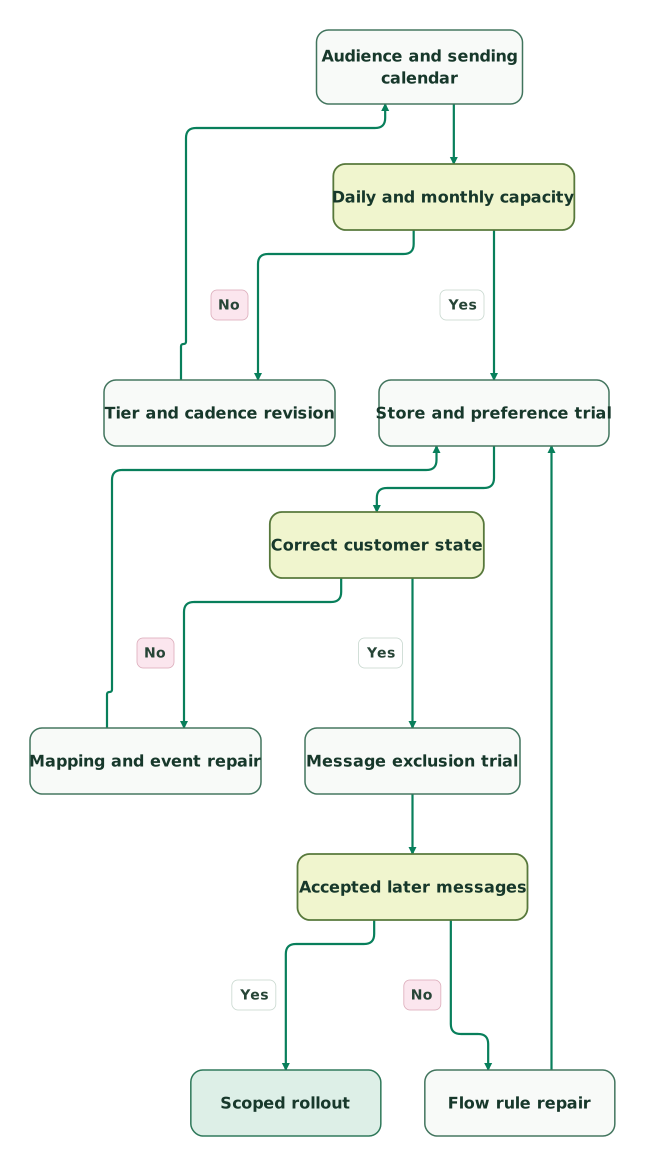
Read diagram as text
- Audience and sending calendar to Daily and monthly capacity.
- Daily and monthly capacity to Tier and cadence revision: No.
- Tier and cadence revision to Audience and sending calendar.
- Daily and monthly capacity to Store and preference trial: Yes.
- Store and preference trial to Correct customer state.
- Correct customer state to Mapping and event repair: No.
- Mapping and event repair to Store and preference trial.
- Correct customer state to Message exclusion trial: Yes.
- Message exclusion trial to Accepted later messages.
- Accepted later messages to Flow rule repair: No.
- Flow rule repair to Store and preference trial.
- Accepted later messages to Scoped rollout: Yes
A flow repair returns to the store and preference trial because the same customer state must still arrive correctly. Keep the sample stable so the team can compare results after each change. Expand production only after the campaign owner can explain both the messages that send and the messages that do not.
Brevo vs Klaviyo checklist
- Count stored contacts, marketable profiles and automation contacts separately.
- Model daily campaign peaks as well as monthly email demand.
- Confirm the paid tier's contact ceiling and required feature scope.
- Separate standalone Brevo pricing from a new Shopify app subscription.
- Review existing-account migration and historical attribute ownership.
- Test purchase, refund, unsubscribe and email-change cases.
- Validate later flow steps after the first correctly suppressed message.
- Re-run store and preference tests after mapping or rule repairs.
- Include growth, add-ons, transition overlap and ordinary renewal.
- Assign one live sender and a named rollback owner during cutover.
Use the lifecycle marketing audit skill to document the audience and journey scope before a purchase. The plan decision should follow the accepted customer workflow and the actual sending calendar.
Keep reading
Browse all CRM & Lifecycle guides
 CRM & Lifecycle
Braze vs Klaviyo for App and Commerce Lifecycle Programs
Compare Braze and Klaviyo by app identity, store journeys, message priority and billing units, with a workload worksheet and migration acceptance tests.
Jafrin Akter AloLast updated 10 min read
 CRM & Lifecycle
Braze vs Iterable for Cross-Channel Journeys and Customer Identity
Compare Braze and Iterable through customer identity, project rules, journey exits, operator ownership and a complete migration-cost model.
Jafrin Akter AloLast updated 11 min read
 CRM & Lifecycle
How to Build a Customer Preference Centre That Works
Build a preference centre that controls real messages. Define topics and channels, prevent stale resubscriptions, record changes and test every sender.
Jafrin Akter AloLast updated 9 min read
Lifecycle marketing
See the implementation scope, deliverables and acceptance checks.
Questions people ask
Can unused Brevo Free sends cover a large campaign the following day?
Unused Brevo Free sends cannot be carried into the following day. The allowance is 300 emails per day, so a campaign requiring more than that on one day needs a different sending plan or timing decision. Multiplying the daily limit by thirty gives a hypothetical monthly sum, but it does not create a pooled monthly allowance.
Does upgrading Brevo always preserve the Free plan's contact-storage ceiling?
Upgrading Brevo does not mean the cheapest paid tier has the same storage ceiling as Free. The documented Starter and Standard tiers connect email volume with contact storage, beginning at 5,000 emails and 500 contacts. Confirm the required stored audience before selecting a tier, especially when the reason for upgrading is only to remove the daily sending limit.
Does a new Brevo PushOwl signup use the standalone Starter price?
A new Brevo PushOwl signup should be budgeted from the app's own subscription offer. Brevo's Shopify setup guide distinguishes new users from existing Brevo accounts and links to separate free and paid app options. An existing-account migration follows different instructions and stated subscription terms. Identify the correct route before comparing its total with Klaviyo.
Can a Shopify historical sync change existing Brevo contact attributes?
A Shopify historical sync can change existing Brevo contact attributes. Brevo's migration guide says Shopify becomes the source of truth for customer data and may override existing attributes. Review the mapping and preserve the original data before enabling broad synchronization. Test a customer with values maintained elsewhere so the team can approve the intended ownership change.
Is Brevo Standard's lower entry price enough to choose it over Klaviyo?
Brevo Standard's lower entry price is useful only after the required audience, integration and automation fit the plan. At the displayed entry rates, the annualized difference from Klaviyo Email is small. Compare the daily operating work, required add-ons and customer-state tests before choosing. A modest subscription saving should not create a harder purchase, preference or reporting process.
Sources

Written by
Jafrin Akter AloData Engineer and Co-founder at Martechdevs and Growth and Analytics Partners
Jafrin writes practical guides to marketing technology, customer data, analytics and AI workflows. Martechdevs is a Growth and Analytics Partners company.