
Pipedrive vs Salesforce: Pipeline, Automation and Full Cost
Pick Pipedrive if your main job is keeping a sales pipeline and follow-up process usable with limited administration. Pick Salesforce if the account model, permissions, applications or coordinated processes need a configuration that Pipedrive cannot demonstrate. Compare the exact plans, integrations and ongoing work: Pipedrive vs Salesforce is a decision about the operating system your team can maintain, as well as its subscription.
On this page
Pipedrive and Salesforce comparison
US list prices in USD per user per month, billed annually except Salesforce Starter, which also supports monthly billing; tax and implementation are extra.
| Decision | Pipedrive | Salesforce | Acceptance condition |
|---|---|---|---|
| Entry subscription | Lite $14 | Starter $25 | The basic pipeline and required connections work |
| Automation candidate | Growth $24 or $39 | Pro $100 | The real automation, including exceptions, fits the edition |
| Broader configuration | Premium $49 or $59; Ultimate $69 or $79 | Core $195; Advanced $395 | Added access and data requirements justify the package |
| Evaluation route | 14-day trial | Free Suite for two users, plus paid-plan trials | Evaluate the intended paid scope with representative data |
| API planning | Plan-based token budget | Pro API add-on at $25/user/month | Entitlement, volume and recovery meet the integration requirement |
Pipedrive's annual USD pricing displays more than one offer: Lite $14, Growth $24 or $39, Premium $49 or $59 and Ultimate $69 or $79 per seat/month. Confirm the applicable offer before purchase. The worked examples below use the $24/$49/$69 offer, with higher-offer sensitivities shown separately. Pipedrive annual pricing.
Our CRM and lifecycle implementation service begins with those requirements. Write down the job a seller performs, the information it requires and the person who maintains the workflow. That turns a subjective interface preference into a decision you can defend.
Platform fit
Pipedrive
- Best for: A team with a repeatable sales motion and limited capacity for CRM administration.
- Pros: A pipeline-centered operating model can keep follow-up, activity and deal ownership manageable.
- Cons: Required automation, permissions and data capacity can force a higher plan or an additional connection.
- Free plan and startup offer: The public evaluation is a fourteen-day trial. Count any separate startup or partner discount only after its eligibility, term and renewal rate are confirmed. Pipedrive trial.
- Choose it if: Ordinary sellers complete the required work and the plan's limits fit the expected workload.
- Skip it if: Necessary relationships or controls require fragile workarounds that the team cannot maintain.
Salesforce
- Best for: A business with a demonstrated Salesforce application dependency or more demanding coordinated processes.
- Pros: The proposed configuration can preserve the required ecosystem and operating relationships.
- Cons: Edition, API, implementation and administration costs need a complete budget.
- Free plan and startup offer: Free Suite supports two users with a login at least every sixty days. Launchpad accepts applications from venture-backed startups; approved benefits and expiry vary. Free Suite terms, Launchpad eligibility.
- Choose it if: The required dependency passes the trial and the team can own its configuration and integrations.
- Skip it if: A simpler pipeline configuration passes the same operating tests at a lower total cost.
Subscription budgets for three sales teams
The following worked examples use the lower Pipedrive offer and the same number of paid users in each candidate, unchanged for a full year. They are illustrative purchasing configurations, with different capabilities. Accept each candidate only after testing the required work; the lower number is not a substitute for that test.
Source rates: Pipedrive pricing and Salesforce pricing. Annual amounts exclude tax, implementation, paid add-ons and consumption.
| Team and candidate | Pipedrive annual subscription | Salesforce annual subscription | Base difference |
|---|---|---|---|
| Five sellers: Lite versus Starter | $840 | $1,500 | $660 |
| Twenty sellers: Growth versus Pro | $5,760 | $24,000 | $18,240 |
| Fifty sellers: Premium versus Core | $29,400 | $117,000 | $87,600 |
For the twenty-person example, Salesforce Pro's listed API add-on would add $6,000 annually if all twenty users are chargeable: 20 × $25 × 12. The resulting subscription-plus-API subtotal is $30,000. Confirm the actual licence population and integration entitlement on the order. Salesforce API add-on.
At the higher offer, twenty Growth users cost $9,360 annually and fifty Premium users cost $35,400. Their base differences from the Salesforce rows are $14,640 and $81,600 respectively. A twenty-user Growth-to-Premium upgrade costs $4,800 annually at the $39/$59 offer.
Pipedrive can also require a higher tier than the first attractive price. If a twenty-person team needs Premium rather than Growth, the annual difference is $6,000: 20 × ($49 - $24) × 12. Required fields, permission controls, scoring and document workflows should be priced in the actual proposed plan. Pipedrive package features.
Use the Salesforce calculator for its edition and quantity assumptions, and the Pipedrive pricing guide for the surrounding add-ons and billing model. Keep third-party subscriptions and administration on separate lines so they cannot disappear inside a seat comparison.
Daily sales work and adoption
Evaluate the sequence a salesperson repeats every day: find the right account, inspect the last interaction, choose the next action, update the deal and explain its forecast. Pipedrive is a strong starting point for a pipeline-centered process. Salesforce deserves a deeper configuration trial when that sequence spans additional records, teams or application dependencies.
Give the same operator the same tasks in both systems. Include a missed follow-up, a deal with several contacts, a customer with two open opportunities and an account reassigned from another owner. Measure completion and remaining manual steps. Avoid judging the product solely through a vendor-led demonstration that hides administrative work.
A simpler screen is useful if it preserves the context required to act. If a seller must open three spreadsheets to discover product usage, billing status and the current owner, the visual pipeline alone has not solved the handoff. Decide which summary belongs in the CRM and which detail should remain in the source system.
For a team comparing another shared marketing-and-sales option, HubSpot versus Pipedrive covers that choice. Keep the same task list so each additional vendor adds evidence rather than another unstructured opinion.
Automation limits and operating consequences
Pipedrive's automation starts at Growth. Its current plan limits allow 50 active automations per company on Growth, 150 on Premium and 250 on Ultimate. These are account-wide configuration limits, not counts multiplied by each salesperson. Automation limits.
A workflow can fit that count and still fail at execution time. Pipedrive also documents frequency limits of 10,000 executions per company and 5,000 per automation within ten minutes. Bulk edits and loops can stop or ignore executions under the documented conditions. Include a bulk update in the trial if that is how your team loads or corrects records.
The operational test should cover:
- A newly created deal receiving exactly one owner and follow-up task.
- A repeated input producing no duplicate business action.
- A reassigned owner keeping the next action and relevant history.
- A missing required value going to a visible exception path.
- An integration failure leaving an identifiable set to repair and replay.
In Salesforce, inspect the exact Flow, approval and execution limits for the edition and design being proposed. A platform with more configuration options still needs deliberate ownership and monitoring. Require the builder to explain the failure path as clearly as the successful demo.
Capacity at the plan boundary
Pipedrive's new plans have a combined leads-and-deals allowance tied to seats, with an absolute company cap of 300,000. It counts active leads plus open, won and lost deals, excluding archived or deleted records. Lite permits 2,500 per seat, Growth 5,000, Premium 15,000 and Ultimate 20,000, all subject to that cap. Excess deals from imports or certain automated sources can enter a skip file or waitlist. Automatically created leads beyond the limit are discarded rather than waitlisted. Usage limits.
A ten-seat Growth account therefore has an indicated allowance of 50,000 leads and deals. A fifty-seat Premium account's seat multiplication gives 750,000, but the actual company ceiling is 300,000. Budget the expected active workload and retention process before treating added seats as unlimited data capacity.
Contacts have no Pipedrive usage limit in that guide, but connected applications can impose their own. Keep contact counts, lead/deal counts and integration capacity distinct in the requirements.
Data relationships, access and reporting
Start with the relationships the business must preserve. A straightforward organization, person, deal and activity model is different from a system coordinating subscriptions, partner accounts, assets or several legal entities. Make each relationship visible in a test case before deciding whether a field, linked record, integration or custom model is appropriate.
For a hypothetical SaaS account, sales needs the billing customer reference, active product workspaces and a concise usage summary. Copying every product event into the sales CRM adds noise and operating cost. A reliable account summary with a last-successful-sync timestamp often serves the seller better.
Test access as an ordinary seller, a manager and an integration identity. Include exports and reports as well as record pages. Pipedrive's export guidance says a user's visibility still limits exported data even when export permission is granted. A restricted export must not become the unexamined basis of a supposedly complete migration. Pipedrive export rules.
For reporting, reconcile a small opportunity total to source records. Include reopened deals, currency, owner changes and the difference between created, won and invoice dates. The Salesforce editions guide helps map Salesforce access to the right licence before the team commits to the broader configuration.
Best fit by scenario
| Operating situation | First candidate | Runner-up | Decision reason |
|---|---|---|---|
| Five sellers with one repeatable pipeline | Pipedrive | Salesforce Starter | Minimize the administration needed for dependable follow-up |
| Twenty sellers needing email sync and bounded automation | Pipedrive Growth or Premium | Salesforce Pro with required access | Test the actual tier and execution limits |
| Complex commercial relationships or a required Salesforce app | Salesforce | Pipedrive with a demonstrated supported design | Preserve the dependency without fragile workarounds |
| Existing Salesforce deployment with poor data hygiene | Repair Salesforce first | Pipedrive after a tested migration case | Data problems can follow the team into another product |
| Cost-sensitive team needing a broader configurable suite | Zoho CRM | The better-fitting Pipedrive or Salesforce configuration | Compare process coverage and full cost together |
The Salesforce versus Zoho CRM guide covers the last scenario. The Zoho alternatives guide helps distinguish a platform limitation from a reason to improve the current setup.
Migration scope in both directions
Preserve identifiers, ownership, relationships and business meaning before moving the full record set. A flat contact export is rarely a complete CRM migration. Inventory deals, organizations, people, activities, notes, products, attachments, integrations and any data needed to reconstruct reporting history.
Pipedrive supports spreadsheet imports using XLS, XLSX or CSV, with one tab per import, up to 200,000 rows and a file under 50 MB. Its import history distinguishes added, updated, merged and skipped records. Test the mapping and review the skip file rather than treating the upload as proof of completion. Pipedrive import guidance.
For a Salesforce destination, map source records into the selected Salesforce model before choosing the import mechanism. Keep an external source ID for reconciliation, and plan association creation in a dependency-aware sequence. Start with a representative sample that contains duplicate names, missing owners and multiple relationships.
The acceptance report should include more than row counts:
| Evidence | Comparison | Failure requiring correction |
|---|---|---|
| Identity | Source ID maps to one intended target record | Duplicate or ambiguous target |
| Relationships | Contacts, organizations and deals stay connected | Orphaned or incorrect association |
| Ownership | Active owner and reassignment rules survive | Work assigned to an inactive user |
| Activity | Required notes, events and follow-ups remain usable | Lost context or duplicated tasks |
| Reporting | Selected totals agree under the same definitions | Different populations, dates or currency rules |
A hypothetical twenty-seat move from Salesforce Pro plus the assumed API add-on to Pipedrive Growth has a base annual difference of $30,000 - $5,760 = $24,240. If the move costs $12,000 once and adds $300 per month in other recurring tools, net annual savings are $20,640. The illustrative payback is 6.98 months on the lower offer. At the $39 Growth offer, annual net savings fall to $17,040 after the same $3,600 recurring costs, and payback becomes 8.45 months. Replace every input with the accepted quote and workload; the arithmetic cannot establish that the target process fits.
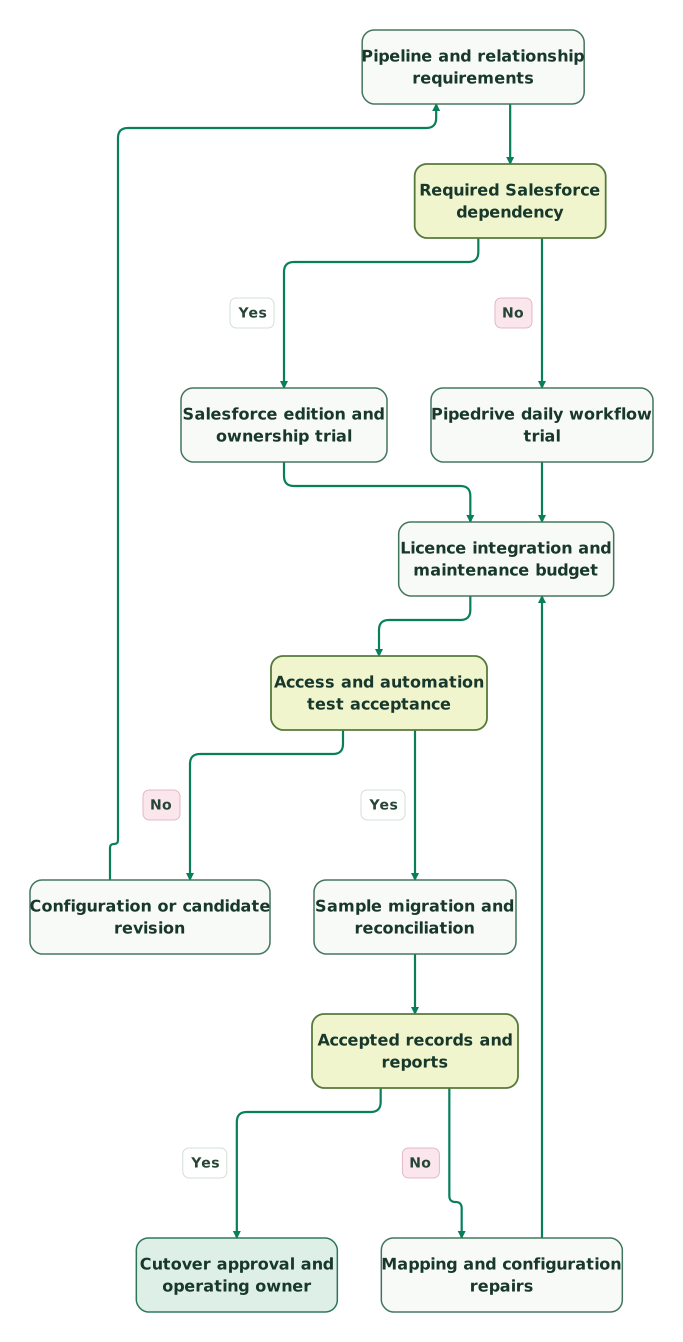
Read diagram as text
- Pipeline and relationship requirements to Required Salesforce dependency.
- Required Salesforce dependency to Salesforce edition and ownership trial: Yes.
- Required Salesforce dependency to Pipedrive daily workflow trial: No.
- Salesforce edition and ownership trial to Licence integration and maintenance budget.
- Pipedrive daily workflow trial to Licence integration and maintenance budget.
- Licence integration and maintenance budget to Access and automation test acceptance.
- Access and automation test acceptance to Configuration or candidate revision: No.
- Configuration or candidate revision to Pipeline and relationship requirements.
- Access and automation test acceptance to Sample migration and reconciliation: Yes.
- Sample migration and reconciliation to Accepted records and reports.
- Accepted records and reports to Mapping and configuration repairs: No.
- Mapping and configuration repairs to Licence integration and maintenance budget.
- Accepted records and reports to Cutover approval and operating owner: Yes
Contract and renewal review
Record the subscription term, paid quantity, add-ons and renewal date before buying. Pipedrive's terms provide for automatic monthly or annual renewal. Upgrades take effect immediately with a prorated difference, while downgrades take effect at the next renewal and do not produce a refund of the prepaid difference. Pipedrive subscription terms.
Salesforce's standard agreement generally restricts quantity reductions during a term and uses a default renewal notice of at least 30 days unless the order says otherwise. Salesforce agreement. A deactivated user and a reduced paid commitment are separate events in either operating plan.
Keep approved startup or partner benefits on a separate first-year budget line. Use the continuing contracted rate for the renewal comparison.
CRM trial and rollout checklist
- Ordinary sellers complete the required daily tasks in the proposed plan.
- Record relationships and restricted access pass representative tests.
- Automation counts, execution volume and API capacity fit expected peaks.
- Imports and exports preserve the intended population and associations.
- Licence, integration and maintenance costs are recorded separately.
- Renewal quantities and notice requirements are owned by a named person.
- Migration reconciliation and rollback conditions are agreed before cutover.
Use the CRM audit skill to assemble the comparison evidence. At Martechdevs, we build the data connections, routing and reporting that make the chosen CRM useful. Request a detailed CRM implementation scope with the workflows and records the project must preserve.
Keep reading
Browse all CRM & Lifecycle guides
 CRM & Lifecycle
Salesforce vs Zoho CRM: Pricing, Features and Team Fit
Compare Salesforce and Zoho CRM prices, process gates, API access and migration costs. Use worked budgets and a practical trial to select the right configuration.
Jafrin Akter AloLast updated 11 min read
 CRM & Lifecycle
Zoho CRM Alternatives: Pipedrive, HubSpot, Salesforce and Attio
Compare Pipedrive, HubSpot, Salesforce and Attio as Zoho CRM alternatives. See current billing units, ten-user budgets, migration checks and reasons to keep Zoho.
Jafrin Akter AloLast updated 12 min read
 CRM & Lifecycle
HubSpot vs Pipedrive: Costs and 6 Tests Before You Buy
Pipedrive vs HubSpot: Pipedrive Growth is $39 a seat, HubSpot Sales Hub Pro $90 plus $1,500 onboarding. Costs for 3, 10 and 25 sellers, free plans and 6 tests.
Jafrin Akter AloLast updated 24 min read
CRM & marketing automation
See the implementation scope, deliverables and acceptance checks.
Questions people ask
Is Pipedrive Lite enough for automated sales follow-up?
Pipedrive's native Automations feature starts at Growth, so Lite is a candidate for a more manual pipeline process. Check the exact follow-up requirement, email connection and trigger before selecting the plan. A third-party automation can add capability, but it also adds cost and ownership that belong in the comparison. Pipedrive automation availability.
Do Pipedrive automation limits increase with each paid seat?
The active automation limits are per company: 50 on Growth, 150 on Premium and 250 on Ultimate. Other limits, including leads-and-deals capacity and API budgets, use different rules. Keep a separate inventory of configured automations and expected execution volume so adding users is not mistaken for increasing every limit. Pipedrive limits.
Does importing contacts prove that a Salesforce migration is complete?
Contact counts alone cannot establish a complete migration. Validate organizations, opportunities, activities, owners, relationships and the reports the business relies on. Preserve source IDs and inspect skipped or merged records. The final acceptance should show that ordinary users can continue the required workflow with the intended history and access, rather than merely confirm that files uploaded.
Can a Pipedrive export omit records despite export permission?
Yes. Pipedrive says visibility restrictions still govern the data a user can export. Use an appropriately authorized export process for a migration or reconciliation, and compare its population with the intended source scope. Keep restricted exports labelled for their actual scope so a partial file is not mistaken for a complete account backup. Pipedrive export rules.
Is company headcount a reliable trigger for moving to Salesforce?
Headcount can reveal more coordination work, but it does not define the platform requirement. Start from a process, relationship, access or application constraint that the current configuration cannot meet reliably. Trial the proposed Salesforce edition and price its ongoing ownership. A larger team with a simple process may still prefer Pipedrive, while a smaller team may need a more specialized configuration.
Sources

Written by
Jafrin Akter AloData Engineer and Co-founder at Martechdevs and Growth and Analytics Partners
Jafrin writes practical guides to marketing technology, customer data, analytics and AI workflows. Martechdevs is a Growth and Analytics Partners company.