
MailerLite vs Mailchimp for Newsletter Budgets and Automation
Pick MailerLite if its subscriber-based plans, sending allowances and automation workflow fit the team's newsletter program; pick Mailchimp if its campaign, integration and selected flow features justify the complete bill. MailerLite vs Mailchimp requires a current plan comparison. Count billable addresses, monthly sends and required automation behavior before choosing from an entry price or free-plan headline.
On this page
MailerLite and Mailchimp compared
Paid amounts below are ordinary USD monthly prices at the displayed 500-subscriber or 500-contact entry configuration, excluding introductory discounts and taxes.
| Decision criterion | MailerLite | Mailchimp | Practical consequence |
|---|---|---|---|
| Paid entry | Comfort $12/month | Essentials $13/month | A small price gap can be outweighed by workflow fit |
| Higher starting package | Power $25/month | Standard $20/month | Different feature and sending scope |
| Entry email allowance | Comfort 5,000/month at 500 subscribers | Essentials 5,000/month at 500 contacts | Count campaigns and automations together |
| Free audience and sends | 250 subscribers; 2,500 monthly emails | 250 contacts; 500 monthly emails, maximum 250/day | Equal audience limits do not mean equal capacity |
| Free automation scope | Three active automations, five steps | Marketing automation flows excluded | A small welcome routine can decide the free-plan fit |
| Higher sending scope | Power unlimited monthly sends, subject to fair use | Standard 6,000/month at 500 contacts | Unlimited sending still has conditions |
MailerLite pricing and Mailchimp pricing establish the selected configurations. MailerLite's current public plan names are Comfort and Power. Use the offer available to the account when comparing an older subscription.
At Martechdevs, we would map the signup, welcome and exclusion paths before selecting a newsletter platform. Our lifecycle messaging implementation service connects those paths to subscriber data and a maintainable campaign routine.
The newsletter operating requirement
Choose a representative routine: a signup form, a welcome sequence, a regular campaign and a customer who should stop receiving a particular message. Include the person who will operate it after setup. They should be able to explain the audience, edit the content, check exclusions and diagnose a failed entry.
MailerLite's lower paid entry price is only a dollar below Mailchimp Essentials at these starting configurations. The decision is therefore unlikely to depend on that difference alone. A required higher-tier feature, an additional integration or recurring manual work can matter more.
The free plans provide a more visible capacity difference. A hypothetical audience of 200 subscribers receiving eight emails a month creates 1,600 sends. That quantity fits MailerLite Free's 2,500 monthly allowance but exceeds Mailchimp Free's 500. Both audience limits still need to include the correct population, and required automation features must fit separately.
For a larger shortlist, use the Mailchimp alternatives guide. If product events and account relationships dominate the requirement, the Customer.io versus Mailchimp comparison addresses a different operating model.
Subscriber counts and billing-cycle usage
MailerLite describes billing around active subscribers, with a cumulative count within the billing cycle. An address that was active during that cycle can still count after deletion. Reading the current active list alone can therefore understate the population used for billing. MailerLite subscriber counting
Consider a hypothetical cycle starting with 400 active addresses. The team removes 100 and adds 150 different addresses. The current active list is 400 − 100 + 150 = 450, but the cycle has included 400 + 150 = 550 distinct active addresses. Under the stated cumulative rule, the team should not budget from 450 as if the earlier addresses had never been active.
Mailchimp uses another definition. Subscribed, unsubscribed and non-subscribed contacts count, while archived, cleaned and deleted records are excluded from its contact total. It measures that total across audiences. Keep the billable inventory separate from the people who will receive the next marketing campaign. Mailchimp pricing definitions
Neither platform's count should be changed casually just to reach a cheaper tier. Preserve required history and marketing exclusions, document archival choices and avoid reactivating previously excluded addresses during a migration. Reconcile the exported population with the destination before enabling campaigns.
Platform decision blocks
MailerLite for a defined newsletter program
- Best for: Creators and small marketing teams whose newsletters, forms and automation needs fit the current subscriber tiers.
- Pros: The free sending allowance can support a useful small program, while Comfort and Power provide distinct capacity and workflow options.
- Cons: Cumulative active subscribers can exceed the current list count, and some automation behavior requires Power despite a modest audience.
- Free plan and startup offer: Free includes 250 subscribers, 2,500 monthly emails and two seats. New accounts receive a 14-day no-card premium trial with the same subscriber and send limits; no startup discount is assumed. Plan scope and trial limits
- Choose it if: The responsible operator can run the required routine within the selected plan and understands the billing-cycle count.
- Skip it if: The budget assumes Comfort while the required triggers or other features need Power, or the actual send volume exceeds the selected allowance.
Comfort includes three seats, up to 50 active automations and 100 steps per automation. Power removes the stated seat and active-automation limits while retaining a 100-step limit. Those are separate dimensions: an unlimited number of automations does not mean an unlimited number of steps in each one.
Mailchimp for the selected campaign workflow
- Best for: A team whose required campaign operation and integrations are accepted in the chosen Mailchimp configuration.
- Pros: Essentials provides a bounded paid starting point, while Standard extends flow depth and includes more users and sending capacity.
- Cons: Retained unsubscribed contacts can affect the bill, and a cheap entry plan may not contain the flow the team built during evaluation.
- Free plan and startup offer: Free includes 250 contacts, 500 monthly emails and one seat, with a daily limit of 250 emails. Fourteen-day paid-plan trials have eligibility and enrollment conditions; no startup discount is assumed. Mailchimp plans and offer terms
- Choose it if: The campaign team can maintain the accepted workflow and the complete audience and integration bill is justified.
- Skip it if: A required workflow or audience expansion creates costs and operating work that another qualified setup handles more suitably.
Mailchimp Essentials supports up to four flow steps, while Standard or higher supports up to 200 steps. The current pricing page also lists numbers of flows, so keep the flow count separate from steps within a flow. Essentials includes three seats and Standard five at the displayed configurations. Mailchimp flow documentation
Automation entry and migration behavior
MailerLite's multiple-trigger feature belongs to Power and allows up to three entry triggers. A subscriber needs to meet one trigger's conditions to enter; the triggers provide alternative entry routes rather than a combined requirement that every event occur. MailerLite multiple triggers
That distinction matters for a welcome journey accepting both form submissions and group membership. Write the expected outcome when both events occur for one subscriber. Test re-entry and repeated events in the configured workflow rather than assuming multiple triggers automatically prevent every duplicate message.
An exclusion on one trigger does not protect the other entry routes. MailerLite lists Clicks a link, Completes a form, Updated field and Joins a segment as triggers without group-exclusion options. Test an excluded subscriber against every route and design a supported control for the entire workflow. The normal re-entry checkbox also has exceptions: Updated field, Event anniversary and Exact date always repeat when their conditions qualify. The guide limits reactivation to once in 24 hours, even when another trigger matches. Check both exclusion coverage and this repeat boundary in the selected configuration. Multiple-trigger exclusions and repeats
Manual migration has another boundary. MailerLite permits manually adding existing subscribers without checking the workflow's original trigger condition. An import followed by manual enrollment can therefore produce a different audience from normal entry. Use a reviewed group and a deliberate continuation point instead of placing every imported contact into the first welcome step. Manual automation enrollment
MailerLite's automation activity guidance describes cancellation after a subscriber leaves the trigger group when that outcome is selected in the trigger settings. Inspect the configured rule and the resulting activity record. A group change should not be assumed to have the same consequence in every automation. Automation activity
Mailchimp requires its own checks. Its flow settings distinguish re-entry, manual removal and early exits; the native exit-condition setting requires a connected store. A newsletter team should verify the actual stopping design that applies to its audience and integration. Mailchimp flow settings
Send capacity and annual commitment
Budget campaigns and automated messages together. A newsletter calendar can fit the allowance until a welcome flow, resend or seasonal promotion adds more work. Keep some room for the sends the program actually needs instead of treating the published maximum as a target.
At the 500-address configuration, the following hypothetical workloads illustrate the capacity boundary.
| Workload | Planned monthly sends | MailerLite Comfort | Mailchimp paid entry |
|---|---|---|---|
| 400 recipients × 12 emails | 4,800 | Within 5,000; 200 remaining | Essentials within 5,000 |
| 500 recipients × 12 emails | 6,000 | Above the selected 5,000 allowance | Essentials exceeded; Standard reaches its 6,000 allowance |
| The same 6,000 plus 400 welcome emails | 6,400 | A revised plan or cadence is needed | Above the illustrated Standard allowance |
MailerLite Power offers unlimited monthly sends subject to its fair-use terms. Qualify the intended workload and feature scope rather than treating that wording as permission for any volume or sending practice. MailerLite's billing guide confirms the current plan families and their sending model. MailerLite billing
The annual commitment changes the price basis:
| Selected starting plan | Monthly payments for 12 months | Annual offer | Difference |
|---|---|---|---|
| MailerLite Comfort | 12 × $12 = $144 | $129.60/year, equivalent to $10.80/month | $14.40 |
| MailerLite Power | 12 × $25 = $300 | $270/year, equivalent to $22.50/month | $30 |
| Mailchimp Essentials | 12 × $13 = $156 | Separate eligible offers require qualification | No annual offer assumed |
| Mailchimp Standard | 12 × $20 = $240 | Separate eligible offers require qualification | No annual offer assumed |
These calculations assume an unchanged audience tier, plan and rate. MailerLite's annual monthly equivalent is not a monthly cancellation arrangement. Mailchimp's introductory discounts have their own eligibility and renewal conditions; the table deliberately uses its ordinary post-offer starting rates.
The Mailchimp cost calculator supports larger audience scenarios, while the Mailchimp pricing guide explains the broader billing model. Include a migration estimate, overlap and continuing operations before claiming that a base-rate difference pays for switching.
A practical two-platform evaluation
Use controlled records owned by the team and a small audience with known states. The proposed cases below test behavior, not comparative inbox placement or conversion performance.
| Case | Required observation | Evidence | Failure response |
|---|---|---|---|
| Fresh valid signup | Correct audience and intended welcome entry | Subscriber record and workflow activity | Form or mapping repair |
| Existing subscriber import | Deliberate continuation rather than accidental restart | Import result and reviewed enrollment group | Migration-state repair |
| Several entry events | Intended number of journey entries | Trigger settings and activity history | Entry and repeat-rule repair |
| Group or preference change | Agreed later-message treatment | Updated state and next action | Exclusion-rule repair |
| Trial expiration or plan choice | Required routine remains supported | Production-plan action and limit review | Package or workflow revision |
Preview content with realistic but non-sensitive data. Check absent optional fields and longer names so a valid audience does not receive a broken message. Then ask the eventual operator to find a specific subscriber, explain the current state and make an ordinary campaign edit.
Keep the sending domain and permission inventory in the migration plan. A successful design preview does not establish production sending readiness. MailerLite's trial documentation also distinguishes trial features from the paid configuration and notes that multi-trigger automations stop after the trial unless the account moves to Power. Build the production plan around the features being retained.
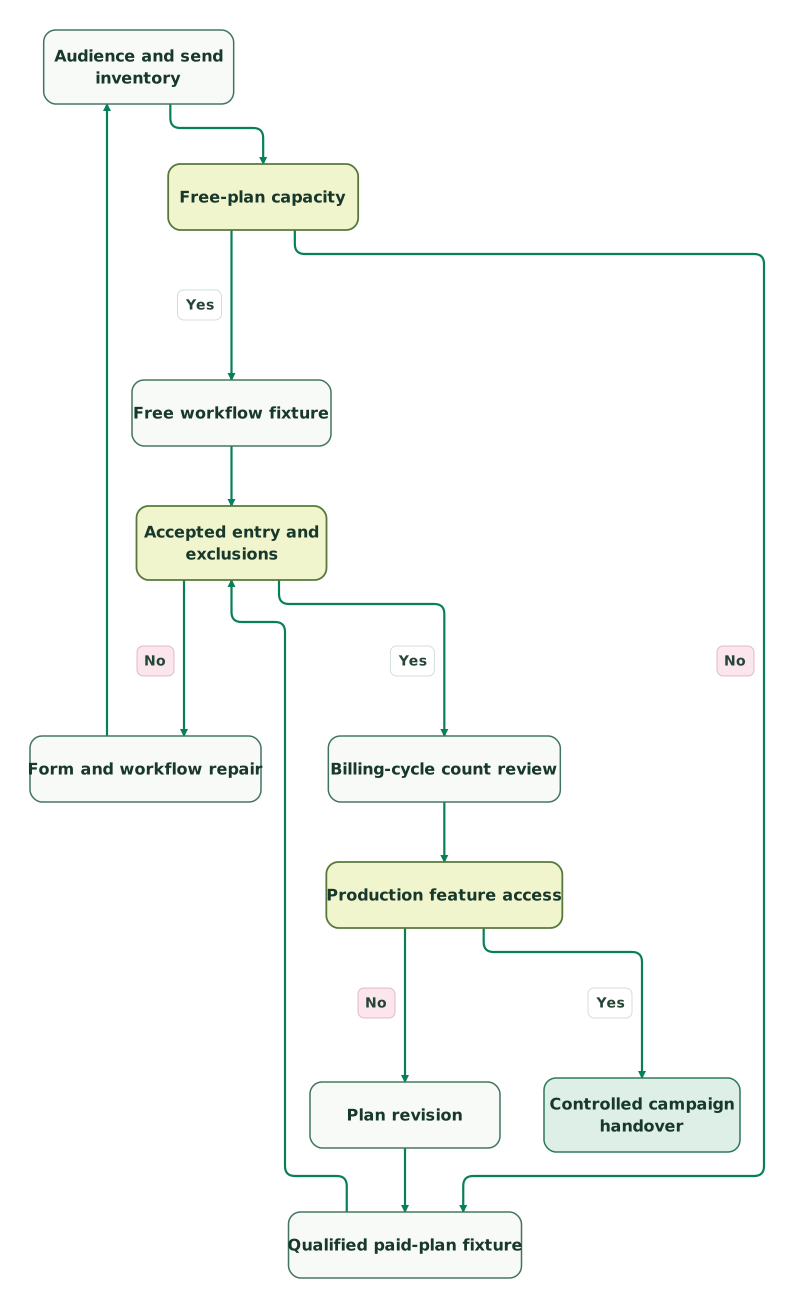
Read diagram as text
- Audience and send inventory to Free-plan capacity.
- Free-plan capacity to Free workflow fixture: Yes.
- Free-plan capacity to Qualified paid-plan fixture: No.
- Free workflow fixture to Accepted entry and exclusions.
- Qualified paid-plan fixture to Accepted entry and exclusions.
- Accepted entry and exclusions to Form and workflow repair: No.
- Form and workflow repair to Audience and send inventory.
- Accepted entry and exclusions to Billing-cycle count review: Yes.
- Billing-cycle count review to Production feature access.
- Production feature access to Plan revision: No.
- Plan revision to Qualified paid-plan fixture.
- Production feature access to Controlled campaign handover: Yes
Best fit by newsletter team
| Company size or model | Best fit | Runner-up | Reason |
|---|---|---|---|
| Small list sending more than 500 but no more than 2,500 monthly emails | MailerLite Free, if other limits fit | Qualified paid plan | Free sending capacity differs substantially |
| Small paid newsletter routine with one entry trigger | MailerLite Comfort | Mailchimp Essentials | Compare the accepted workflow at similar entry cost |
| Team needing several entry triggers and a qualified high-send workload | MailerLite Power | Mailchimp Standard | Trigger entitlement and sending limits decide the package |
| Campaign team with accepted Mailchimp integrations and longer flows | Mailchimp Standard | MailerLite Power | Existing workflow value can justify the selected scope |
Selection and migration checklist
- The current offer uses the correct MailerLite plan family and Mailchimp audience tier.
- Cumulative active subscribers and retained Mailchimp contacts are counted correctly.
- Campaign, automation and seasonal sends fit the complete monthly workload.
- Active automation counts, step limits and trigger limits are assessed separately.
- Imports preserve exclusions and use a deliberate enrollment decision.
- Repeated entry events and later preference changes have accepted outcomes.
- Trial-only features and introductory discounts are separated from production cost.
- The campaign owner can diagnose a subscriber's state after handover.
Use the lifecycle marketing audit skill to keep the selection tied to the actual program. A useful outcome is an owned newsletter workflow that fits the billable audience and the team's ordinary work.
Keep reading
Browse all CRM & Lifecycle guides
 CRM & Lifecycle
Mailchimp Alternatives and Competitors: Prices and Best Fit Compared
Klaviyo or Omnisend for stores, Brevo for big lists, Kit for creators, HubSpot for B2B. Compare 10 Mailchimp alternatives by price, cost at 5,000 contacts and fit.
Jafrin Akter AloLast updated 14 min read
 CRM & Lifecycle
Mailchimp Pricing: Plans, Contact Costs and the Bill After Discounts
Mailchimp costs from $13 a month. Compare real contact-tier bills, send and seat limits, overages, SMS costs and the renewal price after discounts.
Jafrin Akter AloLast updated 12 min read
 CRM & Lifecycle
Customer.io vs Mailchimp for Campaigns, Product Events and Customer State
Compare Customer.io and Mailchimp by billable audiences, product events, store-dependent exits, automation limits and the full cost of changing platforms.
Jafrin Akter AloLast updated 11 min read
Lifecycle marketing
See the implementation scope, deliverables and acceptance checks.
Questions people ask
Can a 450-address MailerLite list exceed a 500-subscriber tier?
A 450-address current list can exceed a 500-subscriber tier under MailerLite's cumulative billing-cycle rule. In the hypothetical example, 400 addresses were active before 100 were removed and 150 different addresses were added. The current list is 450, but 550 distinct addresses were active during the cycle. Review cycle usage rather than using the current list alone.
Do three MailerLite triggers require three completed subscriber actions?
Three MailerLite triggers do not require a subscriber to complete all three actions. The documented multiple-trigger feature provides alternative entry routes, and meeting one trigger's conditions is sufficient. It belongs to Power and supports up to three triggers. Test the configured repeat behavior when a subscriber can satisfy several triggers, so the intended entry count is explicit.
Does manually enrolling MailerLite subscribers recheck the original trigger?
Manual enrollment does not recheck MailerLite's original workflow trigger condition according to its help guide. That makes a reviewed migration audience and continuation point essential. Confirm that the people being added should receive the remaining messages, preserve exclusions and avoid restarting completed welcome steps accidentally. Inspect the resulting activity records before applying the same process to the full audience.
Can 200 subscribers receive eight monthly newsletters on both free plans?
Two hundred subscribers receiving eight newsletters create 1,600 monthly sends. That hypothetical workload fits MailerLite Free's 2,500-email allowance but exceeds Mailchimp Free's 500-email allowance. Audience and feature limits still apply separately, including automation requirements and Mailchimp's daily limit. Add every other planned email before deciding that the free configuration covers the complete program.
Does MailerLite Power remove the limit on steps inside one automation?
MailerLite Power does not remove the stated limit on steps inside an individual automation. Its public plan comparison separates unlimited active automations from the 100-step limit per automation. Treat workflow count, step count, entry triggers and sending volume as different requirements. A plan can satisfy one dimension while the intended design still exceeds another.
Sources
- MailerLite pricing
- MailerLite billing guide
- MailerLite premium trial
- MailerLite multiple triggers
- MailerLite manual automation enrollment
- MailerLite automation activity
- MailerLite fair-use terms
- Mailchimp pricing
- Mailchimp pricing definitions
- Mailchimp flow documentation
- Mailchimp flow settings
- Mailchimp offer terms

Written by
Jafrin Akter AloData Engineer and Co-founder at Martechdevs and Growth and Analytics Partners
Jafrin writes practical guides to marketing technology, customer data, analytics and AI workflows. Martechdevs is a Growth and Analytics Partners company.