
Klaviyo Webhooks: Choose the Right Route, Verify Delivery and Recover Missing Events
Use a Klaviyo flow webhook when an external action belongs at a defined point in a customer journey. Use a system webhook when an eligible account or app needs notifications for selected event topics outside a flow. Confirm the event, authentication and retry contract for that route, then verify the receiving system's final outcome. A successful webhook delivery is not proof that the downstream action happened correctly.
On this page
A loyalty update after an order and an export of email-delivery events are different integration jobs. One follows a journey's timing and eligibility rules; the other observes a stream of events. Choosing the wrong route can produce missing data that no amount of receiver troubleshooting will fix.
Our lifecycle messaging implementation starts with one named event and one required outcome. Trace that example through Klaviyo, the receiver and the destination before subscribing to a wider population.
Should you use a flow webhook or a system webhook?
Choose by the event coverage and timing you need, not simply by whether the destination accepts an HTTP request.
| Requirement | First route to evaluate | Why | Acceptance check |
|---|---|---|---|
| Send an external instruction after a customer reaches a journey step | Flow webhook | Timing belongs to the flow | The intended profile reaches the live action once for the episode |
| Export supported message or consent events outside flows | System webhook | Topics define the observed events | A controlled event appears under the correct account and topic |
| Observe several event topics through one endpoint | System webhook | One subscription can carry several topics | Each item is routed by its own topic |
| Send a purchase or product event into Klaviyo | Events API or supported integration | Outbound webhooks do not perform inbound ingestion | The event is recorded on the intended profile and metric |
A flow webhook runs when the profile reaches its action, not necessarily at the instant of the original trigger. It sends data outward; it does not automatically synchronize a response back into Klaviyo. Flow webhook behaviour.
System webhooks are available through Advanced Klaviyo Data Platform or its active trial, with a separate app-partner API route. Standard marketing-plan access alone does not establish system-webhook entitlement. Advanced KDP webhook access, Webhooks API access.
Use the Klaviyo implementation checks for the underlying order and journey rules. This guide concentrates on the outbound delivery contract and what the receiving system must prove.
Which events can actually trigger the chosen route?
Validate the exact event in the flow trigger selector or account's available system topics. Similar event names are not interchangeable.
Current Advanced KDP help says Received Email and Clicked Email are unavailable as metric flow triggers, while Unsubscribed from Email Marketing is supported. System topics also cover message events, integration events and events from Klaviyo APIs. Do not turn an older limitation for one event into a blanket claim that all consent events need system webhooks. Event coverage by route.
For system webhooks, retrieve the account's actual topics with GET /api/webhook-topics and the required webhooks:read scope. That is more reliable than maintaining a copied list of every possible topic. Get Webhook Topics.
A flow triggered by Started Checkout can use that triggering event's data. It cannot automatically include data from a different later event just because the later event appears in a filter or branch. An arbitrary profile-property change is also not, by itself, a flow-webhook trigger. Flow trigger and payload limits.
Write the event contract in plain terms: “For this account, an eligible checkout episode reaching this step should create one support follow-up carrying this checkout ID.” Then identify which source actually supplies that ID and whether it remains valid after the wait.
What should be configured for a flow webhook?
Configure a flow webhook as a controlled POST action with an explicit endpoint, authentication and small JSON payload.
Klaviyo requires a Manager, Admin or Owner with multi-factor authentication to add or edit a flow webhook. The endpoint must use HTTPS, a valid certificate and no redirect. Flow webhooks support POST, custom headers and JSON bodies; they also include X-Klaviyo-Flow-ID for the originating flow. That identifier is context, not a secret. Flow webhook configuration.
- Choose the trigger and episode. Define what can enter and what should prevent an external action.
- Prepare the receiver. Require the configured authentication before parsing or scheduling work. Use a dedicated secret rather than a shared human credential.
- Select the necessary fields. Include stable source identity, the intended action and the data needed to decide it. Avoid sending every profile property by default.
- Render a controlled payload. Check quotes, newlines, missing values, non-ASCII names and zero amounts. Valid template syntax does not guarantee valid rendered JSON.
- Inspect the actual request. Match the rendered body and flow ID to the receiver's stored record.
- Make the action live deliberately. Confirm the intended action state and test an exclusion as well as a passing profile.
A flow action in Draft does not send automatically; it must be Live. Action-state requirement.
Do not assume a customer-facing email filter automatically protects every external effect. A webhook that grants loyalty points, creates a sales task or requests direct mail needs its own business eligibility and duplicate policy. Define those responsibilities in the lifecycle journey specification.
What should be configured for a system webhook?
Configure the system subscription against known account topics and preserve its identity, signing secret and required access scopes in an operational inventory.
The Webhooks API requires the relevant webhook scopes; event topics also require events:read. OAuth apps have an allowlisting requirement, and their webhooks are scoped to that app. An OAuth-created webhook is not visible in the Klaviyo UI, while UI-created webhooks are not visible through an OAuth app's calls. API access and visibility rules.
Keep an inventory with the account, webhook ID, endpoint, topic set, creator route, enabled state and secret reference. That prevents a team from interpreting “not visible in my screen” as “does not exist” and creating an unnecessary second subscription.
The current UI accepts a 16–100-character signing secret and offers a connection test showing request and response details. Its setup guidance allows up to fifteen minutes before forwarding begins. Use a controlled event after activation when checking delivery, rather than expecting a setup test to prove live event coverage. System webhook setup and testing.
Record the exact topics returned for the account and the API revision used by management calls. Recheck them when the integration changes. A missing event type should become a scoped requirement or alternative route, not an invented topic string.
How do you verify a Klaviyo system-webhook signature?
Verify the HMAC over the original body bytes followed by the literal Klaviyo-Timestamp header, using the subscription's secret key. Compare the resulting SHA-256 hexadecimal signature with Klaviyo-Signature before parsing the body. System request verification.
This short Python helper checks only that cryptographic signature. It accepts a provisioned ASCII secret of 16–100 bytes, matching this example's secret-generation policy. It does not verify the JSON envelope, event eligibility or replay history.
import hashlib
import hmac
import re


def valid_system_signature(raw_body, timestamp_header, signature, *, secret):
    if not isinstance(secret, bytes) or not secret.isascii():
        raise ValueError("Provision the signing secret as ASCII bytes")
    if not 16 <= len(secret) <= 100:
        raise ValueError("This example uses a 16–100-byte ASCII secret")
    if not isinstance(raw_body, bytes):
        raise ValueError("Pass the original body bytes")
    if not isinstance(timestamp_header, str) or not re.fullmatch(
        r"[ -~]{1,128}", timestamp_header
    ):
        return False
    if not isinstance(signature, str) or not re.fullmatch(
        r"[0-9a-fA-F]{64}", signature
    ):
        return False
    signed_bytes = raw_body + timestamp_header.encode("ascii")
    expected = hmac.new(secret, signed_bytes, hashlib.sha256).hexdigest()
    return hmac.compare_digest(expected, signature.lower())
Do not parse and reserialize the body before verification, and do not replace the header's timestamp text with a formatted equivalent. Both can change the signed representation. A correct signature proves possession of the secret and integrity of those bytes; it does not make an old delivery a new business occurrence.
Apply a separate, explicit timestamp/replay policy that fits the route's legitimate delayed retries. Do not copy another provider's five-minute cutoff without establishing the delivery behaviour it must accommodate. Retain event-processing history so a valid repeated request cannot repeat a completed effect.
After signature verification, parse the envelope and require its meta.klaviyo_webhook_id to match the Klaviyo-Webhook-Id header. Also validate the configured account and subscription, rather than allowing a header or body to select an arbitrary tenant. System envelope validation.
For a flow webhook, use the authentication configured in that flow. Do not assume it automatically carries the system-webhook HMAC contract just because both requests originate from Klaviyo.
How should a system batch be accepted and processed?
Accept the batch only after authenticated data is durably recorded, then route each item by its account, topic and event identity.
A system request can contain up to 1,000 events and several topics. Its items include external_id, topic and an event payload. System batching format.
Persist the whole accepted envelope or a transactionally complete set of items before returning success. If one item needs investigation, record that exception durably rather than acknowledging the batch after silently dropping the item.
Keep three identities separate:
| Identity | Purpose | Why a broader shortcut fails |
|---|---|---|
| Webhook subscription | Select configuration and signing secret | One subscription carries many events |
| Account, topic and external event ID | Trace an event for this consumer | One profile can generate many legitimate events |
| Business episode or operation key | Prevent repeated downstream effects | Different events can request the same task or reward |
Store the original event and receipt times independently. A customer's email address should not be the event key, and a successful processing flag on the profile should not suppress all its future events.
For a hypothetical loyalty integration, the episode could be the store, order and reward-policy version. A repeated order notification should not grant points twice. A separate refund or a new order needs its own intentional rule; collapsing everything to the customer's ID would lose legitimate work.
Use transactional uniqueness or a destination-supported idempotency mechanism for the effect. If a remote write succeeds but its response is lost, reconcile the destination before retrying. The martech integration contract covers that uncertainty and the operational owner.
Which success codes and retry rules apply?
The flow and system routes use different acknowledgement and failure rules. Keep them separate in the receiver and monitoring.
| Route | Success contract | Failure handling | What to monitor |
|---|---|---|---|
| Flow webhook | Any 2xx response | Retryable errors follow flow retry policy; other errors are skipped | Action activity and final outcome |
| System webhook | 200, 201 or 202 within five seconds | Backoff retries; prolonged error can disable the subscription | Enabled state, receipt latency and event gaps |
| Your worker after receipt | Explicit destination result | Your durable processing policy | Queue age, rejected items and uncertain effects |
The flow status guide lists 429, 500, 502 and 503 as retryable, with up to seventeen retries over twenty-four hours. Other statuses enter the skipped path under that guide. Inspect the specific action's activity and error rather than treating every non-2xx response as a temporary failure. Flow webhook status codes.
For system webhooks, the retry interval can grow to one hour. A webhook remaining in error for over forty-eight hours becomes disabled; after re-enabling it, only newly processed events are sent. System retries and disablement.
A receiver returning 204 can therefore satisfy a flow's general 2xx rule while failing the documented system success-code list. Use the exact contract for the route you operate.
Do not return success before durable storage merely to avoid retries. That hides a failure from Klaviyo while leaving your application unable to recover the data. Conversely, do not make Klaviyo wait for a slow third-party task that can be completed after receipt.
How do you recover after a system webhook was disabled?
Repair the receiver, restore the intended subscription and reconcile the missing event period separately. Re-enabling is not a replay of the outage.
- Define the missing interval. Preserve the last confirmed durable event and the affected account/topic set.
- Repair and test the receiver. Verify authentication, durable commit and the appropriate success response.
- Re-enable the existing subscription. Confirm its endpoint, topics and secret reference instead of accidentally creating a duplicate.
- Read the relevant event population. Use the supported Events API filters and paginate the bounded window to completion.
- Reconcile received and recovered identities. Expect an overlap around the boundary and preserve deduplication state.
- Review business eligibility before replay. A historical delivery event may belong in a report without triggering fresh customer outreach.
The Get Events endpoint supports metric and occurrence-time filters with cursor pagination and an events:read scope. Use the raw metric required by the recovery job; the endpoint excludes custom metrics from its metric_id filter. Get Events filtering.
Here, custom metrics means derived conversion definitions built from existing metrics. It does not mean every event your application submits through the Events API. Use the underlying source metric for the event population. Custom metric definitions.
Record the queried metric, time boundaries and completed pagination. If events arrive late, a single occurrence-time cutoff may miss them on the first pass; use a defined overlap and repeat the reconciliation where the business needs it. Keep a clear distinction between event occurrence and when the receiving system first observed it.
Do not assume an event export reconstructs a mutable profile's entire historical state. Preserve the event's own fields and retrieve current profile information only when the downstream decision needs current state.
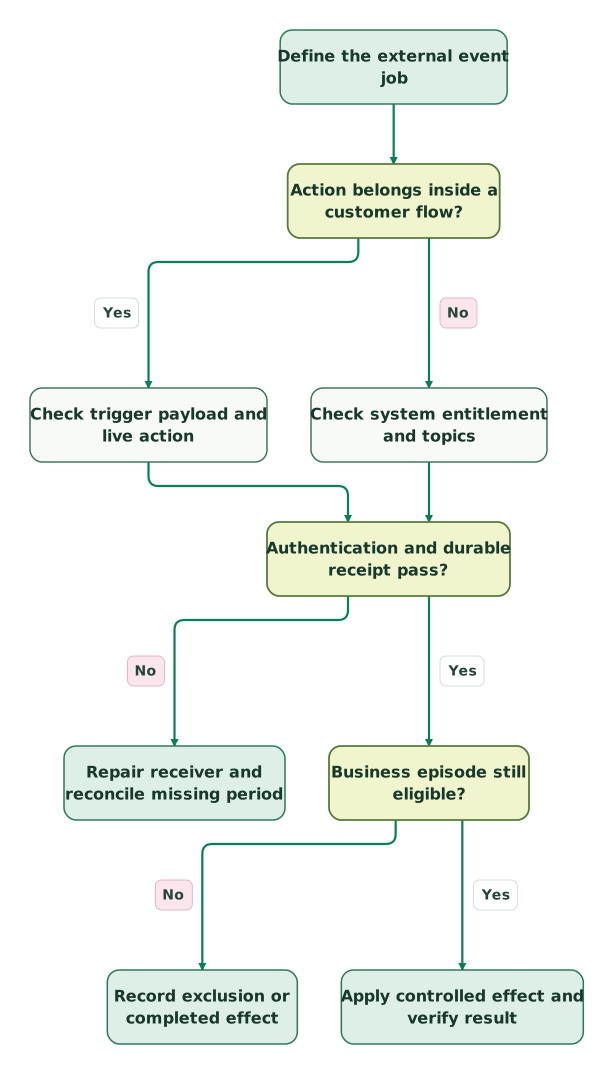
Read diagram as text
- Define the external event job to Action belongs inside a customer flow?.
- Action belongs inside a customer flow? to Check trigger payload and live action: Yes.
- Action belongs inside a customer flow? to Check system entitlement and topics: No.
- Check trigger payload and live action to Authentication and durable receipt pass?.
- Check system entitlement and topics to Authentication and durable receipt pass?.
- Authentication and durable receipt pass? to Repair receiver and reconcile missing period: No.
- Authentication and durable receipt pass? to Business episode still eligible?: Yes.
- Business episode still eligible? to Record exclusion or completed effect: No.
- Business episode still eligible? to Apply controlled effect and verify result: Yes
Why can Klaviyo show success while the destination is wrong?
Klaviyo can observe the HTTP response, while your application owns the subsequent identity mapping, business rule and destination write. Inspect those stages independently.
| Symptom | First evidence | Corrective action |
|---|---|---|
| No flow request arrives | Trigger eligibility, delays and action state | Confirm the profile actually reached a live webhook step |
| No system request arrives | Entitlement, topic, creator route and enabled state | Repair the subscription and test a new controlled event |
| Signature fails | Original bytes, literal timestamp and selected secret | Correct verification before parsing or acting |
| One topic works but another disappears | Per-item topic routing and exception records | Handle the topic explicitly or revise the subscribed scope |
| HTTP success but no destination result | Durable queue, worker outcome and account mapping | Repair processing without resending completed effects |
| Destination sends duplicate messages | Episode key and downstream sender ownership | Reconcile completed actions and stop the competing route |
For flow requests, use the action's activity view to inspect the recorded status. Webhook status inspection. Save the receiver's trace ID and final destination reference beside the source event so another operator can follow the same path.
A downstream contact update is not permission to subscribe that contact to every message. Keep communication purpose, current preference and the authority to change it explicit. The customer preference-centre guide provides the wider model. If the destination is Mailchimp during a switch, the Klaviyo and Mailchimp migration steps assign one sender to each message type.
What should pass before a webhook-driven journey goes live?
Release only when the source event, receipt and final effect reconcile for passing and negative cases.
| Test case | Passing result | Evidence |
|---|---|---|
| Valid system signature, then one changed body byte | Original accepted; altered body rejected | Verification result tied to the original bytes |
| Signed body names a different webhook or account | No processing under the configured tenant | Envelope validation failure |
| Same event appears in two deliveries | One completed business episode | Event and effect records |
| Batch contains different topics | Each item follows its intended handler | Per-item routing and outcomes |
| Customer state changes while work waits | Effect follows current eligibility policy | Decision evidence and final result |
| System subscription is restored after an outage | Missing period reconciles separately | Query coverage, IDs and completed pagination |
Checklist
- Flow and system webhook contracts are identified separately.
- The exact event is supported by the chosen trigger or topic.
- The configured access, scopes and action state are correct.
- Original bytes and the proper authentication contract are verified.
- Account and webhook identities are checked before routing.
- The complete accepted batch is durable before acknowledgement.
- Repeated events cannot repeat a completed business effect.
- Final destination results are visible separately from HTTP success.
- Disablement and missing-event recovery have an owner.
- Replay cannot silently restart old customer communication.
For webhook-driven loyalty, support or CRM work, Martechdevs' lifecycle implementation can connect event identity, customer eligibility and destination evidence. Start with the one journey whose failure would create the most customer harm or operational rework.
Keep reading
Browse all CRM & Lifecycle guides
 CRM & Lifecycle
Klaviyo Implementation Mistakes That Distort Flows and Revenue
Find Klaviyo errors in order events, flow filters, backfills, frequency caps and attribution, with a practical acceptance test and reconciliation example.
Jafrin Akter AloLast updated 12 min read
 Martech AI
Klaviyo MCP Server: Connect Safely and Get Reports That Reconcile
Configure Klaviyo MCP access, confirm the right account and reconcile flow reporting with the dashboard before acting on AI recommendations.
Jafrin Akter AloLast updated 8 min read
 CRM & Lifecycle
Klaviyo active profiles: what counts, plan compliance and a safe cleanup
Why Klaviyo says your plan is out of compliance for active profiles, when the upgrade happens, and how to suppress the right records before renewal.
Jafrin Akter AloLast updated 11 min read
Lifecycle marketing
See the implementation scope, deliverables and acceptance checks.
Questions people ask
Is the Klaviyo flow ID a credential for my webhook endpoint?
No. A flow ID identifies the originating flow but should not be treated as secret authentication. Require the credentials configured for the receiving route and validate the expected account and action context. Keep the ID for tracing and routing after authentication. Knowing an identifier should not let someone cause your system to create a task, grant a reward or send a message.
Does an Advanced KDP trial prove that system webhooks remain available later?
A trial proves the feature can be evaluated under that temporary entitlement. Confirm the production subscription or approved app-partner route before making system webhooks a dependency. Record the owner of the commercial requirement and the fallback if access changes. A successful technical pilot does not guarantee that the required API and subscription remain available under the eventual contract.
Can a flow webhook include the result of an email sent earlier in that flow?
Do not assume the original trigger's variables include a later email's outcome. Flow payload context follows the supported profile and triggering-event data. If the job needs a particular message-delivery or engagement event, evaluate the supported topic or data-retrieval route for that event. Keep the message identity and business purpose explicit instead of attaching unrelated activity to the original checkout.
Should a recovered unsubscribe event automatically resubscribe someone elsewhere?
No. A recovered restriction should be evaluated under the communication purpose and destination's preference model, with its original evidence preserved. Never convert the arrival of any consent-related event into a generic subscribe action. Reconcile the current restrictive state and any later valid customer choice, then confirm enforcement at the actual sender before releasing affected queued communication.
Can the same webhook event update a report and trigger a customer action?
Yes, but give those consumers separate completion and eligibility rules. Reporting may need the historical event even when a customer action is already completed or no longer appropriate. Preserve a shared source identity while tracking each consumer's outcome independently. One successful report insert must not hide a failed operational action, and replaying the report must not automatically repeat customer contact.
Sources
- Klaviyo: flow webhook behaviour.
- Klaviyo: Advanced KDP webhooks.
- Klaviyo: Webhooks API overview.
- Klaviyo: Get Webhook Topics.
- Klaviyo: flow webhook configuration.
- Klaviyo: system webhook verification and delivery.
- Klaviyo: flow webhook status codes.
- Klaviyo: Get Events.
- Klaviyo: custom conversion metric definitions.

Written by
Jafrin Akter AloData Engineer and Co-founder at Martechdevs and Growth and Analytics Partners
Jafrin writes practical guides to marketing technology, customer data, analytics and AI workflows. Martechdevs is a Growth and Analytics Partners company.