
Klaviyo Active Profiles: Understand and Control Billing
Data Engineer and Co-founder, martechdevs
Published 8 min read
Klaviyo's active email profiles are records that can receive email through the platform, including some people who have never subscribed to marketing. Your email plan must accommodate the applicable active-profile count as well as sending volume. Control the bill by reconciling the billing meter, reviewing long-term inactivity, suppressing appropriate records and confirming the lower plan before the next billing cycle.
Last updated: 7 September 2026.
Your newsletter list has 18,000 subscribers, but the account shows 31,000 active profiles. The difference can come from checkout activity, historical imports and other records that can receive email. It needs an explanation before anyone starts deleting customers to reach a cheaper tier.
This guide focuses on the Profile & Email decision. Accounts using several Klaviyo products should check each product's meter and actual billing screen. Email eligibility, SMS eligibility, consent and commercial plan eligibility are separate states.
Why can active profiles exceed newsletter subscribers?
Klaviyo's active-profile guidance includes subscribers and profiles created through general engagement, such as an order or checkout where the person provided an address without opting into marketing. A contact appearing in the active count therefore does not establish permission for a promotional send. Active profile management.
Reconcile the difference using the same timestamp and scope. A list counts its members. A segment counts records matching a rule. The account's billing meter counts according to the product's billing definition. The three counts can answer different questions even when they use the same underlying customers.
Export or inspect a sample from each unexpected group. Record how the profile entered, subscription status, suppression status, last order, last meaningful engagement and the integrations that can update it. The aim is to identify a repeatable rule behind the difference.
Our CRM and lifecycle service connects those customer states across commerce, messaging and reporting. Where the problem starts with conflicting identity or consent updates, reducing the count without repairing the integration only postpones the next increase.
What is the difference between suppression and deletion?
Suppression preserves a profile and its history while preventing marketing email. Deletion permanently removes the record and its associated history. Klaviyo's documentation says suppressed email profiles do not count toward the email plan's active-profile limit; deleting a profile can also allow it to return later as a new record when the person interacts again. Bulk suppression and deletion.
Use suppression when the decision is to stop marketing to a record while retaining permitted history. Use deletion for a documented removal requirement, such as an approved retention policy or a valid deletion request handled through your privacy process. Budget pressure alone is a poor reason to destroy order and engagement context.
For a multichannel account, inspect the other channel states separately. Klaviyo documents that bulk email suppression does not change SMS or push eligibility. Confirm the relevant meter for every paid product after the change. Channel scope of suppression.
This is also why list membership should not be your single subscription record. A customer can leave a newsletter while continuing to receive a purchased service's essential communications under the rules applicable to that message. The customer preference centre guide explains how to keep topic preferences and channel eligibility distinct.
Which profiles are reasonable candidates for review?
Start with evidence of sustained inactivity across the buying cycle, then protect people whose current relationship makes a blanket rule inappropriate. A 90-day absence means something different for a consumable bought monthly and a product usually replaced every two years.
Design the review segment in plain English before building it:
- The profile is currently included in the relevant active count.
- It is old enough to have completed the normal evaluation or repurchase cycle.
- There is no recent purchase, checkout, site activity or meaningful email engagement within the chosen windows.
- It has had a fair opportunity to receive the messages whose response you are evaluating.
- It is outside any explicitly protected customer group.
- The team has no supported future journey that still needs this profile marketable.
Those are review criteria, not a universal suppression formula. Use your own purchase cadence and tracking coverage. A person with no tracked site activity may simply browse in a way your implementation cannot recognise.
Protect active subscriptions, unresolved service issues, recent high-value purchases and new signups as appropriate to your business. Review the Klaviyo implementation checks before trusting an inactivity segment built on incomplete commerce events.
Klaviyo's own guide distinguishes campaign list cleaning from the more consequential decision to suppress a long-term inactive profile. You can exclude a person from a frequent campaign while keeping them available for a relevant future journey. Active profile management.
How would a careful cleanup work in practice?
Consider an illustrative store with 31,000 active email profiles. Its first review rule finds 8,000 candidates. The team then discovers 1,500 current subscribers to an annual product and 500 recent purchasers inside that group. These protected groups are disjoint in this example, leaving 6,000 candidates for further review.
The candidate count is now 31,000 minus 6,000, or 25,000 potentially remaining active profiles. It is still a forecast. Suppression eligibility, processing time, new signups and the actual billing meter can change the eventual count.
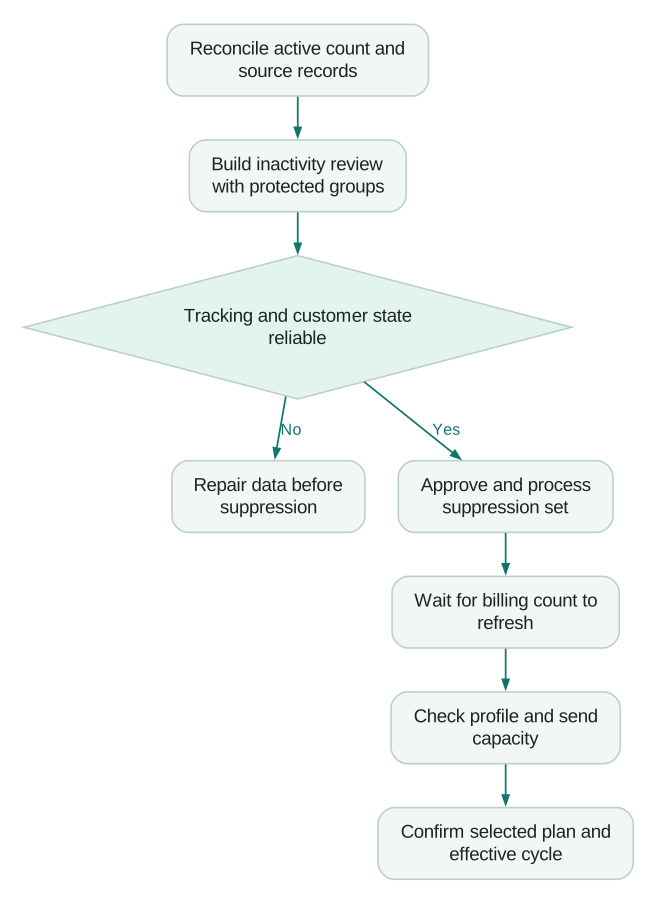
Take these steps:
- Save the segment definition, evaluation time and counts before any action.
- Inspect a sample spanning acquisition sources, purchase histories and consent states.
- Check that missing events or a broken integration are not making customers appear inactive.
- Review whether an eligible, relevant sunset message is justified. Avoid contacting a group solely to make a billing workflow feel complete.
- Record the approved candidate set and reason for suppression.
- Apply the decision using the documented suppression workflow.
- Confirm the processed count, channel state and actual billing eligibility.
The bulk action operates on current members at the time of suppression. Later entrants need another explicit process. Klaviyo also places restrictions on repeated manual suppression after a record has been unsuppressed, so avoid treating suppression as a temporary monthly billing switch. Suppression behaviour.
Review a small group first if the rule has not been used before. Success means the intended records changed, protected records remained untouched, and the marketing team can explain every exclusion. A smaller invoice is only one result to check.
Why has the count changed without the bill changing?
Processing and plan selection are separate steps. Klaviyo says large cleanups can take up to 72 hours to appear fully in active-profile counts used by the plan picker. A lower plan may remain unavailable while that processing is incomplete. Account usage and refresh timing.
The billing-preference documentation describes an optional profile-based auto-downgrade with eligibility checked 24 hours before the cycle ends. It is compatible with flexible sending and unavailable with auto-upgrade. Downgrades take effect in the following billing cycle. Confirm the preference actually enabled in your account; a reduction in records alone does not prove the plan changed. Upgrade and downgrade preferences.
Plan the cleanup several business days before renewal, allowing time for both processing and review. Treat this as an operational buffer, not a guarantee that every account will process at the maximum documented speed. Record the next billing date, the time the count refreshed, the selected plan and its effective date.
If the meter remains unexplained after the documented processing window, provide support with those timestamps and counts. Include the product, old and new plan limits, the action taken and a small set of examples. That evidence is more actionable than a screenshot showing two different totals without context.
How do profile and send limits interact?
A profile cleanup reduces the population that must fit the plan. Your remaining audience may still generate enough emails to need a larger send allowance. Forecast campaigns and flows separately before choosing a lower tier.
In an illustrative month, 20,000 campaign recipients receiving four emails produce 80,000 sends. Flows add another 35,000, producing 115,000 planned sends. A tier covering the active profiles still needs sufficient send capacity for that workload. Do the arithmetic using your actual plan's allowance and commercial terms.
Klaviyo documents three message-limit preferences: flexible overages, automatic upgrade and stopping until capacity is available. Flexible overages preserve the current plan while adding capacity; automatic upgrade changes the tier. The billing preference for message volume is separate from automatic profile compliance. Message-limit preferences.
Select the option with the campaign calendar in view. A one-off seasonal peak and sustained growth warrant different comparisons. Ask finance to compare the displayed flexible capacity cost with the cost of the higher tier over the months you expect to need it.
What should the monthly review contain?
Keep a short operating record and verify it before the next billing decision:
Checklist
- Reconcile starting active profiles, new profiles by source, suppressions by reason and ending count.
- Calculate planned sends, including the next campaign peak.
- Confirm the selected billing preference and the person responsible for plan changes.
Investigate sudden source-level increases. An old import, repeated identity creation or a new checkout integration can change billing faster than subscriber growth suggests. Compare acquisition and order volumes before concluding that the increase represents a larger reachable audience.
Track useful customer outcomes alongside savings. Monitor protected customer coverage, expected journey entries, complaints, opt-outs and repeat purchases using consistent definitions. For a deeper platform decision, compare those operating requirements in Customer.io versus Klaviyo. Switching tools will still require a defensible profile policy.
Questions people ask
Does active mean the customer recently opened an email?
For the email billing discussion, active refers to a profile's email eligibility under Klaviyo's definition. Recent engagement is a separate signal used to decide which messages are useful and whether a record should be reviewed. Check both states before making a suppression decision.
Can a person count without newsletter consent?
Yes, the active-profile guidance includes some records created through general engagement. Billing eligibility does not establish permission to send marketing. Keep the consent decision visible in the sending rules and in your source-system integration.
Should I delete profiles to reduce costs?
Choose deletion when you have a valid data-removal requirement. For a marketing eligibility decision, suppression can preserve useful permitted history. Inspect the consequences for reporting, channel state and later re-entry before applying either action in bulk.
Why is a cheaper plan still unavailable after cleanup?
The billing count may still be processing, or the lower plan may lack the capacity your account requires. Compare the processed active count and send allowance with the proposed tier. Capture the timestamps and contact support if the displayed state remains unexplained beyond the documented processing window.
How often should we review active profiles?
Align the review with billing and your customers' buying cycle. A monthly reconciliation can expose sudden changes, while suppression criteria may use much longer customer-history windows. The cadence for reviewing a count does not need to match the inactivity window used to make a customer decision.
Sources
- Klaviyo active profile management. Accessed 7 September 2026.
- Klaviyo bulk suppression and deletion. Accessed 7 September 2026.
- Klaviyo account usage. Accessed 7 September 2026.
- Klaviyo upgrade and downgrade preferences. Accessed 7 September 2026.
Written by
Jafrin Akter AloData Engineer and Co-founder, martechdevs
Jafrin Akter Alo is a data engineer and co-founder of martechdevs, where the team has delivered 74+ martech, data and growth stack implementations.