
HubSpot NetSuite Integration: Map Customers, Orders and Failed Syncs
A reliable HubSpot–NetSuite integration connects the approved sales handoff to the correct ERP customer and order, then returns the status the commercial team needs. Keep opportunity, order, invoice and payment facts distinct. Define who owns each field, how records match and what happens when creation succeeds but its acknowledgement fails. The goal is one correct business transaction, not simply two systems showing similar contact counts.
On this page

This guide is for teams already operating NetSuite alongside HubSpot. A small business that only needs a sales pipeline does not need an ERP integration to make its CRM look more complete. The work becomes useful when sales, fulfilment and finance need a dependable handoff that would otherwise require repeated manual reconciliation.
Start with one representative order: the customer, subsidiary, item, approved price, tax treatment and expected downstream result. Our martech integration work turns those decisions into a testable contract before enabling broader synchronisation.
Which business facts should each system own?
Let HubSpot represent the commercial opportunity and NetSuite represent the ERP transaction within your approved operating model. Share useful visibility without giving every system authority to overwrite every fact.
| Fact | Suggested authoritative owner | What the other system receives |
|---|---|---|
| Deal qualification and commercial approval | Sales process in HubSpot | Approved handoff reference and relevant context |
| ERP customer and subsidiary | Finance-approved NetSuite record | Stable identifier and permitted account details |
| Item and fulfilment requirements | ERP/item owner | Valid product reference and supported sales information |
| Order acceptance and fulfilment state | NetSuite operations | Linked order and current operational status |
| Invoice, balance and financial outcome | Finance-controlled source | Clearly labelled reporting facts |
These are proposed responsibilities to agree with the business, not mandatory vendor defaults. A negotiated price may originate in an approved quote rather than the ERP price list. The integration must know which price applies to the particular transaction.
NetSuite describes a sales order as a commitment to sell goods or services. It is not itself proof of payment or recognised revenue. Keep those reporting definitions separate from a won deal or accepted order. Oracle sales-order definition.
Use CRM property ownership to assign the writers. A broad “CRM wins” setting cannot safely govern both a salesperson's qualification note and finance's invoice balance.
What does the native HubSpot connector actually map?
The native connector supports selected CRM and ERP objects, while creating an order from a deal is a separate action. Do not assume that turning on deal sync automatically transforms every won deal into a sales order.
| HubSpot record | NetSuite counterpart | Design implication |
|---|---|---|
| Contact | Contact or individual | Choose the person/customer model deliberately |
| Company | Company | Match the intended legal/customer entity |
| Deal | Opportunity | Commercial pipeline is separate from order creation |
| Order | Sales order | Configure the return order sync |
| Invoice | Invoice | Preserve its own identity and financial meaning |
| Product | Supported item types | Verify the actual item category and mapping |
HubSpot also lists tickets/support cases and activities. The connector creates a NetSuite Subsidiary property on supported records. Review the actual object, field and direction configuration for your scope. Native object mapping.
Choose the native route when the required objects, fields and actions fit it. Evaluate middleware or a custom integration when you need a demonstrably unsupported object, transformation, reference field or operating control. Ask for a proof using your difficult transaction rather than accepting a generic “two-way integration” description.
The buying comparison should include who investigates failures, how replay works, which credentials run the connection and how the team can stop it. The integration specification guide covers those requirements beyond the connector's feature list.
What must be ready before creating an ERP order?
Confirm installation, customer and product mapping, the order form and the return path before enabling creation. A connection that can read customers may still be unable to create the transaction your process needs.
HubSpot installation requires Super Admin or App Marketplace access, with a NetSuite administrator completing the NetSuite steps. Production and sandbox connections are supported; custom field mappings require Data Hub. The setup uses the HubSpot sync bundle, role and connection credentials, with additional features authorised separately. Connection prerequisites.
The setup page contains both OAuth 2.0 feature language and token-based bundle instructions. Verify the current installer, enabled features and bundle configuration with the NetSuite administrator instead of substituting a generic OAuth recipe. Keep secrets in the approved connection settings and retain an owner for rotation and recovery.
For native order creation, products must match active NetSuite items, the HubSpot company currency must match NetSuite's base currency, and all required order fields must be supplied. Configure NetSuite-sales-order-to-HubSpot-order sync first. The workflow route requires Professional or Enterprise workflow access and the appropriate Company customers or Individual customers sync. Order-creation prerequisites.
Use a non-production transaction to identify the real required fields for the selected custom form. Do not copy another account's field list: subsidiary, location, department, shipping and other requirements can differ with the business configuration.
How should items, prices and tax be checked?
The native action lets you choose HubSpot line-item price or NetSuite list price, plus the subsidiary and associated customer. Its additional-field selector shows standard fields, excluding reference fields. For legacy tax, a required tax code needs to be supplied; SuiteTax uses its tax engine instead. Native action boundaries.
Write the price authority beside each test order. If the signed offer includes a discount, check that the chosen route preserves it. A correct SKU with the wrong price source is still an incorrect order.
Keep these checks visible:
- The item belongs to the intended product and is available for the transaction.
- The selected customer and subsidiary are permitted together.
- Quantity, unit, rate and discount reflect the approved offer.
- Currency and exchange treatment match the actual order design.
- Tax, shipping and other charges follow the ERP configuration.
- Required custom-form fields can be populated through the chosen route.
Do not claim the connector supports every multi-currency or custom-form case because it has a currency field. Prove the actual combination. If the native action cannot represent it, change the route before launch rather than correcting every order manually afterward.
How should customers and lifecycle statuses match?
Match the intended business entity before updating its fields. A contact is not always the customer that should receive the order, and a company name alone may identify several entities across subsidiaries.
The native workflow action offers the first associated HubSpot contact or company as its customer selection. That makes association quality an order-creation prerequisite. Validate the actual selected record when a deal has multiple associated contacts or companies. Customer selection.
Create a cross-reference containing the source account, source record type and ID, target account, target record type and ID. For approved handoffs, retain a separate business key for the intended order. A single deal may legitimately produce multiple orders, so “deal ID” is not automatically the complete uniqueness rule.
NetSuite external IDs must be unique across their record group, not just one record type. A customer external ID can conflict with another entity record; sales orders share the transaction group with other transaction types. Use an agreed namespace and one owner for external-ID assignment. Oracle ID groups.
For customer stage, HubSpot's NetSuite Status mapping uses a custom dropdown whose labels match NetSuite exactly, including case. The new field is not populated automatically; prepare its values before mapping. Existing object syncs require record updates before those records sync the new mapping. NetSuite Status setup.
Do not map HubSpot's lifecycle stage to the ERP status merely because both contain a word such as “customer.” Define what event moves the customer into each state, which system may make the change and how an exception is corrected. Keep paid status separate from an opportunity's commercial stage.
How do you prevent duplicate sales orders?
Give order creation one owner and treat an unknown result as a reconciliation problem. A timeout may mean the ERP accepted the order but the caller never received the response. Replaying a create action without checking can turn a recoverable connection error into a duplicate transaction.
Define an immutable handoff key for each intended order. A hypothetical format such as hs_deal_482_order_01 distinguishes the first approved order from a later, separately authorised order. Store the returned ERP order ID with that key. Do not generate a new key merely because a retry began.
For a custom REST integration, NetSuite supports upsert with PUT and an external ID in the URL. That provides a record-matching mechanism, not a complete financial-change policy. Updating an existing order can have different business consequences from retrying the same intended creation. Oracle REST upsert.
Use a durable handoff record with states such as approved, submitting, acknowledged and needs reconciliation. These are proposed internal states, not NetSuite API status values. Record the source version, customer, subsidiary, currency, item summary and destination identifier. Claim creation work atomically so two workers cannot independently decide to create the same order.
For the native workflow, test repeat enrolment, manual creation and workflow creation together. Disable unintended repeat paths and require the operating owner to resolve an ambiguous result. Do not assume the native action offers your proposed external key or exactly-once execution unless the actual configuration proves it.
The missing HubSpot order is especially important: the ERP order may exist while the return sync is not configured or is failing. Search the ERP and inspect the original action result before asking a salesperson to click Create again.
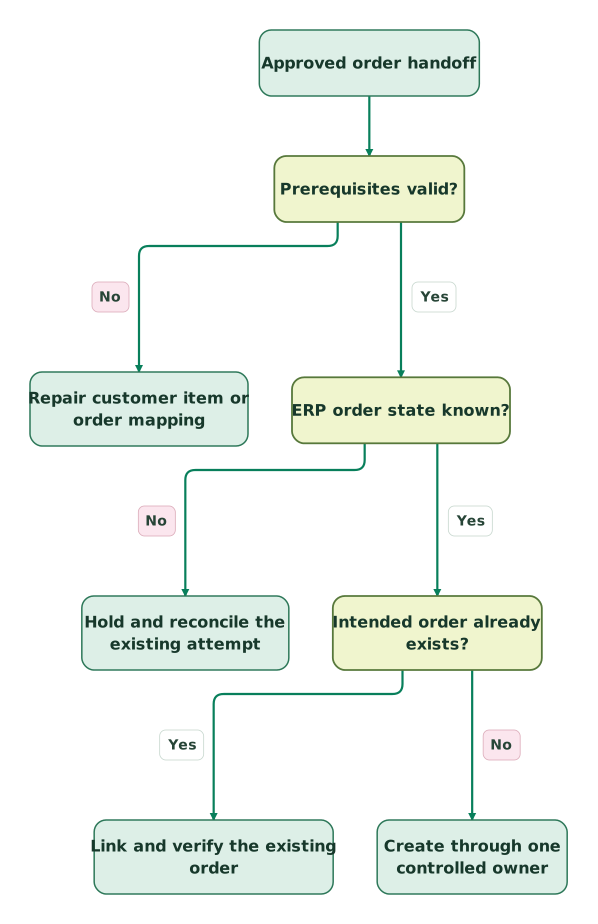
Read diagram as text
- Approved order handoff to Prerequisites valid?.
- Prerequisites valid? to Repair customer item or order mapping: No.
- Prerequisites valid? to ERP order state known?: Yes.
- ERP order state known? to Hold and reconcile the existing attempt: No.
- ERP order state known? to Intended order already exists?: Yes.
- Intended order already exists? to Link and verify the existing order: Yes.
- Intended order already exists? to Create through one controlled owner: No
What should reconcile after the handoff?
Reconcile the intended order against the ERP acknowledgement and the CRM return record. Count matched transactions, then compare their customer, subsidiary, currency and amounts. A total-only check can miss two wrong orders whose errors cancel out.
Consider a hypothetical approved USD order with two units at USD 120 and three units at USD 40. The item subtotal is USD 360. An approved USD 30 discount makes the net item value USD 330. If the configured order adds USD 15 shipping and USD 27.60 tax, its expected total is USD 372.60. The tax is an example input supplied by the scenario, not a tax-rate recommendation.
| Component | Calculation | USD |
|---|---|---|
| First item | 2 × 120 | 240.00 |
| Second item | 3 × 40 | 120.00 |
| Approved discount | Subtract 30 | −30.00 |
| Shipping | Scenario input | 15.00 |
| Tax | Scenario input | 27.60 |
| Order total | 240 + 120 − 30 + 15 + 27.60 | 372.60 |
Now test the same total against different failure cases. An order for the wrong subsidiary must fail even if USD 372.60 matches. An EUR order with the same numeric total must fail the currency check. Two ERP orders for the same intended handoff must be investigated rather than summed into one apparently complete result.
Use the following as a reconciliation record, with identifiers and amounts populated from approved sources:
handoff_key: hs_deal_482_order_01
source_deal_id: 482
expected_customer_id: approved ERP customer reference
expected_subsidiary: approved subsidiary reference
expected_currency: USD
expected_total: 372.60
erp_order_ids: verified matching order IDs
crm_order_id: returned HubSpot order ID, if available
result: matched, missing, duplicate, mismatch, or unknown
next_owner: sales operations, finance, or integration owner
This is an internal evidence format, not a payload to send to either vendor. Preserve amount components and the relevant line identifiers when adjustments or partial fulfilment make a single total insufficient.
Keep the current check at the order boundary: an accepted sales order still needs its own later fulfilment, invoice and payment reconciliation. Extend the reporting model only after each stage has a clear source and reconciliation rule.
How do you investigate a failed sync record?
Start with one affected source record and its exact target relationship. Determine whether the problem is no sync, a failed update, a wrong match or an order-creation failure. Those require different repairs.
The NetSuite sync card shows the linked external record, last sync and states including Up to date, Sync not found, Sync off, Record not syncing, Unknown sync and Record excluded. Error details lead to sync health. The card is available for supported contact, company, deal and invoice records; layout customisation may require adding it. NetSuite sync card.
| Symptom | Inspect first | Safe recovery direction |
|---|---|---|
| No linked customer | Object selection, matching and eligible population | Correct the customer mapping before order creation |
| Status does not change | Exact dropdown labels and populated source field | Repair the value/mapping, then update a controlled record |
| Order creation fails | Required fields, active item, customer, subsidiary and tax configuration | Correct the specific prerequisite before another attempt |
| ERP order exists but HubSpot order is missing | Return order sync and association evidence | Repair the return path; preserve the existing ERP order |
| Values keep reverting | Competing field writers and conflict policy | Narrow the writer and repair the authoritative source |
| Duplicate intended orders | Handoff key, repeated workflow/manual attempts | Stop repeat creation and route finance-approved correction |
Inspect field types as well as names. HubSpot's mapping rules include direction-specific and dropdown constraints; options added later may require saving and restarting the sync to refresh them. Review the impact before restarting a broad connection. Field-mapping considerations.
Keep a repair queue with the source ID, target ID, failed field or action, observed response, proposed correction and responsible owner. Restrict sensitive financial evidence and credentials. A repeated error should lead to a design fix, not an operator repeatedly editing the same field.
Do not delete a transaction to make the queue look clean. Finance and operations must decide the appropriate correction for an accepted, fulfilled or invoiced order. The integration owner should preserve the trace and stop additional unintended actions.
What should pass before the integration goes live?
Approve the handoff only after sales, ERP operations and finance agree on the resulting record and the failure path. Use a controlled non-production example and a narrow rollout that the team can reconcile.
Checklist
- Each object and decision-driving field has an authoritative owner.
- Company customers, individual customers and ordinary contacts are distinguished.
- The customer, subsidiary, currency and item references match the intended order.
- Required custom-form fields fit the chosen native or custom route.
- Price and tax handling match the approved commercial and ERP configuration.
- One approved handoff produces one intended ERP order.
- Repeated and concurrent attempts cannot silently create another order.
- An ambiguous response enters reconciliation rather than blind retry.
- The ERP acknowledgement and HubSpot return order are linked correctly.
- Amount, currency, identity and subsidiary mismatches are visible separately.
- Failure owners can stop creation, repair the source and verify recovery.
- The release has recorded business acceptance and a rollback boundary.
For a scoped review, get the $99 martech audit with one redacted handoff example, the required object map and the current failure trace. That is enough to determine whether the native connector fits, which extra work is necessary and what evidence should approve the integration.
Keep reading
Browse all CRM & Lifecycle guides
 CRM & Lifecycle
Salesforce to HubSpot migration: plan, field mapping and cutover checklist
Plan a Salesforce to HubSpot migration: phases, a field mapping template, load order, Smart Transfer limits, reconciliation checks and a safe cutover.
Jafrin Akter AloLast updated 21 min read
 CRM & Lifecycle
HubSpot implementation: a phased plan, template and launch checklist
Implement HubSpot in five phases: scope, data model, migration, integrations and launch. Includes a plan template, a worked example and a go-live checklist.
Jafrin Akter AloLast updated 22 min read
 CRM & Lifecycle
HubSpot Email Tracking: 8 Reasons Opens, Clicks and Logs Disagree
Fix confusing HubSpot email tracking with eight checks for logging, seats, link formats, inferred opens, privacy filters and report definitions.
Jafrin Akter AloLast updated 14 min read
Martech integration
See the implementation scope, deliverables and acceptance checks.
Questions people ask
Should every HubSpot contact become a NetSuite customer?
No. Define the event that makes a person or company eligible for an ERP customer record. A newsletter subscriber, sales prospect and billing customer can require different treatment. Keep the source relationship and matching rule explicit, then test the intended conversion. Syncing every contact can create unnecessary ERP records and make it harder to identify the actual entity responsible for an order.
Can one deal legitimately create several NetSuite orders?
Yes, if the business process deliberately authorises separate orders, such as distinct deliveries or contractual scopes. Define a separate handoff key and approval for each intended order. Do not use this possibility to excuse accidental duplicates. Reconciliation should compare the expected set of orders with the actual set, including each order's customer, subsidiary, currency and commercial scope.
Is a successful sync status proof that the financial amount is right?
No. A technical success can mean a mapped update completed while the chosen customer, price source or business definition was wrong. Compare the returned record with the approved transaction and its components. Keep the outcome labelled as an order, invoice or payment as appropriate. Business reconciliation is a separate acceptance condition from the connector reporting an error-free request.
Should finance correct an ERP field in HubSpot when the sync is wrong?
Correct the authoritative source through the approved process, then reconcile the mirror. If a temporary exception is necessary, give it an owner, reason and review condition rather than creating another uncontrolled writer. A direct CRM edit may be overwritten or may push an unintended change back into the ERP. Inspect the mapping direction before attempting any correction.
What should happen when the integration owner leaves the company?
Transfer the operating runbook, credential ownership, alerts and recovery permissions before removing access. Verify that the connection does not depend on an unmanaged personal account and that the new owner can investigate a controlled failure. Review tokens and roles under the organisation's access policy. A handover is complete when the next operator can maintain and repair the workflow, not merely view its dashboard.
Sources

Written by
Jafrin Akter AloData Engineer and Co-founder at Martechdevs and Growth and Analytics Partners
Jafrin writes practical guides to marketing technology, customer data, analytics and AI workflows. Martechdevs is a Growth and Analytics Partners company.