
Email Warmup: What Works, What the Score Means and When to Increase Sending
Email warmup is useful when it means gradually introducing legitimate mail from a new or changed sending path while checking real delivery outcomes. Automated exchanges inside a warmup network measure something narrower. Neither elapsed days nor a high tool score proves that your production campaign will reach the inbox. Increase traffic only when the actual sender, audience and delivery evidence support it.
On this page

What are you actually warming up?
Identify the changed sending identity before choosing a schedule. A dedicated sending IP, a domain and an individual mailbox are different parts of the delivery path. A recommendation for one does not automatically apply to the others.
| Change | What to investigate | What a warmup tool cannot establish |
|---|---|---|
| New dedicated IP | Provider-specific volume ramp and receiver feedback | Whether every recipient wants the programme |
| New From or signing domain | Authentication, alignment, identity history and actual messages | A universal date when the domain becomes trusted |
| New mailbox on an existing provider | Permitted use, account configuration and real traffic | Ownership of the provider's shared sending IP |
| New email platform or message format | Changed headers, route, audience and content | That an old platform's score transfers to the new path |
| Existing delivery problem | Exact rejection, deferral, authentication or complaint evidence | A repair simply from waiting longer |
Google recommends low initial volume to engaged recipients, consistent sending and gradual increases while monitoring server responses and reputation. Its guidance also calls for separately ramping traffic after significant infrastructure or header changes. Gmail sender guidelines
Twilio SendGrid's IP-warmup guidance concerns dedicated IPs. It distinguishes those from shared pools and states that gradual warmup does not guarantee a perfect reputation. A shared-IP customer should not copy a dedicated-IP calendar and assume they control the entire IP's history. SendGrid IP warmup
Start with the cold email infrastructure guide if you have not mapped the sending path. Our GTM engineering service connects the account, recipient preferences, sending controls and operating evidence so the decision to increase volume has a clear owner.
Does automated email warmup prove that campaigns will reach the inbox?
No. A warmup network's results describe messages exchanged with that network. Your campaign can have a different audience, message, route and recipient history. Treat a tool score as one limited observation, not as a production acceptance test.
Instantly describes a pool in which participating accounts exchange messages, with automated opens and replies. Its own definition says the health score reflects warmup placement rather than campaign placement, calculated over a rolling seven-day window. Instantly warmup and health-score definition
That distinction matters commercially. A dashboard showing successful pool exchanges does not tell a founder whether prospects received, understood or wanted the actual offer. It also does not validate the unsubscribe path or the CRM's suppression state.
Do not treat simulated replies as evidence of buyer interest. Keep warmup activity excluded from campaign reply metrics and business reporting. If an automation routes every reply into the CRM, verify that warmup messages do not create tasks, inflate engagement scores or enroll another workflow.
The useful comparison is the production path before and after a controlled change, with the same audience definition and observed outcomes. Even then, distinguish association from causation: a better result after warmup may also follow a cleaner audience, corrected authentication or a less intrusive message.
What do Instantly's warmup settings actually control?
They control activity inside Instantly's warmup system. They are vendor settings, not Google or Microsoft sending permissions and not a universal campaign ramp.
| Setting | Instantly's documented value or behavior | How to interpret it |
|---|---|---|
| Increase per day | Default of one | Growth in warmup messages, not an approved campaign increase |
| Daily warmup limit | Suggested ten for new accounts | A pool-message limit, not an inbox-placement guarantee |
| Reply rate | Suggested 30% | Replies from the warmup pool, not genuine prospect responses |
| Read emulation and automatic opens | Simulated interactions with warmup mail | Exclude from real engagement analysis |
| AirMail settings | Dynamically controlled rather than manually editable | Do not assume the same manual configuration applies |
These details come from Instantly's warmup settings. Its separate readiness guidance gives a two-week warmup recommendation, three weeks for AirMail, and a health score above 90%. Those are Instantly's criteria; the same page explicitly limits the score to warmup placement. They do not establish a receiver-provider guarantee. Instantly readiness guidance
If the campaign still fails, use Instantly implementation troubleshooting to inspect account connection, campaign configuration and the real sending evidence. Raising the configured pool reply rate does not answer why a production message was rejected.
What must be true before you increase real sending volume?
The traffic must be appropriate for the sending service and the recipient, and the complete message path must work. Warmup cannot turn prohibited use into permitted use or repair an unresolved suppression failure.
Google Workspace's acceptable-use policy prohibits facilitating unsolicited mass email and evading filtering capabilities. Microsoft's guidance directs customers needing mass mailings toward appropriate bulk-email infrastructure rather than treating Microsoft 365 as an unrestricted campaign service. Evaluate the actual programme against its provider's terms. Google Workspace acceptable use, Microsoft outbound-mail guidance
Complete the following preflight with messages and recipients you control:
- Verify the visible From, envelope sender and DKIM signing identity on a message sent through the intended production tool.
- Confirm the required authentication and alignment results at the receiving mailbox.
- Confirm replies reach an owned inbox and are handled by a real process.
- Exercise the applicable unsubscribe mechanism and confirm the next eligible send respects it.
- Check that suppression survives a CRM import, enrichment update and campaign re-enrollment.
- Establish which recipients expect this message and which must be excluded.
- Capture provider-specific delivery events and a way to pause future dispatch.
The Google, Yahoo and Microsoft sender-requirements guide covers the authentication and unsubscribe details. Repeat the relevant tests for each sending platform; a successful employee email does not validate a newsletter sent through another service.
Also count traffic across tools. A mailbox can send ordinary correspondence, campaign follow-ups and warmup messages on the same day. One campaign's limit is not the total workload, and a new subdomain does not automatically create an independent provider boundary. Google's bulk-sender classification counts across the same primary domain and persists once assigned. Gmail sender FAQ
How long should warmup take, and what schedule should you follow?
Use a conditional ramp rather than promising that every sender is ready after a fixed number of days. The next increase depends on the sending path, legitimate audience, feedback delay and observed failures. A calendar can schedule review points; it cannot certify reputation.
For a new dedicated IP, start with the email service's documented plan and the workload it applies to. SendGrid's automated IP warmup uses hourly limits and can route overflow through other available IPs. Its guidance treats time-sensitive transactional traffic differently from a scheduled marketing ramp. Do not delay password resets merely to satisfy a marketing calendar. SendGrid dedicated-IP ramp
For a new or materially changed programme, use these operating stages:
| Stage | Traffic and scope | Evidence required before the next stage |
|---|---|---|
| Preflight | Controlled test messages only | Correct identity, authentication, reply and suppression paths |
| Initial cohort | A small, genuinely expected recipient cohort | Reconciled outcomes and no unexplained configuration failure |
| Stable baseline | Hold the approved volume and route | Feedback has had time to arrive and the result remains acceptable |
| Small expansion | Increase one controlled segment | No material deterioration by recipient provider or cohort |
| Normal operation | Maintain the justified programme | Monitoring, exclusions and incident ownership continue |
The initial cohort is selected from real recipient expectations. Do not manufacture conversations or contact uninvolved people merely to create a reputation signal.
As an illustrative planning choice, a newsletter owner might approve 200 messages in an observation period and propose 220 for the next one, a 10% increase. That is arithmetic, not a recommended provider quota. If the first cohort shows an unresolved problem, the next volume is held or reduced; it does not rise because the spreadsheet says the next period has started.
The same discipline applies after a long pause or a migration. Begin from the actual retained audience and the current path. Do not resend every old contact to generate volume, and do not assume an old account remains suitable simply because its purchase date is old.
Which measurements should decide whether you hold or increase volume?
Use a small outcome ledger for the actual production stream, split by receiving provider and meaningful audience cohort. Keep attempted messages, receiver acceptance, unresolved delivery and human responses distinct.
| Measurement | What it answers | What it does not prove |
|---|---|---|
| Attempted unique messages | How many intended deliveries entered the path? | Acceptance or inbox placement |
| Receiver accepted | Did the receiving server accept the message? | Which folder the recipient saw |
| Permanent rejection | Which messages failed with a permanent response? | That changing volume alone will fix the cause |
| Still deferred | Which messages remain in retry or delay? | A final delivered or failed outcome |
| Complaints and unsubscribes | Which recipients objected or withdrew? | That silent recipients wanted the message |
| Genuine replies and intended actions | Whether the programme produced useful recipient behavior | That every reported open was a human reading |
SMTP 2xx, 4xx and 5xx response classes distinguish successful acceptance, temporary failure and permanent failure. In particular, a 250 acceptance is not an inbox-folder report. Preserve the complete response when diagnosing a failure. SMTP response meanings
Consider a hypothetical cohort of 100 unique attempted messages. At the review point, 90 have been accepted, four permanently rejected and six remain deferred. The outcome snapshot reconciles as 90 + 4 + 6 = 100. If five deferred messages are subsequently accepted and one expires, the final outcome becomes 95 accepted and five failed. Do not count the five retries as five new prospects or report all 100 as delivered.
Keep a separate event history for retries. One message can generate several events while still representing one intended delivery. Use the stable message identifier and the provider's event semantics to reconcile the final state.
Google Postmaster Tools is not real-time: updates typically appear within 24 hours but can take longer, and low-volume days may have missing data. Its user-reported spam metric concerns relevant DKIM-authenticated Gmail inbox deliveries, not every attempt made by your campaign. A blank chart is not a measured zero. Postmaster dashboard definitions
Google advises keeping the reported spam rate below 0.1% and preventing it from reaching 0.3% or higher. Use Google's metric for that assessment rather than a blended cross-provider rate. Gmail spam-rate guidance
For example, three complaints among 1,200 relevant inbox deliveries equal 0.25%. Dividing those three complaints by 10,000 attempts across all providers gives 0.03%, which conceals the concentration. These are illustrative denominators; a platform's exported fields must be matched to its own definition before calculating a substitute metric.
Open tracking is weaker evidence than it appears. Apple's Mail Privacy Protection can download remote content in the background when a message arrives, rather than when the person views it. Keep that behavior separate from genuine replies and the intended product or commercial action. Apple Mail privacy behavior
What should make you pause the ramp?
Pause an increase when the evidence becomes worse or incomplete in a way that matters to the next decision. Then diagnose the specific cause. A sending programme does not earn permission to continue because a warmup tool remains green.
| Observed problem | Immediate operating response | Evidence to resolve |
|---|---|---|
| Authentication or alignment fails | Hold the affected path | Received message and actual vendor/domain configuration |
| Rejections concentrate at one provider | Hold or reduce that affected stream | Complete SMTP response and changed message/audience conditions |
| Deferrals grow and delivery slows | Stop adding pressure while investigating | Retry status and end-to-end delivery delay |
| Complaints or opt-outs rise | Review recipient expectations and frequency | Cohort, acquisition source, message and suppression behavior |
| Suppression fails | Stop the affected dispatch | Preference update through every queue and synchronization boundary |
| Data is delayed or absent | Keep the last justified setting | Enough completed observations to evaluate another increase |
Deferral is not always a reputation failure. SendGrid lists receiver load, throttling, rate limits and temporary DNS or network problems among the causes. It retries deferred mail for up to 72 hours and recommends examining the time between processing and delivery, not merely the number of deferral events. SendGrid deferral behavior
Do not create a second campaign to resend everything that is still pending in the first. That can produce duplicate delivery after the original retries succeed. Investigate the existing queue and use the sending platform's supported controls.
A hard rejection caused by an invalid address needs a different repair from a temporary deferral. A recipient complaint needs a different repair from a broken DKIM configuration. Keep those categories visible so the team does not replace targeted diagnosis with a blanket instruction to “warm longer.”
When the provider rejects a message, preserve the evidence before changing domains or mailboxes. Buying another sending identity can move the same bad audience and suppression problem somewhere else. Fix the programme and its permitted use first.
How should you evaluate a warmup service before connecting it?
Evaluate the evidence it supplies, its mailbox access and its fit with the actual sending provider's terms. A service that needs broad mailbox permissions deserves an operating review even if its dashboard looks simple.
Ask these questions before connecting an account:
- Does the reported score concern its own pool, seed inboxes or actual production recipients?
- Can the service distinguish acceptance, folder placement, automated activity and genuine response?
- Which messages can it read, send, move or delete under the requested permissions?
- What data is retained, who can access it and how is it removed after disconnection?
- Does a claimed provider partnership or approval have evidence from that provider?
- Can you export useful evidence and stop its activity without disrupting ordinary mail?
- Is the account permitted to be used in the proposed programme under its service terms?
Google lets users review third-party account access and recommends checking an app's privacy and security disclosures before granting access. Removing a connection and deleting data already held by the third party are separate actions to verify. Google linked-app controls
Use an account and scope appropriate to a controlled evaluation. Do not connect a founder's entire working inbox simply because it is convenient. Document the owner, approved permissions, expected activity and exit steps.
If comparing broader outreach platforms, use Instantly vs Smartlead and the Instantly cost guide. A bundled warmup feature still needs the same evidence and access review; its inclusion in a subscription does not establish effectiveness for your campaign.
What should a sender-readiness decision look like?
The readiness decision should state which traffic may run, at what approved pace, through which path, and what would stop it. A date or score without those details is too vague for another operator to use.
The diagram separates a working preflight from an evidence-supported increase:
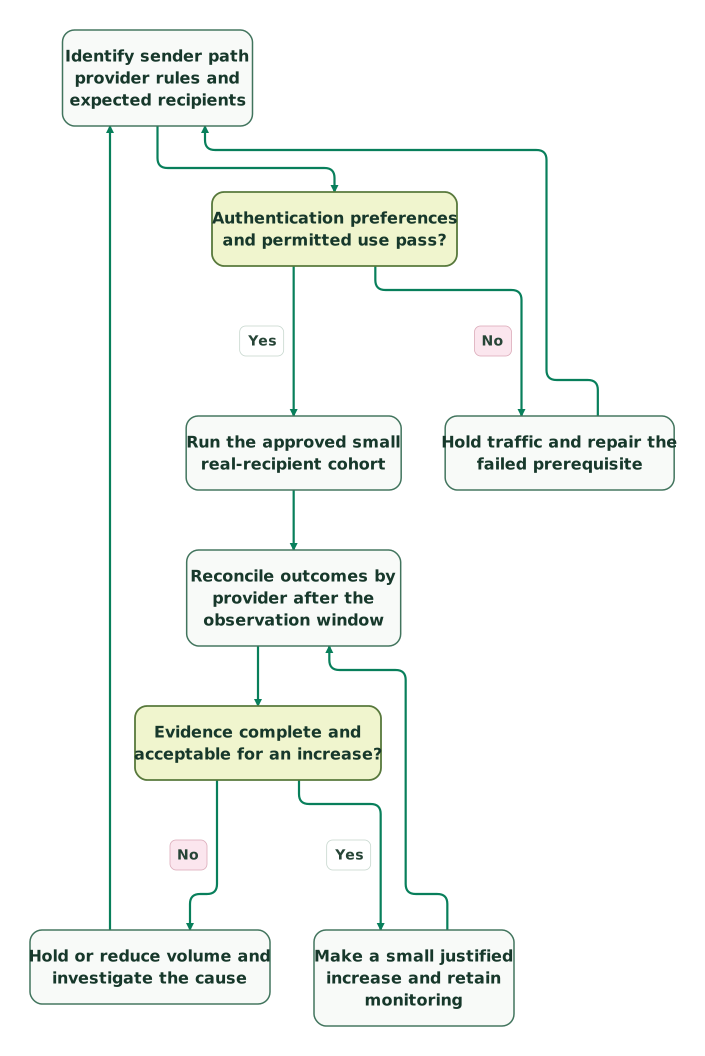
Read diagram as text
- Identify sender path provider rules and expected recipients to Authentication preferences and permitted use pass?.
- Authentication preferences and permitted use pass? to Hold traffic and repair the failed prerequisite: No.
- Hold traffic and repair the failed prerequisite to Identify sender path provider rules and expected recipients.
- Authentication preferences and permitted use pass? to Run the approved small real-recipient cohort: Yes.
- Run the approved small real-recipient cohort to Reconcile outcomes by provider after the observation window.
- Reconcile outcomes by provider after the observation window to Evidence complete and acceptable for an increase?.
- Evidence complete and acceptable for an increase? to Hold or reduce volume and investigate the cause: No.
- Hold or reduce volume and investigate the cause to Identify sender path provider rules and expected recipients.
- Evidence complete and acceptable for an increase? to Make a small justified increase and retain monitoring: Yes.
- Make a small justified increase and retain monitoring to Reconcile outcomes by provider after the observation window
Checklist
- The change is classified as IP, domain, mailbox or sending-path work.
- Provider terms and recipient expectations fit the programme.
- Actual messages pass the required authentication and alignment checks.
- Replies, opt-outs and suppression work through the full system.
- Warmup-pool events are excluded from real campaign results.
- Unique message outcomes reconcile without counting retries as new recipients.
- Complaints, rejections and deferrals are assessed in the correct provider scope.
- Missing or delayed feedback is not treated as success.
- The next increase has a reason, an owner and a stopping condition.
- Connected-tool access and disconnection steps are documented.
If the evidence points to a broken sending or CRM-preference path, bring one representative message and its delivery history to the $99 martech audit. For a defined repair and handover, request a detailed GTM engineering scope.
Keep reading
Browse all GTM Engineering guides
 GTM Engineering
How Many Cold Email Inboxes and Domains Do You Need?
Calculate inbox and domain needs from new contacts, follow-ups, shared limits and reply capacity. Includes a reproducible forecast, cost model and checklist.
Jafrin Akter AloLast updated 13 min read
 GTM Engineering
Instantly Pricing: Outreach, Data and Mailbox Costs
Budget Instantly outreach, data credits, mailboxes and reply handling. Includes plan-limit caveats and a complete small-team cost example.
Jafrin Akter AloLast updated 9 min read
 GTM Engineering
Lemlist Pricing: Seats, Channels and Enrichment Costs
Understand current Lemlist Email and Multichannel pricing, enrichment credits, calling multipliers and legacy-plan differences. Includes a worked budget.
Jafrin Akter AloLast updated 9 min read
GTM engineering & outbound
See the implementation scope, deliverables and acceptance checks.
Questions people ask
Does a domain's age tell us whether it is ready to send?
Age alone does not establish a working or trusted sending programme. Inspect the current authentication, prior use, audience expectations and actual delivery evidence. An older domain may have a poor history, and a domain held without sending has not demonstrated the behavior of your new campaign. Treat age as context rather than using it to bypass the same preflight and observation gates.
Can we use open rate as the main warmup success measure?
No. Automated warmup opens and privacy-related content downloads are different from a person reading your campaign. Keep those events separate and inspect acceptance, unresolved delivery, complaints, opt-outs and genuine recipient actions. A high open rate cannot establish that the offer is relevant or that every intended recipient saw the message. The success measure must match the production programme you are evaluating.
Should we send unnecessary messages to create more history?
No. Send messages that serve a legitimate purpose and that recipients expect, within the sending service's rules. Extra messages created solely to fill a schedule can produce complaints and obscure the behavior of the real programme. If there is not enough appropriate traffic to justify the target volume, revise the plan rather than inventing a conversation or expanding to unrelated recipients.
What if Postmaster Tools shows no data for our small cohort?
Treat the missing dashboard data as unavailable evidence, not as a zero complaint rate or a clean reputation score. Use the actual sending logs, received-message checks and recipient feedback available to you, while acknowledging what the cohort cannot establish. Keep the volume controlled rather than sending more solely to make a chart appear. Google's low-volume privacy thresholds can limit what the dashboard displays. Postmaster data limits
Does stopping a warmup tool require disconnecting our campaign platform?
It depends on how the account and permissions are connected. Inventory which component performs warmup, which sends production mail and which reads replies before changing access. Stop the intended activity through the supported control, then confirm ordinary mail and suppression still work. Review third-party permissions separately and verify data deletion where required; do not revoke an unrelated production dependency by guesswork.
Sources
- Google email sender guidelines
- Twilio SendGrid dedicated-IP warmup
- Instantly warmup and score definitions
- Instantly warmup settings
- Google Workspace acceptable-use policy
- Microsoft outbound spam and mass-mailing guidance
- Google sender requirements FAQ
- Twilio SMTP response meanings
- Google Postmaster dashboard definitions
- Apple Mail Privacy Protection
- Twilio SendGrid deferrals
- Google third-party account connections

Written by
Jafrin Akter AloData Engineer and Co-founder at Martechdevs and Growth and Analytics Partners
Jafrin writes practical guides to marketing technology, customer data, analytics and AI workflows. Martechdevs is a Growth and Analytics Partners company.