
Instantly Implementation Mistakes: Mailboxes, Lists and Reply Handling
Data Engineer and Co-founder, martechdevs
Last updated 9 min read
The most costly Instantly implementation mistakes happen between steps: importing a list without current exclusions, assuming a connected mailbox is correctly authenticated, restarting people who already replied, and losing conversations before they reach a responsible owner. Test the complete path from eligible recipient to stopped sequence and CRM handoff before increasing campaign volume. Successful sending is only one part of a working system.
Last updated: 5 October 2026.
An outreach setup can look healthy in the campaign screen while behaving badly for the recipient. A person replies, a colleague follows up, and the original sequence continues. Someone opts out in the CRM, but an old list puts them into another campaign. Neither problem is fixed by rewriting the opening line.
Build the implementation around state: who is eligible, what has already happened, what should stop, and who owns the next action. The settings below have documented behavior, but the acceptance tests are recommendations to run in your own workspace. They are not claims that we tested your account.
1. Treating a connected mailbox as a finished setup
An account connection proves that a tool can access the mailbox. It does not prove the sending domain is authenticated correctly, the sender identity is clear or responses can be processed reliably.
Google's guidelines for personal Gmail recipients distinguish authentication requirements for all senders from stricter bulk-sender requirements. They also cover alignment, transport security, unsubscribe handling and recipient feedback. Check the requirements that apply to your sending pattern and provider instead of assuming a warmup status overrides them. Gmail sender guidelines.
For each sending identity, record the account owner, provider, domain administrator and intended use. Send an authorized test to an inbox your team controls. Inspect the received message's authentication results, visible sender, reply destination and unsubscribe behavior. Repeat after changing the provider or DNS configuration.
Also test the return path. Send a normal response and confirm it appears where the operator expects to work. An account that can send but cannot reliably receive replies is unsuitable for a conversation-led workflow.
Our martech integration service focuses on these connections and their failure handling. The useful deliverable is a verified operational path, not a green connection indicator.
2. Importing first and deciding eligibility later
A CSV is a transport format, not an audience policy. Before importing, decide which accounts are eligible and which people must be excluded. Check existing customers, active opportunities, prior opt-outs, recent conversations and internal exclusions using the current source of truth.
Instantly's CSV guide requires a correctly mapped Email field and offers a cross-campaign/list duplicate check. Leaving that check off permits duplicates across those destinations. Treat the import options as part of the release configuration and record them with the source file. CSV import guide.
Assign every batch an internal identifier. Keep the extraction time, qualification rules, source system and reviewer. That lets you answer why a recipient was included without trying to reconstruct a spreadsheet weeks later.
Reconcile the import. If 1,000 rows become 760 campaign contacts, account for the difference through duplicate, blocked, invalid or otherwise rejected records. Do not repeatedly upload the same file simply because the displayed count is lower than expected.
Preview personalization using records with missing fields, unusual company names and non-English characters. A default greeting should remain readable when a field is absent. Generated company claims should have evidence and should be omitted when the evidence is missing.
3. Confusing an import exclusion with an active suppression
Instantly documents an important distinction: its Blocklist tab is checked during import and in ongoing campaigns, while the connected Google Sheets blocklist is checked only when importing or uploading. Updating a sheet therefore is not sufficient evidence that a person already in a campaign has been stopped. Global Blocklist.
Maintain a suppression path that reaches active sending. Decide which system holds the authoritative opt-out and how the other systems learn about it. Record the time the request was received and when enforcement completed.
A useful test starts with a controlled recipient already queued for a later step. Add that address through the chosen operational suppression path and verify the queued action no longer proceeds. Then attempt a fresh import of the same address to confirm re-entry is also prevented.
Test email-level and company-level exclusions separately. Blocking one person is different from excluding an entire account. Shared domains, consultants and subsidiaries make domain-only rules an imperfect substitute for a maintained account relationship.
Avoid using deletion as the only way to honor an exclusion. A record can disappear from the working list while the source system later recreates it. Preserve the minimum suppression state your process needs to prevent that recurrence.
4. Assuming “stop on reply” covers every future action
Instantly's troubleshooting guide says enabling stop-on-reply does not retroactively stop leads who replied before the setting changed. It also warns that moving a replied lead to another campaign or deleting and re-uploading it can restart the sequence. Subsequences may intentionally send after a reply. Follow-ups after replies.
Before reorganizing campaigns, classify records by conversation state. Separate untouched leads, active sequences, replied leads and suppressed leads. A bulk move that is harmless for untouched records can be disruptive for an ongoing conversation.
Create an explicit rule for account-level coordination. The campaign settings offer a company-on-reply stop that affects other leads with the same domain, excluding automatic replies. Decide whether that behavior fits the sales motion and test it with two controlled addresses from the same test domain. Campaign settings.
Do not let the campaign structure define your relationship policy accidentally. For a complex account, one buyer's reply may mean the team should coordinate remaining outreach. For another account, separate departments may be independent. Write the rule before applying the switch broadly.
When a follow-up appears after a response, inspect the event timeline. Establish when the original mailbox received the response, when Instantly detected it, which rule applied and whether the later message came from the original sequence or another workflow. A screenshot of a toggle cannot answer all four questions.
5. Missing replies from a different address
The reply troubleshooting guide describes unmatched replies from another address appearing in Unibox's Others folder when the relevant preference is enabled. It provides an Attach Lead action to connect the conversation to the original lead. It also explains that forwarding which removes the original message can disrupt detection. Reply detection guidance.
Include this scenario in testing: the original recipient forwards your message to a colleague, who replies. The correct business action may be to stop the original outreach and assign the new conversation to the same owner. A reply-rate counter alone will not establish that this happened.
Give an operator responsibility for unmatched conversations. Define a review interval that fits the team's actual working hours, and record how a conversation is linked to the CRM account. Do not use a shared inbox as an unowned holding area.
For context, lead routing is the next part of the process. The person answering a relevant reply needs an owner, account context and a clear next action, not merely an automated notification.
6. Combining contradictory automation rules
Workspace preferences can change campaign behavior. Instantly's “Disable Global Lead Status Synchronization” setting is especially easy to misread: off means statuses synchronize across campaigns; on means they remain isolated. The same preferences page describes automatic reply labels and optional automatic reply scheduling. Review the actual enabled state, not just the setting name. Preferences guide.
Map each automatic action to a single intended purpose. One system classifies a reply, another creates a task and another sends a message. If two workflows both own the response, a recipient can receive overlapping follow-ups even though each workflow behaves as configured.
For out-of-office handling, Instantly's Smart Pause guide requires stop-on-auto-reply to be disabled and automatic reply-status tagging enabled. This is a specific configuration for pause-and-resume behavior, not a general reason to ignore automatic replies. Smart Pause and Resume.
Test return dates, ambiguous dates and messages without a date. Decide when the operator should review rather than automatically resume. A message saying the recipient has left the company must not be treated like a short holiday.
Keep automated reply drafting and automated sending as separate decisions. Review the sender, promise, meeting link and current conversation state before enabling any system to respond without review. A useful generated draft can still be inappropriate to send.
7. Planning daily capacity without follow-ups
Campaign daily limits cover total campaign emails across its sending accounts. The documented default prioritizes follow-ups before new leads; the new-lead priority option changes that behavior. A configured new-lead maximum is therefore not a promise that exactly that many new people will be contacted daily. Campaign limits and priorities.
In an illustrative schedule, a campaign has capacity for 120 messages on a particular day and 90 eligible follow-ups. Under a follow-up-first policy, only 30 slots remain for first messages. Raising the new-lead input list to 500 does not create extra capacity.
Forecast the sequence as a queue. Include follow-up dates, stopped recipients, scheduling windows and the accounts available that day. Leave room for operational variation instead of planning every account at its theoretical maximum.
The Instantly pricing guide separates monthly subscription limits from the rest of the stack. Here, the operational question is whether the day's scheduled work fits the available configuration and recipient expectations.
8. Reporting replies without defining the denominator
Instantly's analytics documentation distinguishes total messages from sequence starts and says automatic replies are included by default. Its exclusion preference is device-specific. The page also describes reply metrics differently across reporting sections, so validate the selected report against exported events before comparing dashboards. Analytics documentation.
Build a stable internal report for each recipient cohort. For example, 1,000 unique recipients receive 2,400 total messages. There are 60 unique responding recipients, of whom 20 only sent automatic replies. The human-response rate is 40 ÷ 1,000, or 4%; all responding recipients represent 6%. Dividing 60 by 2,400 produces 2.5%, which answers a different question.
Those numbers are illustrative, not expected campaign results. They demonstrate why two correct calculations can disagree when their units differ.
Track qualified conversations and accepted meetings separately from responses. A decline is a response, and an automatic absence notice is activity, but neither is a qualified sales conversation. Freeze the inclusion rules and reporting window before evaluating a message test.
A practical launch test
Use controlled test inboxes and synthetic CRM records. Exercise the state changes before enrolling an audience:
Checklist
- An eligible test recipient imports with the intended fields and ownership.
- A duplicate and a suppressed recipient are excluded through the intended rules.
- A normal reply stops the original follow-ups and reaches the responsible operator.
- A reply from a different address is found and attached correctly.
- An out-of-office response follows the chosen pause policy without duplicate automation.
- Replayed integration events do not create duplicate CRM tasks or opportunities.
- The report reconciles unique recipients, messages, automatic replies and human responses.
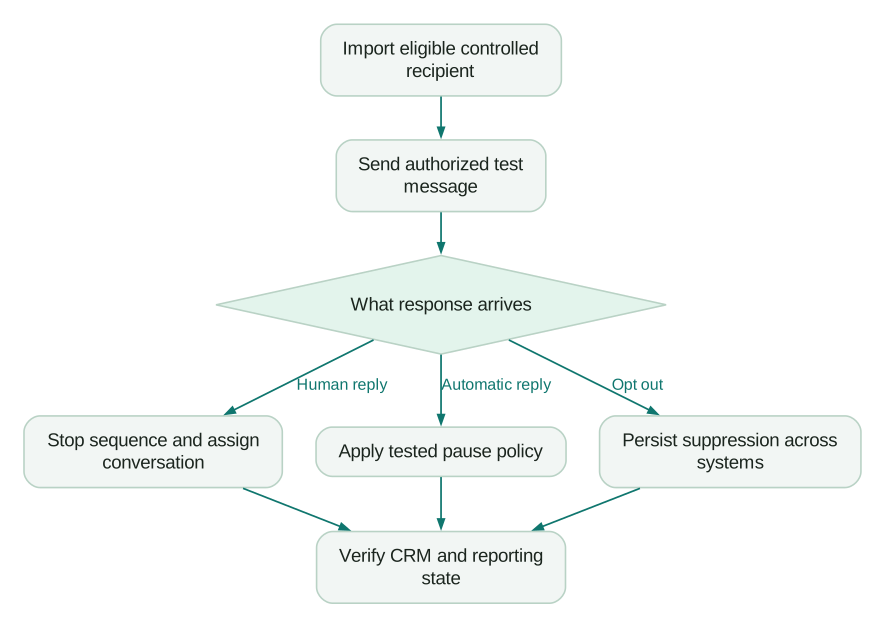
Keep the evidence, settings and failures with the campaign version. Launch a bounded cohort, review real behavior and then expand. A repeatable process makes it possible to improve messaging without repeatedly rediscovering the same integration mistakes.
Questions people ask
Why can a sequence continue after someone replies?
Reply detection, campaign state and subsequent automations can each affect the outcome. Inspect the recipient's event timeline and the source of the later message, then check whether the person was moved, re-imported or enrolled in another workflow.
Is a Google Sheets blocklist enough for active campaigns?
The documented Sheets check applies at import. Use and verify a suppression path that also reaches already-enrolled recipients, and test both stopping an existing sequence and preventing re-entry.
Should every out-of-office message stop outreach permanently?
Choose a policy that distinguishes a temporary absence from a departure or other permanent change. Test the configured pause behavior and send ambiguous cases to review instead of assuming every automatic reply contains a reliable return date.
Why does the campaign contact fewer new leads than expected?
Available sending capacity may be occupied by follow-ups, restricted by schedules or reduced by account availability. Model messages due per day and inspect the queue before changing limits or importing a larger audience.
What proves the implementation is ready?
A controlled recipient should move through import, delivery, response handling and CRM ownership with the expected state at every step. Include exclusions, unmatched replies and repeated integration events in that evidence; successful delivery alone does not prove the workflow.
Sources
- Gmail sender guidelines, accessed 5 October 2026.
- Instantly CSV imports, accessed 5 October 2026.
- Instantly Global Blocklist, accessed 5 October 2026.
- Follow-ups after replies, accessed 5 October 2026.
- Instantly campaign settings, accessed 5 October 2026.
- Instantly preferences, accessed 5 October 2026.
- Smart Pause and Resume, accessed 5 October 2026.
- Instantly analytics, accessed 5 October 2026.
Written by
Jafrin Akter AloData Engineer and Co-founder, martechdevs
Jafrin Akter Alo is a data engineer and co-founder of martechdevs, where the team has delivered 74+ martech, data and growth stack implementations.