
Instantly Pricing: Outreach, Data and Mailbox Costs
Data Engineer and Co-founder, martechdevs
Last updated 9 min read
Instantly's cost depends on the sending plan, data and AI credits, mailboxes, domains and any additional CRM or testing features you use. Choose a plan against both stored contacts and monthly email volume, then add the cost of finding qualified recipients and handling replies. Unlimited connected accounts do not mean unlimited sending capacity or free email infrastructure.
Last updated: 30 September 2026.
The wrong budget starts with the cheapest plan and asks how much outreach it can run. A better budget starts with the audience and the conversations your team can handle, then identifies the subscriptions and infrastructure required to serve that workload.
This distinction matters even for a small campaign. A team can have enough monthly email allowance but exceed its stored-contact limit, or have ample sending capacity while spending its data allowance on research it never uses.
What do the main sending plans cost?
Instantly's current plan overview lists these monthly Outbound subscriptions in USD:
- Growth: USD47, with 1,000 uploaded contacts and 5,000 monthly emails.
- Hyper Growth: USD97, with 25,000 uploaded contacts and 125,000 monthly emails.
- Light Speed: USD358, with 100,000 uploaded contacts and 500,000 monthly emails.
These are sending-plan figures, not the total stack cost. Instantly plans overview.
The public pricing page also presents bundles and annual discounts. Its standalone Hypergrowth card shows 125,000 monthly emails, while another comparison section and the Scale bundle show 100,000. Confirm the exact purchased SKU and allowance in checkout or with support, particularly if the difference affects your workload. Do not silently substitute a number from a different bundle. Instantly pricing.
For annual billing, record the actual upfront charge, the equivalent monthly amount and the cancellation terms separately. An equivalent monthly display is a comparison unit; it is not proof that the subscription can be canceled every month.
If your challenge is connecting audience selection to CRM ownership and follow-up, our GTM engineering service helps define that process. Buying a larger sending allowance will not resolve a missing handoff.
Which limit will you hit first?
Sending volume and uploaded contacts measure different things. A stored-contact allowance is a stock: how many records occupy the workspace. Monthly email volume is a flow: how many messages pass through during the billing period.
Instantly's add-on documentation says campaign contacts count across active, paused and draft campaigns, and the limit does not reset monthly. It lists an USD87 monthly Outbound add-on for Hyper Growth or Light Speed that adds 25,000 uploaded contacts and 125,000 monthly emails. Outbound add-on documentation.
Consider an illustrative campaign with 800 new recipients and a maximum of four emails each. Its maximum planned sequence volume is 3,200 messages before accounting for replies, suppressions and other early stops. That is not the same as 3,200 contacts.
Now suppose the workspace already contains 600 old campaign contacts. Importing the new 800 requires room for 1,400 records under the simplified assumption that all 800 are new and count toward storage. The team can be below a sending allowance and still lack room to upload its list.
Model both constraints before upgrading. Review whether historical campaign records are still needed, and preserve reporting and suppression information before any cleanup. Deleting data merely to regain space can make a cheaper subscription more expensive to operate.
Use a monthly forecast with opening stored contacts, planned additions, approved removals and closing stored contacts. Beside it, forecast messages by sequence step. This makes the reason for a plan change visible.
How do data and AI credits change the budget?
Sending a campaign and acquiring its audience are separate costs. A list of company names may still need contact discovery, work-email enrichment, profile context and review before it can be used.
SuperSearch documents one credit for an email found by Instantly and two or more for partner-sourced results. It says an unsuccessful verified-email lookup does not consume that lookup's credits. Additional profile or AI enrichment can create separate charges, so one contact does not necessarily equal one credit. SuperSearch documentation.
Build a small usage sample before purchasing a large allowance. Record which enrichment steps ran, how many results were usable and which steps changed the campaign decision. If a funding summary never affects qualification or messaging, generating it for every row creates cost without a defined benefit.
For a planning example, suppose 600 usable emails come from a one-credit route and 400 from a two-credit route. The email lookup total is 1,400 credits. If all 1,000 records also receive a half-credit profile enrichment, the modeled total becomes 1,900. The two-credit partner price is an explicit assumption here; actual partner routes can cost more.
Now suppose only 700 records pass your account-fit and suppression checks. The cost per accepted prospect depends on all the work performed to produce those 700, including work on rejected records. Filtering obvious mismatches before enrichment can reduce waste without reducing useful output.
The credit guide lists lead verification at 0.25 credits per record and AI Reply Agent generation at five credits per reply. It also says unused monthly-plan credits expire two months after purchase, while annual-plan credits expire after a year; annual allocations are provided upfront. Track each purchased allowance and expiry rather than treating credits as a permanent balance. Data credit system.
Do not assume that an AI feature's availability means unlimited use. Assign an owner to the shared pool and review usage by action. Research, verification and generated replies can compete for the same budget even though different team members initiated them.
What else belongs in the stack cost?
Mailboxes and domains
Connected accounts still need an email provider. Instantly's overview lists domains at USD15 annually, Done-For-You Google accounts at USD5 monthly, pre-warmed Google accounts at USD10 monthly and Airmail accounts at USD4 monthly. These are distinct options; check current scope and account terms before purchase. Domain and account pricing.
Choose infrastructure for legitimate business communication and recipient expectations. More mailboxes should not be a shortcut around poor targeting or unwanted messages. A cost model can tell you what a deployment costs; it cannot establish that the deployment will be welcome or effective.
Include domain renewal timing and who owns each account. An agency should document which organization can recover credentials, administer domains and retain conversation history when an engagement ends. Operational ownership is part of the purchase decision.
CRM and reply operations
The plans overview lists Growth CRM at USD47 and Hyper CRM at USD97 monthly, but the dedicated CRM article describes the CRM plans together at USD97. Confirm the current tier and included capabilities in the billing interface. The dedicated article also says the CRM trial lasts 14 days and that continued functionality beyond basic lead viewing requires a paid plan. CRM documentation.
If you already use another CRM, evaluate whether a second one solves a clear need. Identify where account ownership, opportunity stage and opt-outs live. Paying for two interfaces can be reasonable, but two competing sources of truth create reconciliation work.
Testing and administration
Budget the time spent validating lists, checking configuration, reviewing replies and fixing sync failures. Add any selected inbox testing service as its own line. A test result is evidence about the tested messages and accounts at that time, not a guarantee for every future campaign.
Our Instantly implementation guide covers the checks that turn a paid subscription into a functioning process. The budget should support those checks instead of treating setup as a one-off login task.
A complete monthly budget example
Here is an illustrative small-team budget using selected published list prices. It is not a recommended mailbox count, a performance forecast or a quote for your workspace.
Assume the team selects Hyper Growth at USD97 monthly and Growth data credits at USD47 monthly. It buys six Done-For-You Google accounts at USD5 each and three domains at USD15 per year. It already has a CRM and does not add an Instantly CRM subscription in this example.
The recurring monthly subscriptions total USD174: 97 + 47 + 30. Allocating the USD45 annual domain purchase over twelve months adds USD3.75, for an effective monthly infrastructure and software cost of USD177.75. Actual cash payments differ because domains are paid annually. Taxes and other services are excluded.
If campaign preparation and reply handling consume eight hours monthly at an illustrative USD40 hourly planning rate, operating work adds USD320. The complete modeled monthly cost becomes USD497.75.
Suppose the team records ten accepted meetings under a consistent definition. Modeled cost per accepted meeting is USD49.78. At five meetings, it is USD99.55. Those outcomes are hypothetical sensitivity cases, not conversion-rate benchmarks.
The arithmetic shows why focusing only on the USD97 sending fee can mislead. It also shows why improving qualification or reducing wasted review may matter more than a small subscription discount.
Keep the numerator complete and the denominator honest. Count meetings accepted by the sales team, not every calendar booking, and distinguish no-shows or clearly unsuitable accounts. Measure a complete cohort long enough for replies and meetings to occur.
When does an upgrade make sense?
An upgrade is justified when a specific constraint prevents worthwhile work and the added capacity can be used responsibly. Identify the constraint before choosing the product:
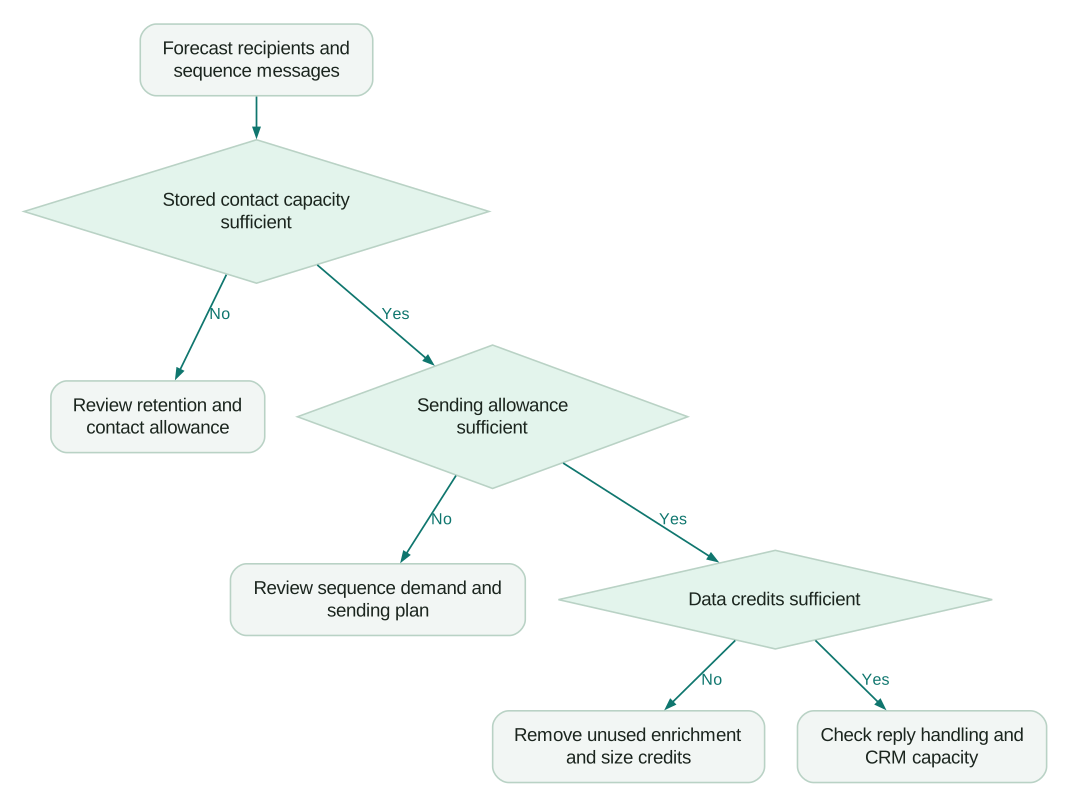
Do not upgrade because the platform can technically send more. Check whether the next group of accounts meets the same qualification standard, whether the message addresses a real need and whether the team can handle the response. More volume can hide declining audience quality for a short time.
A plan comparison should also include alternatives at the same complete scope. Our Instantly versus Smartlead comparison is useful when choosing the sending platform; carry the same mailbox, data and operating assumptions into both options.
Before committing:
Checklist
- The selected plan and bundle have confirmed contact and email allowances.
- Stored-contact demand is forecast separately from monthly message volume.
- A sample workflow establishes credits used per accepted prospect.
- Mailboxes, domains and any CRM or testing add-ons have separate budget lines.
- Annual cash commitments and credit expiries are visible.
- Someone owns reply handling, CRM matching and subscription review.
Revisit the model after the first complete campaign cohort. Replace assumptions with measured consumption and useful outcomes. Keep the plan that supports a working acquisition process, and remove paid features that have no defined role in it.
Questions people ask
Is the sending subscription the total cost of Instantly?
Usually it is only one part of the budget. Add any data or AI usage, email accounts, domains, optional products and operating time required for your actual workflow.
Does the uploaded-contact limit reset every month?
The documented limit is a fixed workspace capacity across campaign statuses. Forecast retained records and new imports together, and preserve required history and suppression data before deleting anything to recover capacity.
Does one data credit always produce one usable lead?
No, usage depends on the lookup route and additional actions, while usefulness depends on your qualification rules. Track total credits consumed divided by accepted prospects rather than assuming a one-to-one relationship.
Should I buy annual billing immediately?
Use annual billing when the workflow and sustained need are established and the commitment fits your cash planning. A lower equivalent monthly amount does not compensate for buying a year of unused capacity, so validate the operating process first.
What is the best metric for judging the cost?
Use a business outcome your team can define consistently, such as an accepted meeting or qualified opportunity, alongside cost per accepted prospect. Keep software, data, infrastructure and operating time in the same model, and avoid treating all replies as valuable outcomes.
Sources
- Instantly plans overview, accessed 30 September 2026.
- Instantly public pricing, accessed 30 September 2026.
- Outbound and data-credit add-ons, accessed 30 September 2026.
- SuperSearch documentation, accessed 30 September 2026.
- Data credit system, accessed 30 September 2026.
- Instantly CRM, accessed 30 September 2026.
Written by
Jafrin Akter AloData Engineer and Co-founder, martechdevs
Jafrin Akter Alo is a data engineer and co-founder of martechdevs, where the team has delivered 74+ martech, data and growth stack implementations.