
Instantly vs Smartlead vs Clay Sequencer: Compare the Whole Outbound Workflow
Data Engineer and Co-founder, martechdevs
Last updated 12 min read
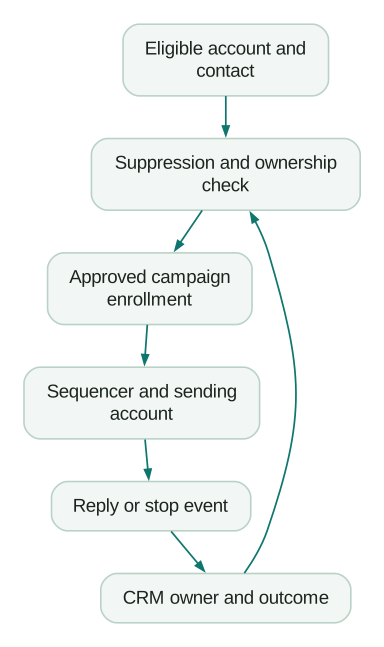
Choose an outbound sequencer by what happens after a prospect enters it: which account sends, what stops the sequence, who handles the reply, and what reaches your CRM. A cheap sending plan becomes expensive when your team has to repair those handoffs every morning.
Last updated: 13 October 2026.
Instantly and Smartlead are reasonable starting points when sending operations are the main purchase. Clay Sequencer deserves a place on the shortlist when targeting, enrichment and campaign enrollment already happen in Clay. The right choice depends on that operating model, the people running it and the cost of the complete workflow.
There is also a significant connection between two of these options: Clay documents Smartlead as its underlying sending infrastructure. You do not need your own Smartlead subscription for Clay campaigns. Buying Clay Sequencer and buying Smartlead directly still gives you different interfaces, controls and billing arrangements. Clay Sequencer FAQ
This comparison uses public pricing and product documentation. The calculations are planning examples. They are not results from a deliverability test or a claim that one vendor produces more pipeline.
Decide what you need to operate
Write down your actual workflow before starting the trials.
For an in-house team, that might be one offer, one CRM, several approved senders and an account owner who handles every interested reply. For an agency, it might involve separate client permissions, separate suppression lists, client reporting, multiple billing arrangements and a clean way to hand everything back when a contract ends.
Those are different purchases even at the same email volume.
Use these initial decision rules:
- Shortlist Instantly when you want a dedicated email workspace and its campaign, inbox and team workflow matches how you already operate.
- Shortlist Smartlead when client management and programmatic campaign operations are central. Prove the separation and permissions you need in the exact package being quoted.
- Shortlist Clay Sequencer when the approved audience and enrichment logic already live in Clay, and keeping enrollment and campaign outcomes there removes useful integration work.
These are starting hypotheses for a trial, not exclusive capabilities. An agency can use Instantly, and an in-house team can use Smartlead.
If your main requirement is a rep working through email, calls and other channels, include a sales engagement product in the evaluation. For example, lemlist lists multichannel sequencing. Assess the relevant channels, seats and operating costs separately; an email-volume comparison will not answer that buying question.
Compare costs at 10,000 and 100,000 sends
The following figures use monthly USD pricing observed on 13 October 2026, excluding promotions, annual discounts, taxes and additional services. They describe subscription capacity, not permission to contact a particular audience or an achievable inbox placement rate.
Instantly: use the plan you will actually need
The public Outreach cards showed Growth at $47 per month with 5,000 monthly emails, and Hypergrowth at $97 with 25,000 uploaded contacts. The Hypergrowth card stated 125,000 monthly emails, while the comparison section stated 100,000. That discrepancy needs confirmation before purchase; both displayed limits cover the 100,000-send scenario below. Instantly pricing
For these examples, Hypergrowth gives a $97 subscription cost at either 10,000 or 100,000 sends. Allocating that entire fee to the actual volume produces $9.70 per 1,000 sends at 10,000, or $0.97 per 1,000 at 100,000.
Those figures assume your contact storage and feature needs fit. A large list receiving one message each can exceed the contact allowance before exhausting the email allowance. Do not estimate capacity from sends alone.
Smartlead: check the gap between Pro and Smart
Smartlead's monthly selector showed Base at $39 for 6,000 sends and 2,000 stored contacts; Pro at $94 for 90,000 sends and 30,000 contacts; and Unlimited Smart at $174 for 150,000 sends with unlimited contact storage. Its verification allowances and add-ons are separate items on the pricing page. Smartlead pricing
At 10,000 sends, Pro is the first listed tier above the required volume: $94, or $9.40 per 1,000 actual sends. At 100,000, Pro's 90,000 allowance is insufficient; the listed Smart tier is $174, or $1.74 per 1,000 actual sends.
That $3 difference between the two 10,000-send subscriptions is smaller than the cost of a few minutes of avoidable work. Choose on operations at that scale. At higher volumes, model storage, client access, API entitlement and infrastructure alongside the subscription.
Clay: count enrollments and other Actions
Clay's monthly pricing controls showed Launch starting at $185 with 15,000 Actions and 2,500 Data Credits. Selecting 40,000 Actions while retaining 2,500 Data Credits changed Launch to $275. Growth started at $495 with 40,000 Actions and 6,000 Data Credits, with additional workflow features. Clay pricing
The important meter is one Action per lead added to a Clay campaign, rather than one per email. Exporting a record to an external sequencer also consumes an Action. Enrichment, AI work and other exports use capacity too. Clay Actions and Data Credits
Suppose a modeled cohort averages three actual sequence emails per enrolled lead within the month:
- 10,000 sends require approximately 3,334 enrollments. Launch's base Action allowance can cover enrollment alone. Allocating its full $185 fee gives $18.50 per 1,000 sends.
- 100,000 sends require approximately 33,334 enrollments. The expanded $275 Launch configuration can cover enrollment alone, giving $2.75 per 1,000 sends.
These are deliberately narrow scenarios. They assume you bring suitable mailboxes, already have usable contact data, stay within other limits and do not need Growth-only capabilities. They exclude other Actions, additional Data Credits and mailbox costs. The higher-volume scenario leaves only 6,666 of the 40,000 Actions for other work.
If each enrolled lead actually receives two emails on average, 100,000 sends require 50,000 enrollments. The same Action configuration is then insufficient. Replies, exclusions and delayed follow-ups change the relationship between enrollment and sends, so use your observed sequence completion pattern.
For a company already paying for Clay, a second question matters: can existing unused capacity handle sequencing without displacing valuable work? The incremental software bill may be small, but the capacity still has a cost. Compare that with the external sequencer fee and the integration you would maintain.
Budget for the system around the sequencer
Your monthly operating estimate should include the sequencer, mailboxes, domains, data acquisition, verification, AI usage, integration maintenance and the people reviewing campaigns and replies.
Keep one-off setup work separate. Allocate annual domain costs consistently, and include the work needed to remove access when staff or clients leave. A pricing page that says unlimited email accounts usually describes connection capacity; it does not mean an unlimited supply of free mailboxes.
As an original planning example, suppose a team budgets $150 for mailboxes, $200 for data and verification, and four hours at an internal planning rate of $75 per hour. Those items total $650 before the sequencer. Adding a $97 subscription brings the modeled monthly cost to $747.
If that program produces five qualified meetings, the modeled cost is $149.40 per meeting. At ten meetings, it is $74.70. Neither outcome is a forecast. The calculation shows why a founder should question targeting and qualification before spending days optimizing a $3 subscription difference.
Define qualified before measuring it. A reply requesting removal, an automated response and a booked meeting with an unsuitable company are different outcomes.
Warmup and rotation cannot prove deliverability
A warmup feature, a reputation score and a seed test are observations about parts of a sending system. None proves that your next campaign will reach the people you care about or that those people want the message.
Assess authentication, mailbox health, recipient relevance, complaint handling and the quality of the underlying list. Rotation distributes work across connected senders; it should not be used to keep an unwanted campaign running after recipients or providers reject it.
Google's requirements for personal Gmail recipients distinguish general senders from bulk senders. They include authentication, low reported spam rates and additional bulk requirements such as SPF, DKIM, DMARC alignment and one-click unsubscribe for covered marketing messages. A vendor warmup setting does not replace those requirements. Google email sender guidelines
For a trial, give each tool comparable, non-overlapping account cohorts with similar recipient-provider mix and audience quality. Do not contact the same prospect through competing tools just to manufacture a comparison. Preserve the targeting rule, offer, scheduling assumptions and qualification definition.
Report what you can observe: sends attempted, accepted messages where reported, hard bounces, complaints where available, human replies, positive replies and qualified meetings. An accepted message is not proof of inbox placement. An open is not proof of attention.
There is no honest basis here for naming a universal deliverability winner. A controlled pilot in your own environment is more useful than a vendor testimonial presented as a benchmark. The bulk sender requirements guide covers the infrastructure checks in more detail.
Make suppression and reply handling the deciding test
Before comparing AI personalization, test whether the system can reliably stop.
An Instantly detail illustrates why this matters: its native Blocklist is checked during ongoing campaigns, while its Google Sheets blocklist is checked when leads are imported. Updating the spreadsheet alone does not stop someone already in a campaign. Instantly suppression behavior
Instantly also documents that moving or deleting and re-uploading a lead can restart campaign progression. Replies from a different address, disconnected mailboxes or an unconnected reply-to address can interfere with reply detection. Test those cases instead of treating a stop-on-reply checkbox as sufficient evidence. Instantly reply troubleshooting
Clay's documentation describes a four-email sequence limit, copy fixed at enrollment and no default cooldown window on a new campaign. It also distinguishes out-of-office responses from ordinary replies. These details affect corrections and overlapping campaigns; a source-row edit should not be assumed to repair messages already prepared for a lead. Clay campaign behavior
Across all three products, run the same acceptance exercise with accounts and addresses you control:
- Enroll a test lead, then suppress it before the next step.
- Reply from the contacted address, then test a reply forwarded through another address.
- Move the lead, retry the import and attempt enrollment in another campaign.
- Disconnect a sender and observe what happens to queued work and reply detection.
- Confirm the CRM receives the outcome once, with the correct account and owner.
Specify the expected result before running each case. Where native controls do not enforce it, add an upstream eligibility check and reconciliation process or reject the configuration. A successful test send proves very little about those failure paths.
Compare APIs and MCP by permissions and failure behavior
API access and an AI connector solve different problems. The API supports explicit integration logic. MCP lets an assistant invoke exposed tools. Both need a defined boundary around who can enroll people, change campaigns or send messages.
Instantly documents scoped API V2 keys and API access across its Outbound plans. Use current V2 documentation for new development; V1 was deprecated in January 2026. Scopes are useful, but do not assume they enforce isolation between individual client campaigns without checking. Instantly API V2
Its MCP guide documents both a key-bearing URL and an Authorization-header option. Prefer the supported header route when the client can use it. The documented header value is the API key; do not invent a Bearer prefix. Keep credentials in the client's supported secret configuration and redact logs. Instantly MCP
Smartlead's API reference documents campaign and lead operations, event webhooks and client filtering, with plan-dependent access. Its documented authentication places the API key in a query parameter. A client filter helps select records; it is not evidence of a security boundary. Ensure request logging does not retain credential-bearing URLs. Smartlead API reference
Smartlead's published MCP setup uses an SSE endpoint with a key in the query string. The article contains confusing wording about HTTPS; its illustrated endpoint uses HTTPS, so SSE should not be described as unencrypted. Nor should a key in a remote request be described as staying entirely local. Verify the current supported connector configuration before deploying it. Smartlead MCP setup
Clay documents OAuth-based access to its MCP server for find-and-enrich tools and custom functions. That is not a promise that every Sequencer operation is exposed through MCP. Evaluate the actual tools and workspace permissions needed by your workflow. Clay MCP connection documentation
Start an assistant with reporting and preparation tasks. Make campaign activation, enrollment and message sending require a reviewable recipient set, approved copy and appropriate permissions. An instruction inside an incoming email must never become authorization to change a campaign or reveal account data.
For integration design and credential boundaries, use the MCP for GTM engineering guide.
Agencies and in-house teams should run different trials
An agency should build two dummy client environments and attempt to cross their boundaries. Check sender visibility, lead exports, inbox access, reporting, credentials and suppression ownership. Confirm how shared administrators work and how to revoke one client's access without disrupting another.
Then rehearse offboarding: export campaign history and suppression data, transfer the agreed assets, disconnect credentials and document what the client retains. Include client seats, workspaces and white-label requirements in the quote. A feature label on a landing page is not a completed isolation test.
An in-house team should concentrate on account ownership and pipeline handling. When a prospect replies, who receives the task, how quickly must they act, and what stops competing campaigns? Existing customers, active opportunities and people who asked not to be contacted need explicit rules.
If Clay feeds HubSpot, resolve field ownership and duplicate creation before automating campaign feedback. The Clay–HubSpot implementation guide explains that handoff.
Run the trial long enough to observe the intended follow-ups and reply workflow. Do not choose a winner halfway through a sequence because one dashboard looks busier.
Buying checklist
- Estimate contacts stored, leads enrolled and actual sends separately.
- Confirm the current plan limits and any contradictory pricing-page details in the purchase terms.
- Price mailbox, data, integration and operating work alongside the subscription.
- Test suppression, reply detection, duplicate enrollment and sender disconnection.
- Verify client or team permissions with realistic roles.
- Check API and MCP access, credential handling and allowed mutations.
- Assign a CRM owner and definition for each commercially meaningful outcome.
- Rehearse export, credential removal and offboarding.
Pick the tool that passes your operating requirements at an acceptable total cost. If the unclear part is the path from targeting to campaign to CRM, a GTM engineering implementation can address that workflow before you commit to more sending capacity.
Questions people ask
Is Instantly cheaper than Smartlead?
It depends on the volume and package. In the monthly scenarios here, Instantly Hypergrowth is $97 against Smartlead Pro at $94 for 10,000 sends. At 100,000, the compared Smartlead tier is $174 because Pro allows 90,000. Contact storage, add-ons and operating work can change the total substantially.
Does Smartlead have better deliverability than Instantly?
This research does not establish that. Sender configuration, recipient quality, provider mix, reputation and campaign behavior all matter. Test comparable cohorts and measure human outcomes and failure signals. Neither warmup metrics nor a Reddit anecdote establishes a general product advantage.
Is Clay Sequencer just Smartlead inside Clay?
Clay identifies Smartlead as the sending infrastructure, but Clay supplies its own data, campaign interface and orchestration. You buy and operate the Clay workflow under Clay's limits and billing. Do not infer that every direct Smartlead capability or permission model is exposed identically.
Can I send 100,000 emails for the advertised subscription price?
A plan may provide that capacity, but the complete program still needs suitable mailboxes, domains, eligible contacts, operational ownership and sufficient time to send. In Clay, also translate actual sends into enrollments and budget other Actions. Capacity is not a delivery guarantee.
Should a small team buy Clay just to send email?
Usually evaluate a dedicated sequencer first if sending is the only problem. Clay becomes more compelling when its research, enrichment and audience workflows remove work you already need to do. Compare that integrated value with its subscription and usage costs, rather than assigning the entire platform purchase to email alone.
Sources
- Instantly pricing
- Smartlead pricing
- Clay pricing
- Clay Actions and Data Credits
- Clay Sequencer FAQ and behavior
- Google email sender guidelines
- Instantly suppression behavior
- Instantly reply troubleshooting
- Instantly API V2
- Instantly MCP
- Smartlead API reference
- Smartlead MCP setup
- Clay MCP connection documentation
- lemlist plans and multichannel capabilities
Written by
Jafrin Akter AloData Engineer and Co-founder, martechdevs
Jafrin Akter Alo is a data engineer and co-founder of martechdevs, where the team has delivered 74+ martech, data and growth stack implementations.