
6 CleverTap Implementation Mistakes: Fix Identity, Push and Profile Updates
A reliable CleverTap implementation must attach each action to the intended person, preserve that separation when devices change hands and deliver messages only through an eligible channel. Diagnose one failed profile update or notification through those layers before changing credentials, identity rules or campaign filters.
On this page
A profile visible in the dashboard is not enough. The useful release evidence shows who the profile represents, which device can receive the message, what changed in the profile and why another message was correctly withheld.
Use these six checks for SDK and API implementation failures. If you are still choosing a platform, start with the Braze alternatives guide; switching vendors does not remove the need for an explicit identity and delivery contract.
What evidence should you collect before changing CleverTap?
Record the account, app build, SDK version, expected person and failing operation before attempting a repair.
Keep a small, restricted diagnostic record:
| Evidence | Why you need it | Diagnostic action |
|---|---|---|
| CleverTap account and region | Confirms where the SDK or API sends data | Compare the configured destination with the profile being inspected |
| Platform, app version and SDK version | Identifies the actual implementation path | Reproduce on the affected build before testing a different version |
| Application user ID and CleverTap profile | Shows whether the intended person was identified | Trace the same controlled person through login and profile lookup |
| Device and token state | Separates profile identity from channel reachability | Check the intended device independently of the person record |
| Source action and expected outcome | Distinguishes a missing event from an incorrect expectation | Record what should change before repeating the action |
| Request, response or delivery reason | Locates the earliest failing layer | Fix that layer before changing downstream campaign rules |
Use test profiles and controlled app builds for changes that may affect identity or sending. Keep credentials, tokens and personal values out of shared screenshots.
For lifecycle messaging implementation, we treat both the expected send and the expected suppression as acceptance cases. Disabling every condition until a message arrives can conceal the reason a real customer should have been excluded.
1. Are different people sharing an identity or profile?
Trace every identifier supplied by the app, backend and imports, and prove that different people remain separate.
CleverTap can unify activity across devices using the same identity. Its first identification on a device associates the anonymous history with the identified user. Subsequent shared-device users need a deliberate identity transition. CleverTap user-profile model.
Create an identity sequence with two synthetic people:
- Person A opens the app anonymously and completes an allowed action.
- Person A signs in and performs a second action.
- Person A uses a second device.
- Person A signs out of the shared device.
- Person B signs in on that device and performs a different action.
- Both profiles are inspected independently.
The expected result is a positive match for Person A across the intended devices and a maintained separation between A and B. A lower profile count alone cannot establish that identity resolution worked.
Check for reused placeholder identifiers, inconsistent ID formats, shared email assumptions and backend requests using the wrong person's identity. Preserve the exact source ID format. Converting every user ID to a number can erase leading zeros that are meaningful in the application.
CleverTap exposes identity-related debug events, including Identity Set and Identity Error, which can help explain an unexpected association. Use them with the actual source actions and profile identifiers. CleverTap debug events.
Avoid treating profile demerge as a harmless cleanup button. CleverTap warns that removing identity-to-device links can make some indexed events unreachable, and its demerge API queues processing asynchronously. Preserve the affected identities and history, stop the incorrect producer and agree on a scoped recovery before applying that operation. Demerge behavior.
2. Are login calls being used for ordinary profile updates?
Use the identity-transition method when identifying or switching the person, and the SDK's profile-update method for ordinary attribute changes.
CleverTap documents that switching from one identified user to another closes the earlier session, refreshes the new user's data and resets global frequency caps as part of the switch. Its Android guidance warns against calling onUserLogin directly from onCreate(). That is a specific identity-switch concern, not proof that every repeated call for the same identity resets a session. Identity-switch behavior.
The Android profile guide uses pushProfile to update properties after identification. Method names differ across SDKs, so follow the implementation for the platform actually installed. Android profile updates.
Audit the call sites:
| App action | Intended responsibility | Check |
|---|---|---|
| Successful authentication | Identify the actual person | Uses the stable authenticated identifier |
| Another person signs in | Switch active identity | Subsequent events belong to the new person |
| Plan or language changes | Update approved properties | Does not invent a new identity transition |
| Screen rerenders | Usually no identity action | Does not repeatedly execute login initialization |
| App resumes | Restore the intended session behavior | Uses the installed SDK's supported lifecycle |
Do not add a global “already logged in” Boolean without considering account switching. That shortcut can suppress Person B's legitimate transition because Person A previously identified on the device.
Keep identity state with the authenticated application state and make transition ownership explicit. Web, Android, iOS and background jobs should agree on the person ID even when they use different SDK calls.
3. Are standard fields and phone values mapped correctly?
Map the meaning and type of each field to CleverTap's intended property, and keep custom business attributes distinct.
CleverTap recommends its predefined property names, including Name, Email, Identity and Phone. User-profile properties are not case-sensitive, so changing email to Email alone is not a general repair. A different name such as EmailAddress, however, needs an explicit mapping to the intended standard field. Predefined profile properties.
Inspect the value as well as the name. A phone number should carry its international country code with a leading plus. The profile-upload API documents the shape as +[country code][phone number]. Profile-upload field format.
For example:
| Source value | Implementation decision | Check before upload |
|---|---|---|
| A verified international phone string | Preserve the intended country code and number | Confirm the transformed value still represents the same number |
| A local number with no country context | Obtain the missing context before normalization | Hold the ambiguous record instead of assigning a guessed country |
| A formatted display number | Convert through the agreed phone-normalization rule | Compare source and normalized values in the test fixture |
| A numeric cell that lost a leading zero | Recover from the source; do not guess | Verify the source correction before replaying the row |
| An empty field from an optional form question | Follow the agreed no-change or clearing rule | Ensure a missing answer cannot silently erase a valid number |
Do not prepend one country code to every record in a global audience. A phone number that matches a syntactic pattern still does not establish ownership, reachability or permission to message.
Keep plan, subscription and lifecycle fields under a defined writer. If a nightly import overwrites a live product update, the latest dashboard value can be technically valid and commercially stale. The CRM property-ownership guide helps assign that responsibility.
Compare an actual source record with the resulting profile before changing segmentation. A custom subscription_status field containing “active” should have a documented meaning, refresh rule and relationship to the subscription that triggered the message.
4. Do FCM credentials match the Android app and Firebase project?
Check the Firebase project, uploaded credential and installed app configuration together before changing the campaign.
CleverTap's Android setup uses an FCM credential file uploaded under Settings, Channels, Mobile Push. Its HTTP v1 setup describes a dedicated service account with the Firebase Cloud Messaging API Admin role and an enabled Firebase Cloud Messaging API. A credential from another project does not establish a working path for this app's tokens. CleverTap Android push configuration.
Compare the project associated with the app build, the project producing the device token and the credential configured in the correct CleverTap account. Keep staging and production separate in that comparison.
If your application has a custom messaging service or another push provider, inspect which handler receives the payload and whether the CleverTap notification is forwarded through the supported handler. A provider's successful send response does not prove the app rendered a notification.
Do not paste credential JSON into an analytics event, support screenshot or source repository. Keep it in the approved credential path and record which owner can rotate it.
After a credential change, use a controlled test profile and a known app build. Retain the send result, device observation and relevant error. If several campaigns share the Firebase project, inspect the actual quota and aggregate traffic before interpreting throttling as a credential failure.
5. Can the device and channel actually display the message?
Check application preference, operating-system permission, notification channel and the device's current token as separate gates.
CleverTap's MSG-push preference works with its device-level DDND state. An application-level opt-in does not override push being disabled in the device settings. CleverTap push preference states.
Android 13 and later introduces runtime notification permission for non-exempt notifications. Test a new installation, an accepted prompt and a refused prompt instead of assuming every app install is push-reachable. Android notification permission.
For Android notification channels, verify that the campaign uses the intended channel and that the user has not disabled it. CleverTap documents channel configuration for Android 8.0 and later. Its iOS setup separately requires APNs credentials. Mobile push channel setup.
Use a controlled observation table:
| Profile and device state | Expected result to verify | Evidence to inspect |
|---|---|---|
| Correct identity, current token, permitted app and device state | Eligible test message can reach the intended device | Match the test recipient, device and observed message |
| App preference disabled | Message follows the configured suppression | Inspect the effective preference and campaign decision |
| Device notification permission denied | No display merely because the app flag is enabled | Check the device permission independently of the profile flag |
| Channel disabled | No display through that disabled Android channel | Inspect the actual channel selected for the test |
| Shared device switches users | Reachability follows the intended active identity | Verify the previous person does not receive the new person's message |
| Token replaced or removed | Future sends use the current supported registration state | Compare the active registration with the next controlled send |
Treat those as tests of your installation, not as a guarantee of network delivery. A powered-off device, an expired token and a wrong campaign audience require different explanations.
Also distinguish sent, delivered, displayed and clicked. CleverTap's Push Impressions collection needs the documented setup, and iOS notification-view tracking has additional configuration. A missing impression may be a measurement setup issue; investigate device and campaign evidence before asserting that nobody received the message. Push impression setup.
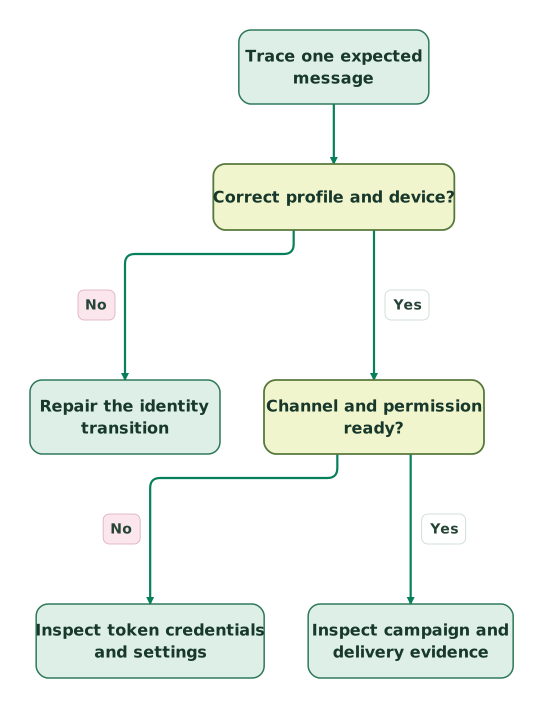
Read diagram as text
- Trace one expected message to Correct profile and device?.
- Correct profile and device? to Repair the identity transition: No.
- Correct profile and device? to Channel and permission ready?: Yes.
- Channel and permission ready? to Inspect token credentials and settings: No.
- Channel and permission ready? to Inspect campaign and delivery evidence: Yes
6. Did every uploaded profile record succeed?
Inspect the response body and reconcile submitted records with processed and unprocessed results.
CleverTap's profile-upload API reports status, processed and unprocessed. Processing errors can accompany HTTP 200. The endpoint also supports dryRun=1 to validate input without submitting it. Profile-upload responses and validation.
A transport-success log should not erase rejected records. Preserve a source identifier and the returned error for each failed record, with sensitive values restricted. Correct the failed input and determine which subset needs another attempt.
This original Python helper checks whether the response counts support a clear batch classification. It does not send data, authorize a retry or verify the resulting profile values.
def classify_profile_upload(http_status, body, submitted_count):
    if type(submitted_count) is not int or submitted_count <= 0:
        raise ValueError("submitted_count must be a positive integer")
    if type(http_status) is not int or http_status != 200:
        return "inspect_transport"
    if not isinstance(body, dict):
        return "inspect_response"

    processed = body.get("processed")
    failed = body.get("unprocessed")
    status = body.get("status")
    if (
        type(processed) is not int
        or processed < 0
        or processed > submitted_count
        or not isinstance(failed, list)
        or not all(isinstance(row, dict) for row in failed)
        or processed + len(failed) != submitted_count
    ):
        return "inspect_response"

    if status == "success" and processed == submitted_count and not failed:
        return "fully_processed"
    if status == "partial" and 0 < processed < submitted_count:
        return "partially_processed"
    if status == "fail" and processed == 0:
        return "failed"
    return "inspect_response"
For a hypothetical three-record request, two processed records and one unprocessed record with a partial status produce partially_processed. A success status with only two accounted-for records produces inspect_response; the helper does not guess where the third went.
Inspect the failed records themselves before replay. This helper only reconciles the count and declared outcome. It cannot establish that the correct person received the update, that a downstream segment refreshed or that a message should be sent.
After a full response, read back a representative profile and compare its identity and important values with the source. Use a separate reconciliation for events that trigger journeys, because blindly replaying an accepted event can repeat a customer action.
How should a CleverTap implementation be accepted and handed over?
Accept the implementation when controlled identity, profile and channel cases produce the intended results and an operator can explain failures.
Start with one consequential journey, such as onboarding after a confirmed signup. Include a completion during a delay, a preference withdrawal, two people sharing a device and a rejected profile update. The lifecycle journey guide provides the broader entry, exit and re-entry rules.
The handover should include:
Checklist
- Account, region, app builds and SDK versions.
- Stable person identity and separate account or subscription relationships.
- First identification and shared-device switching evidence.
- Ordinary profile updates separated from identity transitions.
- Standard and custom field mappings with expected types.
- International phone handling with an exception queue.
- Current FCM or APNs configuration and credential owner.
- App, device and channel permission tests.
- API response reconciliation and failed-record recovery.
- Campaign entry, suppression and delivery evidence.
- An owner who can pause the affected journey and restore compatible configuration.
When repairing an existing setup, fix the producer before replaying history or changing profile associations. Define the historical boundary separately: which records can be corrected, which events remain available and which messages must never be re-triggered.
For a defined repair, request a detailed CleverTap implementation scope with one failing trace and the expected outcome. The work should end with a repeatable acceptance case, not only a screenshot showing a green campaign.
Keep reading
Browse all CRM & Lifecycle guides
 CRM & Lifecycle
CleverTap Pricing: Work Out the Real Cost Before You Buy
Calculate CleverTap costs beyond the starting price: Core billing, add-ons, AI usage, overages and startup discounts, with clear budget examples.
Jafrin Akter AloLast updated 11 min read
 CRM & Lifecycle
Braze vs Reteno for Subscription Apps: Pricing, RevenueCat and Migration
Compare Braze and Reteno for subscription apps: billing units, RevenueCat event formats, entitlement checks, duplicate messages and a safe migration plan.
Jafrin Akter AloLast updated 14 min read
 CRM & Lifecycle
HIPAA-Compliant Email Marketing: Choose the Right CRM and Sending Route
Compare healthcare email and CRM options by BAA scope, patient-data restrictions and sending rules, with a practical setup and release checklist.
Jafrin Akter AloLast updated 14 min read
CleverTap implementation
See the setup scope, acceptance checks and handover.
Questions people ask
How long should a CleverTap implementation take?
Estimate from the required SDK releases, identity cleanup, channel configuration and journeys that must pass before launch. Separate the first useful journey from the full migration. Assign a release gate to each dependency and identify the app-review or engineering work outside marketing's control. A generic duration cannot substitute for that inventory or a scoped delivery commitment.
Should the same CleverTap profile represent everyone in a household?
Only if the product intentionally defines that shared profile and its communication rules. A common device, phone number or subscription payer does not establish that several people are one person. Keep individual identities and household relationships separate when behavior or preferences differ. Test account switching and recipient selection before using the shared relationship to target messages.
Can a successful dry run approve a production profile import?
A successful dry run establishes the validation covered by that endpoint. It does not create the destination records or prove their final identity, segmentation and messaging behavior. Follow it with a controlled authorized import, inspect the resulting profiles and reconcile the affected population. Keep historical imports from triggering live journeys unless that behavior is deliberately required.
Should support change push preferences to investigate a missing notification?
Support should first inspect the current preference and delivery evidence. A customer's refusal is a valid state that the implementation should preserve. Use a controlled test profile to isolate technical behavior instead of changing the real customer's choice. If a preference correction is genuinely requested, record its scope and verify the downstream result.
What should happen to profiles from older app versions after an SDK fix?
Keep the affected app versions visible in the rollout plan and continue checking their behavior. A new SDK release does not immediately update every installed device. Define containment for known harmful behavior, track adoption and preserve the identity or event boundary in reporting. Test the oldest supported version alongside the corrected release before declaring the issue resolved.
Sources

Written by
Jafrin Akter AloData Engineer and Co-founder at Martechdevs and Growth and Analytics Partners
Jafrin writes practical guides to marketing technology, customer data, analytics and AI workflows. Martechdevs is a Growth and Analytics Partners company.