
Third-Party Cookies: Browser Rules, Examples and Tracking Impact
A third-party cookie is a cookie set or accessed by content from a different site than the one being visited. It can support embedded functionality or recognition across websites, depending on browser rules and storage scope. Identify the actual cookie context before changing tracking, because first-party cookies, partitioned cookies and cross-site access behave differently.
On this page
Third-party cookie contexts
The examples below use fictional sites and describe storage context, not permission to collect or use particular data.
| Cookie context | Illustrative example | State availability | Implementation check |
|---|---|---|---|
| First-party | A session cookie for the shop currently being visited | Available within its permitted cookie scope | Session, expiry and security attributes |
| Unpartitioned third-party | An external widget accessing its cookies while embedded on another site | May connect activity across sites when the browser permits access | Browser blocking and approved access flow |
| Partitioned third-party | A widget storing a separate session for each top-level site | Isolated by the top-level site's partition | Correct isolation and supported browser behavior |
There is no special cookie file type called “third-party.” The relationship between the visited site and the resource using the cookie determines the context. WebKit's terminology describes both sending an existing cookie with a third-party request and accepting a new cookie from that response. WebKit tracking-prevention terminology
At Martechdevs, we would identify the feature and data dependency before replacing a cookie-based integration. Our analytics and tracking implementation service connects that inventory to consent, browser behavior and the business report that must remain useful.
First-party and third-party relationships
Imagine a visitor opens shop.example and the page embeds content from support-widget.example. A cookie belonging to the shop is used in a first-party context there. A cookie belonging to the embedded support service is used in a third-party context when that service reads or sends it inside the shop.
The same support service can be first-party when the visitor opens its own site directly. The classification follows the current browsing context. The provider's business model and commercial relationship with the shop do not determine it.
A different hostname also does not automatically mean a different site. Subdomains can belong to the same registrable site. Scheme-aware rules can additionally distinguish HTTP from HTTPS. Document the actual top-level site, resource host and protocol rather than classifying a cookie from a vendor name alone. MDN third-party cookie guide
An external JavaScript file is another common source of confusion. Downloading a script from a vendor does not by itself determine the cookie's party. The script's execution context and the cookie's domain and access path matter. Inspect the storage entry and request rather than assuming that all cookies created by analytics software are third-party cookies.
This distinction helps a marketing team ask a useful implementation question: which feature requires cross-site state, and what happens when that state is unavailable? A broad request to “remove third-party tools” can miss a first-party identifier while breaking an unrelated embedded feature.
Current browser treatment
Chrome has not followed a universal third-party-cookie shutdown timetable. Google announced that it would maintain user choice in Chrome's settings and would not introduce the previously discussed standalone cookie prompt. Its current help still describes allow, block and site-exception controls, with third-party cookies blocked by default in Incognito. Google's cookie-choice update and Chrome cookie settings
Safari and Firefox have different approaches, and partitioned storage needs separate treatment.
| Browser context | Documented treatment | Evaluation consequence |
|---|---|---|
| Chrome normal browsing | User-configurable third-party-cookie controls and exceptions | Record the actual setting used in the test |
| Chrome Incognito | Third-party cookies blocked by default | A normal-mode pass does not establish private-mode behavior |
| Firefox standard protection | Total Cookie Protection separates cookie storage by visited site | Shared cross-site state cannot be assumed |
| Safari with current CHIPS support | Cross-site cookies without requested partitioning are blocked; partitioned cookies have site scope | Test the supported partition or access mechanism |
Firefox's Total Cookie Protection maintains a separate cookie jar for each visited website. That is more precise than saying every third-party cookie is treated identically or that all cookies disappear. Mozilla Total Cookie Protection
Safari's version history matters for embedded features. WebKit says CHIPS returned in Safari 26.2 after an earlier implementation was removed for refinement. Its current description distinguishes partitioned access from unpartitioned cross-site cookies and points to the Storage Access API for the latter. Include the actual browser version in acceptance evidence. Safari partitioned-cookie support
Google also announced retirement of several Privacy Sandbox technologies, including Topics, Protected Audience and Attribution Reporting, while continuing support for CHIPS and FedCM. Do not treat an older Privacy Sandbox roadmap as a guaranteed current replacement for advertising measurement or identity. Verify the particular API and supported deployment path being proposed. Privacy Sandbox technology update
Cookie attributes and browser policy
Cookie attributes describe how a cookie can be stored and sent. They do not override every browser privacy control.
| Attribute | Main purpose | Common interpretation error |
|---|---|---|
| Domain | Defines permitted domain scope | A vendor can set a cookie for any unrelated website |
| Path | Limits the request paths that receive the cookie | Path is a complete access-security boundary |
| Secure | Restricts transmission to a secure connection, with specified browser exceptions | The cookie therefore has no privacy implications |
| HttpOnly | Prevents access through browser JavaScript | The cookie cannot be sent in requests |
| SameSite | Controls eligible cross-site sending contexts | None guarantees acceptance despite browser blocking |
| Partitioned | Requests storage isolated by a top-level-site key | The same identifier is available across unrelated sites |
MDN's Set-Cookie reference defines these controls. In particular, HttpOnly concerns script access while the browser can still send the cookie with applicable requests. A cookie's absence from document.cookie therefore does not prove that the request is anonymous. Set-Cookie attributes
SameSite=None is commonly needed for a cookie intended for embedded cross-site use, and it requires Secure. That combination expresses the intended sending context; browser blocking, partitioning and access permission can still affect the result. Check the browser's stored-cookie and request evidence rather than changing attributes until a warning disappears.
Use HTTPS and suitable attributes for the feature's security requirements. Avoid copying a session-cookie example into production without checking domain, path, lifetime and the application's authentication design. A functional demo is only one part of the implementation review.
Partitioned cookies and the shared-state limit
CHIPS stands for Cookies Having Independent Partitioned State. It lets content opt into cookie storage separated by top-level site. The storage key combines the cookie's own host key with a partition key based on the top-level site, including its scheme. MDN partitioned cookies
An embedded support widget can therefore remember a session inside shop.example without exposing that same partitioned session when the widget appears on news.example. The design supports a bounded embedded feature. It does not restore one shared third-party identifier across unrelated sites.
The following small Python model illustrates that isolation with already-normalized site keys. It is a reproducible storage example, not a browser implementation or a substitute for browser acceptance testing.
cookies = {}
widget = "support-widget.example"
shop_key = ("https://shop.example", widget)
news_key = ("https://news.example", widget)

cookies[shop_key] = "shop-session"
assert cookies.get(news_key) is None

cookies[news_key] = "news-session"
assert cookies[shop_key] == "shop-session"
assert cookies[news_key] == "news-session"
assert len(cookies) == 2
The model has two stored sessions for the same embedded service. It makes no claim about the number of people. One person could have visited both sites, and two people could have used different devices. A storage key and a customer identity are different concepts.
This is why a widget-session requirement and a cross-site attribution requirement need separate solutions. If the feature requires a shared signed-in identity, evaluate a supported authentication or storage-access flow with its user interaction and permission requirements. Test refusal and unavailable-access cases as well as the successful path.
Blocking third-party cookies in a controlled test
Use a dedicated test profile or an approved testing environment. Record the browser version, privacy mode, extensions, site exceptions and consent state before comparing outcomes. Existing cookies and previously granted access can make a returning session behave differently from a new visitor.
- List the embedded features and requests on the journey being tested.
- Identify which feature depends on unpartitioned, partitioned or first-party state.
- Start with a clean profile and the documented cookie setting.
- Complete the login, embed, form or purchase journey using controlled records.
- Inspect relevant request cookies, response Set-Cookie headers and storage entries.
- Repeat with third-party cookies blocked and with the required consent states.
- Record the functional difference and the exact blocked or partitioned dependency.
Chrome's documented desktop route is Settings, Privacy and security, then Third-party cookies. Its site exceptions can change the result, so include them in the record. The purpose is to reproduce the user's environment, not to recommend weakening a real user's privacy setting to make a product work.
Test both a new session and a return visit. Also test the same embed on a second unrelated top-level site if partition isolation is part of the design. A successful return visit to the first site does not establish shared access on the second.
Consent, identity and measurement
Browser cookie permission and the website's consent choice are separate controls. A browser can permit storage while the site's approved consent configuration still requires a tag to remain inactive. A browser can also block storage after the visitor accepts a banner. Record both states.
Google Consent Mode adds another distinction: its advanced implementation can send measurements without cookies while consent is denied. Seeing a request therefore does not establish that a third-party cookie was read or that a persistent identifier was stored. Inspect the request contents and storage behavior for the selected implementation. Google Consent Mode
The Consent Mode v2 guide covers that implementation. The cookieless tracking guide compares approaches to measurement without persistent analytics cookies.
Server-side forwarding changes where a request is processed. It does not automatically create a stable, permitted customer identity or remove the source browser's limitations. Identify the event, identifier, consent state and destination at each stage of the flow. Use server-side tracking guidance when that architecture is part of the proposed change.
For campaign diagnostics, keep the test links consistent with the UTM checker. Valid campaign labels help compare the same arrival path across browser states. The actual cookie, consent and identity observations still come from the controlled journey.
Third-party-cookie failure diagnostics
| Symptom | Possible cause | Evidence | Repair direction |
|---|---|---|---|
| Embed works only after a direct visit to its provider | Dependence on existing unpartitioned provider state | Clean-profile and direct-visit comparison | Supported embedded authentication or access flow |
| Widget remembers state on one site but not another | Expected partition isolation | Top-level site and partition key | Site-scoped design or explicit identity requirement |
| Cookie appears in storage but is absent from a request | Scope, SameSite, expiry or browser policy | Request context and cookie attributes | Correct the intended scope and supported access |
| Cookie is absent from document.cookie but requests include it | HttpOnly access restriction | Browser storage and request headers | Preserve the security control and inspect the right evidence |
| Tracking changes after a banner action | Consent mapping or timing | Consent state before and after interaction | Repair the selected tag behavior and repeat the journey |
Avoid treating every missing attribution record as a cookie problem. A lost campaign parameter, duplicate purchase event, changing customer identifier or different report window can produce a similar reporting symptom. Reconcile the accepted business outcome separately from the browser diagnosis.
Dependency and repair workflow
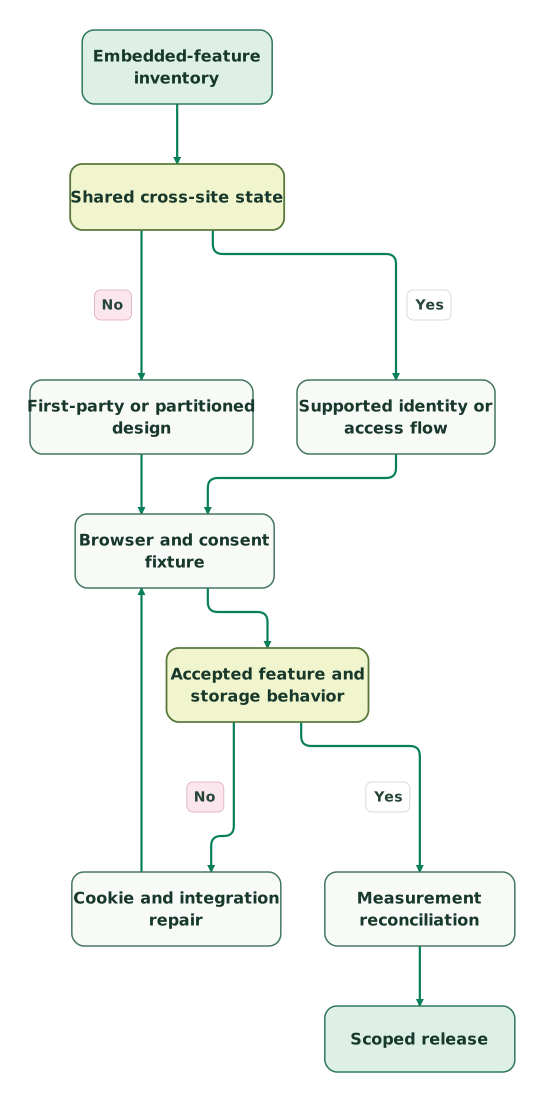
Read diagram as text
- Embedded-feature inventory to Shared cross-site state.
- Shared cross-site state to First-party or partitioned design: No.
- Shared cross-site state to Supported identity or access flow: Yes.
- First-party or partitioned design to Browser and consent fixture.
- Supported identity or access flow to Browser and consent fixture.
- Browser and consent fixture to Accepted feature and storage behavior.
- Accepted feature and storage behavior to Cookie and integration repair: No.
- Cookie and integration repair to Browser and consent fixture.
- Accepted feature and storage behavior to Measurement reconciliation: Yes.
- Measurement reconciliation to Scoped release
The consent debugging skill can organize the evidence across visitor choices and tags. Keep the observed browser behavior with the implementation record so later changes are evaluated against the same accepted feature.
Keep reading
Browse all Tracking & Attribution guides
 Tracking & Attribution
Cookieless Tracking: How It Works, What It Measures and Which Tool Fits
How cookieless tracking works in GA4, PostHog, Plausible and Simple Analytics, what each still counts and how to choose without losing reports you need.
Jafrin Akter AloLast updated 14 min read
 Tracking & Attribution
Consent Mode v2: basic vs advanced, modelling limits and a working setup
Consent Mode v2 signals explained: basic versus advanced setup, and how to test defaults, updates and tags before you trust modelled conversions.
Jafrin Akter AloLast updated 13 min read
 Tracking & Attribution
Server-side tracking: how it works, what it costs and when it pays off
Server-side tracking sends events to an endpoint you control before any platform gets them. See the architecture, costs, a worked ROI model and when it pays.
Jafrin Akter AloLast updated 17 min read
Analytics & tracking
See the implementation scope, deliverables and acceptance checks.
Questions people ask
Is an analytics cookie automatically third-party because a vendor created the script?
An analytics cookie is not automatically third-party because the script came from a vendor. The relevant context is the visited site, the cookie's scope and how the resource accesses or sends it. Inspect the actual storage entry and request. A remotely hosted script can participate in a first-party implementation, while an embedded cross-site resource can depend on third-party state.
Does Chrome's cookie-choice approach mean every visitor allows third-party cookies?
Chrome's cookie-choice approach does not mean every visitor allows third-party cookies. Users can block them or configure site exceptions, and Incognito blocks them by default. Test the actual settings relevant to the audience. A successful journey in one normal browsing profile should not be treated as evidence for private browsing, a managed configuration or a visitor with different privacy controls.
Can a partitioned support-widget cookie identify the same visitor across unrelated shops?
A partitioned support-widget cookie is isolated by top-level site, so the same cookie cannot simply be reused across unrelated shops. The widget can maintain separate site-scoped sessions where supported. If the business needs a shared signed-in identity, evaluate a supported identity flow separately and test its permissions and fallback. Two widget sessions alone do not establish two distinct people.
Does SameSite=None override a browser's third-party-cookie block?
SameSite=None does not override a browser's third-party-cookie block. It specifies a cross-site sending context and requires Secure, while browser policy and supported access mechanisms still determine availability. Inspect the request, response and stored cookie together. Repeatedly changing the attribute cannot replace a design for blocked storage, partitioned state or an explicit authentication requirement.
Can an HttpOnly cookie be active when JavaScript cannot read it?
An HttpOnly cookie can be active while JavaScript cannot read it. HttpOnly restricts script access, but the browser can send the cookie with requests that satisfy its scope and other rules. Use browser storage and network evidence to inspect that behavior. Removing HttpOnly merely to make a diagnostic script see the value would change the security design.
Sources

Written by
Jafrin Akter AloData Engineer and Co-founder at Martechdevs and Growth and Analytics Partners
Jafrin writes practical guides to marketing technology, customer data, analytics and AI workflows. Martechdevs is a Growth and Analytics Partners company.