
Search Impression Share Formula and Campaign Diagnosis
The search impression share formula is received Search impressions divided by estimated eligible Search impressions, multiplied by 100. It describes coverage within the auctions Google considers eligible for the selected scope. Use it with lost share, targeting and business outcomes, because a higher percentage does not automatically mean more useful traffic or a profitable budget increase.
On this page
Search impression share metrics
Use the exact metric and campaign scope before comparing percentages.
| Metric | Numerator or observed quantity | Denominator or comparison | Main use |
|---|---|---|---|
| Search impression share | Received Search impressions | Estimated eligible Search impressions | Coverage of eligible opportunities |
| Search lost IS, budget | Estimated opportunities missed because of budget | Eligible Search opportunity scope | Budget constraint diagnosis |
| Search lost IS, rank | Estimated opportunities missed because of Ad Rank | Eligible Search opportunity scope | Auction competitiveness diagnosis |
| Search top impression share | Impressions among top ads | Estimated eligible top-ad impressions | Top-placement opportunity |
| Top impression rate | Recorded impressions in the top-ad placement | The metric's recorded impression population | Placement of impressions already received |
Google defines eligible impressions using factors including targeting, approval and quality. The denominator is an estimate, and changes to bids or quality can change the set of auctions considered competitive. Google impression share
At Martechdevs, we would connect the campaign's coverage question to reliable conversion and revenue evidence before proposing a measurement-led change. Our analytics and tracking service helps establish that outcome evidence so an impression-share improvement can be evaluated against the business goal.
The formula and a worked example
Write the formula with its units visible:
Search impression share = received eligible-scope impressions ÷ estimated eligible impressions × 100%.
Assume a hypothetical Search reporting scope received 1,200 impressions from an estimated 3,000 eligible opportunities. Its impression share is 1,200 ÷ 3,000 × 100 = 40%. The difference is 1,800 estimated opportunities that did not produce a received impression in that simplified scope.
| Hypothetical input or result | Value | Calculation | Interpretation |
|---|---|---|---|
| Received impressions | 1,200 | Input | Observed numerator for the selected scope |
| Estimated eligible impressions | 3,000 | Input | Estimated opportunity population |
| Impression share | 40% | 1,200 ÷ 3,000 × 100 | Received share |
| Estimated unreceived opportunities | 1,800 | 3,000 − 1,200 | Difference within the same assumed population |
The 1,800 is not a promise of additional traffic available at the present cost. A different bid, budget, targeting choice or auction mix can change both participation and results. The formula explains the current estimate; it does not forecast a new campaign configuration.
You can reverse the arithmetic when the example supplies an exact share. Estimated eligible impressions = received impressions ÷ share expressed as a decimal. Here, 1,200 ÷ 0.40 = 3,000. Dividing by the displayed number 40 instead would be a unit error.
Real reported percentages can be rounded or bounded, so the reversed result may be approximate or unavailable. Preserve that qualification in a spreadsheet or dashboard instead of turning a display value into an exact count.
Eligible auctions and the market-size boundary
Search impression share is not the percentage of every search in the market that the business captured. The eligible set depends on the campaign and auction conditions. A narrow target can have high coverage while leaving many commercially relevant searches outside its chosen scope.
For example, a brand campaign can have a high impression share because it targets a comparatively constrained audience. A broader non-brand campaign can have lower share while producing more qualified prospects. Compare each against its own role and economics before setting the same percentage target for both.
Changes in geography, schedule, keyword matching, exclusions or approval status can alter the denominator. A rise from 50% to 70% may reflect stronger participation, a smaller eligible population or both. Inspect the received impressions and the configuration change beside the percentage.
Google also reports different impression-share definitions for different campaign types. This guide focuses on the Search metric; do not combine Search, Display, Shopping or other inventory into a single invented opportunity count. Keep the selected campaign type and network scope in the report.
Google excludes search partners from impression-share data. Align any impression count used in manual arithmetic with that network scope instead of borrowing an unsegmented total that includes other inventory.
The impressions versus clicks guide explains the observed counts that sit beside share. A campaign can receive more impressions while its click-through rate or accepted conversion rate changes in another direction.
Report setup and data availability
Add the required columns to the relevant Google Ads table and record the reporting level. Google's instructions place impression-share metrics under Competitive metrics in the column selector. The campaign view is necessary for Search lost IS due to budget. Impression-share reporting instructions
- Choose the campaign type and reporting date range.
- Open the Campaigns table or the appropriate ad-group or keyword view.
- Add Search impr. share from the Competitive metrics columns.
- Add Search lost IS, budget at campaign level and the applicable rank metric.
- Add impressions, clicks, cost and the accepted business-outcome columns.
- Save the filters, segments and reporting level with the comparison.
Google notes that lost rank share may be absent from the ad-group view when the campaign ran out of budget during the selected period. An absent value is therefore not evidence of zero rank loss. Its reporting guide also allows one to two days for impression-share updates.
Treat a blank or dash as a missing observation requiring interpretation. Check data availability, new or low-volume keywords and processing time before changing a bid. Keep recent incomplete periods separate from a complete comparison period.
For API-fed reports, Google documents a bounded encoding: Search impression share below 0.1 is returned as 0.0999. That value should be treated as below 10%, not as a precise measurement of 9.99%. Some lost-share fields similarly use 0.9001 for values above 90%. Google Ads metric reference
If an illustrative scope has 1,000 impressions and share below 10%, the implied eligible population is greater than 10,000 under the same formula. It is not exactly 10,000, and using 0.0999 as an exact denominator would create false precision.
Budget loss and rank loss
Budget loss points to opportunities missed because the campaign's budget was insufficient. Rank loss points to poor Ad Rank in the auction. These are useful diagnostic directions, but neither identifies the complete commercial action by itself.
Before raising budget, confirm that the campaign's accepted outcomes justify the extra spend. A campaign can be budget-constrained while buying irrelevant or low-value activity. More coverage of that activity can increase cost without meeting the intended business requirement.
Ad Rank is broader than the bid. Google lists bid, ad and landing-page quality, thresholds, competition, search context and the expected effect of assets among its inputs. Review relevance and the landing experience alongside bidding decisions. Google Ad Rank
| Observed pattern | First review | Useful evidence | Possible decision |
|---|---|---|---|
| Material budget loss with accepted economics | Budget and allocation | Spend, qualified outcomes and campaign role | A bounded budget test |
| Material rank loss | Ad relevance, landing experience and auction conditions | Search terms, ads, assets and cost | A qualified relevance or bid change |
| High share with few useful outcomes | Targeting and conversion definition | Actual queries and accepted leads or orders | Scope or measurement repair |
| Share changes after narrowing targeting | Denominator and received volume | Configuration history and impression count | A qualified comparison |
| Missing recent share values | Reporting level and processing | Columns, filters and complete dates | Wait or repair the report |
Use the negative keyword workflow skill when irrelevant searches are part of the problem. Exclusions should reflect the business's actual intent and evidence; they should not be added merely to make a percentage look better.
Top share, absolute top share and impression rate
Top and absolute top share describe eligible placement opportunity. Top and absolute top impression rates describe the placement of impressions already received under their counting rules. They should remain separate columns with their full names.
“Absolute top” means the first ad among top ads. Google's current definition also says top ads can sometimes appear below top organic results, so “top” should not be reduced to a universal above-every-organic-result rule. Top-ad definition update
Google's prominence guide cautions that placement rates can fall as bids rise, because a higher bid may enter more competitive auctions at a worse location. It also describes special impression-counting rules for these rates, including the most prominent impression for a given advertiser and user search. Do not reconstruct a placement rate from a different Campaigns-table denominator without reconciling that counting basis. Top and absolute top metrics
Use the share metric when the question concerns coverage of eligible placement opportunities. Use the rate when the question concerns where received impressions appeared. Keep the distinction when building a report, even if the short labels in an exported column look similar.
Combined percentages and weighting
An arithmetic average of percentages usually loses the denominator. Consider two hypothetical, explicitly disjoint opportunity populations:
| Population | Received impressions | Eligible impressions | Share |
|---|---|---|---|
| A | 800 | 1,000 | 80% |
| B | 400 | 2,000 | 20% |
| Combined illustrative population | 1,200 | 3,000 | 40% |
The simple average of 80% and 20% is 50%, which is wrong for this constructed combined population. Adding the numerators and denominators gives 1,200 ÷ 3,000 = 40%. The larger opportunity population receives the appropriate weight.
This example demonstrates denominator arithmetic, not a method for inventing an account-wide Google Ads share. Real campaign eligibility can overlap, reported shares can be bounded or rounded, and Google says impression-share metrics are reported separately by campaign type rather than aggregated across the account.
When a reporting tool combines rows, ask for the formula and the exact input scope. A weighted number can still be wrong if the weights come from the wrong population or if overlapping opportunities are counted twice.
Coverage and conversion evidence
Evaluate share beside clicks, cost and accepted outcomes. The CTR calculator can help verify clicks divided by impressions, but CTR and impression share use different denominators. A high share with low CTR raises a different question from a low share with a strong click response.
Conversion evidence needs its own acceptance. An overly broad website trigger or a duplicated conversion action can make extra coverage appear profitable. Use the Google Ads conversion diagnostics guide before treating reported conversions as a reliable budget signal.
Write one proposed change and its expected observation. For a budget test, specify the allowed spending change, the campaign population, the outcome measure and the review window. For a relevance repair, specify the ad or landing change and the customer behavior it is meant to improve. Avoid changing several major inputs at once and attributing the result solely to impression share.
Search impression share diagnosis workflow
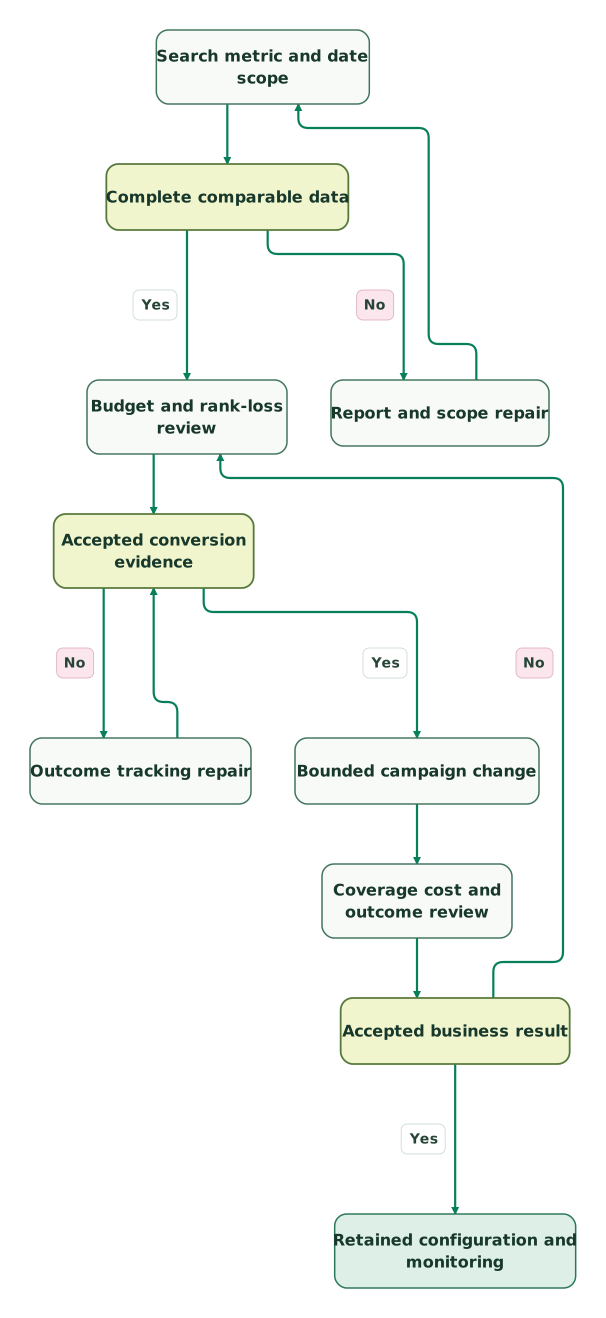
Read diagram as text
- Search metric and date scope to Complete comparable data.
- Complete comparable data to Report and scope repair: No.
- Report and scope repair to Search metric and date scope.
- Complete comparable data to Budget and rank-loss review: Yes.
- Budget and rank-loss review to Accepted conversion evidence.
- Accepted conversion evidence to Outcome tracking repair: No.
- Outcome tracking repair to Accepted conversion evidence.
- Accepted conversion evidence to Bounded campaign change: Yes.
- Bounded campaign change to Coverage cost and outcome review.
- Coverage cost and outcome review to Accepted business result.
- Accepted business result to Budget and rank-loss review: No.
- Accepted business result to Retained configuration and monitoring: Yes
Keep reading
Browse all Tracking & Attribution guides
 Tracking & Attribution
Google Ads conversion diagnostics: "setup is incomplete" and "needs attention" explained
Diagnose incomplete setup, inactive tags and enhanced-conversion alerts. Verify campaign goals, event delivery, offline uploads and the 2026 API changes.
Jafrin Akter AloLast updated 15 min read
 Tracking & Attribution
Impressions vs Clicks: Definitions, CTR and Campaign Decisions
Compare impressions and clicks, calculate CTR and combined rates, diagnose click-to-visit gaps and connect ad visibility with accepted outcomes and cost.
Jafrin Akter AloLast updated 10 min read
 Tracking & Attribution
Why Google Ads and GA4 conversions do not match, and how to reconcile them
Google Ads and GA4 count conversions on different dates, models and rules. Align them step by step, check third-party estimates and report one number.
Jafrin Akter AloLast updated 14 min read
Analytics & tracking
See the implementation scope, deliverables and acceptance checks.
Questions people ask
Can 40% Search impression share be converted into a market-size estimate?
Forty-percent Search impression share cannot by itself establish the size of the whole market. It describes the selected campaign's estimated eligible auction population. Targeting, approval, quality and other auction conditions affect that population. Reverse the formula only for the same scope and with appropriate precision, then keep the result separate from total category searches or all potential customers.
Does a missing Search lost IS, budget value mean the campaign has enough budget?
A missing Search lost IS, budget value does not establish that the budget is sufficient. Google makes the metric available at campaign level, and the selected report or data period can affect availability. Check the reporting level, columns, filters and processing window first. Treat an absent value as an unresolved observation rather than replacing it with zero in a budget calculation.
Can a 0.0999 API value be used as an exact impression-share percentage?
A 0.0999 value should not be treated as an exact share for the documented Search impression share field. Google uses it to represent a value below 10%. Preserve the bound in the report and avoid calculating an exact eligible-impression total from it. The same care applies to other fields with documented upper or lower reporting thresholds.
Can higher bids reduce the top impression rate?
Higher bids can reduce a top impression rate because they may let the campaign enter additional, more competitive auctions where placement is lower. Google's prominence guidance explicitly describes that possibility. Review received volume, eligible opportunity and business outcomes together. A placement-rate decline does not by itself establish that the bid change reduced useful coverage.
Is averaging two campaign impression-share percentages a reliable account total?
A simple average of two campaign impression-share percentages is not a reliable account total. The underlying eligible populations can differ and may overlap, while displayed percentages may be rounded or bounded. The hypothetical disjoint example requires denominator weighting, but that arithmetic should not be applied blindly to real campaign rows. Preserve Google's supported reporting scope and the metric's exact definition.
Sources

Written by
Jafrin Akter AloData Engineer and Co-founder at Martechdevs and Growth and Analytics Partners
Jafrin writes practical guides to marketing technology, customer data, analytics and AI workflows. Martechdevs is a Growth and Analytics Partners company.