
Salesforce Workbench: API Tasks, Support Status and Current Tools
Salesforce Workbench is a browser-based utility for querying and inspecting Salesforce through its APIs, but its current repository states that Salesforce does not support it and that new security issues will not be fixed. For new operating procedures, choose a maintained tool for the specific job. Preserve the query, target org and validation steps when translating an older Workbench instruction.
On this page
Salesforce Workbench task map
Choose the tool from the required operation and the access your organization has approved.
| Existing Workbench task | Current route | Required input | Acceptance evidence |
|---|---|---|---|
| Small SOQL query | Salesforce CLI data query | Target org and saved query | Expected rows and selected fields |
| In-org SOQL or Apex work | Salesforce Web Console where enabled | Supported org and approved permissions | Intended result in the correct org |
| CSV import or export | Salesforce Data Loader | Operation, mapping and source file | Reconciled result files |
| REST request inspection | Approved API client using Salesforce REST API | OAuth access, API resource and method | Status, response and complete result set |
| Metadata work | Maintained Salesforce development tooling | Explicit metadata scope and environment | Reviewed retrieval or deployment result |
Sources: Workbench repository notice, Salesforce CLI query command, Web Console and Data Loader.
Workbench's usefulness came from bringing several API jobs into one browser interface. The underlying jobs still exist when the preferred tool changes. A reliable replacement keeps the operation explicit instead of treating a successful login or a familiar-looking screen as evidence that the correct data was retrieved.
At Martechdevs, CRM and lifecycle implementation includes repeatable data checks and operating handovers. We keep the target org, query or mapping, expected result and repair path together so another administrator can reproduce the work without relying on an old screenshot.
Workbench support and existing procedures
The project's current repository notice describes Workbench as unsupported by Salesforce and in maintenance-only mode, with no new features or new security fixes. Treat that as a tool-selection constraint. A hosted login page being reachable does not establish a current support commitment.
Inventory the procedures that still mention Workbench. Some are read-only checks; others update records, delete data or deploy metadata. Replace them by operation rather than moving every procedure to a single alternative without examining the required capability.
Keep useful information from the old procedure: the business purpose, org, object, API version, selected fields, filters, expected count and output location. Remove assumptions tied only to the old interface. A newer client can execute the same logical query while presenting results and authentication differently.
Distinguish the tool from the API. Workbench is an interface to Salesforce APIs, not the owner of the organization's data model or permission rules. A field-access problem or an incorrect object relationship can remain after switching clients. The investigation should identify whether the failure is in authentication, authorization, query design or result handling.
Environment and authorization prerequisites
Begin with an approved development or sandbox environment and a bounded sample. Record the org and username or alias before running commands. An administrator who works with several environments should make the target explicit rather than relying on whichever org happens to be the default.
Salesforce CLI supports browser-based OAuth authorization with an alias. Salesforce recommends the enhanced My Domain login URL and distinguishes it from the Lightning application URL. CLI authorization guide.
The following is a command template. Replace the placeholder with the approved sandbox's My Domain login address; use the normal organizational authorization process for the client application.
sf org login web \
  --alias crm-pilot \
  --instance-url https://YOUR_DOMAIN--YOUR_SANDBOX.sandbox.my.salesforce.com
The login command reference documents the alias and instance URL flags. Authentication grants the client access under the authorized arrangement; it does not make every field or operation available. Confirm the specific API and data permissions needed for the job.
If authorization fails, inspect the exact error and approved app configuration. Salesforce's authorization troubleshooting guide distinguishes wrong login addresses, missing API access and application-policy issues. Use that evidence instead of granting broad administrative access as a generic fix.
A small reproducible SOQL query
For a controlled exercise, use Account records whose names begin with CRM Pilot. The sample below assumes two matching accounts and one unrelated account. Create or select approved test records in the chosen org before comparing the expected result.
| Sample account | Industry | Expected inclusion | Reason |
|---|---|---|---|
| CRM Pilot North | Technology | Yes | Name matches the prefix |
| CRM Pilot South | Consulting | Yes | Name matches the prefix |
| Existing Customer | Manufacturing | No | Name is outside the sample filter |
Save this query in a local file named accounts-query.soql. The fields are standard Account API names; the logged-in user still needs access to the requested data.
SELECT Id, Name, Industry, LastModifiedDate
FROM Account
WHERE Name LIKE 'CRM Pilot%'
ORDER BY Name
LIMIT 50
Run the saved query against the explicit alias and write the result to CSV.
sf data query \
  --target-org crm-pilot \
  --file accounts-query.soql \
  --result-format csv \
  --output-file accounts-check.csv
The query command supports saved files, an explicit target org and CSV output. The expected sample is two rows, with North before South. The fifty-row limit keeps the example bounded; it is not an export strategy for every account in the organization.
Inspect the returned record identifiers as well as the names. Two similarly named accounts can still be different records. The Salesforce ID guide explains identifier handling, and the Salesforce ID converter supports local conversion where the task requires it.
REST queries and complete result sets
A REST query can return only the first portion of the result. Salesforce's Query resource documents totalSize, records, done and nextRecordsUrl. A synchronous response can contain up to 2,000 records, and the returned batch can be smaller depending on the query and record complexity.
Do not treat a successful HTTP response as proof that the entire export is present. When done is false, retrieve the next page using the returned locator and continue until the result indicates completion. The query-results guide describes that sequence.
This hypothetical pagination fixture uses five records split across three pages. It illustrates result handling rather than Salesforce's actual page-size choice.
| Page | Records in page | Completion flag | Cumulative records |
|---|---|---|---|
| First response | 2 | False | 2 |
| Second response | 2 | False | 4 |
| Final response | 1 | True | 5 |
The completed count is 2 + 2 + 1 = 5. Stopping after the first successful response would retain only two records. Preserve the query, reported total and completion evidence with the output so an incomplete extraction can be distinguished from a genuine change in the data.
For queries above 10,000 records, the CLI query reference recommends the bulk-export command. Choose that maintained route for the larger job rather than stretching a small interactive query example into a production extraction design.
Query and QueryAll boundaries
Query and QueryAll answer different questions. Salesforce's QueryAll reference includes soft-deleted records and archived task and event information. It cannot retrieve records that have already been permanently removed from the recycle bin.
Use the appropriate operation for the investigation. A normal active-customer report should not unexpectedly include deleted records. A reconciliation after a merge or deletion may need the broader view. Record the choice alongside the query instead of labeling both outputs as a complete customer export.
The CLI's --all-rows option includes deleted records for supported queries. CLI query options. Verify the expected population and the user's access before comparing that output with a normal report or another extraction.
Web Console and browser-based work
Salesforce's Web Console release note describes an in-org browser development environment with SOQL and Apex execution. It is a current route to evaluate for work previously performed through browser utilities.
Availability and access remain specific. The supported-org reference distinguishes functionality across org types. The enablement guide lists Web Console User and View All Data permissions. Those permissions deserve an explicit access decision; the tool should not be enabled by casually broadening a routine reporting user's access.
Choose the narrowest suitable workflow. An employee who only needs a maintained business report may be better served by Salesforce report creation. An administrator investigating an API response may need a development tool. The intended task determines the appropriate access and operating responsibility.
Data changes and migration work
Keep read-only inspection separate from record mutation. A query that identifies the intended accounts is useful evidence before an update, but it does not approve a changed value or establish that the resulting automation will behave correctly.
For a CSV operation, use the Salesforce Data Loader guide to select insert, update or upsert deliberately and reconcile the result files. Salesforce's Data Loader overview describes the supported client interface and detailed success and error outputs.
Retain a before-state export for the affected fields and identifiers. A recovery plan should identify which changes can be reversed and which downstream actions need separate handling. Importing old field values back into Salesforce may not reverse notifications, integrations or other work already triggered by the original update.
Metadata changes require their own reviewed scope and deployment process. Do not substitute an API query tool for a controlled configuration release simply because both can connect to the same org. The Salesforce implementation checklist covers the broader release and handover requirements.
Failure diagnosis
| Symptom | First check | Likely repair area | Repeat validation |
|---|---|---|---|
| Login opens the wrong environment | Explicit alias and My Domain URL | Authorization target | Known test-account query |
| Authentication succeeds but query fails | Exact error, object and field access | Permission or query definition | Same saved query as the intended user |
| Correct query returns no rows | Org, filter and visible sample records | Population or access | Known included and excluded records |
| Export contains fewer rows than expected | Completion flag and result pages | Pagination or extraction method | Full count reconciliation |
| Deleted record appears in one result only | Query versus QueryAll choice | Population definition | Same operation and filter |
| Update completes with missing changes | Row-level success and error evidence | Mapping, validation or automation | Corrected failed-row sample |
Change one identified cause at a time. If the filter, user and target org all change together, a successful result does not explain which assumption was wrong. Preserve the failed case so the correction can be repeated and documented.
Procedure migration sequence
- Identify the exact operation in the old Workbench procedure.
- Record its target org, objects, fields, filters and expected result.
- Choose a maintained tool and qualify its access requirements.
- Authorize the approved environment using the organization's client policy.
- Run a bounded read-only sample with known included and excluded records.
- Validate completion, identifiers and output counts.
- Repair the identified failure and repeat the same sample.
- Approve any later data or metadata changes as a separate operation.
Inspection and repair workflow
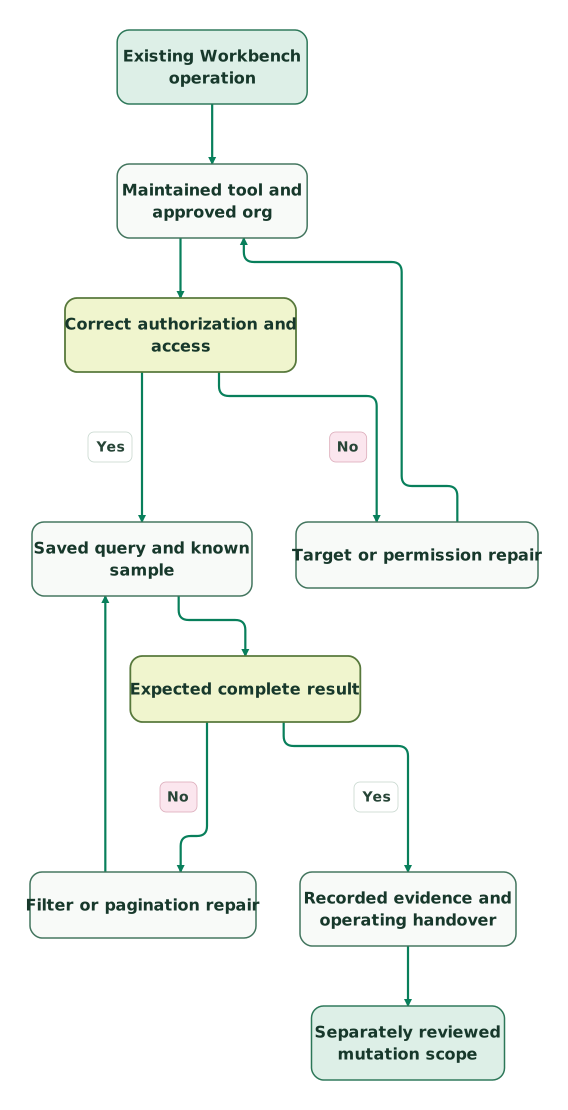
Read diagram as text
- Existing Workbench operation to Maintained tool and approved org.
- Maintained tool and approved org to Correct authorization and access.
- Correct authorization and access to Target or permission repair: No.
- Target or permission repair to Maintained tool and approved org.
- Correct authorization and access to Saved query and known sample: Yes.
- Saved query and known sample to Expected complete result.
- Expected complete result to Filter or pagination repair: No.
- Filter or pagination repair to Saved query and known sample.
- Expected complete result to Recorded evidence and operating handover: Yes.
- Recorded evidence and operating handover to Separately reviewed mutation scope
Authorization repair repeats the environment check. Query or pagination repair repeats the same sample. A verified read result supports the next decision while keeping a later update or deployment distinct from the inspection itself.
Salesforce Workbench checklist
- Identify the operation instead of copying an old interface sequence.
- Record Workbench's current support limitation in the tool decision.
- Use an explicit target org and approved authorization route.
- Validate object, field and operation access for the intended user.
- Save the query and keep its sample scope bounded.
- Inspect identifiers, expected rows and completion evidence.
- Distinguish active data from QueryAll results.
- Choose bulk extraction for the appropriate larger workload.
- Keep data changes and metadata releases separately reviewed.
- Retain the failed case and repeat validation after repair.
The CRM data hygiene audit skill helps define the records and relationships to inspect. A useful procedure ends with evidence another administrator can reproduce, rather than a screenshot of a successful connection.
Keep reading
Browse all CRM & Lifecycle guides
 CRM & Lifecycle
Salesforce 15 vs 18 Character IDs: Convert Safely and Fix Broken Joins
Convert Salesforce 15-character IDs safely, validate canonical 18-character values, prevent case collisions and diagnose broken joins or import errors.
Jafrin Akter AloLast updated 10 min read
 CRM & Lifecycle
Salesforce Implementation Checklist: From Scope to a Working Release
Plan a Salesforce rollout with owners, migration rehearsals, permissions, integration tests, UAT, cutover and recovery gates before approving the release.
Jafrin Akter AloLast updated 14 min read
 CRM & Lifecycle
Salesforce Report Types: Why Records Disappear and Totals Change
Choose Salesforce report types that keep the right records. Fix child filters, blank counts and export totals with worked examples and clear acceptance checks.
Jafrin Akter AloLast updated 12 min read
CRM & marketing automation
See the implementation scope, deliverables and acceptance checks.
Questions people ask
Is Salesforce Workbench a currently supported Salesforce product?
Workbench's current repository states that it is not supported by Salesforce and that no new features or security fixes will be added. Treat that notice as part of the tool-selection decision. For new procedures, select a maintained route for the actual query, import or development task and preserve the validation steps that made the original procedure useful.
Does a successful Workbench or CLI login prove access to every field?
A successful login does not prove access to every field or operation. Authentication establishes the session, while the user's permissions and client configuration determine what the tool can do. Test the required object, fields and action with the intended user, and inspect the exact error before changing access or assuming that the data does not exist.
Can the first successful REST query response be treated as the whole export?
The first successful REST query response is not necessarily the whole export. Inspect the completion flag and follow the returned query locator while more results remain. Reconcile the collected records with the expected population and retain the query definition. A successful status code confirms the request result, but it does not establish that pagination has been completed.
Can QueryAll recover a Salesforce record after permanent removal?
QueryAll cannot recover a record that has already been permanently removed from the recycle bin. It extends the query population to supported soft-deleted records and archived task or event information. Use it for the appropriate investigation, then distinguish that result from a normal active-record query so broader visibility does not become an unexplained reporting difference.
Should a routine report user receive View All Data to use Web Console?
A routine report user should receive access based on their required work and the organization's approved policy, rather than receiving View All Data simply to open Web Console. Salesforce documents that permission as part of Web Console access. If the job is business reporting, evaluate a maintained report and its proper sharing scope before choosing a broader development environment.
Sources
- Workbench repository and support notice
- Salesforce CLI data query
- Salesforce CLI browser authorization
- Salesforce CLI login command
- Salesforce authorization troubleshooting
- Salesforce REST Query resource
- Salesforce query result pagination
- Salesforce QueryAll resource
- Salesforce Web Console release note
- Web Console supported org types
- Web Console enablement and permissions
- Salesforce Data Loader overview

Written by
Jafrin Akter AloData Engineer and Co-founder at Martechdevs and Growth and Analytics Partners
Jafrin writes practical guides to marketing technology, customer data, analytics and AI workflows. Martechdevs is a Growth and Analytics Partners company.