
Klaviyo Events API: Send Reliable Events Without Duplicate Flow Entry
Reliable Klaviyo event ingestion needs a known profile, the intended metric, a stable ID for each logical event and the original occurrence time. Preserve those values across retries, distinguish historical backfills from live customer actions, and verify the recorded event after an accepted response. A 202 Accepted response confirms submission for processing; it does not prove the event or resulting customer journey completed.
On this page

The most useful acceptance test contains two genuine events and a repeated delivery of one of them. Both real occurrences should survive, the retry should add nothing, and the intended profile should receive only the appropriate journey entry. For lifecycle messaging implementation, that test catches mistakes a large successful-request counter can hide.
Which endpoint and authentication route should you use?
Use the server-side Create Event endpoint for an individual event, and Bulk Create Events for bounded groups. Keep browser tracking on the separate client-side API or SDK route.
| Route | Endpoint | Intended use | Required control |
|---|---|---|---|
| Create Event | POST /api/events | One logical occurrence | Stable event identity and readback |
| Bulk Create Events | POST /api/event-bulk-create-jobs | Multiple events for one or more profiles | Batch validation, size limits and per-event reconciliation |
| Client-side tracking | Supported client API or SDK | Permitted browser/app behaviour | Public identifier and the relevant consent/identity controls |
Server APIs use a private key or OAuth; client endpoints use the public company/site ID. Private keys must remain on the server and out of browser code and public repositories. Klaviyo API authentication.
Create Event requires events:write and an explicit API revision. Its successful response indicates validation and submission, with processing still asynchronous. Create Event contract. Give the verification process its required read access separately rather than granting every key full account access.
For data leaving Klaviyo, webhooks are a different integration direction. Do not send an event-ingestion payload to a flow webhook URL and expect it to create a metric.
How should an event, metric and profile be defined?
An event is one occurrence, a metric names the activity, and the profile identifies the person associated with it. Define those three independently before constructing the request.
Klaviyo distinguishes a metric such as Placed Order from the individual timestamped events recorded under it. Custom integration concepts.
For a hypothetical fulfilment feed, one shipment confirmation is an occurrence. Two shipments from the same order are two occurrences if the business wants separate fulfilment follow-up. An ID based only on the order would collapse them; a new ID for every HTTP attempt would duplicate them.
Write a compact event contract:
| Contract field | Example decision | Acceptance question |
|---|---|---|
| Metric | Fulfillment Confirmed, an illustrative custom metric | Does the flow listen to this actual metric and source? |
| Occurrence | One source fulfilment confirmation | Can two partial fulfilments be distinguished? |
| Profile | Verified Klaviyo profile mapped to the customer | Does the source customer resolve to the intended person? |
| Event ID | Persisted ID assigned to that occurrence | Is exactly the same ID reused after a timeout? |
| Time | Original confirmation instant | Does a historical load preserve when it happened? |
| Value | Allocated merchandise value for this fulfilment, in USD | Is it distinct from the whole order, tax and shipping? |
The metric name in this example is a design choice, not a native integration event. Inspect the metric ID and integration source in the target account before adding a similarly named feed. A flow listening to one purchase metric does not automatically listen to every metric with a familiar display name.
Which profile identifiers should be sent?
Send only identifiers whose relationship you have verified, and preserve that resolved identity in the event-delivery record.
Create Event can create a profile or update an existing profile's properties, so an event write is not necessarily limited to event history. Profile effects of Create Event.
Prefer a known Klaviyo profile ID when your integration already has a reliable mapping. If using email or phone to resolve a person, validate the source and avoid attaching an unrelated stored profile ID to the request. Changing the profile on a retry also changes the event's deduplication context.
Klaviyo's external_id does not participate in profile merging in the same way as its other identifiers and can lead to duplicates. Do not assume that a source-system ID alone will merge with an existing email-based profile. Profile identifier behaviour.
Keep mutable profile fields out of a historical event unless the integration is intentionally authorised to update their current values. Importing an old order should not restore an outdated customer name or overwrite a newer preference. The CRM field-ownership method applies to profile writers as well as CRM connectors.
What does a minimal event payload look like?
A minimal useful payload contains the metric, known profile, event properties and stable occurrence identity. Add time and monetary fields deliberately rather than relying on defaults.
This synthetic example uses an illustrative profile ID that must be replaced with a verified profile from the intended account. The event represents USD 149.95 of merchandise allocated to one fulfilment, excluding tax and shipping. It does not subscribe the profile to marketing.
{
  "data": {
    "type": "event",
    "attributes": {
      "properties": {
        "store_id": "store-a",
        "order_id": "order-840",
        "fulfillment_id": "fulfillment-840-1"
      },
      "time": "2026-10-20T08:30:00+00:00",
      "value": 149.95,
      "value_currency": "USD",
      "unique_id": "event-fulfillment-840-1",
      "backfill": false,
      "metric": {
        "data": {
          "type": "metric",
          "attributes": {"name": "Fulfillment Confirmed"}
        }
      },
      "profile": {
        "data": {
          "type": "profile",
          "id": "01K00000000000000000000000",
          "attributes": {}
        }
      }
    }
  }
}
value and value_currency belong in the event attributes, alongside properties; putting them inside ordinary event properties does not express the same monetary field. The profile wrapper still includes its required attributes object when a known ID is used. Current Events request schema.
For a private-key request, the server sends Authorization: Klaviyo-API-Key <secret>, Content-Type: application/vnd.api+json and the chosen revision, such as 2026-10-15. Store the secret through the deployment's secret-management route. The revision is a protocol choice to test, not a date to update automatically whenever the calendar changes.
A bounded payload builder for the fulfilment example
This Python function builds data only; it performs no network request. It is intentionally USD-only, uses integer cents and accepts a known profile ID. The USD 10 million maximum and 255-character text bounds are local guardrails for this example, not a general validator for every Klaviyo event.
from datetime import datetime, timezone


def fulfillment_event(
    *, profile_id, event_id, store_id, order_id, fulfillment_id,
    occurred_at, amount_cents, backfill=False
):
    values = [profile_id, event_id, store_id, order_id, fulfillment_id]
    if any(not isinstance(v, str) or not v.strip() or len(v) > 255 for v in values):
        raise ValueError("Provide known, nonempty identifiers")
    if any(v != v.strip() for v in values):
        raise ValueError("Identifiers must not contain surrounding whitespace")
    if type(amount_cents) is not int or not 0 <= amount_cents <= 1_000_000_000:
        raise ValueError("Use integer USD cents within the example's limit")
    if not isinstance(occurred_at, datetime) or occurred_at.utcoffset() is None:
        raise ValueError("Provide a timezone-aware occurrence time")
    if type(backfill) is not bool:
        raise ValueError("backfill must be boolean")
    attributes = {
        "properties": {
            "store_id": store_id,
            "order_id": order_id,
            "fulfillment_id": fulfillment_id,
        },
        "time": occurred_at.astimezone(timezone.utc).isoformat(timespec="seconds"),
        "value": amount_cents / 100,
        "value_currency": "USD",
        "unique_id": event_id,
        "backfill": backfill,
        "metric": {"data": {
            "type": "metric", "attributes": {"name": "Fulfillment Confirmed"}
        }},
        "profile": {"data": {
            "type": "profile", "id": profile_id, "attributes": {}
        }},
    }
    return {"data": {"type": "event", "attributes": attributes}}
Generate or assign event_id once when the source occurrence is recorded, persist it, and pass the same value on retries. Do not create a UUID inside the retry loop. Confirm the actual profile exists and that the occurrence time meets the endpoint's allowed range before submitting; schema shape alone cannot prove either business fact.
How does Klaviyo event deduplication work?
Klaviyo deduplicates event creation by profile, metric and unique_id. Repeating that tuple preserves the first processed event; it is not an instruction to edit the earlier event. Without an explicit ID, the default uses time truncated to a second, so distinct same-second events can collide. Event identity rules.
Store the resolved profile, metric identity, source occurrence, event ID and intended payload together in a delivery ledger. Keep HTTP attempts in a separate history. This makes a timeout retry reproducible even if the customer's email or other source data changes meanwhile.
| Situation | Correct source decision | Risk of the shortcut |
|---|---|---|
| Same fulfilment, response lost | Retry the same occurrence and ID | A new ID can add a duplicate event |
| Two fulfilments at the same second | Use two distinct occurrence IDs | Timestamp-only identity can drop one |
| Second store uses the same order number | Preserve store and occurrence identity | Order number alone can collide |
| Earlier event contains a wrong amount | Follow a reviewed correction policy | Reposting the same ID will not overwrite the first event |
| Profile mapping was wrong | Reconcile the wrong record and intended outcome | Changing profile on retry can create another event and another journey |
Do not turn a correction into a new “purchase” simply to change a report total. Decide whether the source needs a compensating event, corrected reporting model or a separately controlled remediation. Preserve why the correction exists and whether customer communication should occur.
How should historical events be imported?
Preserve the original occurrence time and use the backfill control for the actual endpoint, then inspect every downstream journey affected by the new history. If the backfill is part of a move from Mailchimp, first check what Klaviyo's Mailchimp migration already imports.
For Create Event, backfill: true is an event attribute. In a bulk request, place it on each event-bulk-create entry to govern that entry's events. The events remain recorded and usable in segmentation, while their metric-triggered flows are suppressed. Historical event controls.
That suppression does not remove the need to test segment-based journeys or current profile writes. Loading old purchases can change an audience today even when the old purchase itself does not start a metric-triggered flow.
Use a controlled historical cohort containing a previous buyer, a refunded purchase and a profile with a restrictive communication preference. Inspect recorded history, segment membership, profile changes and message activity before expanding the import.
A stable ID also matters during backfill. If the original live occurrence was already recorded, replaying it under a new ID describes another event to the ingestion system. Keep the source occurrence identity consistent across live and historical routes unless the correction plan explicitly calls for a different record.
How should bulk requests be validated before sending?
Validate the complete batch, not just one representative event, and keep each source occurrence traceable through the response and readback.
Bulk Create Events accepts up to 1,000 events per request, with a maximum 5 MB payload and a 100 KB limit for one string. It also can create profiles or update their properties. Bulk endpoint limits.
Klaviyo warns that repeated event IDs within a bulk request can reject the request rather than merely discard an extra copy. Adopt a stricter local preflight rule that every unique_id in your batch is distinct, and remove accidental duplicate occurrences before submission. Bulk deduplication warning.
Keep bulk profile wrappers separate from the events nested beneath them. Reusing the single-event JSON unchanged inside a bulk job can put fields at the wrong level. Validate both forms against the selected endpoint's schema.
A useful batch record includes its payload hash, source IDs, profile grouping, event count, serialized byte size, API revision, response and unresolved events. If the request fails validation, repair the cause while preserving the same source occurrence identities.
Do not treat the event count limit as a target. A smaller batch can be easier to reconcile and recover, particularly when profiles or properties need correction.
Which event properties can mislead segmentation?
Keep event-property semantics explicit, especially for missing, zero and empty values.
Klaviyo excludes numeric zero, null and empty-string event-property values from segmentation as though they were not set. Profile properties behave differently. Excluded event-property values.
If “no discount” is an important segment condition, model that business state explicitly, for example with an agreed categorical discount_status value of none. Do not depend on a numeric discount_amount: 0 behaving like a retained segmentable property. Keep the actual monetary amount in its correct field and the categorical meaning separately defined.
Likewise, do not use an empty string to mean both unknown and deliberately cleared. A downstream operator should be able to distinguish unavailable data from a real zero-value transaction or an intentionally omitted property.
Keep order-level and item-level events separate. Counting each item as another order can multiply conversion counts, while sending the whole order value on every item can multiply value. The Klaviyo source-order reconciliation guide explains the reporting consequence.
How should retries and rate limits be handled?
Retry transient failures with the same event identity, and stop automatic retries when the payload or authorization needs repair.
| Result | Interpretation | Next action |
|---|---|---|
| 202 | Submitted for asynchronous processing | Record acceptance, then verify the event |
| 400 or 415 | Invalid request shape, parameter or media type | Inspect the error and correct the request |
| 401 or 403 | Authentication or permission problem | Check account, key/token and scopes |
| 429 | Rate window exceeded | Wait for Retry-After, then retry with unchanged IDs |
| 503 or a transient network failure | Service unavailable or outcome uncertain | Apply bounded backoff and preserve identity |
Klaviyo's 429 Retry-After value is in seconds. Private-key integrations share account-level quota, while OAuth apps have a quota per installed app instance. Burst and steady windows both apply. Rate-limit and retry behaviour.
Create Event lists 350 requests per second burst and 3,500 per minute steady; Bulk Create Events lists 10 per second and 150 per minute. Those are ceilings, not throughput commitments. A sender running at 350 requests every second would exceed the steady limit. Create Event rate, bulk rate.
Use a shared limiter for the relevant account/app scope, add jitter to retries and keep failed work durable. Record the response's error detail rather than reducing every failure to “API down.” A malformed event retried indefinitely wastes capacity without improving delivery.
Why can an accepted event fail to appear?
Check the profile, metric, event ID and processing evidence before sending another version of the same occurrence.
Klaviyo can accept placeholder addresses such as @example.com and later drop the events. Use a controlled real address or verified profile for account acceptance tests; the synthetic payload above is for local construction checks. Accepted-but-missing event diagnostics.
Then inspect the actual metric and profile activity. A duplicate ID may have been discarded; a wrong profile may have received the event; or a similarly named metric may be the one that changed.
Use Get Events with the supported profile, metric and time filters, and paginate the result. Get Events.
Record three separate outcomes: accepted by the API, found in event history, and handled by the intended journey. A profile can contain the event while a flow correctly excludes it because of current eligibility. Conversely, a recorded event on the wrong profile is an ingestion failure even if a message sends.
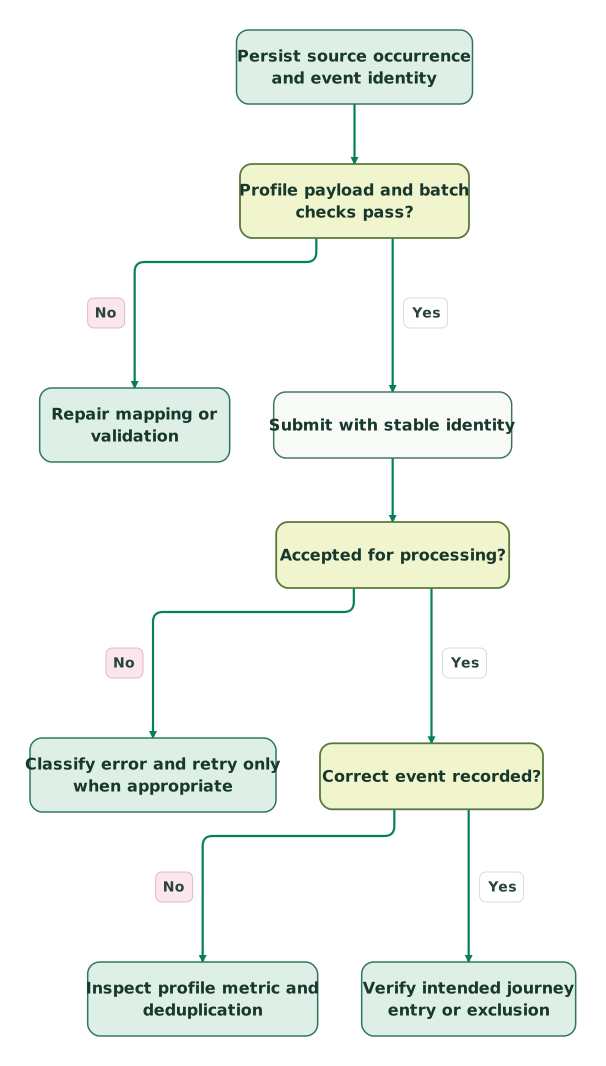
Read diagram as text
- Persist source occurrence and event identity to Profile payload and batch checks pass?.
- Profile payload and batch checks pass? to Repair mapping or validation: No.
- Profile payload and batch checks pass? to Submit with stable identity: Yes.
- Submit with stable identity to Accepted for processing?.
- Accepted for processing? to Classify error and retry only when appropriate: No.
- Accepted for processing? to Correct event recorded?: Yes.
- Correct event recorded? to Inspect profile metric and deduplication: No.
- Correct event recorded? to Verify intended journey entry or exclusion: Yes
What should the release test include?
Release the feed when distinct events, repeated delivery, historical imports and customer eligibility all produce their intended outcomes.
| Controlled case | Expected result | Evidence |
|---|---|---|
| Two same-second fulfilments with distinct IDs | Both occurrences survive | Source and recorded event IDs |
| Retry one accepted event | No extra occurrence or unintended entry | Stable tuple and activity history |
| Timeout after submission | Same identity on retry | Attempt ledger and eventual readback |
| Historical event with backfill | History recorded with the intended flow suppression | Event time, segment state and message activity |
| Batch contains a duplicate source occurrence | Local preflight blocks or removes it deliberately | Batch validation result |
| Old event carries stale profile fields | Current profile state remains under its owner | Before/after profile comparison |
| Recipient is ineligible for marketing | Event history and messaging eligibility stay distinct | Preference and flow decision |
Checklist
- Each metric has a defined occurrence and value basis.
- Profile identity is known and preserved across retries.
- Event IDs originate from the source ledger rather than the HTTP attempt.
- Time, currency and monetary fields occupy the correct schema locations.
- Bulk grouping, uniqueness and serialized size are checked.
- Backfill uses the correct level and downstream journeys are inspected.
- Retries follow the relevant quota and retain their original identity.
- Readback verifies the event before the journey is marked ready.
If the custom feed connects commerce or product activity to customer communication, Martechdevs' lifecycle implementation can define the source contract, payload, reconciliation and release checks together. Use the tracking-plan guide to keep the event definitions consistent as more teams depend on them.
Keep reading
Browse all CRM & Lifecycle guides
 CRM & Lifecycle
Klaviyo Implementation Mistakes That Distort Flows and Revenue
Find Klaviyo errors in order events, flow filters, backfills, frequency caps and attribution, with a practical acceptance test and reconciliation example.
Jafrin Akter AloLast updated 12 min read
 Martech AI
Klaviyo MCP Server: Connect Safely and Get Reports That Reconcile
Configure Klaviyo MCP access, confirm the right account and reconcile flow reporting with the dashboard before acting on AI recommendations.
Jafrin Akter AloLast updated 8 min read
 CRM & Lifecycle
Klaviyo active profiles: what counts, plan compliance and a safe cleanup
Why Klaviyo says your plan is out of compliance for active profiles, when the upgrade happens, and how to suppress the right records before renewal.
Jafrin Akter AloLast updated 11 min read
Lifecycle marketing
See the implementation scope, deliverables and acceptance checks.
Questions people ask
Does sending the same unique ID correct an event's earlier amount?
No. Klaviyo records the first processed event for the same profile, metric and unique ID; a later repeat is treated as a duplicate. Define a correction process that preserves the original source evidence and reporting meaning. Do not generate another purchase event merely to overwrite a total, because the new event may also create another customer journey entry.
Can a profile ID change between the first attempt and its retry?
Changing the profile changes the deduplication context, so treat that as an identity correction rather than an ordinary retry. Preserve the original submitted mapping and investigate where the occurrence was recorded. Resolve the intended person and any downstream effect before resubmission. A retry worker should not silently re-resolve the customer differently every time it runs.
Should a fulfilment event use the order ID as its unique ID?
Use an identity that represents the actual occurrence. If one order can have several fulfilments, the order ID alone is insufficient. Preserve the store and fulfilment relationship, and assign a stable event ID to each genuine confirmation. Reuse that identity for delivery attempts. Keep order-level reporting separate so partial fulfilments do not become multiple purchases.
Does importing events give the profile permission to receive marketing?
No. Event history and communication permission are separate. A profile may be created or updated by ingestion without having agreed to marketing. Keep the intended channel and subscription purpose in the eligibility process, and test an ineligible profile before activating flows. The integration should not infer consent merely because an order, login or product event exists.
Can one successful bulk response be used as the migration completion count?
Use it as an accepted-request count, then reconcile the underlying events and profiles. Preserve the source population, event IDs and batch membership so missing or duplicate outcomes can be investigated. Inspect historical flow behaviour and profile updates as well as record totals. A completed transport step does not prove the imported history reached the correct people with the intended timing.
Sources

Written by
Jafrin Akter AloData Engineer and Co-founder at Martechdevs and Growth and Analytics Partners
Jafrin writes practical guides to marketing technology, customer data, analytics and AI workflows. Martechdevs is a Growth and Analytics Partners company.