
Instantly Alternatives: Four Tools by Workflow, Limits and Cost
Pick Smartlead for a mailbox-based outreach operation, lemlist for a team choosing between email-volume and multichannel work, Reply.io for coordinated sales channels, and Mailshake for a smaller seller-led programme. The best Instantly alternative fixes a specific operating gap. Compare contact and send limits, reply handling, suppression and the full infrastructure bill before moving active campaigns.
On this page
Instantly competitors compared
These are USD public prices with monthly billing, excluding promotions, mailboxes, domains and optional data purchases.
| Tool | Entry configuration | Best fit | Main tradeoff |
|---|---|---|---|
| Smartlead | Base $39/month; 2,000 stored contacts and 6,000 email sends | An email-focused operation managing multiple connected mailboxes | Client-workspace, data and supporting-service costs need a separate check |
| lemlist | Email $69/month; 50,000 emails with unlimited users and senders | Teams buying email capacity separately from multichannel seller access | Multichannel Expert uses a different per-user model |
| Reply.io | Multichannel $99/user/month for the configuration compared here | Sales teams coordinating email with other channels | Seat quantities, data and channel entitlements affect the complete bill |
| Mailshake | Starter $29/user/month; one email address and 1,500 monthly sends | A smaller programme with one accountable seller | Higher send needs require a suitable higher plan |
Sources: Smartlead pricing, lemlist plans, Reply.io pricing, and Mailshake pricing.
Reply.io also sells a separate Email Volume offer. This comparison uses its clearly priced Multichannel configuration for that job; an email-only quote needs its own active-contact and user assumptions.
We would keep Instantly if the current process works and the proposed change only moves the same problem elsewhere. Our GTM engineering service starts with audience quality, sender ownership, reply routing and CRM handoff. Changing the sequencer does not repair a missing suppression rule or an unattended inbox.

The Instantly configuration being replaced
Instantly's standalone Outreach Growth plan lists $47 monthly, with 1,000 uploaded contacts and 5,000 monthly emails. Its data-credit offering is a separate product, and the site also sells bundles. Record the exact subscriptions you currently pay for before comparing the replacement's headline amount. Instantly product pricing.
Uploaded contacts, contacts active in a month, total email sends, account users and connected mailboxes are different units. A contact receiving an initial email and two follow-ups uses three sends if all steps occur. A platform can support many mailbox connections while still imposing a total contact or sending allowance.
Build the baseline from an ordinary completed period:
- Audience: Unique eligible contacts, stored records and excluded domains or addresses.
- Messages: Initial sends, follow-ups, manual responses and any other billable sending.
- People: Account administrators, sellers, reviewers and client access.
- Mailboxes: Owned accounts, provider subscriptions, connection status and assigned sender.
- Outcomes: Positive replies, accepted meetings and CRM follow-up, with their definitions.
- Failures: Bounces, duplicate enrolments, missed replies and messages after an opt-out.
The cold email infrastructure guide helps separate the sending service from the systems around it. Use that boundary before deciding whether a platform replacement is the right repair.
Alternatives by operating need
Smartlead for an email-focused operation
- Best for: Teams managing email campaigns across connected mailboxes and needing a defined contact/send budget.
- Pros: All plans list unlimited connected email accounts. Base includes 2,000 contacts and 6,000 monthly sends; Pro lists 30,000 and 90,000 respectively. Smartlead plans.
- Cons: Verification, purchased mailboxes and client-workspace features can add separate costs. Confirm the exact service included in each line.
- Free plan and startup offer: The site offers a trial without a credit card. Use regular paid rates for the continuing budget.
- Choose it if: Its reply workflow, account separation and integrations pass your actual operating test.
- Skip it if: The only reason is an unlimited-mailbox label while the audience, volume and ownership problem remains unresolved.
For an agency, test the permissions boundary between clients. The person working one customer's replies should see the appropriate account and send with the correct identity. The available client-workspace and branding arrangement belongs in the quote.
lemlist for volume-priced email or seller-led multichannel work
- Best for: Teams that want a deliberate choice between email capacity and a per-person multichannel process.
- Pros: Email includes unlimited users and senders at a selected monthly volume. Multichannel Expert adds its channel workflow at $109 per user monthly. Current plan guide.
- Cons: These plan families use different units. Moving between them needs the applicable subscription process, and reaching the Email volume limit pauses campaigns.
- Free plan and startup offer: The guide specifies a 14-day trial for Multichannel Expert and no free trial for Email. Check any separate promotion's terms.
- Choose it if: The team's actual channel mix and reply-handling process justify the selected model.
- Skip it if: Your comparison assumes the Email price includes every multichannel feature or treats it as a per-seat price.
Test the reply rule deliberately. lemlist permits continuing, pausing or ending a sequence after a reply, and can also pause other contacts at the same company. Configure the intended behaviour rather than assuming every campaign stops the same way. Reply automation.
Reply.io for coordinated sales channels
- Best for: Sellers working through a defined combination of email, calls and other supported touchpoints.
- Pros: The Multichannel package lists email automation, channel steps and team reporting under a per-user purchase. Reply.io plan scope.
- Cons: A channel appearing in the sequence builder does not establish every external account, data credit or usage cost is included.
- Free plan and startup offer: A trial is advertised for the selected package. Keep discounted first-term offers separate from regular rates.
- Choose it if: The seller can complete the required sequence and handoff inside the quoted configuration.
- Skip it if: The team only needs a narrow email process and the additional channels introduce work without improving the sales motion.
For an email-only evaluation, distinguish Reply's active-contact unit from stored contacts. Its pricing page defines active contacts as unique contacts eligible for a first-step email and follow-ups during the month. Confirm the chosen tier and its fair-use mailbox policy before treating its capacity label as comparable to another vendor's stored-contact limit.
Mailshake for a smaller accountable sales programme
- Best for: A seller or small team that needs a defined sequence and a manageable reply queue.
- Pros: Starter lists automated email sequences and A/B testing with a small explicit send allowance. Higher packages add CRM and sales-engagement functions. Mailshake plans.
- Cons: Billing is based on purchased users, while connected-email and sending scope depend on the plan. Confirm both before adding staff or sender identities.
- Free plan and startup offer: The pricing FAQ says payment is collected upfront and there is no free trial. Review the available evaluation or onboarding arrangement before purchasing.
- Choose it if: The selected package fits the real monthly workload and the seller can reliably handle responses.
- Skip it if: The operating requirement depends on many clients or sender accounts without an agreed account structure.
Run a trial or approved evaluation case around a reply needing follow-up, a negative reply and an out-of-office response. A usable queue should lead to the correct next task, not simply accumulate message activity for a report.
Comparable capacity and complete cost
Start with one operator, 1,000 eligible stored contacts and a planned maximum of three email touches per person during the month. If every person reaches all three steps, that is 3,000 sends. Early replies and exclusions may reduce the actual count. This is an illustrative capacity model, not a recommended sending cadence.
| Candidate configuration | Public monthly base | Fit for the stated volume | Remaining purchase check |
|---|---|---|---|
| Instantly Outreach Growth | $47 | 1,000 uploaded contacts and 5,000 sends | Separate data products and required functions |
| Smartlead Base | $39 | 2,000 contacts and 6,000 sends | Required integrations and operating access |
| lemlist Email, 50,000 tier | $69 | Sending allowance exceeds the example | Email-only scope and actual provider capacity |
| Mailshake Starter | $29/user | 1,500 sends cannot cover all 3,000 | Higher plan required for this workload |
| Reply.io Multichannel | $99/user | Candidate for the broader channel job | Exact connected accounts and external charges |
These figures use the vendor pricing sources above. A cheaper entry plan that cannot execute the workload is not the budget to approve. Likewise, unused allowance on a larger plan has no value unless the business needs it.
Now add an explicitly hypothetical infrastructure allowance: one mailbox at $6 monthly, one domain at $15 annually and $20 monthly for data and verification. That is $6 + $15 / 12 + $20 = $27.25 per month beyond the sequencer. A $39 platform becomes $66.25; a $69 platform becomes $96.25. Replace those assumptions with the actual provider and data quotes.
If a migration costs $900 and saves $15 per month after all recurring changes, simple subscription payback is 60 months. A faster reply workflow or better client separation can still justify the move, but make that benefit explicit and measure it separately.
For a wider data-and-engagement option, see Apollo alternatives. Use the software pricing directory to include tools that remain after the sequencer changes.
Platform allowances and provider limits
An unlimited platform feature is bounded by the systems it connects to. Google Workspace, for example, applies its own per-account sending and recipient limits and can stop further sending after a limit is reached. The connected platform cannot waive those rules. Google Workspace sending limits.
Treat authentication, sender reputation, recipient relevance and provider policy as operating requirements. A warmup feature or large platform send allowance does not guarantee inbox placement. Investigate a delivery problem before migrating it: the cause may be the audience, message, domain configuration or sender behaviour.
The US CAN-SPAM rules also apply to business-to-business commercial email. The FTC requires accurate sender information, an appropriate opt-out mechanism and timely honouring of opt-outs, among other requirements. Apply the rules for the actual countries and channels being used. FTC business guidance.
Keep the allowed audience and suppression policy attached to the workflow. Expanding a platform allowance does not expand permission to contact a person. A recipient's objection must remain effective through imports, re-enrichment and tool changes.
Migration of exclusions and active sequences
Move suppression before moving active sending. Instantly's Global Blocklist tab applies during imports and ongoing campaigns. Its Google Sheets blocklist integration is checked only at import/upload time, so it is not equivalent to the live blocklist tab. Record the effective source and export the required addresses or domains. Instantly Global Blocklist.
Bring over the current sequence state: never contacted, in progress, replied, bounced, opted out, completed and manually paused. Define which records may enter a new campaign and which must remain excluded. A contact export that loses these distinctions can restart old outreach at the wrong step.
Test the same cases in each candidate before reconnecting production sending:
| Case | Expected result | Evidence |
|---|---|---|
| Reply received before follow-up | Required pause/end and seller task | Reply recognition and next queued step |
| Opt-out in any connected campaign | Suppression across the agreed scope | Recipient state and later enrolment test |
| Duplicate import | No duplicate business action | Matched identity and campaign membership |
| Out-of-office response | Agreed pause and review | Classified response and resume rule |
| Sender disconnected | Visible failure without silent reassignment | Account status and exception queue |
| Late reply during cutover | One accountable conversation owner | Old/new inbox reconciliation |
Inspect queued messages as well as future sequence rules. Changing a setting should have a documented effect on work already accepted for sending. The acceptance test must establish that boundary for the chosen platform.
Preserve recovery without enabling two senders for the same follow-up. Pause new entry to the old process, reconcile remaining work and then activate the agreed group in the replacement. Keep the old reply path accessible for the period needed to handle outstanding conversations.
Best fit by sales motion
| Situation | First candidate | Runner-up | Deciding evidence |
|---|---|---|---|
| Email-focused team with several mailbox connections | Smartlead | Retained Instantly setup | Stored-contact capacity and reply ownership |
| Team wanting email-volume pricing with several operators | lemlist Email | Smartlead | Required volume and access scope |
| Sellers combining email and other channels | Reply.io Multichannel | lemlist Multichannel Expert | Per-user process and channel costs |
| Smaller programme with one responsible seller | Mailshake | Retained Instantly setup | Appropriate send allowance and usable reply queue |
| Agency with isolated client work | Explicit agency/workspace quote | Current-system repair | Access separation, branding and complete client cost |
Replacement acceptance checklist
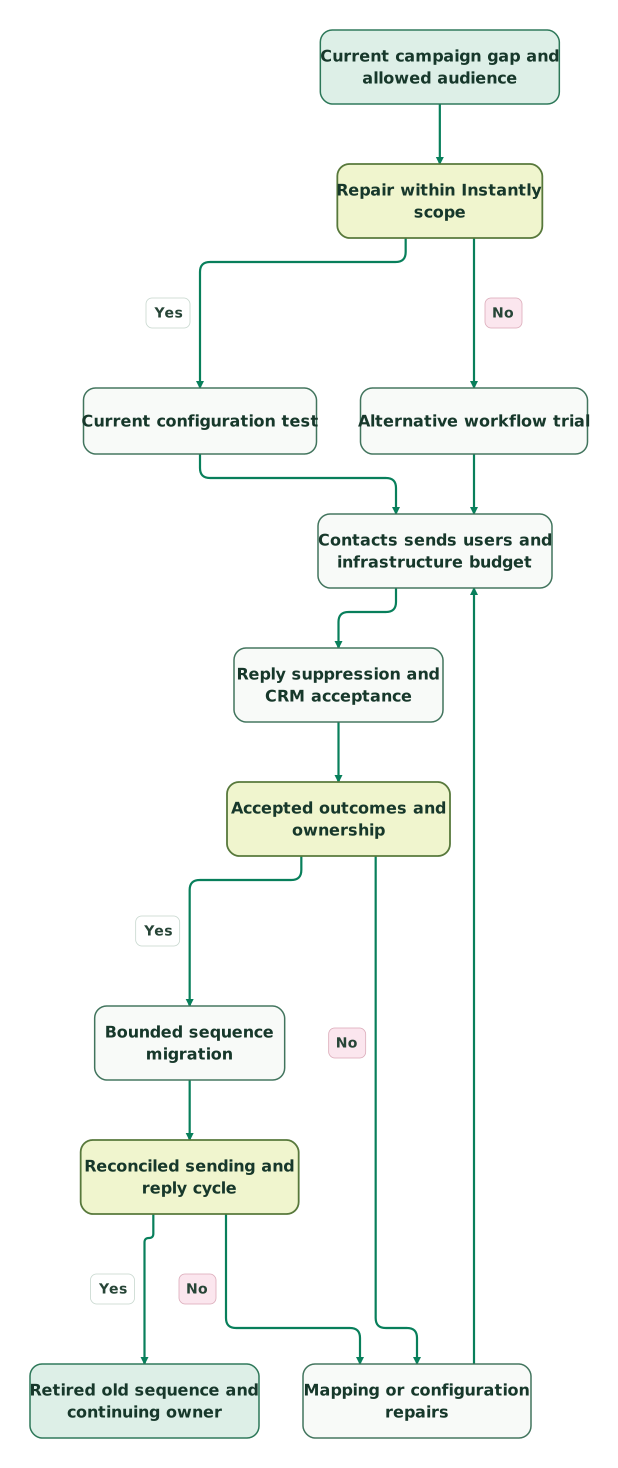
Read diagram as text
- Current campaign gap and allowed audience to Repair within Instantly scope.
- Repair within Instantly scope to Current configuration test: Yes.
- Repair within Instantly scope to Alternative workflow trial: No.
- Current configuration test to Contacts sends users and infrastructure budget.
- Alternative workflow trial to Contacts sends users and infrastructure budget.
- Contacts sends users and infrastructure budget to Reply suppression and CRM acceptance.
- Reply suppression and CRM acceptance to Accepted outcomes and ownership.
- Accepted outcomes and ownership to Mapping or configuration repairs: No.
- Mapping or configuration repairs to Contacts sends users and infrastructure budget.
- Accepted outcomes and ownership to Bounded sequence migration: Yes.
- Bounded sequence migration to Reconciled sending and reply cycle.
- Reconciled sending and reply cycle to Mapping or configuration repairs: No.
- Reconciled sending and reply cycle to Retired old sequence and continuing owner: Yes
Checklist
- The specific operating gap and repair option are written down.
- Contact, send, user and mailbox units are mapped for each plan.
- Mailboxes, domains, data and optional channels appear in the full budget.
- Sender identity and audience use comply with the applicable provider and channel rules.
- Suppressions move before active campaign enrolment.
- Replies, opt-outs, duplicates and disconnected senders pass the acceptance cases.
- Contacts already in sequences have explicit transition rules.
- One owner handles conversations arriving during cutover.
Use the CRM audit skill to verify destination ownership and follow-up. At Martechdevs, we connect audience data, campaign operations and sales routing into a process the team can maintain. Discuss the GTM implementation scope with the current gap and the required acceptance evidence.
Keep reading
Browse all GTM Engineering guides
 GTM Engineering
Cold email infrastructure: domains, authentication, sending and monitoring
Build email infrastructure around authentication, suppression and recipient expectations. Check Gmail, Yahoo and Outlook requirements and plan a measured pilot.
Jafrin Akter AloLast updated 9 min read
 GTM Engineering
Apollo Alternatives: Cognism, Clay, Outreach, Lemlist and HubSpot Compared
The best Apollo.io alternatives by job: Cognism for contact data, Clay for research, Outreach or Lemlist for outreach and HubSpot for CRM follow-up.
Jafrin Akter AloLast updated 12 min read
 GTM Engineering
How Many Cold Email Inboxes and Domains Do You Need?
Calculate inbox and domain needs from new contacts, follow-ups, shared limits and reply capacity. Includes a reproducible forecast, cost model and checklist.
Jafrin Akter AloLast updated 13 min read
GTM engineering & outbound
See the implementation scope, deliverables and acceptance checks.
Questions people ask
Does unlimited mailbox support include the mailbox subscriptions?
A platform's connection allowance does not establish that it pays the email provider's mailbox and domain fees. Check those line items separately, along with data, verification and optional infrastructure. The provider also applies its own limits and policies. Compare the complete cost of the accepted sending setup rather than treating unlimited connections as an unlimited free service.
Is lemlist Email priced per seller like its multichannel plan?
No. The current Email plan prices team-wide email volume and includes unlimited users and senders. Multichannel Expert uses a per-user price and different entitlements. Choose the required channels first, then compare the appropriate model, volume and billing term. Moving from a legacy plan or between plan families can require separate subscription handling. Plan guide.
Can an Instantly Google Sheets blocklist stop an already active lead?
Instantly's guide says the Google Sheets blocklist is checked during import or upload. The Global Blocklist tab applies to ongoing campaigns as well. Confirm which mechanism currently enforces an exclusion, then preserve that behaviour in the replacement. An imported suppression file alone does not prove that future or already queued work is covered. Blocklist scope.
Should all contacts restart at step one after leaving Instantly?
No. Preserve whether a contact has been approached, replied, opted out, bounced or reached a later sequence step. Define the transition rule for each state before importing live campaign members. A restart is appropriate only for a deliberately approved eligible group; the migration should not repeat old messages or reactivate excluded recipients.
Can switching sequencers guarantee more qualified meetings?
A switch can improve a specific operational constraint, but qualified meetings also depend on audience relevance, the offer, message quality and follow-up. Define the expected improvement before selecting software, then measure it with a consistent outcome definition. A larger sending allowance or vendor-reported reply rate cannot establish the result your business will achieve.
Sources

Written by
Jafrin Akter AloData Engineer and Co-founder at Martechdevs and Growth and Analytics Partners
Jafrin writes practical guides to marketing technology, customer data, analytics and AI workflows. Martechdevs is a Growth and Analytics Partners company.