
Customer.io and Intercom MCP: Choose the Workflow Before the Connector
Data Engineer and Co-founder, martechdevs
Last updated 9 min read
Customer.io MCP helps an external assistant inspect and operate lifecycle messaging. Intercom MCP exposes support and help-centre context to an external assistant. Fin's MCP connectors run in the other direction, letting Fin use external tools during support. Choose the connection around the decision, data and person affected, then test one bounded workflow before combining systems.
Last updated: 25 September 2026.
A product team may want to know which onboarding failures create support tickets. A lifecycle team may want to suppress a reminder while a customer waits for help. A support leader may want Fin to retrieve a delivery status. These jobs need different data flows and different controls, even though each can involve MCP.
This guide is for growth and support operations owners choosing a first cross-system workflow. It is based on current vendor documentation, with illustrative examples rather than customer-account results. Our martech integration work covers the identity mapping and operational ownership that make these connections useful.
Which direction does the data travel?
Name the assistant doing the work and the system it is accessing. That resolves much of the confusion around “Intercom MCP.”
- External assistant to Customer.io: the assistant investigates or changes lifecycle resources in a selected Customer.io workspace.
- External assistant to Intercom: the assistant searches support context and works with the supported Intercom objects.
- Fin to an external MCP server: the customer-facing support agent obtains information or performs a configured action in another system.
The first two paths can support an internal investigation. The third can affect what a customer sees immediately. Decide whether a result is intended for an internal reviewer or a customer before allowing a tool to return sensitive information.
Avoid buying or rebuilding a messaging platform solely because a connector exists. The useful selection criteria remain the journey you need to operate, its data requirements and the people maintaining it. The Customer.io and Braze comparison covers lifecycle platform fit separately.
What does Customer.io MCP give an operator?
Customer.io's MCP guide describes schema discovery and separate read, write and delete tools across its Journeys UI and CDP Data Pipelines APIs. The connection defaults to a read scope. Additional scopes distinguish draft changes, live actions, sensitive-data access and configuration. Access cannot exceed the connecting user's own role.
For an onboarding audit, begin with the selected workspace, automation, entry criteria, messages and delivery evidence. Ask the assistant to map the intended journey before proposing changes. A segment called “inactive” is insufficient unless the underlying definition matches the business state you want to act on.
Customer.io has separate account controls for MCP and native in-product AI. Its AI settings documentation also separates MCP live-data and sensitive-data permissions from the native agent's settings. Record which controls your workflow actually uses; an administrator checking the wrong toggle can leave an unexpected path open.
A useful first prompt is:
In the selected production workspace, inspect the onboarding automation and describe its trigger, entry filters, exit conditions and messages. Identify the evidence needed to establish whether customers with unresolved setup problems receive the reminder. Prepare an investigation note and make no changes.
The output should distinguish what the assistant read from what still needs verification. If support state has never been synchronised into Customer.io, the automation cannot reliably use it. The next step is a data design decision, rather than an invented audience rule.
What does Intercom MCP give an external assistant?
The current Intercom developer guide supports US and EU hosted workspaces, with regional endpoints; AU is not yet supported. It lists support-data search and retrieval, Help Center article creation and updates, and internal notes. Search results can be paginated. Internal notes do not send a customer reply, but adding one can unsnooze a conversation assigned to another teammate.
For a first internal workflow, investigate a defined support theme and prepare a reviewed knowledge improvement. That can produce value without changing a customer's subscription or sending a lifecycle message.
Specify which conversations belong in the analysis. “Find onboarding issues” may capture implementation questions, sales enquiries, billing concerns and historical incidents. Define the time period, product area and inclusion rule. Ask for evidence links and a list of ambiguous examples rather than forcing every conversation into a confident category.
Check that the assistant retrieved all intended pages or clearly labelled its sample. A summary of the first returned results cannot support a claim about every conversation in the period. Keep the retrieval method alongside the thematic findings.
If the assistant prepares an internal note, review whether it should alter the conversation's operational state. A research annotation and a support handoff have different purposes. The note's placement should serve the support team's queue, not merely make the assistant's work visible.
How are Fin's MCP connectors different?
Fin uses MCP connectors to reach outside Intercom. The Intercom connector guide describes selecting tools, setting input sources and audience rules, testing responses and making the configured connector live. It warns that returned data may be shared with the customer.
Design the response for that audience. A delivery-status lookup might need the order's public status and expected next step. It usually does not need internal fraud notes, margin, every address on file or another customer's orders.
Bind the lookup to the authenticated customer or approved account context. A customer typing an order number into chat is not sufficient authorisation to retrieve any matching order. That check belongs in the service returning the data, where it can be enforced consistently.
Use an explicit failure response. “Order not available to this customer” should not invite Fin to try nearby identifiers. If the request is ambiguous, the workflow should clarify or hand off according to your support policy.
Choose direct tool use for a genuinely self-contained lookup with clear inputs. A multi-step action with commercial consequences benefits from an explicit procedure and checks at each transition. The selection should follow the work's failure modes.
How do you connect support evidence to a lifecycle decision?
Start with a maintained customer or account identifier shared between systems. Email can change, one account can have several people, and one person can contact support on behalf of another company. Decide which entity owns the messaging rule before joining records.
For example, a B2B onboarding reminder might belong to an account, while Customer.io messages an individual contact. A support issue opened by the technical owner may need to suppress a reminder to the account's commercial owner. A person-level email join could miss that relationship.
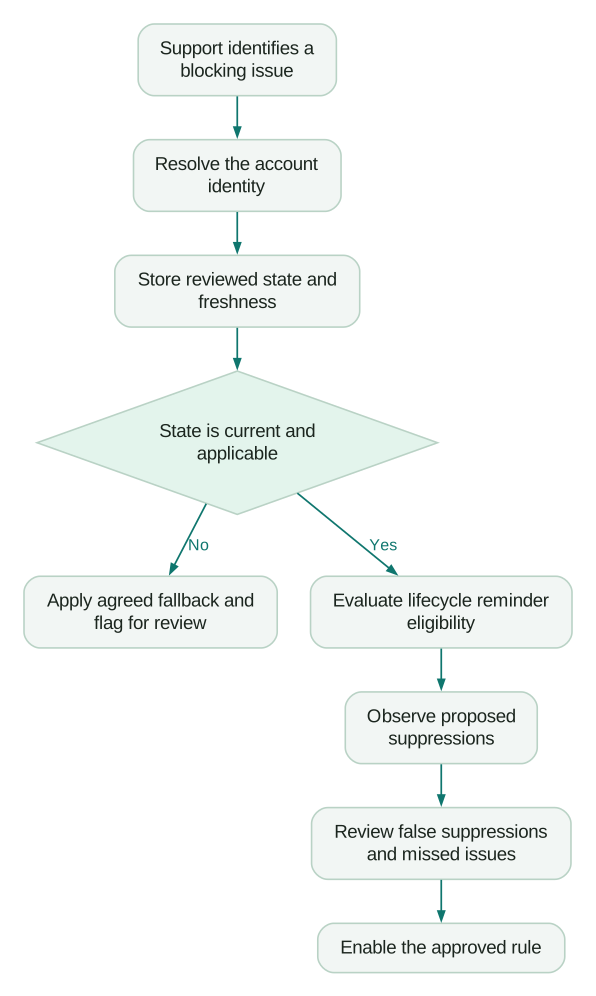
Define a compact operational state in the source system or integration. An illustrative state could answer: “Does this account have an unresolved setup-blocking issue, and when was that state last confirmed?” Avoid asking an assistant to infer this anew from every conversation whenever a message is due.
Keep the evidence and the decision separate. Support owns whether the issue is unresolved and blocking. Lifecycle owns which messages should pause and how they resume. The integration owns the update, freshness and failure behaviour.
The customer-support context guide explains why a shared account view matters. If the shared identifier is missing, establish it before using support state to automate a message decision.
A worked example: validate suppression before enabling it
Consider a fictional SaaS onboarding programme. The proposed rule pauses a setup reminder for accounts with an unresolved blocking issue. Assume the team has confirmed the account-to-contact relationship and uses a support-owned boolean state with a freshness timestamp.
Test cases should establish the intended behaviour:
- A new account with no support issue remains eligible for its scheduled reminder.
- An account with a current blocking issue is suppressed while the issue remains open.
- An account with a non-blocking product question remains eligible under the agreed policy.
- An account whose issue has been resolved returns to the journey only if it still needs the reminder.
- An account with stale or missing support state follows the team's explicit fallback instead of being treated as clear.
Suppose a review sample contains 40 accounts that the proposed rule would suppress. Human review finds 32 current blocking issues, five already resolved issues and three unrelated questions. The preliminary rule's precision is 32 divided by 40, or 80%, within this fictional sample.
That number reveals an operating problem: eight of the reviewed suppressions would withhold a message outside the intended policy. It says nothing about how many blocking issues the rule missed. To assess that, separately review a sample from the accounts left eligible, or compare against a complete independently labelled set.
The corrective work follows the errors. Resolved cases suggest state freshness or lifecycle transition problems. Unrelated questions suggest the classification rule is too broad. Increasing an AI confidence threshold might hide both symptoms without fixing either cause.
Run the rule in observation mode first. Record who would have been suppressed without changing delivery, review the exceptions and repair the definition. Only then connect the state to the live message condition.
What should the assistant produce after an investigation?
Ask for a decision note with the population, evidence, proposed rule, exceptions and owner. Keep customer details out of the note unless they are essential to resolving a specific case. Link back to controlled source records for people authorised to inspect them.
For a knowledge improvement, the note should show which repeated support question the proposed article answers, where the approved policy comes from and which existing pages need updating. The assistant can draft the content, but a product or support owner must establish that its instructions are correct.
For a lifecycle change, the note should name the trigger, eligible entity, message purpose, stop condition and recovery behaviour. A request to “improve retention messaging” is too broad to validate. The key customer journeys guide helps narrow that requirement.
Avoid presenting qualitative support themes as a representative customer survey. Customers who contact support differ from those who do not, and the retrieval sample can add further bias. Use the themes to identify questions and design a follow-up, with counts described as counts from the analysed population.
How do you choose the first pilot?
Choose a job with a clear reviewer and a result you can check from existing records. Useful candidates include an onboarding support-theme review, a knowledge-gap draft, or an audit of whether a lifecycle automation has the state it needs.
Before activation, confirm:
Checklist
- The assistant and data direction are explicit.
- Workspace, hosted region and connecting identity are correct.
- The retrieved population or sample is reproducible.
- Shared customer or account identifiers have an owner.
- Customer-visible tools return only the necessary authorised data.
- Message changes and support-state changes have defined consequences.
- The pilot records both useful decisions and review effort.
A successful pilot leaves the team with a maintained rule or a corrected piece of knowledge. That is a better basis for expansion than a large transcript nobody can use again.
Questions people ask
Are Customer.io MCP and Fin MCP connectors interchangeable?
They serve different directions of work. Customer.io MCP exposes lifecycle resources to an external assistant, while Fin connectors let Fin access another system during support. Select the connection according to the assistant, audience and intended action.
Can I combine Customer.io and Intercom in one investigation?
Yes, when access is approved and the records can be joined to the correct customer or account. Begin with a bounded internal investigation and retain each source's meaning. Do not infer identity from a similar name or an unverified email match.
Is an internal Intercom note harmless to the support queue?
Check its operational effect before adding it. Intercom documents an unsnooze case for notes on conversations assigned to another teammate. Decide whether the note belongs in that conversation or in a separate internal research record.
Does an MCP connection make the support classification reliable?
The connection provides access to data and operations. Reliability still depends on a useful label definition, representative review examples and handling of ambiguous or stale cases. Test both incorrect inclusions and missed cases before using the classification in messaging.
Should a support complaint automatically stop all marketing?
Define the affected message types and the reason for suppression. A setup reminder, a required account notice and a promotional campaign can need different rules. The lifecycle owner should agree the policy with support and make resumption explicit.
Sources
- Customer.io, Get started with MCP, accessed 25 September 2026.
- Customer.io, AI settings, accessed 25 September 2026.
- Intercom, Model Context Protocol developer guide, live page accessed 25 September 2026.
- Intercom, Add MCP connectors for popular apps or custom MCPs, accessed 25 September 2026.
Written by
Jafrin Akter AloData Engineer and Co-founder, martechdevs
Jafrin Akter Alo is a data engineer and co-founder of martechdevs, where the team has delivered 74+ martech, data and growth stack implementations.