
Attio Implementation Mistakes: Records, Relationships and Ownership
Data Engineer and Co-founder, martechdevs
Last updated 9 min read
The most expensive Attio implementation mistakes start in the data model: treating an account as a deal, putting process details on shared records, and letting integrations overwrite fields they do not own. Build around the relationships and decisions your team needs, then test imports, merges, mailbox visibility and automation against awkward cases before expanding access.
Last updated: 23 September 2026.
A CRM can look organised while misrepresenting the business. A company appears once, its status looks correct, and the pipeline has attractive columns. Then the company buys a second product. Someone changes its status, and the first sale disappears from the team's understanding.
Attio gives you flexibility to represent your business. That flexibility needs boundaries. This guide is for founders and revenue operators configuring a workspace, migrating from another CRM, or adding product and billing data.
If the model already mixes account, sales and onboarding ownership, CRM and lifecycle implementation should begin with those definitions. Automating the ambiguity makes it spread faster.
1. Putting every process on the company record
Attio separates objects, records, attributes, lists and views. Object attributes belong to the record wherever it is used; list attributes describe that record's participation in a particular list. A view filters existing data rather than creating a separate process record. Attio also supports record relationships, with custom objects and custom relationships subject to plan availability. Attio's data-model guide
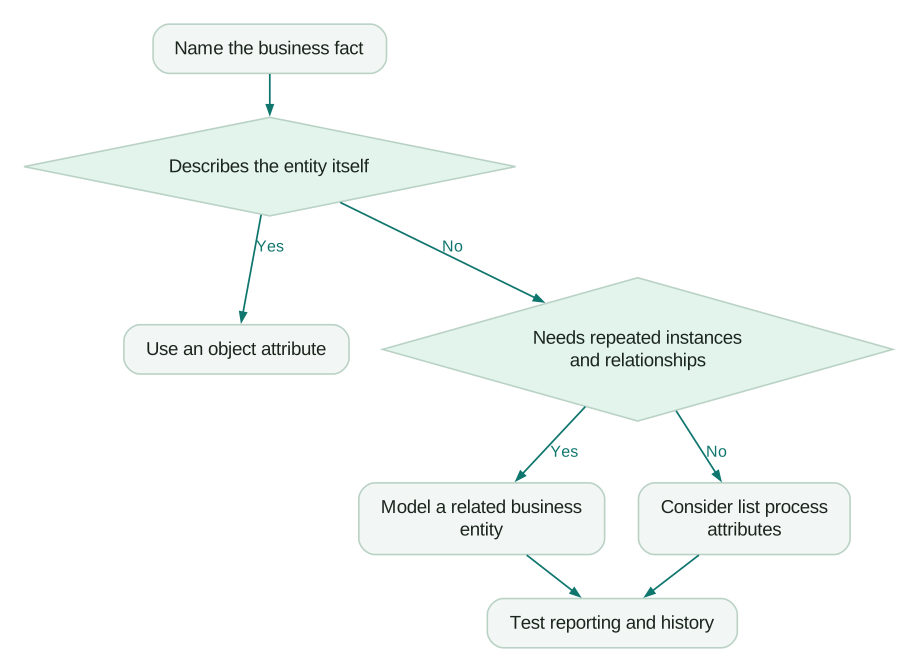
Use three questions before creating an attribute:
- Does this describe the entity itself?
- Does it describe a specific process involving that entity?
- Can that process happen more than once, or happen twice simultaneously?
A company's legal name belongs with the company. An expansion opportunity's expected close date belongs with that opportunity. A repeated onboarding project needs a way to retain separate instances if the business must report on them.
A shared field named “Status” fails these questions. Prospect, negotiation, onboarding and healthy customer describe different things. A customer can be healthy, negotiating an expansion and onboarding another business unit at the same time.
Name the object and process in your requirements. “Sales needs to see the expansion deal's stage” is buildable. “We need a status column” is not sufficiently defined.
2. Using a list when you need a separate business entity
Lists are useful for organising work. They should not become an accidental substitute for every entity the business needs.
Consider this illustrative account:
- Northstar has one company record and four known contacts.
- It has an existing subscription.
- Sales is negotiating an expansion.
- A partner team is separately evaluating a referral agreement.
- An implementation team is onboarding a new division.
A practical model keeps the company shared, creates a deal for the expansion, and gives the partnership and implementation work their own appropriate process context. Whether those last two need lists or custom objects depends on repeatability, relationships and reporting.
If partner onboarding occurs once per company and requires a simple queue, a list may be enough. If each agreement has its own term, counterparties, documents and renewal history, model the agreement explicitly.
Write the questions the model must answer:
- Which open deal belongs to this company?
- Who owns the next action on that deal?
- Which implementation is late?
- Which contract is renewing?
- What happened during the previous implementation?
If the final question can only be answered by overwriting a field or reading a note, the proposed model may not preserve the history you need. Our Attio versus HubSpot comparison examines the wider operating choice; this is the modelling test to run inside the chosen platform.
3. Letting enrichment decide operational truth
Useful enrichment is not the same as authoritative business data.
A suggested company size can support prospect research. It should not silently change a negotiated customer segment, billing entitlement or account assignment. An inferred domain should not automatically decide that two legal entities share one contract.
Attio distinguishes enriched attributes from attributes you manage. Its current attribute documentation also separates schema permissions from the ability to edit record values. Review who can change definitions as well as who can change individual records. Create and manage attributes
For each important property, define:
- Business meaning and object.
- Authoritative writer.
- Whether enrichment may suggest or replace it.
- Whether a person may override it.
- What happens when the source is missing or stale.
- Which reports or workflows depend on it.
For example, let the billing system own subscription status, sales own deal stage, and the account team own the next account action. Keep an inferred company segment separate from an approved commercial segment if they can disagree.
A useful exception record includes the old value, proposed value, source and decision. It should not require a developer to explain why the CRM changed. The CRM property ownership guide provides a fuller approach to controlling competing writers.
4. Matching records on a convenient but unstable value
Choose identity before moving data.
An email address may change. A company can have several domains. A domain can represent a group of businesses, while a legal customer ID identifies the contractual entity. Your model needs to explain which identity each system means.
For imported operational entities, preserve the source system and its stable ID. Keep a mapping to the Attio record ID instead of assuming names or domains are sufficient forever.
Attio's upsert endpoint uses a unique matching attribute to update an existing record or create one when there is no match. That technical uniqueness does not establish that the selected attribute represents the correct business identity. Upsert a record
Before a bulk import, prepare a small set containing:
- One company with multiple domains.
- Two distinct legal customers sharing a group brand.
- A person whose email changed.
- Two people with similar names.
- A source record already present in Attio.
- A record missing its intended matching value.
Specify the expected result for each case. A rejected ambiguous row is preferable to silently attaching an invoice or sales opportunity to the wrong account.
Do not automatically treat every product workspace as a company either. A customer may operate several workspaces, and one workspace may contain members from several companies. The single customer view guide explains why these relationships should remain explicit.
5. Assuming every API update merges multi-value fields
A successful HTTP response can still remove useful information.
For Attio upserts, a multi-value matching attribute preserves existing values while adding new ones. Other multi-value attributes supplied in the same request are reconciled to the supplied values, which can remove existing entries. This is a specific endpoint behaviour, not a general guarantee that updates append. Upsert behaviour
Imagine an illustrative record with relationship labels “Customer” and “Partner.” An enrichment job sends only “Enterprise” to that same non-matching attribute. If it intends to add a classification but submits a replacement, it can remove the relationship labels.
The design mistake happened before the request: two sources were writing different meanings into one collection.
Prefer separate attributes when the concepts differ. If a source legitimately owns a whole collection, send its complete intended state. If it owns only additions, select and test the documented append operation for that use case. Attio provides a separate record-update endpoint for appending multi-value attributes. Append multi-value updates
Test additions, removals, empty values and retries independently. Never infer deletion behaviour from an omitted field or an empty array without checking the exact endpoint and attribute type.
Also test two writers acting close together. A read-modify-write sequence can preserve old values in a simple demonstration but still lose another writer's recent change in production.
6. Treating duplicate merges as cosmetic cleanup
Attio's documented merge behaviour creates a new record ID and URL, rather than retaining either source ID. Conflicting values favour the record shown on the right in the merge interface. That makes a merge an integration event, not just housekeeping. Merge and delete records
Suppose your warehouse maps account A to record X. An operator merges X with duplicate Y, producing Z. The CRM looks correct, but an integration that keeps writing to X may now fail or lose its intended target.
Your acceptance test should follow the entire relationship:
- Create two safe test records with different source references.
- Record the expected surviving attribute values.
- Merge them using the intended operator role.
- Locate the resulting record and ID.
- Repair or refresh the external mapping.
- Confirm subsequent updates reach the result.
- Reconcile dependent reports and links.
Do not assume a merge fixes conflicting source identities. If two IDs represent separate customers, combining their CRM records can damage the model. Route uncertain cases for review.
Keep an audit of source IDs and the destination mapping. “We merged duplicates” is not enough information to repair a downstream join.
7. Connecting every mailbox before reviewing visibility
Mailbox sync changes both the data population and what colleagues can see.
Attio keeps email bodies private by default, but shares email subject lines and metadata by default. Its default selective creation setting creates contacts from people the team has emailed or met, with related companies derived from domains. Record suppression and communication visibility are separate controls. Email and calendar syncing
Start with a limited pilot using approved business correspondence. Review the workspace as a normal colleague, not only as the person connecting the mailbox.
Check sensitive subject lines, internal discussions, shared contacts and company associations. A body being private does not make every part of a conversation invisible.
Also separate relationship coverage from pipeline qualification. A supplier, lawyer or job applicant may be a valid contact without belonging in an active prospect queue. Filter work around business criteria instead of treating the number of synced people as a sales KPI.
Plan offboarding before onboarding. Removing a synced mailbox changes available communication history and intelligence; it can also affect sequences using that sender. Confirm the consequences for your configured workflows before a team member disconnects.
What should an Attio pilot prove?
Use a real operating scenario with synthetic or approved test data. Do not approve a workspace solely because imported row counts match.
Checklist
- One company can have two concurrent deals without one overwriting the other.
- Process ownership differs from account ownership where the business requires it.
- A repeated project retains its own history and relationships.
- Missing identity values are rejected or reviewed rather than guessed.
- A multi-value update preserves exactly the values the writer is authorised to preserve.
- A merge is reflected in downstream record mappings.
- An ordinary workspace member sees only the intended communication details.
- A report answers a defined business question using the correct object and period.
- An integration failure creates a visible exception with an owner.
Record the expected result, observed result and remediation for each test. Run them against the actual plan and permissions you will use, because a trial or administrator view can hide practical constraints.
The first useful release is a workspace that supports one complete revenue motion accurately. Expand when the team can explain what a record means, who can change it and how an exception gets resolved.
Questions people ask
Should every process have a custom object?
No. Use a separate entity when repeated instances, relationships or history justify it. A simple queue involving existing records may be better represented with a list, provided it supports the questions the team needs to answer.
Can I import everything first and fix the model later?
You can make later changes, but early ambiguity spreads into mappings, reports and workflows. Test a representative subset first and preserve source identifiers so you can reconcile the migration. A smaller correct import is easier to expand than a large ambiguous one.
Why did an integration remove existing labels?
Check the exact endpoint, attribute and payload. Replacement and append operations have different meanings, and a writer may have supplied only part of a collection. Fix the ownership rule as well as the request so a later run does not repeat the damage.
Does a duplicate merge preserve an existing Attio record ID?
The documented merge creates a new ID. Include downstream identity mapping in the merge procedure, especially when a warehouse or integration stores CRM IDs. Avoid assuming a cleaner CRM screen proves every external link is still correct.
How do we know the implementation is ready for the whole team?
Require evidence from representative records, ordinary user roles and failure cases. The workspace should support a complete process, preserve identity and history, and expose exceptions clearly. Training should explain these operating rules rather than only where to click.
Sources
- Attio: Define your data model. Accessed 23 September 2026.
- Attio: Create and manage attributes. Accessed 23 September 2026.
- Attio: Upsert a record. Accessed 23 September 2026.
- Attio: Update a record by appending multi-value attributes. Accessed 23 September 2026.
- Attio: Merge and delete records. Accessed 23 September 2026.
- Attio: Sync email and calendar. Accessed 23 September 2026.
Written by
Jafrin Akter AloData Engineer and Co-founder, martechdevs
Jafrin Akter Alo is a data engineer and co-founder of martechdevs, where the team has delivered 74+ martech, data and growth stack implementations.